Introduction to Verilog Table of Contents 1. Introduction . . . . - - PDF document

introduction to verilog
SMART_READER_LITE
LIVE PREVIEW

Introduction to Verilog Table of Contents 1. Introduction . . . . - - PDF document

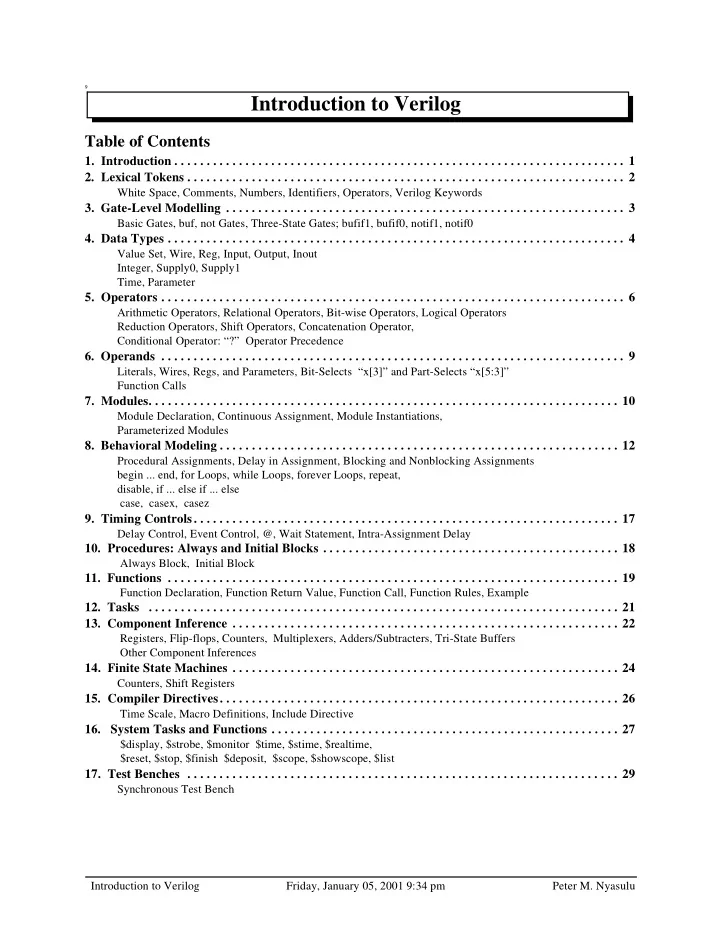
9 Introduction to Verilog Table of Contents 1. Introduction . . . . . . . . . . . . . . . . . . . . . . . . . . . . . . . . . . . . . . . . . . . . . . . . . . . . . . . . . . . . . . . . . . . . . . 1 2. Lexical Tokens . . . . . . . . . . . .


slide-1
SLIDE 1

Introduction to Verilog Friday, January 05, 2001 9:34 pm Peter M. Nyasulu

9

Table of Contents

  • 1. Introduction . . . . . . . . . . . . . . . . . . . . . . . . . . . . . . . . . . . . . . . . . . . . . . . . . . . . . . . . . . . . . . . . . . . . . . 1
  • 2. Lexical Tokens . . . . . . . . . . . . . . . . . . . . . . . . . . . . . . . . . . . . . . . . . . . . . . . . . . . . . . . . . . . . . . . . . . . . 2

White Space, Comments, Numbers, Identifiers, Operators, Verilog Keywords

  • 3. Gate-Level Modelling . . . . . . . . . . . . . . . . . . . . . . . . . . . . . . . . . . . . . . . . . . . . . . . . . . . . . . . . . . . . . . 3

Basic Gates, buf, not Gates, Three-State Gates; bufif1, bufif0, notif1, notif0

  • 4. Data Types . . . . . . . . . . . . . . . . . . . . . . . . . . . . . . . . . . . . . . . . . . . . . . . . . . . . . . . . . . . . . . . . . . . . . . . 4

Value Set, Wire, Reg, Input, Output, Inout Integer, Supply0, Supply1 Time, Parameter

  • 5. Operators . . . . . . . . . . . . . . . . . . . . . . . . . . . . . . . . . . . . . . . . . . . . . . . . . . . . . . . . . . . . . . . . . . . . . . . . 6

Arithmetic Operators, Relational Operators, Bit-wise Operators, Logical Operators Reduction Operators, Shift Operators, Concatenation Operator, Conditional Operator: “?” Operator Precedence

  • 6. Operands . . . . . . . . . . . . . . . . . . . . . . . . . . . . . . . . . . . . . . . . . . . . . . . . . . . . . . . . . . . . . . . . . . . . . . . . 9

Literals, Wires, Regs, and Parameters, Bit-Selects “x[3]” and Part-Selects “x[5:3]” Function Calls

  • 7. Modules. . . . . . . . . . . . . . . . . . . . . . . . . . . . . . . . . . . . . . . . . . . . . . . . . . . . . . . . . . . . . . . . . . . . . . . . . 10

Module Declaration, Continuous Assignment, Module Instantiations, Parameterized Modules

  • 8. Behavioral Modeling . . . . . . . . . . . . . . . . . . . . . . . . . . . . . . . . . . . . . . . . . . . . . . . . . . . . . . . . . . . . . . 12

Procedural Assignments, Delay in Assignment, Blocking and Nonblocking Assignments begin ... end, for Loops, while Loops, forever Loops, repeat, disable, if ... else if ... else case, casex, casez

  • 9. Timing Controls. . . . . . . . . . . . . . . . . . . . . . . . . . . . . . . . . . . . . . . . . . . . . . . . . . . . . . . . . . . . . . . . . . 17

Delay Control, Event Control, @, Wait Statement, Intra-Assignment Delay

  • 10. Procedures: Always and Initial Blocks . . . . . . . . . . . . . . . . . . . . . . . . . . . . . . . . . . . . . . . . . . . . . . 18

Always Block, Initial Block

  • 11. Functions . . . . . . . . . . . . . . . . . . . . . . . . . . . . . . . . . . . . . . . . . . . . . . . . . . . . . . . . . . . . . . . . . . . . . . 19

Function Declaration, Function Return Value, Function Call, Function Rules, Example

  • 12. Tasks . . . . . . . . . . . . . . . . . . . . . . . . . . . . . . . . . . . . . . . . . . . . . . . . . . . . . . . . . . . . . . . . . . . . . . . . . 21
  • 13. Component Inference . . . . . . . . . . . . . . . . . . . . . . . . . . . . . . . . . . . . . . . . . . . . . . . . . . . . . . . . . . . . 22

Registers, Flip-flops, Counters, Multiplexers, Adders/Subtracters, Tri-State Buffers Other Component Inferences

  • 14. Finite State Machines . . . . . . . . . . . . . . . . . . . . . . . . . . . . . . . . . . . . . . . . . . . . . . . . . . . . . . . . . . . . 24

Counters, Shift Registers

  • 15. Compiler Directives. . . . . . . . . . . . . . . . . . . . . . . . . . . . . . . . . . . . . . . . . . . . . . . . . . . . . . . . . . . . . . 26

Time Scale, Macro Definitions, Include Directive

  • 16. System Tasks and Functions . . . . . . . . . . . . . . . . . . . . . . . . . . . . . . . . . . . . . . . . . . . . . . . . . . . . . . 27

$display, $strobe, $monitor $time, $stime, $realtime, $reset, $stop, $finish $deposit, $scope, $showscope, $list

  • 17. Test Benches . . . . . . . . . . . . . . . . . . . . . . . . . . . . . . . . . . . . . . . . . . . . . . . . . . . . . . . . . . . . . . . . . . . 29

Synchronous Test Bench

Introduction to Verilog

slide-2
SLIDE 2

Introduction to Verilog

Friday, January 05, 2001 9:34 pm

1 Peter M. Nyasulu Verilog HDL is one of the two most common Hardware Description Languages (HDL) used by integrated circuit (IC) designers. The other one is VHDL. HDL’s allows the design to be simulated earlier in the design cycle in order to correct errors or experiment with different architectures. Designs described in HDL are technology-independent, easy to design and debug, and are usually more readable than schematics, particularly for large circuits. Verilog can be used to describe designs at four levels of abstraction: (i) Algorithmic level (much like c code with if, case and loop statements). (ii) Register transfer level (RTL uses registers connected by Boolean equations). (iii) Gate level (interconnected AND, NOR etc.). (iv) Switch level (the switches are MOS transistors inside gates). The language also defines constructs that can be used to control the input and output of simulation. More recently Verilog is used as an input for synthesis programs which will generate a gate-level description (a netlist) for the circuit. Some Verilog constructs are not synthesizable. Also the way the code is written will greatly effect the size and speed of the synthesized circuit. Most readers will want to synthesize their circuits, so nonsynthe- sizable constructs should be used only for test benches. These are program modules used to generate I/O needed to simulate the rest of the design. The words “not synthesizable” will be used for examples and constructs as needed that do not synthesize. There are two types of code in most HDLs: Structural, which is a verbal wiring diagram without storage. assign a=b & c | d; /* “|” is a OR */ assign d = e & (~c); Here the order of the statements does not matter. Changing e will change a. Procedural which is used for circuits with storage, or as a convenient way to write conditional logic. always @(posedge clk) // Execute the next statement on every rising clock edge. count <= count+1; Procedural code is written like c code and assumes every assignment is stored in memory until over written. For syn- thesis, with flip-flop storage, this type of thinking generates too much storage. However people prefer procedural code because it is usually much easier to write, for example, if and case statements are only allowed in procedural

  • code. As a result, the synthesizers have been constructed which can recognize certain styles of procedural code as

actually combinational. They generate a flip-flop only for left-hand variables which truly need to be stored. However if you stray from this style, beware. Your synthesis will start to fill with superfluous latches. This manual introduces the basic and most common Verilog behavioral and gate-level modelling constructs, as well as Verilog compiler directives and system functions. Full description of the language can be found in Cadence Verilog-XL Reference Manual and Synopsys HDL Compiler for Verilog Reference Manual. The latter emphasizes

  • nly those Verilog constructs that are supported for synthesis by the Synopsys Design Compiler synthesis tool.

In all examples, Verilog keyword are shown in boldface. Comments are shown in italics.

  • 1. Introduction
slide-3
SLIDE 3

Introduction to Verilog

Friday, January 05, 2001 9:34 pm

2 Peter M. Nyasulu Verilog source text files consists of the following lexical tokens:

2.1. White Space

White spaces separate words and can contain spaces, tabs, new-lines and form feeds. Thus a statement can extend

  • ver multiple lines without special continuation characters.

2.2. Comments

Comments can be specified in two ways (exactly the same way as in C/C++):

  • Begin the comment with double slashes (//). All text between these characters and the end of the line will be

ignored by the Verilog compiler.

  • Enclose comments between the characters /* and */. Using this method allows you to continue comments on

more than one line. This is good for “commenting out” many lines code, or for very brief in-line comments.

2.3. Numbers

Number storage is defined as a number of bits, but values can be specified in binary, octal, decimal or hexadecimal (See Sect. 6.1. for details on number notation). Examples are 3’b001, a 3-bit number, 5’d30, (=5’b11110), and 16‘h5ED4, (=16’d24276)

2.4. Identifiers

Identifiers are user-defined words for variables, function names, module names, block names and instance names. Identifiers begin with a letter or underscore (Not with a number or $) and can include any number of letters, digits and

  • underscores. Identifiers in Verilog are case-sensitive.

2.5. Operators

Operators are one, two and sometimes three characters used to perform operations on variables. Examples include >, +, ~, &, !=. Operators are described in detail in “Operators” on p. 6.

2.6. Verilog Keywords

These are words that have special meaning in Verilog. Some examples are assign, case, while, wire, reg, and, or, nand, and module. They should not be used as identifiers. Refer to Cadence Verilog-XL Reference Manual for a complete listing of Verilog keywords. A number of them will be introduced in this manual. Verilog keywords also includes Compiler Directives (Sect. 15. ) and System Tasks and Functions (Sect. 16. ).

  • 2. Lexical Tokens

Example 2 .1 a = c + d; // this is a simple comment /* however, this comment continues on more than one line */ assign y = temp_reg; assign x=ABC /* plus its compliment*/ + ABC_ Example 2 .2 adder // use underscores to make your by_8_shifter // identifiers more meaningful _ABC_ /* is not the same as */ _abc_ Read_ // is often used for NOT Read Syntax allowed symbols ABCDE . . . abcdef. . . 1234567890 _$ not allowed: anything else especially

  • & # @
slide-4
SLIDE 4

Introduction to Verilog

Friday, January 05, 2001 9:34 pm

3 Peter M. Nyasulu Primitive logic gates are part of the Verilog language. Two properties can be specified, drive_strength and delay. Drive_strength specifies the strength at the gate outputs. The strongest output is a direct connection to a source, next comes a connection through a conducting transistor, then a resistive pull-up/down. The drive strength is usually not specified, in which case the strengths defaults to strong1 and strong0. Refer to Cadence Verilog-XL Reference Man- ual for more details on strengths. Delays: If no delay is specified, then the gate has no propagation delay; if two delays are specified, the first represent the rise delay, the second the fall delay; if only one delay is specified, then rise and fall are equal. Delays are ignored in synthesis. This method of specifying delay is a special case of “Parameterized Modules” on page 11. The parame- ters for the primitive gates have been predefined as delays.

3.1. Basic Gates

These implement the basic logic gates. They have one output and one or more inputs. In the gate instantiation syntax shown below, GATE stands for one of the keywords and, nand, or, nor, xor, xnor.

3.2. buf, not Gates

These implement buffers and inverters, respectively. They have one input and one or more outputs. In the gate instan- tiation syntax shown below, GATE stands for either the keyword buf or not

3.3. Three-State Gates; bufif1, bufif0, notif1, notif0

These implement 3-state buffers and inverters. They propagate z (3-state or high-impedance) if their control signal is

  • deasserted. These can have three delay specifications: a rise time, a fall time, and a time to go into 3-state.
  • 3. Gate-Level Modelling

Syntax GATE (drive_strength) # (delays) instance_name1(output, input_1, input_2,..., input_N), instance_name2(outp,in1, in2,..., inN); Delays is #(rise, fall) or # rise_and_fall or #(rise_and_fall) Example 3 .1 and c1 (o, a, b, c, d); // 4-input AND called c1 and c2 (p, f g); // a 2-input AND called c2.

  • r #(4, 3) ig (o, a, b);

/* or gate called ig (instance name); rise time = 4, fall time = 3 */ xor #(5) xor1 (a, b, c); // a = b XOR c after 5 time units xor (pull1, strong0) #5 (a,b,c); /* Identical gate with pull-up strength pull1 and pull-down strength strong0. */ Syntax GATE (drive_strength) # (delays) instance_name1(output_1, output_2, ..., output_n, input), instance_name2(out1, out2, ..., outN, in); Example 3 .2 not #(5) not_1 (a, c); // a = NOT c after 5 time units buf c1 (o, p, q, r, in); // 5-output and 2-output buffers c2 (p, f g); Example 3 .3 bufif0 #(5) not_1 (BUS, A, CTRL); /* BUS = A 5 time units after CTRL goes low. */ notif1 #(3,4,6) c1 (bus, a, b, cntr); /* bus goes tri-state 6 time units after ctrl goes low. */

BUS = Z

En A

CTRL=1

bufif0 En notif1 En notif0 En bufif1

slide-5
SLIDE 5

Introduction to Verilog

Friday, January 05, 2001 9:34 pm

4 Peter M. Nyasulu

4.1. Value Set

Verilog consists of only four basic values. Almost all Verilog data types store all these values: 0 (logic zero, or false condition) 1 (logic one, or true condition) x (unknown logic value) x and z have limited use for synthesis. z (high impedance state)

4.2. Wire

A wire represents a physical wire in a circuit and is used to connect gates or modules. The value of a wire can be read, but not assigned to, in a function or block. See “Functions” on p. 19, and “Procedures: Always and Initial Blocks” on p. 18. A wire does not store its value but must be driven by a continuous assignment statement or by con- necting it to the output of a gate or module. Other specific types of wires include: wand (wired-AND);:the value of a wand depend on logical AND of all the drivers connected to it. wor (wired-OR);: the value of a wor depend on logical OR of all the drivers connected to it. tri (three-state;): all drivers connected to a tri must be z, except one (which determines the value of the tri).

4.3. Reg

A reg (register) is a data object that holds its value from one procedural assignment to the next. They are used only in functions and procedural blocks. See “Wire” on p. 4 above. A reg is a Verilog variable type and does not necessarily imply a physical register. In multi-bit registers, data is stored as unsigned numbers and no sign extension is done for what the user might have thought were two’s complement numbers.

4.4. Input, Output, Inout

These keywords declare input, output and bidirectional ports of a module or task. Input and inout ports are of type

  • wire. An output port can be configured to be of type wire, reg, wand, wor or tri. The default is wire.
  • 4. Data Types

Syntax wire [msb:lsb] wire_variable_list; wand [msb:lsb] wand_variable_list; wor [msb:lsb] wor_variable_list; tri [msb:lsb] tri_variable_list; Example 4 .1 wire c // simple wire wand d; assign d = a; // value of d is the logical AND of assign d = b; // a and b wire [9:0] A; // a cable (vector) of 10 wires. Syntax reg [msb:lsb] reg_variable_list; Example 4 .2 reg a; // single 1-bit register variable reg [7:0] tom; // an 8-bit vector; a bank of 8 registers. reg [5:0] b, c; // two 6-bit variables Syntax input [msb:lsb] input_port_list;

  • utput [msb:lsb] output_port_list;

inout [msb:lsb] inout_port_list; Example 4 .3 module sample(b, e, c, a); //See “Module Instantiations” on p. 10 input a; // An input which defaults to wire.

  • utput b, e;

// Two outputs which default to wire

  • utput [1:0] c;

/* A two-it output. One must declare its type in a separate statement. */ reg [1:0] c; // The above c port is declared as reg.

slide-6
SLIDE 6

Introduction to Verilog

Friday, January 05, 2001 9:34 pm

5 Peter M. Nyasulu

4.5. Integer

Integers are general-purpose variables. For synthesois they are used mainly loops-indicies, parameters, and con-

  • stants. See“Parameter” on p. 5. They are of implicitly of type reg. However they store data as signed numbers

whereas explicitly declared reg types store them as unsigned. If they hold numbers which are not defined at compile time, their size will default to 32-bits. If they hold constants, the synthesizer adjusts them to the minimum width needed at compilation.

4.6. Supply0, Supply1

Supply0 and supply1 define wires tied to logic 0 (ground) and logic 1 (power), respectively.

4.7. Time

Time is a 64-bit quantity that can be used in conjunction with the $time system task to hold simulation time. Time is not supported for synthesis and hence is used only for simulation purposes.

4.8. Parameter

A parameter defines a constant that can be set when you instantiate a module. This allows customization of a mod- ule during instantiation. See also “Parameterized Modules” on page 11. Syntax integer integer_variable_list; ... integer_constant ... ; Example 4 .4 integer a; // single 32-bit integer assign b=63; // 63 defaults to a 7-bit variable. Syntax supply0 logic_0_wires; supply1 logic_1_wires; Example 4 .5 supply0 my_gnd; // equivalent to a wire assigned 0 supply1 a, b; Syntax time time_variable_list; Example 4 .6 time c; c = $time; // c = current simulation time Syntax parameter par_1 = value, par_2 = value, .....; parameter [range] parm_3 = value Example 4 .7 parameter add = 2’b00, sub = 3’b111; parameter n = 4; parameter n = 4; parameter [3:0] param2 = 4’b1010; . . . reg [n-1:0] harry; /* A 4-bit register whose length is set by parameter n above. */ always @(x) y = {{(add - sub){x}}; // The replication operator Sect. 5.8. if (x) begin state = param2[1]; else state = param2[2]; end

slide-7
SLIDE 7

Introduction to Verilog

Friday, January 05, 2001 9:34 pm

6 Peter M. Nyasulu

5.1. Arithmetic Operators

These perform arithmetic operations. The + and - can be used as either unary (-z) or binary (x-y) operators.

5.2. Relational Operators

Relational operators compare two operands and return a single bit 1or 0. These operators synthesize into comparators. Wire and reg variables are positive Thus (-3’b001) = = 3’b111 and (-3d001)>3d110. However for integers -1< 6.

5.3. Bit-wise Operators

Bit-wise operators do a bit-by-bit comparison between two operands. However see“Reduction Operators” on p. 7.

5.4. Logical Operators

Logical operators return a single bit 1 or 0. They are the same as bit-wise operators only for single bit operands. They can work on expressions, integers or groups of bits, and treat all values that are nonzero as “1”. Logical operators are typically used in conditional (if ... else) statements since they work with expressions.

  • 5. Operators

Operators + (addition)

  • (subtraction)

* (multiplication) / (division) % (modulus) Example 5 .1 parameter n = 4; reg[3:0] a, c, f, g, count; f = a + c; g = c - n; count = (count +1)%16; //Can count 0 thru 15. Operators < (less than) <= (less than or equal to) > (greater than) >= (greater than or equal to) == (equal to) != (not equal to) Example 5 .2 if (x = = y) e = 1; else e = 0; // Compare in 2’s compliment; a>b reg [3:0] a,b; if (a[3]= = b[3]) a[2:0] > b[2:0]; else b[3]; Equivalent Statement e = (x == y); Operators ~ (bitwise NOT) & (bitwise AND) | (bitwise OR) ^ (bitwise XOR) ~^ or ^~(bitwise XNOR) Example 5 .3 module and2 (a, b, c); input [1:0] a, b;

  • utput [1:0] c;

assign c = a & b; endmodule

b(1) a(1) b(0) a(0 c(0 c(1)

2 2 a b

Operators ! (logical NOT) && (logical AND) || (logical OR) Example 5 .4 wire[7:0] x, y, z; // x, y and z are multibit variables. reg a; . . . if ((x == y) && (z)) a = 1; // a = 1 if x equals y, and z is nonzero. else a = !x; // a =0 if x is anything but zero.

slide-8
SLIDE 8

Introduction to Verilog

Friday, January 05, 2001 9:34 pm

7 Peter M. Nyasulu

5.5. Reduction Operators

Reduction operators operate on all the bits of an operand vector and return a single-bit value. These are the unary (one argument) form of the bit-wise operators above.

5.6. Shift Operators

Shift operators shift the first operand by the number of bits specified by the second operand. Vacated positions are filled with zeros for both left and right shifts (There is no sign extension).

5.7. Concatenation Operator

The concatenation operator combines two or more operands to form a larger vector.

5.8. Replication Operator

The replication operator makes multiple copies of an item. For synthesis, Synopsis did not like a zero replication. For example:- parameter n=5, m=5; assign x= {(n-m){a}} Operators & (reduction AND) | (reduction OR) ~& (reduction NAND) ~| (reduction NOR) ^ (reduction XOR) ~^ or ^~(reduction XNOR) Example 5 .5 module chk_zero (a, z); input [2:0] a;

  • utput z;

assign z = ~| a; // Reduction NOR endmodule

a(0) a(1) a(2)

z a 3

Operators << (shift left) >> (shift right) Example 5 .6 assign c = a << 2; /* c = a shifted left 2 bits; vacant positions are filled with 0’s */ Operators

{ }(concatenation)

Example 5 .7 wire [1:0] a, b; wire [2:0] x; wire [3;0] y, Z; assign x = {1’b0, a}; // x[2]=0, x[1]=a[1], x[0]=a[0] assign y = {a, b}; /* y[3]=a[1], y[2]=a[0], y[1]=b[1], y[0]=b[0] */ assign {cout, y} = x + Z; // Concatenation of a result Operators

{n{item}} (n fold replication of an item)

Example 5 .8 wire [1:0] a, b; wire [4:0] x; assign x = {2{1’b0}, a}; // Equivalent to x = {0,0,a } assign y = {2{a}, 3{b}}; //Equivalent to y = {a,a,b,b}

slide-9
SLIDE 9

Introduction to Verilog

Friday, January 05, 2001 9:34 pm

8 Peter M. Nyasulu

5.9. Conditional Operator: “?”

Conditional operator is like those in C/C++. They evaluate one of the two expressions based on a condition. It will synthesize to a multiplexer (MUX).

5.10. Operator Precedence

Table 6.1 shows the precedence of operators from highest to lowest. Operators on the same level evaluate from left to

  • right. It is strongly recommended to use parentheses to define order of precedence and improve the readability of

your code. Table 5.1: Verilog Operators Precedence Operator Name [ ] bit-select or part-select ( ) parenthesis !, ~ logical and bit-wise NOT &, |, ~&, ~|, ^, ~^, ^~ reduction AND, OR, NAND, NOR, XOR, XNOR; If X=3’B101 and Y=3’B110, then X&Y=3’B100, X^Y=3’B011; +, - unary (sign) plus, minus; +17, -7 { } concatenation; {3’B101, 3’B110} = 6’B101110; {{ }} replication; {3{3'B110}} = 9'B110110110 *, /, % multiply, divide, modulus; / and % not be supported for synthesis +, - binary add, subtract. <<, >> shift left, shift right; X<<2 is multiply by 4 <, <=, >, >=

  • comparisons. Reg and wire variables are taken as positive numbers.

= =, != logical equality, logical inequality = = =, != = case equality, case inequality; not synthesizable & bit-wise AND; AND together all the bits in a word ^, ~^, ^~ bit-wise XOR, bit-wise XNOR | bit-wise OR; AND together all the bits in a word &&, logical AND. Treat all variables as False (zero) or True (nonzero). logical OR. (7||0) is (T||F) = 1, (2||-3) is (T||T) =1, (3&&0) is (T&&F) = 0. || ? :

  • conditional. x=(cond)? T : F;

Operators (cond) ? (result if cond true): (result if cond false) Example 5 .9 assign a = (g) ? x : y; assign a = (inc = = 2) ? a+1 : a-1; /* if (inc), a = a+1, else a = a-1 */ g x y

1 1

slide-10
SLIDE 10

Introduction to Verilog

Friday, January 05, 2001 9:34 pm

9 Peter M. Nyasulu

6.1. Literals

Literals are constant-valued operands that can be used in Verilog expressions. The two common Verilog literals are: (a) String: A string literal is a one-dimensional array of characters enclosed in double quotes (“ “). (b) Numeric: constant numbers specified in binary, octal, decimal or hexadecimal.

6.2. Wires, Regs, and Parameters

Wires, regs and parameters can also be used as operands in Verilog expressions. These data objects are described in more detail in Sect. 4. .

6.3. Bit-Selects “x[3]” and Part-Selects “x[5:3]”

Bit-selects and part-selects are a selection of a single bit and a group of bits, respectively, from a wire, reg or parame- ter vector using square brackets “[ ]”. Bit-selects and part-selects can be used as operands in expressions in much the same way that their parent data objects are used.

6.4. Function Calls

The return value of a function can be used directly in an expression without first assigning it to a register or wire var-

  • iable. Simply place the function call as one of the operands. Make sure you know the bit width of the return value of

the function call. Construction of functions is described in “Functions” on page 19

  • 6. Operands

Number Syntax n’Fddd..., where n - integer representing number of bits F - one of four possible base formats: b (binary), o (octal), d (decimal), h (hexadecimal). Default is d. dddd - legal digits for the base format Example 6 .1 “time is”// string literal 267 // 32-bit decimal number 2’b01 // 2-bit binary 20’hB36F// 20-bit hexadecimal number ‘o62 // 32-bit octal number Syntax variable_name[index] variable_name[msb:lsb] Example 6 .2 reg [7:0] a, b; reg [3:0] ls; reg c; c = a[7] & b[7]; // bit-selects ls = a[7:4] + b[3:0]; // part-selects Syntax function_name (argument_list) Example 6 .3 assign a = b & c & chk_bc(c, b);// chk_bc is a function . . ./* Definition of the function */ function chk_bc;// function definition input c,b; chk_bc = b^c; endfunction

slide-11
SLIDE 11

Introduction to Verilog

Friday, January 05, 2001 9:34 pm

10 Peter M. Nyasulu

7.1. Module Declaration

A module is the principal design entity in Verilog. The first line of a module declaration specifies the name and port list (arguments). The next few lines specifies the i/o type (input, output or inout, see Sect. 4.4. ) and width of each

  • port. The default port width is 1 bit.

Then the port variables must be declared wire, wand,. . ., reg (See Sect. 4. ). The default is wire. Typically inputs are wire since their data is latched outside the module. Outputs are type reg if their signals were stored inside an always

  • r initial block (See Sect. 10. ).

7.2. Continuous Assignment

The continuous assignment is used to assign a value onto a wire in a module. It is the normal assignment outside of always or initial blocks (See Sect. 10. ). Continuous assignment is done with an explicit assign statement or by assigning a value to a wire during its declaration. Note that continuous assignment statements are concurrent and are continuously executed during simulation. The order of assign statements does not matter. Any change in any of the right-hand-side inputs will immediately change a left-hand-side output.

7.3. Module Instantiations

Module declarations are templates from which one creates actual objects (instantiations). Modules are instantiated inside other modules, and each instantiation creates a unique object from the template. The exception is the top-level module which is its own instantiation. The instantiated module’s ports must be matched to those defined in the template. This is specified: (i) by name, using a dot(.) “ .template_port_name (name_of_wire_connected_to_port)”.

  • r(ii) by position, placing the ports in exactly the same positions in the port lists of both the template and the instance.
  • 7. Modules

Syntax module module_name (port_list); input [msb:lsb] input_port_list;

  • utput [msb:lsb] output_port_list;

inout [msb:lsb] inout_port_list; ... statements ... endmodule Example 7 .1 module add_sub(add, in1, in2, oot); input add; // defaults to wire input [7:0] in1, in2; wire in1, in2;

  • utput [7:0] oot; reg oot;

... statements ... endmodule

  • ot

add in1 in2 add_sub 8 8 8

Syntax wire wire_variable = value; assign wire_variable = expression; Example 7 .2 wire [1:0] a = 2’b01; // assigned on declaration assign b = c & d; // using assign statement assign d = x | y; /* The order of the assign statements does not matter. */ c d x b y

slide-12
SLIDE 12

Introduction to Verilog

Friday, January 05, 2001 9:34 pm

11 Peter M. Nyasulu Modules may not be instantiated inside procedural blocks. See “Procedures: Always and Initial Blocks” on page 18.

7.4. Parameterized Modules

You can build modules that are parameterized and specify the value of the parameter at each instantiation of the mod-

  • ule. See “Parameter” on page 5 for the use of parameters inside a module. Primitive gates have parameters which

have been predefined as delays. See “Basic Gates” on page 3. Synthesis does not support the defparam keyword which is an alternate way of changing parameters. Syntax for Instantiation module_name instance_name_1 (port_connection_list), instance_name_2 (port_connection_list), ...... instance_name_n (port_connection_list); Example 7 .3 // MODULE DEFINITION module and4(a, b, c); input [3:0] a, b;

  • utput [3:0] c;

assign c = a & b; endmodule // MODULE INSTANTIATIONS wire [3:0] in1, in2; wire [3:0] o1, o2; /* C1 is an instance of module and4 C1 ports referenced by position */ and4 C1 (in1, in2, o1); /* C2 is another instance of and4. C2 ports are referenced to the declaration by name. */ and4 C2 (.c(o2), .a(in1), .b(in2)); Syntax module_name #(parameter_values) instance_name(port_connection_list); Example 7 .4 // MODULE DEFINITION module shift_n (it, ot); // used in module test_shift. input [7:0] it; output [7:0] ot; parameter n = 2;‘ // default value of n is 2 assign ot = (it << n); // it shifted left n times endmodule // PARAMETERIZED INSTANTIATIONS wire [7:0] in1, ot1, ot2, ot3; shift_n shft2(in1, ot1), // shift by 2; default shift_n #(3) shft3(in1, ot2); // shift by 3; override parameter 2. shift_n #(5) shft5(in1, ot3); // shift by 5; override parameter 2.

slide-13
SLIDE 13

Introduction to Verilog

Friday, January 05, 2001 9:34 pm

12 Peter M. Nyasulu

c

Verilog has four levels of modelling: 1) The switch level which includes MOS transistors modelled as switches. This is not discussed here. 2) The gate level. See “Gate-Level Modelling” on p. 3 3) The Data-Flow level. See Example 7 .4 on page 11 4) The Behavioral or procedural level described below. Verilog procedural statements are used to model a design at a higher level of abstraction than the other levels. They provide powerful ways of doing complex designs. However small changes n coding methods can cause large changes in the hardware generated. Procedural statements can only be used in procedures. Verilog procedures are described later in “Procedures: Always and Initial Blocks” on page 18,“Functions” on page 19, and “Tasks Not Synthesizable”

  • n page 21.

8.1. Procedural Assignments

Procedural assignments are assignment statements used within Verilog procedures (always and initial blocks). Only reg variables and integers (and their bit/part-selects and concatenations) can be placed left of the “=” in procedures. The right hand side of the assignment is an expression which may use any of the operator types described in Sect. 5.

8.2. Delay in Assignment (not for synthesis)

In a delayed assignment ∆t time units pass before the statement is executed and the left-hand assignment is made. With intra-assignment delay, the right side is evaluated immediately but there is a delay of ∆t before the result is place in the left hand assignment. If another procedure changes a right-hand side signal during ∆t, it does not effect the output. Delays are not supported by synthesis tools.

8.3. Blocking Assignments

Procedural (blocking) assignments (=) are done sequentially in the order the statements are written. A second assignment is not started until the preceding one is complete. See also Sect. 9.4.

  • 8. Behavioral Modeling

Syntax for Procedural Assignment variable = expression Delayed assignment #∆t variable = expression; Intra-assignment delay variable = #∆t expression; Example 8 .1 reg [6:0] sum; reg h, ziltch; sum[7] = b[7] ^ c[7]; // execute now. ziltch = #15 ckz&h; /* ckz&a evaluated now; ziltch changed after 15 time units. */ #10 hat = b&c; /* 10 units after ziltch changes, b&c is evaluated and hat changes. */ Syntax Blocking variable = expression; variable = #∆t expression; grab inputs now, deliver ans. later. #∆t variable = expression; grab inputs later, deliver ans. later Example 8 .2. For simulation initial begin a=1; b=2; c=3; #5 a = b + c; // wait for 5 units, and execute a= b + c =5. d = a; // Time continues from last line, d=5 = b+c at t=5. Example 0 .1. For synthesis always @( posedge clk) begin Z=Y; Y=X; // shift register y=x; z=y; //parallel ff.

1D C1 1D C1

Z Y X

1D C1

z y x

1D C1

slide-14
SLIDE 14

Introduction to Verilog

Friday, January 05, 2001 9:34 pm

13 Peter M. Nyasulu

8.4. Nonblocking (RTL) Assignments (see below for synthesis)

RTL (nonblocking) assignments (<=), which follow each other in the code, are done in parallel. The right hand side of nonblocking assignments is evaluated starting from the completion of the last blocking assignment or if none, the start of the procedure. The transfer to the left hand side is made according to the delays. A delay in a non-blocking statement will not delay the start of any subsequent statement blocking or non-blocking. A good habit is to use “<=” if the same variable appears on both sides of the equal sign (Example 0 .1 on page 13).

For synthesis :

The following example shows interactions between blocking and non-blocking for simulation. Do not mix the two types in one procedure for synthesis.

8.5. begin ... end

begin ... end block statements are used to group several statements for use where one statement is syntactically

  • allowed. Such places include functions, always and initial blocks, if, case and for statements. Blocks can optionally

be named. See “disable” on page 15) and can include register, integer and parameter declarations.

  • One must not mix “<=” or “=” in the same procedure.
  • “<=” best mimics what physical flip-flops do; use it for “always @ (posedge clk ..) type procedures.
  • “=” best corresponds to what c/c++ code would do; use it for combinational procedures.

Syntax Non-Blocking variable <= expression; variable <= #∆t expression; #∆t variable <= expression; Example 0 .1. For simulation initial begin #3 b <= a; /* grab a at t=0 Deliver b at t=3. #6 x <= b + c; // grab b+c at t=0, wait and assign x at t=6. x is unaffected by b’s change. */ Example 0 .2. For synthesis always @( posedge clk) begin Z<=Y; Y<=X; // shift register y<=x; z<=y; //also a shift register.

1D C1 1D C1

Z Y X

1D C1 1D C1

z y x Example 8 .3. Use <= to transform a variable into itself. reg G[7:0]; always @( posedge clk) G <= { G[6:0], G[7]}; // End around rotate 8-bit register. Syntax Non-Blocking variable <= expression; variable <= #∆t expression; ?#∆t variable <=expression; Blocking variable = expression; variable = #∆t expression; #∆t variable = expression; Example 8 .4 for simulation only initial begin a=1; b=2; c=3; x=4; #5 a = b + c; // wait for 5 units, then grab b,c and execute a=2+3. d = a; // Time continues from last line, d=5 = b+c at t=5. x <= #6 b + c;// grab b+c now at t=5, don’t stop, make x=5 at t=11. b <= #2 a; /* grab a at t=5 (end of last blocking statement). Deliver b=5 at t=7. previous x is unaffected by b change. */ y <= #1 b + c;// grab b+c at t=5, don’t stop, make x=5 at t=6. #3 z = b + c; // grab b+c at t=8 (#5+#3), make z=5 at t=8. w <= x // make w=4 at t=8. Starting at last blocking assignm.

slide-15
SLIDE 15

Introduction to Verilog

Friday, January 05, 2001 9:34 pm

14 Peter M. Nyasulu

8.6. for Loops

Similar to for loops in C/C++, they are used to repeatedly execute a statement or block of statements. If the loop con- tains only one statement, the begin ... end statements may be omitted.

8.7. while Loops

The while loop repeatedly executes a statement or block of statements until the expression in the while statement evaluates to false. To avoid combinational feedback during synthesis, a while loop must be broken with an @(posedge/negedge clock) statement (Section 9.2). For simulation a delay inside the loop will suffice. If the loop contains only one statement, the begin ... end statements may be omitted.

8.8. forever Loops

The forever statement executes an infinite loop of a statement or block of statements. To avoid combinational feed- back during synthesis, a forever loop must be broken with an @(posedge/negedge clock) statement (Section 9.2). For simulation a delay inside the loop will suffice. If the loop contains only one statement, the begin ... end statements may be omitted. It is

8.9. repeat Not synthesizable

The repeat statement executes a statement or block of statements a fixed number of times. Syntax begin : block_name reg [msb:lsb] reg_variable_list; integer [msb:lsb] integer_list; parameter [msb:lsb] parameter_list; ... statements ... end Example 8 .5 function trivial_one; // The block name is “trivial_one.” input a; begin: adder_blk; // block named adder, with integer i; // local integer i ... statements ... end Syntax for (count = value1; count </<=/>/>= value2; count = count +/- step) begin ... statements ... end Example 8 .6 for (j = 0; j <= 7; j = j + 1) begin c[j] = a[j] & b[j]; d[j] = a[j] | b[j]; end Syntax while (expression) begin ... statements ... end Example 8 .7 while (!overflow) begin @(posedge clk); a = a + 1; end Syntax forever begin ... statements ... end Example 8 .8 forever begin @(posedge clk); // or use a= #9 a+1; a = a + 1; end

slide-16
SLIDE 16

Introduction to Verilog

Friday, January 05, 2001 9:34 pm

15 Peter M. Nyasulu

8.10. disable

Execution of a disable statement terminates a block and passes control to the next statement after the block. It is like the C break statement except it can terminate any loop, not just the one in which it appears. Disable statements can only be used with named blocks.

8.11. if ... else if ... else

The if ... else if ... else statements execute a statement or block of statements depending on the result of the expression following the if. If the conditional expressions in all the if’s evaluate to false, then the statements in the else block, if present, are executed. There can be as many else if statements as required, but only one if block and one else block. If there is one statement in a block, then the begin .. end statements may be omitted. Both the else if and else statements are optional. However if all possibilities are not specifically covered, synthesis will generated extra latches. Syntax repeat (number_of_times) begin ... statements ... end Example 8 .9 repeat (2) begin // after 50, a = 00, #50 a = 2’b00; // after 100, a = 01, #50 a = 2’b01; // after 150, a = 00, end// after 200, a = 01 Syntax disable block_name; Example 8 .10 begin: accumulate forever begin @(posedge clk); a = a + 1; if (a == 2’b0111) disable accumulate; end end Syntax if (expression) begin ... statements ... end else if (expression) begin ... statements ... end ... more else if blocks ... else begin ... statements ... end Example 8 .11 if (alu_func == 2’b00) aluout = a + b; else if (alu_func == 2’b01) aluout = a - b; else if (alu_func == 2’b10) aluout = a & b; else // alu_func == 2’b11 aluout = a | b; if (a == b) // This if with no else will generate begin // a latch for x and ot. This is so they x = 1; // will hold there old value if (a != b).

  • t = 4’b1111;

end

slide-17
SLIDE 17

Introduction to Verilog

Friday, January 05, 2001 9:34 pm

16 Peter M. Nyasulu

8.12. case

The case statement allows a multipath branch based on comparing the expression with a list of case choices. Statements in the default block executes when none of the case choice comparisons are true (similar to the else block in the if ... else if ... else). If no comparisons , including delault, are true, synthesizers will generate unwanted latches. Good practice says to make a habit of puting in a default whether you need it or not. If the defaults are dont cares, define them as ‘x’ and the logic minimizer will treat them as don’t cares. Case choices may be a simple constant or expression, or a comma-separated list of same.

8.13. casex

In casex(a) the case choices constant “a” may contain z, x or ? which are used as don’t cares for comparison. With case the corresponding simulation variable would have to match a tri-state, unknown, or either signal. In short, case uses x to compare with an unknown signal. Casex uses x as a don’t care which can be used to minimize logic.

8.14. casez

Casez is the same as casex except only ? and z (not x) are used in the case choice constants as don’t cares. Casez is favored over casex since in simulation, an inadvertent x signal, will not be matched by a 0 or 1 in the case choice. Syntax case (expression) case_choice1: begin ... statements ... end case_choice2: begin ... statements ... end ... more case choices blocks ... default: begin ... statements ... end endcase Example 0 .1 case (alu_ctr) 2’b00: aluout = a + b; 2’b01: aluout = a - b; 2’b10: aluout = a & b; default: aluout = 1’bx; // Treated as don’t cares for endcase // minimum logic generation. Example 0 .2 case (x, y, z) 2’b00: aluout = a + b; //case if x or y or z is 2’b00. 2’b01: aluout = a - b; 2’b10: aluout = a & b; default: aluout = a | b; endcase Syntax same as for case statement (Section 8.10) Example 8 .12 casex (a) 2’b1x: msb = 1; // msb = 1 if a = 10 or a = 11 // If this were case(a) then only a=1x would match. default: msb = 0; endcase Syntax same as for case statement (Section 8.10) Example 8 .13 casez (d) 3’b1??: b = 2’b11; // b = 11 if d = 100 or greater 3’b01?: b = 2’b10; // b = 10 if d = 010 or 011 default: b = 2’b00; endcase

slide-18
SLIDE 18

Introduction to Verilog

Friday, January 05, 2001 9:34 pm

17 Peter M. Nyasulu

9.1. Delay Control Not synthesizable

This specifies the delay time units before a statement is executed during simulation. A delay time of zero can also be specified to force the statement to the end of the list of statements to be evaluated at the current simulation time.

9.2. Event Control, @

This causes a statement or begin-end block to be executed only after specified events occur. An event is a change in a variable. and the change may be: a positive edge, a negative edge, or either (a level change), and is specified by the keyword posedge, negedge, or no keyword respectively. Several events can be combined with the or keyword. Event specification begins with the character @and are usually used in always statements. See page 18. For synthesis one cannot combine level and edge changes in the same list. For flip-flop and register synthesis the standard list contains only a clock and an optional reset. For synthesis to give combinational logic, the list must specify only level changes and must contain all the variables appearing in the right-hand-side of statements in the block.

9.3. Wait Statement Not synthesizable

The wait statement makes the simulator wait to execute the statement(s) following the wait until the specified condi- tion evaluates to true. Not supported for synthesis.

9.4. Intra-Assignment Delay Not synthesizable

This delay #∆ is placed after the equal sign. The left-hand assignment is delayed by the specified time units, but the right-hand side of the assignment is evaluated before the delay instead of after the delay. This is important when a variable may be changed in a concurrent procedure. See also “Delay in Assignment (not for synthesis)” on page 12.

  • 9. Timing Controls

Syntax #delay statement; Example 9 .1 #5 a = b + c; // evaluated and assigned after 5 time units #0 a = b + c; // very last statement to be evaluated Syntax @ (posedge variable or negedge variable) statement; @ (variable or variable . . .) statement; Example 9 .2 always @(posedge clk or negedge rst) if (rst) Q=0; else Q=D; // Definition for a D flip-flop. @(a or b or e); // re-evaluate if a or b or e changes. sum = a + b + e; // Will synthesize to a combinational adder. Syntax wait (condition_expression) statement; Example 9 .3 wait (!c) a = b; // wait until c=0, then assign b to a Syntax variable = #∆t expression; Example 9 .4 assign a=1; assign b=0; always @(posedge clk) b = #5 a; // a = b after 5 time units. always @(posedge clk) c = #5 b; /* b was grabbed in this parallel proce- dure before the first procedure changed it. */

slide-19
SLIDE 19

Introduction to Verilog

Friday, January 05, 2001 9:34 pm

18 Peter M. Nyasulu

10.1. Always Block

The always block is the primary construct in RTL modeling. Like the continuous assignment, it is a concurrent statement that is continuously executed during simulation. This also means that all always blocks in a module execute

  • simultaneously. This is very unlike conventional programming languages, in which all statements execute sequen-
  • tially. The always block can be used to imply latches, flip-flops or combinational logic. If the statements in the

always block are enclosed within begin ... end, the statements are executed sequentially. If enclosed within the fork ... join, they are executed concurrently (simulation only). The always block is triggered to execute by the level, positive edge or negative edge of one or more signals (sepa- rate signals by the keyword or). A double-edge trigger is implied if you include a signal in the event list of the always

  • statement. The single edge-triggers are specified by posedge and negedge keywords.

Procedures can be named. In simulation one can disable named blocks. For synthesis it is mainly used as a com-

ment.

10.2. Initial Block

The initial block is like the always block except that it is executed only once at the beginning of the simulation. It is typically used to initialize variables and specify signal waveforms during simulation. Initial blocks are not supported for synthesis.

  • 10. Procedures: Always and Initial Blocks

Syntax 1 always @(event_1 or event_2 or ...) begin ... statements ... end Example 10 .1 always @(a or b) // level-triggered; if a or b changes levels always @(posedge clk); // edge-triggered: on +ve edge of clk see previous sections for complete examples Syntax 2 always @(event_1 or event_2 or ...) begin: name_for_block ... statements ... end Syntax initial begin ... statements ... end Example 10 .2 inital begin clr = 0; // variables initialized at clk = 1; // beginning of the simulation end inital // specify simulation waveforms begin a = 2’b00; // at time = 0, a = 00 #50 a = 2’b01; // at time = 50, a = 01 #50 a = 2’b10; // at time = 100, a = 10 end

slide-20
SLIDE 20

Introduction to Verilog

Friday, January 05, 2001 9:34 pm

19 Peter M. Nyasulu Functions are declared within a module, and can be called from continuous assignments, always blocks or other func-

  • tions. In a continuous assignment, they are evaluated when any of its declared inputs change. In a procedure, they are

evaluated when invoked. Functions describe combinational logic, and by do not generate latches. Thus an if without an else will simulate as though it had a latch but synthesize without one. This is a particularly bad case of synthesis not following the simula-

  • tion. It is a good idea to code functions so they would not generate latches if the code were used in a procedure.

Functions are a good way to reuse procedural code, since modules cannot be invoked from a procedure.

11.1. Function Declaration

A function declaration specifies the name of the function, the width of the function return value, the function input arguments, the variables (reg) used within the function, and the function local parameters and integers.

11.2. Function Return Value

When you declare a function, a variable is also implicitly declared with the same name as the function name, and with the width specified for the function name (The default width is 1-bit). This variable is “my_func” in Example 11 .1 on page 19. At least one statement in the function must assign the function return value to this variable.

11.3. Function Call

As mentioned in Sect. 6.4. , a function call is an operand in an expression. A function call must specify in its terminal list all the input parameters.

11.4. Function Rules

The following are some of the general rules for functions:

  • Functions must contain at least one input argument.
  • Functions cannot contain an inout or output declaration.
  • Functions cannot contain time controlled statements (#, @, wait).
  • Functions cannot enable tasks.
  • Functions must contain a statement that assigns the return value to the implicit function name register.
  • 11. Functions

Syntax, Function Declaration function [msb:lsb] function_name; input [msb:lsb] input_arguments; reg [msb:lsb] reg_variable_list; parameter [msb:lsb] parameter_list; integer [msb:lsb] integer_list; ... statements ... endfunction Example 11 .1 function [7:0] my_func; // function return 8-bit value input [7:0] i; reg [4:0] temp; integer n; temp= i[7:4] | ( i[3:0]); my_func = {temp, i[[1:0]}; endfunction

slide-21
SLIDE 21

Introduction to Verilog

Friday, January 05, 2001 9:34 pm

20 Peter M. Nyasulu

11.5. Function Example

A Function has only one output. If more than one return value is required, the outputs should be concatenated into

  • ne vector before assigning it to the function name. The calling module program can then extract (unbundle) the indi-

vidual outputs from the concatenated form. Example 11.2 shows how this is done, and also illustrates the general use and syntax of functions in Verilog modeling. Syntax function_name = expression Example 11 .2 module simple_processor (instruction, outp); input [31:0] instruction;

  • utput [7:0] outp;

reg [7:0] outp;; // so it can be assigned in always block reg func; reg [7:0] opr1, opr2; function [16:0] decode_add (instr) // returns 1 1-bit plus 2 8-bits input [31:0] instr; reg add_func; reg [7:0] opcode, opr1, opr2; begin

  • pcode = instr[31:24];
  • pr1 = instr[7:0];

case (opcode) 8’b10001000: begin // add two operands add_func = 1;

  • pr2 = instr[15:8];

end 8’b10001001: begin // subtract two operands add_func = 0;

  • pr2 = instr[15:8];

end 8’b10001010: begin // increment operand add_func = 1;

  • pr2 = 8’b00000001;

end default: begin; // decrement operand add_func = 0;

  • pr2 = 8’b00000001;

end endcase decode_add = {add_func, opr2, opr1}; // concatenated into 17-bits end endfunction // ----------------------------------------- --------------------------------- always @(instruction) begin {func, op2, op1} = decode_add (instruction); // outputs unbundled if (func == 1)

  • utp = op1 + op2;

else

  • utp = op1 - op2;

end endmodule

slide-22
SLIDE 22

Introduction to Verilog

Friday, January 05, 2001 9:34 pm

21 Peter M. Nyasulu A task is similar to a function, but unlike a function it has both input and output ports. Therefore tasks do not return

  • values. Tasks are similar to procedures in most programming languages. The syntax and statements allowed in tasks

are those specified for functions (Sections 11).

  • 12. Tasks Not Synthesizable

Syntax task task_name; input [msb:lsb] input_port_list;

  • utput [msb:lsb] output_port_list;

reg [msb:lsb] reg_variable_list; parameter [msb:lsb] parameter_list; integer [msb:lsb] integer_list; ... statements ... endtask Example 12 .1 module alu (func, a, b, c); input [1:0] func; input [3:0] a, b;

  • utput [3:0] c;

reg [3:0] c; // so it can be assigned in always block task my_and; input[3:0] a, b;

  • utput [3:0] andout;

integer i; begin for (i = 3; i >= 0; i = i - 1) andout[i] = a[i] & b[i]; end endtask always @(func or a or b) begin case (func) 2’b00: my_and (a, b, c); 2’b01: c = a | b; 2’b10: c = a - b; default: c = a + b; endcase end endmodule

slide-23
SLIDE 23

Introduction to Verilog

Friday, January 05, 2001 9:34 pm

22 Peter M. Nyasulu

13.1. Latches

A latch is inferred (put into the synthesized circuit) if a variable is not assigned to in the else branch of an if ... else if ... else statement. A latch is also inferred in a case statement if a variable is assigned to in only some of the possible case choice branches. Assigning a variable in the default branch avoids the latch. In general, a latch is inferred in if ... else if ... else and case statements if a variable, or one of its bits, is only assigned to in only some of the possible branches. To improve code readability, use the if statement to synthesize a latch because it is difficult to explicitly specify the latch enable signal when using the case statement.

13.1. Edge-Triggered Registers, Flip-flops, Counters

A register (flip-flop) is inferred by using posedge or negedge clause for the clock in the event list of an always block. To add an asynchronous reset, include a second posedge/negedge for the reset and use the if (reset) ... else statement. Note that when you use the negedge for the reset (active low reset), the if condition is (!reset).

  • 13. Component Inference

Syntax See Sections 8.9 and 8.10 for if ... else if ... else and case statements Example 13 .1 always @(c, i); begin; if (c == 1)

  • = i;

end

Q D c i EN

  • Syntax

always @(posedge clk or posedge reset_1 or negedge reset_2) begin if (reset_1) begin ... reset assignments end else if (!reset_2) begin ... reset assignments end else begin ...register assignments end end Example 0 .1 always @(posedge clk); begin; a <= b & c; end

Q D c b CLK a clk rst b CLR Q D CLK a clk CLR

always @(posedge clk or negedge rst); begin; if (! rst) a< = 0; else a <= b; end Example 0 .2 An Enabled Counter reg [7:0] count; wire enable; always @(posedge clk or posedge rst) // Do not include enable. begin; if (rst) count<=0; else if (enable) count <= count+1; end; // 8 flip-flops will be generated.

slide-24
SLIDE 24

Introduction to Verilog

Friday, January 05, 2001 9:34 pm

23 Peter M. Nyasulu

13.2. Multiplexers

A multiplexer is inferred by assigning a variable to different variables/values in each branch of an if or case state-

  • ment. You can avoid specifying each and every possible branch by using the else and default branches. Note that a

latch will be inferred if a variable is not assigned to for all the possible branch conditions. To improve readability of your code, use the case statement to model large multiplexers.

13.3. Adders/Subtracters

The +/- operators infer an adder/subtracter whose width depend on the width of the larger operand.

13.4. Tri-State Buffers

A tristate buffer is inferred if a variable is conditionally assigned a value of z using an if, case or conditional operator.

13.5. Other Component Inferences

Most logic gates are inferred by the use of their corresponding operators. Alternatively a gate or component may be explicitly instantiated by using the primitive gates (and, or, nor, inv ...) provided in the Verilog language. Syntax See Sections 8.9 and 8.10 for if ... else if ... else and case statements Example 13 .2 if (sel == 1) y = a; else y = b;

sel

case (sel) 2’b00: y = a; 2’b01: y = b; 2’b10: y = c; default: y = d; endcase

y b a

sel[1:0]

a

b

c d y Syntax See Section 7 for operators Example 13 .3 if (sel == 1) y = a + b; else y = c + d;

+

sel sel b

d a c y Syntax See Sections 8.9 and 8.10 for if ... else if ... else and case statements Example 13.5 if (en == 1) y = a; else y = 1’bz;

y a en

slide-25
SLIDE 25

Introduction to Verilog

Friday, January 05, 2001 9:34 pm

24 Peter M. Nyasulu When modeling finite state machines, it is recommended to separate the sequential current-state logic from the com- binational next-state and output logic.

  • 14. Finite State Machines. For synthesis

State Diagram for lack of space the outputs are not shown on the state diagram, but are: in state0: Zot = 000, in state1: Zot = 101, in state2: Zot = 111, in state3: Zot = 001. Example 14 .1 module my_fsm (clk, rst, start, skip3, wait3, Zot); input clk, rst, start, skip3, wait3;

  • utput [2:0] Zot; // Zot is declared reg so that it can

reg [2:0] Zot; // be assigned in an always block. parameter state0=0, state1=1, state2=2, state3=3; reg [1:0] state, nxt_st; always @ (state or start or skip3 or wait3) begin : next_state_logic //Name of always procedure. case (state) state0: begin if (start) nxt_st = state1; else nxt_st = state0; end state1: begin nxt_st = state2; end state2: begin if (skip3) nxt_st = state0; else nxt_st = state3; end state3: begin if (wait3) nxt_st = state3; else nxt_st = state0; end default: nxt_st = state0; endcase // default is optional since all 4 cases are end // covered specifically. Good practice says uses it. always @(posedge clk or posedge rst) begin : register_generation if (rst) state = state0; else state = nxt_st; end always @(state) begin : output_logic case (state) state0: Zot = 3’b000; state1: Zot = 3’b101; state2: Zot = 3’b111; state3: Zot = 3’b001; default: Zot = 3’b000;// default avoids latches endcase end endmodule

state0 state2 state3 state1 start=0 wait3=0 wait3=1 skip3=0 skip3=1 start=1 reset=1

Using Macros for state definition As an alternative for- parameter state0=0, state1=1, state2=2, state3=3;

  • ne can use macros. For example after the

definition below 2'd0 will be textually substituted whenever `state0 is used.

`define state0 2'd0

`define state1 2'd1 `define state2 2'd `define state3 2'd3; When using macro definitions one must put a back quote in front. For example: case (state) `state0: Zot = 3’b000; `state1: Zot = 3’b101; `state2: Zot = 3’b111; `state3: Zot = 3’b001;

slide-26
SLIDE 26

Introduction to Verilog

Friday, January 05, 2001 9:34 pm

25 Peter M. Nyasulu

14.1.

14.2. Counters

Counters are a simple type of finite-state machine where separation of the flip-flop generation code and the next-state generation code is not worth the effort. In such code, use the nonblocking “<=” assignment operator.

14.3. Shift Registers

Shift registers are also best done completely in the flip-flop generation code. Use the nonblocking “<=” assignment

  • perator so the operators “<< N” shifts left N bits. The operator “>>N” shifts right N bits. See also Example 8 .3 on

page 13. Binary Counter Using toggle flip-flops Example 14 .2 reg [3:0] count; wire TC; // Terminal count (Carry out) always @(posedge clk or posedge rset) begin if (rset) count <= 0; else count <= count+1; end assign TC = & count; // See “Reduction Operators” on page 7

1T C1 CLK 1T C1 1T C1 1T C1

count[3] TC count[2] count[1] count[0]

Shift Register Example 14 .3 reg [3:0] Q; always @(posedge clk or posedge rset) begin if (rset) Q <= 0; else begin Q <=Q << 1; // Left shift 1 position Q[0] <= Q[3]; /* Nonblocking means the old Q[3] is sent to Q[0]. Not the revised Q[3] from the previous line. end

1D C1 CLK 1D C1 1D C1 1D C1

Q[0] Q[1] Q[2] Q[3]

Linear-Feedback Shift Register Example 14 .4 reg [3:0] Q; always @(posedge clk or posedge rset) begin if (rset) Q <= 0; else begin Q <= {Q[2:1]: Q[3]^Q[2]; /* The concatenation operators “{...}” form the new Q from elements of the old Q. */ end end

1D C1 CLK 1D C1 1D C1 1D C1

Q[0] Q[1] Q[2] Q[3]

slide-27
SLIDE 27

Introduction to Verilog

Friday, January 05, 2001 9:34 pm

26 Peter M. Nyasulu Compiler directives are special commands, beginning with ‘, that affect the operation of the Verilog simulator. The Synopsys Verilog HDL Compiler/Design Compiler and many other synthesis tools parse and ignore compiler direc- tives, and hence can be included even in synthesizable models. Refer to Cadence Verilog-XL Reference Manual for a complete listing of these directives. A few are briefly described here.

15.1. Time Scale

`timescale specifies the time unit and time precision. A time unit of 10 ns means a time expressed as say #2.3 will have a delay of 23.0 ns. Time precision specifies how delay values are to be rounded off during simulation. Valid time units include s, ms, µs, ns, ps, fs. Only 1, 10 or 100 are valid integers for specifying time units or precision. It also determines the displayed time units in display commands like $display

15.2. Macro Definitions

A macro is an identifier that represents a string of text. Macros are defined with the directive `define, and are invoked with the quoted macro name as shown in the example.

15.3. Include Directive

Include is used to include the contents of a text file at the point in the current file where the include directive is. The include directive is similar to the C/C++ include directive.

  • 15. Compiler Directives

Example 15 .1 `timescale 1 ns/1 ps // unit =1ns, precision=1/1000ns `timescale 1 ns /100 ps // time unit = 1ns; precision = 1/10ns; Syntax `timescale time_unit / time_precision; Example 15 .2 `define add_lsb a[7:0] + b[7:0] assign 0 = 'add_lsb; // assign o = a[7:0] + b[7:0]; Syntax `define macro_name text_string; . . . `macro_name . . . Example 15 .3 module x; 'include “dclr.v”; // contents of file “dclr,v” are put here Syntax `include file_name;

slide-28
SLIDE 28

Introduction to Verilog

Friday, January 05, 2001 9:34 pm

27 Peter M. Nyasulu These are tasks and functions that are used to generate input and output during simulation. Their names begin with a dollar sign ($). The Synopsys Verilog HDL Compiler/Design Compiler and many other synthesis tools parse and ignore system functions, and hence can be included even in synthesizable models. Refer to Cadence Verilog-XL Ref- erence Manual for a complete listing of system functions. A few are briefly described here. System tasks that extract data, like $monitor need to be in an initial or always block.

16.1. $display, $strobe, $monitor

These commands have the same syntax, and display their values as text on the screen during simulation. They are much less convenient than waveform display tools like cwaves or Signalscan. $display and $strobe display once every time they are executed, whereas $monitor displays every time one of its parameters changes. The difference between $display and $strobe is that $strobe displays the parameters at the very end of the current simulation time

  • unit. The format string is like that in C/C++, and may contain format characters. Format characters include %d (deci-

mal), %h (hexadecimal), %b (binary), %c (character), %s (string) and %t (time). Append b, h, o to the task name to change default format to binary, octal or hexadecimal.

16.2. $time, $stime, $realtime

These return the current simulation time as a 64-bit integer, a 32-bit integer, and a real number, respectively. Their use is illustrated in Examples 4.6 and 13.1.

16.3. $reset, $stop, $finish

$reset resets the simulation back to time 0; $stop halts the simulator and puts it in the interactive mode where the user can enter commands; $finish exits the simulator back to the operating system.

16.4. $deposit

$deposit sets a net to a particular value.

16.5. $scope, $showscope

$scope(hierarchy_name) sets the current hierarchical scope to hierarchy_name. $showscopes(n) lists all modules, tasks and block names in (and below, if n is set to 1) the current scope.

16.6. $list

$list (hierarchical_name) lists line-numbered source code of the named module, task, function or named-block.

  • 16. System Tasks and Functions

Syntax $display (“format_string”, par_1, par_2, ... ); Example 16 .1 initial begin $displayh (b, d); // displayed in hexadecimal $monitor (“at time=%t, d=%h”, $time, a); end Syntax $deposit (net_name, value); Example 16 .2 $deposit (b, 1’b0); $deposit (outp, 4’b001x);// outp is a 4-bit bus

slide-29
SLIDE 29

Introduction to Verilog

Friday, January 05, 2001 9:34 pm

28 Peter M. Nyasulu

16.7. $random

$random generates a random integer every time it is called. If the sequence is to be repeatable, the first time one invokes random give it a numerical argument (a seed). Otherwise the seed is derived from the computer clock.

16.8. $dumpfile, $dumpvar, $dumpon, $dumpoff, $dumpall

These can dump variable changes to a simulation viewer like cwaves. The dump files are capable of dumping all the variables in a simulation. This is convenient for debugging, but can be very slow.

16.9. $shm_probe, $shm_open

These are special commands for the Simulation History Manager for Cadence cwaves only. They will save variable changes for later display. Syntax xzz = $random[(integer)]; Example 16 .3 reg [3:0] xyz; initial begin xyz= $random (7); // Seed the generator so number // sequence will repeat if simulation is restarted. forever xyz = #20 $random; // The 4 lsb bits of the random integers will transfer into the // xyz. Thus xyz will be a random integer 0 ≤ xyz ≤ 15. Syntax $dumpfile(“filename.dmp”) $dumpvar dumps all variables in the design. $dumpvar(1, top) dumps all the varia- bles in module top and below, but not modules instantiated in top. $dumpvar(2, top) dumps all the varia- bles in module top and 1 level below. $dumpvar(n, top) dumps all the varia- bles in module top and n-1 levels below. $dumpvar(0, top) dumps all the varia- bles in module top and all level below. $dumpon initiates the dump. $dumpoff stop dumping. Example 16 .4 // Test Bench module testbench: reg a, b; wire c; initial begin; $dumpfile(“cwave_data.dmp”); $dumpvar //Dump all the variables // Alternately instead of $dumpvar, one could use $dumpvar(1, top) //Dump variables in the top module. // Ready to turn on the dump. $dumpon a=1; b=0; topmodule top(a, b, c); end Syntax $shm_open (“cwave_dump.dm”) $shm_probe (var1,var2, var3); /* Dump all changes in the above 3 varia-

  • bles. */

$shm_probe(a, b, inst1.var1, inst1.var2); /* Use the qualifier inst1. to look inside the hierarchy. Here inside module instance “inst1” the variables var1 and var2 will be dumped.*/ Example 16 .5 // Test Bench module testbench: reg a, b; wire c; initial begin; $shm_open(“cwave_data.dmp”); $shm_probe(a, b, c) /* See also the testbench example in “Test Benches” on p. 29

slide-30
SLIDE 30

Introduction to Verilog

Friday, January 05, 2001 9:34 pm

29 Peter M. Nyasulu A test bench supplies the signals and dumps the outputs to simulate a Verilog design (module(s)). It invokes the design under test, generates the simulation input vectors, and implements the system tasks to view/format the results

  • f the simulation. It is never synthesized so it can use all Verilog commands.

To view the waveforms when using Cadence Verilog XL Simulator, use the Cadence-specific Simulation History Manager (SHM) tasks of $shm_open to open the file to store the waveforms, and $shm_probe to specify the varia- bles to be included in the waveforms list. You can then use the Cadence cwaves waveform viewer by typing cwaves & at the UNIX prompt.

  • 17. Test Benches

Syntax $shm_open(filename); $shm_probe(var1, var2, ...)

Note also

var=$random wait(condition) statement Example 17 .1 ‘timescale 1 ns /100 ps // time unit = 1ns; precision = 1/10 ns; module my_fsm_tb; // Test Bench of FSM Design of Example 14.1 /* ports of the design under test are variables in the test bench */ reg clk, rst, start, skip3, wait3; wire Button; /**** DESIGN TO SIMULATE (my_fsm) INSTANTIATION ****/ my_fsm dut1 (clk, rst, start, skip3, wait3, Button); /**** SECTION TO DISPLAY VARIABLES ****/ initial begin $shm_open(“sim.db”); //Open the SHM database file /* Specify the variables to be included in the waveforms to be viewed by Cadence cwaves */ $shm_probe(clk, reset, start); // Use the qualifier dut1. to look at variables inside the instance dut1. $shm_probe(skip3, wait3, Button, dut1.state, dut1.nxt_st); end /**** RESET AND CLOCK SECTION ****/ initial begin clk = 0; rst=0; #1 rst = 1; // The delay gives rst a posedge for sure. #200 rst = 0; // Deactivate reset after two clock cycles +1 ns*/ end always #50 clk = ~clk; // 10 MHz clock (50*1 ns*2) with 50% duty-cycle /**** SPECIFY THE INPUT WAVEFORMS skip3 & wait3 ****/ initial begin skip3 = 0; wait3 = 0; // at time 0, wait3=0, skip3=0 #1; // Delay to keep inputs from changing on clock edge. #600 skip3 = 1; // at time 601, wait3=0, skip3=1 #400 wait3 = 1; // at time 1001, wait3=1, skip3=0 skip3= 0; #400 skip3 = 1; // at time 1401, wait3=1, skip3=1 wait(Button) skip3 = 0; // Wait until Button=1, then make skip3 zero. wait3 = $random; //Generate a random number, transfer lsb into wait3 $finish; // stop simulation. Without this it will not stop. end endmodule

slide-31
SLIDE 31

Introduction to Verilog

Friday, January 05, 2001 9:34 pm

30 Peter M. Nyasulu

17.1. Synchronous Test Bench

In synchronous designs, one changes the data during certain clock cycles. In the previous test bench one had to keep counting delays to be sure the data came in the right cycle. With a synchronous test bench the input data is stored in a vector or array and one part injected in each clock cycle. The Verilog array is not defined in these notes. Synchronous test benches are essential for cycle based simulators which do not use any delays smaller than a clock cycle. Things to note: data[8:1]=8'b1010_1101; The underscore visually separates the

  • bits. It acts like a comment.

if (I==9) $finish; When the data is used up, finish x<=data[I]; I<=I+1; When synthesizing to flip-flops as in an In an @(posedge... procedure, always use nonblocking. Without that you will be racing with the flip-flops in the other modules. Example 17 .2 // Synchronous test bench module SynchTstBch: reg [8:1] data; reg x,clk; integer I; initial begin data[8:1]=8'b1010_1101; // Underscore spaces bits. I=1; x=0; clk=0; forever #5 clk=~clk; end /*** Send in a new value of x every clock cycle***/ always @(posedge clk) begin if (I==9) $finish; #1; // Keeps data from changing on clock edge. x<=data[I]; I<=I+1; end topmod top1(clk, x); endmodule