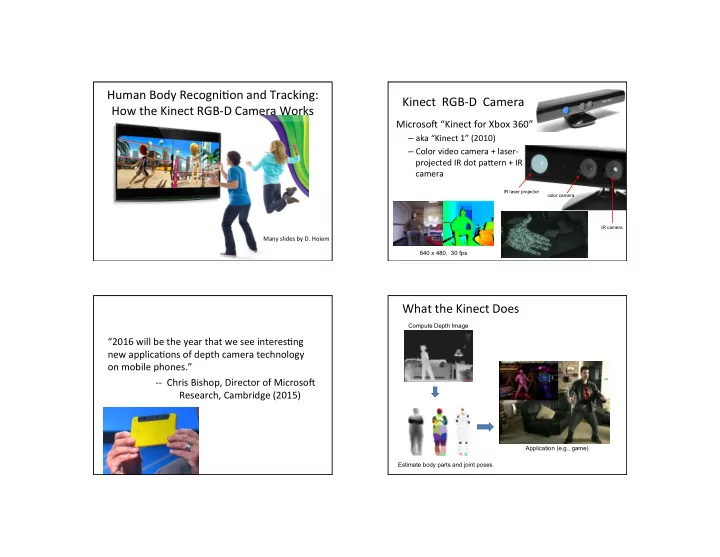
Human Body Recogni6on and Tracking: Kinect RGB-D Camera How the - - PowerPoint PPT Presentation

human body recogni6on and tracking kinect rgb d camera
SMART_READER_LITE
LIVE PREVIEW

Human Body Recogni6on and Tracking: Kinect RGB-D Camera How the - - PowerPoint PPT Presentation

Human Body Recogni6on and Tracking: Kinect RGB-D Camera How the Kinect RGB-D Camera Works MicrosoC Kinect for Xbox 360 aka Kinect 1 (2010) Color video camera + laser- projected IR dot paUern + IR camera IR laser projector


slide-1
SLIDE 1

T2

Many slides by D. Hoiem

Human Body Recogni6on and Tracking: How the Kinect RGB-D Camera Works Kinect RGB-D Camera

MicrosoC “Kinect for Xbox 360”

– aka “Kinect 1” (2010) – Color video camera + laser- projected IR dot paUern + IR camera

IR laser projector color camera IR camera

640 x 480, 30 fps

“2016 will be the year that we see interes6ng new applica6ons of depth camera technology

  • n mobile phones.”
  • - Chris Bishop, Director of MicrosoC

Research, Cambridge (2015)

What the Kinect Does

Compute Depth Image Estimate body parts and joint poses Application (e.g., game)

slide-2
SLIDE 2

How Kinect Works: Overview

IR Projector IR Sensor

Projected Light Pattern Depth Image Stereo Algorithm Segmentation, Part Prediction Body parts and joint positions

Stereo from Projected Dots

IR Projector IR Sensor

Projected Light Pattern Depth Image Stereo Algorithm Segmentation, Part Prediction Body parts and joint positions

Stereo from Projected Dots

  • 1. Overview of depth from stereo
  • 2. How it works for a projector/sensor pair
  • 3. Stereo algorithm used

Depth from Stereo Images

image 1 image 2 Dense depth map

Some of following slides adapted from Steve Seitz and Lana Lazebnik

slide-3
SLIDE 3

Depth from Stereo Images

  • Goal: recover depth by finding image coordinate x’ in

Image 2 that corresponds to x in Image 1

f x x’ Baseline B z C C’ X f X x x'

Basic Stereo Matching Algorithm

  • For each pixel in the first image

– Find corresponding epipolar line in the right image – Examine all pixels on the epipolar line and pick the best match – Triangulate the matches to get depth informa6on

Depth from Disparity

f x’ Baseline B z O O’ X f

z f B x x disparity ⋅ = ′ − = Disparity is inversely proportional to depth, z

x

z f O O x x = ′ − ′ − z = B⋅ f x − ′ x

Basic Stereo Matching Algorithm

  • If necessary, rec6fy the two stereo images to transform

epipolar lines into scanlines

  • For each pixel x in the first image

– Find corresponding epipolar scanline in the right image – Examine all pixels on the scanline and pick the best match x’ – Compute disparity x-x’ and set depth(x) = fB/(x-x’)

slide-4
SLIDE 4

Matching cost disparity Left Right scanline

Correspondence Search

  • Slide a window along the right scanline and compare

contents of that window with the reference window in the leC image

  • Matching cost: SSD or normalized cross-correla6on

Results of Window Search

Window-based matching Ground truth Data Graph cuts Ground truth

For the latest and greatest: http://www.middlebury.edu/stereo/

  • Y. Boykov, O. Veksler, and R. Zabih,

Fast Approximate Energy Minimization via Graph Cuts, PAMI 2001

Before

Improve by Adding Constraints and Solve with Graph Cuts

Failures of Correspondence Search

Textureless surfaces Occlusions, repeated structures Non-Lambertian surfaces, specularities

slide-5
SLIDE 5

Structured Light

  • Basic Principle

– Use a projector to create known features in the 3D scene (e.g., points, lines)

  • Light projec6on

– If we project dis6nc6ve points, matching is easy

Example: Book vs. No Book

Source: http://www.futurepicture.org/?p=97

Example: Book vs. No Book

Source: http://www.futurepicture.org/?p=97

Kinect’s Projected Dot PaUern

slide-6
SLIDE 6

Same Stereo Algorithms Apply

Projector Sensor

Kinect RGB-D Camera Implementa6on

  • In-camera ASIC computes 11-bit 640 x 480

depth map at 30 Hz

  • Range limit for tracking: 0.7 – 6 m (2.3’ to 20’)
  • Prac6cal range limit: 1.2 – 3.5 m

Kinect for Xbox One

  • aka “Kinect 2” (2013)
  • Replaced Structured-Light Camera by

Time-of-Flight Camera

  • Higher resolu6on (1080p), larger view
  • f view , 30 fps camera
  • Depth resolu6on 2.5cm at 4m
slide-7
SLIDE 7

emiUed light pulse

Time-of-Flight Depth Sensing

sensor source scene r e c e i v e d l i g h t p u l s e 6me 6me delay t intensity emiUed pulse received pulse

[Koechner, 1968]

stop-watch depth = c / 2t, where c = speed

  • f light

Impulse Time-of-Flight Imaging

Kinect 2’s Time of Flight Sensor

  • Kinect 2 uses mul6ple measurements (3 pulse

frequencies x 3 amplitudes) to compute at each pixel:

– The amount of reflected light origina6ng from the ac6ve light source (called the “ac6ve image”) – The depth of the scene from the phase shiCs for the mul6ple measurements (which disambiguate the depth) – The amount of ambient light

Part 2: Pose from Depth

IR Projector IR Sensor

Projected Light Pattern Depth Image Stereo Algorithm Segmentation, Part Prediction Body parts and joint positions

Goal: Es6mate Pose from Depth Image

Real-Time Human Pose Recognition in Parts from a Single Depth Image,

  • J. Shotton, A. Fitzgibbon, M. Cook, T. Sharp, M. Finocchio, R. Moore, A. Kipman,

and A. Blake, Proc. IEEE Conf. Computer Vision and Pattern Recognition, 2011

slide-8
SLIDE 8

Goal: Es6mate Pose from Depth Image

RGB Depth Part Label Map Joint Positions http://research.microsoft.com/apps/video/default.aspx?id=144455

Step 1. Find body parts Step 2. Compute joint positions

Challenges

  • Lots of varia6on in bodies, orienta6ons, poses
  • Needs to be very fast (their algorithm runs at 200

fps on the Xbox 360 GPU)

Pose Examples Examples of

  • ne part

Finding Body Parts

  • What should we use for a feature?

– Difference in depth

  • What should we use for a classifier?

– Random Forest / Decision Forest

Extract Body Pixels by Thresholding Depth

slide-9
SLIDE 9

Features

dI(x) is depth image, θ = (u, v) is offset to second pixel

  • Difference of depth at two pixels
  • Offset is scaled by depth at reference pixel

Part Classifica6on with Random Forests

  • Random Forest: collec6on of independently-trained

binary decision trees

  • Each tree is a classifier that predicts the likelihood of a

pixel x belonging to body part class c

– Non-leaf node corresponds to a thresholded feature – Leaf node corresponds to a conjunc6on of several features – At leaf node store learned distribu6on P(c|I, x)

Classifica6on

Learning Phase:

  • 1. For each tree, pick a randomly sampled subset of training data
  • 2. Randomly choose a set of features and thresholds at each node
  • 3. Pick the feature and threshold that give the largest information gain
  • 4. Recurse until a certain accuracy is reached or tree-depth is obtained

Classifica6on

Tes5ng Phase:

  • 1. Classify each pixel x in image I using all

decision trees and average the results at the leaves:

slide-10
SLIDE 10

Implementa6on

  • 31 body parts
  • 3 trees (depth 20)
  • 300,000 training images per tree randomly

selected from 1M training images

  • 2,000 training example pixels per image
  • 2,000 candidate features
  • 50 candidate thresholds per feature
  • Decision forest constructed in 1 day on 1,000

core cluster

Get Lots of Training Data

  • Capture and sample 500K mo6on capture

frames of people kicking, driving, dancing, etc.

  • Get 3D models for 15 bodies with a variety of

weights, heights, etc.

  • Synthesize mo6on capture data for all 15 body

types

Results

slide-11
SLIDE 11

Step 2: Joint Posi6on Es6ma6on

  • Joints are es6mated using the mean-shi;

clustering algorithm applied to the labeled pixels

  • Gaussian-weighted density es6mator for each

body part to find its mode 3D posi6on

  • “Push back in depth” each cluster mode to lie

at approx. center of the body part

  • 73% joint predic6on accuracy (on head,

shoulders, elbows, hands)

Results Cameras for Tracking

Leap Mo6on

– 2’ x 2’ x 2’ volume – 2015, $80