
SLIDE 1
1
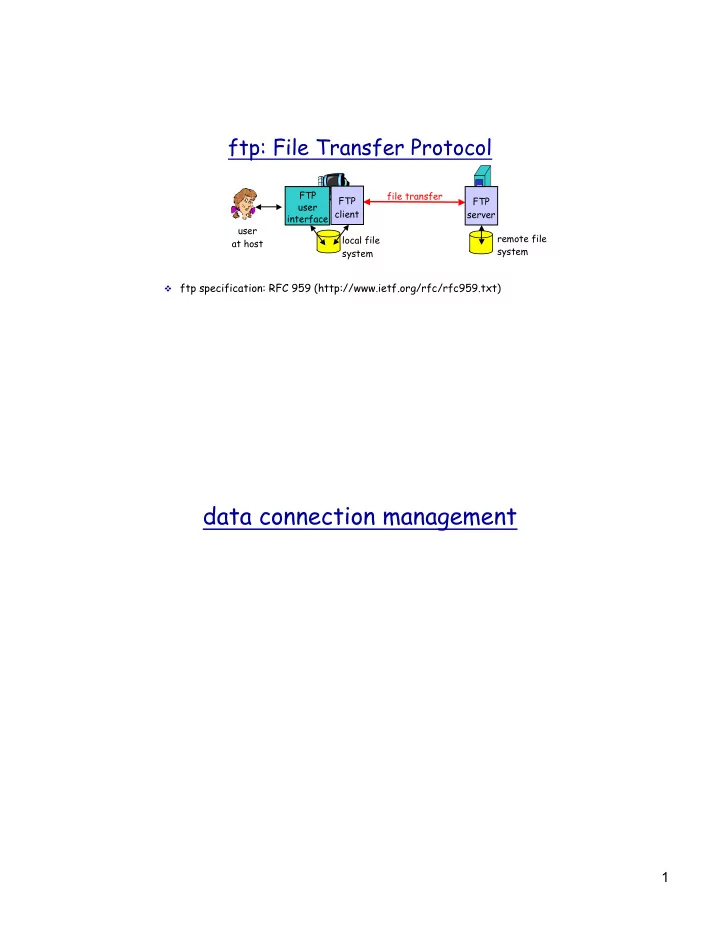
ftp: File Transfer Protocol
v ftp specification: RFC 959 (http://www.ietf.org/rfc/rfc959.txt) file transfer FTP server FTP user interface FTP client local file system remote file system user at host
data connection management 1 ftp commands, responses over 30 are - - PDF document
ftp: File Transfer Protocol FTP file transfer FTP FTP user client server interface user remote file local file at host system system v ftp specification: RFC 959 (http://www.ietf.org/rfc/rfc959.txt) data connection management 1 ftp
v ftp specification: RFC 959 (http://www.ietf.org/rfc/rfc959.txt) file transfer FTP server FTP user interface FTP client local file system remote file system user at host
v sent as ASCII text over control conn.
v authentication: user, pass v file access: e.g. put, get v file transfer control: mode v directory: pwd, list, delete v ftp session: help, stat, abort, quit
v USER username v PASS password v LIST: return list of file in the
v RETR filename: retrieves (gets)
v STOR filename: stores (puts) file
v status code and phrase (as in http) v 331 Username OK, password
required
v 125 data connection already
v 425 Can’t open data
connection
v 452 Error writing file
Three major components:
v user agents v mail servers v simple mail transfer protocol(smtp)
v composing, editing, reading mail msgs
ÿ
Eudora, Outlook, elm, Netscape Messenger v outgoing, incoming messages stored on
server
v mailbox contains incoming messages
(yet to be read) for user
v message queue of outgoing (to be sent)
mail messages
user mailbox
message queue mail server user agent user agent user agent mail server user agent user agent mail server user agent
application layer
SMTP server port 25 socket
data
220 whitehouse.gov SMTP ready HELO foo.berkeley.edu 250 whitehouse.gov MAILFROM:<john@foo.berkeley.edu> 250 OK RCPT TO: <clinton@whitehouse.gov> 250 OK RCPT TO: <al@whitehouse.gov> 550 No such user DATA 354 start mail input blah blah blah ..... <CRLF>.<CRLF> 250 OK QUIT 221 whitehouse.gov service closing
v smtp uses persistent
v smtp requires that message
v certain character strings are
v smtp server uses CRLF.CRLF to
v http: pull v email: push v both have ASCII
v http: each object is
v smtp: multiple objects message
ÿ To: ÿ From: ÿ Subject:
different from smtp commands! v body
ÿ the “message”, ASCII characters
From: alice@crepes.fr To: bob@hamburger.edu Subject: Picture of yummy crepe. MIME-Version: 1.0 Content-Transfer-Encoding: base64 Content-Type: image/jpeg base64 encoded data ..... ......................... ......base64 encoded data
ÿ authorization (agent <-->server) and download
ÿ more features, such as msg folders on the server
ÿ manipulation of stored msgs on server
user agent sender’s mail server user agent
receiver’s mail server
ÿ user: declare
ÿ pass: password
ÿ +OK ÿ -ERR
S: 1 498 S: 2 912 S: . C: retr 1 S: <message 1 contents> S: . C: dele 1 C: retr 2 S: <message 1 contents> S: . C: dele 2 C: quit S: +OK POP3 server signing off S: +OK POP3 server ready C: user alice S: +OK C: pass hungry S: +OK user successfully logged on
ÿ the client side can use any unreserved port.
User's key board & display
telnet client
system
system
application process
ÿ server processes start at system initialization time
ÿ server application informs local OS that it is ready to
ÿ client application contacts the server
ÿ multiplexing/demultiplexing ÿ reliable data transfer ÿ flow control ÿ congestion control
ÿ How to achieve reliable data delivery
application transport network data link physical application transport network data link physical network data link physical network data link physical network data link physical network data link physical network data link physical
logical end-end transport
application transport network
application transport network
receiver
Ht Hn segment
segment
M
P1
M M M
P3 P4
transport header Application data
M
P2 sender
Some
host
source port: x
source port:23
Source IP: C Dest IP: B sour port:1180
Source IP: C Dest IP: B sour port:2211
Source IP: A Dest IP: B sour port:1180
source port # dest port # 32 bits
length checksum Length of UDP segment (in bytes), including header
v treat data in the segment as
sequence of 16-bit integers
v checksum: addition (1’s
complement sum) of segment contents
v puts checksum value into UDP
checksum field
v compute checksum of received
segment
v check if computed checksum equals
checksum field value:
ÿ NO - error detected ÿ YES - no error detected
Goal: detect bit errors (e.g., flipped bits) in transmitted segment
ÿ consider the data block as 16xn matrix ÿ add all data together using 16-bit one’s
ÿ take the one’s complement of the result
ÿ add all bytes together, including the checksum
ÿ if sum=0, no bit error