CS411 Whats the purpose of main memory buffer? Database Systems - - PDF document

cs411
SMART_READER_LITE
LIVE PREVIEW

CS411 Whats the purpose of main memory buffer? Database Systems - - PDF document

Storage Representation: Basic questions What is a block? Whats the metrics for evaluating algorithms in DBMS? CS411 Whats the purpose of main memory buffer? Database Systems Why do we need a record header? What kind


slide-1
SLIDE 1

CS411 Database Systems

Kazuhiro Minami 10: Indexing-1

Storage Representation: Basic questions

  • What is a “block”?
  • What’s the metrics for evaluating algorithms in DBMS?
  • What’s the purpose of main memory buffer?
  • Why do we need a record header? What kind of

information is included?

  • Why do we need a block header? What kind of

information is included?

  • What’s the major difference between a block storing

fixed-length records and that storing variable-length records?

  • What is a “pointer”?

2

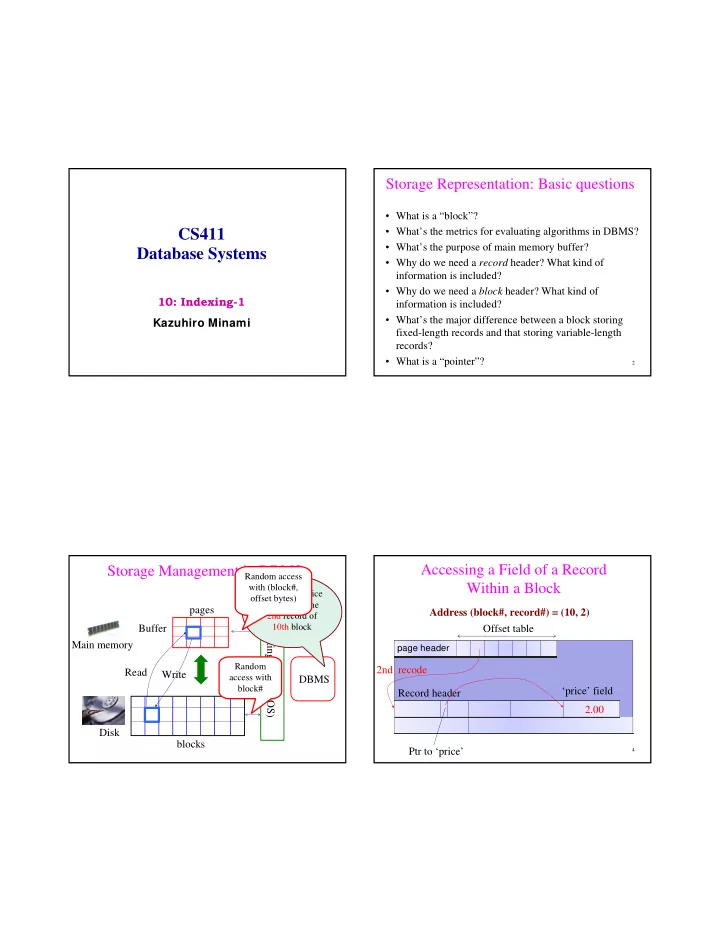
Storage Management in DBMS

Main memory Disk Buffer DBMS Operating System (OS) blocks pages

Update the price to $2.00 in the 2nd record of 10th block

Read Write

Random access with block# Random access with (block#,

  • ffset bytes)

Accessing a Field of a Record Within a Block

4

page page header

Offset table Record header Ptr to ‘price’ 2nd recode ‘price’ field 2.00 Address (block#, record#) = (10, 2)

slide-2
SLIDE 2

What if a user say “Update the price of Bud in Beers to $2.00”?

Main memory Disk Buffer DBMS Operating System (OS) blocks pages

How can we figure

  • ut (block#,

record#)?

Indexing How to find boxes containing “History of Japan” Volume 1 – 100 from Storage?

7

Storage with millions of boxes

You can only check out 5 boxes and takes a few days for delivery I don’t want to

  • pen all the

boxes; it takes forever…

Librarian

Suppose that each box has a ID and boxes are sorted by IDs Q: What kind of information would like to have?

Probably, what you want is a table (i.e., index)

8

Book title Box ID History of Japan vol. 1 925 History of Japan vol. 2 925 History of Japan vol. 3 926 History of Japan vol. 4 928 History of Japan vol. 5 928 History of Japan vol. 6 928 History of Japan vol. 7 1001 History of Japan vol. 8 1002 History of Japan vol. 9 1002 History of Japan vol. 10 1003

Q: do you think that we solved the problem? Q: how do you find the entry for “History of Japan” in this table? Q: What if this table is so big and is stored in boxes in the storage? This is the exact problem we need to address in DBMS

slide-3
SLIDE 3

How to first find boxes containing Index for “History of Japan” from Storage?

9

Storage with millions of boxes Librarian Boxes for index

Need to retrieve index blocks first

Indexes are used to speed up selections on particular attributes

Search key field(s) :

– The attribute(s) that you want to look up tuples by – any subset of the fields of a relation – Search key is not the same as key (minimal set of fields that uniquely identify a record in a relation).

Index entries take the form (k, r) Search key record, or record ID, or record IDs

There are several different kinds of indexes used in DBMSs

  • Clustered/unclustered

– Clustered = records sorted in the (search) key order – Unclustered = no

  • Dense/sparse

– Dense = each record has an entry in the index – Sparse = only some records have

  • Primary/secondary

– Primary = on the primary key – Secondary = on any key

Dense Indexes on a Sequential Data File

  • (key, pointer) pair for every record
  • File is sorted by the primary key

10 20 30 40 50 60 70 80

10 20 30 40 50 60 70 80

Index file Sequential file (data file) Index blocks Data blocks (key, pointer)

Keys and pointers take much less space

Key

slide-4
SLIDE 4

Sparse Indexes on a Sequential Data File

  • Sparse index: one key per data block
  • Use less space, but takes more time for search
  • Only work with sequential files

10 30 50 70 90 110 130 150

10 20 30 40 50 60 70 80

Sequential file (data file)

Search the sparse index for the largest key less than or equal to K

Unclustered Indexes

  • To index other attributes than primary key
  • Always dense (why ?)

10 10 20 20 20 30 30 30

20 30 30 20 10 20 10 30

How to find an index entry efficiently?

10 20 30 40 50 60 70 80

Index blocks

90 100 110 120 130 140 150 160 170 180 190 200

Data file

10 50 90 130 170

Second-level sparse index

B-Trees

slide-5
SLIDE 5

B-Trees

  • Automatically maintain as many level of index as

is appropriate for the size of the file being indexed

  • Organize its blocks into a tree

– Balanced: all paths from the root to a leaf have the same length

  • Manage the space on the blocks they use so that

every block is between half used and completely full.

– No overflow blocks are needed

B-Trees: Balanced Trees

  • Intuition:

– Give up on sequentiality of index – Try to get “balance” by dynamic reorganization

  • B+trees:

– Textbook refers to B+trees (a popular variant) as B-trees (as most people do) – Distinction will be clear later (ok to confuse now)

UIUC (Alumni) Contribution!

  • Prof. Rudolf Bayer

Rudolf Bayer studied Mathematics in Munich and at the University of Illinois, where he received his Ph.D. in 1966. After working at Boeing Research Labs he became an Associate Professor at Purdue University. He is a Professor of Informatics at the Technische Universität München since 1972 and … … The 2001 SIGMOD Innovations Award goes to Prof. Rudolf Bayer of the Technical University of Munich, for his invention of the B-Tree (with Edward

  • M. McCreight), of B-Tree prefix compression, and of lock coupling (a.k.a.

crabbing) for concurrent access to B-Trees (with Mario Schkolnick). All of these techniques are widely used in commercial database products. ……

The Original Publication

Rudolf Bayer, Edward M. McCreight: Organization and Maintenance of Large Ordered Indices. Acta Informatica 1: 173-189(1972)

  • Parameter d = the degree (In the textbook, d/2 is the

parameter n)

  • Each node has k keys and k+1 pointers

where d <= k <= 2d keys (except root)

  • Each leaf has k keys where d <= k <= 2d:

B-Trees Basics

30 120 240 Keys k < 30 Keys 30<=k<120 Keys 120<=k<240 Keys 240<=k 40 50 60

40 50 60

Next leaf

Disk block Disk block

slide-6
SLIDE 6

B-Tree Example

80 20 60 100 120 140

10 15 18 20 30 40 50 60 65 80 85 90 10 15 18 20 30 40 50 60 65 80 85 90

d = 2

Ok for the root to have

  • nly one key

B-Tree Design

  • How large d ?
  • Example:

– Key size = 4 bytes – Pointer size = 8 bytes – Block size = 4096 byes

  • 2d * 4 + (2d+1) * 8 <= 4096
  • d = 170

Searching a B-Tree

  • Exact key values:

– Start at the root – Proceed down, to the leaf

  • Range queries:

– As above – Then sequential traversal

  • f the leaf nodes

Select name From people Where age = 25 Select name From people Where 20 <= age and age <= 30

Example: Find a record with key 30

80 20 60 100 120 140

10 15 18 20 30 40 50 60 65 80 85 90 10 15 18 20 30 40 50 60 65 80 85 90

Only 4 blocks read necessary

slide-7
SLIDE 7

B-Trees in Practice

  • Typical order: 100. Typical fill-factor: 67%.

– average fanout = 133

  • Typical capacities:

– Height 4: 1334 = 312,900,700 records – Height 3: 1333 = 2,352,637 records

  • Can often hold top levels in buffer pool:

– Level 1 = 1 page = 8 Kbytes – Level 2 = 133 pages = 1 Mbyte – Level 3 = 17,689 pages = 133 MBytes

Big enough for most applications

Insertion in a B-Tree

Insert (K, P)

  • Find leaf where K belongs, insert
  • If no overflow (2d keys or less), halt
  • If overflow (2d+1 keys), split node, insert in parent:
  • If leaf, keep K3 too in right node

K1 K2 K3 K4 K5 P0 P1 P2 P3 P4 p5 K1 K2 P0 P1 P2 K4 K5 P3 P4 p5

(K3, ) to parent

Insertion in a B-Tree

80 20 60 100 120 140

10 15 18 20 30 40 50 60 65 80 85 90 10 15 18 20 30 40 50 60 65 80 85 90

Insert K=19

Insertion in a B-Tree

80 20 60 100 120 140

10 15 18 19 20 30 40 50 60 65 80 85 90 10 15 18 20 30 40 50 60 65 80 85 90 19

After insertion

slide-8
SLIDE 8

Insertion in a B-Tree

80 20 60 100 120 140

10 15 18 19 20 30 40 50 60 65 80 85 90 10 15 18 20 30 40 50 60 65 80 85 90 19

Now insert 25

Insertion in a B-Tree

80 20 60 100 120 140

10 15 18 19 20 25 30 40 50 60 65 80 85 90 10 15 18 20 25 30 40 60 65 80 85 90 19

After insertion

50

Insertion in a B-Tree

80 20 60 100 120 140

10 15 18 19 20 25 30 40 50 60 65 80 85 90 10 15 18 20 25 30 40 60 65 80 85 90 19

But now have to split !

50

Insertion in a B-Tree

80 20 30 60 100 120 140

10 15 18 19 20 25 60 65 80 85 90 10 15 18 20 25 30 40 60 65 80 85 90 19

After the split

50 30 40 50

slide-9
SLIDE 9

Deletion from a B-Tree

80 20 30 60 100 120 140

10 15 18 19 20 25 60 65 80 85 90 10 15 18 20 25 30 40 60 65 80 85 90 19

Delete 30

50 30 40 50

Deletion from a B-Tree

80 20 30 60 100 120 140

10 15 18 19 20 25 60 65 80 85 90 10 15 18 20 25 40 60 65 80 85 90 19

After deleting 30

50 40 50

May change to 40, or not

Deletion from a B-Tree

80 20 30 60 100 120 140

10 15 18 19 20 25 60 65 80 85 90 10 15 18 20 25 40 60 65 80 85 90 19

Now delete 25

50 40 50

Deletion from a B-Tree

80 20 30 60 100 120 140

10 15 18 19 20 60 65 80 85 90 10 15 18 20 40 60 65 80 85 90 19

After deleting 25 Need to rebalance Rotate

50 40 50

slide-10
SLIDE 10

Deletion from a B-Tree

80 19 30 60 100 120 140

10 15 18 19 20 60 65 80 85 90 10 15 18 20 40 60 65 80 85 90 19

Now delete 40

50 40 50

We need to update this key Because key 19 moves to the child node on the right

Deletion from a B-Tree

80 19 30 60 100 120 140

10 15 18 19 20 60 65 80 85 90 10 15 18 20 60 65 80 85 90 19

After deleting 40 Rotation not possible Need to merge nodes

50 50

We no longer need this key because the third child is merged.

Deletion from a B-Tree

80 19 60 100 120 140

10 15 18 19 20 50 60 65 80 85 90 10 15 18 20 60 65 80 85 90 19

Final tree

50