CPSC 213 Exceptions, Logical Control Flow, Signal Terminology, - - PowerPoint PPT Presentation

cpsc 213
SMART_READER_LITE
LIVE PREVIEW

CPSC 213 Exceptions, Logical Control Flow, Signal Terminology, - - PowerPoint PPT Presentation

Reading Text CPSC 213 Exceptions, Logical Control Flow, Signal Terminology, Sending Signals, Receiving Signals 8.1, 8.2.1, 8.5.1-8.5.3 Introduction to Computer Systems Unit 2a I/O Devices, Interrupts and DMA 1 2 Looking Beyond


slide-1
SLIDE 1

CPSC 213

Introduction to Computer Systems

Unit 2a

I/O Devices, Interrupts and DMA

1

Reading

  • Text
  • Exceptions, Logical Control Flow, Signal Terminology, Sending Signals,

Receiving Signals

  • 8.1, 8.2.1, 8.5.1-8.5.3
2

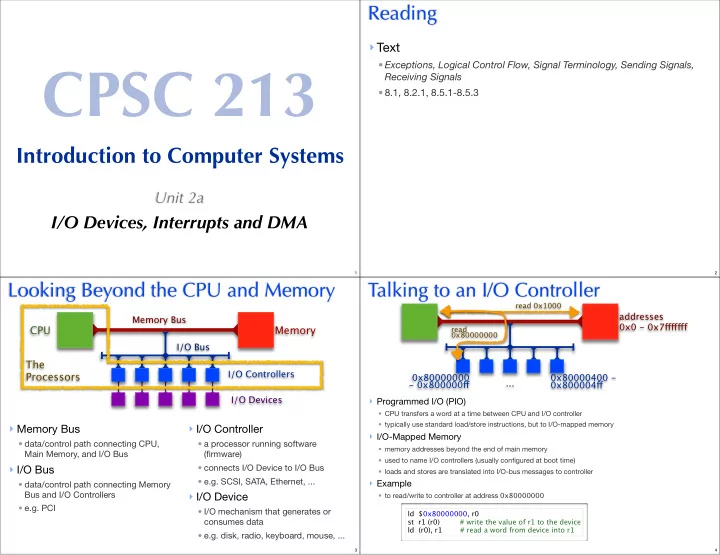
Looking Beyond the CPU and Memory

  • Memory Bus
  • data/control path connecting CPU,

Main Memory, and I/O Bus

  • I/O Bus
  • data/control path connecting Memory

Bus and I/O Controllers

  • e.g. PCI
  • I/O Controller
  • a processor running software

(firmware)

  • connects I/O Device to I/O Bus
  • e.g. SCSI, SATA, Ethernet, ...
  • I/O Device
  • I/O mechanism that generates or

consumes data

  • e.g. disk, radio, keyboard, mouse, ...

CPU Memory

Memory Bus I/O Bus I/O Controllers I/O Devices

The Processors

3

Talking to an I/O Controller

  • Programmed I/O (PIO)
  • CPU transfers a word at a time between CPU and I/O controller
  • typically use standard load/store instructions, but to I/O-mapped memory
  • I/O-Mapped Memory
  • memory addresses beyond the end of main memory
  • used to name I/O controllers (usually configured at boot time)
  • loads and stores are translated into I/O-bus messages to controller
  • Example
  • to read/write to controller at address 0x80000000

ld $0x80000000, r0 st r1 (r0) # write the value of r1 to the device ld (r0), r1 # read a word from device into r1

addresses 0x0 - 0x7fgfgfgf 0x80000000

  • 0x800000fg

...

read 0x1000 read 0x80000000

0x80000400 - 0x800004fg

4
slide-2
SLIDE 2

Limitations of PIO

  • Reading or writing large amounts of data slows CPU
  • requires CPU to transfer one word at a time
  • controller/device is (often) much slower than CPU
  • and so, CPU runs at controller/device speed, mostly waiting for controller
  • IO Controller can not initiate communication
  • sometimes the CPU asks for for data
  • but, sometimes controller receives data for the CPU, without CPU asking
  • e.g., mouse click or network packet reception (everything is like this really as we will see)
  • how does controller notify CPU that it has data the CPU should want?
  • One not-so-good idea
  • what is it? ___________________________________________________
  • what are drawbacks? _________________________________________
  • when is it okay? ______________________________________________
5

Key Observation

  • CPU and I/O Controller are independent processors
  • they should be permitted to work in parallel
  • either should be able to initiate data transfer to/from memory
  • either should be able to signal the other to get the other’s attention

The Processors

6

Autonomous Controller Operation

  • Direct Memory Access (DMA)
  • controller can send/read data from/to any main memory address
  • the CPU is oblivious to these transfers
  • DMA addresses and sizes are programmed by CPU using PIO
  • CPU Interrupts
  • controller can signal the CPU
  • CPU checks for interrupts on every cycle (it's like a really fast, clock-speed poll)
  • CPU jumps to controller’s Interrupt Service Routine if it is interrupting

PIO:

data transfer CPU <-> Controller initiated by CPU

DMA:

data transfer Controller <-> Memory initiated by Controller

Interrupt:

control transfer controller -> CPU

7

Adding Interrupts to Simple CPU

  • New special-purpose CPU registers
  • isDeviceInterrupting set by I/O Controller to signal interrupt
  • interruptControllerID

set by I/O Controller to identify interrupting device

  • interruptVectorBase interrupt-handler jump table, initialized at boot time
  • Modified fetch-execute cycle

while (true) { if (isDeviceInterrupting) { m[r[5]-4] ← r[6]; r[5] ← r[5]-4; r[6] ← pc; pc ← interruptVectorBase [interruptControllerID]; } fetch (); execute (); }

8
slide-3
SLIDE 3

Sketching Interrupt Control Flow

ISR - Controller #0

... ... ... iret

ISR - Controller #1

... ... ... iret

ISR - Controller #2

... ... ... iret

ISR - Controller #3

... ... ... iret

Interrupt Vector Current Program

... ... ... ... ... ... ... ... ... ... ... ... ... ... ... ...

  • 1. Controller #0 Interrupts
  • 2. CPU jumps to its ISR
  • 3. ISR returns to program
9

Big Ideas: Second Half

  • Memory hierarchy
  • progression from small/fast to large/slow
  • registers (same speed as ALU instruction execution, roughly: 1 ns clock tick)
  • memory (over 100x slower: 100ns)
  • disk (over 1,000,000x slower: 10 millisec)
  • network (even worse: 200+ millisec RT to other side of world just from speed of light in fiber)
  • implications
  • don’t make ALU wait for memory
  • ALU input only from registers, not memory
  • don’t make CPU wait for disk
  • interrupts, threads, asynchrony
  • Clean abstraction for programmer
  • ignore asynchronous reality via threads and virtual memory (mostly)
  • explicit synchronization as needed
10

Adding I/O to Simple Machine

  • Beyond CPU/memory
  • CPU: ALU and registers
  • I/O devices have small processors: I/O controllers
  • processing power available outside CPU

CPU Memory

CPU Memory

Memory Bus I/O Bus I/O Controllers I/O Devices

The Processors

11

I/O-Mapped Memory

  • I/O-Mapped Memory
  • use familiar syntax for load/store for both memory and I/O
  • memory addresses beyond the end of main memory handled by I/O controllers
  • mapping configured at boot time
  • loads and stores are translated into I/O-bus messages to controller
  • Example
  • to read/write to controller at address 0x80000000

ld $0x80000000, r0 st r1 (r0) # write the value of r1 to the device ld (r0), r1 # read a word from device into r1

addresses 0x00000000- 0x7fffffff addresses 0x80000000

  • 0x800000ff

read 0x1000 read 0x80000000

addresses 0x80000400- 0x800004ff addresses 0x80000100- 0x800001ff

CPU Memory

addresses 0x80000200- 0x800002ff addresses 0x80000300- 0x800003ff

12
slide-4
SLIDE 4

Programmed IO (PIO)

  • CPU requests one word at a time and waits for I/O controller
  • CPU must wait until data is available
  • but I/O devices may be much slower than CPU (disks millions of times slower)
  • large transfers slow since must be done one word at a time
  • CPU must check back with I/O controller (for instance by polling)
  • poll too often means high overhead
  • poll too seldom means high latency
  • no way for I/O controller to initiate communication
  • for some devices CPU has no idea when to poll (network traffic, mouse click)

PIO:

data transfer: CPU sends requests to controller and waits until data is ready

CPU Memory

13

Direct Memory Access (DMA)

  • I/O controller transfers data to/from main memory

independently of CPU

  • process initiated by CPU using PIO
  • send request to controller with addresses and sizes
  • data transferred to memory without CPU involvement
  • controller signals CPU with interrupt when transfer complete
  • can transfer large amounts of data with one request
  • not limited to one word at a time

1: PIO

data transfer CPU -> Controller initiated by CPU

2: DMA

data transfer Controller <-> Memory initiated by Controller

3: Interrupt

control transfer Controller -> CPU initiated by Controller

14

Programming with I/O

15

Reading from Disk (a Timeline)

CPU I/O Controller

  • 1. PIO to request read
  • 2. PIO Received, start read

... do other things ...

  • 3. Read completes
  • 4. Transfer data to memory (DMA)
  • 5. Interrupt CPU
  • 6. Interrupt Received

Call readComplete ... wait for read to complete ...

16
slide-5
SLIDE 5
  • Tell disk controller what block to read and where to put data
  • Read is finished when disk controller interrupts CPU

First Cut at Disk Read

struct Ctrl { int op; char* buf; int siz; int blkNo; }; void scheduleRead (char* aBuf, int aSiz, int aBlkNo) { // use PIO to instruct disk controller to read struct Ctrl* ctrl = (struct Ctrl*) 0x80000000; ctrl->op = 1; ctrl->buf = aBuf; ctrl->siz = aSiz; ctrl->blkNo = aBlkNo; } char buf[4096] scheduleRead (buf, sizeof(buf), 1234); // do some other things ... LOTS of other things interruptVector [DISK_ID] = readComplete; void readComplete () { // content of disk block 1234 is now in buf }

What is wrong?

17

Generalized Disk Read

  • Completion Queue
  • stores a completion routine (and other info) for all pending operations
  • organized as a circular queue: add to head, consume from tail

struct Comp { void (*handler) (char*, int); char* buf; int siz; }; struct Comp compQueue[1000]; int compHead = 0; int compTail = 0; void asyncRead (char* aBuf, int aSiz, int aBlkNo, void (*aCompHandler) (char*, int)) { // store completion record in main memory compHead = (compHead + 1) % 1000; compQueue [compHead].handler = aCompHandler; compQueue [compHead].buf = aBuf; compQueue [compHead].siz = aSiz; // use PIO to instruct disk controller to read scheduleRead (aBuf, aSiz, aBlkNo); }

18
  • Your code to request a disk read
  • call asynchronous read
  • specify your own completion routine
  • Generalized interrupt service routine
  • consumes next completion record, calling specified completion routine
  • assumes I/O operations complete in order

char buf[4096]; void askForBlock (int aBlkNo) { asyncRead (buf, sizeof(buf), aBlkNo, nowHaveBlock); } void nowHaveBlock (char* aBuf, int aSiz) { // aBuf now stores the requested disk data } interruptVector [DISK_ID] = diskInterruptServiceRoutine; void diskInterruptServiceRoutine () { struct Comp comp = compQueue[compTail]; compTail = (compTail + 1) % 1000; comp.handler (comp.buf, comp.siz); asm ("iret"); // return from interrupt }

19
  • Your program schedules the read
  • call asyncRead, register a completion routine
  • enqueue completion routine
  • use PIO to tell controller which block to read and where to put the data
  • The disk controller performs the read
  • gets data from disk surface
  • uses DMA to transfer data to memory
  • interrupts CPU to signal completion
  • Interrupt Service Routine
  • dequeue next completion routine
  • call completion routine so that your program can consume data ...
  • return from interrupt

Timeline of Asynchronous Disk Read

What is wrong now?

20
slide-6
SLIDE 6

Synchronous vs Asynchronous

  • Consider reading a block and then using its data
  • read must complete before data can be read (by nowHaveBlock)
  • A synchronous approach
  • nowHaveBlock starts only after read completes and block is in memory
  • the execution of consecutive statements in a program is synchronized
  • An asynchronous approach
  • asyncRead returns immediately; the next statement executes before nowHaveBlock
  • the execution of request and response is not synchronized
  • when nowHaveBlock runs, it does not have the context of its calling procedure

read (buf, siz, blkNo); // read siz bytes at blkNo into buf nowHaveBlock (buf, siz); // now do something with the block asyncRead (buf, siz, blkNo, nowHaveBlock);

21
  • Call graphs
  • Runtime stack when nowHaveBlock runs

Sync vs Async a Closer look

main read nowHaveBlock main read nowHaveBlock disk ISR

Synchronous Asynchronous

main nowHaveBlock disk ISR nowHaveBlock

22

Happy System, Sad Programmer

  • Humans like synchrony
  • we expect each step of a program to complete before the next one starts
  • we use the result of previous steps as input to subsequent steps
  • with disks, for example,
  • we read from a file in one step and then usually use the data we’ve read in the next step
  • Computer systems are asynchronous
  • the disk controller takes 10-20 milliseconds (10-3s) to read a block
  • CPU can execute 60 million instructions while waiting for the disk
  • we must allow the CPU to do other work while waiting for I/O completion
  • many devices send unsolicited data at unpredictable times
  • e.g., incoming network packets, mouse clicks, keyboard-key presses
  • we must allow programs to be interrupted many, many times a second to handle these things
  • Asynchrony makes programmers sad
  • it makes programs more difficult to write and much more difficult to debug
23

Possible Solutions

  • Accept the inevitable
  • use an event-driven programming model
  • event triggering and handling are de-coupled
  • a common idiom in many Java programs
  • GUI programming follows this model
  • CSP is a language boosts this idea to first-class status
  • no procedures or procedure calls
  • program code is decomposed into a set of sequential/synchronous processes
  • processes can fire events, which can cause other processes to run in parallel
  • each process has a guard predicate that lists events that will cause it to run
  • Invent a new abstraction
  • an abstraction that provides programs the illusion of synchrony
  • but, what happens when
  • a program does something asynchronous, like disk read?
  • an unanticipated device event occurs?
  • What’s the right solution?
  • we still don’t know — this is one of the most pressing questions we currently face
24