Control Flow for Selection Statements } Suppose we run this code, - - PowerPoint PPT Presentation

control flow for selection statements
SMART_READER_LITE
LIVE PREVIEW

Control Flow for Selection Statements } Suppose we run this code, - - PowerPoint PPT Presentation

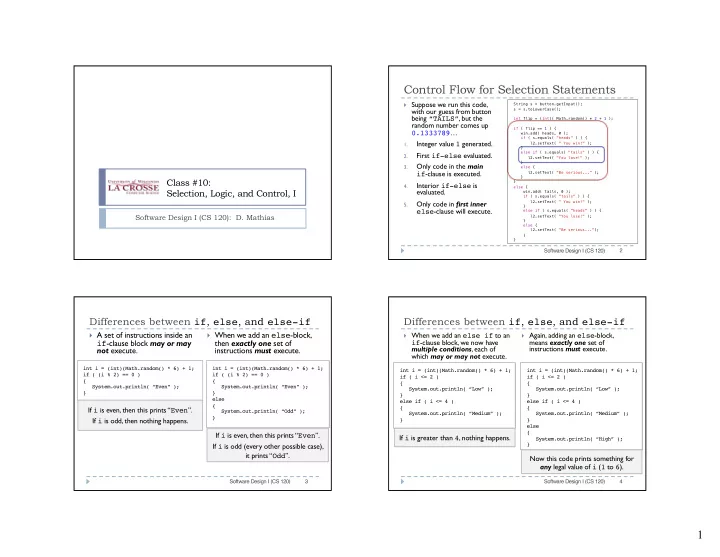
Control Flow for Selection Statements } Suppose we run this code, String s = button.getInput(); s = s.toLowerCase(); with our guess from button being TAILS , but the int flip = (int)( Math.random() * 2 + 1 ); random number comes up if (


slide-1
SLIDE 1

1

Class #10: Selection, Logic, and Control, I

Software Design I (CS 120): D. Mathias

String s = button.getInput(); s = s.toLowerCase(); int flip = (int)( Math.random() * 2 + 1 ); if ( flip == 1 ) { win.add( heads, 0 ); if ( s.equals( "heads" ) ) { l2.setText( " You win!" ); } else if ( s.equals( "tails" ) ) { l2.setText( "You lose!" ); } else { l2.setText( "Be serious..." ); } } else { win.add( tails, 0 ); if ( s.equals( "tails" ) ) { l2.setText( " You win!" ); } else if ( s.equals( "heads" ) ) { l2.setText( "You lose!" ); } else { l2.setText( "Be serious..."); } }

Control Flow for Selection Statements

} Suppose we run this code,

with our guess from button being “TAILS”, but the random number comes up 0.1333789…

1.

Integer value 1 generated.

2.

First if-else evaluated.

3.

Only code in the main if-clause is executed.

4.

Interior if-else is evaluated.

5.

Only code in first inner else-clause will execute.

Software Design I (CS 120) 2

Differences between if, else, and else-if

} A set of instructions inside an

if-clause block may or may not execute.

} When we add an else-block,

then exactly one set of instructions must execute.

Software Design I (CS 120) 3 int i = (int)(Math.random() * 6) + 1; if ( (i % 2) == 0 ) { System.out.println( “Even” ); } int i = (int)(Math.random() * 6) + 1; if ( (i % 2) == 0 ) { System.out.println( “Even” ); } else { System.out.println( “Odd” ); }

If i is even, then this prints “Even”. If i is odd, then nothing happens. If i is even, then this prints “Even”. If i is odd (every other possible case), it prints “Odd”.

Differences between if, else, and else-if

} When we add an else if to an

if-clause block, we now have multiple conditions, each of which may or may not execute.

} Again, adding an else-block,

means exactly one set of instructions must execute.

Software Design I (CS 120) 4 int i = (int)(Math.random() * 6) + 1; if ( i <= 2 ) { System.out.println( “Low” ); } else if ( i <= 4 ) { System.out.println( “Medium” ); } int i = (int)(Math.random() * 6) + 1; if ( i <= 2 ) { System.out.println( “Low” ); } else if ( i <= 4 ) { System.out.println( “Medium” ); } else { System.out.println( “High” ); }

If i is greater than 4, nothing happens. Now this code prints something for any legal value of i (1 to 6).

slide-2
SLIDE 2

2 The boolean Primitive Type

} As usual, to combine

these with relational and mathematical operators, we must remember precedence order

} For a set of operations

this complex, use of parentheses to mark precedence is often highly recommended!

Software Design I (CS 120) 5 Operator Precedence (highest to lowest) ++ -- ! - (unary negation) * / % + - (subtraction) < <= > >= == != && || = } Java boolean variables/expressions are used for true or false values } Constant expressions: true, false } Binary infix operators: && (and), || (or) } Unary prefix operator: ! (not)

Using boolean Expressions

} When we use relational

  • perators (==, !=, etc.)

properly, we produce an expression that is either true or false

} Such an expression can be

used anywhere boolean values could be used:

} condition for an if-clause } instantiation of some

boolean variable

} Anywhere else… Software Design I (CS 120) 6

int i = 3; int j = 5; if ( i <= j ) { System.out.println( i ); } int i = 3; int j = 5; boolean b = ( i <= j ); if ( b ) { System.out.println( i ); }

Evaluating boolean Expressions

} The simple numeric comparison

  • perators and equality relations

are easy to evaluate

} T

  • determine whether a more

complex logical formula is true or false, we use truth tables for logical operators

Software Design I (CS 120) 7

P ! P T F F T

P Q P || Q T T T T F T F T T F F F P Q P && Q T T T T F F F T F F F F

Evaluating boolean Expressions

} Sometimes we need to

negate a boolean expression that contains multiple variables

Software Design I (CS 120) 8

P ! P T F F T

P Q !(P || Q) T T F T F F F T F F F T P Q !(P && Q) T T F T F T F T T F F T

slide-3
SLIDE 3

3 Evaluating boolean Expressions

} Sometimes we need to

negate a boolean expression that contains multiple variables

Software Design I (CS 120) 9

P Q P && Q !(P && Q) !P || !Q T T T F F T F F T T F T F T T F F F T T

Evaluating boolean Expressions

} Sometimes we need to

negate a boolean expression that contains multiple variables

Software Design I (CS 120) 10

P Q P || Q !(P || Q) !P && !Q T T T F F T F T F F F T T F F F F F T T

Evaluating boolean Expressions

} Sometimes we need to negate a boolean

expression that contains multiple variables

Software Design I (CS 120) 11

P Q R P || Q || R !(P || Q || R) !P && !Q && !R T T T T F F T T F T F F T F T T F F T F F T F F F T T T F F F T F T F F F F T T F F F F F F T T

Review: Relations between Primitives

} We can combine primitive types when we compare them } We can use any relational operator, to produce a boolean value } Just like arithmetic, Java does an automatic widening of all types as

needed so they are able to be compared meaningfully

int i = 3; double j = 3.0; if ( i == j ) { System.out.println( “Equal” ); }

int i is widened to a double. Expression then evaluates to be true

12 Software Design I (CS 120)

slide-4
SLIDE 4

4 Relations between Reference Types

} Do not assume comparison operators work for non-primitive types } For any reference type (Class), basic comparison is not reliable Scanner scan = new Scanner( System.in ); String input = scan.next(); String check = “Exit”; if ( input == check ) { System.out.println( “Goodbye” ); } The == operator checks that two values are exactly the same. For reference types, this means that they refer to the same address in memory. Here, no matter what the user types, this will be false, since the two String

  • bjects are created in two different ways in two different locations.

13 Software Design I (CS 120)

Equality between Reference Types

}

For any reference (Class) type, to check whether the content of two objects is the same, we must use an equals() method, not the basic equality operator Scanner scan = new Scanner( System.in ); String input = scan.next(); String check = “Exit”; if ( input.equals( check ) ) { System.out.println( “Ciao!” ); } The equals() method for the String class actually checks whether or not they are identical, character-by-character. If a class has such a method, then we can compare it reliably. When writing our

  • wn classes, if we want to be able to do this, then we must write our own

method to do so. Here, as long as the user types in the same word exactly, this will be true.

14 Software Design I (CS 120)

Comparison between Reference Types

}

Every primitive type can be compared using basic operators like <, <=, etc.,

}

This is not true for reference (Class) types

}

If such a type is supposed to be comparable, then it must have a method, compareTo(), that:

1.

Takes another object of the same type as input

2.

Returns an integer that is:

a)

Zero (0) if the objects are equal

b)

Negative (less than 0) if the object calling the method comes before the input

c)

Positive (greater than 0) if the object calling the method comes after the input String s1 = “abacus”; String s2 = “barnacle”; if ( s1.compareTo( s2 ) < 0 ) { System.out.println( s1 + “ before “ + s2 ); } else if ( s1.compareTo( s1 ) == 0 ) { System.out.println( s1 + “ equals “ + s1 ); } else if ( s2.compareTo( s1 ) > 0 ) { System.out.println( s2 + “ after “ + s1 ); } 15 Software Design I (CS 120)

Here, all of the comparisons will be true, since the two String objects are compared using their proper method.