Class = functions + data (variables) in one unit INF1100 Lectures, - - PowerPoint PPT Presentation

class functions data variables in one unit inf1100
SMART_READER_LITE
LIVE PREVIEW

Class = functions + data (variables) in one unit INF1100 Lectures, - - PowerPoint PPT Presentation

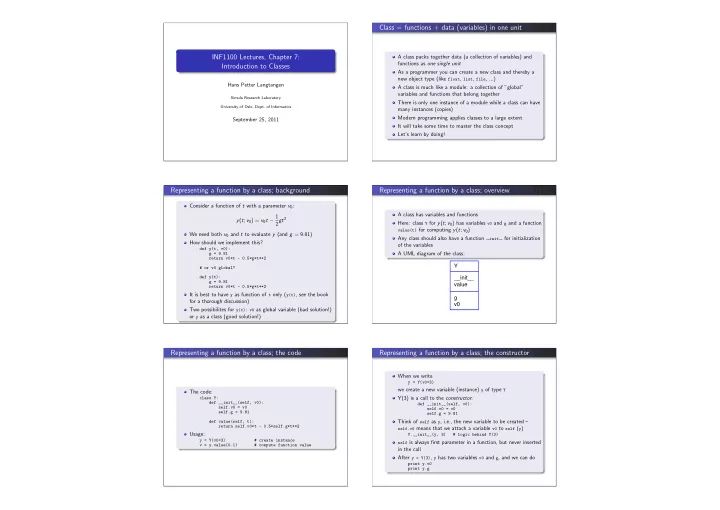
Class = functions + data (variables) in one unit INF1100 Lectures, Chapter 7: A class packs together data (a collection of variables) and functions as one single unit Introduction to Classes As a programmer you can create a new class and thereby


slide-1
SLIDE 1

INF1100 Lectures, Chapter 7: Introduction to Classes

Hans Petter Langtangen

Simula Research Laboratory University of Oslo, Dept. of Informatics

September 25, 2011

Class = functions + data (variables) in one unit

A class packs together data (a collection of variables) and functions as one single unit As a programmer you can create a new class and thereby a new object type (like float, list, file, ...) A class is much like a module: a collection of ”global” variables and functions that belong together There is only one instance of a module while a class can have many instances (copies) Modern programming applies classes to a large extent It will take some time to master the class concept Let’s learn by doing!

Representing a function by a class; background

Consider a function of t with a parameter v0: y(t; v0) = v0t − 1 2gt2 We need both v0 and t to evaluate y (and g = 9.81) How should we implement this?

def y(t, v0): g = 9.81 return v0*t - 0.5*g*t**2 # or v0 global? def y(t): g = 9.81 return v0*t - 0.5*g*t**2

It is best to have y as function of t only (y(t), see the book for a thorough discussion) Two possibilites for y(t): v0 as global variable (bad solution!)

  • r y as a class (good solution!)

Representing a function by a class; overview

A class has variables and functions Here: class Y for y(t; v0) has variables v0 and g and a function

value(t) for computing y(t; v0)

Any class should also have a function

init

for initialization

  • f the variables

A UML diagram of the class: Y __init__ value g v0

Representing a function by a class; the code

The code:

class Y: def __init__(self, v0): self.v0 = v0 self.g = 9.81 def value(self, t): return self.v0*t - 0.5*self.g*t**2

Usage:

y = Y(v0=3) # create instance v = y.value(0.1) # compute function value

Representing a function by a class; the constructor

When we write

y = Y(v0=3)

we create a new variable (instance) y of type Y Y(3) is a call to the constructor:

def __init__(self, v0): self.v0 = v0 self.g = 9.81

Think of self as y, i.e., the new variable to be created –

self.v0 means that we attach a variable v0 to self (y) Y.__init__(y, 3) # logic behind Y(3) self is always first parameter in a function, but never inserted

in the call After y = Y(3), y has two variables v0 and g, and we can do

print y.v0 print y.g

slide-2
SLIDE 2

Representing a function by a class; the value method

Functions in classes are called methods Variables in classes are called attributes The value method:

def value(self, t): return self.v0*t - 0.5*self.g*t**2

Example on a call:

v = y.value(t=0.1) self is left out in the call, but Python automatically inserts y

as the self argument inside the value method Inside value things ”appear” as

return y.v0*t - 0.5*y.g*t**2

The method value has, through self (here y), access to the attributes – attributes are like ”global variables” in the class, and any method gets a self parameter as first argument and can then access the attributes through self

Representing a function by a class; summary

Class Y collects the attributes v0 and g and the method value as one unit

value(t) is function of t only, but has automatically access to

the parameters v0 and g The great advantage: we can send y.value as an ordinary function of t to any other function that expects a function

f(t), def table(f, tstop, n): """Make a table of t, f(t) values.""" for t in linspace(0, tstop, n): print t, f(t) def g(t): return sin(t)*exp(-t) table(g, 2*pi, 101) # send ordinary function y = Y(6.5) table(y.value, 2*pi, 101) # send class method

Representing a function by a class; the general case

Given a function with n + 1 parameters and one independent variable, f (x; p0, . . . , pn) it is smart to represent f by a class where p0, . . . , pn are attributes and where there is a method, say value(self, x), for computing f (x)

class MyFunc: def __init__(self, p0, p1, p2, ..., pn): self.p0 = p0 self.p1 = p1 ... self.pn = pn def value(self, x): return ...

Representing a function by a class; another example

A function with four parameters: v(r; β, µ0, n, R) = β 2µ0 1

n

n n + 1

  • R1+ 1
n − r1+ 1 n
  • class VelocityProfile:

def __init__(self, beta, mu0, n, R): self.beta, self.mu0, self.n, self.R = \ beta, mu0, n, R def value(self, r): beta, mu0, n, R = \ self.beta, self.mu0, self.n, self.R n = float(n) # ensure float divisions v = (beta/(2.0*mu0))**(1/n)*(n/(n+1))*\ (R**(1+1/n) - r**(1+1/n)) return v v = VelocityProfile(R=1, beta=0.06, mu0=0.02, n=0.1) print v.value(r=0.1)

Rough sketch of a class

class MyClass: def __init__(self, p1, p2): self.attr1 = p1 self.attr2 = p2 def method1(self, arg): # can init new attribute outside constructor: self.attr3 = arg return self.attr1 + self.attr2 + self.attr3 def method2(self): print ’Hello!’ m = MyClass(4, 10) print m.method1(-2) m.method2()

It is common to have a constructor where attributes are initialized, but this is not a requirement – attributes can be defined whenever desired

More introductory material on class Y

The book features a section on a different version of class Y where there is no constructor (which is possible) The book also features a section on how to implement classes without using classes These sections may be clarifying – or confusing

slide-3
SLIDE 3

Another class example: a bank account

Attributes: name of owner, account number, balance Methods: deposit, withdraw, pretty print

class Account: def __init__(self, name, account_number, initial_amount): self.name = name self.no = account_number self.balance = initial_amount def deposit(self, amount): self.balance += amount def withdraw(self, amount): self.balance -= amount def dump(self): s = ’%s, %s, balance: %s’ % \ (self.name, self.no, self.balance) print s

UML diagram of class Account

Account __init__ deposit withdraw dump balance name no

Example on using class Account

>>> a1 = Account(’John Olsson’, ’19371554951’, 20000) >>> a2 = Account(’Liz Olsson’, ’19371564761’, 20000) >>> a1.deposit(1000) >>> a1.withdraw(4000) >>> a2.withdraw(10500) >>> a1.withdraw(3500) >>> print "a1’s balance:", a1.balance a1’s balance: 13500 >>> a1.dump() John Olsson, 19371554951, balance: 13500 >>> a2.dump() Liz Olsson, 19371564761, balance: 9500

Protected names for avoiding misuse

Possible, but not intended:

>>> a1.name = ’Some other name’ >>> a1.balance = 100000 >>> a1.no = ’19371564768’

The assumptions on correct usage: The attributes should not be changed! The balance attribute can be viewed Changing balance is done through withdraw or deposit Remedy: Attributes and methods not intended for use outside the class can be marked as protected by prefixing the name with an underscore (e.g., name). This is just a convention – and no technical way of avoiding attributes and methods to be accessed.

Improved class with attribute protection (underscore)

class AccountP: def __init__(self, name, account_number, initial_amount): self._name = name self._no = account_number self._balance = initial_amount def deposit(self, amount): self._balance += amount def withdraw(self, amount): self._balance -= amount def get_balance(self): # NEW - read balance value return self._balance def dump(self): s = ’%s, %s, balance: %s’ % \ (self._name, self._no, self._balance) print s

Usage of improved class AccountP

a1 = AccountP(’John Olsson’, ’19371554951’, 20000) a1.withdraw(4000) print a1._balance # it works, but a convention is broken print a1.get_balance() # correct way of viewing the balance a1._no = ’19371554955’ # this is a "serious crime"!!!

slide-4
SLIDE 4

Another example: a phone book

Phone book: list of data about persons Data about a person: name, mobile phone, office phone, private phone, email Data about a person can be collected in a class as attributes Methods:

Constructor for initializing name, plus one or more other data Add new mobile number Add new office number Add new private number Add new email Write out person data

UML diagram of class Person

Person __init__ add_mobile_phone add_office_phone add_private_phone add_email dump email mobile name

  • ffice

private

Code of class Person (1)

class Person: def __init__(self, name, mobile_phone=None, office_phone=None, private_phone=None, email=None): self.name = name self.mobile = mobile_phone self.office = office_phone self.private = private_phone self.email = email def add_mobile_phone(self, number): self.mobile = number def add_office_phone(self, number): self.office = number def add_private_phone(self, number): self.private = number def add_email(self, address): self.email = address

Code of class Person (2)

def dump(self): s = self.name + ’\n’ if self.mobile is not None: s += ’mobile phone: %s\n’ % self.mobile if self.office is not None: s += ’office phone: %s\n’ % self.office if self.private is not None: s += ’private phone: %s\n’ % self.private if self.email is not None: s += ’email address: %s\n’ % self.email print s

Usage:

p1 = Person(’Hans Petter Langtangen’, email=’hpl@simula.no’) p1.add_office_phone(’67828283’), p2 = Person(’Aslak Tveito’, office_phone=’67828282’) p2.add_email(’aslak@simula.no’) phone_book = [p1, p2] # list phone_book = {’Langtangen’: p1, ’Tveito’: p2} # better for p in phone_book: p.dump()

Another example: a circle

A circle is defined by its center point x0, y0 and its radius R These data can be attributes in a class Possible methods in the class: area, circumference The constructor initializes x0, y0 and R

class Circle: def __init__(self, x0, y0, R): self.x0, self.y0, self.R = x0, y0, R def area(self): return pi*self.R**2 def circumference(self): return 2*pi*self.R >>> c = Circle(2, -1, 5) >>> print ’A circle with radius %g at (%g, %g) has area %g’ % \ ... (c.R, c.x0, c.y0, c.area()) A circle with radius 5 at (2, -1) has area 78.5398

Special methods for nice syntax

Some class methods have leading and trailing double underscores

def __init__(self, ...) def __call__(self, ...) def __add__(self, other)

These are called special methods and allow for special syntax Recall the constructor, we write

y = Y(4)

and not (the more logical)

Y.__init__(y, 4)

With the

call

special method we can make the class instance behave and look as a function With the

add

special method we can add two class instances (with our own tailored rule for addition) Many forthcoming examples illustrate various special methods

slide-5
SLIDE 5

Example on a call special method

Let us replace the value method in class Y by a call special method:

class Y: def __init__(self, v0): self.v0 = v0 self.g = 9.81 def __call__(self, t): return self.v0*t - 0.5*self.g*t**2

Now we can write

y = Y(3) v = y(0.1) # same as v = y.__call__(0.1)

The instance y behaves/looks as a function! The value(t) method does the same, but the special method (call) allows nicer syntax for computing function values

Representing a function by a class revisited

Given a function with n + 1 parameters and one independent variable, f (x; p0, . . . , pn) it is wise to represent f by a class where p0, . . . , pn are attributes and where there is a call special method for computing f (x)

class MyFunc: def __init__(self, p0, p1, p2, ..., pn): self.p0 = p0 self.p1 = p1 ... self.pn = pn def __call__(self, x): return ...

Example: automagic differentiation; goal

Given some mathematical function in Python, say

def f(x): return x**3

can we make a class Derivative and write

dfdx = Derivative(f)

so that dfdx will behave as a function that computes the derivative of f?

print dfdx(2) # computes 3*x**2 for x=2

Yes – this is possible using classes

Automagic differentiation; solution

We use numerical differentiation ”behind the curtain”: f ′(x) ≈ f (x + h) − f (x) h for a small h, say h = 10−9 Class Derivative stores f and h as attributes and applies the differentation formula in the call special method

class Derivative: def __init__(self, f, h=1E-9): self.f = f self.h = float(h) def __call__(self, x): f, h = self.f, self.h # make short forms return (f(x+h) - f(x))/h

Automagic differentiation; demo

>>> from math import * >>> df = Derivative(sin) >>> x = pi >>> df(x)

  • 1.000000082740371

>>> cos(x) # exact

  • 1.0

>>> def g(t): ... return t**3 ... >>> dg = Derivative(g) >>> t = 1 >>> dg(t) # compare with 3 (exact) 3.000000248221113

Automagic differentiation; useful in Newton’s method

Newton’s method solves nonlinear equations f (x) = 0, but the method requires f ′(x) Suppose we have an implementation

def Newton(f, xstart, dfdx, epsilon=1E-9): ... return x, no_of_iterations, f(x)

Suppose we have a function f (x) that we do not want to differentiate – then class Derivative is handy:

>>> def f(x): ... return 100000*(x - 0.9)**2 * (x - 1.1)**3 ... >>> df = Derivative(f) >>> xstart = 1.01 >>> Newton(f, xstart, df, epsilon=1E-5) (1.0987610068093443, 8, -7.5139644257961411e-06)

slide-6
SLIDE 6

Example: automagic integration; problem setting

Given a function f (x), we want to compute F(x; a) = x

a

f (t)dt Technique: Trapezoidal rule x

a

f (t)dt = h

  • 1

2f (a) +

n−1

  • i=1

f (a + ih) + 1 2f (x)

  • This is the application code we want:

def f(x): return exp(-x**2)*sin(10*x) a = 0; n = 200 F = Integral(f, a, n) x = 1.2 print F(x)

Example: automagic integration; implementation

Let us first make a separate integration function:

from scitools.std import iseq def trapezoidal(f, a, x, n): h = (x-a)/float(n) I = 0.5*f(a) for i in iseq(1, n-1): I += f(a + i*h) I += 0.5*f(x) I *= h return I

Class Integral holds f, a and n as attributes and has a special method call for computing the integral:

class Integral: def __init__(self, f, a, n=100): self.f, self.a, self.n = f, a, n def __call__(self, x): return trapezoidal(self.f, self.a, x, self.n)

Special method for printing

In Python, we can usually print an object a by print a This works for built-in types (strings, lists, floats, ...) If we have made a new type through a class, Python does not know how to print objects of this type However, if the class has defined a method

str , Python will

use this method to convert the object to a string

class Y: ... def __call__(self, t): return self.v0*t - 0.5*self.g*t**2 def __str__(self): return ’v0*t - 0.5*g*t**2; v0=%g’ % self.v0

Demo:

>>> y = Y(1.5) >>> y(0.2) 0.1038 >>> print y v0*t - 0.5*g*t**2; v0=1.5

Class for polynomials; functionality

A polynomial can be specified by a list of its coefficients Example: [1,0,-1,2] corresponds to 1 + 0 · x − 1 · x2 + 2 · x3 = 1 − x2 + 2x3 i.e., elem. no. i in the list is the coefficient for the xi term We want the following application code:

>>> p1 = Polynomial([1, -1]) >>> print p1 1 - x >>> p2 = Polynomial([0, 1, 0, 0, -6, -1]) >>> p3 = p1 + p2 >>> print p3.coeff [1, 0, 0, 0, -6, -1] >>> print p3 1 - 6*x^4 - x^5 >>> p2.differentiate() >>> print p2 1 - 24*x^3 - 5*x^4

How can we make class Polynomial?

Class Polynomial; basic code

class Polynomial: def __init__(self, coefficients): self.coeff = coefficients def __call__(self, x): s = 0 for i in range(len(self.coeff)): s += self.coeff[i]*x**i return s def __add__(self, other): # return self + other # start with the longest list and add in the other: if len(self.coeff) > len(other.coeff): coeffsum = self.coeff[:] # copy! for i in range(len(other.coeff)): coeffsum[i] += other.coeff[i] else: coeffsum = other.coeff[:] # copy! for i in range(len(self.coeff)): coeffsum[i] += self.coeff[i] return Polynomial(coeffsum)

Class Polynomial; multiplication

Mathematics:

Multiplication of two general polynomials: M

  • i=0

cixi N

  • j=0

djxj

  • =
M
  • i=0
N
  • j=0

cidjxi+j The coeff. corresponding to power i + j is ci · dj. If r is the list representation

  • f the result, we then have r[i+j] = c[i]*d[j] (i and j running from 0 to M

and N, resp.)

Implementation:

class Polynomial: ... def __mul__(self, other): M = len(self.coeff) - 1 N = len(other.coeff) - 1 coeff = [0]*(M+N+1) # or zeros(M+N+1) for i in range(0, M+1): for j in range(0, N+1): coeff[i+j] += self.coeff[i]*other.coeff[j] return Polynomial(coeff)

slide-7
SLIDE 7

Class Polynomial; differentation

Mathematics:

Rule for differentiating a general polynomial: d dx

n
  • i=0

cixi =

n
  • i=1

icixi−1 If c is the list of coefficients, the derivative has a list of coefficients, dc, where

dc[i-1] = i*c[i] for i running from 1 to the largest index in c. Note that dc

has one element less than c.

Implementation:

class Polynomial: ... def differentiate(self): # change self for i in range(1, len(self.coeff)): self.coeff[i-1] = i*self.coeff[i] del self.coeff[-1] def derivative(self): # return new polynomial dpdx = Polynomial(self.coeff[:]) # copy dpdx.differentiate() return dpdx

Class Polynomial; pretty print

class Polynomial: ... def __str__(self): s = ’’ for i in range(0, len(self.coeff)): if self.coeff[i] != 0: s += ’ + %g*x^%d’ % (self.coeff[i], i) # fix layout: s = s.replace(’+ -’, ’- ’) s = s.replace(’ 1*’, ’ ’) s = s.replace(’x^0’, ’1’) s = s.replace(’x^1 ’, ’x ’) s = s.replace(’x^1’, ’x’) if s[0:3] == ’ + ’: # remove initial + s = s[3:] if s[0:3] == ’ - ’: # fix spaces for initial - s = ’-’ + s[3:] return s

Class for polynomials; usage

Consider p1(x) = 1 − x, p2(x) = x − 6x4 − x5 and their sum p3(x) = p1(x) + p2(x) = 1 − 6x4 − x5

>>> p1 = Polynomial([1, -1]) >>> print p1 1 - x >>> p2 = Polynomial([0, 1, 0, 0, -6, -1]) >>> p3 = p1 + p2 >>> print p3.coeff [1, 0, 0, 0, -6, -1] >>> p2.differentiate() >>> print p2 1 - 24*x^3 - 5*x^4

Special methods for arithmetic operations

c = a + b # c = a.__add__(b) c = a - b # c = a.__sub__(b) c = a*b # c = a.__mul__(b) c = a/b # c = a.__div__(b) c = a**e # c = a.__pow__(e)

Special methods for comparisons

a == b # a.__eq__(b) a != b # a.__ne__(b) a < b # a.__lt__(b) a <= b # a.__le__(b) a > b # a.__gt__(b) a >= b # a.__ge__(b)

Example: class for vectors in the plane

Some mathematical operations for vectors in the plane:

(a, b) + (c, d) = (a + c, b + d) (a, b) − (c, d) = (a − c, b − d) (a, b) · (c, d) = ac + bd (a, b) = (c, d) if a = c and b = d

Desired application code:

>>> u = Vec2D(0,1) >>> v = Vec2D(1,0) >>> print u + v (1, 1) >>> a = u + v >>> w = Vec2D(1,1) >>> a == w True >>> print u - v (-1, 1) >>> print u*v

slide-8
SLIDE 8

Class for vectors; implementation

class Vec2D: def __init__(self, x, y): self.x = x; self.y = y def __add__(self, other): return Vec2D(self.x+other.x, self.y+other.y) def __sub__(self, other): return Vec2D(self.x-other.x, self.y-other.y) def __mul__(self, other): return self.x*other.x + self.y*other.y def __abs__(self): return math.sqrt(self.x**2 + self.y**2) def __eq__(self, other): return self.x == other.x and self.y == other.y def __str__(self): return ’(%g, %g)’ % (self.x, self.y) def __ne__(self, other): return not self.__eq__(other) # reuse __eq__

The repr special method

Two special methods for turning an object into a string:

class MyClass: def __init__(self, a, b): self.a, self.b = a, b def __str__(self): """Return string with pretty print.""" return ’a=%s, b=%s’ % (self.a, self.b) def __repr__(self): """Return s such that eval(s) recreates self.""" return ’MyClass(%s, %s)’ % (self.a, self.b)

Demo:

>>> m = MyClass(1, 5) >>> print m # calls m.__str__() a=1, b=5 >>> str(m) # calls m.__str__() ’a=1, b=5’ >>> s = repr(m) # calls m.__repr__() >>> m2 = eval(s) >>> m2 # calls m.__repr__() ’MyClass(1, 5)’

Class Y revisited with repr print method

class Y: """Class for function y(t; v0, g) = v0*t - 0.5*g*t**2.""" def __init__(self, v0): """Store parameters.""" self.v0 = v0 self.g = 9.81 def __call__(self, t): """Evaluate function.""" return self.v0*t - 0.5*self.g*t**2 def __str__(self): """Pretty print.""" return ’v0*t - 0.5*g*t**2; v0=%g’ % self.v0 def __repr__(self): """Print code for regenerating this instance.""" return ’Y(%s)’ % self.v0

Class for complex numbers; functionality

Python already has a class complex for complex numbers, but implementing such a class is a good pedagogical example on class programming (especially with special methods) Here is what we would like to do:

>>> u = Complex(2,-1) >>> v = Complex(1) # zero imaginary part >>> w = u + v >>> print w (3, -1) >>> w != u True >>> u*v Complex(2, -1) >>> u < v illegal operation "<" for complex numbers >>> print w + 4 (7, -1) >>> print 4 - w (1, 1)

Class for complex numbers; implementation (part 1)

class Complex: def __init__(self, real, imag=0.0): self.real = real self.imag = imag def __add__(self, other): return Complex(self.real + other.real, self.imag + other.imag) def __sub__(self, other): return Complex(self.real - other.real, self.imag - other.imag) def __mul__(self, other): return Complex(self.real*other.real - self.imag*other.imag, self.imag*other.real + self.real*other.imag) def __div__(self, other): ar, ai, br, bi = self.real, self.imag, r = float(br**2 + bi**2) return Complex((ar*br+ai*bi)/r, (ai*br-ar*bi)/r)

Class for complex numbers; implementation (part 2)

def __abs__(self): return sqrt(self.real**2 + self.imag**2) def __neg__(self): # defines -c (c is Complex) return Complex(-self.real, -self.imag) def __eq__(self, other): return self.real == other.real and \ self.imag == other.imag def __ne__(self, other): return not self.__eq__(other) def __str__(self): return ’(%g, %g)’ % (self.real, self.imag) def __repr__(self): return ’Complex’ + str(self) def __pow__(self, power): raise NotImplementedError\ (’self**power is not yet impl. for Complex’)

slide-9
SLIDE 9

Refining the special methods for arithmetics

Can we add a real number to a complex number?

>>> u = Complex(1, 2) >>> w = u + 4.5 ... AttributeError: ’float’ object has no attribute ’real’

Problem: we have assumed that other is Complex Remedy:

def __add__(self, other): if isinstance(other, (float,int)):

  • ther = Complex(other)

return Complex(self.real + other.real, self.imag + other.imag) # or def __add__(self, other): if isinstance(other, (float,int)): return Complex(self.real + other, self.imag) else: return Complex(self.real + other.real, self.imag + other.imag)

Special methods for ”right” operands; addition

What if we try this:

>>> u = Complex(1, 2) >>> w = 4.5 + u ... TypeError: unsupported operand type(s) for +: ’float’ and ’instance’

Problem: Python’s float objects cannot add a Complex Remedy: if a class has a

radd (self, other) special method,

Python applies this for the expression other + self

def __radd__(self, other): """Defines other + self.""" # other + self = self + other: return self.__add__(other)

Special methods for ”right” operands; subtraction

Right operands for subtraction is a bit more complicated since a − b = b − a:

def __sub__(self, other): if isinstance(other, (float,int)):

  • ther = Complex(other)

return Complex(self.real - other.real, self.imag - other.imag) def __rsub__(self, other): if isinstance(other, (float,int)):

  • ther = Complex(other)

return other.__sub__(self)

What’s in a class?

A demo class:

class A: """A class for demo purposes.""" def __init__(self, value): self.v = value

Any instance holds its attributes in the self. dict dictionary (Python automatically creates this dict)

>>> a = A([1,2]) >>> print a.__dict__ # all attributes {’v’: [1, 2]} >>> dir(a) # what’s in object a? ’__doc__’, ’__init__’, ’__module__’, ’dump’, ’v’] >>> a.__doc__ # programmer’s documentation of A ’A class for demo purposes.’

Ooops – we can add new attributes as we want!

>>> a.myvar = 10 # add new attribute (!) >>> a.__dict__ {’myvar’: 10, ’v’: [1, 2]} >>> dir(a) [’__doc__’, ’__init__’, ’__module__’, ’dump’, ’myvar’, ’v’] >>> b = A(-1) >>> b.__dict__ # b has no myvar attribute {’v’: -1} >>> dir(b) [’__doc__’, ’__init__’, ’__module__’, ’dump’, ’v’]

Summary of defining a class

Example on a defining a class with attributes and methods:

class Gravity: """Gravity force between two objects.""" def __init__(self, m, M): self.m = m self.M = M self.G = 6.67428E-11 # gravity constant def force(self, r): G, m, M = self.G, self.m, self.M return G*m*M/r**2 def visualize(self, r_start, r_stop, n=100): from scitools.std import plot, linspace r = linspace(r_start, r_stop, n) g = self.force(r) title=’m=%g, M=%g’ % (self.m, self.M) plot(r, g, title=title)

slide-10
SLIDE 10

Summary of using a class

Example on using the class:

mass_moon = 7.35E+22 mass_earth = 5.97E+24 # make instance of class Gravity: gravity = Gravity(mass_moon, mass_earth) r = 3.85E+8 # earth-moon distance in meters Fg = gravity.force(r) # call class method

Summary of special methods

c = a + b implies c = a.__add__(b)

There are special methods for a+b, a-b, a*b, a/b, a**b, -a, if

a:, len(a), str(a) (pretty print), repr(a) (recreate a with eval), etc.

With special methods we can create new mathematical

  • bjects like vectors, polynomials and complex numbers and

write ”mathematical code” (arithmetics) The call special method is particularly handy:

c = C() v = c(5) # means v = c.__call__(5)

Functions with parameters should be represented by a class with the parameters as attributes and with a call special method for evaluating the function

Summarizing example: interval arithmetics

Consider measuring gravity by dropping a ball: y(t) = y0 − 1 2gt2 T: time to reach the ground y = 0; g = 2y0T −2 What if y0 and T are uncertain? Say y0 ∈ [0.99, 1.01] m and T ∈ [0.43, 0.47] s. What is the uncertainty in g? Interval arithmetics can answer this question Rules for computing with intervals, p = [a, b] and q = [c, d]:

1

p + q = [a + c, b + d]

2

p − q = [a − d, b − c]

3

pq = [min(ac, ad, bc, bd), max(ac, ad, bc, bd)]

4

p/q = [min(a/c, a/d, b/c, b/d), max(a/c, a/d, b/c, b/d)] ([c, d] cannot contain zero)

Obvious idea: make a class for interval arithmetics

Class for interval arithmetics

class IntervalMath: def __init__(self, lower, upper): self.lo = float(lower) self.up = float(upper) def __add__(self, other): a, b, c, d = self.lo, self.up, other.lo, other.up return IntervalMath(a + c, b + d) def __sub__(self, other): a, b, c, d = self.lo, self.up, other.lo, other.up return IntervalMath(a - d, b - c) def __mul__(self, other): a, b, c, d = self.lo, self.up, other.lo, other.up return IntervalMath(min(a*c, a*d, b*c, b*d), max(a*c, a*d, b*c, b*d)) def __div__(self, other): a, b, c, d = self.lo, self.up, other.lo, other.up if c*d <= 0: return None return IntervalMath(min(a/c, a/d, b/c, b/d), max(a/c, a/d, b/c, b/d)) def __str__(self): return ’[%g, %g]’ % (self.lo, self.up)

Demo of the new class for interval arithmetics

Code:

I = IntervalMath # abbreviate a = I(-3,-2) b = I(4,5) expr = ’a+b’, ’a-b’, ’a*b’, ’a/b’ # test expressions for e in expr: print e, ’=’, eval(e)

Output:

a+b = [1, 3] a-b = [-8, -6] a*b = [-15, -8] a/b = [-0.75, -0.4]

Shortcomings of the class

This code

a = I(4,5) q = 2 b = a*q

leads to

File "IntervalMath.py", line 15, in __mul__ a, b, c, d = self.lo, self.up, other.lo, other.up AttributeError: ’float’ object has no attribute ’lo’

Problem: IntervalMath times int is not defined Remedy: (cf. class Complex)

def __mul__(self, other): if isinstance(other, (int, float)): # NEW

  • ther = IntervalMath(other, other)

# NEW a, b, c, d = self.lo, self.up, other.lo, other.up return IntervalMath(min(a*c, a*d, b*c, b*d), max(a*c, a*d, b*c, b*d))

with similar adjustments of other special methods

slide-11
SLIDE 11

More shortcomings of the class

Try to compute g = 2*y0*T**(-2): multiplication of int (2) and

IntervalMath (y0), and power operation T**(-2) are not defined def __rmul__(self, other): if isinstance(other, (int, float)):

  • ther = IntervalMath(other, other)

return other*self def __pow__(self, exponent): if isinstance(exponent, int): p = 1 if exponent > 0: for i in range(exponent): p = p*self elif exponent < 0: for i in range(-exponent): p = p*self p = 1/p else: # exponent == 0 p = IntervalMath(1, 1) return p else: raise TypeError(’exponent must int’)

Adding more functionality to the class

”Rounding” to the midpoint value:

>>> a = IntervalMath(5,7) >>> float(a) 6

is achieved by

def __float__(self): return 0.5*(self.lo + self.up)

repr and str methods:

def __str__(self): return ’[%g, %g]’ % (self.lo, self.up) def __repr__(self): return ’%s(%g, %g)’ % \ (self.__class__.__name__, self.lo, self.up)

Demonstrating the class: g = 2y0T −2

>>> g = 9.81 >>> y_0 = I(0.99, 1.01) >>> Tm = 0.45 # mean T >>> T = I(Tm*0.95, Tm*1.05) # 10% uncertainty >>> print T [0.4275, 0.4725] >>> g = 2*y_0*T**(-2) >>> g IntervalMath(8.86873, 11.053) >>> # computing with mean values: >>> T = float(T) >>> y = 1 >>> g = 2*y_0*T**(-2) >>> print ’%.2f’ % g 9.88

Demonstrating the class: volume of a sphere

>>> R = I(6*0.9, 6*1.1) # 20 % error >>> V = (4./3)*pi*R**3 >>> V IntervalMath(659.584, 1204.26) >>> print V [659.584, 1204.26] >>> print float(V) 931.922044761 >>> # compute with mean values: >>> R = float(R) >>> V = (4./3)*pi*R**3 >>> print V 904.778684234

20% uncertainty in R gives almost 60% uncertainty in V