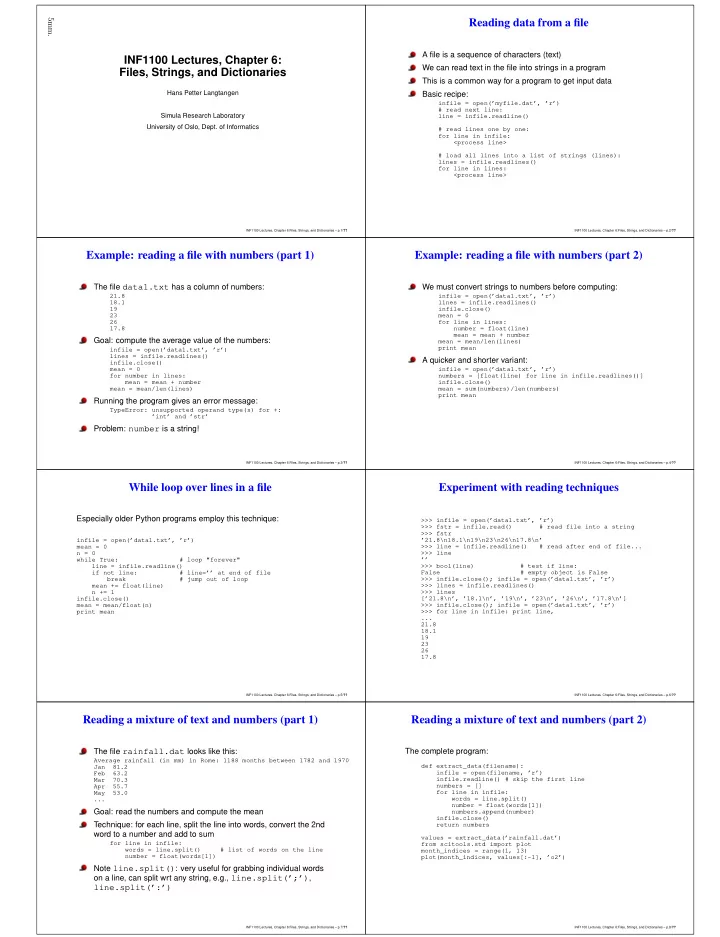
Reading data from a file INF1100 Lectures, Chapter 6: A file is a - - PDF document

reading data from a file
SMART_READER_LITE
LIVE PREVIEW

Reading data from a file INF1100 Lectures, Chapter 6: A file is a - - PDF document

5mm. Reading data from a file INF1100 Lectures, Chapter 6: A file is a sequence of characters (text) Files, Strings, and Dictionaries We can read text in the file into strings in a program This is a common way for a program to get input data


slide-1
SLIDE 1

5mm.

INF1100 Lectures, Chapter 6: Files, Strings, and Dictionaries

Hans Petter Langtangen Simula Research Laboratory University of Oslo, Dept. of Informatics

INF1100 Lectures, Chapter 6:Files, Strings, and Dictionaries – p.1/??

Reading data from a file

A file is a sequence of characters (text) We can read text in the file into strings in a program This is a common way for a program to get input data Basic recipe:

infile = open(’myfile.dat’, ’r’) # read next line: line = infile.readline() # read lines one by one: for line in infile: <process line> # load all lines into a list of strings (lines): lines = infile.readlines() for line in lines: <process line>

INF1100 Lectures, Chapter 6:Files, Strings, and Dictionaries – p.2/??

Example: reading a file with numbers (part 1)

The file data1.txt has a column of numbers:

21.8 18.1 19 23 26 17.8

Goal: compute the average value of the numbers:

infile = open(’data1.txt’, ’r’) lines = infile.readlines() infile.close() mean = 0 for number in lines: mean = mean + number mean = mean/len(lines)

Running the program gives an error message:

TypeError: unsupported operand type(s) for +: ’int’ and ’str’

Problem: number is a string!

INF1100 Lectures, Chapter 6:Files, Strings, and Dictionaries – p.3/??

Example: reading a file with numbers (part 2)

We must convert strings to numbers before computing:

infile = open(’data1.txt’, ’r’) lines = infile.readlines() infile.close() mean = 0 for line in lines: number = float(line) mean = mean + number mean = mean/len(lines) print mean

A quicker and shorter variant:

infile = open(’data1.txt’, ’r’) numbers = [float(line) for line in infile.readlines()] infile.close() mean = sum(numbers)/len(numbers) print mean

INF1100 Lectures, Chapter 6:Files, Strings, and Dictionaries – p.4/??

While loop over lines in a file

Especially older Python programs employ this technique:

infile = open(’data1.txt’, ’r’) mean = 0 n = 0 while True: # loop "forever" line = infile.readline() if not line: # line=’’ at end of file break # jump out of loop mean += float(line) n += 1 infile.close() mean = mean/float(n) print mean

INF1100 Lectures, Chapter 6:Files, Strings, and Dictionaries – p.5/??

Experiment with reading techniques

>>> infile = open(’data1.txt’, ’r’) >>> fstr = infile.read() # read file into a string >>> fstr ’21.8\n18.1\n19\n23\n26\n17.8\n’ >>> line = infile.readline() # read after end of file... >>> line ’’ >>> bool(line) # test if line: False # empty object is False >>> infile.close(); infile = open(’data1.txt’, ’r’) >>> lines = infile.readlines() >>> lines [’21.8\n’, ’18.1\n’, ’19\n’, ’23\n’, ’26\n’, ’17.8\n’] >>> infile.close(); infile = open(’data1.txt’, ’r’) >>> for line in infile: print line, ... 21.8 18.1 19 23 26 17.8

INF1100 Lectures, Chapter 6:Files, Strings, and Dictionaries – p.6/??

Reading a mixture of text and numbers (part 1)

The file rainfall.dat looks like this:

Average rainfall (in mm) in Rome: 1188 months between 1782 and 1970 Jan 81.2 Feb 63.2 Mar 70.3 Apr 55.7 May 53.0 ...

Goal: read the numbers and compute the mean Technique: for each line, split the line into words, convert the 2nd word to a number and add to sum

for line in infile: words = line.split() # list of words on the line number = float(words[1])

Note line.split(): very useful for grabbing individual words

  • n a line, can split wrt any string, e.g., line.split(’;’),

line.split(’:’)

INF1100 Lectures, Chapter 6:Files, Strings, and Dictionaries – p.7/??

Reading a mixture of text and numbers (part 2)

The complete program:

def extract_data(filename): infile = open(filename, ’r’) infile.readline() # skip the first line numbers = [] for line in infile: words = line.split() number = float(words[1]) numbers.append(number) infile.close() return numbers values = extract_data(’rainfall.dat’) from scitools.std import plot month_indices = range(1, 13) plot(month_indices, values[:-1], ’o2’)

INF1100 Lectures, Chapter 6:Files, Strings, and Dictionaries – p.8/??
slide-2
SLIDE 2

What is a file?

A file is a sequence of characters For simple text files, each character is one byte (=8 bits, a bit is 0

  • r 1), which gives 28 = 256 different characters

(Text files in, e.g., Chinese and Japanese need several bytes for each character) Save the text "ABCD" to file in Emacs and OpenOffice/Word and examine the file In Emacs, the file size is 4 bytes

INF1100 Lectures, Chapter 6:Files, Strings, and Dictionaries – p.9/??

Dictionaries

Lists and arrays are fine for collecting a bunch of objects in a single object List and arrays use an integer index, starting at 0, for reaching the elements For many applications the integer index is "unnatural" - a general text (or integer not restricted to start at 0) will ease programming Dictionaries meet this need Dictionary = list with text (or any constant object) as index Other languages use names like hash, HashMap and associative array for what is known as dictionary in Python

INF1100 Lectures, Chapter 6:Files, Strings, and Dictionaries – p.10/??

Example on a dictionary

Suppose we need to store the temperatures in Oslo, London and Paris List solution:

temps = [13, 15.4, 17.5] # temps[0]: Oslo # temps[1]: London # temps[2]: Paris

We need to remember the mapping between the index and the city name – with a dictionary we can index the list with the city name directly (e.g., temps["Oslo"]):

temps = {’Oslo’: 13, ’London’: 15.4, ’Paris’: 17.5} # or temps = dict(Oslo=13, London=15.4, Paris=17.5) # application: print ’The temperature in London is’, temps[’London’]

INF1100 Lectures, Chapter 6:Files, Strings, and Dictionaries – p.11/??

Dictionary operations (part 1)

Add a new element to a dict (dict = dictionary):

>>> temps[’Madrid’] = 26.0 >>> print temps {’Oslo’: 13, ’London’: 15.4, ’Paris’: 17.5, ’Madrid’: 26.0}

Loop (iterate) over a dict:

>>> for city in temps: ... print ’The temperature in %s is %g’ % \ ... (city, temps[city]) ... The temperature in Paris is 17.5 The temperature in Oslo is 13 The temperature in London is 15.4 The temperature in Madrid is 26

The index in a dictionary is called key (a dictionary holds key–value pairs)

for key in dictionary: value = dictionary[key] print value

INF1100 Lectures, Chapter 6:Files, Strings, and Dictionaries – p.12/??

Dictionary operations (part 2)

Does the dict have a particular key?

>>> if ’Berlin’ in temps: ... print ’Berlin:’, temps[’Berlin’] ... else: ... print ’No temperature data for Berlin’ ... No temperature data for Berlin >>> ’Oslo’ in temps # standard boolean expression True

The keys and values can be reached as lists:

>>> temps.keys() [’Paris’, ’Oslo’, ’London’, ’Madrid’] >>> temps.values() [17.5, 13, 15.4, 26.0]

Note: the sequence of keys is arbitrary! Never rely on it – if you need a specific order of the keys, use a sort:

for key in sorted(temps): value = temps[key] print value

INF1100 Lectures, Chapter 6:Files, Strings, and Dictionaries – p.13/??

Dictionary operations (part 3)

More operations:

>>> del temps[’Oslo’] # remove Oslo key w/value >>> temps {’Paris’: 17.5, ’London’: 15.4, ’Madrid’: 26.0} >>> len(temps) # no of key-value pairs in dict. 3

Two variables can refer to the same dictionary:

>>> t1 = temps >>> t1[’Stockholm’] = 10.0 # change t1 >>> temps # temps is also changed {’Stockholm’: 10.0, ’Paris’: 17.5, ’London’: 15.4, ’Madrid’: 26.0} >>> t2 = temps.copy() # take a copy >>> t2[’Paris’] = 16 >>> t1[’Paris’] 17.5

INF1100 Lectures, Chapter 6:Files, Strings, and Dictionaries – p.14/??

Examples: polynomials represented by dictionaries

The polynomial p(x) = −1 + x2 + 3x7 can be represented by a dict with power as key and coefficient as value:

p = {0: -1, 2: 1, 7: 3}

Evaluate polynomials represented as dictionaries:

i∈I cixi

def poly1(data, x): sum = 0.0 for power in data: sum += data[power]*x**power return sum

Shorter:

def poly1(data, x): return sum([data[p]*x**p for p in data])

INF1100 Lectures, Chapter 6:Files, Strings, and Dictionaries – p.15/??

Lists as dictionaries

A list can also represent a polynomial The list index must correspond to the power −1 + x2 + 3x7 becomes

p = [-1, 0, 1, 0, 0, 0, 0, 3]

Must store all zero coefficients, think about 1 + x100... Evaluating the polynomial at a given x value: N

i=0 cixi

def poly2(data, x): sum = 0 for power in range(len(data)): sum += data[power]*x**power return sum

INF1100 Lectures, Chapter 6:Files, Strings, and Dictionaries – p.16/??
slide-3
SLIDE 3

What is best for polynomials: lists or dictionaries?

Dictionaries need only store the nonzero terms Dictionaries can easily handle negative powers, e.g., 1

2x−3 + 2x4

p = {-3: 0.5, 4: 2}

Lists need more book-keeping with negative powers:

p = [0.5, 0, 0, 0, 0, 0, 0, 4] # p[i] corresponds to power i-3

Dictionaries are much more suited for this task

INF1100 Lectures, Chapter 6:Files, Strings, and Dictionaries – p.17/??

Example: read file data into a dictionary

Here is a data file:

Oslo: 21.8 London: 18.1 Berlin: 19 Paris: 23 Rome: 26 Helsinki: 17.8

City names = keys, temperatures = values

infile = open(’deg2.dat’, ’r’) temps = {} # start with empty dict for line in infile.readlines(): city, temp = line.split() city = city[:-1] # remove last char (:) temps[city] = float(temp)

INF1100 Lectures, Chapter 6:Files, Strings, and Dictionaries – p.18/??

Reading file data into nested dictionaries

Data file table.dat with measurements of four properties:

A B C D 1 11.7 0.035 2017 99.1 2 9.2 0.037 2019 101.2 3 12.2 no no 105.2 4 10.1 0.031 no 102.1 5 9.1 0.033 2009 103.3 6 8.7 0.036 2015 101.9

Create a dict data[p][i] (dict of dict) to hold measurement

  • no. i of property p ("A", "B", etc.)

Examine the first line: split it into words and initialize a dictionary with the property names as keys and empty dictionaries ({}) as values For each of the remaining lines: split line into words For each word after the first: if word is not "no", convert to float and store See the book for implementation details!

INF1100 Lectures, Chapter 6:Files, Strings, and Dictionaries – p.19/??

Comparing stock prices (part 1)

Problem: we want to compare the stock prices of Microsoft, Sun, and Google over a long period finance.yahoo.com offers such data in files with tabular form

Date,Open,High,Low,Close,Volume,Adj Close 2008-06-02,28.24,29.57,27.11,28.35,79237800,28.35 2008-05-01,28.50,30.53,27.95,28.32,69931800,28.32 2008-04-01,28.83,32.10,27.93,28.52,69066000,28.42 2008-03-03,27.24,29.59,26.87,28.38,74958500,28.28 2008-02-01,31.06,33.25,27.02,27.20,122053500,27.10 ...

Columns are separated by comma First column is the date, the final is the price of interest We can compare Microsoft and Sun from e.g. 1988 and add in Google from e.g. 2005 For comparison we should normalize prices: Microsoft and Sun start at 1, Google at the max Sun/Microsoft price in 2005

INF1100 Lectures, Chapter 6:Files, Strings, and Dictionaries – p.20/??

Comparing stock prices (part 2)

Algorithm for file reading: Skip first line, read line by line, split line wrt. colon, store first "word" in a list of dates, final "word" in a list of prices; collect lists in dictionaries with company names as keys; make a function so it is easy to repeat for the three data files Algorithm for file plotting: Convert year-month-day time specifications in strings into coordinates along the x axis (use month indices for simplicity), Sun/Microsoft run 0,1,2,... while Google start at the Sun/Microsoft index corresponding to Jan 2005 See the book for all details. If you understand this example, you know and understand a lot!

INF1100 Lectures, Chapter 6:Files, Strings, and Dictionaries – p.21/??

Plot of stock prices 1988-2008

50 100 150 200 250 300 50 100 150 200 250 Microsoft Sun Google INF1100 Lectures, Chapter 6:Files, Strings, and Dictionaries – p.22/??

e started with Sun in 1988 and switched to Google in 2005? (simple e

20 40 60 80 100 120 140 160 50 100 150 200 250 Microsoft Sun Google INF1100 Lectures, Chapter 6:Files, Strings, and Dictionaries – p.23/??

String manipulation

Text in Python is represented as strings Programming with strings is therefore the key to interpret text in files and construct new text First we show some common string operations and then we apply them to real examples Our sample string used for illustration is

>>> s = ’Berlin: 18.4 C at 4 pm’

Strings behave much like lists/tuples - they are a sequence of characters:

>>> s[0] ’B’ >>> s[1] ’e’

INF1100 Lectures, Chapter 6:Files, Strings, and Dictionaries – p.24/??
slide-4
SLIDE 4

Extracting substrings

Substrings are just as slices of lists and arrays:

>>> s ’Berlin: 18.4 C at 4 pm’ >>> s[8:] # from index 8 to the end of the string ’18.4 C at 4 pm’ >>> s[8:12] # index 8, 9, 10 and 11 (not 12!) ’18.4’ >>> s[8:-1] ’18.4 C at 4 p’ >>> s[8:-8] ’18.4 C’

Find start of substring:

>>> s.find(’Berlin’) # where does ’Berlin’ start? # at index 0 >>> s.find(’pm’) 20 >>> s.find(’Oslo’) # not found

  • 1
INF1100 Lectures, Chapter 6:Files, Strings, and Dictionaries – p.25/??

Checking if a substring is contained in a string

>>> ’Berlin’ in s: True >>> ’Oslo’ in s: False >>> if ’C’ in s: ... print ’C found’ ... else: ... print ’no C’ ... C found

INF1100 Lectures, Chapter 6:Files, Strings, and Dictionaries – p.26/??

Substituting a substring by another string

s.replace(s1, s2): replace s1 by s2

>>> s.replace(’ ’, ’__’) ’Berlin:__18.4__C__at__4__pm’ >>> s.replace(’Berlin’, ’Bonn’) ’Bonn: 18.4 C at 4 pm’

Example: replacing the text before the first colon by ’Bonn’

\>>> s ’Berlin: 18.4 C at 4 pm’ >>> s.replace(s[:s.find(’:’)], ’Bonn’) ’Bonn: 18.4 C at 4 pm’

1) s.find(’:’) returns 6, 2) s[:6] is ’Berlin’, 3) this is replaced by ’Bonn’

INF1100 Lectures, Chapter 6:Files, Strings, and Dictionaries – p.27/??

Splitting a string into a list of substrings

Split a string into a list of substrings where the seperator is sep:

s.split(sep)

No separator implies split wrt whitespace

>>> s ’Berlin: 18.4 C at 4 pm’ >>> s.split(’:’) [’Berlin’, ’ 18.4 C at 4 pm’] >>> s.split() [’Berlin:’, ’18.4’, ’C’, ’at’, ’4’, ’pm’]

Try to understand this one:

>>> s.split(’:’)[1].split()[0] ’18.4’ >>> deg = float(_) # convert last result to float >>> deg 18.4

INF1100 Lectures, Chapter 6:Files, Strings, and Dictionaries – p.28/??

Splitting a string into lines

Very often, a string contains lots of text and we want to split the text into separate lines Lines may be separated by different control characters on different

  • platforms. On Unix/Linux/Mac, backslash n is used:

>>> t = ’1st line\n2nd line\n3rd line’ >>> print t 1st line 2nd line 3rd line >>> t.split(’\n’) [’1st line’, ’2nd line’, ’3rd line’] >>> t.splitlines() # cross platform - better! [’1st line’, ’2nd line’, ’3rd line’]

INF1100 Lectures, Chapter 6:Files, Strings, and Dictionaries – p.29/??

Strings are constant (immutable) objects

You cannot change a string in-place (as you can with lists and arrays) - all changes of a strings results in a new string

>>> s[18] = 5 ... TypeError: ’str’ object does not support item assignment >>> # build a new string by adding pieces of s: >>> s[:18] + ’5’ + s[19:] ’Berlin: 18.4 C at 5 pm’

INF1100 Lectures, Chapter 6:Files, Strings, and Dictionaries – p.30/??

Stripping off leading/trailing whitespace

>>> s = ’ text with leading/trailing space \n’ >>> s.strip() ’text with leading/trailing space’ >>> s.lstrip() # left strip ’text with leading/trailing space \n’ >>> s.rstrip() # right strip ’ text with leading/trailing space’

INF1100 Lectures, Chapter 6:Files, Strings, and Dictionaries – p.31/??

Some convenient string functions

>>> ’214’.isdigit() True >>> ’ 214 ’.isdigit() False >>> ’2.14’.isdigit() False >>> s.lower() ’berlin: 18.4 c at 4 pm’ >>> s.upper() ’BERLIN: 18.4 C AT 4 PM’ >>> s.startswith(’Berlin’) True >>> s.endswith(’am’) False >>> ’ ’.isspace() # blanks True >>> ’ \n’.isspace() # newline True >>> ’ \t ’.isspace() # TAB True >>> ’’.isspace() # empty string False

INF1100 Lectures, Chapter 6:Files, Strings, and Dictionaries – p.32/??
slide-5
SLIDE 5

Joining a list of substrings to a new string

We can put strings together with a delimiter in between:

>>> strings = [’Newton’, ’Secant’, ’Bisection’] >>> ’, ’.join(strings) ’Newton, Secant, Bisection’

These are inverse operations:

t = delimiter.join(stringlist) stringlist = t.split(delimiter)

Split off the first two words on a line:

>>> line = ’This is a line of words separated by space’ >>> words = line.split() >>> line2 = ’ ’.join(words[2:]) >>> line2 ’a line of words separated by space’

INF1100 Lectures, Chapter 6:Files, Strings, and Dictionaries – p.33/??

Example: read pairs of numbers (x,y) from a file

Sample file:

(1.3,0) (-1,2) (3,-1.5) (0,1) (1,0) (1,1) (0,-0.01) (10.5,-1) (2.5,-2.5)

Method: read line by line, for each line: split line into words, for each word: split off the parethesis and the split the rest wrt comma into two numbers

INF1100 Lectures, Chapter 6:Files, Strings, and Dictionaries – p.34/??

The code for reading pairs

lines = open(’read_pairs.dat’, ’r’).readlines() pairs = [] # list of (n1, n2) pairs of numbers for line in lines: words = line.split() for word in words: word = word[1:-1] # strip off parenthesis n1, n2 = word.split(’,’) n1 = float(n1); n2 = float(n2) pair = (n1, n2) pairs.append(pair) # add 2-tuple to last row

INF1100 Lectures, Chapter 6:Files, Strings, and Dictionaries – p.35/??

Output of a pretty print of the pairs list

[(1.3, 0.0), (-1.0, 2.0), (3.0, -1.5), (0.0, 1.0), (1.0, 0.0), (1.0, 1.0), (0.0, -0.01), (10.5, -1.0), (2.5, -2.5)]

INF1100 Lectures, Chapter 6:Files, Strings, and Dictionaries – p.36/??

Alternative solution: Python syntax in file format

What if we write, in the file, the pairs (x,y) with comma in between the pairs? Adding a leading and trailing square bracket gives a Python syntax for a list of tuples (!)

eval on that list could reproduce the list...

The file format:

(1.3, 0), (-1, 2), (3, -1.5) ...

We want to add a comma at the end of every line and square brackets around the whole file text, and then do an eval:

list = eval("[(1.3,0), (-1, 2), (3, -1.5), ... ]")

INF1100 Lectures, Chapter 6:Files, Strings, and Dictionaries – p.37/??

The code for reading pairs with eval

infile = open(’read_pairs_wcomma.dat’, ’r’) listtext = ’[’ for line in infile: # add line, without newline (line[:-1]), # with a trailing comma: listtext += line[:-1] + ’, ’ infile.close() listtext = listtext + ’]’ pairs = eval(listtext)

INF1100 Lectures, Chapter 6:Files, Strings, and Dictionaries – p.38/??

What are web pages?

Web pages are nothing but text files Commands in the text files tell the browser that this is a headline, this is boldface text, here is an image, etc. The commands are written in the HTML language

<html> <body bgcolor="orange"> <h1>A Very Simple Web Page</h1> <!-- headline --> Ordinary text is written as ordinary text, but when we need headlines, lists, <ul> <li><em>emphasized words</em>, or <li> <b>boldfaced words</b>, </ul> we need to embed the text inside HTML tags. We can also insert GIF or PNG images, taken from other Internet sites, if desired. <hr> <!-- horizontal line --> <img src="http://www.simula.no/simula_logo.gif"> </body> </html>

INF1100 Lectures, Chapter 6:Files, Strings, and Dictionaries – p.39/??

The web page generated by HTML code from the previous slide

INF1100 Lectures, Chapter 6:Files, Strings, and Dictionaries – p.40/??
slide-6
SLIDE 6

Getting data from the Internet

A program can download a web page, as an HTML file, and extract data by interpreting the text in the file (using string

  • perations)

Example: climate data from the UK

http://www.metoffice.gov.uk/climate/uk/stationdata/

Download the file:

import urllib url = \ ’http://www.metoffice.gov.uk/climate/uk/stationdata/oxforddata.txt’ urllib.urlretrieve(url, filename=’Oxford.txt’)

View the file weather.html to see how the text looks like

INF1100 Lectures, Chapter 6:Files, Strings, and Dictionaries – p.41/??

The structure of the Yahoo! weather forecast file

Oxford Location: 4509E 2072N, 63 metres amsl Estimated data is marked with a * after the value. Missing data (more than 2 days missing in month) is marked by

  • --.

Sunshine data taken from an automatic ... yyyy mm tmax tmin af rain sun degC degC days mm hours 1853 1 8.4 2.7 4 62.8

  • 1853

2 3.2

  • 1.8

19 29.3

  • 1853

3 7.7

  • 0.6

20 25.9

  • 1853

4 12.6 4.5 60.1

  • 1853

5 16.8 6.1 59.5

  • ...

2010 5 17.6 7.3 28.6 207.4 2010 6 23.0 11.1 34.5 230.5 2010 7 23.3* 14.1* 0* 24.4* 184.4* Provisional 2010 10 14.6 7.4 2 43.5 128.8 Provisional

INF1100 Lectures, Chapter 6:Files, Strings, and Dictionaries – p.42/??

We want to extract the weather conditions and the temperature

Read the file line by line If a line contains Current conditions, grab the text between the <h3> tags on the next line If a line contains forecast-temperature, grab the temperature between the <h3> tags on the next line

lines = infile.readlines() for i in range(len(lines)): line = lines[i] # short form if ’Current conditions’ in line: weather = lines[i+1][4:-6] if ’forecast-temperature’ in line: temperature = float(lines[i+1][4:].split(’&’)[0]) break # everything is found, jump out of loop

INF1100 Lectures, Chapter 6:Files, Strings, and Dictionaries – p.43/??

File writing

File writing is simple: collect the text you want to write in one or more strings and do, for each string, a

  • utfile.write(string)
  • utfile.write does not add a newline, like print, so you

may have to do that explicitly:

  • utfile.write(string + ’\n’)

That’s it! Compose the strings and write!

INF1100 Lectures, Chapter 6:Files, Strings, and Dictionaries – p.44/??

Example: writing a nested list (table) to file (part 1)

Given a table like

data = \ [[ 0.75, 0.29619813, -0.29619813, -0.75 ], [ 0.29619813, 0.11697778, -0.11697778, -0.29619813], [-0.29619813, -0.11697778, 0.11697778, 0.29619813], [-0.75,

  • 0.29619813,

0.29619813, 0.75 ]]

Write this nested list to a file

INF1100 Lectures, Chapter 6:Files, Strings, and Dictionaries – p.45/??

Example: writing a nested list to file (part 2)

  • utfile = open(’tmp_table.dat’, ’w’)

for row in data: for column in row:

  • utfile.write(’%14.8f’ % column)
  • utfile.write(’

’) # ensure linebreak

  • utfile.close()
INF1100 Lectures, Chapter 6:Files, Strings, and Dictionaries – p.46/??

Summary of file reading and writing

Reading a file:

infile = open(filename, ’r’) for line in infile: # process line lines = infile.readlines() for line in lines: # process line for i in range(len(lines)): # process lines[i] and perhaps next line lines[i+1] fstr = infile.read() # process the while file as a string fstr infile.close()

Writing a file:

  • utfile = open(filename, ’w’)

# new file or overwrite

  • utfile = open(filename, ’a’)

# append to existing file

  • utfile.write("""Some string

.... """)

INF1100 Lectures, Chapter 6:Files, Strings, and Dictionaries – p.47/??

Dictionary functionality

a = {}

initialize an empty dic

a = {’point’: [2,7], ’value’: 3}

initialize a dictionary

a = dict(point=[2,7], value=3)

initialize a dictionary

a[’hide’] = True

add new key-value pa

a[’point’]

get value correspond

’value’ in a True if value is a k del a[’point’]

delete a key-value pa

a.keys()

list of keys

a.values()

list of values

len(a)

number of key-value

for key in a:

loop over keys in unk

for key in sorted(a.keys()):

loop over keys in alph

INF1100 Lectures, Chapter 6:Files, Strings, and Dictionaries – p.48/??
slide-7
SLIDE 7

Summary of some string operations

s = ’Berlin: 18.4 C at 4 pm’ s[8:17] # extract substring s.find(’:’) # index where first ’:’ is found s.split(’:’) # split into substrings s.split() # split wrt whitespace ’Berlin’ in s # test if substring is in s s.replace(’18.4’, ’20’) s.lower() # lower case letters only s.upper() # upper case letters only s.split()[4].isdigit() s.strip() # remove leading/trailing blanks ’, ’.join(list_of_words)

INF1100 Lectures, Chapter 6:Files, Strings, and Dictionaries – p.49/??