Compilation/linking revisited Memory and C/C++ modules From Reading - - PDF document

compilation linking revisited memory and c c modules
SMART_READER_LITE
LIVE PREVIEW

Compilation/linking revisited Memory and C/C++ modules From Reading - - PDF document

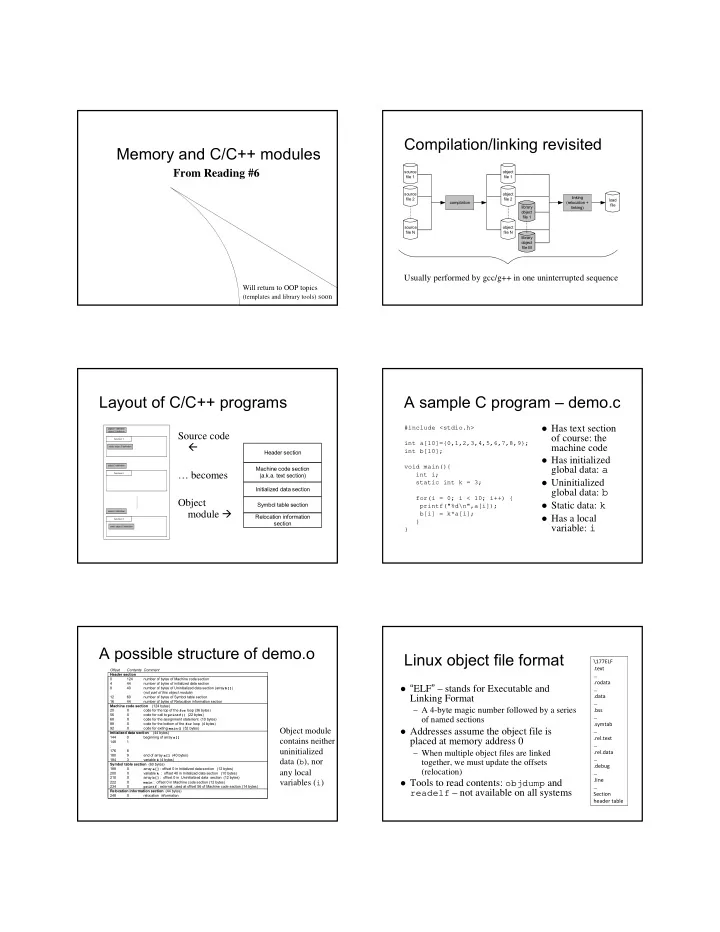
Compilation/linking revisited Memory and C/C++ modules From Reading #6 source object file 1 file 1 source object linking file 2 file 2 load compilation (relocation + file library linking) object file 1 source object file N


slide-1
SLIDE 1

Memory and C/C++ modules

From Reading #6

Will return to OOP topics

(templates and library tools) soon

Compilation/linking revisited

source file 1 source file 2 source file N

  • bject

file 1

  • bject

file 2

  • bject

file N library

  • bject

file 1 library

  • bject

file M load file linking (relocation + linking) compilation

Usually performed by gcc/g++ in one uninterrupted sequence

Layout of C/C++ programs

Source code

  • … becomes

Object module

  • bject 1 definition
  • bject 2 definiton
  • bject 4 definition
  • bject 3 definition

............

static object 5 definition function 1 function 2 static object 5 definition function 3

Header section Machine code section (a.k.a. text section) Initialized data section Symbol table section Relocation information section

A sample C program – demo.c

Has text section

  • f course: the

machine code

Has initialized

global data: a

Uninitialized

global data: b

Static data: k Has a local

variable: i

#include <stdio.h> int a[10]={0,1,2,3,4,5,6,7,8,9}; int b[10]; void main(){ int i; static int k = 3; for(i = 0; i < 10; i++) { printf("%d\n",a[i]); b[i] = k*a[i]; } }

A possible structure of demo.o

Offset Contents Comment Header section 124 number of bytes of Machine code section 4 44 number of bytes of initialized data section 8 40 number of bytes of Uninitialized data section (array b[]) (not part of this object module) 12 60 number of bytes of Symbol table section 16 44 number of bytes of Relocation information section Machine code section (124 bytes) 20 X code for the top of the for loop (36 bytes) 56 X code for call to printf() (22 bytes) 68 X code for the assignment statement (10 bytes) 88 X code for the bottom of the for loop (4 bytes) 92 X code for exiting main() (52 bytes) Initialized data section (44 bytes) 144 beginning of array a[] 148 1 : 176 8 180 9 end of array a[] (40 bytes) 184 3 variable k (4 bytes) Symbol table section (60 bytes) 188 X array a[] : offset 0 in Initialized data section (12 bytes) 200 X variable k : offset 40 in Initialized data section (10 bytes) 210 X array b[] : offset 0 in Uninitialized data section (12 bytes) 222 X main : offset 0 in Machine code section (12 bytes) 234 X printf : external, used at offset 56 of Machine code section (14 bytes) Relocation information section (44 bytes) 248 X relocation information

Object module contains neither uninitialized data (b), nor any local variables (i)

Linux object file format

“ELF” – stands for Executable and

Linking Format

– A 4-byte magic number followed by a series

  • f named sections

Addresses assume the object file is

placed at memory address 0

– When multiple object files are linked together, we must update the offsets (relocation)

Tools to read contents: objdump and

readelf – not available on all systems

\177ELF .text … .rodata … .data … .bss … .symtab … .rel.text … .rel.data … .debug … .line … Section header table

slide-2
SLIDE 2

ELF sections

.text = machine code (compiled program

instructions)

.rodata = read-only data .data = initialized global variables .bss = “block storage start” for

uninitialized global variables – actually just a placeholder that occupies no space in the object file

.symtab = symbol table with information

about functions and global variables defined and referenced in the program

\177ELF .text … .rodata … .data … .bss … .symtab … .rel.text … .rel.data … .debug … .line … Section header table

ELF Sections (cont.)

.rel.text = list of locations in .text section

that need to be modified when linked with other object files

.rel.data = relocation information for

global variables referenced but not defined

.debug = debugging symbol table; only

created if compiled with -g option

.line = mapping between line numbers in

source and machine code in .text; used by debugger programs

\177ELF .text … .rodata … .data … .bss … .symtab … .rel.text … .rel.data … .debug … .line … Section header table

Creation of a load module

Header Section Machine Code Section Initialized data Section Symbol table Section Header Section Machine Code Section Initialized data Section Symbol table Section Header Section Machine Code Section Initialized data Section Symbol table Section Object Module A Object Module B Load Module

Interleaved from

multiple object modules

– Sections must be “relocated”

Addresses relative to

beginning of a module

– Necessary to translate from beginnings of

  • bject modules

When loaded – OS

will translate again to absolute addresses

Loading and memory mapping

(logical) address space of program 1 (logical) address space of program 2 Header Section Machine Code Section Initialized data Section Symbol table Section Code Static data Dynamic data Unused logical address space initialized uninitialized load module Stack Code Static data Dynamic data (logical) address space of program 3 Stack Unused Logical address space

loading memory mapping

PHYSICAL MEMORY OPERATING SYSTEM

memory mapping

Code Static data Dynamic data Unused logical address space Stack

Includes

memory for stack, dynamic data (i.e., free store), and un- initialized global data

Physical

memory is shared by multiple programs

From source program to “placement” in memory during execution

int a[10]={0,1,2,3,4,5,6,7,8,9}; int b[10]; void main() { int i; static int k = 3; for(i = 0; i < 10; i++) { printf("%d\n",a[i]); b[i] = k*a[i]; }/*endfor*/ }/*end main*/ array a[] array b[] variable k code for top of for loop code for call to printf() code for b[i] = k*a[i] code for printf()

physical memory source program

Dynamic memory allocation

PHYSICAL MEMORY

Before dynamic memory allocation

Code Static data Dynamic data Unused logical address space initialized uninitialized (logical) address space of the program OPERATING SYSTEM Stack PHYSICAL MEMORY

After dynamic memory allocation

Code Static data Dynamic data Unused logical address space initialized uninitialized (logical) address space of the program OPERATING SYSTEM Stack

increment of dynamic data

slide-3
SLIDE 3

Sections of an executable file

Segments:

Variables and objects in memory

Variables and data objects are data containers

with names

The value of the variable is the code stored in the

container

To evaluate a variable is to fetch the code from

the container and interpret it properly

To store a value in a variable is to code the value

and store the code in the container

The size of a variable is the size of its container

01000001 0100001000010100 'A' 16916

Overflow is when a data code is larger than the size of its container

e.g., char i; // just 1 byte

int *p = (int*)&i; // legal *p = 1673579060; // result if "big endian" storage:

If whole space (X) belongs to this program:

– Seems OK if X does not contain important data for rest of the program’s execution – Bad results or crash if important data are overwritten

If all or part of X belongs to another process, the

program is terminated by the OS for a memory access violation (i.e., segmentation fault)

variable i 01001001100101100000001011010100 X

More about overflow

Previous slide showed example of "right

  • verflow" – result truncated (also warning)

Compilers handle "left overflow" by

truncating too (usually without any warning)

– Easily happens: unsigned char i = 255;

i++; // What is the result of this increment? 010001… 01000001 11111111 00000000 1

Placement & padding – word

Compiler places

data at word boundaries

– e.g., word = 4 bytes

Imagine:

struct { char a; int b; } x;

Classes too

variable x x.a x.b 01001001 10010110000000101101010001101101 a machine word a machine word

data completely ignored, junk

padding

Compilers do it this way

variable x 0100100110010110000000101101010001101101 x.a x.b a machine word a machine word

Not like this! See/try ~mikec/cs32/demos/padding*.c*

Pointers are data containers too

As its value is a memory

address, we say it "points" to a place in memory

It points at just 1 byte, so it

must "know" what data type starts at that address

– How many bytes? – How to interpret the bits?

Question: What is stored in

the 4 bytes at addresses

802340..802343 in the

diagram at right?

– Continued next slide

8090346 byte with address 8090346 8090346 byte with address 8090346 int* p

integer "data container"

01000001010000100100001101000100 ...0101 1100...

address 802340 address 802343 address 802342 address 802341

slide-4
SLIDE 4

What is ?

Could be four chars: ‘A’,

‘B’, ‘C’, ‘D’

Or it could be two shorts:

16961, 17475

– All numerical values shown here are for a "little endian" machine (more about endian next slide) Maybe it’s a long or an

int: 1145258561

It could be a floating point

number too: 781.035217

...0101 1100...

address 802340 802340

char* b ASCII code for 'A' 01000001010000100100001101000100 ...0101 1100...

address 802340 802340 short* s

binary code for short 16916 (on a little endian machine) 01000001010000100100001101000100 ...0101 1100...

address 802340 802340

int* p binary code for int 1145258561 (on a little endian machine) 01000001010000100100001101000100 ...0101 1100...

address 802340 802340 float* f

binary code for float 781.035217 (on a little endian machine) 01000001010000100100001101000100

01000001010000100100001101000100 ...0101 1100...

address 802340 address 802343 address 802342 address 802341

Beware: two different byte orders

Matters to actual value of anything but chars Say: short int x = 1; On a big endian machine it looks like this:

– Some Macs, JVM, TCP/IP "Network Byte Order"

On a little endian machine it looks like this:

– Intel, most communication hardware

Only important when dereferencing pointers

– See/try ~mikec/cs32/demos/endian.c

0000000000000001 0000000100000000

Dynamic memory allocation

OS memory manager (OSMM) allocates large

blocks at a time to individual processes

A process memory manager (PMM) then takes over

Operating System Process memory management Process memory management Process 1 Process 2 OS memory manager large memory blocks large memory blocks

Memory management by OSMM

Essentially, a simple "accounting" of what process

  • wns what part(s) of the memory

Memory allocation – like making an entry in the

accounting "book" that this segment is given to this process for keeps

Memory deallocation – an entry that this segment

is no longer needed, so it’s "free"

OSMM usually keeps track of allocated memory

blocks in a binary heap, to quickly search for suitable free blocks – hence the name "system heap" (traditionally called "free store" in C++)

PMM handles a process’s memory

A "middle manager" – intermediary to OSMM Usually keeps a dynamic list of free segments When program requests more memory – PMM

searches its list for a suitable segment

If none found, asks OSMM for another block

– OSMM searches its heap and delivers a block – Then PMM carves out a suitable segment

Can be a significant time delay while all this

goes on – which can slow performance if a program makes many allocation requests

Dynamic memory in C programs

Use C standard functions – all in <stdlib.h>

– All use void* – means "any type" – no dereferencing

void *malloc(size_t size);

– Get at least size bytes; contents are arbitrary!

void *calloc(size_t n, size_t elsize);

– Get at least n*elsize bytes; contents cleared!

void *realloc(void *ptr, size_t size);

– Changes size of existing segment (at ptr) – IMPORTANT: ptr must have come by malloc or calloc – And beware dangling pointers if data must be moved

To deallocate, use void free(void *ptr);

slide-5
SLIDE 5

Easier, better in C++ programs

Allocate memory by operator new

– Easier than malloc and other C functions: just need to specify type – object’s size is known – Better than the C functions: also calls a constructor to create the object properly

Operator delete returns memory to the

free store that was allocated by new

– Also calls class destructor to keep things neat – Use delete[] if deallocating an array

Dynamic arrays of C++ objects

MyClass *array = new MyClass[5];

– Creates an array of 5 MyClass objects – Returns a pointer to the first object

Default ctor is called for every object

No way to call a different constructor

– So class must have a no-argument ctor

delete [] array;

– Calls dtor on all 5 objects

~mikec/cs32/demos/ dynarray.cpp

Using memory all over the place!

Fairly simple in C: an

  • bject is either in

static memory, or on stack, or on heap

C++ objects can "be"

more than one place!

So important in C++

to manage memory even for stack objects (with dynamic parts)

activation frame

  • f doit()

sample salutation dynamic memory (heap) h e y '\0' static memory sample salutation dynamic memory (heap) h e y '\0'

(about program on Reader p. 190)

Don’t corrupt the PMM: guidelines

Never pass an address to free that was not

returned by malloc, calloc, or realloc

Deallocate segments allocated by malloc,

calloc, or realloc only by using free

Never pass address to delete (or delete[])

that was not previously returned by new

Deallocate segments allocated by new

using exclusively delete

– And exclusively delete[] if array allocated

BTW: in general, don’t mix C and C++ ways to do things.

Implementing generic types

Starting Savitch Chapter 17

With C++ templates

C++ templates

Like “blueprints” for the compiler to use in

creating class and function definitions

Always involve one or more parameterized types

– e.g., function template to compare object sizes:

template <typename T1, typename T2> int sizeComp(T1 const &o1, T2 const &o2) { return (sizeof o1 – sizeof o2); }

– e.g., class template for a list that holds any type:

template <typename DataType> class List { /* here refer to DataType objects */ }; Can use either keyword typename or class in a

“template prefix” – e.g., template <class T>

slide-6
SLIDE 6

Function templates

An alternative to function overloading

– But code for concrete types created only as needed

And the programmer does not have to write it!

– Compiler deduces types if user doesn’t specify:

int x = sizeComp(‘a’, 7);

// compiler uses template to create sizeComp(char, int)

– To specify: x = sizeComp<int, int>(‘a’, 7.5);

// compiler uses template to create sizeComp(int, int) Better choice than macros too

– Strictly type-checked, and no nasty side effects

See ~mikec/cs32/demos/templates/greater.cpp

More function template issues

Template definition must be in header file – so

compiler can know how to define the functions

– i.e., cannot be defined in a separate .cpp file

Sometimes specialized for particular types

– Tells compiler to use specialized version instead of creating a new definition – e.g. greater for char*:

template <> // <> does not show a type parameter char * &greater<char *>(char *s, char *t) { /* would use strcmp to compare s and t, instead of operator< */ }

Empty parameter types – exact types everywhere else

– No type conversions though (must be exact match), so usually better to just overload instead of specialize

Defining class templates

Idea: “generalize” data that can be managed by a class

template<typename T> class Pair { public: Pair(); Pair(T firstVal, T secondVal); void setFirst(T newVal); void setSecond(T newVal); T getFirst() const; T getSecond() const; private: T first; T second; };

Class template member functions

All methods need template prefix – e.g., constructor:

template<class T> Pair<T>::Pair(T val1, T val2) : first(val1), second(val2) { }

Similarly setter and getter functions:

template<class T> void Pair<T>::setFirst(T newVal) { first = newVal; } template<class T> T Pair<T>::getFirst() const { return first; }

See ~mikec/cs32/demos/templates/complex example

Note: each function definition is itself a template

More class template notes

Mostly design just like any class

– Can have friends – usually do – Can be a base class or a derived class

Careful though: MyTemplate<T1> ≠ MyTemplate<T2>

– That is, there is no inheritance or any other kind of formal relationship between the two classes

e.g., cannot cast an object of one to an object of the other

– Why?

Compiler defines completely different classes!

Class templates in OO design

An alternative to using an inheritance hierarchy

– More flexible, as template classes stand alone – More efficient than using virtual functions

Both are ways to have objects with independent

behaviors, but all sharing a common interface

The STL is mostly template classes and functions

– Ditto the Java Collections Framework by the way

Even a string is actually a specialization of a

template, defined as follows in namespace std:

– typedef basic_string<char> string;

– Also: typedef basic_string<wchar_t> wstring;

slide-7
SLIDE 7

std::string

Encapsulates a sequence of characters

– i.e., much more object-oriented than (char *)

Both a size and a capacity (for efficiency)

– Both are mutable, and so are the characters

Member operator functions =, +=, [] Others include substr, insert, compare, clear, … Nonmember: op<<, op>>, getline, op+, op==, … See http://www.cplusplus.com/reference/string/ and

librarytools.cpp::stringDemo() in ~mikec/cs32/demos/templates/

Starting Savitch Chapter 18