ATPDraw Graphical Preprocessor to ATP Hans Kristian Hidalen NTNU, - - PowerPoint PPT Presentation

atpdraw graphical preprocessor to atp
SMART_READER_LITE
LIVE PREVIEW

ATPDraw Graphical Preprocessor to ATP Hans Kristian Hidalen NTNU, - - PowerPoint PPT Presentation

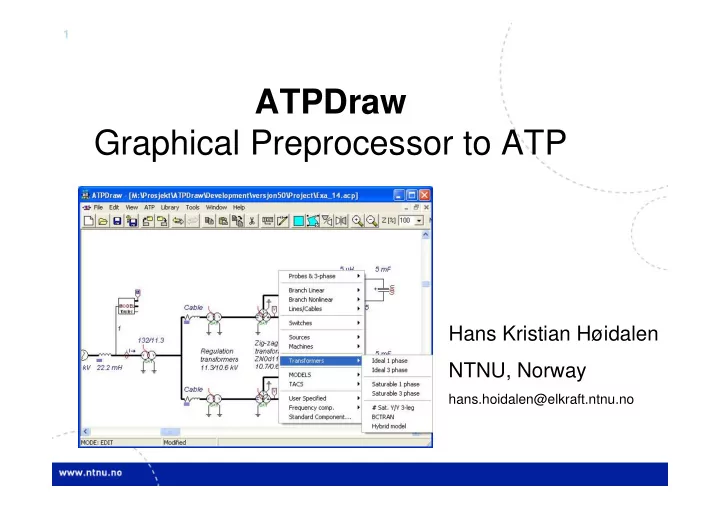
1 ATPDraw Graphical Preprocessor to ATP Hans Kristian Hidalen NTNU, Norway hans.hoidalen@elkraft.ntnu.no 2 Contents Introduction Overview of ATPDraw functionality Examples Latest news in version 5.0-5.4 3 Introduction


slide-1
SLIDE 1

1

ATPDraw Graphical Preprocessor to ATP

Hans Kristian Høidalen NTNU, Norway

hans.hoidalen@elkraft.ntnu.no
slide-2
SLIDE 2

2

Contents

  • Introduction
  • Overview of ATPDraw functionality
  • Examples
  • Latest news in version 5.0-5.4
slide-3
SLIDE 3

3

Introduction

  • ATPDraw is a graphical, mouse-driven, dynamic

preprocessor to ATP on the Windows platform

  • Handles node names and creates the ATP input file

based on ”what you see is what you get”

  • Freeware
  • Supports

– All types of editing operations – ~100 standard components – ~60 TACS components – MODELS – $INCLUDE and User Specified Components – Groups

slide-4
SLIDE 4

4

Introduction- ATPDraw history

  • Simple DOS version

– Leuven EMTP Centre, fall meeting 1991, 1992

  • Extended DOS versions, 1994-95
  • Windows version 1.0, July 1997

– Line/Cable modelling program ATP_LCC – User Manual

  • Windows version 2.0, Sept. 1999

– MODELS, more components (UM, SatTrafo ++) – Integrated line/cable support (Line Constants + Cable Parameters)

BPA Sponsored

slide-5
SLIDE 5

5

Introduction- ATPDraw history

  • Windows version 3, Dec. 2001

– Grouping/Compress – Data Variables, $Parameter + PCVP – LCC Verify + Cable Constants – BCTRAN – User Manual @ version 3.5

  • Windows version 4, July 2004

– Line Check – Hybrid Transformer model – Zigzag Saturable transformer

  • Windows version 5, Oct. 2006

– Vector graphics, multi-phase nodes, interactive Models integration, files in memory

slide-6
SLIDE 6

6

ATPDraw functionality

Circuit map Circuit windows Header, circuit file name Main menu Tool bar Component selection menu Circuit under construction

slide-7
SLIDE 7

7

ATPDraw Component dialog

Editable data values Windows clipboard support Branch

  • utput

Edit local definitions Icon/help/ pos/name/ units Node names Red=User Spec. Used for sorting Label on screen Component not to ATP Comment in ATP file High precision Local help F1=Global help

slide-8
SLIDE 8

8

I I V I I I V I I V t I I V I V I I I I V I V I I LCC LCC LCC LCC LCC LCC I LCC LCC I I LCC I I LCC LCC I LCC LCC LCC I LCC LCC I LCC LCC LCC I I I LCC LCC LCC LCC LCC LCC LCC LCC LCC LCC LCC LCC LCC UI I UI I UI I UI I I I I V V V I I V V V V V V V VINCENT LUGO MIDWAY 3 1 2 3 1 2 SERRANO VALLEY MIRA LOMA 1 2 2 3 Diab lo Canyon Gates Los Banos 2 3 3 1 LB - Mid 30050 30055 30057 30060 24156 24086 24092 24151 24138 3 1 1 2

ATPDraw capability

  • 30.000 nodes
  • 10.000 components
  • 10.000 connections
  • 1.000 text strings
  • Up to 64 data and 32 nodes per component
  • Up to 26 phases per node (A..Z extension)
  • 21 phases in lines&cables module
  • Unlimited grouping hierarchy
  • 100 UnDo/ReDo steps
slide-9
SLIDE 9

9

ATPDraw Edit options

  • Multiple documents

– several circuit windows – large circuit windows (map+scroll) – grid snapping

  • Circuit editing

– Copy/Paste, Export/Import, Rotate/Flip, Undo/Redo (100), Zoom, Compress/Extract – Windows Clipboard: Circuit drawings, icons, text, circuit data

  • Text editor

– Viewing and editing of ATP, LIS, model files, and help files

  • Help file system

– Help on ATPDraw functionality, all components, and MODELS

slide-10
SLIDE 10

10

All standard components

Branch

U(0) + I i(0) +

NonLin

R(i)

MOV

U

MOV T

  • L. lump
  • L. distr

LINE Z-MT LINE Z-T + Vf -

XFMR Y

S C M STAT SY ST

H

+

SM

Trafos

P S : n 1 P S

Models 3-phase

V

Fortran

F

+ T T T T

TACS

T

SAT Y

Devices

50

f

51 52 53 54 56 58 G u 59 Gdu dt 60

if

61 64

MIN MAX

63

MIN MAX

65

ACC

UserSpec

LIB

ABC DEF

I

InitCond

INIT TACS 66

RMS T

H L

G(s)

G(s)

Machines

SM

K s 62

Sampl T rack

R(t)

Prob es & Line/Cab

S C

FreqComp

HFS CIGRE LOAD CIGRE LOAD RLC

BCT Y

+

v

  • LINE

Z-T SM ω IM ω IM ω SP ω DC ω

LCC

LCC K·s K 1+T·s K·s 1+T·s

Math

+

  • +

+ K

*

x y x y

|x| x

NEG

Logic

x x y y P S : n 1 Y Y 57 55 F(s|z) H

Switches

M

sin x=y exp log log10 RAD DEG RND cos tan cotan asin acos atan sinh cosh tanh x x y y

Excit Torque Windsyn

slide-11
SLIDE 11

11

ATPDraw node naming

  • "What you see is what you get"
  • Connected nodes automatically get the

same name – Direct node overlap – Positioned on connection

  • Warnings in case of duplicates and

disconnections

  • 3-phase and n-phase nodes

– Extensions A..Z added automatically – Objects for transposition and splitting – Connection between n- and single phase

nodes connected nodes overlap Splitter Transposition Connection

ABC

1

slide-12
SLIDE 12

12

User’s manual

  • Documents version 3.5 of ATPDraw (246 pages), pdf
  • Written by Laszlo Prikler and H. K. Høidalen
  • Content

– Intro: To ATP and ATPDraw + Installation – Introductory manual: Mouse+Edit, MyFirstCircuit – Reference manual: All menus and components – Advanced manual: Grouping/LCC/Models/BCTRAN + create new components – Application manual: 9 real examples

slide-13
SLIDE 13

13

Example 1

  • Multi-phase connections
  • Increased circuit readability

Freq

T K

x y x y

+

  • Freq

58

G u

Angle

T

x y x y

+

  • 180

T

54 54 54 54 54 54

T T T T T

1 4 3 6 5 2 1 2 3 4 5 6 6-phase

slide-14
SLIDE 14

14

Example 2

  • Multi-phase groups
  • New component: Collector

AC POS NEG PULSE 1 4 3 6 5 2 6-phase AC POS NEG PULSE +

  • SAT

Y Y

+

  • T

T LCC

3 1

slide-15
SLIDE 15

15

Example 3

  • Multi-phase Models
  • New Model probe

SAT Y Z

132 kV

SAT Y Y

5 uH

V

Cable 132/11.3

SAT Y Y SAT Y Z SAT Y Y

HVBUS

I

5 uH 0.0265

UI

5 mF

U(0) +

22.2 mH

V

Cable 0.0265

UI

5 mF

U(0) +

MODEL fourier M

1 Regulation 11.3/10.6 kV transformers Diode bridges Zig-zag transformers ZN0d11y0 10.7/0.693 kV

MODEL FOURIER INPUT X --input signal to be transformed DATA FREQ {DFLT:50} --power frequency n {DFLT:26} --number of harmonics to calculate OUTPUT absF[1..26], angF[1..26],F0 --DFT signals VAR absF[1..26], angF[1..26],F0,reF[1..26], imF[1..26], i,NSAMPL,OMEGA,D,F1,F2,F3,F4

(f ile Exa_14.pl4; x-v ar t) m:X0027E m:X0027G m:X0027V m:X0027Y

0.02 0.03 0.04 0.05 0.06 0.07 0.08 0.09 0.10 [s] 4 8 12 16 20

slide-16
SLIDE 16

16

Example 4

L_imp

H

t

TOP

I

t t t V

TWR4

V V

LINE2

t

R(i) I

TR400

t

R(i) I

LINE1

t

TR

R(i) I

V

PT1 U

LCC LCC LCC LCC LCC LCC

A

  • Lightning study
  • JMarti lines
  • Simple Bergeron lines in sub-station
  • Flashover char. In MODELS
slide-17
SLIDE 17

17

Transformer modeling

  • Saturable Transformer
  • BCTRAN
  • Hybrid Transformer

SAT Y Z BCT Y XFMR Y

slide-18
SLIDE 18

18

Saturable transformer

  • Zigzag supported

SAT Y Z

132 kV

SAT Y Y

V

Cable 132/11.3

SAT Y Y SAT Y Z SAT Y Y

5 uH 26.5mohm

UI

5 mF

U(0) +

22.2 mH

V

Cable

SAT Y Z SAT Y Y

V

Cable

SAT Y Z SAT Y Y

V

Cable

SAT Y Y SAT Y Y

V

Cable

V

5 uH 26.5mohm

UI

5 mF

U(0) +

V

5 uH 26.5mohm

UI

5 mF

U(0) +

V

5 uH 26.5mohm

UI

5 mF

U(0) +

V

5 uH 26.5mohm

UI

5 mF

U(0) +

V

Zdy Zdy Zdy Zdy Zig-zag transformers ZN0d11y0 10.7/0.693 kV

  • 12
  • 6

+6 +12 11.3/10.6 kV transformers Ydy

slide-19
SLIDE 19

19

BCTRAN

  • Automatic inclusion of external magnetization

characteristic

BCT Y

16 kV

I

V V

XFMR Y

I

V V V

XFMR BCTRAN

(f ile Exa_16.pl4; x-v ar t) c:X0004A-LV_XA c:X0004A-LV_BA

0.00 0.02 0.04 0.06 0.08 0.10 [s]

  • 70
  • 40
  • 10

20 50 80 [A]

slide-20
SLIDE 20

20

Hybrid transformer

  • Four separate parts connected

– Leakage: A-matrix; Auto, Y, D with all phase shifts – Winding resistance: Frequency dep. with Foster equiv. – Core: Topological correct core: Frolich equation, relative

  • dimensions. Connected at n+1 winding at core surface.

– Capacitance

Zl Zl Zl Zy Zy L4 L4 L3 L3 L3 NH:NX NH:NX NH:NX NX:NX NX:NX NX:NX CH-GND/2 CHA-HB/2 CHB-HC/2 CHA-HB/2 CHB-HC/2 CX-GND/2 CX-GND/2 CH-GND/2 RH(f) RH(f) RH(f) RX(f) RX(f) RX(f) CH-GND/2 CH-GND/2 ’ ’ ’ a a’ b b’ c c’ CHA-Xa/2 6 A A’ B B’ C C’

slide-21
SLIDE 21

21

Hybrid cont.

  • Design, test report, or typical values

Winding geometry Open and short circuit test report Typical values from text books

slide-22
SLIDE 22

22

Line/Cable modeling

  • Line/Cable Constants, Cable Parameters

– Bergeron, PI, JMarti, Semlyen, Noda(?)

  • View

– Cross section, grounding

  • Verify

– Frequency response, power frequency params.

  • Line Check
  • Power freq. test of line/cable sections

0.0 2.0 4.0 6.0 log(freq) 0.4 1.5 2.7 3.9 log(| Z |)

slide-23
SLIDE 23

23

Example

  • Double circuit case (420 kV + 145 kV)

11 m 11 m 12 m 18.6 m 3.8 m 11 m 9.6 m 4.5 m 4.5 m4.5 m 35.5 m

Circuit Positive sequence system Zero sequence system Test type [kV] Z [Ω/km] C [nF/km] Z [Ω/km] C [nF/km] 420 0.02+j0.29 12.8 0.19+j0.71 9.3 Benchmark data 50 Hz, 100 Ωm 145 0.06+j0.38 9.7 0.25+j0.80 6.7 420 0.02+j0.29 12.8 0.18+j0.71 9.3 Individual testing Bergeron model 145 0.06+j0.38 9.7 0.25+j0.80 6.9

slide-24
SLIDE 24

24

Creating the Bergeron model

slide-25
SLIDE 25

25

Testing the Bergeron model

  • Line Model Frequency scan. Model OK for 50 Hz.
slide-26
SLIDE 26

26

Line Check

  • The user selects a group in the circuit
  • ATPDraw identifies the inputs and outputs (user

modifiable)

slide-27
SLIDE 27

27

Line Check cont.

  • ATPDraw reads the lis-file and calculates the

series impedance and shunt admittance

slide-28
SLIDE 28

28

Latest news, Version 5.0 available from October 2006

Sponsored by BPA & EEUG

  • Vector graphics

– Improved zoom – Larger, dynamic icon; RLC, transformer, switch… – Individual selection area

  • Multi-phase nodes

– 1..26 phases, A..Z extension – MODELS input/output X[1..26] – Connection between n-phase and single phase – 21 phases in LCC components

  • New file management

– Project file follows the PKZIP 2 format. Improved compression. acp-extension. – Sup-file only used when a component is created. – External data moved from files to memory. – Individual, editable help strings for all components.

LCC LCC LCC LCC

1 132 kV 132/11.3

SAT Y

22.2 mH

MODEL fourier M

I

1 AC POS NEG PULSE 1 4 3 6 5 2 6-phase

slide-29
SLIDE 29

29

Latest news, continued

  • MODELS fully integrated

– No files on disk – Dynamic update of the component based on the Model’s header

  • Object size increased to 32 nodes and 64

data.

  • Increased name and label strings. Unit

added.

  • Extended probe reads the lis-file and

displays steady-state values

  • Recompress of Groups supported.
  • Undo/Redo updated. Possible to Undo

”external” data editing.

  • Type 1 source added.
  • $Parameter for Models supported.
  • Bug corrections

MODEL abc2dq MODEL test

  • 56.7+j22.18

I

slide-30
SLIDE 30

30

Integrated handling of MODELS

  • Possible to edit a Model from the Component dialog
  • The object in the circuit will be updated automatically

– Inputs/outputs – Data – Dialog box – Icon

  • Handling of indexed data
  • Equal Models elsewhere are updated
  • No files involved
slide-31
SLIDE 31

31

Add a new Model to a circuit

  • Select a mod or sup file from the global library

– If a sup-file does not exist, default data is used and icon automatically created

  • Create a new Model

– Default Model is used (ModelDef.sup from ATPDraw.scl) – Icon is automatically created

MODEL default

slide-32
SLIDE 32

32

Edit a Model in a circuit

  • In the Component dialog box click on Edit
  • The built-in text editor appears

– Edit the text/Import – Click on Done

  • Respond to the Model identified message

Right click

slide-33
SLIDE 33

33

Go to Edit definitions

  • Edit during identification

– Click Yes: Go to Edit definitions – Click No: Accept default icon/node

  • If the number of nodes has changed

– ATPDraw will as default create a new icon in vector graphic style

  • Edit definitions later

– Click Edit definitions

MODEL flash_1

slide-34
SLIDE 34

34

Edit definitions

  • Local:

Component dialog|Edit definitions

  • Global: Library|Edit|
  • Edit data, nodes, icon, and help

Note: Node positions changed from icon border 1-12 to (x, y) positions Switch between bitmap/vector Data|Unit added

slide-35
SLIDE 35

35

Latest news, version 5.1px

  • Corrections to version 5 related to

MODELS, User specified components, and LCC with equal names

  • Improved integration of MODELS
  • Indexed data to MODELS
  • Version 5.2 prepared for the EEUG

meeting 2007: New design

slide-36
SLIDE 36

36

Vector graphics

  • Sponsored by EEUG (2007)
  • Better zooming and dynamics
  • Increased icon size 255x255 (from 41x41)
  • Allow more nodes than 12
  • Additional: Flipping & Individual scalable icons

MODEL large

SM ω

SM ω

SAT A A

slide-37
SLIDE 37

37

Dynamic icons

RLC, RLC3, RLCD3, RLCY3; R, L, C, RL, RC, LC, RLC appearance. PROBE_I (Current probe); Single phase or three phase appearance.

I I

LCC; Overhead line, single core cable, or enclosing pipe appearance. Length

  • f transmission line optionally added.

LCC 5.09 km LCC

  • 50. km

All sources; current (rhomb) or voltage (circle) source appearance. Universal machines; manual/automatic initialization, neutral grounding.

IM ω SM ω

TSWITCH (Time controlled switch); opening/closing indications. Transformers; Coupling (Wye, delta, auto, zigzag), two/three windings.

SAT Y XFMR A A

TACS summation. Positive (red), negative (blue), or disconnected input. Click

  • n the nodes to activate.

66

RMS

G(s)

slide-38
SLIDE 38

38

Grouping

  • Groups get default icon in vector style
  • Compress/Recompress:

Note: Group name: just for icon Keep icon: in case of recompress Choses between Bitmap/Vector Vector supports automatic node positioning Old style 1-12 borderpos kept Specify Position=0 to enable (x, y) pos.

slide-39
SLIDE 39

39

All standard components:

slide-40
SLIDE 40

40

Other updates

  • Facelift

–Toolbar improvements. –Component bar option added. –Pull down menu icons. –More rotation options added.

  • XFMR update

–Bugfix –Extensive benchmarking –Support of Triplex core

slide-41
SLIDE 41

41

Latest news, version 5.3

  • Upgrade to a new compiler Delphi 2007, basically to better support the new

help file standard.

  • Upgrade of this help file system from HLP to CHM (HTML format).
  • The main menu and toolbar are updated to Windows XP look and feel. New

icons added for both toolbar and main menu. The toolbar is customizable. Elements are intentionally enabled and disabled.

  • Support of "themed" design and real Windows XP/Vista appearance of

buttons and tabs.

  • Support of multi-lined text with individual font and color properties. Using the

multi-line option will prevent older versions of ATPDraw to show the text correctly on screen.

  • Option to give node names directly in the Component dialog re-introduced.

User specified names are drawn with a red color.

  • Several corrections in the Hybrid Transformer model. Zero sequence. Core

losses, saturation curve small transformers. Frequency dependent winding resistance.

  • Support of Triplex and Shell-form cores added to the Hybrid Transformer

model XFMR.

slide-42
SLIDE 42

42

Latest news, version 5.3 cont.

  • A connection's node dots can be individually forced on in order to produce a

consistent drawing with all other node dots off.

  • A Vector Graphic Editor available. Drawing, selection, rescaling of individual
  • r all elements. Handling of node positions together with the icon. Support of

rotated ellipses and rectangles. Support of pie shapes.

  • Relations drawn as a dotted line. The relation property is available from the

Connection dialog. A Relation can have a label and different colors just like a connection.

  • A third page 'Nodes' added to the LCC dialog which allows the user to

change the node names and assign the individual conductors to the

  • terminals. This could be useful for more complex cable systems.
  • The LCC dialog is rewritten to give a better handling of the Name and better

support of Cancel.

  • Error in Copy/Paste nonlinear characteristic corrected.
  • Shortcut keys Alt+F1-F12 added to the Edit Definition/Support dialog (and

Vector Graphic editor) to support the "old" icon border node positions (1-12) co-ordinates.

  • Alt+click to select texts, node names, or labels instead of the Ctrl key.

Ctrl+P/V followed by a rapid click on the pasted component resulted in an unexpected shift to Edit Text mode.

slide-43
SLIDE 43

43

New help file system

  • The old hlp standard not supported in

VISTA by default

  • Switch to html help was necessary

– Conversion of old help file – Update the help file system

  • Benefit

– Content-Navigation – Search

slide-44
SLIDE 44

44

HTML help: atpdraw.chm

slide-45
SLIDE 45

45

Layout

  • ”Themed design”

– Utilizing the new Windows graphic routines – Dynamic mouse drag-over response

  • Main menu and tool bar
  • Tabbed pages, check boxes and buttonss
  • Combo, spin edit, and scroll boxes
  • Actions

– Automatic disabling/enabling of menu items – Customizable toolbar

  • Layout comparable to standard programs
slide-46
SLIDE 46

46

Customize toolbar

  • Select View|Toolbar customize

– Drag items on/off the toolbar – Select category and drag on:

Stored in:

APPDATA\atpdraw\Toolbar.cfg

slide-47
SLIDE 47

47

Multi-lined text

  • Support of multi-lines text with properties

– Font – Size – Colors – Style

  • 2 GB (!) maximum text size
slide-48
SLIDE 48

48

Latest news, version 5.4

  • Vector graphic editor significantly enhanced.
  • Possible to add a standard bitmap background to component icons,

including scaling and rotation.

  • Output Manager. ATPDraw lists all output requests and gives the user direct

access to each of them. Includes also a statistical tabulation option with scaling and grouping.

  • Additional cards moved to separate new component under User specified in

the selection menu. Follows standard edit operations including Hide and

  • Sort. Inclusion of request templates via the built-in text editor's context

menu (right click).

  • Models Record moved locally into each model component.
  • All results files stored in memory (also for LCC and BCTRAN). $Include files

dumped to the result directory (user selectable ATP or project folder) each time the final ATP file is created. No more any risk of file sharing conflicts with simultaneously open projects. No initial request for ResultDir. BCTRAN result file stored in project.

  • User extendable Selection menu. Add frequent used sub-circuits to the

selection menu.

  • Protection of Groups, Models and User Specified components.
  • Hybrid Transformer model benchmarked and corrected.
  • Windsyn integration supported.
slide-49
SLIDE 49

49

Edit definitions

  • Edit icon/backiground/help/nodes/data
slide-50
SLIDE 50

50

Vector Graphic Editor

slide-51
SLIDE 51

51

Add bitmap background

slide-52
SLIDE 52

52

Output manager

  • ATP|Output manager F9

V

2.5 ohms

I

V

26 uF 2.5 ohms

I

SAT Y

1PH FALT

I

0 %

V V

SAT Y Y SAT Y Y SAT Y

I

RECTIFIER A.C. SYSTEM INVERTER A.C. SYSTEM

Find: Centre and highlight the involved component Edit: Show the dialog box of the involved component

slide-53
SLIDE 53

53

Statistical tabulation

  • Addition to output manager

U U U

MOV

PE

U

STAT

MOV

PE LCC

MID

LCC LCC LCC STAT STAT

V

S

V

S

V

S

slide-54
SLIDE 54

54

Additional cards

  • Moved from ATP|Settings/Format to

separate component

slide-55
SLIDE 55

55

Insert templates

slide-56
SLIDE 56

56

Models RECORD

  • Moved from ATP|Settings to locally in

Model component

slide-57
SLIDE 57

57

Windsyn integration

  • Execution of Windsyn from ATPDraw
  • Storing data properly in the project file

Excit Torque Windsyn

Exciter and governor under development

slide-58
SLIDE 58

58

Protection

  • Groups + Models + User Specified
  • Password to open and edit component
  • Edit definitions, Make ATP file, Edit Group

restrictions

  • $LISTOFF-$LISTON used to protect lis-file
  • ATP file dumped to disk when Run ATP (F2) is

clicked

– Saved with a random name – Modified after 2 seconds; $LISTOFF blocks removed, renamed to user specified name.

slide-59
SLIDE 59

59

Selection menu

  • User extendable – Import project file
  • Create directory structure under /Plugins
slide-60
SLIDE 60

60

Pocket calculator pl4

  • Multiple runs via Pocket

calculator creates plot file

  • n the form

MyCircuit.001, MyCircuit.002,.., MyCircuit.100

  • These files can not be

read by PlotXY

  • ATPDraw adds ’.pl4’ to

the file name if they can be found on disk

slide-61
SLIDE 61

61

Result Directory

  • The user initially specifies where the result

should be stored (ATP and $Include files)

– Introduced in version 5 – Removed from version 5.4

  • ATPDraw.ini file stored in APPDATA/ATPDraw
slide-62
SLIDE 62

62

Data files in memory

Problems:

  • Where? Lots of

files/messy disk

  • Is it safe to delete files?
  • Conflicts between

projects

Old:

Memory Disk Solutions:

  • All data in memory
  • Files extracted to disk

’just in time’

  • Import/Export allowed
  • Project file contains all

required information

New:

Memory Disk data sup data

  • bj
  • bj

Library import/export

slide-63
SLIDE 63

63

Project vs. Library: Local|Global

ATPDraw Memory Circuit project Library Disk ATPDraw.scl User specified /USP Models /MOD Line&Cables /LCC Bctran/XFMR /BCT New/Import Export/Save as /ResultDir: User Specified and Line&Cable include files Make ATP file Run ATP

  • When a new component is

added to the project:

  • All information copied into the

project

  • No links to files

Edit local data Edit global data

slide-64
SLIDE 64

64

Types of files

  • Project file (acp): Contains all circuit data.
  • Support file (sup): Component definitions. Used only

when a component is added to the project. – Standard components: ATPDraw.scl – User defined components: Optionally in global library

  • Data file (mod/alc/bct/xfm): Contain special data

– Stored internally in data structure – Optionally in global library

  • Help file (sup/txt): User specified help text

– Global help stored in sup-file or /HLP directory (txt file) – Local help created under Edit definitions

+