SLIDE 1
Antialiasing
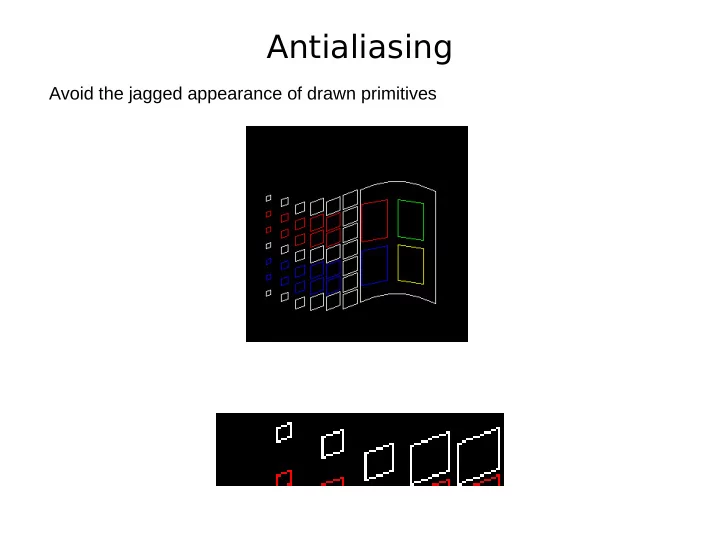
Avoid the jagged appearance of drawn primitives
SLIDE 2
Antialiasing
Avoid the jagged appearance of drawn primitives
SLIDE 3
Antialiasing Solutions
Increase the resolution Expensive solution – diminishes jaggies, does not eliminate them
SLIDE 4
Antialiasing Solutions
Treat the line as having thickness Highlight the intersected pixels based on area of overlap
SLIDE 5
Antialiasing
Weighted Area Sampling – amount of intensity depends on area of overlap Pixel representation – overlay pixel with disks of radius 1 allows the pixel to be intensified as the object approaches it, i.e. before object crosses the pixel
SLIDE 6
Antialiasing
Weighted Area Sampling – amount of intensity depends on area of overlap Pixel representation – overlay pixel with disks of radius 1 allows the pixel to be intensified as the object approaches it, i.e. before object crosses the pixel
SLIDE 7
Antialiasing
Weighted Area Sampling – amount of intensity depends on area of overlap Pixel representation – overlay pixel with disks of radius 1 allows the pixel to be intensified as the object approaches it, i.e. before object crosses the pixel
SLIDE 8
Antialiasing
Weighted Area Sampling – amount of intensity depends on area of overlap Pixel representation – overlay pixel with disks of radius 1 allows the pixel to be intensified as the object approaches it, i.e. before object crosses the pixel
SLIDE 9
Midpoint Algorithm and Antialiasing
Calculate the “true distance” from the pixel center to the line Use the “true distance” as a measure of the are of overlap Need to consider the neighbors above and below this pixel would have been selected based on the midpoint but now we also consider the immediate neighbors vertically M PN PS P
SLIDE 10
Midpoint Algorithm and Antialiasing
In the algorithm from Section 3.2 we know F(M) from the equation F(x, y) = 2a*x + 2b*y + 2c a = dy, b = -dx = 2*(ax + by + c) Given a line equation F(x, y) = a*x + b*y + c the (signed) distance to the line can be found if we use an equivalent form D(x, y) = a*x + b*y + c a2+b2 a2+b2 a2+b2 This is the line equation scaled by the factor 1 / a2+b2
SLIDE 11
Midpoint Algorithm and Antialiasing
If we decided to move East and we knew the distance DP can we find DPE, DPN, DPS Coordinates: P(xp,yp) PE(xp+1,yp) PN(xp+1,yp+1) PS(xp+1,yp-1) M PN PS PE P
SLIDE 12
Midpoint Algorithm and Antialiasing
If we decided to move East and we knew the distance DP can we find DPE, DPN, DPS Coordinates: P(xp,yp) PE(xp+1,yp) PN(xp+1,yp+1) PS(xp+1,yp-1) M PN PS PE P D(PE) = a*(xp+1) + b*yp + c = a*xp + a + b*yp + c = a*xp + b*yp + c + a = D(P) + a
SLIDE 13
Midpoint Algorithm and Antialiasing
If we decided to move East and we knew the distance DP can we find DPE, DPN, DPS Coordinates: P(xp,yp) PE(xp+1,yp) PN(xp+1,yp+1) PS(xp+1,yp-1) M PN PS PE P D(PE) = a*(xp+1) + b*yp + c = a*xp + a + b*yp + c = a*xp + b*yp + c + a = D(P) + a D(PN) = a*(xp+1) + b*(yp+1) + c = a*xp + a + b*yp + b + c = a*xp + b*yp + c + a + b = D(P) + a + b = D(PE) + b
SLIDE 14
Midpoint Algorithm and Antialiasing
If we decided to move East and we knew the distance DP can we find DPE, DPN, DPS Coordinates: P(xp,yp) PE(xp+1,yp) PN(xp+1,yp+1) PS(xp+1,yp-1) M PN PS PE P D(PE) = a*(xp+1) + b*yp + c = a*xp + a + b*yp + c = a*xp + b*yp + c + a = D(P) + a D(PN) = a*(xp+1) + b*(yp+1) + c = a*xp + a + b*yp + b + c = a*xp + b*yp + c + a + b = D(P) + a + b = D(PE) + b D(PS) = a*(xp+1) + b*(yp-1) + c = a*xp + a + b*yp + b + c = a*xp + b*yp + c + a - b = D(P) + a - b = D(PE) + b
SLIDE 15 Midpoint Algorithm and Antialiasing
If we decided to move East and we knew the distance DP can we find DPE, DPN, DPS M PN PS PE P D(PE) = D(P) + a + b
SLIDE 16
Midpoint Algorithm and Antialiasing
If we decided to move NorthEast and we knew the distance DP can we find DPNE, DPN, DPS Coordinates: P(xp,yp) PNE(xp+1,yp+1) PN(xp+1,yp+2) PS(xp+1,yp) M PNE PN PS P
SLIDE 17
Midpoint Algorithm and Antialiasing
If we decided to move NorthEast and we knew the distance DP can we find DPNE, DPN, DPS Coordinates: P(xp,yp) PNE(xp+1,yp+1) PN(xp+1,yp+2) PS(xp+1,yp) M PNE PN PS P D(PNE) = a*(xp+1) + b*(yp+1) + c = a*xp + a + b*yp + b + c = a*xp + b*yp + c + a + b = D(P) + a + b
SLIDE 18
Midpoint Algorithm and Antialiasing
If we decided to move NorthEast and we knew the distance DP can we find DPNE, DPN, DPS Coordinates: P(xp,yp) PNE(xp+1,yp+1) PN(xp+1,yp+2) PS(xp+1,yp) M PNE PN PS P D(PNE) = a*(xp+1) + b*(yp+1) + c = a*xp + a + b*yp + b + c = a*xp + b*yp + c + a + b = D(P) + a + b D(PN) = a*(xp+1) + b*(yp+2) + c = a*xp + a + b*yp + 2b + c = a*xp + b*yp + c + a + 2b = D(P) + a + 2b = D(PNE) + b
SLIDE 19
Midpoint Algorithm and Antialiasing
If we decided to move NorthEast and we knew the distance DP can we find DPNE, DPN, DPS Coordinates: P(xp,yp) PNE(xp+1,yp+1) PN(xp+1,yp+2) PS(xp+1,yp) M PNE PN PS P D(PNE) = a*(xp+1) + b*(yp+1) + c = a*xp + a + b*yp + b + c = a*xp + b*yp + c + a + b = D(P) + a + b D(PN) = a*(xp+1) + b*(yp+2) + c = a*xp + a + b*yp + 2b + c = a*xp + b*yp + c + a + 2b = D(P) + a + 2b = D(PNE) + b D(PS) = a*(xp+1) + b*yp + c = a*xp + a + b*yp + c = a*xp + b*yp + c + a = D(P) + a = D(PNE) - b
SLIDE 20 Midpoint Algorithm and Antialiasing
If we decided to move NorthEast and we knew the distance DP can we find DPNE, DPN, DPS M PNE PN PS P D(PNE) = D(P) + a + b + b
SLIDE 21
Midpoint Algorithm and Antialiasing
Finally, consider the initial conditions, i.e at first vertex P0 PN PS P0 D(P0) = ? ? ?
SLIDE 22 Midpoint Algorithm and Antialiasing
Finally, consider the initial conditions, i.e at first vertex P0 PN PS P0 D(P0) = 0 + b
SLIDE 23
Midpoint Algorithm and Antialiasing
Minor modification s required to Midpoint Algorithm to use Antialiasing def drawLineAA(x0, y0, x1, y1, c): # # keep original algorithm # compute a', b' for D(x,y) from a,b of F(x,y) compute dist increments for E, NE update dist similar to update of d # # change plotPixel(P, c) # plotPixel(Pabove, c, distabove) plotPixel(P, c, dist) plotPixel(Pbelow, c, distbelow)
SLIDE 24
Distance and Intensity
How to convert distances to pixel intensity? 1. use a formula that returns a number in [0..1] based on distance value dist = 0 => return 1, dist = distmax => return 0 2. use a table of precomputed values (Gupta-Sproull paper, Table 1)
SLIDE 25
Distance and Intensity
How to convert distances to pixel intensity? 1. use a formula that returns a number in [0..1] based on distance value dist = 0 => return 1, dist = distmax => return 0 2. use a table of precomputed values (Gupta-Sproull paper, Table 1) Under our assumptions what is the useful range for dist
SLIDE 26
Distance and Intensity
How to convert distances to pixel intensity? 1. use a formula that returns a number in [0..1] based on distance value dist = 0 => return 1, dist = distmax => return 0 2. use a table of precomputed values (Gupta-Sproull paper, Table 1) Under our assumptions what is the useful range for dist distmax= 1.5 intensity = 0% dist = 1 dist = 0 intensity = 100%
SLIDE 27
Horizontal/Vertical Lines
SLIDE 28
Alpha Blending
Instead of overwriting the intensity of the current pixel, blend current and new value color = α * colornew + (1-α) * colorcurrent α = [0..1]