16-bit Memory Word CSCI 125 & 161 / ENGR 144 To store number - - PDF document

16 bit memory word csci 125 161 engr 144
SMART_READER_LITE
LIVE PREVIEW

16-bit Memory Word CSCI 125 & 161 / ENGR 144 To store number - - PDF document

16-bit Memory Word CSCI 125 & 161 / ENGR 144 To store number 6, use 0000000000000110 Lecture 5 Value 0 is 0000000000000000 Martin van Bommel Largest value is 1111111111111111 = 65,535 = 2 16 1 32-bit word gives


slide-1
SLIDE 1

1

CSCI 125 & 161 / ENGR 144 Lecture 5

Martin van Bommel

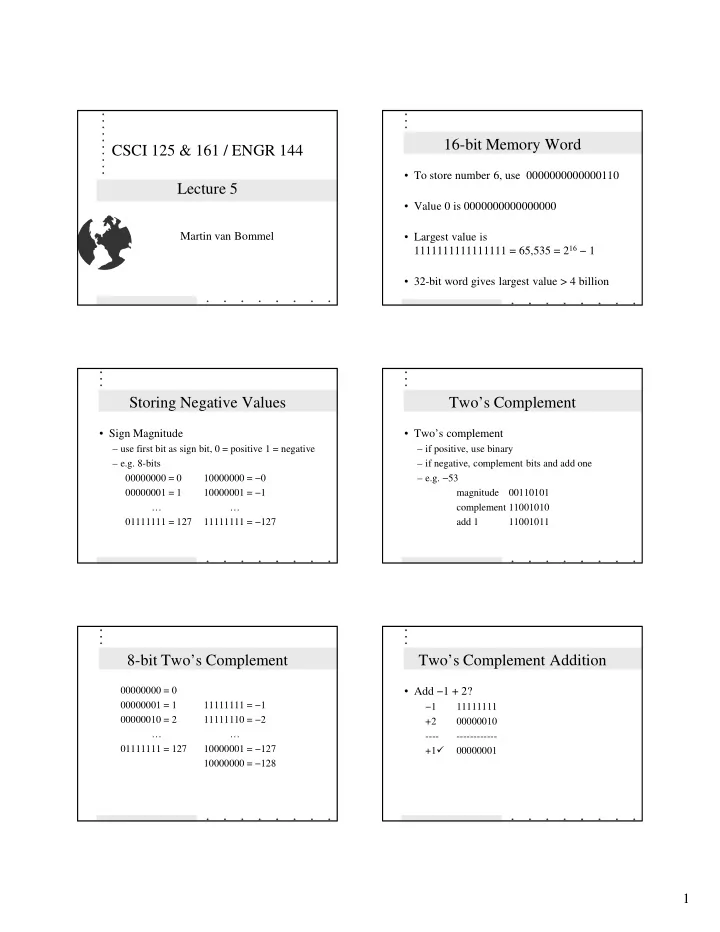
16-bit Memory Word

  • To store number 6, use 0000000000000110
  • Value 0 is 0000000000000000
  • Largest value is

1111111111111111 = 65,535 = 216 − 1

  • 32-bit word gives largest value > 4 billion

Storing Negative Values

  • Sign Magnitude

– use first bit as sign bit, 0 = positive 1 = negative – e.g. 8-bits 00000000 = 0 10000000 = −0 00000001 = 1 10000001 = −1 … … 01111111 = 127 11111111 = −127

Two’s Complement

  • Two’s complement

– if positive, use binary – if negative, complement bits and add one – e.g. −53 magnitude 00110101 complement 11001010 add 1 11001011

8-bit Two’s Complement

00000000 = 0 00000001 = 1 11111111 = −1 00000010 = 2 11111110 = −2 … … 01111111 = 127 10000001 = −127 10000000 = −128

Two’s Complement Addition

  • Add −1 + 2?

−1 11111111 +2 00000010

  • +1

00000001

slide-2
SLIDE 2

2

16-bit Two’s Complement

  • 8-bit two’s complement range is

− 27 = − 128 to 27 − 1 = 127

  • 16-bit two’s complement range is

− 215 = −32,768 to 215 − 1 = 32,767

  • 32-bit two’s complement range is

− 231 −2 million to 231 − 1 2 million

Data Types

  • Two properties

– set of values (domain) – set of operations

  • int - 32-bit two’s complement integers
  • 2 147 483 648 to 2 147 483 647

+, -, *, /, %

Floating-point Data

  • Numbers that include fractional parts
  • float - 32-bit floating point representation

– approximately seven decimal digits of accuracy

  • double - 64-bit floating point representation

– approximately sixteen decimal digits of accuracy

+, -, *, /

Character Data

  • char - Elements from the ASCII table
  • Values expressed in single quotes

e.g. ’A’ ’?’ ’\n’

  • stored in memory as their ASCII value

+, -

Expressions

  • A sequence of terms and operators
  • Term - represents single data value

– constant - data value as part of program, e.g. 4 – variable - name as placeholder for memory – function call - one that generates a value

e.g. sqrt(9)

– expression in parenthesis

  • Operator - character indicating computation

Constants

  • Explicit values that never change
  • Integer constants - sequence of digits

– e.g. 1000; 5; 1 not 1,000; 3.14

  • Floating-point constant - includes decimal

– e.g. 3.14; 1.0; 2.9E+8

  • String constant - characters in double quotes

– e.g. “Hello, world.\n”

slide-3
SLIDE 3

3

Variables

  • Placeholder for value in memory

– name - alias for memory location – value - current value stored in location – type - kind of data values that may be stored

name value

Variable Names

  • Must start with letter or underscore ( _ )

followed by letters, digits, or underscores

  • Case of letters significant
  • Name not a C++ keyword
  • Name any length, but only 31 characters

significant (safe only up to 8 characters)

Operators and Operands

  • expression operator expression
  • e.g. (2 * x) + (3 * y)
  • expressions are operands - values to which
  • perator is applied
  • operator signifies operation
  • binary operators - two operands e.g. a + b
  • unary operators - one operand e.g. - b

Combining Integers and Floats

  • Result of expression is most specific type
  • e.g. Value of 2.5 + 3 is 5.5
  • type of expression n + 1 is type of n
  • type of expression n + 1.5 is float if

n is float or int, but double if n is double

Integer Division and Remainder

  • Division of int’s results in int
  • Remainder operator % gives remainder
  • e.g. 5 / 2 is 2

5 % 2 is 1

  • 5 / 2.0 is 2.5

0 % 4 is 0

  • 5.0 / 2 is 2.5

1 % 4 is 1

  • 5.0 / 2.0 is 2.5

4 % 4 is 0

Precedence Rules

  • Parenthesized expressions first
  • Unary minus operator next
  • *, /, and % next, from left to right
  • + and - next, from left to right
  • e.g.

8 * (7 - 6 + 5) % (4 + 3 / 2) - 1