1. Participation All Clearing Clearing Member KDPW_CCP Members - - PDF document

1 participation
SMART_READER_LITE
LIVE PREVIEW

1. Participation All Clearing Clearing Member KDPW_CCP Members - - PDF document

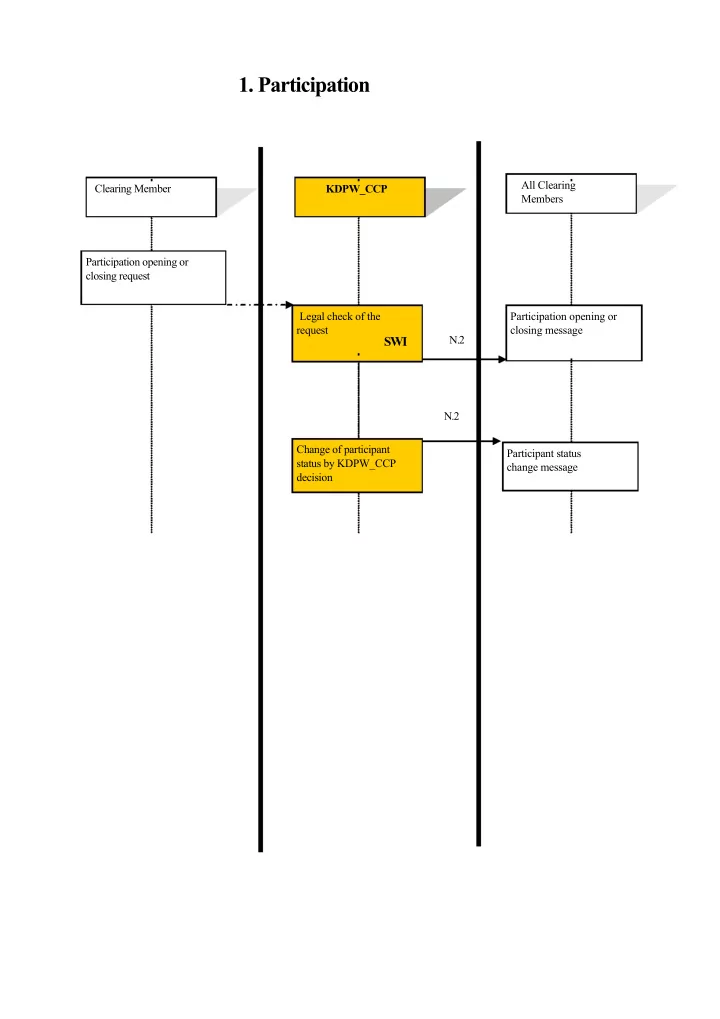
1. Participation All Clearing Clearing Member KDPW_CCP Members Participation opening or closing request Legal check of the Participation opening or request closing message N.2 SWI N.2 Change of participant Participant status status by


slide-1
SLIDE 1
  • 1. Participation

Clearing Member KDPW_CCP All Clearing Members Participation opening or closing request Legal check of the request

SWI

Change of participant status by KDPW_CCP decision N.2 N.2 Participation opening or closing message Participant status change message

slide-2
SLIDE 2
  • 2. Opening and Closing Accounts

KDPW_CCP Clearing Member K.1 Account opening or closing message Check of: (a) account opening request (b) account closing request

  • if any

K.4 Message receipt confirmation. (a) for an account opening request – account opening confirmation (b) for an account closing request – change of request status to PEND.

End of day

Check whether: (a) there are active transactions in the PA account, (b) this is the last PA account for the PB account (phase 2) (c) there is collateral in the PB account. Change of the account database. Receipt of confirmation / rejection of the account database change and entry of changes in the kdpw_stream database. K.4 Account closing success / failure message
slide-3
SLIDE 3
  • 3. Account Configuration Management

KDPW_CCP Clearing Member Setting account limit U.1 and/or attributes Updating account limits and/or attributes U.2 Confirmation

slide-4
SLIDE 4
  • 4. Accepting New Transactions

Clearing Member KDPW_CCP SWIFT Accord MarkitWire Suspending the processing of new transactions Receipt of a new transaction Formal check Calculating margin requirements, limit check Matching the transaction N.1 Concluding the transaction Transaction rejection message due to errors of substance or participant suspension or default (a) accepting the transaction, NOVATION (b) suspending the transaction and suspending the Clearing Member (c) suspending the transaction N.1 (a) Receipt of a message that the transaction is covered by guarantees and, where the collateral limit is exceeded, also the time limit for adjusting the collateral (b) Where the collateral limit is exceeded – transaction suspension message (c) Where a mandatory individual limit is exceeded – transaction suspension message N.2 If (b) – Clearing Member suspension message (status change to SUSPENDED_PRIVATE)

slide-5
SLIDE 5
  • 5. Depositing Collateral Intra-day

KDPW_CCP Clearing Member Collateral Register Depositing collateral in securities and in cash. Updating the Collateral Register; Updating the available collateral and use of limits message. G.4

slide-6
SLIDE 6
  • 6. Releasing Collateral Intra-Day

Clearing Member KDPW_CCP Collateral release request (cash or securities) Collateral release request: securities: xml , cash — ESDI Only one request per PB. Suspending the processing of transactions Collateral release request: amount to be released – delta. Calculating new collateral amount (after release). Checking limits at PB level (if any) and the collateral amount. (a) collateral can be released Updating the Collateral Register, updating collateral for the PB (b) collateral cannot be released G.4 G.5 (a) Collateral release message. (b) Collateral release request rejection. Accepting new transactions

slide-7
SLIDE 7
  • 7. OTC Guarantee Fund

KDPW_CCP Clearing Member End of day Calculating daily uncovered risk. Calculating final uncovered risk (ORN). Calculating the Guarantee Fund amount Calculating Clearing F.2 Members’ contributions to the OTC Guarantee Fund, revaluation of collateral deposited in securities, calculating final contributions (SA), calculating additional margins (DD). OTC Guarantee Fund update message. F.3 OTC additional margin update message. Netting of Clearing Member and payment agent credits and debits. Payment instructions.

slide-8
SLIDE 8
  • 8. Hypothetical Transaction Margin Requirement

Request

KDPW_CCP Clearing Member Transaction margin requirement request. W .1 Calculating the impact of the hypothetical transaction

  • n collateral and limits

Margin requirement, collateral amount, use of limits message. N.1 Message to the Clearing Member

slide-9
SLIDE 9
  • 9. Closing Positions (Auction)

KDPW_CCP Clearing Members Starting an auction Generating portfolios Starting an auction A.1 SWI Auction Identification and distribution of auction portfolios, internal hedges. Receipt of quotes Formal check Awaiting all quotes or time-out Aggregating offers A.2 A.4 A.5 A.3 Preparing for an auction Preparing quotes Receipt of error message Time-out message Setting the auction price Assigning portfolios to auction winner participants Ending the auction A.6 Transaction conclusion confirmation Auction status N.1 Receipt of winning/ losing confirmation Transaction conclusion confirmation

slide-10
SLIDE 10
  • 10. Closing Positions On Demand

Clearing Member KDPW_CCP Banks – Termination Participants Position closing request Receipt of KDPW_CCP decision to start the termination process T.1 T.2 Checking the impact of termination

  • n the collateral limit of the

Clearing Member (initiator). Transaction ID matching. Manual set-up of auction start time. Manual process Starting an auction from “Identification and distribution of auction portfolios” to “Awaiting all quotes or time-out” using SWI See point 1 (auction) Starting an auction from “Aggregating offers” to “Setting the auction price” using SWI – see point 1 (auction) Impact of termination on the collateral limit of the Clearing Member participating in termination T.3 Auction result acceptance/rejection T.4 Starting an auction from “Assigning portfolios to auction winning participants” to “Auction status” using SWI See point 1 (auction)

slide-11
SLIDE 11
  • 11. Clearing at the End of Day

KDPW_CCP Clearing Member Start:17:00 End of day Blocking new operations Incoming transactions get the status QUEUED Calculating margin requirements at two levels: PB level: IM, VM, SA, coupons, PAI, PA level: IM E.1 Cancelling opposite transactions. Start:~18:00 Revaluation of collateral deposited in securities Netting of clearing member and payment agents credits and debits Payment instructions (to MOROP). E.3 E.2 Receipt of end-of-day messages with current margin requirements. Receipt of cancelled transaction messages. Receipt of end-of-day messages: current margin requirements, cash settlement and the collateral amount.

slide-12
SLIDE 12
  • 12. Cash Settlement at the End of Day

KDPW_CCP Clearing Members Cash settlement (MOROP)

End of day

Calculating IM, VM, SA, coupons, PAI for each PB. Recognition of collateral in securiting, calculating current margin amounts. Netting of credits and debits. E.1 E.2 Receipt of end-of-day message with margin requirements and marking-to- market End of clearing day process Cash settlement Updating the Collateral Register after payment. Morning settle- ment session Authorisation to accept a new transaction from the platform

slide-13
SLIDE 13
  • 13. Charging Fees

KDPW_CCP Clearing Member Calculating fees post Printing invoices Receipt of an invoice

slide-14
SLIDE 14
  • 14. Clearing and Settlement of Repo Transactions

Bondspot

Concluding a transaction KDPW_CCP Accepting a transaction Preparing the settlement

  • f the first or second leg
  • f the transaction (DvP

and payment instruction – MtM) N.1 R.3

CM

Sending an order Transaction acceptance message Preparing a message with balances on the next day Instruction enrichment, if any Correct settlement Reduction of the collateral requirement. R.2 R.3 R.3, R.4 Sent instruction message Calculated settlement amount message Enrichment message Successful settlement message

for enrichment

slide-15
SLIDE 15

Table of Changes Document Version Changes 1.0 Source document 1.1 Adding detailed information to Figure 4