Windows NT and Real-Time? Reading: Inside Microsoft Windows 2000, - - PDF document

windows nt and real time
SMART_READER_LITE
LIVE PREVIEW

Windows NT and Real-Time? Reading: Inside Microsoft Windows 2000, - - PDF document

CPSC-663: Real-Time Systems Windows NT/2000 and Real-Time Windows NT and Real-Time? Reading: Inside Microsoft Windows 2000, (Solomon, Russinovich, Microsoft Programming Series) Real-Time Systems and Microsoft Windows NT


slide-1
SLIDE 1

CPSC-663: Real-Time Systems Windows NT/2000 and Real-Time 1

Windows NT and Real-Time?

  • Reading: “Inside Microsoft Windows 2000”, (Solomon, Russinovich,

Microsoft Programming Series)

  • “Real-Time Systems and Microsoft Windows NT” (MSDN Library)
  • “Windows XP with RTX - The off-the-shelf platform for

Integrated Communication Equipment” (www.venturcom.com)

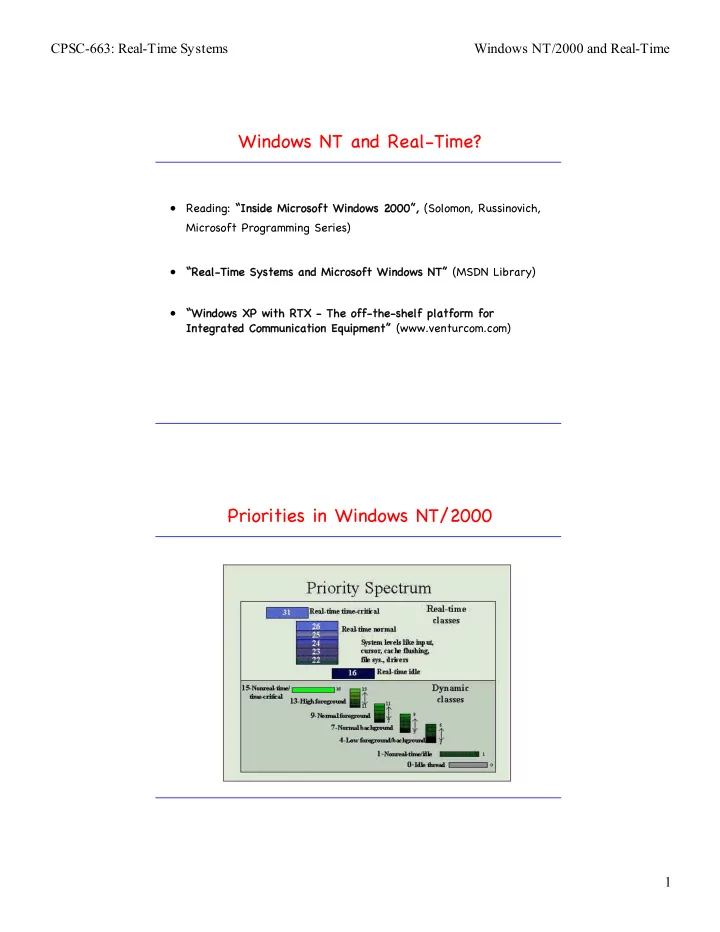
Priorities in Windows NT/2000

slide-2
SLIDE 2

CPSC-663: Real-Time Systems Windows NT/2000 and Real-Time 2

IO System Components (Windows 2k)

user mode kernel mode HAL WDM WMI routines PnP manager Power manager I/O manager I/O system drivers

...

setup components

user-mode PnP manager WMI service Applications Win32 services

.inf files .cat files registry

Device Driver Layering

slide-3
SLIDE 3

CPSC-663: Real-Time Systems Windows NT/2000 and Real-Time 3

Device Driver Layering (2)

dispatch routines

Primary Device Driver Routines

IO system interrupt service routine DPC routine initialization routine add-device routine dispatch routines dispatch routines start I/O routine

  • Initialization routine This routine

initializes hardware and sets up data structures used by the driver at startup time.

  • Interrupt service routine (ISR) This

routine handles an interrupt on the device that the device driver controls.

  • Deferred processing call (DPC) One
  • r more DPCs handle non–time-

critical processing for the driver.

  • System thread Some, but not all,

drivers will have a system thread for very low- priority work.

  • NT/2000 device drivers run entirely within the system process and have

access to all hardware through the HAL. A typical device driver will have several components:

slide-4
SLIDE 4

CPSC-663: Real-Time Systems Windows NT/2000 and Real-Time 4

Control Flow for an IO Operation

Call ReadFile() Call NTReadFile() return to caller INT 2E return to caller Call NTReadFile() dismiss interrupt Invoke driver dismiss interrupt Initiate I/O operation dismiss interrupt

User mode Kernel mode Whether to wait depends

  • n overlapped flag

ReadFile NtReadFile KiSystemService NtReadFile Application Kernel32.dll Ntdll.dll Ntoskrnl.exe Ntoskrnl.exe Driver.sys

Queueing and Completing a Synchronous Request

slide-5
SLIDE 5

CPSC-663: Real-Time Systems Windows NT/2000 and Real-Time 5

Servicing a Device Interrupt (only Phase I)

Servicing a Device Interrupt (Phase II)

slide-6
SLIDE 6

CPSC-663: Real-Time Systems Windows NT/2000 and Real-Time 6

Completing an I/O Request (Phase I) Completing an I/O Request (Phase II)

slide-7
SLIDE 7

CPSC-663: Real-Time Systems Windows NT/2000 and Real-Time 7

Priority Levels vs. Interrupt Levels

31: High 30: Power Fail 29: Inter-Processor Interrupt 28: Clock 27: Profile 26: Device n 3: Device 1 2 DPC/dispatch 1: APC 0: Passive Hardware Interrupts Software Interrupts Thread Priorities 0-31

  • The HAL maps hardware-

interrupt numbers to IRQLs.

  • IRQLs are not the same as

IRQs in x86.

  • Scheduling priority is

attribute of thread, while IRQL is attribute of an interrupt source.

  • Lazy IRQL management for

slow PICs.

  • Code running at

DPC/dispatch level or above can’t wait on object if so would necessitate scheduler to invoke another thread.

Memory Management

  • Paging I/O occurs at a lower priority level than the real-time

priority process levels. Paging within the real-time process is still free to occur, but this really ensures that background virtual memory management won't interfere with processing at real-time priorities.

  • Windows NT permits an application to lock itself into memory so

that it is not affected by paging within its own process. This allows even very large processes (such as raster image processing, where some processes are over 100MB) to lock all their memory down into physical memory and avoid the overhead

  • f paging, while allowing the rest of the system to function

normally.

  • Windows NT memory management allows for memory mapping,

which permits multiple processes—even device drivers and user applications—to share the same physical memory. This results in very fast data transfers between cooperating processes or between a driver and an application. Memory mapping can be used to dramatically enhance real-time performance.

slide-8
SLIDE 8

CPSC-663: Real-Time Systems Windows NT/2000 and Real-Time 8

Windows 2000/NT and Real-Time Processing

  • Windows 2000/NT does not prioritize device IRQs in controllable

way.

  • User-level applications execute only when a processor’s IRQL is

at passive level.

  • System’s devices and device drivers – not the OS – ultimately

determine the worst-case delay.

  • This is a problem with off-the-shelf hardware and drivers.
  • System designer must bound the length of device’s ISR and DPC

in the worst case.

  • Embedded versions of Windows NT/2000 provide control over

memory footprint etc, but are not real-time capable.

  • Extensions of real-time kernels can be provided through custom

extensions of the HAL.

VenturCom RTX Architecture