
SLIDE 1
Whats up with the fruit? Visual literacy is the ability - - PowerPoint PPT Presentation
Whats up with the fruit? Visual literacy is the ability to interpret, evaluate, and create meaning from informa;on presented in visual representa;onssuch
Baroque ¡Pain2ng ¡
¡ Characteris;cs ¡
The ¡Calling ¡of ¡Saint-‑Ma;hew ¡ ¡ Caravaggio, ¡1599-‑1600 ¡ Oil ¡on ¡Canvas ¡
The Cestello Annunciation c. 1489; Botticelli, Sandro Example of early Christian art
The ¡linear ¡perspec;ve ¡symbolizes, ¡or ¡represents, ¡another ¡visual ¡dimension. ¡ ¡ Something ¡we ¡take ¡for ¡granted ¡in ¡digital ¡photography ¡had ¡to ¡be ¡invented ¡for ¡pain;ng. ¡
Baroque ¡S2ll ¡Life ¡
Occasion ¡for ¡the ¡ar2st ¡to ¡ demonstrate ¡technical ¡skill ¡and ¡ engage ¡the ¡senses ¡ ¡
¡ ¡ ¡ ¡ ¡ ¡ ¡ ¡rela;onship ¡between ¡objects ¡ ¡ Fruit ¡and ¡flowers ¡were ¡common ¡ subjects ¡ ¡ Symbolic ¡meaning ¡ ¡
¡
S2ll ¡Life ¡with ¡Fruit ¡on ¡a ¡Stone ¡Ledge ¡ Caravaggio, ¡1603 ¡ Oil ¡on ¡Canvas ¡ ¡
¡ S2ll ¡Life ¡with ¡Fruit ¡and ¡Carafe ¡ Jan ¡Davidsz ¡de ¡Heem, ¡circa ¡1610 ¡ ¡
What’s ¡up ¡with ¡the ¡pomegranate? ¡ the ¡grapes? ¡the ¡apples? ¡ ¡ Realis;c ¡representa;on ¡of ¡fruit… ¡
Festoon ¡of ¡Fruit ¡and ¡Flowers ¡ Jan ¡Davidsz ¡de ¡Heem, ¡circa ¡1660 ¡ Oil ¡on ¡Canvas ¡ Or ¡a ¡symbolic ¡representa;on ¡of ¡something ¡of ¡greater ¡ significance? ¡ Life, ¡death, ¡rebirth? ¡Chris;anity? ¡
Representation: Representation is a mechanism for modeling our world(s). Media representation results in images, photographs, and sound objects that model meaning. It provides a template that filters our perception of the world.
At ¡least ¡three ¡representa;ons, ¡none ¡of ¡which ¡are ¡the ¡actual ¡object ¡being ¡ represented: ¡ ¡
1. Picture ¡of ¡an ¡apple ¡ 2. Set ¡of ¡le;ers ¡grouped ¡together, ¡which ¡we ¡understand ¡as ¡that ¡piece ¡of ¡fruit ¡ 3. Le;ers ¡represen2ng ¡the ¡sound ¡of ¡a ¡spoken ¡word ¡ 4. And ¡_____________ ¡? ¡
Bacchus ¡
lounging ¡in ¡a ¡classical ¡style ¡with ¡ grape ¡leaves ¡in ¡his ¡hair ¡and ¡with ¡ carafe ¡of ¡red ¡wine ¡and ¡fruit ¡ displayed ¡on ¡a ¡stone ¡table ¡
Bacchus ¡ Caravaggio, ¡1595 ¡ Oil ¡on ¡Canvas ¡
What ¡happens ¡to ¡the ¡meaning ¡
context? ¡
Composi2on ¡ ¡ Organiza;on ¡& ¡order ¡of ¡objects ¡to ¡ create ¡unity ¡and ¡engage ¡the ¡eye ¡ ¡ Use ¡of ¡line ¡ Triangular ¡arrangements ¡ ¡ Repe;;on ¡of ¡shapes ¡and ¡colours ¡ Use ¡of ¡textures ¡ ¡ Light ¡and ¡dark, ¡posi;ve ¡and ¡ nega;ve ¡spaces ¡
Making ¡& ¡communica2ng ¡meaning ¡ The ¡contents ¡of ¡the ¡work ¡make ¡us ¡ think ¡about ¡the ¡context ¡of ¡the ¡work ¡ ¡ What ¡is ¡the ¡work ¡trying ¡to ¡say? ¡ What ¡ideas ¡are ¡being ¡ communicated? ¡ What ¡role ¡does ¡the ¡medium ¡play ¡in ¡ conveying ¡the ¡message? ¡ ¡
Peter ¡Lippman ¡on ¡composing ¡ a ¡photograph ¡
¡ “Simplicity. ¡I ¡try ¡to ¡eliminate ¡every ¡ superfluous ¡element, ¡in ¡order ¡to ¡ create ¡a ¡dense, ¡emo;onal ¡and ¡ thought ¡provoking ¡environment ¡full ¡
¡ This ¡cannot ¡be ¡accidental. ¡It ¡only ¡ happens ¡when ¡every ¡millimetre ¡of ¡ the ¡photograph ¡is ¡craied ¡with ¡taste ¡ and ¡restraint, ¡when ¡the ¡ photographer ¡not ¡only ¡completely ¡ controls ¡his ¡image ¡but ¡has ¡a ¡clear ¡ pre-‑visualisa;on ¡of ¡his ¡subject.” ¡
¡
hkp://www.photographyoffice.com/2011/04/peter-‑ lippmann-‑reinvents-‑french-‑cuisine-‑with-‑pierre-‑ gagnaire-‑using-‑photography/ ¡
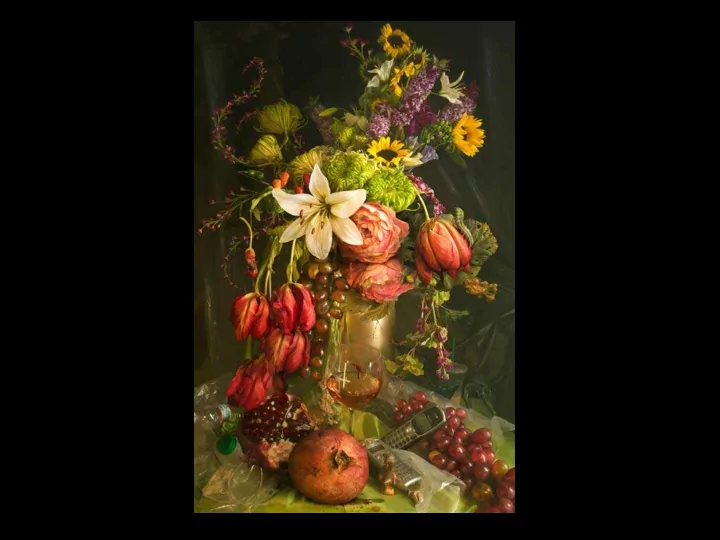
Early ¡Fall ¡
From ¡the ¡series ¡ ¡ Earth ¡Laughs ¡in ¡Flowers, ¡2012 ¡ ¡ David ¡LaChappelle ¡ Digital ¡Photography ¡ ¡ ¡ ¡ ¡ ¡
What ¡is ¡the ¡social ¡message ¡here? ¡
Spring2me ¡
From ¡the ¡series ¡ ¡ Earth ¡Laughs ¡in ¡Flowers, ¡2012 ¡ ¡ David ¡LaChappelle ¡ Digital ¡Photography ¡ ¡ ¡ ¡ ¡ ¡ ¡ ¡ ¡ ¡ ¡ What ¡does ¡colour ¡communicate ¡here? ¡ What ¡is ¡the ¡message ¡here? ¡ ¡
S2ll ¡Life ¡ Jan ¡Davidsz ¡de ¡Heem, ¡circa ¡1660 ¡ Oil ¡on ¡Canvas ¡ ¡ Vanitas ¡S2ll ¡Life ¡ Pieter ¡Claesz, ¡1630 ¡ Oil ¡Canvas ¡
¡ Vanitas ¡are ¡Baroque ¡s;ll ¡life ¡pain;ngs ¡that ¡ represent ¡ideas ¡around ¡mortality ¡and ¡the ¡ flee2ng ¡nature ¡of ¡life. ¡Skulls ¡are ¡oien ¡composed ¡ alongside ¡personal ¡objects: ¡books, ¡wine ¡glasses, ¡ hourglasses, ¡jewelry, ¡pipes, ¡guns, ¡keys… ¡
Concerning ¡the ¡Soul ¡
From ¡the ¡series ¡ ¡ Earth ¡Laughs ¡in ¡Flowers, ¡2012 ¡ ¡ David ¡LaChappelle ¡ Digital ¡Photography ¡ ¡
Sources: ¡ hkp://www.davidlachapelle.com/about/ ¡ hkp://www.featureshoot.com/2012/02/david-‑ lachapelles-‑twist-‑on-‑baroque-‑s;ll-‑life-‑pain;ngs/ ¡
¡
David ¡LaChapelle ¡on ¡photography ¡and ¡digital ¡technology ¡ ¡ Well ¡the ¡computer ¡is ¡slave ¡to ¡the ¡camera, ¡because ¡without ¡a ¡good ¡photograph ¡all ¡the ¡ technology ¡in ¡the ¡world ¡doesn't ¡take ¡a ¡good ¡picture. ¡You ¡have ¡to ¡have ¡a ¡good ¡photograph ¡ to ¡begin ¡with. ¡ ¡
hkp://www.designboom.com/eng/interview/lachapelle.html ¡
¡
hkp://speckyboy.com/2012/07/22/30-‑stunning-‑examples-‑of-‑s;ll-‑life-‑photography/ ¡
Soul ¡Tailor ¡
Lief ¡Laxman ¡
hkp://www.aperture.org/exposures/?tag=melanie-‑bonajo ¡ Fruit, ¡2008. ¡ ¡ Krista ¡van ¡der ¡Niet ¡ ¡
Carrie ¡Louise ¡S2ll ¡Life ¡(Set ¡Designer) ¡ Photographer: ¡Graeme ¡Montgomery ¡ hkp://www.itsnicethat.com/ar;cles/carrie-‑louise ¡
S2ll ¡Life ¡Things ¡I ¡Can’t ¡ ¡Live ¡Without ¡ Designer ¡ Prabal ¡Gurung ¡
hkp://weddingphotography.com.ph/6605/s;ll-‑ life-‑photography-‑things-‑you-‑cannot-‑live-‑without/ ¡
understanding ¡how ¡we ¡*see* ¡ourselves ¡in ¡rela;on ¡to ¡an ¡external ¡world. ¡
¡ ¡ ¡ ¡ ¡ ¡ ¡ ¡ ¡ ¡ ¡Carlos ¡Castellanos ¡(D101, ¡D103) ¡ ¡ ¡ ¡ ¡ ¡ ¡ ¡ ¡ ¡ ¡Paul ¡Brokenshire ¡ ¡ ¡(D102, ¡104, ¡105, ¡107) ¡
Simon ¡Fraser ¡University ¡, ¡School ¡of ¡Interac;ve ¡Arts ¡ ¡& ¡Technology ¡ ¡| ¡ ¡2013 ¡
¡ ¡ ¡
TechBytes ¡is ¡a ¡tutoring ¡program ¡run ¡by ¡student ¡peer ¡educators ¡who ¡are ¡ dedicated ¡to ¡helping ¡other ¡students ¡learn ¡so]ware ¡ ¡ TechBytes ¡offers ¡weekly ¡sessions ¡ ¡Date: ¡To ¡Be ¡Announced ¡ ¡Room: ¡TBA ¡ ¡Cost: ¡ ¡FREE ¡ ¡ TechBytes ¡offers ¡both ¡so]ware ¡tutorials ¡and ¡study ¡sessions ¡ – Come ¡with ¡a ¡specific ¡ques;on ¡or ¡just ¡come ¡and ¡work ¡on ¡your ¡homework ¡ – Soiware ¡tutorials ¡include: ¡Adobe ¡Photoshop, ¡Dreamweaver, ¡Illustrator, ¡ Flash, ¡InDesign, ¡Premier, ¡Aier ¡Effects, ¡etc. ¡ www.sfu.ca/techbytes ¡
– Course ¡Descrip;on ¡ – Policies ¡& ¡Expecta;ons ¡ – Course ¡Structure ¡ – Grading ¡
– Course ¡Prep ¡
¡ ¡
Apply ¡rules ¡of ¡composi;on, ¡ colour, ¡sequencing ¡& ¡ movement ¡ ¡
– Power ¡point ¡ presenta;ons ¡ – Papers ¡& ¡Reports ¡w ¡ images ¡ – Presenta;on ¡posters ¡
– Professional ¡porxolio ¡ documents ¡
¡ – Week ¡4: ¡ ¡Project ¡1 ¡-‑ ¡ ¡Digital ¡Photography ¡20% ¡ – Week ¡8: ¡ ¡ ¡Project ¡2 ¡-‑ ¡ ¡Sequenced ¡Narra;ve ¡25% ¡ – Week ¡13: ¡Project ¡3 ¡-‑ ¡ ¡Mo;on ¡Graphic ¡ ¡30% ¡ ¡ – Weekly: ¡ ¡Lab ¡Ac;vi;es ¡ ¡ ¡ ¡ ¡ ¡15% ¡ – Lecture ¡A;endance ¡/ ¡Par2cipa2on ¡/ ¡Quizzes ¡10% ¡
– student ¡engagement ¡ – in-‑class ¡quizzes ¡ – par;cipa;on ¡ ¡
by ¡Week ¡3 ¡Lecture ¡
Gezng ¡Started ¡module ¡in ¡Canvas ¡
student ¡number ¡ ¡
in ¡a;endance ¡is ¡an ¡act ¡of ¡ Academic ¡Dishonesty ¡ ¡
– Show ¡up ¡to ¡lecture ¡/ ¡lab ¡on ¡;me ¡ – Do ¡the ¡Readings ¡BEFORE ¡the ¡lecture ¡ – Watch ¡Video ¡Tutorials ¡BEFORE ¡the ¡lab ¡ – Read ¡all ¡assignments ¡completely ¡ – In-‑class ¡conduct: ¡appropriate ¡use ¡of ¡laptops, ¡phones ¡& ¡talking ¡ – Do ¡not ¡video ¡or ¡audio ¡record ¡or ¡photograph ¡the ¡lecture ¡without ¡ permission ¡ ¡
– Work ¡Load: ¡Not ¡an ¡easy ¡A ¡/ ¡Not ¡a ¡GPA ¡Booster ¡ – Original ¡Submissions ¡only/ ¡work ¡must ¡be ¡completed ¡during ¡the ¡term ¡ – No ¡borrowing ¡from ¡the ¡web ¡ – Produc;on ¡Quality: ¡digital ¡cameras ¡(no ¡phones) ¡ – Subject ¡Maker: ¡should ¡reflect ¡university ¡level ¡ ¡
– ALWAYS ¡Include ¡IAT100 ¡and ¡your ¡lab ¡sec;on ¡number ¡in ¡the ¡subject ¡ line ¡of ¡all ¡emails ¡to ¡me ¡or ¡your ¡TA. ¡ (Example ¡– ¡Subject: ¡IAT100 ¡ ¡D106 ¡– ¡Request ¡for ¡Office ¡Hour ¡ Appointment) ¡
– When: ¡Tuesday, ¡10:00am-‑12:00pm ¡(or ¡by ¡appointment) ¡ – Where: ¡My ¡office, ¡Pod ¡2, ¡2808 ¡
Widescreen ¡Test ¡Pakern ¡(16:9) ¡
Aspect ¡Ra2o ¡Test ¡
¡
(Should ¡appear ¡ circular) ¡
16x9 ¡ 4x3 ¡