What is a good model? A model is a representation of something. It - - PDF document

what is a good model
SMART_READER_LITE
LIVE PREVIEW

What is a good model? A model is a representation of something. It - - PDF document

10/8/2019 What is a good model? A model is a representation of something. It captures not all attributes of the represented thing, but rather only those that are relevant for a specific purpose. It should be expressive (an accurate


slide-1
SLIDE 1

10/8/2019 1

2

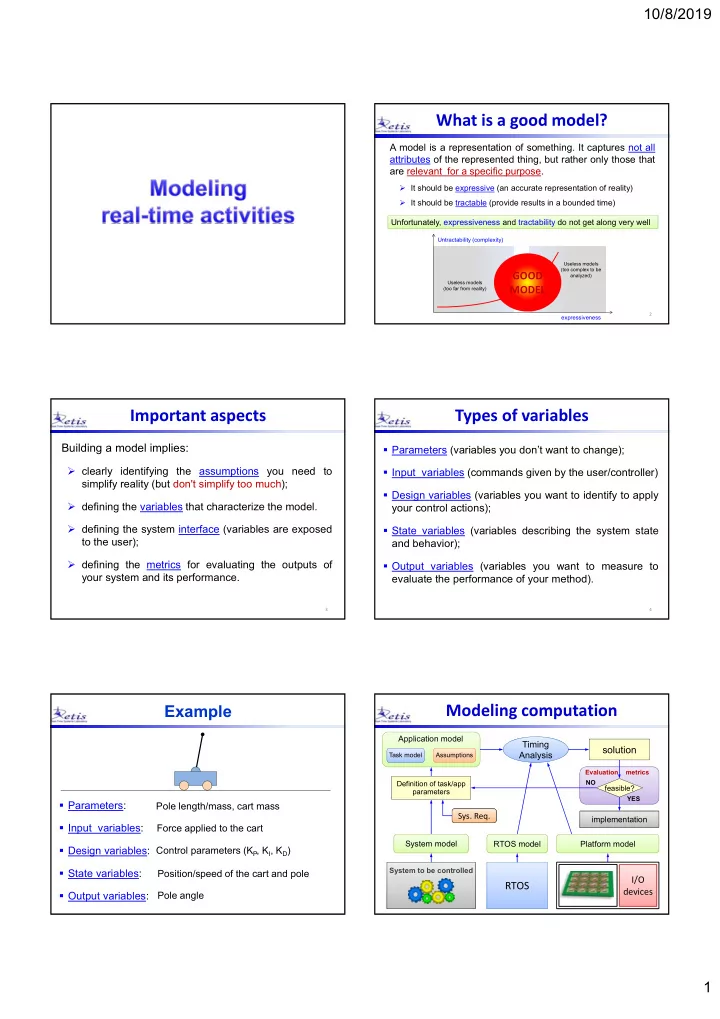
What is a good model?

  • It should be expressive (an accurate representation of reality)
  • It should be tractable (provide results in a bounded time)

Unfortunately, expressiveness and tractability do not get along very well Unfortunately, expressiveness and tractability do not get along very well

expressiveness Untractability (complexity)

Useless models (too far from reality) Useless models (too complex to be analyzed)

GOOD MODEL

A model is a representation of something. It captures not all attributes of the represented thing, but rather only those that are relevant for a specific purpose.

3

Important aspects

Building a model implies:

  • clearly identifying the assumptions you need to

simplify reality (but don't simplify too much);

  • defining the variables that characterize the model.
  • defining the system interface (variables are exposed

to the user);

  • defining the metrics for evaluating the outputs of

your system and its performance.

4

Types of variables

  • Parameters (variables you don’t want to change);
  • Input variables (commands given by the user/controller)
  • Design variables (variables you want to identify to apply

your control actions);

  • State variables (variables describing the system state

and behavior);

  • Output variables (variables you want to measure to

evaluate the performance of your method).

Example

  • Parameters:
  • Input variables:
  • Design variables:
  • State variables:
  • Output variables:

Pole length/mass, cart mass Force applied to the cart Control parameters (KP, KI, KD) Position/speed of the cart and pole Pole angle

Application model

6

Modeling computation

Task model Task model

System to be controlled Definition of task/app parameters

  • Sys. Req.
  • Sys. Req.

I/O devices I/O devices

RTOS RTOS

Timing Analysis Timing Analysis

solution

System model System model Platform model Platform model RTOS model RTOS model

Assumptions Assumptions

implementation implementation

feasible?

NO YES Evaluation metrics

slide-2
SLIDE 2

10/8/2019 2

Task i

Activation time (ai) Start time (si) Finishing time (fi) t ai si fi Computation time (Ci) Ci The interval fi  ai is referred to as the task response time Ri The interval fi  ai is referred to as the task response time Ri Ri

Task

Sequence of instructions that in the absence of other activities is continuously executed by the processor until completion.

Ready queue

In a concurrent system, more tasks can be simultaneously active, but only one can be in execution (running).

  • An active task that is not in execution is said to be ready.
  • Ready tasks are kept in a ready queue, managed by a

scheduling policy.

  • The processor is assigned to the first task in the queue

through a dispatching operation.

Ready queue CPU activation dispatching termination

1 2 3

Preemption

It is a kernel mechanism that allows to suspend the execution of the running task in favor of a more important

  • task. The suspended task goes back in the ready queue.

It is a kernel mechanism that allows to suspend the execution of the running task in favor of a more important

  • task. The suspended task goes back in the ready queue.

Ready queue CPU activation dispatching termination

1 2 3

preemption

  • Preemption enhances concurrency and allows reducing

the response times of high priority tasks.

  • It can be disabled (completely or temporarily) to ensure

the consistency of certain critical operations.

Schedule

Is a particular assignement of tasks to the processor that determines the task execution sequence: Formally, given a task set  = {1, ..., n}, a schedule is a function : R+  N that associates an integer k to each interval of time [t, t+1) with the following meaning: Formally, given a task set  = {1, ..., n}, a schedule is a function : R+  N that associates an integer k to each interval of time [t, t+1) with the following meaning: k = 0 k > 0 in [t, t+1) the processor is IDLE in [t, t+1) the processor executes k

(t)

3 2 1

t t3 t4 t2 t1

1 2 3

idle idle

  • Each interval [ti, ti+1) is called a time slice.
  • In time instants t1, t2, t3, t4 the processor is said to

perform a context switch.

Schedule Preemptive schedule

1 2 3

priority (t)

3 2 1 2 4 6 10 12 14 8 16 18 20 2 4 6 10 12 14 8 16 18 20

slide-3
SLIDE 3

10/8/2019 3

1 2 3

priority (t)

3 2 1 2 4 6 10 12 14 8 16 18 20 2 4 6 10 12 14 8 16 18 20

Task states

running ready ready running running running running

ACTIVE READY RUNNING activation dispatching preemption termination wait BLOCKED signal

Task states

  • It is a task characterized by a timing constraint on its

response time, called deadline:

Real-Time Task

t ai si fi response time Ri di absolute deadline (di = ai + Di) relative deadline Di

A real‐time task i is said to be feasible if it guaranteed to complete within its deadline, that is, if fi  di, o equivalently, if Ri  Di A real‐time task i is said to be feasible if it guaranteed to complete within its deadline, that is, if fi  di, o equivalently, if Ri  Di i

Slack and Lateness

t ai si fi Ri di Di

i

slacki = di - fi t ai si fi Ri di Di

i

lateness Li = fi - di

Tasks and jobs

ai,k ai,k+1

t

i

Ci

ai,1 A task running several times on different input data generates a sequence of instances (or jobs):

Job 1

i,1 i,k i,k+1

Job k Job k+1

  

Activation mode

  • Time driven:

(periodic tasks)

A task is automatically activated by the

  • perating system at predefined time instants.
  • Event driven:

(aperiodic tasks)

A task is activated at the arrival of an event (by interrupt or by another task through an explicit system call).

slide-4
SLIDE 4

10/8/2019 4

Ci

timer computation time (period Ti )

sync input

  • utput

utilization factor Ci Ti Ui =

Periodic task

  • A periodic task i generates an infinite sequence of

jobs: i1, i2, …, ik (same code on different data):

Ti Ci

i

ai,k = i + (k1) Ti di,k = ai,k + Di

  • ften

Di = Ti

ai,k ai,k+1

t Ti Ci

ai,1 = i

i (Ci , Ti , Di )

job ik

task phase

Periodic task

 Aperiodic: ai,k+1 > ai,k  Sporadic: ai,k+1  ai,k + Ti

ai,k ai,k+1 t

i

Ci

ai,1

Aperiodic task

minimum interarrival time minimum interarrival time

job ik

Ci Ci

Estimating Ci is not easy

Ci (computation time or execution time) is the time taken by a processor to execute task i, without considering suspension times. Ci (computation time or execution time) is the time taken by a processor to execute task i, without considering suspension times. If we want to meet a given deadline for all possible cases (i.e., event combinations), we have to estimate the worst-case execution time (WCET). Example Let’s estimate the time taken to go to the airport by car.

Ri t Ci

i

Two different approaches

  • 1. By Analysis: make a number of assumptions and

estimate the worst-case time.

  • 2. By Measurements: perform a lot of measures and

take the maximum.

Home Airport

By Measurements

time # occurrences BOET WOET AOET

BOET: Best Observed Execution Time AOET: Average Observed Execution Time WOET: Worst Observed Execution Time WCET: Worst-Case Execution Time WOET = WCET? WOET = WCET?

slide-5
SLIDE 5

10/8/2019 5

By Measurements

time # occurrences BOET WOET AOET

BOET: Best Observed Execution Time AOET: Average Observed Execution Time WOET: Worst Observed Execution Time WCET: Worst-Case Execution Time

WCET WCET

Safety Margin

BOUND estimated by analysis actual

?

For a computation

To make a precise estimate, we need to know the task code and the CPU speed. To make a precise estimate, we need to know the task code and the CPU speed.

loop

? ? ?

By Analysis

  • Bound the loop cycles.
  • Compute the longest path.
  • Bound the number of cache misses.
  • Compute the execution time for each

instruction in the longest path.

Each job operates on different data and can take different paths.

For a computation

By Measurements

  • Execute the task several times

using different input data.

  • Collect statistics on the execution

times:

# occurrencies

execution time

Ci

min

Ci

max

loop

? ? ?

Predictability vs. Efficiency

# occurrencies

execution time

Ci

min

Ci

max

Ci

avg

Ci estimate

safe efficient unsafe Ci

min

Ci

max

Ci

avg

Ci

efficiency predictability

FIRM tasks SOFT tasks HARD tasks

Predictability vs. Efficiency Criticality

HARD task All jobs must meet their deadlines. Missing a single deadline may cause catastrophic effects on the whole system. FIRM task Missing a job deadline has not catastrophic effects on the system, but invalidates the execution of that particular job. SOFT task Missing a deadline is not critical. A job finishing after its deadline has still some value but causes a performance degradation. An operating system able to handle hard real-time tasks is called a hard real-time system.

slide-6
SLIDE 6

10/8/2019 6

Typical HARD tasks – sensory acquisition – low-level control – sensory-motor planning – RT audio processing – RT video decoding – reading data from the keyboard – user command interpretation – message displaying – graphical activities Typical FIRM tasks Typical SOFT tasks

Criticality Jitter

t1

It is a measure of the time variation of a periodic event:

t2 t3 Absolute:

max (tk – ak) – min (tk – ak)

k k

Relative:

max | (tk – ak) – (fk-1 – ak-1) |

k

a1 a2 a3 a4

Types of Jitter

fi,1

i

Finishing‐time Jitter

fi,2 fi,3 si,1

i

Start‐time Jitter

si,2 si,3

Completion‐time Jitter (I/O Jitter)

si,1

i

si,2 si,3 fi,2 fi,1 fi,3

Parameters summary

t

ai si fi

Ri

di Di

i

slacki

  • Computation time (Ci)
  • Period (Ti)
  • Relative deadline (Di)
  • Arrival time (ai)
  • Start time (si)
  • Finishing time (fi)
  • Response time (Ri)
  • Slack and Lateness
  • Jitter

These parameters are specified by the programmer and are known off-line These parameters depend

  • n

the scheduler and on the actual execution, and are known at run time. ai fi di Di

Ti Ri

slacki

Other periodic task models

i

Zero Execution Time (ZET)

In-out occur instantaneously at the beginning of the period no delay, no jitter

i

Actual execution

variable delay and variable jitter

i

Logical Execution Time (LET) In-out occur instantaneously

at the end of the period constant delay, no jitter

LET implementation

Interrupt routine

i

Memory buffers

The LET model can be implemented by a service routine that performs input and output every period Ti using two buffers:

  • The routine acquires the input and write it to the input buffer for

the task;

  • The tasks write the output to the output buffer for the routine;
  • A constant delay  = Ti is introduced between input and output.
slide-7
SLIDE 7

10/8/2019 7

Support for periodic tasks

Task i

wait_for_next_period(); while (condition) { }

ready running idle active active idle idle

wait_for_activation();

The IDLE state

Timer wait_for_next_period wake_up IDLE dispatching preemption signal wait RUNNING READY terminate activate BLOCKED

Design approaches

Event driven Time driven RT system y(t+) x(t) RT system polling

Environment Environment

Types of constraints

  • Timing constraints

–activation, completion, jitter.

  • Precedence constraints

–they impose an ordering in the execution.

  • Resource constraints

–they enforce a synchronization in the access of mutually exclusive resources.

Timing constraints

They can be explicit or implicit.

  • Explicit timing constraints

They are directly included in the system specifications.

Examples –open the valve in 10 seconds –send the position within 40 ms –read the altimeter every 200 ms –acquire the camera every 20 ms

t0

? Example What is the time validity of a sensory data?

Implicit timing constraints

They do not appear in the system specification, but they need to be met to satisfy the performance requirements. They do not appear in the system specification, but they need to be met to satisfy the performance requirements.

slide-8
SLIDE 8

10/8/2019 8 Computing the yellow duration

D > Td + Tr + Tb Td = detection time Tr = reaction time Tb = braking time

STOP

Detection time:

Td = 0.6 s

Reaction time:

Tr = 0.6 s

Braking time:

Tb = v/(g) v = 50 Km/h = 14 m/s  = 0.5 Time to stop the car from the time the yellow is turned on:  Tb = 2.8 s D > 4 s

Computing the yellow duration

Dashboard Controls Dashboard Controls

BRAKES human

Distribution Unit Distribution Unit condition checker

sensors emergency stop

  • bstacle

v D sensor visibility PROBLEM: Find the sampling periods of the sensors that guarantee the feasibility of the goal GOAL: If an obstacle is detected, stop the train without hitting the obstacle.

Example 2: automatic braking

Assumptions

  • Let s(Cs ,Ts) be the task devoted to sampling (Ds = Ts)
  • Assume s is the task with the highest priority.
  • Let Uother be the load of the other tasks

Ts

max

  • bstacle not

detected in time

Ts

min

  • verload

performance

Ts

load 1

Minimum period

The system is in overload if

1  

  • ther

s s

U T C

  • ther

s s

U C T   1

Hence a necessary condition for the system feasibility is The minimum period can be computed by imposing that the system is not in overload: The maximum period can be found by a worst-case reasoning.

  • ther

s s

U C T   1

min

Thus:

Worst-case reasoning

Ts

acq. task

  • bstacle in

the field

Ts

  • bstacle

detected brake pressed

train stopped

Tb

v

slide-9
SLIDE 9

10/8/2019 9

49

D = sensor visibility

v(Ts + ) + Xb < D a = g g v X b   2

2 2

2 1 at vt X b   v = a t D g v T v

s

     2 ) (

2

50

    g v v D Ts  2

speed

Tmax vmax v Ts

g g D g v         2 ) (

2 max

g D v   2

max

Example 3: contour following

v F

PROBLEM: Find the sampling period of the force sensor that guarantees the feasibility of the goal. GOAL: Move at velocity v along the surface tangent, exerting a force F < Fmax along its normal direction. The surface is unknown and no deadline is given to complete the task!

Worst-case reasoning

Ts

acq. task

Ts

force not detected trajectory modified robot stopped

d

v

v F(t-1) F(t) F(t+1)

v = v0 e–(t/d)

53

Lenght covered by the robot after the contact: L = vTs + xf

d d t f

v e e v dt e v dt t v x

d

 

 /

) ( ) (      

    

 

L = v(Ts + d) Force on the robot tool: F = KL = Kv(Ts + d) < Fmax

(K = elastic coefficient)

54

Condition on the sampling period:

d s

Kv F T   

max

speed

Tmax vmax v0 Ts

         

d

Kv F T 

max max d

K F v 

max max 

slide-10
SLIDE 10

10/8/2019 10

Types of constraints

  • Timing constraints

– activation, completion, jitter.

  • Precedence constraints

– they impose an ordering in the execution.

  • Resource constraints

– they enforce a synchronization in the access of mutually exclusive resources.

Precedence constraints

Sometimes tasks must be executed with specific precedence relations, specified through a Directed Acyclic Graph (DAG):

1 2 3 4 5 1  2 1 4

predecessor immediate predecessor

Sample application

stereo vision processing recognition

Precedence graph

acq1 acq2 edge1 edge2 shape disp depth rec

Other task models

To refine the analysis and reduce the pessimism, a task can be modeled at a finer grain expressing:

  • precedence constraints between blocks
  • execution flow of internal blocks
  • potential parallel execution of code
  • activation constraints of internal blocks
  • timing constraints between internal blocks

More expressive models increase the complexity of the analysis. More expressive models increase the complexity of the analysis.

Code parallelism

Fork-Join Graphs

  • After a fork node, all

immediate successors must be executed (the order does not matter).

  • A join node is executed
  • nly after all immediate

predecessors are completed. fork node join node

slide-11
SLIDE 11

10/8/2019 11

Code flow

  • Some task model also allows specifying activation

constraints between immediate successors as minimum interarrival times

5 8 3

Conditional nodes

  • A branch represents a conditional statement
  • Only one node among all immediate successors

must be executed

switch if-then

Conditional DAGs

They include both type of semantics, allowing representing both conditional statements and parallel execution:

Nodes in conditional branches cannot have precedence relations with nodes in other branches to avoid infinite waiting times. Nodes in conditional branches cannot have precedence relations with nodes in other branches to avoid infinite waiting times.

Types of constraints

  • Timing constraints

– activation, completion, jitter.

  • Precedence constraints

– they impose an ordering in the execution.

  • Resource constraints

– they enforce a synchronization in the access of mutually exclusive resources.

Concurrency

Resource conflicts are caused by concurrency, that is the ability of the processor to execute more tasks at a time, by alternating their executions:

1 2 3 sequential execution parallel execution concurrent execution

Multiprogramming

Concurrency is the basic mechanism used to implement multiprogramming in multi‐user

  • perating

systems (it exploits input waiting times to manage other users):

slide-12
SLIDE 12

10/8/2019 12

Comparing sequential with concurrent executions, it seems that concurrency has no advantages:

sequential execution concurrent execution R1 = 4 R2 = 10 R3 = 15

2 4 6 10 12 14 2 4 10 12 14

R1 = 10 R2 = 15 R3 = 14 Response times

8 6 8

Concurrency

If a task must wait for I/O data, concurrency allows another task to run during that interval:

sequential execution R1 = 9 R2 = 15

2 4 6 10 12 14 2 4 10 12 14

R1 = 9 R2 = 10 Response times

8 6 8

Concurrency and I/O

I/O device I/O device concurrent execution

busy‐wait

1 2 1 2

blocked

Concurrency becomes superior when managing periodic tasks at different rates (waiting times are used to execute other tasks):

sequential execution (FIFO) concurrent execution (Rate Monotonic)

2 4 6 10 12 14 8 16 18 20 2 4 6 10 12 14 8 16 18 20

Periodic tasks

Concurrency allows exploiting tasks inactive intervals (e.g., waiting times for input data or periodic task activation) to execute other tasks. Concurrency allows exploiting tasks inactive intervals (e.g., waiting times for input data or periodic task activation) to execute other tasks. However, concurrency can generate conflicts when using shared resources (for example, when more tasks operate on global data). However, concurrency can generate conflicts when using shared resources (for example, when more tasks operate on global data).

Concurrency: pro and cons Example of conflict

Each thread increments a counter every time an event is detected:

1 2

counter 10 counter 10 11 counter 11

An event is lost! An event is lost! counter c: 10 counter c: 10

1 2

x = counter; x = x + 1; counter = x;

global variable

x = counter; x = x + 1; counter = x;

Example 2

(x, y) (x, y)

1 2

x = (a + b)/c; y = (a  b) /c;

(x, y) global buffer

m1 = k1*(a*x ‐ x); m2 = k2*(a*y ‐ y); writing buffer reading buffer

It estimates the next position (x,y)

  • f a moving target

It controls a missile to catch the target in (x,y)

slide-13
SLIDE 13

10/8/2019 13

x: 3 y: 5 x: 3 y: 5

1 2

x = 1 y = 8

1 2

read(x)

3

read(y)

8

x ← 1 y ← 8

It reads (3,8) which does not belong to the trajectory!

Example 2 Solution

x: 3 y: 5 x: 3 y: 5

1 2

x = 1 y = 8

1 2

read(x)

3

read(y)

5 reads (3,5) correctly!

Regulate the use of shared resources so that tasks can only access them one at the time (i.e., in mutual exclusion):

x ← 1 y ← 8

blocked (x, y) (x, y)

1 2

x = ... y = … m1 = … x; m2 = … y; writing buffer reading buffer

Mutual exclusion is implemented by two primitives, wait(s) and signal(s), that use a system variable s, called semaphore:

wait(s); signal(s); wait(s); signal(s); critical section

Semaphores

critical section

  • Each shared resourse is protected by a different

semaphore.

  • s = 1  free resource,

s = 0  busy (locked) resource.

  • wait(s):

− if s == 0, the task must be blocked on a queue of the

  • semaphore. The queue management policy depends
  • n the OS (usually it is FIFO or priority‐based).

− else set s = 0.

  • signal(s):

− if there are blocked tasks, the first in the queue is awaken (s remains 0), else set s = 1.

Semaphores

  • If the semaphore s is initialized to 1, the pair wait(s) and

signal(s) can be used for enforcing mutual exclusion:

R

1 3 2

wait(s) wait(s) wait(s) signal(s) signal(s) signal(s)

s = 1 s = 0 s = 1

blocked blocked

1 2 3

Semaphores

  • If a resource has n parallel units that can be accessed by

n tasks simultaneously, it can be protected by a semaphore initialized to n.

  • wait(s):

− if s == 0, the task is blocked on the semaphore queue; − else s is decremented.

  • signal(s):

− If there are blocked tasks, the first in the queue is awaken (s remains 0), else s is incremented.

Multi-unit resources

slide-14
SLIDE 14

10/8/2019 14

s = create_sem(n) creates the semaphore structure, including a counter (s.count) initialized to n, and a queue of tasks (s.queue). wait(s) { if (s.count == 0) <block the calling task on s.queue> else s.count--; } signal(s) { if (!empty(s.queue)) <unblock the first task in s.queue> else s.count++; }

Implementation notes

  • A semaphore initialized to 0 can be used to wait for an

event generated by another task:

Synchronization semaphores

1 2

wait(s); signal(s);

wait(s) signal(s) blocked

1 2

priority calls signal(s) at the event occurrence calls signal(s) at the event occurrence

Problem with semaphores

  • Semaphores

(when properly used) guarantee the consistency of shared global data, but introduce extra blocking delays in high priority tasks.

1 2

blocked w s w s

priority

Scheduling anomalies

T1: 3 T2: 2 T3: 2 T4: 2 T9: 9 T8: 4 T7: 4 T6: 4 T5: 4 priority

Pi > Pj  i < j

1 2 3 4 5 6 7 8 9 10 11 12 13 14

t P1 P2 P3 T1 T2 T3 T4 T9 T5 T6 T7 T8

tr = 12

Increased processors

T1: 3 T9: 9 T2: 2 T3: 2 T4: 2 T8: 4 T7: 4 T6: 4 T5: 4 P1 P2 P3 P4

1 2 3 4 5 6 7 8 9 10 11 12 13 14

t

15

T1 T2 T3 T4 T5 T6 T7 T8 T9

tr = 15

Shorter tasks

1 2 3 4 5 6 7 8 9 10 11 12 13 14

t P1 P2 P3 T1: 2 T9: 8 T2: 1 T3: 1 T4: 1 T8: 3 T7: 3 T6: 3 T5: 3 T1 T2 T3 T4 T5 T6 T7 T8 T9

tr = 13

slide-15
SLIDE 15

10/8/2019 15

Released constraints

P1 P2 P3

1 2 3 4 5 6 7 8 9 10 11 12 13 14 15 16

T1: 3 T2: 2 T3: 2 T4: 2 T5: 4 T6: 4 T7: 4 T8: 4 T9: 9 T1 T2 T3 T4 T5 T6 T7 T8 T9

tr = 16

Faster processor

1 2 1 2

double speed deadline miss

Delay: dangerous system call

A delay() may cause a delay longer than .

1 2

2 4 6 8 10 12 14 delay(2) blocked

1 2

2 4 6 8 10 12 14

A delay in a task may also increase the response time of other tasks (example for fixed priorities):

1 2

5 10 15 4 8 12 delay(1)

1 2

deadline miss 5 10 15 4 8 12

Delay: dangerous system call Lessons learned

  • Tests are not enough for real-time systems
  • Intuitive solutions do not always work
  • Delay should not be used in real-time tasks

The safest approach:  use predictable kernel mechanisms  analyze the system to predict its behavior

Achieving predictability

  • The operating system is the most important

component responsible for achieving a predictable execution.

  • Concurrency control must be enforced by:

 appropriate scheduling algorithms  appropriate synchronization protocols  efficient communication mechanisms  predictable interrupt handling