Visibility Determination AKA, hidden surface elimination - - PowerPoint PPT Presentation

visibility determination
SMART_READER_LITE
LIVE PREVIEW

Visibility Determination AKA, hidden surface elimination - - PowerPoint PPT Presentation

Visibility Determination AKA, hidden surface elimination Visibility Algorithms Roger Crawfis CIS 781 This set of slides reference slides used at Ohio State for instruction by Prof. Machiraju and Prof. Han-Wei Shen. Hidden Lines Hidden


slide-1
SLIDE 1

Visibility Algorithms

Roger Crawfis CIS 781

This set of slides reference slides used at Ohio State for instruction by Prof. Machiraju and Prof. Han-Wei Shen.

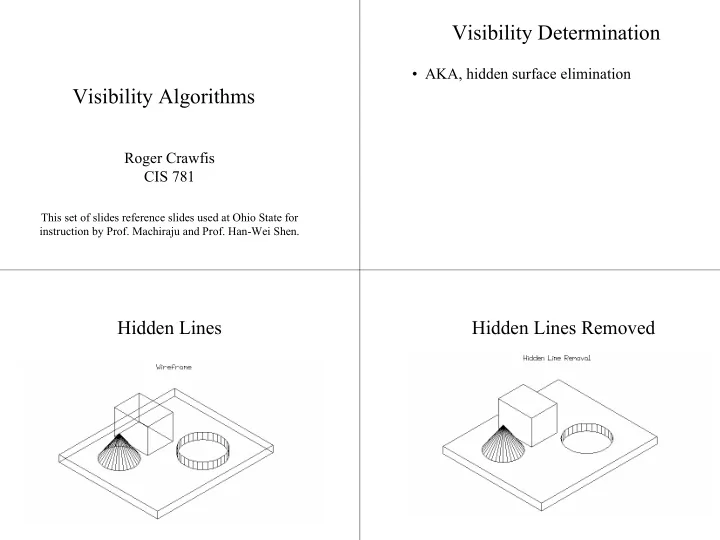
Visibility Determination

  • AKA, hidden surface elimination

Hidden Lines Hidden Lines Removed

slide-2
SLIDE 2

Hidden Surfaces Removed

Backface Culling Hidden Object Removal: Painters Algorithm Z-buffer Spanning Scanline Warnock Atherton-Weiler List Priority, NNA BSP Tree Taxonomy

Topics Where Are We ?

Canonical view volume (3D image space) Clipping done division by w z > 0

x y z

near far clipped line 1 1 1

x y z

image plane near far clipped line

Back-face Culling

Problems ? Conservative algorithm Real job of visibility never solved

slide-3
SLIDE 3

Back-face Culling

  • If a surface’s normal is pointing in the same general

direction as our eye, then this is a back face

  • The test is quite simple: if N * V > 0 then we reject the

surface

  • If test is in eye-

space, then if Nz > 0 reject.

Back-face Culling

  • Only handles faces oriented

away from the viewer:

– Closed objects – Near clipping plane does not intersect the objects

  • Gives complete solution for a single convex

polyhedron.

  • Still need to sort, but we have reduced the number
  • f primitives to sort.

Painters Algorithm

Sort objects in depth order Draw all from Back-to-Front (far-to-near)

Simply overwrite the existing pixels.

Is it so simple? at z = 22, at z = 18, at z = 10, X Y

Point sorting vs Polygon Sorting

  • What does it mean to sort two line

segments?

– Zmin? – Zmax? – Slope? – Length?

z

slide-4
SLIDE 4

3D Cycles

How do we deal with cycles? How do we deal with intersections? How do we sort objects that overlap in Z? Z

Form of the Input

Object types: what kind of objects does it handle? convex vs. non-convex polygons vs. everything else - smooth curves, non- continuous surfaces, volumetric data Object Space Geometry in, geometry out Independent of image resolution Followed by scan conversion

Form of the output

Image Space Geometry in, image out Visibility only at pixel centers

Precision: image/object space?

Object Space Algorithms

Volume testing – Weiler-Atherton, etc. input: convex polygons + infinite eye pt

  • utput: visible portions of wireframe edges
slide-5
SLIDE 5

Image-space algorithms

Traditional Scan Conversion and Z-buffering Hierarchical Scan Conversion and Z-buffering input: any plane-sweepable/plane-boundable

  • bjects

preprocessing: none

  • utput: a discrete image of the exact visible set

Conservative Visibility Algorithms

Viewport clipping Back-face culling Warnock's screen-space subdivision

Z-buffer

Z-buffer is a 2D array that stores a depth value for each pixel. InitScreen: for i := 0 to N do for j := 1 to N do Screen[i][j] := BACKGROUND_COLOR; Zbuffer[i][j] := ∞; DrawZpixel (x, y, z, color) if (z <= Zbuffer[x][y]) then Screen[x][y] := color; Zbuffer[x][y] := z;

Z-buffer: Scanline

  • I. for each polygon do

for each pixel (x,y) in the polygon’s projection do z := -(D+A*x+B*y)/C; DrawZpixel(x, y, z, polygon’s color);

  • II. for each scan-line y do

for each “in range” polygon projection do for each pair (x1, x2) of X-intersections do for x := x1 to x2 do z := -(D+A*x+B*y)/C; DrawZpixel(x, y, z, polygon’s color); If we know zx,y at (x,y) then: zx+1,y = zx,y - A/C

slide-6
SLIDE 6

Incremental Scanline

On a scan line Y = j, a constant Thus depth of pixel at (x1=x+∆x,j) ≠ + + − = = + + + C C D By Ax z D Cz By Ax , ) ( x C A z z C x x A z z C D Bj Ax C D Bj Ax z z ∆ − = − = − + + − + + + − = − ) ( ) ( ) ( ) (

1 1 1 1 1

, since ∆x = 1, C A z z − =

1

Incremental Scanline (contd.)

All that was about increment for pixels on each scanline. How about across scanlines for a given pixel ? Assumption: next scanline is within polygon y C B z z C y y A z z C D By Ax C D By Ax z z ∆ − = − = − + + + + + − = − ) ( ) ( ) ( ) (

1 1 1 1 1

, since ∆y = 1, C B z z − =

1

P1 P2 P3 P4 ys za zp zb

Non-Planar Polygons

Bilinear Interpolation of Depth Values

) ( ) ( ) ( ) ( ) ( ) ( ) ( ) ( ) (

b a p a a b a p s b s a

x x x x z z z z y y y y z z z z y y y y z z z z − − − + = − − − + = − − − + =

2 1 1 1 2 1 4 1 1 1 4 1

Z-buffer - Example

∞ ∞ ∞ ∞ ∞ ∞ ∞ ∞ ∞ ∞ ∞ ∞ ∞ ∞ ∞ ∞ ∞ ∞ ∞ ∞ ∞ ∞ ∞ ∞ ∞ ∞ ∞ ∞ ∞ ∞ ∞ ∞ ∞ ∞ ∞ ∞ ∞ ∞ ∞ ∞ ∞ ∞ ∞ ∞ ∞ ∞ ∞ ∞ ∞ ∞ ∞ ∞ ∞ ∞ ∞ ∞ ∞ ∞ ∞ ∞ ∞ ∞ ∞ ∞ Z-buffer Screen

slide-7
SLIDE 7

[0,1,5] [0,7,5] [6,7,5] 5 5 5 5 5 5 5 5 5 5 5 5 5 5 5 5 5 5 5 ∞ 5 5 ∞ ∞ 5 ∞ ∞ ∞ ∞ ∞ ∞ ∞ 5 5 5 ∞ 5 5 ∞ ∞ 5 ∞ ∞ ∞ ∞ ∞ ∞ ∞ ∞ ∞ ∞ ∞ ∞ ∞ ∞ ∞ ∞ ∞ ∞ ∞ ∞ ∞ ∞ ∞ 5 5 5 5 5 5 5 5 5 5 5 5 5 5 5 5 5 5 5 5 5 5 5 5 5 5 5 5 [0,1,2] [0,6,7] [5,1,7] 2 3 4 5 3 4 5 6 4 5 6 7 5 6 7 6 7 7 6 7 7 5 5 5 5 5 5 5 5 5 5 5 5 5 5 5 5 4 5 5 7 3 4 5 6 2 3 4 5 ∞ ∞ ∞ ∞ 5 5 5 ∞ 5 5 ∞ ∞ 5 ∞ ∞ ∞ ∞ ∞ ∞ ∞ ∞ ∞ ∞ ∞ 7 ∞ ∞ ∞ 6 7 ∞ ∞ ∞ ∞ ∞ ∞

Rectangle: P1(10,5,10), P2(10,25,10), P3(25,25,10), P4(25,5,10) Triangle: P5(15,15,15), P6(25,25,5), P7(30,10,5) Frame Buffer: Background 0, Rectangle 1, Triangle 2 Z-buffer: 32x32x4 bit planes

Non Trivial Example ? Example

slide-8
SLIDE 8

Z-Buffer Advantages

Simple and easy to implement Amenable to scan-line algorithms Can easily resolve visibility cycles Handles intersecting polygons

Z-Buffer Disadvantages

Does not do transparency easily Aliasing occurs! Since not all depth questions can be resolved Anti-aliasing solutions non-trivial Shadows are not easy Higher order illumination is hard in general

Spanning Scan-Line

Can we do better than scan-line Z-buffer ? Scan-line z-buffer does not exploit Scan-line coherency across multiple scan-lines Or span-coherence ! Depth coherency How do you deal with this – scan-conversion algorithm and a little more data structure

Spanning Scan Line Algorithm

  • Use no z-buffer
  • Each scan line is subdivided into

several "spans"

  • Determine which polygon the

current span belongs to

  • Shade the span using the current

polygon’s color

  • Exploit "span coherence" :
  • For each span, only one visibility

test needs to be done

– Assuming no intersecting polygons.

slide-9
SLIDE 9

Spanning Scan Line Algorithm

  • A scan line is subdivided into a sequence of spans
  • Each span can be "inside" or "outside" polygon

areas

– "outside“: no pixels need to be drawn (background color) – "inside“: can be inside one or multiple polygons

  • If a span is inside one polygon, the pixels in the

span will be drawn with the color of that polygon

  • If a span is inside more than one polygon, then we

need to compare the z values of those polygons at the scan line edge intersection point to determine the color of the pixel

Spanning Scan Line Algorithm Determine a span is inside or

  • utside (single polygon)
  • When a scan line intersects an edge of a

polygon

– for a 1st time, the span becomes "inside" of the polygon from that intersection point on – for a 2nd time, the span becomes "outside“ of the polygon from that point on

  • Use a "in/out" flag for each polygon to keep

track of the current state

  • Initially, the in/out flag is set to be "outside"

(value = 0 for example). Invert the tag for “inside”.

When there are multiple polygons

  • Each polygon will have its own in/out flag
  • There can be more than one polygon having

the in/out flags to be "in" at a given instance

  • We want to keep track of how many polygons

the scan line is currently in

  • If there is more than one polygon "in", we

need to perform z value comparison to determine the color of the scan line span

slide-10
SLIDE 10

Z value comparison

  • When the scan line intersects an edge, leaving the

top-most polygon, we use the color of the remaining polygon if there is now only 1 polygon "in".

  • If there is still more than one polygon with an "in" flag,

we need to perform z comparison, but only when the scan line leaves a non-obscured polygon.

x ymax ∆x poly-ID ET PT poly-ID A,B,C,D color in/out flag

Many Polygons !

Use a PT entry for each polygon When polygon is considered, Flag is true Multiple polygons can have their flags set to true Use IPL as active In-Polygon List !

S T

a b c 1 2 3 X0 I III II IV XN

BG

Think of ScanPlanes to understand !

Example Spanning Scan-Line: Example

Y AET IPL I x0, ba , bc, xN BG, BG+S, BG II x0, ba , bc, 32, 13, xN BG, BG+S, BG, BG+T, BG III III x x0

0,

, ba ba , 32, ca, 13, , 32, ca, 13, x xN

N

BG, BG+S, BG+S+T, BG+T, BG BG, BG+S, BG+S+T, BG+T, BG IV x0, ba , ac, 12, 13, xN BG, BG+S, BG, BG+T, BG

S T

a b c 1 2 3 I III II IV

BG
slide-11
SLIDE 11

Scan Line I: Polygon S is in and flag of S=true ScanLine II: Both S and T are in and flags are disjointly true Scan Line III: Both S and T are in simultaneously Scan Line IV: Same as Scan Line II

Some Facts ! Spanning Scan-Line

build ET, PT

  • - all polys+BG poly

AET := IPL := Nil; for y := ymin to ymax do e1 := first_item ( AET );IPL := BG; while (e1.x <> MaxX) do e2 := next_item (AET); poly := closest poly in IPL at [(e1.x+e2.x)/2, y] draw_line(e1.x, e2.x, poly-color); update IPL (flags); e1 := e2; end-while; IPL := NIL; update AET; end-for;

Depth Coherence

  • Depth relationships may not change

between polygons from one scan-line to the next scan-line.

  • These can be kept track using the

(active edge table) AET and the (polgon table) PT.

  • How about penetrating polygons?

Penetrating Polygons

Y AET IPL I x0, ba , 23, ad, 13, xN BG, BG+S, S+T, BG+T,BG I’ x0, ba , 23, ec, ad, 13, xN BG, BG+S, BG+S+T, BG+S+T, BG+T, BG

S

I

T

a 2

BG

b c 3 d e 1

False edges and new polygons!

slide-12
SLIDE 12

surround intersect contained disjoint

Area Subdivision 1 (Warnock’s Algorithm)

Divide and conquer: the relationship of a display area and a polygon after projection is one of the four basic cases:

Warnock : One Polygon

if it surrounds then draw_rectangle(poly-color); else begin if it intersects then poly := intersect(poly, rectangle); draw_rectangle(BACKGROUND); draw_poly(poly); end else; What about contained and disjoint ?

Warnock’s Algorithm

  • Starting with the entire display, we check the following

four cases. If none hold, we subdivide the area and repeat, otherwise, we stop and perform the action associated with the case

  • 1. All polygons are disjoint wrt the area -> draw the background color
  • 2. Only 1 intersecting or contained polygon -> draw background, and

then draw the contained portion of the polygon

  • 3. There is a single surrounding polygon -> draw the entire area in

the polygon’s color

  • 4. There are more than one intersecting, contained, or surrounding

polygons, but there is a front surrounding polygon -> draw the entire area in the polygon’s color

  • The recursion stops at the pixel level

At A Single Pixel Level

  • When the recursion stops and none of the

four cases hold, we need to perform a depth sort and draw the polygon with the closest Z value

  • The algorithm is done at the object space

level, except scan conversion and clipping are done at the image space level

slide-13
SLIDE 13

1 M 1 1 1 1 M M M

Warnock : Zero/One Polygons

warnock01(rectangle, poly) new-poly := clip(rectangle, poly); if new-poly = NULL then draw_rectangle(BACKGROUND); else draw_rectangle(BACKGROUND); draw_poly(new-poly); return; surround intersect contained disjoint 1-polygon 0-polygon

Warnock(rectangle, poly-list)

new-list := clip(rectangle, poly-list); if length(new-list) = 0 then draw_rectangle(BACKGROUND); return; if length(new-list) = 1 then draw_rectangle(BACKGROUND); draw_poly(poly); return; if rectangle size = pixel size then poly := closest polygon at rectangle center draw_rectangle(poly color); return; warnock(top-left quadrant, new-list); warnock(top-right quadrant, new-list); warnock(bottom-left quadrant, new-list); warnock(bottom-right quadrant, new-list);

slide-14
SLIDE 14

1 1 1 M M 1 1 M M M 1 1 1 1 1 1 M M M M M M M M M M M M M M M M

Area Subdivision 2 Weiler -Atherton Algorithm

Object space Like Warnock Output – polygons of arbitrary accuracy

slide-15
SLIDE 15

Weiler-Atherton Clipping

  • General polygon clipping algorithm
  • Allows one to clip a concave polygon

against another concave polygon.

Weiler-Atherton Clipping

  • First, find all of the intersection points

between edges of the two polygons.

A B C D E a b c d e

S T

1 2 3 4 5 6

S: A,B,C,D,E T: a,b,c,d,e

Weiler-Atherton Clipping

  • Now, rebuild the polygon’s such that they

include the intersection points in their clock-wise ordering.

A B C D E a b c d e

S T

S: A,1,4,B,2,6,C,D,5,3,E T: a,4,2,b,6,c,5,d,e,3,1

1 2 3 4 5 6

Weiler-Atherton Clipping

  • Find an intersecting vertex of the polygon to be

clipped that starts outside and goes inside the clipping region.

  • Traverse the polygon until another intersection

point is found.

A B C D E a b c d e

S T

S: A,1,4,B,2,6,C,D,5,3,E T: a,4,2,b,6,c,5,d,e,3,1

Clip: 6,c,5,…

1 2 3 4 5 6

slide-16
SLIDE 16

Weiler-Atherton Clipping

  • Switch from walking around the polygon 1, to

walking around polygon 2, when an intersection is detected.

  • Stop when we reached the initial point.

A B C E a b c d e

S T

S: A,1,4,B,2,6,C,D,5,3,E T: a,4,2,b,6,c,5,d,e,3,1

Clip: 6,c,5,3,1,4,2,6

1 2 3 4 5 6

Weiler -Atherton Algorithm

  • Subdivide along polygon boundaries (unlike Warnock’s

rectangular boundaries in image space);

  • Algorithm:
  • 1. Sort the polygons based on their minimum z distance
  • 2. Choose the first polygon P in the sorted list
  • 3. Clip all polygons left against P, create two lists:

– Inside list: polygon fragments inside P (including P) – Outside list: polygon fragments outside P

  • 4. All polygon fragments on the inside list that are behind P

are discarded. If there are polygons on the inside list that are in front of P, go back to step 3), use the ’offending’ polygons as P

  • 5. Display P and go back to step (2)

Weiler -Atherton Algorithm

WA_display(polys : ListOfPolygons) sort_by_minZ(polys); while (polys <> NULL) do WA_subdiv(polys->first, polys) end; WA_subdiv(first: Polygon; polys: ListOfPolygons) inP, outP : ListOfPolygons := NULL; for each P in polys do Clip(P, first->ancestor, inP, outP); for each P in inP do if P is behind (min z)first then discard P; for each P in inP do if P is not part of first then WA_subdiv(P, inP); for each P in inP do display_a_poly(P); polys := outP;

t r t r 1 3 2

slide-17
SLIDE 17

0.2 0.5 0.3 0.8

List Priority Algorithms

  • Find a valid order for rendering.
  • Only consider cases where the sort matters.

List Priority Algorithms

If objects do not overlap in X or in Y there is no need for hidden object removal process. If they do not overlap in the Z dimension they can be sorted by Z and rendered in back (highest priority)-to- front (lowest priority) order (Painter’s Algorithm). It is easy then to implement transparency. How do we sort ? – different algorithms differ

z x/y 1 2 3 4 4

z x/y 1 2 ?

slide-18
SLIDE 18

Newell, Newell, Sancha Algorithm

  • 1. Sort by [minz..maxz] of each polygon
  • 2. For each group of unsorted polygons G

resolve_ambiguities(G);

  • 3. Render polygons in a back-to-front order.

resolve_ambiguities is basically a sorting algorithm that relies on the procedure rearrange(P, Q): resolve_ambiguities(G) not-yet-done := TRUE; while (not-yet-done) do not-yet-done := FALSE; for each pair of polygons P, Q in G do --- bubble sort L := rearrange(P, Q, not-yet-done); insert L into G instead of P,Q

Newell, Newell, Sancha Algorithm

rearrange(P, Q, flag) if (P and Q do not have overlapping x-extents, return P, Q if (P and Q do not have overlapping y-extents, return P, Q if all Q is on the opposite side of P from the eye return P, Q if all P is on the same side of Q from the eye return P, Q if not overlap-projection(P, Q) return P, Q flag := TRUE; // more work is needed if all Q is on the same side of P from the eye return Q, P if all P is on the opposite side of Q from the eye return Q, P split(P, Q, p1, p2);

  • - split P by Q

return (p1, p2, Q);

Newell-Newell-Sancha Sorting

  • Q is on the opposite side of P.
  • Means, all of Q’s vertices are behind the

half-plane defined by P.

P Q P Q

True False

P Q P Q

Newell-Newell-Sancha Sorting

  • P is on the same side of Q.
  • Means, all of P’s vertices are in front of the

half-plane defined by Q.

False True

slide-19
SLIDE 19

Taxonomy

Apel, Weiler-Atherton List priority Image Space edge Object space volume Roberts Newell Warnock Span-line Algorithms A’priori Dynamic Area Point A characterization of 10 Hidden Surface Algorithm: Sutherland, Sproull, Schumaker (1974)

Spatial Subdivision

  • Uniform grid
  • Octrees
  • K-d Trees
  • BSP-trees
  • Non-overlapping polyhedra

– Axis-Aligned Bounding Boxes (AABB’s) – Oriented Bounding Boxes (OBB’s) – Useful for non-static scenes

Back-to-front Traversals

  • For the first four, you can develop either a

front-to-back or back-to-front traversal

  • rder explicitly.
  • Thereby, solving the visibility sort

efficiently.

  • For the polyhedra, use a Newell-Newell-

Sancha sort.

Sorting for Uniform Grid

  • Parallel Projection

– Can always proceed along the x-axis, then y- axis then z-axis or any combination. – Simply need to decide whether to go forward or backward on each axis.

  • Look at the z-value of the transformed x-axis, …
  • Positive, go forward for back-to-front sort.

– Better ordering would choose the axis most parallel to the viewing direction to traverse last.

slide-20
SLIDE 20

Sorting for Uniform Grid

  • Perspective projection

– May need to proceed forward for part of the grid and backwards for the other.

K-d Trees

X

  • Alternate splits in each direction

Alternate splits in each direction

Split X axis Split Y axis

K-d Trees

  • Extend to any dimension d
  • In 3D, the splits are done with axis-aligned

planes.

– Test is simple, is x-value (for nodes splitting the x-axis) greater than the node value?

K-d Trees

  • A subset of BSP-trees.
  • Sorting is the same.
  • More efficient storage representation.
slide-21
SLIDE 21

Binary Space-Partitioning Tree

Given a polygon p Two lists of polygons: those that are behind(p) :B those that are in-front(p) :F If eye is in-front(p), right display order is B, p, F Otherwise it is F, p, B

B p F p B F

back front

Bf Bb p F Bb Bf B

Display a BSP Tree

struct bspnode { p: Polygon; back, front : *bspnode; } BSPTree; BSP_display ( bspt ) BSPTree *bspt; { if (!bspt) return; if (EyeInfrontPoly( bspt->p )) { BSP_display(bspt->back);Poly_display(bspt->p); BSP_display(bspt->front); } else { BSP_display(bspt->front); Poly_display(bspt->p); BSP_display(bspt->back); } }

Generating a BSP Tree

if (polys is empty ) then return NULL; rootp := first polygon in polys; for each polygon p in the rest of polys do if p is infront of rootp then add p to the front list else if p is in the back of rootp then add p to the back list else split p into a back poly pb and front poly pf add pf to the front list add pb to the back list end_for; bspt->back := BSP_gentree(back list); bspt->front := BSP_gentree(front list); bspt->p = rootp;return bspt;

slide-22
SLIDE 22

3 4, 5b 1 2 3 4 5 a b 1 5a 3 1 2 3 4 5 a b 1 5a 3 1, 2, 5a 4, 5b 1 2 3 4 5 a b 2 2 5b 4