V& V&V V Version 1.9, May 2013 The whole picture - - PDF document

v v v v
SMART_READER_LITE
LIVE PREVIEW

V& V&V V Version 1.9, May 2013 The whole picture - - PDF document

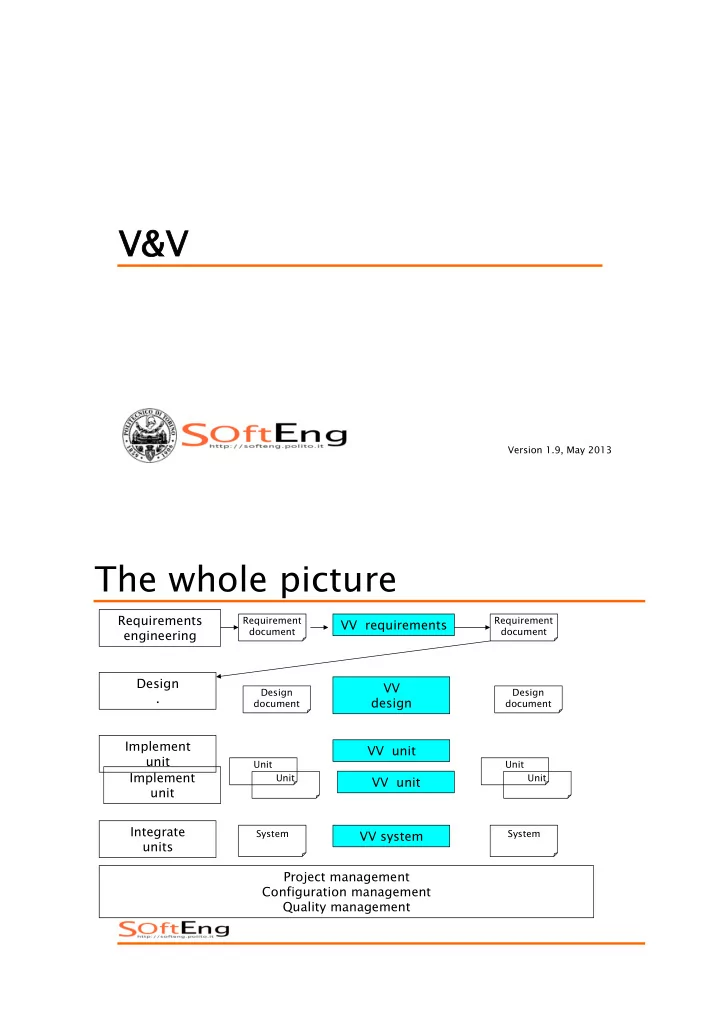
V& V&V V Version 1.9, May 2013 The whole picture Requirements Requirement Requirement VV requirements document document engineering Design VV Design Design . design document document Implement VV unit unit Unit Unit


slide-1
SLIDE 1

V& V&V V

Version 1.9, May 2013

The whole picture

Integrate units Design . Requirements engineering

Requirement document Design document Unit Unit System

Implement unit Implement unit VV system VV design VV requirements VV unit VV unit

Requirement document Design document Unit Unit System

Project management
 Configuration management
 Quality management

slide-2
SLIDE 2

V&V

! Validation

" is it the right software system? " effectiveness " external (vs user) " reliability

! Verification

" is the software system right? " efficiency " internal (correctness of vertical transformations) " correctness

3

Scenario1 in a dev process

! Stakeholder

" Real need: big car /6 seats

! Developers

" R1: compact car (4 seats) " Result : compact car (4 seats)

– Verification: passed – Validation : not passed

slide-3
SLIDE 3

Scenario2 in a dev process

! Stakeholder

" Real need: big car /6 seats

! Developers

" R1: big car (6 seats) " Result : big car (6 seats)

– Verification: passed – Validation : passed

Scenario3 in a dev process

! Stakeholder

" Real need: big car /6 seats

! Developers

" R1: big car (6 seats) " Result : compact car (4 seats)

– Verification: not passed – Validation : passed

slide-4
SLIDE 4

Requirements

! The root… …of all evils

7

slide-5
SLIDE 5

V & V

validation stakeholders Design 
 document Requirement document Unit

Unit

System verification

Traceability

Requirement Design Item Code Fragment Use case Test case Test result Failure if( i = j ){ …

10

slide-6
SLIDE 6

V & V vs. cost of fixing defect

Design 
 document Requirement document Unit

Unit

System Cost of fixing
 defect

Cost of detection delay

!" #$" $!" %$"

&'()*+','-./" 0+12*.'1.)+'" 34-/.+)154-" 67/.',"8'/." 94/.:&';'</'"

&'()*+','-./" 0+12*.'1.)+'" 34-/.+)154-"

12

slide-7
SLIDE 7

Failure, fault, defect

! Failure

" An execution event where the software behaves in an unexpected way

! Fault

" The feature of software that causes a failure " May be due to:

– An error in software – Incomplete/incorrect requirements

! Defect

" Failure or fault

Failure, fault, defect

! Error

" A mistake e.g. committed by a programmer

! Fault or Defect or Bug

" The feature of software that causes a failure " The result of an error

! Failure

" An execution event where the software behaves in an unexpected way

14

slide-8
SLIDE 8

Error Defect Failure

Error Defect Failure Causes Causes

15

Bicycle

! Failure Requirements

" User falls down R1 transport person " R1 not satisfied

! Why? ! Fault Design

" Hole in tyre component fails

slide-9
SLIDE 9

Failure fault defect

Fault Failure causes 1, * 0,* Defect

Insertion / removal

! Defect is characterized by

" Insertion activity (phase) " Removal activity (phase)

time removal insertion discover

slide-10
SLIDE 10

Basic goal of VV

! Minimize number of defects inserted

" Cannot be zero due to inherent complexity of software

! Maximize number of defects discovered and removed ! Minimize time span between insertion and discover and removal

Insertion/removal by phase – typical scenario

2 4 6 8 10 12 14 16 18 Requirements Design Code Unit test Integration test System test Operation

Defects/KLOC

Injected Discovered

slide-11
SLIDE 11

Rework Problem

! The longer the delay insert-remove, the higher the cost of removing defect ! Avoidable rework accounts for 40-50% of development 
 [Boehm, 1987; Boehm&Basili, 2001]

" More recent data available at www.cebase.org

Basic goal of VV

! Minimize number of defects inserted

" Cannot be zero due to inherent complexity of software

! Maximize number of defects discovered and removed ! Minimize time span between insertion and discover and removal

22

slide-12
SLIDE 12

V&V techniques

! Static

" inspections " source code analysis

! Dynamic

" testing

INSPEC ECTIONS

slide-13
SLIDE 13

Inspections

! Static

" inspections " source code analysis

! Dynamic

" testing

Inspections

Integrate units Design . Requirements engineering

Requirement document Design document Unit Unit System

Implement unit Implement unit VV system VV design VV requirements VV unit VV unit

Requirement document Design document Unit Unit System

Project management
 Configuration management
 Quality assurance

slide-14
SLIDE 14

Inspection

! Consists in

" reading documents/code " By a group of people (3+, group dynamics) " With goal of finding defects (no correction)

! Variants of inspections

– Reading techniques, walkthroughs, reviews

! Can find many defects

– Test concentrates one defect at a time

Inspection

! Advantages

" Can be applied to documents

– Requirements, design, test cases, ..

" Can be applied to code

– Does not require execution environment

" Is very effective

– Reuses experience and know of people on domain and technologies – Has more global view (vs test: one defect at a time) – Uses group dynamics

! Limits

" More suitable for functional aspects " Requires time (effort and calendar time)

slide-15
SLIDE 15

Benefits

! Early defect detection improves product quality and reduces avoidable rework (down to 10-20%) " Data from industry averages [Capers Jones, 1991]

– more data available at www.cebase.org

Requirements Insp. Design Insp. Code Insp. Unit Test Insp. Integration Test Insp. System Test Insp.

5 (20) 8 (40) 15 (100) 7 (50) 3 (20) 1 (10)

Defects per KLOC passed without inspection Defects per KLOC passed with inspection

Rework Costs

Inspection vs. testing

! Complementary techniques

" Both should be used in V and V

slide-16
SLIDE 16

Roles in group

" Moderator:

– Leads inspection process and notably inspection meeting

– Selects participants, prepares material – Usually not from project that produces document to be inspected

" Readers:

– Read document to be inspected

" Author

– Answers to questions that arise

" Scribe

– Writes inspection log

Fagan Inspection Process

! Select team, arrange materials, schedule dates ! Present process, product ! Become familiar with th th the product
 ! Team analysis to to find defects ts ! Correct defects ! Verify fixes, collect data

Planning Overview Preparation Inspection Meeting Rework Follow-Up Preparation Preparation

Inspectors are

  • ften unprepared.

How to make visible the quality of preparation?

slide-17
SLIDE 17

Process

" Overview

– Quickly present inspection to group goals and document to be inspected

" Preparation

– Read individually (applying inspection technique)

" Meeting

– Group reads, discusses issues, agrees on

  • problems. Scribe logs problems. Moderator keeps

focus, keeps pace, stops (long) discussions

" Rework

– Author fixes defects/problems

" Follow up

– Repeat inspection or close and pass to next phase

Prerequisites for successful inspections

! Commitment from management

" Effort invested upfront, that “does not produce anything”

! Find defects, not fix them ! Document under inspection meets quality standards ! Results not used to evaluate people (and notably author) ! Constructive approach

" Group aims to produce best possible document

– No “kill the author” game – No “relax and chat” meetings
slide-18
SLIDE 18

Rates (code inspections)

! 500 LOC/hour (overview) ! 125 LOC/hour (preparation) ! 90-125 LOC/hour (meeting)

" Ex. 500 LOCs, 4 people, 40 person hours

– Overview 1hr X 4= 4person hours – Preparation 4hr X 4 = 16 person hours – Meeting 5hr X 4 = 20 person hours

Techniques

" Depend on document to be inspected " Ad hoc (code, requirements, design)

– Just read it

" Defect taxonomy (code, requirements, design)

– Categories of common defects

" Checklist (code, requirements, design)

– Questions/controls to be applied

" Code

– Author or reader ‘executes’ code – Reader reconstructs goal of code from code – Reader defines and applies some test cases

" Requirements

– Scenario based reading

– Defect based – Perspective based

slide-19
SLIDE 19

Defect Taxonomies for Requirements

One level 


[Basili et al., 1996] ! Omission ! Incorrect Fact ! Inconsistency ! Ambiguity ! Extraneous Information

Two levels 


[Porter et al., 1995] ! Omission

" Missing Functionality " Missing Performance " Missing Environment " Missing Interface

! Commission

" Ambiguous Information " Inconsistent Information " Incorrect or Extra Functionality " Wrong Section

Checklists for Requirements

! Based on past defect information ! Questions refine a defect taxonomy

[Ackerman et al., 1989] " Completeness

  • 1. Are all sources of input identified?

  • 12. For each type of run, is an output value specified for each

input value? ...

" Ambiguity

  • 18. Are all special terms clearly defined?

...

" Consistency

slide-20
SLIDE 20

Checklists for code

! Depends on programming language ! Depends on previous results of inspections

Inspection checks

Fault class Inspection check Data fa ults Are all program variables initialised before their values are used? Have all constants been named? Should the lower bound of arrays be 0, 1, or something else? Should the upper bound of arrays be equal to the size of the array or Size -1? If character strings are used, is a delimiter explicitly assigned? Control faults For each conditional statement, is the condition correct? Is each loop certain to terminate? Are compound statements correctly bracketed? In case statements, are all possible cases accounted for? Input/output faults Are all input variables used? Are all output variables assigned a value before they are

  • utput?

Interface faults Do all function and procedure calls have the correct number of parameters? Do formal and actual parameter types match? Are the parameters in the right order? If components access shared memory, do they have the same model of the shared memory struc ture? Storage management faults If a linked structure is modified, have all links been correctly reassigned? If dynamic storage is used, has space been allocated correctly? Is space explicitly de-allocated after it is no longer required? Exception management faults Have all possible error conditions been taken into account?

slide-21
SLIDE 21

Scenario based reading

" Ask inspectors to create an appropriate abstraction

– Help to understand the product

" Ask inspectors to answer a series of questions tailored to the abstraction Inspectors follow different scenarios each focusing on specific issues

Defect-Based Reading

[Porter et al., 1995] ! A scenario-based reading technique to detect defects in requirements expressed in a formal notation (SCR) ! Each scenario focuses on a specific class of defects

" data type inconsistencies " incorrect functionality " ambiguity/missing functionality

Excerpt from incorrect functionality scenario

  • 1. For each functional requirement identify all input/output data objects:

questions ...

  • 2. For each functional requirement identify all specified system events:

(a) Is the specification of these events consistent with their intended interpretation?

  • 3. Develop an invariant for each system mode:

questions ...

slide-22
SLIDE 22

Perspective-Based Reading

[Basili et al., 1996] ! A scenario-based reading technique to detect defects in requirements expressed in natural language

" extended later for design and source code

! Each scenario focuses on reviewing the document from the point of view of a specific stakeholder

" User (abstraction required: user tasks descriptions) " Designer (abstraction required: design) " Tester (abstraction required: test suite)

For each requirement/functional specification, generate a test or set

  • f tests that allow you to ensure that an implementation of the

system satisfies the requirement/functional specification. Use your standard test approach and technique, and incorporate test criteria in the test suite. In doing so, ask yourself the following questions for each test: questions ...

TES ESTING

slide-23
SLIDE 23

Testing

! Static

" inspections " source code analysis

! Dynamic

" testing

Testing

! Dynamic technique, requires execution

  • f executable system or executable

unit

" system test " unit test

slide-24
SLIDE 24

Purpose of test

! The purpose of testing process is to find defects in the software products

" A test is successful if it reveals a defect

! The process of operating a system or component under specified conditions

  • bserving or recording the results to

detect the differences between actual and required behavior (= failures)

Testing vs. debugging

! Defect testing and debugging are different activities

" May be performed by different roles in different times

! Testing tries to find failures ! Debugging searches for and removes the fault

slide-25
SLIDE 25

Traceability

Requirement Design Item Code Fragment Use case Test case Test result Failure if( i = j ){ …

49

Debugging

Locate fault Test case result (failure) Design fault repair Repair (code) Re-test Test suite Design doc

slide-26
SLIDE 26

Test case

! Certain stimulus applied to executable (system or unit), composed of

" name " input (or sequence of) " expected output

! With defined constraints/context

" ex. version and type of OS, DBMS, GUI ..

Test suite

! Set of (related) test cases

slide-27
SLIDE 27

Test case log

! Test case ref. +

" Time and date of application " Actual output " Result (pass / no pass)

Ex.

! Function add(int x, int y) ! Test case:

" T1(1,1; 2) " T2(3,5; 8)

! Test suite

" TS1{T1, T2}

! Test log

" T1, 16-3-2013 9:31, result 2, success " T2, 16-3-2013 9:32, result 9, fail

slide-28
SLIDE 28

Test activities

! Write test cases

" Test case, test suite

! Run test case (test suite) ! Record results

" Test case log

Test activities

Write tests Requirement doc, design doc Run tests Record results Test case, test suite Test log Code

slide-29
SLIDE 29

Possible scenario

Developer team Tester team

Write tests Run tests Record results Write code, informally test Debug

Scenario 2

Developer team

Write tests Run tests Record results Write code, informally test Debug

slide-30
SLIDE 30

Scenario 3

Developer team Tester team Tester team 
 (3rd party)

Write code, informally test Write tests Run tests Record results Write tests Run tests Record results Debug

Oracle

Test Case Software under test Oracle Comparator Actual


  • utput

Expected


  • utput

Test
 result

slide-31
SLIDE 31

Oracle

! The ideal condition would be to have an automatic oracle and an automatic comparator

" The former is very difficult to have " The latter is available only in some cases

! A human oracle is subject to errors ! The oracle is based on the program specifications (which can be wrong)

Oracle

! Necessary condition to perform testing:

" Know the expected behavior of a program for a given test case (oracle)

! Human oracle

" Based on req. specification or judgment

! Automatic oracle

" Generated from (formal) req. specification " Same software developed by other parties " Previous version of the program (reg regression ression)

slide-32
SLIDE 32

Theory and constraints Exhaustive test

slide-33
SLIDE 33

Correctness

! Correct output for all possible inputs ! Requires exhaustive testing

Exhaustive test

! function: Y = A + B ! A and B integers, 32 bit ! Total number of test cases : 232 * 232 = 264 ≈ 1020 !

1 ms/test ⇒ 3 billion years

slide-34
SLIDE 34

Pentium case – 1994

! Error in division function ! 1 case in 9 billion

Exhaustive test

! 5 possible paths per iteration ! 20 iterations ! Overall: 520 ≈ 1014 possible paths ! 1 ms/test ⇒ 3170 years

20 iterations

slide-35
SLIDE 35

Exhaustive test

! Exhaustive test is not possible ! So, goal of test is finding defects, not demonstrating that systems is defect free ! Goal of test (and VV in general) is assuring a good enough level of confidence

Dijkstra thesis

! Testing can only reveal the presence

  • f errors, never their absence
  • E. W. Dijkstra. Notes on Structured Programming. 


In Structured Programming, O.-J. Dahl, E. W. Dijkstra, and C. A.

  • R. Hoare, Eds. Academic, New York, 1972, pp. 1–81.
slide-36
SLIDE 36

Basic concepts

! D: program domain (input) ! d ∈ D, P(d) is the program output ! OK(d) # P(d) corresponds to oracle ! Test: T ⊆ D ! SUCC(T) ⇔ ∀ t ∈ T, OK(t)

  • J. B. Goodenough and S. L. Gerhart. Toward a Theory of Test Data
  • Selection. IEEE Transactions on Software Engineering, June 1975, pp.

26–37.

Criteria

! Tests can be selected by means of different criteria ! C : selection criterion for tests ! COMPLETE(T,C): T is selected by C

slide-37
SLIDE 37

Validity

! ∃d ∈ D, ¬OK(d) ⇒ (∃T ⊆ D) COMPLETE(C,T) ∧ ¬SUCC(P,T)) ! Valid Criterion:

" C is valid if and only if whenever P is incorrect C selects at least one test set T which is not successful for P.

Reliability

! ∀T1,∀T2 ⊆ D, 
 COMPLETE(C,T1) ∧ COMPLETE(C,T2)) ⇒ SUCC(T1) ⇔ SUCC(T2) ! Reliable Criterion:

" C is reliable if and only if either every test selected by C is successful or no test selected is successful.

slide-38
SLIDE 38

Fundamental theory

! Theorem (∃T ⊆D)(COMPLETE(T,C)∧RELIABLE(C)∧ VALID(C) ∧ SUCC(T)) ⇒ 
 (∀d ∈ D)OK(d) ! The success of a test T selected by a reliable and valid criterion implies the correctness of T

Uniformity

! Criterion uniformity focuses on program specification

" Not only program

! A criterion C is uniformly valid and uniformly reliable if and only if C selects only the single test set T = D

  • E. J. Weyuker and T. J. Ostrand. Theories of Program Testing and the

Application of Revealing Subdomains. IEEE Transactions on Software Engineering, May 1980, pp. 236–246.

slide-39
SLIDE 39

Howden theorem

! For an arbitrary program P it is impossible to find an algorithm that is able to generate a finite ideal test (that is selected by a valid and reliable criterion)

W.Howden. Reliability of the Path Analysis Testing Strategy. IEEE Transactions of Software Engineering, 2(3), September 1976, pp. 208-215

Brainerd Landweber

! Given two programs the problem of deciding whether they compute the same function is indecidible ! Therefore even if we have access to the archetype program we cannot demonstrate the equivalence of a new program

slide-40
SLIDE 40

Weinbergs law

! A developer is unsuitable to test his/ her own code ! Testing should be performed by

" A separate QA team " Peers

! If a developer misunderstands a problem, he cannot find such error

Pareto-Zipf law

! Approximately 80% of defects come from 20% of modules ! It is better to concentrate on the faulty modules

10 20 30 40 50 60 70 1 2 3 4 5 6 7 8 9 10

80

slide-41
SLIDE 41

Test classification

! Per phase/granularity level

" Unit, integration, system " Regression

! Per approach

" Black box (functional) " White box (structural) " Reliability assessment/prediction " Risk based (safety security)

slide-42
SLIDE 42

Test per granularity level/phase

! Unit tests

" Individual modules

! Integration tests

" Modules when working together

! System tests

" The system as a whole (usable system)

Test per phase

Integrate units Design . Requirements engineering

Requirement document Design document Unit Unit System

Implement unit Implement unit VV system VV design VV requirements VV unit VV unit

Requirement document Design document Unit Unit System

Project management
 Configuration management
 Quality assurance

Unit test, integration test System test,

slide-43
SLIDE 43

Test per approach

! Given an object/artifact to test, approach can be

" Requirements driven

– Are the requirements of the object satisfied?

" Structure

– Is the object built as it should?

" Reliability / statistic

– Does it satisfy the customer need? (use most common

  • perational scenarios)

" Risk

– Is it vulnerable to most likely risks?

Testing classification (2)

Pha Phase se Unit Integration System Functi tional / black box / black box X X X Str tructu tural / white te box X Reliability ty X Ris Risks ks X

slide-44
SLIDE 44

Test classification and coverage

Approach Testing phase Unit
 testing Integration testing System 
 testing

Requirements-driven 100% unit reqs 100% product reqs 100% system reqs Structure-driven 85% paths 100% modules 100% components Statistics-driven 90-100% of usage profiles Risk-driven As required As required 100% if required

Regression testing

Run tests

Test suite Element v. x Element v. x+1

Run tests

slide-45
SLIDE 45

UNIT TES EST

Unit Test

Integrate units Design . Requirements engineering

Requirement document Design document Unit Unit System

Implement unit Implement unit VV system VV design VV requirements VV unit VV unit

Requirement document Design document Unit Unit System

Project management
 Configuration management
 Quality assurance

slide-46
SLIDE 46

Unit test

! Black box (functional)

" Random " Equivalence classes partitioning " Boundary conditions

! White Box (structural)

" Coverage of structural elements

UNIT TES EST – – BLACK BOX X

slide-47
SLIDE 47

Random

! Function double squareRoot(double x)

– Extract randomly x

– T1 (3.0 ; √3) – T2 (1000.8 ; √1000.8) – T3 (-1223.7; error)

! Function double invert(double x)

– Extract randomly x

– T1 (1.0 ; 1.0) – T2 (-2.0 ; -0.5)

Random

! Pros

" Indipendent of requirements

! Cons

" Requires many test cases (easy to define the inputs, requires Oracle to compute the expected output)

slide-48
SLIDE 48

Equivalence classes partitioning

! Divide input space in partitions

" that have similar behavior from point of view of (requirements for) unit " Take one / two test cases per partition

! Boundary conditions

" Boundary between partitions " Take test cases on the boundary

Equivalence classes

System Outputs Invalid inputs Valid inputs

slide-49
SLIDE 49

Equivalence classes

! A class corresponds to set of valid or invalid inputs for a condition on the input variables

" If a test in a class has not success the

  • ther tests in the same class may have

the same behavior

Conditions

! Common conditions:

" Single value: age = 33 " Interval: age between 0 and 200 " Boolean: married = true or false " Discrete set: marital status = single, married, divorced

slide-50
SLIDE 50

Conditions and classes

Conditions Classes Example Single value Valid value, invalid values < value Invalid values > value Age = 33 Age < 33 Age > 33 Interval Inside interval, Outside one side Outside, other side Age > 0 and age <200 Age > 200 Age < 0 Boolean True false Married = true Married = false Discrete set Each value in set One value outside set Status = single Status = married Status = divorced Status = jksfhj

Selection of test cases

! Every equivalence class must be covered by a test case at least

" A test case for each invalid input class " Each test case for valid input classes must cover as many (remaining) valid classes as possible

slide-51
SLIDE 51

Equivalence classes

! Function double squareRoot(double x);

" Partitions

– Positive numbers T1 (1 ; √1) – Negative numbers T2 (-1 ; error)

" Boundary: zero, infinite

– Zero and close 
 T3 (0; √0) T4(0.01; √ 0.01) T5(-0.01; error) – Infinite and close 
 T6 (maxdouble; √ maxdouble) T7 (maxdouble+0.01; err) 
 T8 (mindouble; √ mindouble) T7 (mindouble-0.01; err) 


Equivalence classes

int convert(String s) converts a sequence of chars (max 6) into an integer number. Negative numbers start with a - Crite terion to to define th the class Eq Equivalence classes and te test t cases String represents a well formed integer Yes T1(123; 123) No T2(1d3 ; error) Sign of number Positive T1(123 ; 123) Negative T3(-123 ; -123) Number of characters <=6 T1(123 ; 123) >6 T4(1234567; err)

slide-52
SLIDE 52
  • Equiv. classes- combinatorial

WF inte teger sign sign N N char char yes Pos <=6 T1(123; 123) >6 T4(1234567; err) Neg <=6 T3(-123; -123) >6 T5(-123456; err) no Pos <=6 T2(1d3; err) >6 T6(1sed345; err) Neg <=6 T7(-1ed; err) >6 T8(-1ed234; err)

Boundary - combinatorial

WF inte teger sign sign N N char char yes Pos <=6 0999999 >6 1000000 9999999 Neg <=6

  • 0-99999

>6

  • 999999

no Pos <=6

  • >6

(7 blanks) Neg <=6

  • >6
slide-53
SLIDE 53

Equiv classes and state

! When a module has state

" the state has to be considered to define the partitions " State may be difficult to read/create " Requires a sequence of calls

Equiv classes and state

! double Ave3(int i)

" Computes average of last three numbers passed, excluding the negative ones " Criteria

– state: n elements received – int i: positive, negative

slide-54
SLIDE 54

Equiv classes and state

N elements ts i i Test NA 1 Pos T1(10; 10) Neg T2(-10; ?) 2 Pos T3(10,20 ; 15) Neg T4(-10,-20; ?) 3 Pos T5(10,2,6; 6) Neg T6(-10,-2,-6; ?) >3 Pos T7(1,2,3,4; 2.5) Neg T8(-1,-2,-3,-4; ?)

Test of OO classes

! Have state ! Many functions to be tested ! Identify criteria and classes ! Apply them to each function

slide-55
SLIDE 55

Test of OO classes

// receives and sto tores events ts, with th ti time ta tag public class EventsQueue{ public void reset(); // cancels all events ts public void push(int timeTag) throws InvalidTag // discards events ts with th negati tive or zero ti time ta tag // and with th ti time ta tag already existi ting public int pop() throws EmptyQueue // // retu turns an and d can cancels cels ev even ent with th low lower er ti time ta tag // // raises raises excepti tion if if qu queu eue empty ty }

Test of OO classes

Em Empty ty Repeate ted elements ts Si Sign gn > > 0 Test t case

yes yes Yes Reset(); Push(10); Push(10); Pop() $ 10; Pop(); $ EmptyQueue No Reset();Push(-10); Push(-10); Pop(); $ EmptyQueue no Yes No no yes Yes No no Yes No

! Function push()

slide-56
SLIDE 56

Test of OO classes

Em Empty ty Repeate ted elements ts Si Sign gn > > 0 Test t cases yes yes Yes NA No NA no Yes reset(); pop() $ EmptyQueue No NA no yes Yes NA No NA no Yes NA No NA

! Function reset()

Unit test black box - summary

! Functional test of units (functions, classes) generates test cases starting from the specification of the unit ! Key techniques are

" Random " Equivalence classes partitioning " Boundary conditions

slide-57
SLIDE 57

UNIT TES EST - WHITE E BOX X

Unit test

! Black box (functional)

" Random " Equivalence classes partitioning

! White Box (structural)

" Coverage of structural elements

– Statement – Decision, condition (simple, multiple) – Path – Loop

slide-58
SLIDE 58

Statement coverage

double abs(double x){ if (x>=0) then return x; else return -x; }

statements

Two test cases to cover all statements T1( 1; 1) T2( -1; 1)

Statement coverage

Try to execute all statements in the program Measure: statement coverage = #statements covered/ #statements

slide-59
SLIDE 59

Problem: statement?

double abs(double x){ if (x>=0) then return x; else return -x; } double abs(double x){ if (x>=0) then return x; else return -x; } double abs(double x){ if (x>=0) then return x; else return - x; }

Transform program in control flow

! Node:

" atomic instruction " decision

! Edge: transfer of control

" and basic blocks

– Nodes can be collapsed in basic blocks – A basic block has only one entry point at initial instruction and one exit point at final instruction

slide-60
SLIDE 60

Node coverage

x>= 0 return -x return x T1 (1; 1) T2 (-1; 1) Statement coverage = node coverage

double abs(double x){ if (x>=0) then return x; else return -x; }

Control flow graph

x>= 0 return -x return x

double abs(double x){ if (x>=0) then return x; else return -x; }

slide-61
SLIDE 61

Control flow graph

float homeworkAverage(float[] scores) { float min = 99999; float total = 0; for (int i = 0; i < scores.length; i++){ ++){ if if (s (scores cores[i] < [i] < m min in) ) m min in = = s scores cores[i]; [i]; to tota tal += scores[i]; } total = total – min; return total / (scores.length – 1); } min=9999 total=0 i=0 i<scores.length scores[i]<min min=scores[i] total+=scores[i] i++ true true total=total-min return

Measure: Node coverage

! Node coverage = number of nodes executed / total number of nodes ! For each test ! Cumulative: for a test suite

slide-62
SLIDE 62

Basic blocks

float homeworkAverage(float[] scores) { float min = 99999; float total = 0; for (int i = 0; i < scores.length; i++){ if (scores[i] < min) min = scores[i]; total += scores[i]; } total = total – min; return total / (scores.length – 1); } min = 99999
 total= 0
 i=0 i<scores.length scores[i]<min min=scores[i] total+=scores[i] i++ true true total=total-min return

Statement coverage

! Node covergage ⇔ Statement coverage ! Basic block cov ⇔ Statement coverage

slide-63
SLIDE 63

Decision coverage

Try to cover all decisions in the program with true and false Measure: decision coverage = #decisions covered/ #decisions

Decision coverage

! Edge coverage ⇔ Decision coverage

slide-64
SLIDE 64

Edge coverage

double abs(double x){ if (x < 0) then x = -x; return x; }

X < 0 x = -x return x T1 ( 1 ;1) T2 (-1; 1) float homeworkAverage(float[] scores) { float min = 99999; float total = 0; for (int i = 0; i < scores.length; i++){ if (scores[i] < min) min = scores[i]; total += scores[i]; } total = total – min; return total / (scores.length – 1); } min=9999 total=0 i=0 i<scores.length scores[i]<min min=scores[i] total+=scores[i] i++ true tru e total=total-min return T1({1}; 1) T2({1,2}; 1.5)

slide-65
SLIDE 65

Relations

Edge coverage implies node coverage not viceversa

Condition coverage

! Simple

Test case age>60 isRetired isMarried

T1 T T T T2 F F F { boolean isMarried; boolean isRetired; int age; if (age>60 and isRetired or isMarried) discountRate = 30; else discountRate = 10; }

slide-66
SLIDE 66

Condition coverage multiple

! Multiple

Test case age>60 isRetired isMarried Decisio

T1 T T T T T2 T T F T T3 T F T T T4 T F F F T5 F T T T T6 F T F F T7 F F T T T8 F F F F

{ boolean isMarried; boolean isRetired; int age; if (age>60 and isRetired or isMarried) discountRate = 30; else discountRate = 10; }

Relations

Multiple condition coverage Simple condition coverage Decision coverage Statement coverage

slide-67
SLIDE 67

! T2 and T7 provide simple condition coverage, but no decision coverage

Test case age>60 isRetired isMarried Decision

T1 T T T T T2 T T F T T3 T F T T T4 T F F F T5 F T T T T6 F T F F T7 F F T T T8 F F F F

Path coverage

! Path = sequence of nodes in a graph ! select test cases such that every path in the graph is visited

slide-68
SLIDE 68

Path coverage

! Ex. 4 paths in this simple graph

" 1,2,3,4,5 " 1,3,5 " 1,3,4,5 " 1,2,3,5

1 5 3 2 4

Path coverage

! Combinatorial explosion with cycle

" 1,3,5 " 1,3,5,1,3,5 " 1,3,5,1,3,5,1,3,5 " Etc .. " Npaths = 4nloops

1 5 3 2 4

slide-69
SLIDE 69

Path coverage

! In most cases unfeasible if graph is cyclic ! Approximations

" Path–n

– Path-4 == loop 0 to 4 times in each loop

" Loop coverage

– In each loop cycle 0, 1 , >1 times

Loop coverage

! select test cases such that every loop boundary and interior is tested

" Boundary: 0 iterations " Interior: 1 iteration and > 1 iterations " Coverage formula: x/3

slide-70
SLIDE 70

Loop coverage

! Consider each loop (for, while) separately ! Write 3 test cases

– No enter the loop – Cycle once in the loop – Cycle more than once

Loop coverage

float homeworkAverage(float[] scores) { float min = 99999; float total = 0; for (int i = 0; i < scores.length; i++){ if (scores[i] < min) min = scores[i]; total += scores[i]; } total = total – min; return total / (scores.length – 1); } min=9999 total=0 i=0 i<scores.length scores[i]<min min=scores[i] total+=scores[i] i++ true true total=total-min return T1({1}; 1) loops 1 T2({1,2,3}; 2) loops >1 T3({}; ?) loops 0

slide-71
SLIDE 71

Tools

! To write and run test cases

" Ex JUnit

! To compute coverage

" Ex. Cobertura

JUnit

slide-72
SLIDE 72

Cobertura Summary

! Structural / white box testing starts from the code, and uses several coverage objectives

" Statements " Decisions " Conditions (simple, multiple) " Path " Loop

slide-73
SLIDE 73

Summary

! White box testing is typically made in the development environment and supported by tools to compute coverage

Mutation testing

slide-74
SLIDE 74

Mutation testing

! Are our test cases good? ! Idea:

  • 1. write test cases
  • 2. inject errors in program (single small

change)

  • 3. verify if test cases catch the errors

injected

Mutation Testing

! Mutation Testing (a.k.a., Mutation analysis, Program mutation)

" Introduced in early 1970s " Used in software/hardware

slide-75
SLIDE 75

Terms

! Mutant: program with one change ! Killable mutant: non functionally

  • equivalent. A test case can kill it

! Equivalent mutant: functionally equivalent to program. No test case can kill it. ! Mutation score:

" property of a test suite (goal: 100%) " Killed non equivalent mutants / all non equivalent mutants

Mutations

! Common mutations

" Delete a statement " Swap two statements " Replace arithmetic operation " Replace boolean relation " Replace a variable " Replace boolean subexpression with constant value

slide-76
SLIDE 76

151

Mutation examples

public int sum( int a, int b ) { return a + b; }

public int sum( int a, int b ) { return a + b--; } public int sum( int a, int b ) { return a++ + b; } public int sum( int a, int b ) { return a * b; } ...

Integration test

slide-77
SLIDE 77

Integration test

Integrate units Design . Requirements engineering

Requirement document Design document Unit Unit System

Implement unit Implement unit VV system VV design VV requirements VV unit VV unit

Requirement document Design document Unit Unit System

Project management
 Configuration management
 Quality assurance

The problem

! Some units need others. How to test them?

slide-78
SLIDE 78

The dependency graph

function1() { //some code call function2(); call function3(); // some other code} function2() { //some code call function4();} function1 function2 function3 function4

The problem -2

! Function3, function4 have no dependency

" Unit test techniques can be applied

! Function1, function2 have dependencies, how to test them?

" Option1: test everything together (big bang integration) " Option2: incremental (top down, bottom up, mixed) function1 function2 function3 function4

slide-79
SLIDE 79

Big bang integration

! All functions are developed ! Test is applied directly to the aggregate as- if it were a single unit

function1 function2 function3 function4 Test cases

Problems

! When a defect is found, how to locate it?

" Could be generated

– by any function

– function1, 2, 3, 4

– by any interaction

– function1 to function2, function1 to function3, function2 to function4 – Interaction problems: bad parameter passed, parameter passed in wrong order, in wrong timing

slide-80
SLIDE 80
  • Ex. Integration problems

triangleSurface( float height, float base){} Class Person{ public Person(String surname, String name){} } main() { triangleSurface(10, 4); // int instead of float triangleSurface(3.1, 4.2); // exchanged base (3.1) // and height (4.2) new Person(John, Wright) }

Incremental integration

! Goal:

" Add one unit at a time, test the partial aggregate

! Pro:

" Defects found, most likely, come by last unit/interaction added

! Con:

" More tests to write, stubs/drivers to write

slide-81
SLIDE 81

! Step 1

" function4, function3 have no

  • dependencies. Test

them in isolation (unit test)

function3 function4 Test cases function4 Test cases function3

! Step 2

" Test function2+function4 as-if they were one unit " if defect is found, it should come

– from function2 or – from interaction function1- function4 – Not from function 4, that is now trusted function2 function4 Test cases Function2+4

slide-82
SLIDE 82

! Step 3

" Test all " if defect is found, it should come

– from function1 or – from interaction function1-function2 – from interaction function1-function3 – Not from function 2+4, and function3, that are now trusted function1 function2 function3 function4 Test cases

Stub, driver

! Driver

" Unit (function or class) developed to pilot another unit

! Stub

" Unit developed to substitute another unit (fake unit)

! Also called mock ups

slide-83
SLIDE 83
  • Ex. driver (JUnit)

public class Converter { public int convert(char[] str) throws Exception { if (str.length > 6) throw new Exception(); int number = 0; int digit; int i = 0; if (str[0] == '-') i = 1; for (; i < str.length; i++) { digit = str[i] - '0'; number = number * 10 + digit; } if (str[0] == '-') number = -number; if (number > 32767 || number < -32768) throw new Exception(); return number; } } public class ConverterTest extends TestCase { public void testOne(){ Converter c = new Converter(); char [] str = {'1', '2','3','4','5','6', '7'}; try { c.convert(str); fail(); } catch (Exception e) { assertTrue(true); } } }

Stub

! Must be simpler than unit substituted (trade

  • ff between simplicity and functionality)

" Ex. unit = function to compute social security number from name/family name etc. " Stub = returns always same ssn " Ex. unit = catalog of products, contains thousands of them " Stub. Contains 3 products, returns them randomly

slide-84
SLIDE 84

Incremental integration

! Top down ! Bottom up

" Defined relatively to the dependency graph

A system

Level 2 Level 2 Level 2 Level 3 Level 3 Level 3 Level 3 Level 1

slide-85
SLIDE 85

Top-down

Level 1 Level 2 stub Level 2 stub Level 2 stub Level 1 Driver

Top-down

Level 1 Level 2 Level 2 Level 2 Level 3 stub Level 3 stub Level 3 stub Level 3 stub Level 1 Driver

slide-86
SLIDE 86

Top-down

! Pros

" Allows early detection of architectural flaws " A limited working system is available early

! Cons

" Requires the definition of stubs for all lower level units " Suitable only for top-down development " Lower levels not directly observable

Bottom-up

Level 3 Level 3 Level 3 Level 3 Level 3 Driver Level 3 Driver Level 3 Driver Level 3 Driver

slide-87
SLIDE 87

Bottom-up

Level 2 Level 2 Level 2 Level 3 Level 3 Level 3 Level 3 Level 2 Driver Level 2 Driver Level 2 Driver

Bottom-up

Level 2 Level 2 Level 2 Level 3 Level 3 Level 3 Level 3 Level 1 Driver Level 1

slide-88
SLIDE 88

Bottom-up

! Pros

" Testing can start early in the development process " Lower levels are directly observable

! Cons

" Requires the definition of drivers for all lower level units

Example

! A company has employees and departments, each employee belongs to a department ! Payroll

" salary(ID) – returns salary given employee ID " bonus(amount) – gives bonus amount to employees with higher sales record

! Employee

" name, surname, ID, salary

! Department

" name, id, salesPerYear " addEmployee

! Employees

" add employee " search employee, returns employee given ID

! Departments

" add department " search department, returns department given ID

slide-89
SLIDE 89

Class diagram (1)

Payroll +bonus() +salary() Employee +name +surname +ID +salary Department +name +ID +salesPerYear +addEmployee() Employees +addEmployee() +searchEmployee() Departments +addDepartment() +searchDepartment() 0..* 0..* 0..* 1

Dependencies (1)

Payroll +bonus() +salary() Employee +name +surname +ID +salary Department +name +ID +salesPerYear +addEmployee() Employees +addEmployee() +searchEmployee() Departments +addDepartment() +searchDepartment()

slide-90
SLIDE 90

Integration

! Bottom up

" Employee " Employees Department " Departments " Payroll

! Top Down

" Payroll " Departments, Employees

BU - 1

Employee +name +surname +ID +salary DriverEmployee

slide-91
SLIDE 91

BU - 2

Employee +name +surname +ID +salary Department +name +ID +salesPerYear +addEmployee() DriverDepartment

BU – 3

Employee +name +surname +ID +salary Department +name +ID +salesPerYear +addEmployee() Employees +addEmployee() +searchEmployee() Departments +addDepartment() +searchDepartment() DriverDepartments DriverEmployees

slide-92
SLIDE 92

BU - 4

Payroll +bonus() +salary() Employee +name +surname +ID +salary Department +name +ID +salesPerYear +addEmployee() Employees +addEmployee() +searchEmployee() Departments +addDepartment() +searchDepartment() DriverPayroll

TD – 1

Payroll +bonus() +salary() StubDepartments StubEmployees DriverPayroll

slide-93
SLIDE 93

TD - 2

StubDepartment, StubEmployee probably useless, have similar complexity of Department and Employee

Payroll +bonus() +salary() Employees +addEmployee() +searchEmployee() Departments +addDepartment() +searchDepartment() DriverPayroll StubDepartment StubEmployee

Class Diagram (2)

Payroll +bonus() +salary() Employee +name +surname +ID +salary +setDepartment() Department +name +ID +salesPerYear +addEmployee() Employees +addEmployee() +searchEmployee() Departments +addDepartment() +searchDepartment() 0..* 0..* 0..* 1

slide-94
SLIDE 94

Dependencies (2)

Payroll +bonus() +salary() Employee +name +surname +ID +salary +setDepartment() Department +name +ID +salesPerYear +addEmployee() Employees +addEmployee() +searchEmployee() Departments +addDepartment() +searchDepartment()

Integration

  • 1. Consider classes with dependency

loop as single class

Not feasible if large/complex classes

  • 2. Change design, split loop
slide-95
SLIDE 95

Case 1 - BU

" Next steps as for BU case


Employee +name +surname +ID +salary +setDepartment() Department +name +ID +salesPerYear +addEmployee() DriverEmployeeDepartment

System test

slide-96
SLIDE 96

System test

Integrate units Design . Requirements engineering

Requirement document Design document Unit Unit System

Implement unit Implement unit VV system VV design VV requirements VV unit VV unit

Requirement document Design document Unit Unit System

Project management
 Configuration management
 Quality assurance

System test

! Is applied to the software system as a whole ! Aims at verifying the correspondence

  • f the system to the requirements

! Is performed by a test team (typically not the development team)

slide-97
SLIDE 97

System test

! Test of functional requirements

" Coverage of uses cases/scenarios as listed in requirement document " Consider usage profile (the most common, typical ways of using the system)

– Cfr. Unit and integration test, goal is coverage, using all functions, all code.

! Test in conditions as far as possible close to working conditions

" Cfr. Acceptance test performed by user " Cfr. Platform

The platform

! Environment where an application runs, defined by

" Operating system " Database " Network " Memory " CPU " Libraries " Other applications installed " Other users " …

slide-98
SLIDE 98

Platform and test

! An element (system, unit, ..) can be tested on

" Target platform

– Where the element will run for day by day use – Cannot Cannot be used for production

– Risk of corrupting data – Availability

" Production platform

– Where the element is produced – Cannot be (in most cases) equal to the target platform

Platforms, examples

! Embedded system

" ABS for car, heating control system, mobile phone

– Production platform is typically PC, external devices simulated/emulated

! Information system

" Bank account management, student enrollment management

– Production platform is PC or workstation, database replicated in simplified form

slide-99
SLIDE 99

System test variants

! Developer, production platform ! Developer, target platform ! Acceptance testing

" User, developer platform " User, target platform

System test

! Test of non functional requirements

" Non functional properties are usually system, (emerging) properties. In many cases only testable when system is available

– See efficiency, reliability

slide-100
SLIDE 100

Non functional properties

! Usability ty, reliability ty, porta tability ty, mainta tainability ty, efficiency (see ISO 9126) ! Configurati tion: the commands and mechanisms to change the system ! Recov Recovery: ery: the capability of the system to react to catastrophic events ! Str tress: reliability of the system under limit conditions ! Security ty: resilience to non authorized accesses

System test - variants

! Acceptance testing

" Data and test cases provided by the customer,

  • n target platform

! Beta-testing

" Selected group of potential customers

slide-101
SLIDE 101

Test, in summary

Functional/ non functional Who tests Platform Techniques Unit test Functional Developer

  • r test

group Producti

  • n

BB, WB Integration test Functional Developer

  • r test

group Producti

  • n

Incremental TD or BU System test Functional + non functional Developer

  • r test

group or user Producti

  • n,

target Requireme nt coverage Scenarios, profiles

Testing classification (2)

Phase Unit Integration System Functional / black box X X X Structural / white box X Reliability X Risks X

slide-102
SLIDE 102

Reliability testing

! Aims at providing estimate of reliability 
 = P(failure over period of time) ! Other measures of reliability:

" defect rate = defect/time " MTBF = time between defects

! Constraints

" Large number of test cases " Independent " Defect fix does not introduce other defect

slide-103
SLIDE 103

Hw reliability Sw reliability

time Defect rate ?

slide-104
SLIDE 104

HP IBM application

slide-105
SLIDE 105

Risk based testing / safety

! Identify risks ! Characterize risks: probability, effect ! Rank risks ! Handle risks ! Int x; typed language ! x = 12 ! x = good // error syntax ! char x = 12; loosely typed language; ! Variable x; x=12; x= good

slide-106
SLIDE 106

Regression testing

! Regression testing

" Tests previously defined are repeated after a change " To assure that the change has not introduced defects

– Time0

– Element (unit, system ) in v0, test set t0 is defined and applied, all tests pass

– Time1

– Element is changed to v1 – Test set t0 is re-applied, do all tests still pass?

Test, documentation and automation

slide-107
SLIDE 107

Representing test cases

! Informally

" i.e. Word document

! Formally

" Word/excel document + translator to programming language

– FIT, Fitnesse

" Programming language

– Java, Eclipse + JUnit – (similar for C, C#, http, perl,..)

Test automation

slide-108
SLIDE 108

The problem

! Test cases should be not only documented

" So that they are not lost, and can be reapplied

– Cfr. Test cases are just invented and applied

! But also automated

" So that application of test cases is fast and error free

– Cfr manual application of test cases

Testing tools

! Table based testing

" FIT, Fitnesse

! Documentation and application

" Junit

! Capture replay ! Coverage ! Profiling

slide-109
SLIDE 109

Table based testing

! Test cases are written as tables (word/ excel), and linked to application to be tested ! Pro:

" Allows end users to write tests (especially acceptance tests, black box tests) " Independent of GUI " Allows automation

! Cons

" Requires fixtures

FIT Framework for Integrated Test

! Open source implementation of table based testing

" User specifies tests in HTML tables " Developers defines fixtures to parse tables and execute tests " Fit compares tables and actual results

slide-110
SLIDE 110

FITnesse

! Standalone wiki thats hooked to FIT ! Allows group to easily edit test files without worrying about ensuring the correct versions propagate out to all locations ! http://fitnesse.org

Capture replay

! Capture tool: captures end user test as sequence of events on the GUI

" Mouse clicks, keyboard inputs, screen outputs

! Replay tool: reapplies any captured sequence ! Pros:

" End user write test case, seamlessly " Allows automation

! Cons:

" Depends on GUI structure: if changed, captured test cases may not be replayed

slide-111
SLIDE 111

Coverage

! Show graphically and numerically coverage (statements, branches, conditions) on source code ! Ex., Clover, Jcoverage, Cobertura, Eclemma

Profilers

! Trace time spent per function, given specific test execution

" Performance test

slide-112
SLIDE 112

Test documentation Test process

slide-113
SLIDE 113

Test Process Standard

! IEEE Standard for Software Test Documentation (Std. 829-2008, revised Std. 829-1998, revised Std. 829 1983). ! Defines the deliverables to be produced by the testing process ! Avoid duplication between documents and between documents and tools

Integrity levels

! Catastrophic ! Critical ! Marginal

! Software must execute correctly or an intended function will not be realized causing minor consequences. Complete mitigation possible.

! Negligible

! Software must execute correctly or intended function will not be realized causing negligible consequences. Mitigation not required.

226

slide-114
SLIDE 114

Test activities

Write tests

Requirement doc, design doc

Run tests Record results

Test case, test suite Test log code

Test levels

! Specific for each company, e.g.

" Component " Component Integration " System " Acceptance

228

slide-115
SLIDE 115

Deliverables

! Planning and specification documents

" MTP Master Test Plan " LTP LTP Test Plan " LTD D Test Design " LTC LTC Test Case " LTP LTPr r Test Procedure

! Enactment documents

" LTL LTL Test Log " AR Anomaly Report " ITSR Interim Test Status Report " LTR Test Report " TS TSR R Master Test Report

229

TPS 1

Relationship among deliverables

MTP LTD LTC Acceptance LTP System LTP Integration LTP Component LTP LTD LTPr Test Execution

230

slide-116
SLIDE 116

Master Test plan

! Guide the management of testing ! Establish a plan and schedule ! Define the required resources ! Define the generic pass/fail criteria ! Identify the test items ! Explain the nature and extent of each test

231

Level Test Plan

! Define testing activities:

" scope, approach, resources, and schedule

! Identify

" items being tested, " features to be tested, " testing tasks to be performed, " personnel responsible for each task, " associated risk(s).

232

slide-117
SLIDE 117

Deliverables

! Planning and specification documents

" TP TP Test Plan " TDS DS Test Design Specification " TCS TCS Test Case " TP TPS Test Procedure Specification

! Enactment documents

" TTR TTR Test -item Transmittal Report " TL TL Test Log " TIR TIR Test Incident Report " TS TSR R Test -Summary Report

Test plan

! Guide the management of testing ! Establish a plan and schedule ! Define the required resources ! Define the generic pass/fail criteria ! Identify the test items ! Explain the nature and extent of each test

slide-118
SLIDE 118

Traceability matrix

Req x.1 Req x.2 Req y.1 Test 1 X X Test 2 X Test 3 X ! Map tests to requirements ! May be part of test plan or in some other place

Test-to-requirement Correspondence Table

235

Test design specification

! Specifies, for one or more features to be tested the details of the approach

" Testing techniques " Analysis of results " List of test cases and motivation " Generic attributes

slide-119
SLIDE 119

Test case specification

! Specifies a test case in terms of

" Goal " Input data " Expected output (oracle) " Test conditions

– Required HW and SW

" Special procedural requirements " Inter-test dependencies

! The test case is listed in a TDS document

Test procedure specification

! Specifies how to execute one o more test cases ! The test procedure defines:

" How to prepare the execution of the test " How to start and conduct the execution " Which measurements to collect " How to suspend the test in presence of unforeseen events " How to resume a suspended test

slide-120
SLIDE 120

Relationship among deliverables

Test plan TDS 1 TDS 2 TCS 1 TPS 1 TCS 1 TCS 2 TPS 1

Execution Deliverables

Test Execution AR LTL Acceptance LTR System
 LTR Component LTR Integration
 LTR MTR

240

slide-121
SLIDE 121

Execution deliverables

! Test item transmittal report

" Describes a test item delivered for test " Includes at least

– Identification of sw item – Its status – Its physical location

! Test log

" Complete, systematic, chronological records of all details relative to test execution

Test-Incident Report

! Test incident:

" Any event occurred during testing requiring further investigation

! TIR documents all test-incidents

" Input " Expected output " Actual output " Anomalies " Time " Attempts to re-execute the test " Personnel

slide-122
SLIDE 122

Test summary report

! Summarizes the result of a testing session ! Includes

" List of solved incidents " Solutions applied " List of unsolved incidents " Evaluation of test limitations

Level Test Log

! Provides a chronological record of relevant details about test execution

" An automated tool may capture all or part

  • f this information

! Relevant info:

" Execution description " Procedure results (success or failure) " Environment (deviation) " Anomalies

244

slide-123
SLIDE 123

Anomaly Report

! Document any event that occurs during the testing process that requires investigation.

! Time and context ! Description

" Input " Expected output " Actual output " Anomalies

! Impact

245

Interim Test Status Report

! Summarizes the results of testing activities

" Test status summary " Changes from plans " Test status metrics

246

slide-124
SLIDE 124

Level Test Report

! Summarizes the results of the designated testing activities

" Overview of results " Detailed results

– Open and resolved anomalies – Test executed and collected metrics – Test assessment (e.g. coverage metrics)

" Recommendations

– Test items evaluation – Suitability for production use

247

Master Test Report

! Summarizes the result of all testing activities

" Test activities " Test tasks results " List of anomalies and resolutions " Assessment of release quality " Summary of collected metrics

248

slide-125
SLIDE 125

Object-oriented sw test

! Procedural

" Basic component: procedure " Test method: procedure I/O " A procedure call is statically bound to a code " Procedures keep the same context

! OO

" Basic components: class (data+operation), object " Test methods: several levels " Polymorphism and dynamic binding can change it at run-time " Methods can be inherited by several classes

OO sw test

! The behavior depends on the state too ! It may be difficult to observe the state

Object Input Current State Output Next State

slide-126
SLIDE 126

Static analysis

! Static

" inspections " source code analysis

! Dynamic

" testing

Static analysis techniques

! Compilation static analysis ! Control flow analysis ! Data flow analysis ! Symbolic execution ! Inspections

slide-127
SLIDE 127

Compilation analysis

! Compilers analyze the code checking for

" Syntax correctness " Types correctness " Semantic correctness

! The errors detected by a compiler strongly depend on the language

" Loose vs. strongly typed languages " Static vs. dynamic visibility

MISRA-C

! MISRA: Motor Industry Software Reliability Association ! Issues Misra-C, guidelines for C programs

" Issue1, 1998

– 127 rules, 93 compulsory

" Issue2, 2004

– 141 rules, 121 compulsory

slide-128
SLIDE 128

Rules, examples

5 Use only characters in the source character set. This excludes the characters $ and @, among others. 22 Declarations of identifiers denoting objects should have the narrowest block scope unless a wider scope is necessary. 34 The operands of the && and || operators shall be enclosed in parenthesis unless they are single identifiers. 67 Identifiers modified within the increment expression of a loop header shall not be modified inside the block controlled by that loop header. 103 Relational operators shall not be applied to

  • bjects of pointer type except where both operands

are of the same type and both point into the same

  • bject.

Rule 5

signed char dollar = $; ! not accepted signed char esc_m = \m; ! not accepted (what would be the associated behaviour to this escape sequence?)

slide-129
SLIDE 129

Rule 34

if ((var++) || (num == 11)){...} /* OK */ if (var++ || num == 11){...} /* NOT OK */ if ((vect[num]) && (num == 11)){...} /* OK */ if ((structure.field != 0) && (num < 11)){...} /* OK */ if (vect[num] == 4 && (num == 11)){...} /* NOT OK */

Rule 67

for (int i = 0; i< max; i++){ i=i+1; // NO }

slide-130
SLIDE 130

Misra static analyzers

! Parse source code and check if rules are violated

" QA-C by Programming Research, is a full featured MISRA C1 and C2 validator. " Testbed by LDRA, offers a static and dynamic analysis. " PC-Lint by Gimpel, is one of the fastest and least expensive validtors. " DAC by Ristan-CASE, provides a reverse engineering, documentation and code analyzer.

Bad Smells (Fowler)

! Fowler et al., Refactoring, Improving quality of existing code

slide-131
SLIDE 131

Bad smells

! Duplicated code ! Long method ! Large class ! Long parameter list ! Divergent change ! Shotgun surgery ! Feature envy ! Data clumps ! Primitive obsession ! Switch statements ! Parallel inheritance hierarchies ! Lazy class ! Speculative generality ! Temporary field ! Message chain ! Middle man ! Inappropriate intimacy ! Alternative classes with different interfaces ! Incomplete Library class ! Data class ! Refused bequest ! Comments

Java analyzers

! PMD

" pmd.sourceforge.net

! Findbug

" findbug.sourceforge.net

slide-132
SLIDE 132

PMD

ruleset filename

JavaCC-generated parser InputStream

AST For each rule Rules violations

PMD, rules

" empty try/catch/finally/switch statements... " Dead code - unused local variables, parameters and private methods... " Suboptimal code - wasteful String/ StringBuffer usage... " Overcomplicated expressions - unnecessary if statements, for loops that could be while loops... " Duplicate code - copied/pasted code means copied/pasted bugs

slide-133
SLIDE 133

Findbug, rules

" Correctness bug:

– Probable bug - an apparent coding mistake resulting in code that was probably not what the developer intended.

" Bad Practice

– Violations of recommended and essential coding

  • practice. Examples include hash code and equals

problems, cloneable idiom, dropped exceptions, serializable problems, and misuse of finalize.

" Dodgy

– Code that is confusing, anomalous, or written in a way that leads itself to errors. Examples include dead local stores, switch fall through, unconfirmed casts, and redundant null check of value known to be null.

PMD and FIND BUGS: let's try!

! Let's run the plugins with the following piece of code

slide-134
SLIDE 134

Results comparison

private te int t unread; pu public v blic void

  • id

print_a t_a_n _null_s _str tring(){ Str tring s = new Str tring ("I'm 'm not t null...yet" t");

Avoid unused private fields Methods names should not contain underscores Avoid instantiating String objects: it's usually unnecessary Avoid variables with short names Unused field Dead store to variable s Invokes inefficient new String(String)‏ constructor

Results comparison

s=null; s=null; Syste tem.out. t.printl tln (s.length th()); } }

Assigning an Object to null is a code smell. Consider refactoring.

System.(out|err).print is used, consider using a logger. Null point deference of s

Load of known null value Anomaly: A recently defined variable is

  • redefined. This is ominous but don't

have to be a bug.

slide-135
SLIDE 135

Data flow analysis

! Analyzes the values of variables during execution to find out anomalies ! Looks like dynamic but some information can be collected statically ! Three operations on variables

" Definition: - write- a new value is assigned " Use: - read- the value of the variable is read " Nullification: the variable has no significant value

Data flow analysis

! Correct sequences ! D U

" The use of a variable must be always preceded by a definition of the same variable

! Suspect (forbidden) sequences ! D D ! N U

" A use of a variable not preceded by a definition corresponds to the use of an undefined value

slide-136
SLIDE 136

Data flow analysis

! Tools recover the sequence and recognize suspect ones x1 x2 x void swap(float*x1, float* x2){ D D

  • int float x;
  • N

*x2 = x;

  • D

U *x2 = *x1; U D

  • *x1 = x;

D

  • U

} x = *x2;

Symbolic execution

! The program is executed with symbolic values instead of actual values ! Output variables are expressed as symbolic formulas of input variables ! Symbolic execution may be extremely complex even for simple programs

slide-137
SLIDE 137

Symbolic execution

1 inte teger product t (int t x, int t y, int t z){ 2 int t tm tmp1, tm tmp2; 3 tm tmp1 = x*y; 4 tm tmp2 = y*z; 5 retu turn tm tmp1 * tm tmp2 / y; 6 } 6 }

Stmt x y z tmp1 tmp2 product 2 X Y Z ? ? ? 3 X Y Z X*Y ? ? 4 X Y Z X*Y Y*Z ? 5 X Y Z X*Y Y*Z X*Y*Y*Z / Y