Using the JSP Standard Tag Library (JSTL) with JSF Berner - - PowerPoint PPT Presentation

using the jsp standard tag library jstl with jsf
SMART_READER_LITE
LIVE PREVIEW

Using the JSP Standard Tag Library (JSTL) with JSF Berner - - PowerPoint PPT Presentation

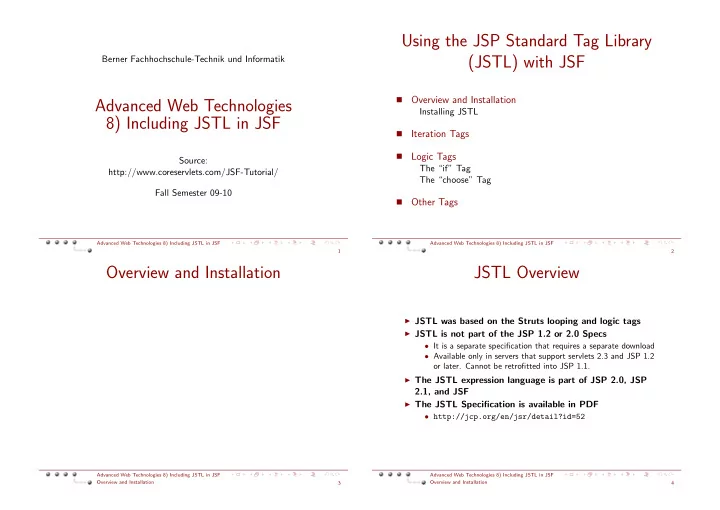
Using the JSP Standard Tag Library (JSTL) with JSF Berner Fachhochschule-Technik und Informatik Overview and Installation Advanced Web Technologies Installing JSTL 8) Including JSTL in JSF Iteration Tags Logic Tags Source:


slide-1
SLIDE 1

Berner Fachhochschule-Technik und Informatik

Advanced Web Technologies 8) Including JSTL in JSF

Source: http://www.coreservlets.com/JSF-Tutorial/ Fall Semester 09-10

Advanced Web Technologies 8) Including JSTL in JSF 1

Using the JSP Standard Tag Library (JSTL) with JSF

  • Overview and Installation

Installing JSTL

  • Iteration Tags
  • Logic Tags

The “if” Tag The “choose” Tag

  • Other Tags

Advanced Web Technologies 8) Including JSTL in JSF 2

Overview and Installation

Advanced Web Technologies 8) Including JSTL in JSF Overview and Installation 3

JSTL Overview

◮ JSTL was based on the Struts looping and logic tags ◮ JSTL is not part of the JSP 1.2 or 2.0 Specs

  • It is a separate specification that requires a separate download
  • Available only in servers that support servlets 2.3 and JSP 1.2
  • r later. Cannot be retrofitted into JSP 1.1.

◮ The JSTL expression language is part of JSP 2.0, JSP

2.1, and JSF

◮ The JSTL Specification is available in PDF

  • http://jcp.org/en/jsr/detail?id=52

Advanced Web Technologies 8) Including JSTL in JSF Overview and Installation 4

slide-2
SLIDE 2

Installing JSTL

◮ Some servers come with JSTL preinstalled

  • E.g., MyFaces

◮ Official reference implementation

  • http://jakarta.apache.org/taglibs/doc/

standard-doc/intro.html

◮ JSTL (like JSP) is a specification, not an

implementation

  • Code is portable but not all versions are equal
  • Speed, tools, and development environments vary

◮ To install:

  • Download 1.1 zip file
  • Unzip into directory of your choice.
  • Copy install_dir/lib/jstl.jar and

install_dir/lib/standard.jar to the WEB-INF/lib directory of your Web application

Advanced Web Technologies 8) Including JSTL in JSF Overview and Installation: Installing JSTL 5

The JSTL Expression Language

◮ Accessed via ${expression} ◮ Similar to JavaScript and XPath ◮ Provides shorthand notation to access:

  • Attributes of standard servlet objects
  • Bean properties
  • Map, List, and Array elements

◮ Is standard part of JSP 2.0 and 2.1

  • In JSTL, EL can be used only in attributes of JSTL tags
  • In JSP 2.0, the EL can be used anywhere
  • web.xml element and page directive attribute let you disable

the EL for backward compatibility

◮ Covered in separate lecture

Advanced Web Technologies 8) Including JSTL in JSF Overview and Installation: Installing JSTL 6

Problems with JSTL 1.0 and the JSP 2 Expression Language

◮ The JSTL tag attributes are not defined with

rtexprvalue="true"

  • So JSTL can parse EL, even in non-JSP-2 environments

◮ In JSP 2, the EL is evaluated before tags

  • So EL in JSTL attributes would be evaluated by JSP 2, not by

JSTL, which is an illegal rtexprvalue

◮ So, you must disable the regular EL

  • Use web.xml declaration that refers to servlets 2.3; Disables

the regular EL in the entire Web app

  • Use jsp-property-group in web.xml; Disables the regular

EL in selected pages

  • Use <%@ page isELIgnored="true" %>; Disables the

regular EL in current page

Advanced Web Technologies 8) Including JSTL in JSF Overview and Installation: Installing JSTL 7

Iteration Tags

Advanced Web Technologies 8) Including JSTL in JSF Iteration Tags 8

slide-3
SLIDE 3

Looping Tags: Summary

Looping with explicit numeric values <c:forEach var=”name” begin=”x” end=”y” step=”z”> Blah, blah <c:out value=”${name}”/> </c:forEach>

◮ Looping over data structures

  • Can loop down arrays, strings, collections, maps

<c:forEach var=”name” items=”array−or−collection”> Blah, blah <c:out value=”${name}”/> </c:forEach>

Looping down delimited strings

  • forTokens

Advanced Web Technologies 8) Including JSTL in JSF Iteration Tags 9

Looping Tags: Motivation

◮ JSP without JSTL

<UL> <% for(int i=0; i<messages.length; i++) { String message = messages[i]; % > <LI><%= message %> <% } %> </UL>

◮ JSP with JSTL

<UL> <c:forEach var=”message” items=”${messages}”> <LI> <c:out value=”${message}”/> </LI> </c:forEach> </UL>

Advanced Web Technologies 8) Including JSTL in JSF Iteration Tags 10

Looping with Simple Numeric Values

<%@ taglib prefix=”c” uri=”http://java.sun.com/jsp/jstl/core”%> <UL> <c:forEach var=”i” begin=”1” end=”10”> <LI><c:out value=”${i}”/> </c:forEach> </UL>

Advanced Web Technologies 8) Including JSTL in JSF Iteration Tags 11

Looping with a Designated Step Size

<%@ taglib prefix=”c” uri=”http://java.sun.com/jsp/jstl/core”%> <UL> <c:forEach var=”seconds” begin=”0” end=”${pageContext.session.maxInactiveInterval}” step=”100”> <LI><c:out value=”${seconds}”/> seconds. </c:forEach> <LI>Timeout exceeded. </UL>

Advanced Web Technologies 8) Including JSTL in JSF Iteration Tags 12

slide-4
SLIDE 4

Looping Down Arrays

<% String[] words = { ”foo”, ”bar”, ”baz”}; pageContext.setAttribute(”words”, words); %> <%@ taglib prefix=”c” uri=”http://java.sun.com/jsp/jstl/core”%> <H2>Key Words:</H2> <UL> <c:forEach var=”word” items=”${words}”> <LI><c:out value=”${word}”/> </c:forEach> </UL> <H2>Values of the test Parameter:</H2> <UL> <c:forEach var=”val” items=”${paramValues.test}”> <LI><c:out value=”${val}”/> </c:forEach> </UL>

Advanced Web Technologies 8) Including JSTL in JSF Iteration Tags 13

Looping Down Comma-Delimited Strings

<%@ taglib prefix=”c” uri=”http://java.sun.com/jsp/jstl/core”%> <UL> <c:forEach var=”country” items=”Australia,Canada,Japan,Philippines,USA”> <LI><c:out value=”${country}”/> </c:forEach> </UL>

Advanced Web Technologies 8) Including JSTL in JSF Iteration Tags 14

Looping Down Arbitrarily-Delimited Strings

<%@ taglib prefix=”c” uri=”http://java.sun.com/jsp/jstl/core” %> <UL> <c:forTokens var=”color” items=”(red (orange) yellow)(green)((blue) violet)” delims=”()”> <LI><c:out value=”${color}”/> </c:forTokens> </UL>

◮ Point: forTokens built on forEach: you can build your own

custom tags based on JSTL tags

Advanced Web Technologies 8) Including JSTL in JSF Iteration Tags 15

Logic Tags

Advanced Web Technologies 8) Including JSTL in JSF Logic Tags 16

slide-5
SLIDE 5

Conditional Evaluation Tags

◮ One choice: if

<c:if test=”${someTest}”> Content </c:if>

◮ Lots of choices: choose

<c:choose> <c:when test=”test1”>Content1</c:when> <c:when test=”test2”>Content2</c:when> ... <c:when test=”testN”>ContentN</c:when> <c:otherwise>Default Content</c:otherwise> </c:choose>

◮ Caution: resist use of business logic!

Advanced Web Technologies 8) Including JSTL in JSF Logic Tags 17

The ”if” Tag

<%@ taglib prefix=”c” uri=”http://java.sun.com/jsp/jstl/core”%> <UL> <c:forEach var=”i” begin=”1” end=”10”> <LI><c:out value=”${i}”/> <c:if test=”${i > 7}”> (greater than 7) </c:if> </c:forEach> </UL>

Advanced Web Technologies 8) Including JSTL in JSF Logic Tags: The “if” Tag 18

The ”choose” Tag

<%@ taglib prefix=”c” uri=”http://java.sun.com/jsp/jstl/core”%> <UL> <c:forEach var=”i” begin=”1” end=”10”> <LI><c:out value=”${i}”/> <c:choose> <c:when test=”${i < 4}”> (small) </c:when> <c:when test=”${i < 8}”> (medium) </c:when> <c:otherwise> (large) </c:otherwise> </c:choose> </c:forEach> </UL>

Advanced Web Technologies 8) Including JSTL in JSF Logic Tags: The “choose” Tag 19

URL-Handling Tags

◮ <c:import>

  • Read content from arbitrary URLs
  • Insert into page
  • Store in variable
  • Or make accessible via a reader
  • Unlike <jsp:include>, not restricted to own system

◮ <c:redirect>

  • Redirects response to specified URL

◮ <c:param>

  • Encodes a request parameter and adds it to a URL
  • May be used within body of <c:import> or <c:redirect>

Advanced Web Technologies 8) Including JSTL in JSF Other Tags 20

slide-6
SLIDE 6

Formatting Tags

◮ <fmt:formatNumber>

  • Formats a numeric value as a number, currency value, or

percent, in a locale-specific manner

◮ <fmt:parseNumber>

  • Reads string representations of number, currency value, or

percent

◮ <fmt:formatDate> ◮ <fmt:parseDate> ◮ <fmt:timeZone> ◮ <fmt:setTimeZone>

Advanced Web Technologies 8) Including JSTL in JSF Other Tags 21

Internationalization (I18N) Tags

◮ <fmt:setLocale>

  • Sets Locale

◮ <fmt:setBundle> ◮ <fmt:bundle> ◮ <fmt:message>

  • Retrieves localized message from a resource bundle

◮ <fmt:param>

Advanced Web Technologies 8) Including JSTL in JSF Other Tags 22

Summary

◮ JSTL is similar to the old Struts looping and logic tags, but

better

◮ JSTL is standardized, but not a standard part of JSP

  • It is supposed to be included with all JSF implementations

◮ Supports a concise expression language

  • Lets you access bean properties and implicit objects
  • EL is standard part of JSP 2.0, JSP 2.1, and JSF

◮ Looping tags

  • Explicit numeric values
  • Arrays, collections, maps, strings, etc.

◮ Conditional evaluation tags

  • Single options
  • Multiple options

Advanced Web Technologies 8) Including JSTL in JSF Other Tags 23

Conclusion

◮ Java Server Faces help a lot in separating the different

layers.

◮ We are forced to separate ”business logic” from

”presentation layer”

◮ Hello World is much more complicated than with PHP ◮ Reusability of components is high

  • Components of the business logic can be reused in any

application (for instance web service, or java application)

  • Presentation layer components may be reused for another

project totaly different.

Advanced Web Technologies 8) Including JSTL in JSF Other Tags 24

slide-7
SLIDE 7

References

◮ http://www.coreservlets.com/JSF-Tutorial/

Advanced Web Technologies 8) Including JSTL in JSF Other Tags 25