Using Facelets Berner Fachhochschule, Technik und Informatik - - PowerPoint PPT Presentation

using facelets
SMART_READER_LITE
LIVE PREVIEW

Using Facelets Berner Fachhochschule, Technik und Informatik - - PowerPoint PPT Presentation

Using Facelets Berner Fachhochschule, Technik und Informatik Motivation The gap between JSP and JSF Advanced Web Technologies 8) Facelets in JSF First Example : The Birds Directory JSP Standard Template Library: JSTL Dr. E.


slide-1
SLIDE 1

Berner Fachhochschule, Technik und Informatik

Advanced Web Technologies 8) Facelets in JSF

  • Dr. E. Benoist

Fall Semester 2010/2011

Advanced Web Technologies 8) Facelets in JSF 1

Using Facelets

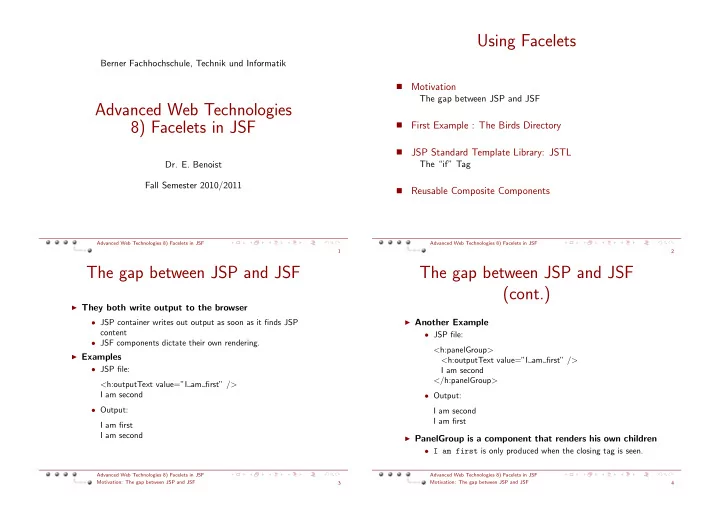
  • Motivation

The gap between JSP and JSF

  • First Example : The Birds Directory
  • JSP Standard Template Library: JSTL

The “if” Tag

  • Reusable Composite Components

Advanced Web Technologies 8) Facelets in JSF 2

The gap between JSP and JSF

◮ They both write output to the browser

  • JSP container writes out output as soon as it finds JSP

content

  • JSF components dictate their own rendering.

◮ Examples

  • JSP file:

<h:outputText value=”I am first” /> I am second

  • Output:

I am first I am second

Advanced Web Technologies 8) Facelets in JSF Motivation: The gap between JSP and JSF 3

The gap between JSP and JSF (cont.)

◮ Another Example

  • JSP file:

<h:panelGroup> <h:outputText value=”I am first” /> I am second </h:panelGroup>

  • Output:

I am second I am first

◮ PanelGroup is a component that renders his own children

  • I am first is only produced when the closing tag is seen.

Advanced Web Technologies 8) Facelets in JSF Motivation: The gap between JSP and JSF 4

slide-2
SLIDE 2

Advantages of Facelets over JSP

◮ Intertwining JSP and JSF can cause difficulties

  • JSTL (Jsp Standard Template Library) can not be used with

JSF

◮ Facelets provide a Template solution for JSF ◮ Allows creation of lightweight components

  • Quite trivial to produce
  • You don’t need to create tags for your new components

◮ Facelets use Unified Expression Language EL

Advanced Web Technologies 8) Facelets in JSF Motivation: The gap between JSP and JSF 5

Creating a project with Facelets

◮ Download Facelets library

  • https://facelets.dev.java.net
  • it includes some demonstration applications

◮ Adding Dependencies ◮ Configure the Web Descriptor (web.xml)

<web−app> <!−− Use Documents Saved as ∗.xhtml −−> <context−param> <param−name> javax.faces.DEFAULT SUFFIX </param−name> <param−value>.xhtml</param−value> </context−param> </web−app>

Advanced Web Technologies 8) Facelets in JSF Motivation: The gap between JSP and JSF 6

Configure JSF

◮ Facelets replaces the default JSF ViewHandler with its

  • wn implementation

faces-config.xml <faces−config> <application> <view−handler> com.sun.facelets.FaceletViewHandler </view−handler> </application> </faces−config>

Advanced Web Technologies 8) Facelets in JSF Motivation: The gap between JSP and JSF 7

First Example : The Modules Directory

◮ We need to create a simple directory of Modules ◮ We create various xhtml files

  • template.xhtml for storing the main design for the site
  • index.xhtml the welcome file
  • awt.xhtml file presenting the Advanced Web Technology

Module

  • webProg.xhtml file presenting the webProgramming
  • menu.xhtml contains just the menu. It is included in the other

files

Advanced Web Technologies 8) Facelets in JSF First Example : The Birds Directory 8

slide-3
SLIDE 3

The template

◮ We include the name spaces corresponding to jsf and

facelets tags

  • JSF tags are prefixed with h or f
  • Facelets specific tags are prefixed with ui

<!DOCTYPE html PUBLIC ”−//W3C//DTD XHTML 1.0 ց

→Transitional//EN”

”http://www.w3.org/TR/xhtml1/DTD/xhtml1−transitional.ց

→dtd”>

<html xmlns=”http://www.w3.org/1999/xhtml” xmlns:h=”http://java.sun.com/jsf/html” xmlns:f=”http://java.sun.com/jsf/core” xmlns:ui=”http://java.sun.com/jsf/facelets”> <head>

Advanced Web Technologies 8) Facelets in JSF First Example : The Birds Directory 9

The template (Cont.)

◮ We define the basic layout.

  • We insert CSS and Javascript in such a file

<title>Facelets−Test</title> <style type=”text/css”> <!−− .box { float: right; width: 50%; border: black dotted 1px; padding: 5px } −−> </style> </head> <body>

Advanced Web Technologies 8) Facelets in JSF First Example : The Birds Directory 10

The template (Cont.)

◮ Template contains placeholders that can be overwritten

  • We use ui:insert to define areas that can be overwritten
  • each insert receives a name and a default value (the content
  • f the tag).

<h:form> <h1>Facelets−Template</h1> <div class=”box”> <ui:insert name=”navigation” /> </div> <ui:insert name=”content”> Default Text for content (only if no content has been defined) </ui:insert> </h:form> </body> </html>

Advanced Web Technologies 8) Facelets in JSF First Example : The Birds Directory 11

The home page

◮ The index.xhtml file greets a user

  • Must be a valid xhtml document, so includes all the xhtml

“stuff”

  • Everything that is outside the ui:composition tag is ignored.

<!DOCTYPE html PUBLIC ”−//W3C//DTD XHTML 1.0 ց

→Transitional//EN”

”http://www.w3.org/TR/xhtml1/DTD/xhtml1−transitional.ց

→dtd”>

<html xmlns=”http://www.w3.org/1999/xhtml” xmlns:h=”http://java.sun.com/jsf/html” xmlns:f=”http://java.sun.com/jsf/core” xmlns:ui=”http://java.sun.com/jsf/facelets”> <body> This text will never be displayed (text before composition is ignored) <ui:composition template=”template.xhtml”>

Advanced Web Technologies 8) Facelets in JSF First Example : The Birds Directory 12

slide-4
SLIDE 4

The home page (Cont.)

◮ We are using new facelets tags:

  • ui:composition used to reference the template for this page
  • ui:define (its name must match the one of the ui:insert

in the template).

  • ui:include to include the content from another document

<ui:composition template=”template.xhtml”> <ui:define name=”navigation”> <ui:include src=”menu.xhtml” /> </ui:define> </ui:composition> This text will neither be used (text after composition is ignored too) </body> </html>

Advanced Web Technologies 8) Facelets in JSF First Example : The Birds Directory 13

A menu page

◮ This page in included in all the other pages ◮ It must contain the same “xhtml” stuff (like definitions

  • f name spaces).

<!DOCTYPE html PUBLIC ”−//W3C//DTD XHTML 1.0 Transitional//ց

→EN”

... <ui:composition> <h3>Content table</h3> <hr /> <h:panelGrid column=”1”> <h:commandLink value=”Home” action=”home” /> <h:commandLink value=”Web Programming” action =”webProg” /> <h:commandLink value=”Advanced Web Technology” action =”awt” /> </h:panelGrid> </ui:composition> This text will neither be used (text after composition is ignored too) </body> </html> Advanced Web Technologies 8) Facelets in JSF

First Example : The Birds Directory 14

We need the corresponding navigation

◮ For navigating from any page to the modules or home pages

<navigation−rule> <navigation−case> <from−outcome>home</from−outcome> <to−view−id>/index.xhtml</to−view−id> </navigation−case> </navigation−rule> <navigation−rule> <navigation−case> <from−outcome>webProg</from−outcome> <to−view−id>/webProg.xhtml</to−view−id> </navigation−case> </navigation−rule> <navigation−rule> ...

Advanced Web Technologies 8) Facelets in JSF First Example : The Birds Directory 15

Facelets TagLibs

Facelets support the following tag libraries

◮ Templating library The one we have already seen (with the

ui:... tags.

◮ JSF libraries core and html jsf libraries are supported by

Facelets.

◮ JSTL facelets provides partial support for JSTL tags.

Function library is fully supported, Core is only partially:

  • c:if for conditional branching
  • c:forEach for looping in a collection
  • c:catch For emulating a try catch
  • c:set For defining manualy some attribute variables

Advanced Web Technologies 8) Facelets in JSF First Example : The Birds Directory 16

slide-5
SLIDE 5

JSP Standard Template Library: JSTL

◮ Introduces some programming in the view part

  • Not used as a template language
  • JSTL is not fully supported

Advanced Web Technologies 8) Facelets in JSF JSP Standard Template Library: JSTL 17

JSTL (Cont.)

Looping with explicit numeric values <c:forEach var=”name” begin=”x” end=”y” step=”z”> Blah, blah <h:outputText value=”#{name}”/> </c:forEach>

◮ Looping over data structures

  • Can loop down arrays, strings, collections, maps

<c:forEach var=”name” items=”array−or−collection”> Blah, blah <h:outputText value=”#{name}”/> </c:forEach>

Advanced Web Technologies 8) Facelets in JSF JSP Standard Template Library: JSTL 18

The ”if” Tag

<ul> <c:forEach var=”i” begin=”1” end=”10”> <li><h:outputText value=”#{i}”/> <c:if test=”#{i > 7}”> (greater than 7) </c:if></li> </c:forEach> </ul>

Advanced Web Technologies 8) Facelets in JSF JSP Standard Template Library: JSTL: The “if” Tag 19

Reusable Composite Components

◮ Facelets allows to create lightweight composition

components Two basic steps

  • Create a tag source file, which will contain the XHTML code

that defines your component

  • Register the tag in your custom tag library, so it can be used in

your Facelets applications.

◮ You can reuse this component as much as possible

Advanced Web Technologies 8) Facelets in JSF Reusable Composite Components 20

slide-6
SLIDE 6

Example: Custom “inputTextLabeled” Component

◮ We need a component that can be used like this:

<custom:inputTextLabeled label=’’Name’’ value=’’#{module.name} />

◮ What it does:

  • Is a combination of a label and an input text

Advanced Web Technologies 8) Facelets in JSF Reusable Composite Components 21

Creating a tag source file

In the directory: WEB-INF/facelets/components/ we write the following file:

◮ InputTextLabeled.xhtml

<!DOCTYPE html PUBLIC ”−//W3C//DTD XHTML 1.0 Transitional//ց

→EN”

”http://www.w3.org/TR/xhtml1/DTD/xhtml1−transitional.dtd”> <html xmlns=”http://www.w3.org/1999/xhtml” xmlns:h=”http://java.sun.com/jsf/html” xmlns:f=”http://java.sun.com/jsf/core” xmlns:ui=”http://java.sun.com/jsf/facelets”> <ui:component> <h:outputLabel value=”#{label}: ”> <h:inputText value=”#{value}” /> </h:outputLabel> </ui:component> </html>

Advanced Web Technologies 8) Facelets in JSF Reusable Composite Components 22

Registering the tag in the tag library

◮ We need to create a tag lib file.

WEB-INF/facelets/mycustom.taglib.xml Defines a new name space that needs to be included in any file using this component(s). <!DOCTYPE facelet−taglib PUBLIC ”−//Sun Microsystems. Inc//DTD Facelet Taglib 1.0//EN” ”http://java.sun.com/dtd/facelet−taglib 1 0.dtd”> <facelet−taglib> <namespace>http://myfaces.benoist.ch/custom </namespace> <tag> <tag−name>inputTextLabelled</tag−name> <source>components/inputTextLabeled.xhtml</source> </tag> </facelet−taglib>

Advanced Web Technologies 8) Facelets in JSF Reusable Composite Components 23

Declare the taglib to Facelets

◮ We need to edit web.xml

  • declare our new taglib in the facelets.LIBRARIES context

parameter

<context−param> <param−name>facelets.LIBRARIES</param−name> <param−value> /WEB−INF/facelets/mycustom.taglib.xml</param−value> </context−param>

Advanced Web Technologies 8) Facelets in JSF Reusable Composite Components 24

slide-7
SLIDE 7

Let’s use the new component / tag

<!DOCTYPE html PUBLIC ”−//W3C//DTD XHTML 1.0 Transitional//ց

→EN”

”http://www.w3.org/TR/xhtml1/DTD/xhtml1−transitional.dtd”> <html xmlns=”http://www.w3.org/1999/xhtml” xmlns:h=”http://java.sun.com/jsf/html” xmlns:f=”http://java.sun.com/jsf/core” xmlns:ui=”http://java.sun.com/jsf/facelets” xmlns:custom=”http://myfaces.benoist.ch/custom”> <head><title>head</title></head> <body> <f:view> <h:form> <h:panelGrid columns=”1”> <custom:inputTextLabeled label=”Name” value=”#{module.name}ց

→” />

<custom:inputTextLabeled label=”Number” value=”#{module.ց

→number}” />

<custom:inputTextLabeled label=”ECTS” value=”#{module.ects}” ց

→/>

<h:commandButton value=”Add module” actionListener=”#{moduleDictionary.addModule}” />

Advanced Web Technologies 8) Facelets in JSF Reusable Composite Components 25

Conclusion

◮ Facelets will be the standard

  • JSF 2.0 will only support facelets for its view part

◮ Facelets allow easy creation of components

  • Custom composition components are much easier to write

than with JSP

◮ Facelets allow to enrich view part of JSF

  • You can use a part of JSTL (if / foreach / try catch)
  • You can use the Unified Expression Language

Advanced Web Technologies 8) Facelets in JSF Reusable Composite Components 26

References

◮ The definitive Guide to Apache MyFaces and Facelets,

  • Z. Wadia, M. Marinschek, H. Saleh and D. Byrne,

Apress, 2008

◮ http://www.ibm.com/developerworks/java/library/

j-facelets/

Advanced Web Technologies 8) Facelets in JSF Reusable Composite Components 27