The Stream - Upcoming , then Announcements, click View All - - - PowerPoint PPT Presentation

the stream upcoming then
SMART_READER_LITE
LIVE PREVIEW

The Stream - Upcoming , then Announcements, click View All - - - PowerPoint PPT Presentation

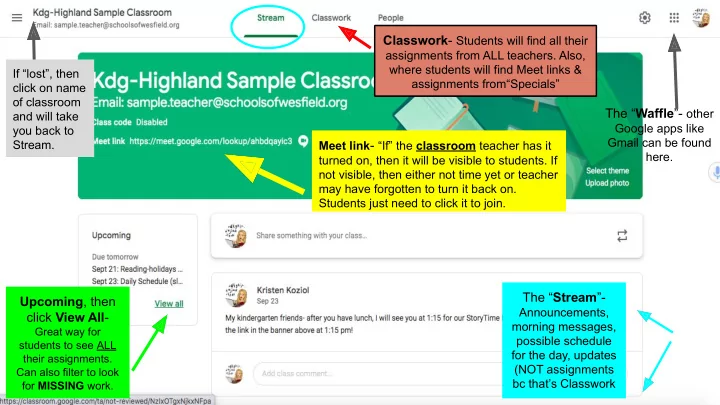
Classwork - Students will find all their assignments from ALL teachers. Also, where students will find Meet links & If lost, then assignments fromSpecials click on name of classroom The Waffle - other and will take


slide-1
SLIDE 1

The “Waffle”- other

Google apps like Gmail can be found here.

Classwork- Students will find all their

assignments from ALL teachers. Also, where students will find Meet links & assignments from“Specials” Meet link- “If” the classroom teacher has it turned on, then it will be visible to students. If not visible, then either not time yet or teacher may have forgotten to turn it back on. Students just need to click it to join.

The “Stream”-

Announcements, morning messages, possible schedule for the day, updates (NOT assignments bc that’s Classwork

Upcoming, then click View All-

Great way for students to see ALL their assignments. Can also filter to look for MISSING work.

If “lost”, then click on name

  • f classroom

and will take you back to Stream.

slide-2
SLIDE 2

Classwork- Students will find all their assignments from ALL teachers. Also, where students will find Meet links & assignments from“Specials” Students can screen

  • n left side

for “Specials” (art, music, health, tech, and PE). Or they can scroll down through all the Topics.

slide-3
SLIDE 3

Name of Student

The “Waffle” still available:)

If “lost”, then click on name of classroom and will take you back to Stream.

Upcoming, then click View All- Great way for students to

see ALL their assignments. Can also filter to look for MISSING work.