static vs automatic storage classes Three types of memory - - PowerPoint PPT Presentation

static vs automatic storage classes three types of memory
SMART_READER_LITE
LIVE PREVIEW

static vs automatic storage classes Three types of memory - - PowerPoint PPT Presentation

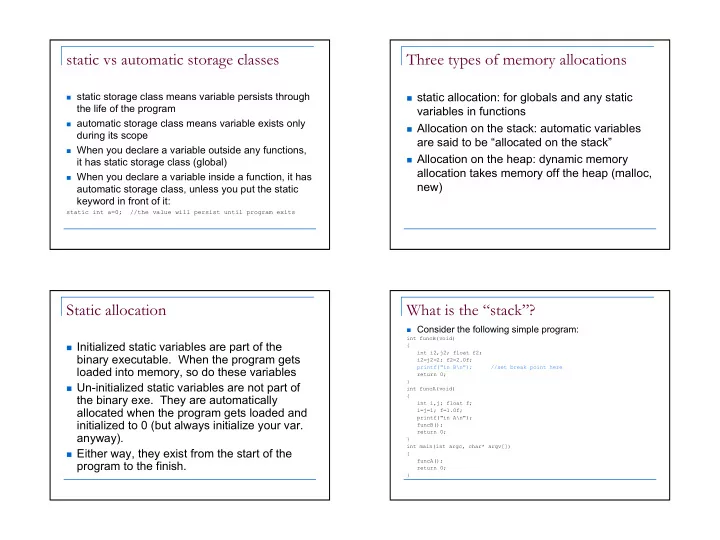
static vs automatic storage classes Three types of memory allocations static storage class means variable persists through static allocation: for globals and any static the life of the program variables in functions automatic storage


slide-1
SLIDE 1

1

static vs automatic storage classes

static storage class means variable persists through

the life of the program

automatic storage class means variable exists only

during its scope

When you declare a variable outside any functions,

it has static storage class (global)

When you declare a variable inside a function, it has

automatic storage class, unless you put the static keyword in front of it:

static int a=0; //the value will persist until program exits

Three types of memory allocations

static allocation: for globals and any static

variables in functions

Allocation on the stack: automatic variables

are said to be “allocated on the stack”

Allocation on the heap: dynamic memory

allocation takes memory off the heap (malloc, new)

Static allocation

Initialized static variables are part of the

binary executable. When the program gets loaded into memory, so do these variables

Un-initialized static variables are not part of

the binary exe. They are automatically allocated when the program gets loaded and initialized to 0 (but always initialize your var. anyway).

Either way, they exist from the start of the

program to the finish.

What is the “stack”?

Consider the following simple program:

int funcB(void) { int i2,j2; float f2; i2=j2=2; f2=2.0f; printf("in B\n"); //set break point here return 0; } int funcA(void) { int i,j; float f; i=j=1; f=1.0f; printf("in A\n"); funcB(); return 0; } int main(int argc, char* argv[]) { funcA(); return 0; }

slide-2
SLIDE 2

2

Display the call stack shows:

funcB() line 12 funcA() line 24 main(int 1, char * * 0x00430e90) line 30 mainCRTStartup() line 206 + 25 bytes KERNEL32! 77e814c7() When a function is called it is “pushed” onto the top

  • f the stack and when it returns, it is “popped” off the

top

Using the debugger we can show that:

+ &j2 0x0012fec4 + &i2 0x0012fec8 + &j 0x0012ff24 + &i 0x0012ff28 Look at the memory: 0012FEC4 02 00 00 00 02 00 00 00 2C FF 12 00 ........,ÿ.. 0012FED0 CE 10 40 00 80 FF 12 00 00 00 00 00 Î.@..ÿ...... 0012FEDC 00 F0 FD 7F CC CC CC CC CC CC CC CC .ðý.ÌÌÌÌÌÌÌÌ 0012FEE8 CC CC CC CC CC CC CC CC CC CC CC CC ÌÌÌÌÌÌÌÌÌÌÌÌ 0012FEF4 CC CC CC CC CC CC CC CC CC CC CC CC ÌÌÌÌÌÌÌÌÌÌÌÌ 0012FF00 CC CC CC CC CC CC CC CC CC CC CC CC ÌÌÌÌÌÌÌÌÌÌÌÌ 0012FF0C CC CC CC CC CC CC CC CC CC CC CC CC ÌÌÌÌÌÌÌÌÌÌÌÌ 0012FF18 CC CC CC CC CC CC CC CC 00 00 80 3F ÌÌÌÌÌÌÌÌ...? 0012FF24 01 00 00 00 01 00 00 00 80 FF 12 00 .........ÿ.. 0012FF30 1D 11 40 00 00 00 00 00 00 00 00 00 ..@......... 0012FF3C 00 F0 FD 7F CC CC CC CC CC CC CC CC .ðý.ÌÌÌÌÌÌÌÌ 0012FF48 CC CC CC CC CC CC CC CC CC CC CC CC ÌÌÌÌÌÌÌÌÌÌÌÌ 0012FF54 CC CC CC CC CC CC CC CC CC CC CC CC ÌÌÌÌÌÌÌÌÌÌÌÌ 0012FF60 CC CC CC CC CC CC CC CC CC CC CC CC ÌÌÌÌÌÌÌÌÌÌÌÌ 0012FF6C CC CC CC CC CC CC CC CC CC CC CC CC ÌÌÌÌÌÌÌÌÌÌÌÌ 0012FF78 CC CC CC CC CC CC CC CC C0 FF 12 00 ÌÌÌÌÌÌÌÌÀÿ..

Stack cont’d

Notice the stack starts from a high memory address

and grows downwards.

Automatic variables (allocated on the stack) are part

  • f an activation record

Activation record is a chunk of memory allocated on

the top of the stack that holds:

Automatic variables Parameters Return address Cpu register values to be restored on return

Every function call creates new activation record

(pushed on top of stack)

On return, the activation record is popped.

Is this good code? Why?

1.

char *f() { char result[80]; sprintf(result,"anything will do"); return(result); }

2.

int g() { char *p; p = f(); printf("f() returns: %s\n",p); }

slide-3
SLIDE 3

3

Stack corruption

//A few examples: char buf[30],str[30]; str[0]=‘a’; str[1]=‘b’; str[2]=‘c’; strcpy(buf,str); char a; int b=10; memcpy(&a,&b,sizeof(b));

Is particularly nasty because:

Doesn’t always generate seg fault right away (the stack is your memory) Corrupting the activation record can alter the register values, return

address etc of the previous function

Behavior is completely undefined (but may actually work)

Memory allocation off the heap

Allocate with malloc(), new Must be freed with corresponding free(),

delete

Once allocated, memory persists until

termination

Do not double free, or double delete The proper way to return a buffer from a

function is to

Pass in a chunk of pre-allocated memory Or allocate memory off the heap with malloc(),

new and return that

Signals

Haviland – Ch. 6

Signals

Are interrupts Unexpected/unpredictable asynchronous events

floating point error death of a child interval timer expired (alarm clock) control-C (termination request) control-Z (suspend request)

When the kernel recognizes an event, it sends a

signal to the process.

Normal processes may send signals.

slide-4
SLIDE 4

4

What is an interrupt?

An interrupt is an event (generated by

software or hardware) that causes the processor to stop what it’s currently doing, and transfer control to a handler for the interrupt

When the handler finishes, the processor

(usually) resumes what it was doing

Example: when you type at the keyboard Completely transparent to the program

What are signals for?

To tell the program some unexpected event has

happened

When a program forks into 2 or more processes,

rarely do they execute independently.

The processes usually require some form of

synchronization, often handled by signals.

To transfer data between processes, we will use

pipes and sockets (coming soon).

Signals are generated by

machine interrupts the program itself, other programs or the user.

Software Interrupts

<sys/signal.h> lists the signal types on CDF. “man 7 signal” (“man 5 signal” on Solaris)

gives some description of various signals

SIGTERM, SIGABRT, SIGKILL SIGSEGV, SIGBUS SIGSTOP, SIGCONT SIGCHLD SIGPIPE

Some common signals

SIGABRT – sent by abort(), causes termination,

core dump

SIGINT – caused by the “interrupt key” (ctrl-c) SIGKILL – causes process termination, can’t alter

default behavior

SIGCHLD – child process terminated SIGFPE – floating point exception, causes abnormal

termination

SIGSEGV – illegal memory reference, causes

termination, core dump

SIGSTP, SIGCONT – stop the process (ctrl-z) and

resume execution, respectively

slide-5
SLIDE 5

5

Default actions

Each signal has a default action:

terminate stop ignore

The default action can be changed for most

signal types using the sigaction()

  • function. The exceptions are SIGKILL and

SIGSTOP (not the same at SIGSTP).

Signal handlers

When a program receives a signal, control is

immediately passed to a function called a signal handler.

The signal handler function can execute

some statements and exit in 3 different ways:

return control to the place in the program which

was executing when the signal occurred.

return control to some other point in the program. terminate the program by calling exit.

Unix signal internals

Each process has the following information

  • re. Signals:

An array of entries called the signal handler array

(describes what to do when each type of signal is received)

An array of bits called the pending signal bitmap

(1 bit per signal type – has signal for that type been received?)

Signals may not be processed immediately No count for number of signal received (1 bit)

Signal handler array

For each process, Unix maintains a table of

actions that should be performed for each kind

  • f signal.

Each entry of the signal handler array can have

  • ne of 3 settings:

Signal can be ignored (value = 1) Use default action for Signal (value = 0) Use user installed handler (value = address

  • f handler)
slide-6
SLIDE 6

6

Signals and fork(), exec()

On fork():

Signal handler array is inherited across a fork() But the pending signal bitmap is cleared

On exec():

Pending signal bitmap is left as is All user installed handlers cleared (set to 0) in signal

handler array

sigaction()

  • Install a signal handler, act, for the signal sig.

int sigaction(int sig, const struct sigaction *act, struct sigaction *oldact);

  • Struct defined in <signal.h> to fill in to pass in for act.

struct sigaction { /* SIG_DFL, SIG_IGN, or pointer to function */ void (*sa_handler)(int); sigset_t sa_mask; /*Signals to block during handler*/ int sa_flags; /* flags and options */ };

  • You may come across various extensions, including another field in

the sigaction struct for a function to catch signals.

More about sigaction structure

The 1st field sa_handler is a function pointer;

can be 1 of 3 values:

SIG_DFL – symbolic name, restore default

handler

SIG_IGN – ignore this signal Or the address of your signal handler function

2nd field sa_mask gives a set of signals to be

blocked during the execution of the handler. The blocked signals aren’t ignored, but put on hold until handler finishes

3rd field sa_flag is advanced, set it to 0

Signal sets

Given by the type sigset_t Used to describe a set of signals (SIGINT,

SIGCHLD…etc)

Initialize set with:

sigemptyset(sigset_t * set) sigfillset(sigset_t * set)

Manipulate with:

sigaddset(sigset_t * set, int signo) sigdelset(sigset_t * set,int signo)

slide-7
SLIDE 7

7

Example of signal sets

#include <signal.h> sigset_t mask1, mask2; ... sigemptyset(&mask1); //create empty set sigaddset(&mask1, SIGINT); //add some signals sigaddset(&mask1, SIGQUIT); ... sigfillset(&mask2); //start with full set Sigdelset(&mask2,SIGCHLD); //remove some signals

sigaction() example

/* signal handling function */ void quit( int code ) { fprintf(stderr, “\nInterrupt (code=%d, i=%d)\n”, code, i); exit(1); } int i = 0; int main( void ){ ... /* fill in newact */ newact.sa_handler = quit; sigfillset(&(newact.sa_mask)); newact.sa_flags=0; if(sigaction(SIGINT, &newact,NULL)== -1)exit(1); /* compute for a while */ for(;;) { if((i++ % 50000000) == 0) fprintf(stderr,‘.’); } } Run the program and try sending different signals to it.

Saving the old handler

3rd param to sigaction() is a pointer to the old

action handler

Use it to restore default handling:

static struct sigaction act,oact; sigaction(SIGTERM,NULL,&oact); //save the old one act.sa_handler=SIG_IGN; sigaction(SIGTERM,&act,NULL); ... Sigaction(SIGTERM,&oact,NULL);

Blocking Signals

Signals can arrive at any time. Sometimes, interruptions are dangerous

(critical DB update)

To temporarily prevent a signal from being

delivered we block it.

The signal is held until the process unblocks

the signal.

When a process ignores a signal, it is thrown

away.

slide-8
SLIDE 8

8

sigprocmask()

int sigprocmask(int how, const sigset_t *set, sigset_t *oset);

how indicates how the signal will be modified

SIG_BLOCK: add to those currently blocked SIG_UNBLOCK: delete from those currently blocked SIG_SETMASK: set the collection of signals being blocked

set points to the set of signals to be used for

modifying the mask

  • set on return holds the set of signals that were

blocked before the call.

Sending a signal

From the command line use

kill [-signal] pid [pid]…

If no signal is specified, kill sends the TERM signal

to the process.

signal can be specified by the number or name

without the SIG.

Examples:

kill -QUIT 8883 kill -STOP 78911 kill -9 76433 (9 == KILL)

Signaling between processes

One process can send a signal to another process

using the misleadingly named function call. kill( int pid, int sig );

This call sends the signal sig to the process pid Signaling between processes can be used for many

purposes:

kill errant processes temporarily suspend execution of a process make a process aware of the passage of time synchronize the actions of processes.

Privilege issues

Real/effective user id of sender must match

the real/effective user id of receiver

Super user processes can send signals to

every other process

If user id doesn’t match, kill() returns –1 and

EPERM is placed into errno

Special pid values for kill():

pid=0 means to send to all process in group pid=-1 means to send to all processes with the

same real/effective uid as the sender

slide-9
SLIDE 9

9

Timer signals

Three interval timers are maintained for each

process:

SIGALRM (real-time alarm, like a stopwatch) SIGPROF (used for profilers)

Useful functions to set and get timer info:

sleep() – cause calling process to suspend. usleep() – like sleep() but at a finer granularity. alarm() – sets SIGALRM pause() – suspend until next signal arrives setitimer(), getitimer()

sleep() and usleep() are interruptible by other

signals.