Sponsored by: Schedule 8:30am - 8:35am Meet in Auditorium 8:35am - - PDF document

sponsored by schedule 8 30am 8 35am meet in auditorium 8
SMART_READER_LITE
LIVE PREVIEW

Sponsored by: Schedule 8:30am - 8:35am Meet in Auditorium 8:35am - - PDF document

Sponsored by: Schedule 8:30am - 8:35am Meet in Auditorium 8:35am 9:00am Welcome Mrs. Sharon Ackerman 9:00am - 9:15am Keynote Speaker Dr. Kipp Rodgers 9:30am - 10:20am Session A 10:30am - 11:20am Session B 11:30am - 12:20pm


slide-1
SLIDE 1

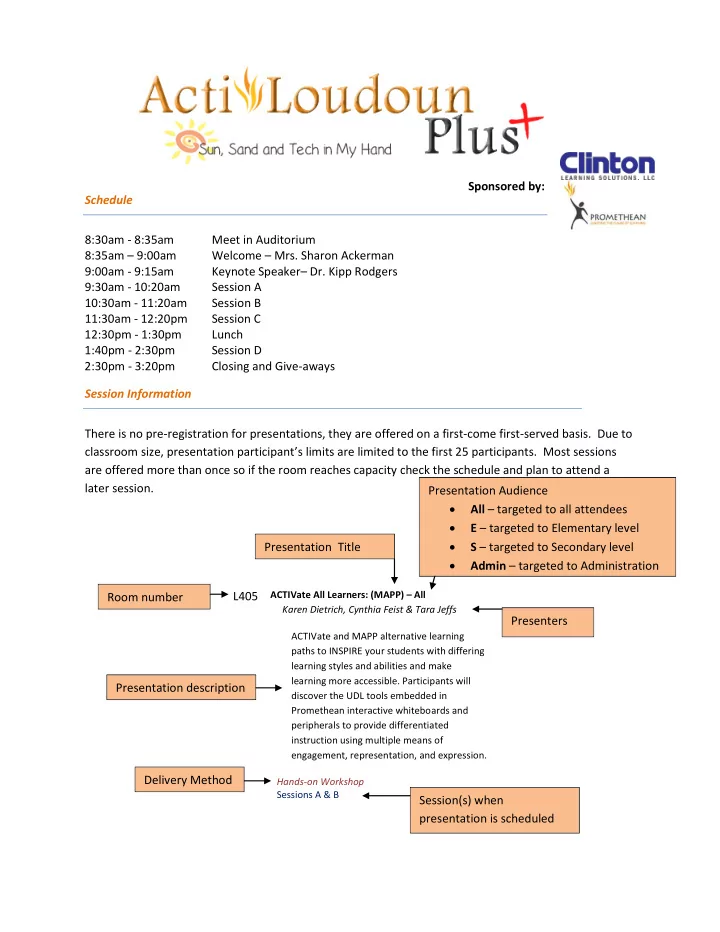
Schedule 8:30am - 8:35am Meet in Auditorium 8:35am – 9:00am Welcome – Mrs. Sharon Ackerman 9:00am - 9:15am Keynote Speaker– Dr. Kipp Rodgers 9:30am - 10:20am Session A 10:30am - 11:20am Session B 11:30am - 12:20pm Session C 12:30pm - 1:30pm Lunch 1:40pm - 2:30pm Session D 2:30pm - 3:20pm Closing and Give-aways Session Information There is no pre-registration for presentations, they are offered on a first-come first-served basis. Due to classroom size, presentation participant’s limits are limited to the first 25 participants. Most sessions are offered more than once so if the room reaches capacity check the schedule and plan to attend a later session. L405

ACTIVate All Learners: (MAPP) – All Karen Dietrich, Cynthia Feist & Tara Jeffs ACTIVate and MAPP alternative learning paths to INSPIRE your students with differing learning styles and abilities and make learning more accessible. Participants will discover the UDL tools embedded in Promethean interactive whiteboards and peripherals to provide differentiated instruction using multiple means of engagement, representation, and expression. Hands-on Workshop Sessions A & B

Presentation Title Room number Presentation description Presenters Session(s) when presentation is scheduled Presentation Audience

  • All – targeted to all attendees
  • E – targeted to Elementary level
  • S – targeted to Secondary level
  • Admin – targeted to Administration

Delivery Method Sponsored by:

slide-2
SLIDE 2

My Notes My Schedule

Session A: Session B: Session C: Session D:

slide-3
SLIDE 3

Keynote Speaker: Dr. Kipp Rodgers Author, Presenter & Director of Secondary Instruction for York County Schools

Kipp D. Rogers, Ph.D. is a professional educator with over 20 years of experience. An author of several articles and three books on technology integration, Dr. Rogers regularly conducts workshops and seminars that focus on integrating technology into instruction. He received an International Leadership and Vision Award for his work with using mobile learning devices as instructional tools. Dr. Rogers has had classroom teaching and administrative experience at all levels in urban and suburban school districts. Under his leadership, his staff achieved high levels of professional learning, meaningful collaboration and significant increases in student performance after integrating technology and differentiating instruction.

Special thanks to those who were kind enough to donate to make ActivLoudounPlus a success

slide-4
SLIDE 4

Technology Plus 402 Hands-on History - E

Melissa Stutt Your students can be history detectives too, just like the 2011-2012 Lovettsville Lookouts, winners of the Virginia Trekkers annual video contest. Get your students involved in preservation projects and local historical societies. We will also take a look at how to use interactive notebooks, experiential activities, and Promethean flipcharts full of images, links, and songs to promote memory and conceptual understanding. Having students analyze primary source documents to discover information can promote higher level thinking. Finally, artifact trunks provide hands-on experiences that will bring history to life! Lecture-Discussion Sessions: A & B

404 Can You Hear Me Now? Using Audio in Your

Classroom - All Christopher Bugaj, Bugaj Melissa Have fun with audio! Discover a wide array of free, readily available resources to differentiate instruction for learners

  • f all ages using audio! From listening stations for students

to providing multi-modal professional development for staff, audio allows people to capitalize on the shortage of

  • ur most precious commodity; time. Learn how to search,

subscribe and create enriching audio to add a new element to your classroom. Lecture-Discussion Sessions: A & B

404 Taking the "Ill" Out of Illiteracy - All

Christopher Bugaj, Melissa Bugaj This interactive discussion will explore easy to implement strategies for improving the literacy abilities of all

  • students. Practical ideas will be shared alongside evidence

and research-based practices which all fuse together to create media-rich literacy supports useful for engaging contemporary students. Although a number of proven strategies will be shared, this presentation will take the form of an interactive discussion involving the audience as thought-partners working to share tools and techniques that work for their students. Lecture-Discussion Sessions: C & D

L510 Google Drive for the Classroom - All

Heather Banks, Kathy Rush Google Drive gives you and your students the freedom to work creatively, collaboratively and conveniently inside and outside of the classroom. Take away the need for the ink and paper in the classroom! Hands-on Workshop Sessions: A & B

303 Technology Shootout with Web 2.0 Tools for

Research - All Laura Rahn, Pam Gernerd Come discover several different Web. 2.0 tools that will turn your traditional research unit into an innovative demonstration of creativity! Are you tired of teaching the same research process year after year? Join us as we share with you alternatives to "just" writing the 5 paragraph

  • essay. In this fast paced technology shootout, participants

will leave with all of the tech tools and knowledge needed to upgrade thier research instruction and products with 21st Century Skills. Demonstration Sessions: A & B

L506 Social Media for Teachers: Professional

Development - All Michelle Haseltine Teachers will utilize popular social media tools for professional development purposes. Hands-on Workshop Sessions: C & D

602 Jump into Writing Workshop with StoryJumper - E

Lindsey Norman, Jennifer Petrusky Are you looking for a creative way for your students to publish their writing? Please join us as we introduce you to StoryJumper! This easy-to-use online tool integrates technology into your writing workshop and gives students the opportunity to become authors and illustrators. Using a book template, students type their stories, construct creative scenes, and complete the process by sharing their StoryJumper book with their friends and family! Demonstration Sessions: A & B

L400 Using Technology to Engage the Struggling Math

Student - S Carolyn Briles Engage students through video and television. Concept animations, virtual manipulatives, and video clips catch their eye,hold their attention and increase their motivation at all levels. This hands-on presentation will focus on three lessons incorporating technology and best practices for learning mathematics. The lesson topics will be quadratics, probability, and the Pythagorean Theorem. Demonstration Sessions: A & B

slide-5
SLIDE 5

Technology Plus 403 10 Practical Ways to Make Edmodo a Part of Your

Classroom - All Don Rahn, Tiffany Ciancio Can you make your classroom an open social learning network where students can easily communicate and collaborate with themselves and their teachers? With Edmodo, you can! Edmodo is a social learning platform that provides a safe and secure environment for students, teachers and parents to interact with other learners within and outside their traditional classroom. This presentation will be an introduction that focuses on Edmodo both as a basic classroom management tool, and then as a collaborative, interactive learning environment. It will include two teachers' favorite integration strategies from test taking to cloud storage to small group discussions and

  • projects. It will also include some practical examples that

were implemented this past school year. Edmodo is appropriate for every kind of classroom and every kind of educational professional. Participants in this presentation are encouraged to bring their own devices, but it is not

  • necessary. Come and see how Edmodo can enchance your

classroom! Demonstration Sessions: A & B

405 ActivExpressions - Down and Dirty - All

Celeste Liscouski, Patricia Lockwood Have you ever wondered how to get guick, easy, and immediate feedback on what your students know; what they can do; what they need remediation on? There is a way to do this that is not as hard as you think and this session is it! During this session you will learn how to use the ActivExpressions with current assessments using the annotate over desktop function. Teachers should bring

  • ne electronic assessement that can be shared. This

presentation is geared for first time users of the ActivExpressions. Hands-on Workshop Sessions: A & B

409 Research in the 21st Century - S

Katherine Littell, Timothy Yorke Presenters will demonstrate a complete research process including advanced Google search, evaluating sources, and web publishing. Examples will be provided from an English class; however, it can be utilized in all content areas. Materials will be provided for the attendees. Demonstration Sessions: A & B

L604 Flip, Stretch and Extend with Edmodo, a social

learning platform! - S Jocelyn Smith Demonstration of Edmodo in the classroom. Participants will log onto Edmodo and explore its innner workings. I will demonstrate various ways to use Edmodo in the English classroom to include adding assignments, apps, and awarding badges! Hands-on Workshop Sessions: C & D

603 Animoto: Video Creation Made Easy - S

Colleen Dobbs Participants who attend will see the awesome power of the Animoto.com web tool. We will look at the specifics of the program as well as possible classroom applications of this tool. Focus will be on using Animoto as both a student tool and teacher tool. Following a demonstration of the program, participants will be given an opportunity to create their own videos using Animoto. Hands-on Workshop Sessions: A & B

311 A Positive Outlook! Learning the basics of Outlook

Email, Calendar and Contact Management - All Jane Bishop, Rachel Johnson Throughout the summer of 2013, all LCPS GroupWise accounts will be migrated to Outlook. During this presentation the Outlook functionality with respect to Emails, Calendar and Contacts will be demonstrated. This session also provides participants with the opportunity to access online resources, ask questions and share experiences. Demonstration Sessions: C & D

L510 Presenting Creatively: Designing Presentations

with PREZI - All Andi Rounsley Are you tired of creating the same old Powerpoint presentations? Have you heard of PREZI? Do you know how to create powerful and inspiring presentations with PREZI? Come learn how! This hands on workshop will provide you with the basic tools of getting started in PREZI along with providing you some inspiration for creating dynamic and creative presentations. Learn how you can use PREZI in the classroom, at faculty meetings, to collaborate with others, to create student/professional portfolios, to enhance your website and more! Hands-on Workshop Sessions: C & D

slide-6
SLIDE 6

Technology Plus 206 Great apps for classroom management - S

Michele LaFerriere Ever had that day that after class let out that you realized with horror you forgot to tell your students something important that they would need to know for next class? No worries - there's an app for that! Come learn about some great apps that can really help with classroom management that are easy to use. Bring your smartphone and/or tablet. Demonstration Sessions: C & D

506 QRU: Using QR Codes to Connect Students, Ideas,

and Information - All Rachel Gottlieb Have you ever wondered what the barcodes on posters, websites, t-shirts and bumper stickers do? Learn about practical applications of QR codes in the classroom including for projects, homework, assessments, games, inventory, and more. This hands-on presentation will help teachers in all grade levels and content areas to address the new SOL and Common Core standards for media literacy while simultaneously improving student

  • engagement. ALL PARTICIPANTS SHOULD BRING A

SMARTPHONE OR TABLET IF THEY HAVE ONE! Hands-on Workshop Sessions: A & B

607 Gesture Based Learning using Xbox 360 - All

Martha Schonberger, Karen Dietrich Want to play Xbox? Come take a turn and learn about what educators in Loudoun are doing with Xbox 360 and Avatar Kinect. This hands on demonstration will allow you to touch and try the technology being used in Autism classrooms around the county. This will be an interactive session, so come join the fun! Demonstration Sessions: C & D

602 Google Forms Tutorial: How to Use Google Forms

to Collect Classroom Data - All Katie Robertson I will show you how I use Google Forms to collect data on IEP goals for students who receive speech and language

  • services. The forms are electronic and all teachers have to

do is click a few boxes and hit submit! You can use them to collect data on behavior, academic progress, or anything you need! Demonstration Sessions: C & D

514 3D Printers and MakerSpaces - All

Josh Ajima, Laura Lowenbach 3D Printers in the classroom? Makerspaces in the Library? Find out what you and your students can Design, Make and Share. Hands on with cool instructional items that can be made at the new IRC Makerspace. Demonstration of 3D printer with lesson ideas for your classroom Makerspace. From low tech to high tech, from K to 12, this session is for you! Demonstration Sessions: B & C Open Lab A & D

606 The ETM Machine and Ecard System - All

Tracy Mayobre Created by a Loudoun County teacher, this innovative device helps you manage classroom behavior and teach money management skills. It is a debit card system specifically designed to work on a device called the Educational Transaction Money Machine or ETM Machine and a plastic card called an Ecard. Students, K-12, self- monitor behavior through specific registries and learn money management skills through 21st Century

  • technology. Tired of spending money on tokens and play

paper money? Give your students an Ecard instead! Come find out how you can use it to manage and monitor behavior or use it for banking simulations. It’s easy and eco-friendly. Demonstration Sessions: C & D

409 Flipping the Elementary Classroom - E

Darell Eldridge, Jill Buss Come see what the flipped classroom looks like in the elementary school! The flippped classroom is a new method of teaching that promotes active learning and student engagement. Presenters will share effective strategies and lessons utilizing Jing, Blogger and You Tube and much more! Lecture-Discussion Sessions: C & D

301 Storytelling in a Digital Age - All

Lauren McBride, JB Reynolds Everybody loves to tell a story, especially kids. Do you want to learn about different ways to incorporate storytelling into your classroom? Then join us to explore a variety of digital tools to do just that. We will cover comics and video storytelling just to name a few. Demonstration Sessions: C & D

slide-7
SLIDE 7

Technology Plus 208 Engaging Teachers and Learners Using Mobile

Devices - All Dan Muscarella, Larissa Lemp Learn about several digital technologies available on mobile devices that you can use in your own classroom or with your staff tomorrow. The apps we share will increase both engagement and communication. Please download the Socrative Student Clicker app (Android and iOS only; not available on Windows phones yet) and be sure your device is charged and ready to use! Administrators are welcome to attend!!! Hands-on Workshop Sessions: C & D

301 Games Technology Style: Allowing students to

have fun while learning using technology. - All Cheryl Golden, Lauren McBride The best learning is when students are fully engaged in the learning process. When students are moving, having fun, using technology and learning, the success rate of them remembering the material covered greatly increases. Come and join us for Games Technology Style where we will show case a variety of games using technology. Bring a flash drive for takeaways. Demonstration Sessions: A & B

L514 Put your students in the driver’s seat - using

Google Drive in the classroom. - All Jeff Frazee, Nancy Woods Put your students in the driver’s seat - using Google Drive in the classroom. This hands-on workshop will explore classroom collaboration techniques using Google documents, spreadsheets, and presentation. Learn about Doctopus - a spreadsheet plugin that allows you to share documents, see ‘real time’ progress, and provide

  • feedback. Create forms - useful for quizzes or classroom

surveys - and see the data populate a spreadsheet

  • automatically. Google chat, gmail account strategies, and

professional collaboration are techniques that will be discussed. Hands-on Workshop Sessions: C & D

L514 Death by Worksheet...How to differentiate your

instruction using worksheets, tips and tricks to make them accessible. - All Hannah Moffitt, Karen Dietrich Have you ever found a worksheet that is almost what you need, but you wish you could modify it a little? Do you have a wide range of students who need modifications and differentiation of instruction? Come learn how to modify worksheets and make them accessible to all of your

  • students. We will use Read and Write Gold software and

Active Inspire software to create differentiated worksheets and lessons you can use today. Lecture-Discussion Sessions: A & B

500 We've Taken a Bite Out of the Apple! - E

Jennifer Rule, Lorri Whiteman Come learn from our adventure in iPads for teachers. We've begun the implementation of iPads for classroom and specialist teachers, and started an e-reader program in our library. We've worked through the funding, set up and logistics of one device per classroom. We're looking to the future of Apple TVs for all rooms. Lecture-Discussion Sessions: C & D

L406 Google Earth - The World at Your Finger Tips - All

Jennifer Nichols Learn to use Google Earth in exciting ways. We will explore to basic tools and learn how to create virtual tours to make science, history and language arts come alive. Be prepared to show your students the worlds of Shakespeare, Darwin, or Washington. The sky is the limit. Hands-on Workshop Sessions: C & D

L408 Grabbing Attention with an Online Bookshelf - All

Beth Bryden-Miller Want to share what you’ve been reading with students, colleagues and parents? Attendees will be walked through signing up for Shelfari, an online book collector/tracker and review site. They will then be able to customize a widget to display book covers on their webpage. The digital shelves are extremely eye catching and automatically update as personal accounts update. A brief discussion will follow after widgets are done, highlighting the differences between Shelfari, Good Books and Biblionasium and their potential use in the classroom. Focused on Language Arts/Reading but all are welcomed. Demonstration Sessions: C & D

slide-8
SLIDE 8

Technology Plus 204 Using Digital Picture Frames in the Classroom - All

Patricia Becker-Sabik Do you want to engage your students with shiny flashy images? Want to make sure important information is not forgotten to be conveyed to your classroom? Come and learn innovative ways to utilize a digital picture frame in the classroom. Attendees will take home a list of ideas of how to incorporate this increasingly affordable tool in their classroom. Lecture-Discussion Sessions: C & D

L516 50 Websites to Help Teachers Teach and Students

  • Learn. (50 Websites in 50 Minutes) - All

Nicholas Grzeda Those in attendance will be enrolled in a Vision course and through hands on activities will examine how to effectively utilize Prezi; instructional vocabulary websites; SAT websites; and other sites in the classroom eliminating the burden of reinventing the wheel and engaging students in technology in the classroom on a regular basis. Hands-on Workshop Sessions: A & B

611 Work Smarter, Not Harder Through Collaboration -

All Monique Howley, Kimberly Rouse Learn to use Microsoft OneNote as a collaboration tool between students, teachers, staff, and experts throughout the curriculum. Students interact with a wide variety of people through this controlled tool. Demonstration Sessions: C & D

210 Title: Scratch Programming: Why the Cat is Cool! -

E William Hicks Description: Scratch 2.0 is a programming language developed by the MIT Lifelong Kindergarten group at the MIT Media Lab. When my 10 year old daughter asked me to start a STEM club for her and her friends, I chose Scratch as part of the activities to use in teaching math, logic and sequential thinking. Along the way, I became a big fan of this intuitive, web-based, drag and drop programing environment which is appropriate for learners from 8 to 18. The ease of use affords beginning users the

  • pportunity to create working programs immediately with

enough flexibility to challenge experienced programmers. Also, it's just fun! Come learn about this resource that definitely makes learning an adventure. Hands-on Workshop Sessions: A & B

507 Paperless Classrooms that provide 21st Century

Skills - S Sundaram Thirukkurungudi This lecture and discussion focuses on how we can minimize use of paper in the classroom and prepare students to develop cognitive and metacognitive skills required for success in 21st century. Lecture-Discussion Sessions: A & B

512 Make Math Fact Fluency a Reality at your School

with Reflex! - E/Admin Betty Korte What would math classrooms be like if all students were fluent in their math facts? Find out how Loudoun County Schools are making fluency a reality using the individualized and adapative Reflex Math program! See the research behind the product, and take a look at the results from schools right here in Loudoun. Experience Reflex through a student's eyes and have fun trying out the sophisticated games!Adminstrators and Teachers are welcome. Demonstration Sessions: C & D

508 The Future is Here: Engaging Students through

Gesture-Based Learning - All Monica Kissel, Janet Platenberg How do we engage our 21st Century students? How do we help them understand that the material covered in class is relevant to their lives? Through kinesthetic learning, students develop lasting skills that many times translate into higher levels of student achievement. But how does kinesthetic learning look in a 21st Century classroom? The answer is simple: gesture-based learning. The purpose of this session is to identify current technologies that employ gesture recognition, and then present innovative and replicable ways through which these technologies have been used at Steuart Weller Elementary. From turning shy students into persuasive public speakers through Avatar Kinect, to opening a world of possibilities to students with special needs though Kinect Adventures, to saving animal species with partner classrooms across the globe using multiple technologies, to exergaming, children have been immersed in a world of learning that they love. Attendees learn not only what relevant technologies are available, but also how to use these technologies in any curriculum area. Demonstration Sessions: A & D

slide-9
SLIDE 9

Technology Plus 508 Olympics of Education: How to get to the Global

Forum - All Adina Popa If you have an activity that engages students and helps bring excitement in your classroom/school, you could very well qualify to participate in Microsoft's Global Forum. Come to this session to learn how you could participate in this all-expense-covered event. (Last year's event was held in Prague). Demonstration Sessions: C & B

Teaching and Learning with Promethean 601 What Are You Thinking? - All

Alan Skubal Do you want to gain a deeper understanding of what your students are thinking? Learn how to use the screen record function to record your students thoughts while they simultaneously solve problems. You hear first hand the thought process of each of your students. You will also learn how to manage your students' recordings. Demonstration Sessions: A & B

400 Go Paperless with VISION! - S

Laura Noselli Do you have consistent assignments from week to week or quarter to quarter? These assignments can be turned into forms which students can fill in and turn in online! No broken or busy copier lines that waste your valuable time! And, I will show you how to collect student work on VISION, provide feedback on their work, and return it – all electronically! It’s portable, too - much less hassle than carrying around a stack of paper. This presentation is ideal for English teachers but is useful for anyone who struggles with obscene numbers of student papers. Lecture-Discussion Sessions: A & B

202 Break out of multiple choice only mode. How to

enhance chapter review sessions using Activexpressions and different question types. - S Laurie Sanders Break out of multiple choice only mode. Using Activexpressions to enhance chapter review sessions with your students. This session will examine how to program different types of questions like numerical responses, sorting and likert scale. The session will also examine how to use ActiveInspire to generate a pdf file out of your questions for student review. Demonstration Sessions: A & B

305 Technology in math - All

Sandy Chalke Make math fun by incorporating activotes in instruction. Activotes is an excellent form of assessment that helps in monitoring students strenghts and weakness. According to research, "The ActiVote is a student response system that enables teachers to poll students at any time during class to assess progress and, based on responses, tailor lessons to specific student needs." Come and learn how to use this important tool for assessing students academic level in any content area. Demonstration Sessions: A & B

500 Using WeatherBug to Provide Students With a Real

and Relevant Forecasting Experience - All Maria Crawford Students are naturally curious about weather and how it affects their daily lives. With WeatherBug resources, classroom teachers can build lessons that utilize technology, inquiry, and problem solving skills based on current weather data. Students appreciate and understand the relevance of this activity because their forecasting is genuine and observable. They take on the role of true meteorologists as they interpret local weather data and apply their findings to "real life" situations. Demonstration Sessions: A & B

L406 The Excuse-Proof Math Classroom - S

Andrea Grieser In the math classroom, absent students miss so much, as well as cause teachers to lose precious time catching them

  • up. Learn how to use ActivInspire tools to provide an

excuse-proof classroom where students can no longer tell you "I was absent" when work is not done. Learn how to use ActivInspire to record lessons as well as create flip charts that can be used as classroom learning materials as well as documents for students to use to get caught up. These techniques also work for those interested in flipping their classrooms. Hands-on Workshop Sessions: A & B

slide-10
SLIDE 10

Teaching and Learning with Promethean 305 Using Active Expressions and ActiVoters for

"in"formative Assessments - All Pauline Burkett, Chrissie Devinney TRT and Librarian will demonstrate best practices using the ActivExpressions and ActiVoters for a variety of assessments and data collection. Models and templates can be used to create common grade level assesments for pre- and post-testing, self-paced questions, or a quick informal/ formative assesment. Hands-on Workshop Sessions: C & D

611 Analyzing Authentic Writing with Students - All

Blossom Martin, Christina Loman Are you preparing students to take a writing SOL? Wondering how to prepare them and give them the tools to write the best essay that they can? In this workshop, we will take you through the process of making students aware of what is expected of them on the test as well as in everyday essay writing. We will use authentic student writing and the Understand Scoring website and show you how to increase student metacognition and independence in order to improve their own writing. Hands-on Workshop Sessions: A & B

L506 Capturing the Imagination with ActivInspire

Screen & Image Capture Tools - All Steve Norman If you can see it on your screen - you can capture it. Learn how to use the capture tools associated with ActivInspire. Capture any image on your monitor and learn how to save it as a .jpg or insert it into any presentation software (powerpoint or activinspire). Hands-on Workshop Sessions: A & B

L403 Recording Lessons on ActivInspire / Flip the

Classroom - S Scott Mitchell Want to flip the classroom? Know that you're going to be absent and can't afford for a class to fall behind? Plan to differentiate your lesson and want to incorporate technology? Learn how to record a lesson in ActivInspire and make learning a 24-7 occurance! Demonstration Sessions: C & D

510 Reading, Writing and iPads with LEGO

StoryStarters! - E Laura Briggs, Diane Newcomer Get your students engaged and motivated to read and write using the first LEGO StoryStarters specifically developed to support the Language Arts Standards for grades K-5 and ELL. StoryStarters is a hands-on tool that inspires students to collaborate while creating and communicating stories using LEGO bricks and figures as their toolbox. This hands-on building session will show how StoryStarters teaches students the basic structure of a well-composed story, making it a great tool for analyzing existing stories or discussing current topics, developing character studies, and more. Using the StoryVisualizer website and iPads link the physical world with the digital, enabling students to record and write the stories they have crafted, resulting in students that are engaged and energized about reading, writing and digital storytelling! Demonstration Sessions: B

202 Free websites for teacher use and resources - All

Rosella Fonte This presentation will give different websites to use with all subjects to find lesson plans, worksheets, and other

  • materials. Some websites may require registration and are

free to teachers. Hands-on Workshop Sessions: C & D

L516 Pixie3 Learning in 3-D Demonstration through

Digital Depiction! - E Jeannie Rizzo, Holly Colbert Pixie is exciting creativity software you can use to share ideas, understanding, and imagination through a combination of text, original artwork, voice narration, and

  • images. Whether you work alone or in a group, Pixie is the
  • nly canvas you need. Pixie 3 includes new features that

support collaboration and cooperative learning. The new import page function makes it easy to collect individual student work into small group or whole-class projects. Pixie also supports team-building and organization skills through real-time collaborative projects. During this session, teachers will learn how to create projects that meet the Virginia SOL standards. In addition to Pixie, you'll be introduced to the web-based Pixie version called Wixie. Demonstration Sessions: C & D

slide-11
SLIDE 11

Teaching and Learning with Promethean 603 Convert Your PowerPoints into Interactive,

Engaging Flipcharts! - All Michelle Schwartz Still using PowerPoint? Do you want to get more out of your Promethean Board, but not lose all your hard work? Learn how to import your slides and turn them into engaging, interactive flipcharts your student will love! In this hands-on session, learn how to use the action tool, create containers, embed sounds and videos, and get my top 2 tips for making your life easier! Hands-on Workshop Sessions: C & D

400 Get Your G.A.M.E. On! - E

Miriam Morgan, Pressman Terrie GAMES are Great Activities for Math Exploration! We all know that students love to learn and practice math by playing games, but sometimes demonstrating games in the classroom can be frustrating. Not anymore! Create an interactive flipchart to demonstrate your favorite K-5 math game and engage all your students. Participants will learn how to use ActivInspire tools to "jazz up" their favorite math games and create exciting flipcharts. So come get your "G.A.M.E. on" a flipchart! Hands-on Workshop Sessions: C & D

613 Creating Engaging and Interactive Lessons using

Unique Learning Systems - All Alexis Phan Do you already use materials from Unique Learning Systems? If so, come and check out a way to spice up your lessons! If not, come and check out an easy way to take the ID/MD curriculum and create engaging and interactive lessons! Demonstration Sessions: A & B

212 Embark, Engage, Energize, Empower, Educate

through the use of BrainPOP and BrainPOP Jr. - All Laura Damewood Worried about what you'd like to teach the students the first week of school? Let BrainPop + BrainPopJr. turn your classroom into a 21st century environment. Learn how to engage students with animated, curricular content that engages students, supports teachers and bolsters achievement in classrooms, at home and on mobile

  • devices. Learn how you can use individual learning

responses (Activotes) as part of student engagement through a variety of BrainPOP lessons. Demonstration Sessions: A & B

311 Creating and Sharing Student Videos the LCPS Way:

Videoblocks, CreationStation and your SAFARI Montage Lockers - All Matthew Thompson, Mark Galpern See how to create and share learning objects as well as student created videos and digital projects. Learn about

  • ur new Videoblocks subscriptions, utilizing

CreationStation for SAFARI Montage uploads. See how to store your Promethean Flipcharts and over 50 other file formats locally without the need for external streaming. Learn how to manage all your learning objects for searchability, sharing, downloading, etc. Demonstration Sessions: A & B

L512 Google docs - All

Lisa Maxvill Google Docs is a free, web-based word processing, presentation, forms and spreadsheets program. This is one

  • f the best alternative to the Office Suites, for you do not

need any software download and you can access your files wherever you are with an internet connection. This is basically an online storage system that provides up to 5GB for free. Google Documents is part of Google Drive and anything you create on Google Docs will automatically be saved in your Google Drive account. Anyway this is just a tidbit I want you to know before we start our Google Docs guide. Demonstration Sessions: A & B

507 First Grade Fun - E

Paula Palkovic Check out some examples of great flipcharts that make the first grade classroom fun! We will discuss flipcharts that can be used for shared reading, literacy centers, science, math and social studies. Discover how to enhance informational flipcharts to make them fun and interactive with the use of sounds and containers. Demonstration Sessions: C & D

600 Technology to Maximize Learning for All - All

Dawn Miller, Danna Grier Best practice tools to use with all learners; will include information about multiple intelligences, learning styles, UDL, SIOP, classroom management, etc. Demonstration Sessions: C & D
slide-12
SLIDE 12

Teaching and Learning with Promethean 309 Come play and experience the collaboration of the

ActivTable! - All Luanne Ropp If you haven’t seen the ActivTable by Promethean, come and experience what collaborative learning looks like inside the pre-created Activities, see how six students can create a projects and interact with content to support learning objectives. Hands on time as well as time for questions! Hands-on Workshop Sessions: B, C & D

S.T.E.A.M. (S.T.E.M.+Art) 204 Reinventing The Wheel: Turning your favorite

activities into STEM/STEAM - E Laura Ganley, Kim Dempsey Let’s keep the “oldies but goodies”, but turn them into STEM! Learn how to tweak some of the activities that you already do to encourage problem solving and critical thinking! Teachers will experience integrated STEM activities that teach the Virginia State SOLs. They will see the process of planning, writing design briefs, and assessments to meet curriculum needs. Do you know how to engineer a fraction? You will after this one! Hands-on Workshop Sessions: A & B

510 Build-Play-Learn with LEGO WeDo Robotics - E

Laura Briggs, Diane Newcomer Robotics, engineering, and programming are becoming common terms in a world that is excelling in the technology forefront. Come learn to build a LEGO WeDo robot out of LEGOs and program it to come alive by using drag and drop programming. Concepts in language, writing, mathematics, science, engineering, technology, communication, teamwork and independence are incorporated into teaching materials that will be shared. Integrating iPads and Scratch with Lego WeDo robots will also be highlighted. Join us for a hands-on experience and learn how you can engage students in STEM activities, building, and programming to make learning exciting. Hands-on Workshop Sessions: A

200 Inquiry and STEM in the Elementary Classroom - E

Patricia Herr Through a hands on experience, teachers will discover what STEM is, how inquiry is used in STEM lessons, and how it can be implemented without the use of expensive technology tools. Hands-on Workshop Sessions: A & B

Mobile Learning L408 You've Got Gizmos . . . Now What? - S

Kathy Kaplan Middle School Science teachers, you have access to ExploreLearning Gizmos! Come find out how to make the most of your subscription! Hands-on Workshop Sessions: A & B

206 Handhelds in the Foreign Language Classroom - S

Shannon Graham Students show up to our rooms everyday with cell phones. Why not put them to use? This workshop is for Foreign Language teachers who are interested in using mobile

  • devices. Come for ideas on how to use handhelds in the

classroom. Lecture-Discussion Sessions: A & B

601 PAPERLESS GRADING: Using Vision to collect

assignments or projects without having to carry stacks of papers around. - S Linda Hough This session will help attendees to set up drop boxes on vision for collecting assignments from students. It allows the teacher to grade assignments anywhere they have access to a computer without having to carry a stack of papers around. Hands-on Workshop Sessions: C & D

slide-13
SLIDE 13

Mobile Learning 502 1 iPad + 1 Teacher +1Class = Engagement,

Excitement, & Motivation - All Addison Bender, Nancy Farrell Make one ipad teach like twenty! With only a teacher ipad, first-year, itinerant Art Teacher Addison Bender will demonstrate his innovative engagement strategies using Apple TV with the Promethean Boards. Learn how to mirror your ipad, iphone, ipad mini, or mac book on your

  • board. Frustrated when you need a YouTube video for a

class and LCPS had had to shut down the website? You will learn to prepare ahead using apps to solve this issue. Learn about apps to enhance your instruction and classroom management, including icabmobile, ClassDojo, Arts Authority, and many, many more! Bring your ipad, ipad mini, or iphone – play along with us! Demonstration Sessions: C & D

210 QR Ready? - E

Kahla Lose, Jennifer Brown Are you QR ready? If not, we have you covered. Come see a ready made lesson that integrates QR codes into the

  • curriculum. We'll share with you all the tips and tricks

needed to create a lesson using QR codes so you can do the same thing in your classroom. **All participants should bring their own smartphone or ipad to participate in this part of the lesson. Already have an idea you want to try? Bring some websites you would like to incorporate into a lesson and we'll help you get started using QR

  • codes. **Bring your own laptop/tablet to work on for this

part of the session. Hands-on Workshop Sessions: C & D

L401 Flipping the Math Classroom - All

Mariyana Yaneva, Bill Gulgert Participants will be exposed to and have the opportunity to participate in the flipped classroom model we implemented with 7th and 8th grade Algebra students at Stone Hill Middle. They will see how workload was decreased and student achievement significantly

  • increased. Bring a smart phone or tablet to scan our QR

codes if available. Demonstration Sessions: A & B

208 Curious about the Flipped Class? Come on in! - All

Dan Muscarella Ever thought about flipping your classroom? I’ll tell you how I set up my flipped class, what support is critical for success, and what tools I use to create and share videos. I’ll also give you a lengthy list of support materials to get you going! Demonstration Sessions: A

315 Help! They Gave Me an iPad and I Don’t Know

What to Do With It! - All Kipp Rodgers This session will cover using iPads to improve full class and small-group instruction. Kipp will review some of hisfavorite apps from dynamic visual presentation tools to amazing apps that have the capability of increasing the effectiveness of every lesson. Also, learn strategies to manage the use of iPads in your classroom! Lecture-Discussion Sessions: C & D

Leadership/Administration 504 Using an iPad to support School Leadership -

Admin Neil Slevin An iPad is a tool that can be integrated into the daily professional life of a school leader in Loudoun County Public Schools. This presentation will focus on how a iDevices can be used to promote a positive school culture, encourage technology use amongst staff, increase collaboration in a Professional Learning Community, and provide opportunities for personal professional development. Lecture-Discussion Sessions: A & B

L503 Electronic Data Walls - Admin

Derek Kaufman Move your paper and pencil data wall collection and discussion to the web using Google Apps for Education. Learn how the Focus Schools and Sully have transformed their data collection process and discussions to be more efficient and strategic by using Google Forms, Spreadsheets and Documents collaboratively. Demonstration Sessions: A & B

slide-14
SLIDE 14

Leadership/Administration L503 Automate the Creation of Personalized

Documents using Google Forms and Spreadsheets. - Admin Derek Kaufman Learn to use the AutoCrat merge script which was written to be a multi-purpose document merge tool that allows you to take any personalized, row-based spreadsheet data and create, save, attach to email, and share templated

  • documents. No scripting ability required to use! Provide

instantaneous feedback to your teachers after a walk- through or observation and automate your workflow and

  • ther office processes to use less paper -- from parking

permit applications to building reservations -- save paper! Hands-on Workshop Sessions: C & D

L402 Have You Met TIM? - Admin

Casey Hearlihy, Steve Sandy Come meet your new best friend TIM (the Technology Integration Matrix). Learn about the different levels of technology integration, and develop a plan to realize your vision of technology use in your building. Sample lessons for each level of integration will be provided. Lecture-Discussion Sessions: C & D

315 10 Web 2.0 Tools Educational Leaders Can’t Live

Without! - All Kipp Rodgers The participants of this session will leave with an understanding of how to use several Web 2.0 websites with instructional leadership. Participants will learn to use the tools to communicate with students, staff and parents as well as ways to enhance professional development. Demonstration Sessions: B

504 Excite, Ignite & Inspire Your Parent Community -

Admin Bob Marple, Teri Finn What better way to gain support from your school community than to have families actively engage in your school and be in the "know" regarding what is going on, not only from an "events" perspective, but more importantly, about day to day instruction in the classroom. This session will highlight the continuing journey to becoming a transparent school. Participants will learn about social media presence (Facebook and Twitter); virtual meeting opportunities (PTA Meetings and Webinars for Parents); alternatives to traditional monthly newsletters; and leveraging your Blackberry (or other smartphone) to provide "real time" information to parents. Lecture-Discussion Sessions: C & D

slide-15
SLIDE 15
slide-16
SLIDE 16

WANT TO WIN AN INSTUCTIONAL PRIZE?

Just scan the QR Code below to see if you won. ;-)