Speeding things up: Getting sloooower The TLB Memory Exception - - PowerPoint PPT Presentation

speeding things up getting sloooower the tlb
SMART_READER_LITE
LIVE PREVIEW

Speeding things up: Getting sloooower The TLB Memory Exception - - PowerPoint PPT Presentation

Speeding things up: Getting sloooower The TLB Memory Exception Every new level of paging no p o CPU reduces the memory overhead for computing yes page # frame # Access the mapping function f but increases the time necessary


slide-1
SLIDE 1

Getting sloooower

Every new level of paging

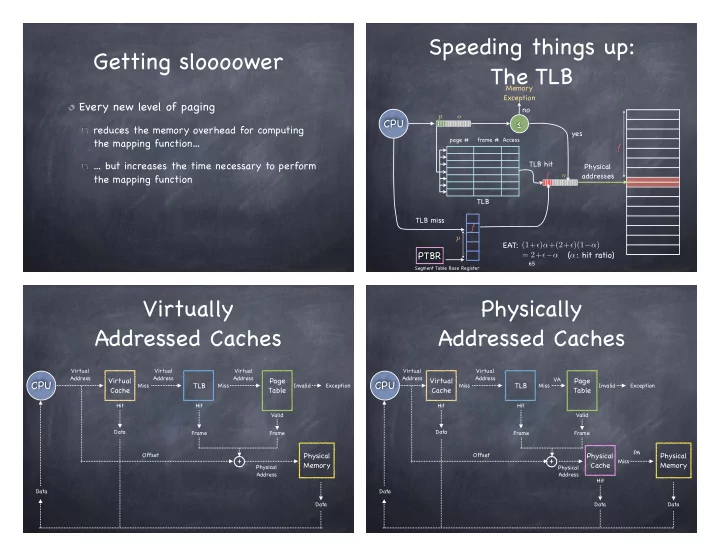
reduces the memory overhead for computing the mapping function… … but increases the time necessary to perform the mapping function

Speeding things up: The TLB

CPU

yes Memory Exception Physical addresses

f

PTBR

  • Segment Table Base Register

p f

f

p

  • TLB miss

TLB hit

page # frame #

TLB no

EAT: (1+)α+(2+)(1−α) = 2+−α ( : hit ratio) α

65 Access

Virtually Addressed Caches

CPU

Virtual Cache Physical Memory TLB Page Table

Virtual Address Miss Virtual Address Miss

+

Invalid Exception Hit Hit Valid Frame Frame Physical Address Data Data Data Virtual Address Offset

Physically Addressed Caches

CPU

Virtual Cache Physical Memory TLB Page Table

Virtual Address Miss Virtual Address Miss

+

Invalid Exception Hit Hit Valid Frame Frame Physical Address Data Data Data VA

Physical Cache

PA Hit Data Miss Offset

slide-2
SLIDE 2

TLB Consistency - I

On context switch

VAs of old process should no longer be valid Change PTBR — but what about the TLB?

TLB Consistency - I

On context switch

VAs of old process should no longer be valid Change PTBR — but what about the TLB?

Option 1: Flush the TLB 1 0x0053 0x0012 R/W

PID VirtualPage PageFrame Access

TLB Entry

Ignore entries with wrong PIDs Option 2: Add pid tag to each TLB entry

TLB Consistency - II

What if OS changes permissions on page?

If permissions are reduced, OS must ask hardware to purge affected TLB entries

e.g., on copy-on-write

What if permissions are expanded?

What if we miss in the TLB?

Suppose a 64-bit VAS, with 4KB page and a 512MB physical memory

Page table has 252 entries At 4 bytes/PTE, Page Table is 16 Petabytes!

per process!

For Page Table at each level to fit in a single page, each level should span at most 10 bits 6 levels of paging!! But only 229/212 = 128K frames…

slide-3
SLIDE 3

A different approach

What if mapping size were proportional to the number of frames, not pages?

If PTE = 16 bytes, Page table size = 2MB And since all processes share the same physical frames, just one global page table!

Inverted page tables

Page Registers

(a.k.a. Inverted Page Tables)

For each frame, a register containing

Residence bit

is the frame occupied?

Page number of the occupying page Protection bits

Searched by page number The VAS of different processes may map the same page number to different frames!

Catch?

Basic Inverted Page Table Architecture

CPU

pid p

  • ffset

pid p

} f

search

f

  • ffset

Inverted Page Table

Physical Memory

Where have all the pages gone?

Searching 128KB of registers on every memory reference is not fun If the number of frames is small, the page registers can be placed in an associative memory---but... Large associative memories are expensive

hard to access in a single cycle. consume lots of power

75

slide-4
SLIDE 4

Hashed Inverted Page Tables

Add a Hash Anchor Table, mapping <pid, VP#> to an entry of the Inverted Page Table Collisions handled by chaining

0x1 0x123 pid vpn

  • ffset

0x184fc 0xaf013 0x0

Hash Anchor Table hash

1 0xa63 0x184fa 0x1

  • 3

0x31ab 0x0a921 pid vpn next 0x0 0x184fa 0x184fb 0x184fa 0x123 Index 76

Inverted Page Table

Demand Paging

Code pages are stored in a memory-mapped file on disk

some are currently residing in memory–most are not

Data and stack pages are also stored in a memory-mapped file OS determines what portion of VAS is mapped in memory

physical memory serves as cash for memory- mapped file on disk

77

Demand Paging:

Instruction Touches Invalid Mapped Address

  • 1. TLB Miss
  • 2. Page Table walk
  • 3. Page fault (page invalid

in Page Table)

  • 4. Exception to kernel
  • 5. Convert VA to file offset
  • 6. Allocate page frame

(evict page if needed) 7 . Initiate disk block read into page frame

  • 8. Disk interrupt when

DMA completes

  • 9. Mark page as valid
  • 10. Resume process at

faulting instruction

  • 11. TLB miss
  • 12. Page Table walk –

success!

  • 13. TLB updated
  • 14. Execute instruction

Allocating a Page Frame

Select “victim” page to evict Find all PTEs referring to old page

if page frame was shared

Set each PTE to invalid Remove any TLB entries

the PTE they are caching is now invalid!

Write changes to page back to disk