shell: program that runs other programs CS 251 Fa Fall 2019 2019 - - PowerPoint PPT Presentation

shell program that runs other programs cs 251 fa fall
SMART_READER_LITE
LIVE PREVIEW

shell: program that runs other programs CS 251 Fa Fall 2019 2019 - - PowerPoint PPT Presentation

shell: program that runs other programs CS 251 Fa Fall 2019 2019 CS 240 Spring 2020 Principles of Programming Languages Foundations of Computer Systems Ben Ben W Wood Ben Wood Shells and Signals https://cs.wellesley.edu/~cs240/s20/


slide-1
SLIDE 1

CS 251 Fa Fall 2019 2019 Principles of Programming Languages

Ben Ben W Wood

λ

CS 240 Spring 2020

Foundations of Computer Systems

Ben Wood https://cs.wellesley.edu/~cs240/s20/

Shells and Signals

Shells and Signals 1

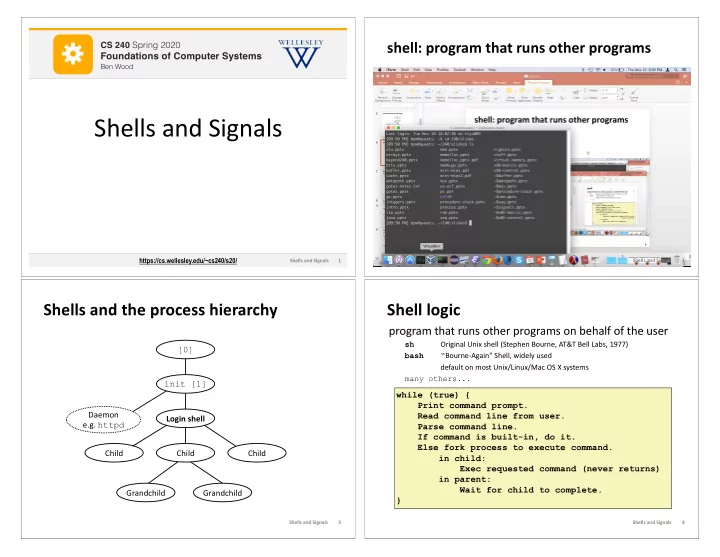
shell: program that runs other programs

Shells and Signals 2

Shells and the process hierarchy

Login shell Child Child Child Grandchild Grandchild [0] Daemon e.g. httpd init [1]

Shells and Signals 3

Shell logic

program that runs other programs on behalf of the user

sh Original Unix shell (Stephen Bourne, AT&T Bell Labs, 1977) bash “Bourne-Again” Shell, widely used default on most Unix/Linux/Mac OS X systems many others...

while (true) { Print command prompt. Read command line from user. Parse command line. If command is built-in, do it. Else fork process to execute command. in child: Exec requested command (never returns) in parent: Wait for child to complete. }

Shells and Signals 4

slide-2
SLIDE 2

Terminal ≠ shell

User interface to shell and other programs.

Graphical (GUI) vs. command-line (CLI)

Command-line terminal (emulator):

Input (keyboard) Output (screen, sound)

Shells and Signals 5

To wait or not?

A foreground job is a process for which the shell waits.*

A background job is a process for which the shell does not wait*… yet.

*Also: foregound jobs get input from (and "own") the terminal. Background jobs do not. $ emacs fizz.txt # shell waits until emacs exits. $ emacs boom.txt & # emacs runs in background. [1] 9073 # shell saves background job and is… $ gdb ./umbrella # immediately ready for next command. don't do this with emacs unless using X windows version

Shells and Signals 6

Signals

Signal: small message notifying a process of event in system

like exceptions and interrupts sent by kernel, sometimes at request of another process ID is entire message

ID Name Corresponding Event Default Action Can Override? 2 SIGINT Interrupt (Ctrl-C) Terminate Yes 9 SIGKILL Kill process (immediately) Terminate No 11 SIGSEGV Segmentation violation Terminate & Dump Yes 14 SIGALRM Timer signal Terminate Yes 15 SIGTERM Kill process (politely) Terminate Yes 17 SIGCHLD Child stopped or terminated Ignore Yes 18 SIGCONT Continue stopped process Continue (Resume) No 19 SIGSTOP Stop process (immediately) Stop (Suspend) No 20 SIGTSTP Stop process (politely) Stop (Suspend) Yes

Shells and Signals 7

  • ptional

Sending/receiving a signal

Kernel sends (delivers) a signal to a destination process by updating state in the context of the destination process. Reasons:

System event, e.g. segmentation fault (SIGSEGV) Another process used kill system call: explicitly request the kernel send a signal to the destination process

Destination process receives signal when kernel forces it to react. Reactions:

Ignore the signal (do nothing) Terminate the process (with optional core dump) Catch the signal by executing a user-level function called signal handler

Like an impoverished Java exception handler

Shells and Signals 8
  • ptional
slide-3
SLIDE 3

Signals handlers as concurrent flows

Signal handlers run concurrently with main program (in same process).

Shells and Signals 9

Process A while (1) ; Process A handler(){ … } Process B

Time

  • ptional

Another view of signal handlers as concurrent flows

Shells and Signals 10

Signal delivered Signal received Process A Process B

user code (main) kernel code user code (main) kernel code user code (handler) context switch context switch kernel code user code (main) Icurr Inext

  • ptional

Pending and blocked signals

A signal is pending if sent but not yet received

<= 1 pending signal per type per process No Queue! Just a bit per signal type.

Signals of type S discarded while process has S signal pending.

A process can block the receipt of certain signals

Receipt delayed until the signal is unblocked

A pending signal is received at most once

Let's draw a picture...

Shells and Signals 11

  • ptional

Process Groups

Every process belongs to exactly one process group (default: parent's group)

Fore- ground job Back- ground job #1 Back- ground job #2 Shell Child Child

pid=10 pgid=10

Foreground process group 20 Background process group 32 Background process group 40

pid=20 pgid=20 pid=32 pgid=32 pid=40 pgid=40 pid=21 pgid=20 pid=22 pgid=20

getpgrp() Return process group of current process setpgid() Change process group of a process

Shells and Signals 13

  • ptional
slide-4
SLIDE 4

Sending signals from the keyboard

Shell: Ctrl-C sends SIGINT (Ctrl-Z sends SIGTSTP) to every job in the foreground process group.

SIGINT – default action is to terminate each process SIGTSTP – default action is to stop (suspend) each process

Fore- ground job Back- ground job #1 Back- ground job #2 Shell Child Child

pid=10 pgid=10

Foreground process group 20 Background process group 32 Background process group 40

pid=20 pgid=20 pid=32 pgid=32 pid=40 pgid=40 pid=21 pgid=20 pid=22 pgid=20 Shells and Signals 14

  • ptional

Signal demos

Ctrl-C Ctrl-Z kill kill(pid, SIGINT);

Shells and Signals 15

  • ptional

A program that reacts to externally generated events (Ctrl-c)

#include <stdlib.h> #include <stdio.h> #include <signal.h> void handler(int sig) { safe_printf("You think hitting ctrl-c will stop me?\n"); sleep(2); safe_printf("Well..."); sleep(1); printf("OK\n"); exit(0); } main() { signal(SIGINT, handler); /* installs ctrl-c handler */ while(1) { } }

external.c

> ./external <ctrl-c> You think hitting ctrl-c will stop me? Well...OK >

Shells and Signals 26

  • ptional

A program that reacts to internally generated events

#include <stdio.h> #include <signal.h> int beeps = 0; /* SIGALRM handler */ void handler(int sig) { safe_printf("BEEP\n"); if (++beeps < 5) alarm(1); else { safe_printf("DING DING!\n"); exit(0); } } main() { signal(SIGALRM, handler); alarm(1); /* send SIGALRM in 1 second */ while (1) { } } > ./internal BEEP BEEP BEEP BEEP BEEP DING DING! >

internal.c

Shells and Signals 27

  • ptional
slide-5
SLIDE 5

Signal summary

Signals provide process-level exception handling

Can generate from user programs Can define effect by declaring signal handler

Some caveats

Very high overhead

>10,000 clock cycles Only use for exceptional conditions

Not queued

Just one bit for each pending signal type

Many more complicated details we have not discussed.

Book goes into too much gory detail.

Shells and Signals 36

  • ptional