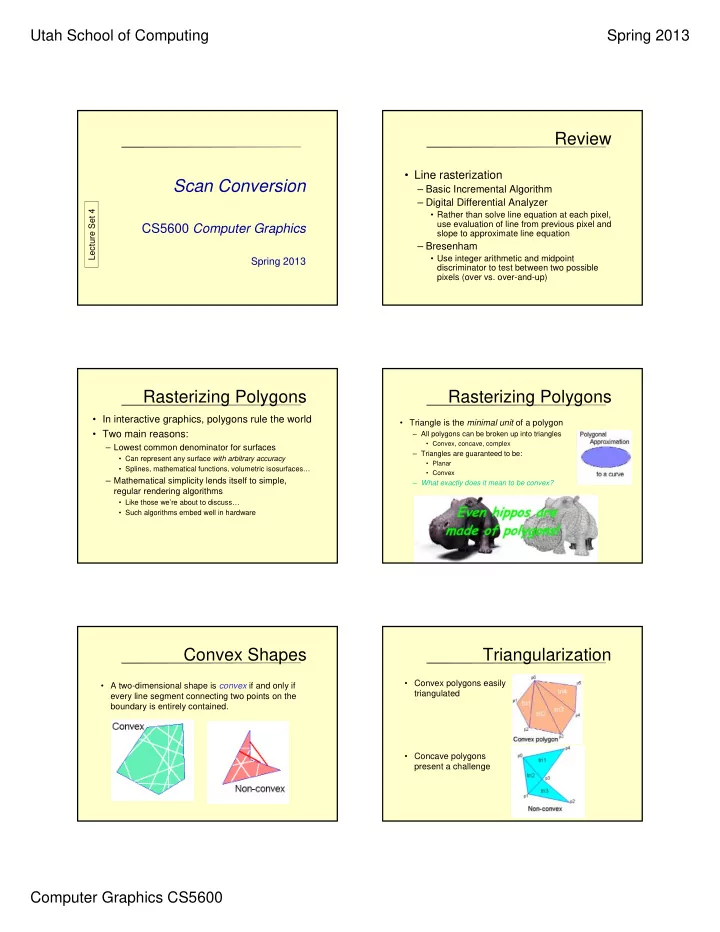
Review Line rasterization Scan Conversion Basic Incremental - - PDF document

review
SMART_READER_LITE
LIVE PREVIEW

Review Line rasterization Scan Conversion Basic Incremental - - PDF document

Utah School of Computing Spring 2013 Review Line rasterization Scan Conversion Basic Incremental Algorithm Digital Differential Analyzer Lecture Set 4 Rather than solve line equation at each pixel, use evaluation of line


slide-1
SLIDE 1

Utah School of Computing Spring 2013 Computer Graphics CS5600

Scan Conversion

CS5600 Computer Graphics

Spring 2013

Lecture Set 4

Review

  • Line rasterization

– Basic Incremental Algorithm – Digital Differential Analyzer

  • Rather than solve line equation at each pixel,

use evaluation of line from previous pixel and slope to approximate line equation

– Bresenham

  • Use integer arithmetic and midpoint

discriminator to test between two possible pixels (over vs. over-and-up)

Rasterizing Polygons

  • In interactive graphics, polygons rule the world
  • Two main reasons:

– Lowest common denominator for surfaces

  • Can represent any surface with arbitrary accuracy
  • Splines, mathematical functions, volumetric isosurfaces…

– Mathematical simplicity lends itself to simple, regular rendering algorithms

  • Like those we’re about to discuss…
  • Such algorithms embed well in hardware

Rasterizing Polygons

  • Triangle is the minimal unit of a polygon

– All polygons can be broken up into triangles

  • Convex, concave, complex

– Triangles are guaranteed to be:

  • Planar
  • Convex

– What exactly does it mean to be convex?

Convex Shapes

  • A two-dimensional shape is convex if and only if

every line segment connecting two points on the boundary is entirely contained.

Triangularization

  • Convex polygons easily

triangulated

  • Concave polygons

present a challenge

slide-2
SLIDE 2

Utah School of Computing Spring 2013 Computer Graphics CS5600

Rasterizing Triangles

  • Interactive graphics hardware

sometimes uses edge walking or edge equation techniques for rasterizing triangles

  • Interactive graphics hardware more

commonly uses barycentric coordinates for rasterizing triangles

Scan Conversion

  • In scanline rendering surfaces are projected on the

screen and space filling ‘rasterizing’ algorithms are used to fill in the color.

  • Color values from light are approximated.

Triangle Rasterization Issues

  • Exactly which pixels should be lit?
  • A: Those pixels inside the triangle edges
  • What about pixels exactly on the edge?

– Draw them: order of triangles matters (it shouldn’t) – Don’t draw them: gaps possible between triangles

  • We need a consistent (if arbitrary) rule

– Example: draw pixels on left and bottom edge, but not on right or top edge

Triangle Rasterization Issues

  • Sliver
  • Moving Slivers

Triangle Rasterization Issues Triangle Rasterization Issues

  • Shared Edge Ordering
slide-3
SLIDE 3

Utah School of Computing Spring 2013 Computer Graphics CS5600

slide-4
SLIDE 4

Utah School of Computing Spring 2013 Computer Graphics CS5600

How do we know if it’s ‘inside’?

Edge Equations

  • An edge equation is simply the equation of

the line defining that edge

– Q: What is the implicit equation of a line? – A: Ax + By + C = 0 – Q: Given a point (x,y), what does plugging x & y into this equation tell us? – A: Whether the point is:

  • On the line: Ax + By + C = 0
  • “Above” the line: Ax + By + C > 0
  • “Below” the line: Ax + By + C < 0

Edge Equations

  • Edge equations thus define two half-spaces:

Edge Equations

  • And a triangle can be defined as the

intersection of three positive half-spaces:

A1x + B1y + C1 < 0 A2 x + B2 y + C2 < A3x + B3y + C3 < 0 A1x + B1y + C1 > 0 A3x + B3y + C3 > 0 A2 x + B2 y + C2 >

Edge Equations

  • So…simply turn on those pixels for which all edge

equations evaluate to > 0:

+ + +

slide-5
SLIDE 5

Utah School of Computing Spring 2013 Computer Graphics CS5600

Sweep-line

  • Basic idea:

– Draw edges vertically

  • Interpolate colors up/down edges

– Fill in horizontal spans for each scanline

  • At each scanline, interpolate

edge colors across span

Sweep-line: Notes

  • Order three triangle vertices in x and y

– Find middle point in y dimension and compute if it is to the left or right of polygon. Also could be flat top or flat bottom triangle

  • We know where left and right edges are.

– Proceed from top scanline downwards (and other way too) – Fill each span – Until bottom/top vertex is reached

  • Advantage: can be made very fast
  • Disadvantages:

– Lots of finicky special cases

Sweep line: Disadvantages

  • Fractional offsets:
  • Be careful when interpolating color values!
  • Beware of gaps between adjacent edges
  • Beware of duplicating shared edges
slide-6
SLIDE 6

Utah School of Computing Spring 2013 Computer Graphics CS5600

Polygon Scan Conversion

Intersection Points Other points in the span

slide-7
SLIDE 7

Utah School of Computing Spring 2013 Computer Graphics CS5600

Determining Inside vs. Outside

  • Use the odd-parity rule

– Set parity even initially – Invert parity at each intersection point – Draw pixels when parity is odd, do not draw when it is even

  • How do we count vertices, i.e., do we invert parity

when a vertex falls exactly on a scan line?

Vertices and Parity

  • How do we count the intersecting vertex in

the parity computation?

Scan line ?????

Vertices and Parity

  • We need to either count it 0 times, or 2 times to keep parity

correct.

  • What about:
  • We need to count this

vertex once Scan line ?????

Vertices and Parity

  • If we count a vertex as one intersection, the second

polygon gets drawn correctly, but the first does not.

  • If we count a vertex as zero or two intersections, the

first polygon gets drawn correctly, but the second does not.

  • How do we handle this?

– Count only vertices that are the ymin vertex for that line

Vertices and Parity

  • Both cases now work correctly

Horizontal Edges

  • How do we deal with horizontal edges?

Don’t count their vertices in the parity calculation! ???

slide-8
SLIDE 8

Utah School of Computing Spring 2013 Computer Graphics CS5600

Top Spans of Polygons

  • Effect of only counting ymin :

– Top spans of polygons are not drawn – If two polygons share this edge, it is not a problem. – What about if this is the only polygon with that edge?

Shared Polygon Edges

  • What if two polygons share an edge?
  • Solution:

– Span is closed on left and

  • pen on right (xmin  x < xmax)

– Scan lines closed on bottom and

  • pen on top (ymin  y < ymax)

Draw  Last polygon wins Orange last Blue last

General Pixel Ownership Rule

  • Half-plane rule:

A boundary pixel (whose center falls exactly on an edge) is not considered part of a primitive if the half plane formed by the edge and containing the primitive lies to the left or below the edge.

  • Consequences:

– Spans are missing the right-most pixel – Each polygon is missing its top-most span

Shared edge

Applies to arbitrary polygons as well as to rectangles....

General Polygon Rasterization

  • Consider the following polygon:
  • How do we know whether a given pixel on the

scanline is inside or outside the polygon?

A B C D E F

Polygon Rasterization

  • Inside-Outside Points

Polygon Rasterization

  • Inside-Outside Points
slide-9
SLIDE 9

Utah School of Computing Spring 2013 Computer Graphics CS5600

General Polygon Rasterization

  • Basic idea: use a parity test

for each scanline edgeCnt = 0; for each pixel on scanline (l to r) if (oldpixel->newpixel crosses edge) edgeCnt ++; // draw the pixel if edgeCnt odd if (edgeCnt % 2) setPixel(pixel);

General Polygon Rasterization

  • Count your vertices carefully

B C D E F G I H J A

Faster Polygon Rasterization

  • How can we optimize the code?

for each scanline edgeCnt = 0; for each pixel on scanline (l to r) if (oldpixel->newpixel crosses edge) edgeCnt ++; // draw the pixel if edgeCnt odd if (edgeCnt % 2) setPixel(pixel);

  • Big cost: testing pixels against each edge
  • Solution: active edge table (AET)

Active Edge Table

  • Idea:

– Edges intersecting a given scanline are likely to intersect the next scanline – The order of edge intersections doesn’t change much from scanline to scanline

Active Edge Table

Preprocess: Sort on Y

Edge Table Ymax,xat y min,slope

slide-10
SLIDE 10

Utah School of Computing Spring 2013 Computer Graphics CS5600

Active Edge Table

Preprocess: Sort on Y

Edge Table Ymax,xat y min,slope AB:

Active Edge Table

Preprocess: Sort on Y

Edge Table Ymax,xat y min,slope AB: 3 7 -5/2 CB:

Active Edge Table

Preprocess: Sort on Y

Edge Table Ymax,xat y min,slope AB: 3 7 -5/2 CB: 5 7 6/4 CD:

Active Edge Table

Preprocess: Sort on Y

Edge Table Ymax,xat y min,slope AB: 3 7 -5/2 CB: 5 7 6/4 CD: 11 13 0 DE:

Active Edge Table

Preprocess: Sort on Y

Edge Table Ymax,xat y min,slope AB: 3 7 -5/2 CB: 5 7 6/4 CD: 11 13 0 DE: 11 7 6/4 EF:

Active Edge Table

Preprocess: Sort on Y

Edge Table Ymax,xat y min,slope AB: 3 7 -5/2 CB: 5 7 6/4 CD: 11 13 0 DE: 11 7 6/4 EF: 9 7 -5/2 FA:

slide-11
SLIDE 11

Utah School of Computing Spring 2013 Computer Graphics CS5600

Active Edge Table

Preprocess: Sort on Y

Edge Table Ymax,xat y min,slope AB: 3 7 -5/2 CB: 5 7 6/4 CD: 11 13 0 DE: 11 7 6/4 EF: 9 7 -5/2 FA: 9 2 0

Active Edge Table

Preprocess: Sort on Y

Edge Table Ymax,xat y min,slope AB: 3 7 -5/2 CB: 5 7 6/4 CD: 11 13 0 DE: 11 7 6/4 EF: 9 7 -5/2 FA: 9 2 0 What about Ymin?

Active Edge Table

Preprocess: Sort on Y

Edge Table Ymax,xmin,slope

Active Edge Table

  • Algorithm: scanline from bottom to top…

– Sort all edges by their minimum y coord (last slide) – Starting at smallest Y coord with in entry in edge table – For each scanline:

  • Add edges with Ymin = Y (move edges in edge table to AET)
  • Retire edges with Ymax < Y (completed edges)
  • Sort edges in AET by x intersection
  • Walk from left to right, setting pixels by parity rule
  • Increment scanline
  • Recalculate edge intersections (how?)

– Stop when Y > Ymax for edge table and AET is empty

Active Edge Table

  • Algorithm: scanline from bottom to top…

– Sort all edges by their minimum y coord (last slide) – Starting at smallest Y coord with in entry in edge table – For each scanline:

1. Add edges with Ymin = Y (move edges in edge table to AET) 2. Retire edges with Ymax < Y (completed edges) 3. Sort edges in AET by x intersection 4. Walk from left to right, setting pixels by parity rule 5. Increment scanline 6. Recalculate edge intersections (how?)

For every non-vertical edge in the AET update x for the new y (calculate the next intersection of the edge with the scan line).

– Stop when Y > Ymax for edge table and AET is empty

Active Edge Table Example

Example of an AET containing edges {FA, EF, DE, CD} on scan line 8:

1. : (y = 8) Get edges from ET bucket y (none in this case, y = 8 has no entry) 2. : Remove from the AET any entries where ymax = y (none here) 3. : sort by X 4. : Draw scan line. To handle multiple edges, group in pairs: {FA,EF}, {DE,CD} 5. : y = y+1 (y = 8+1 = 9) 6. : Update x for non-vertical edges, as in simple line drawing.

(FvDFH pages 92, 99)

Current X Slope Y val

Scanline 8

2 3 9 13

slide-12
SLIDE 12

Utah School of Computing Spring 2013 Computer Graphics CS5600

Active Edge Table Example (cont.)

1. : (y = 9) Get edges from ET bucket y (none in this case, y = 9 has no entry in ET)

– “Scan line 9” shown in fig 3.28 below

2. : Remove from the AET any entries with ymax = y (remove FA, EF) 3. : Sort by X 4. : Draw scan line between {DE, CD} 5. : y = y+1 = 10 6. : Update x in {DE, CD} 7. : (y = 10) (Scan line 10 shown in fig 3.28 below) 8. And so on…

(FvDFH pages 92, 99) (FvDFH pages 92, 99)

Current X Slope Y val

Triangles (cont.)

  • Rasterization algorithms can take advantage of

triangle properties

  • Graphics hardware is optimized for triangles
  • Because triangle drawing is so fast, many systems will

subdivide polygons into triangles prior to scan conversion

Why are Barycentric coordinates useful?

  • For any point x, if the barycentric representation of

that point: x,x, x < 1

  • Also ,, can be used as a mass function across

the surface of a triangle to be used for interpolation.

  • This is used to interpolate normals across the surface
  • f a triangle to make polygon surfaces look rounder.

Barycentric Coordinates

  • Consider a triangle defined by three points a, b, and c.
  • Define a new coordinate system in which a is the
  • rigin, b and c define the coordinate system basis

vectors

  • Note that the coordinate system will be non-
  • rthogonal.

Barycentric Coordinates

a c b b-a c-a

Barycentric Coordinates

  • With this new coordinate system, any point can be

written as:

  • rearranging terms, we get:
  • let
  • then

) ( ) ( a c a b a p        c b a p          ) 1 ( ) 1 (       c b a p      

slide-13
SLIDE 13

Utah School of Computing Spring 2013 Computer Graphics CS5600

Barycentric Coordinates

a c b b-a c-a =0 =-1 =1 =2   =

  • 1

 =   = 1   = 2

Barycentric Coordinates

  • Now any point in the plane can be represented using

its barycentric coordinates

  • If
  • then the point lies somewhere in the triangle

c b a p       1 1 1 1                Barycentric Coordinates

  • If one of the coordinates is zero and the other two are between 0

and 1, the point is on an edge

  • If two coordinates are zero and the other is one, the point is at a

vertex.

  • The barycentric coordinate is the signed scaled distance from the

point to the line passing through the other two triangle points

a c b c-a =0 =-1 =1 d=1

Computing Barycentric Coordinates

  • Implicit form between two points (a,b) and (a,c)

a b b a a b b a

y x y x y x x x y y b a f       ) ( ) ( ) , (

a c c a a c c a

y x y x y x x x y y c a f       ) ( ) ( ) , (

Barycentric Coordinates

a c b b-a c-a =0 =-1 =1 =2   =

  • 1

 =   = 1   = 2

PDF Slides

slide-14
SLIDE 14

Utah School of Computing Spring 2013 Computer Graphics CS5600

Computing Barycentric Coordinates

  • To compute the barycentric coordinates of a point:

a b b a c a b c b a a b b a a b b a

y x y x y x x x y y y x y x y x x x y y            ) ( ) ( ) ( ) ( 

a c c a b a c b c a a c c a a c c a

y x y x y x x x y y y x y x y x x x y y            ) ( ) ( ) ( ) (       1

Barycentric Coordinate Applet

http://i33www.ira.uka.de/applets/mocca/html/noplugin/inhalt.html

Rasterize This!

(Rasterization intuition)

  • When we render a triangle we want to determine if a

pixel is within a triangle. (barycentric coords)

  • Calculate the color of the pixel (use barycentric coors).
  • Draw the pixel.
  • Repeat until the triangle is appropriately filled.

Rasterization Pseudo Code Rasterization Rasterization

slide-15
SLIDE 15

Utah School of Computing Spring 2013 Computer Graphics CS5600

Rasterization

Ymax, Xmax Ymin, X??? Y???, Xmin

Bounding Box

Ymax, Xmax Ymin, X??? Y???, Xmin

Barycentric Coordinates

  • weighted combination of vertices

3 2 1

P P P P         

1

P

3

P

2

P P

(1,0,0) (1,0,0) (0,1,0) (0,1,0) (0,0,1) (0,0,1)

5 .   1     1 , , 1           

“ “convex combination convex combination

  • f points
  • f points”

Barycentric Coordinates for I nterpolation

  • how to compute ?

– use bilinear interpolation or plane equations – once computed, use to interpolate any # of parameters from their vertex values    , ,

interpolate interpolate

   , , ...           d z c y b x a

3 2 1

x x x x         

3 2 1

r r r r         

3 2 1

g g g g         

etc. etc.

Interpolatation: Gouraud Shading

  • need linear function over triangle that yields original

vertex colors at vertices

  • use barycentric coordinates for this

– every pixel in interior gets colors resulting from mixing colors of vertices with weights corresponding to barycentric coordinates – color at pixels is affine combination of colors at vertices

) ( ) ( ) ( : ) (

3 2 1 3 2 1

x x x x x x Color Color Color Color                 

Gouraud Shading Scanline Alg

  • algorithm

– modify scanline algorithm for polygon scan-conversion :

  • linearly interpolate colors along edges of triangle to obtain colors for

endpoints of span of pixels

  • linearly interpolate colors from these endpoints within the scanline

max min max max min min max max

* 1 * C X X X X C X X X X

cur cur

             

Xmin Xmax Xcur

slide-16
SLIDE 16

Utah School of Computing Spring 2013 Computer Graphics CS5600

Filling Techniques

  • Another approach to polygon fill is using a filling

technique, rather than scan conversion

  • Pick a point inside the polygon, then fill neighboring

pixels until the polygon boundary is reached

  • Boundary Fill Approach:

– Draw polygon boundary in the frame buffer – Determine an interior point – Starting at the given point, do

  • If the point is not the boundary color or the fill color

Set this pixel to the fill color Propagate to the pixel’s neighbors and continue

Filling Techniques

  • Flood Fill Approach:

– Set all interior pixels to a certain color – The boundary can be any other color – Pick an interior point and set it to the polygon color – Propagate to neighbors, as long as the neighbor is the interior color

  • This is used for regions with multi-colored boundaries

Region to be filled

Propagating to Neighbors

  • Most frequently used approaches:

– 4-connected area – 8-connected area

4-connected 8-connected

Fill Problems

  • Fill algorithms have potential problems
  • E.g., 4-connected area fill:

Starting point Fill complete

Fill Problems

  • Similarly, 8-connected can “leak” over to another

polygon

  • Another problem: the algorithm is highly recursive

– Can use a stack of spans to reduce amount of recursion

Starting point Fill complete

slide-17
SLIDE 17

Utah School of Computing Spring 2013 Computer Graphics CS5600

Pattern Filling

  • Often we want to fill a region with a pattern, not just a

color

  • Define an n by m pixmap (or bitmap) that we wish to

replicate across the region 5x4 pixmap Object to be patterned Final patterned

  • bject

Pattern Filling

  • How do you determine the anchor point

– A point on the polygon

  • Left-most point?
  • The pattern will move with the polygon
  • Difficult to decide the right anchor point

– Screen (or window) origin

  • Easier to determine anchor point
  • The pattern does not move with the object

Pattern Filling

  • How do we determine which color to color a point in

the object?

  • Use the MOD function to tile the pattern across the

polygon

  • For point (x, y)

– Use the pattern color located at (x MOD m, y MOD n)

Pattern Example

  • For the pattern shown, what color does the pixel at

location (235, 168) get colored, assuming the pattern is anchored at the lower left corner of the object? Pattern ???

2 3 5 2 2 5 1 6 8 1 6 3

Pattern Example

Pattern ???

2 3 5 2 2 5 1 6 8 1 6 3

The pattern is 5x4

Need to find the relative distance to the point to draw: X = (235 – 225) = 10 Y = (168 – 163) = 5 Next figure out which pattern pixel corresponds to this screen pixel: Xpattern = 10 MOD 4 = 2 Ypattern = 5 MOD 5 = 0

Pattern Example

  • The pattern pixel (2, 0) should map to screen location

(235, 168) (2, 0) Let’s map the pattern onto the polygon and see ???

2 3 5 2 2 5 1 6 8 1 6 3

(0, 0) pattern location

slide-18
SLIDE 18

Utah School of Computing Spring 2013 Computer Graphics CS5600

The End

Scan Conversion

Lecture Set 4

103