Review of Symbols Review of Symbols CS 105 Basic Parameters Tour - - PowerPoint PPT Presentation

review of symbols review of symbols cs 105
SMART_READER_LITE
LIVE PREVIEW

Review of Symbols Review of Symbols CS 105 Basic Parameters Tour - - PowerPoint PPT Presentation


slide-1
SLIDE 1

Virtual Memory: Systems Virtual Memory: Systems

Topics

Simple memory system example

Case study: Core i7

Linux memory management

Memory mapping

CS 105

“Tour of the Black Holes of Computing!”

– 2 – CS 105

Review of Symbols Review of Symbols

Basic Parameters

N = 2n : Number of addresses in virtual address space

M = 2m : Number of addresses in physical address space

P = 2p : Page size (bytes)

Components of the virtual address (VA)

TLBI: TLB index

TLBT: TLB tag

VPO: Virtual page offset

VPN: Virtual page number

Components of the physical address (PA)

PPO: Physical page offset (same as VPO)

PPN: Physical page number

CO: Byte offset within cache line

CI: Cache index

CT: Cache tag

– 3 – CS 105

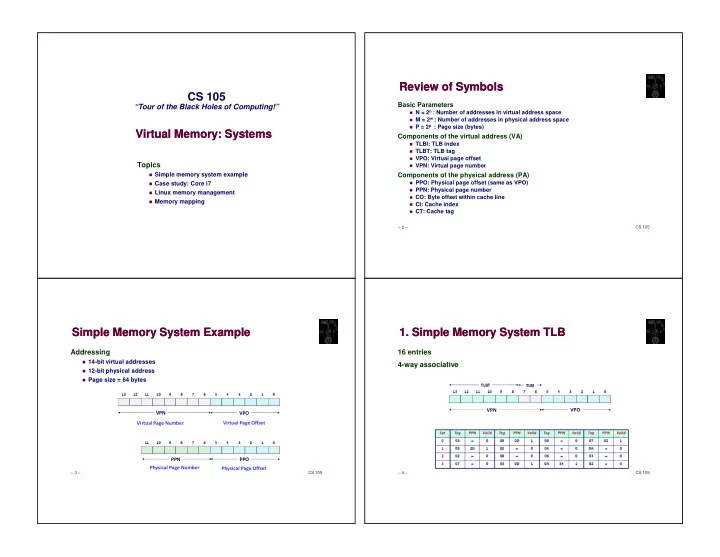
Simple Memory System Example Simple Memory System Example

Addressing

14-bit virtual addresses

12-bit physical address

Page size = 64 bytes

✁ ✂ ✁ ✄ ✁ ✁ ✁ ☎ ✆ ✝ ✞ ✟ ✠ ✡ ✂ ✄ ✁ ☎ ✁ ✁ ✁ ☎ ✆ ✝ ✞ ✟ ✠ ✡ ✂ ✄ ✁ ☎
  • – 4 –

CS 105

  • 1. Simple Memory System TLB
  • 1. Simple Memory System TLB

16 entries 4-way associative

✁ ✂ ✁ ✄ ✁ ✁ ✁ ☎ ✆ ✝ ✞ ✟ ✠ ✡ ✂ ✄ ✁ ☎
☛ ☎ ✄ ✁ ✂ ✡ ☎ ☞ ✁ ☎ ✌ ☎ ✂ ☎ ☛ ☎ ✞ ✂ ☎ ☛ ☎ ✂ ☎ ☛ ☎ ✟ ☎ ☛ ☎ ✝ ☎ ☛ ☎ ✄ ✄ ☎ ☛ ☎ ☞ ☎ ☛ ☎ ✡ ☎ ☛ ☎ ✄ ✁ ✄ ✌ ☎ ✂ ✁ ✁ ☎ ✄ ☎ ✞ ☎ ☛ ☎ ☎ ✁ ☎ ✌ ☎ ✆ ☎ ☛ ☎ ✂ ☎ ✁ ✂ ✄ ☎ ✆ ✝ ✝ ✞ ✟ ✂ ✠ ✁ ✂ ✄ ☎ ✆ ✝ ✝ ✞ ✟ ✂ ✠ ✁ ✂ ✄ ☎ ✆ ✝ ✝ ✞ ✟ ✂ ✠ ✁ ✂ ✄ ☎ ✆ ✝ ✝ ✞ ✟ ✂ ✠ ✡
slide-2
SLIDE 2

– 5 – CS 105

  • 2. Simple Memory System Page Table
  • 2. Simple Memory System Page Table

Only show first 16 entries (out of 256)

  • – 6 –

CS 105

  • 3. Simple Memory System Cache
  • 3. Simple Memory System Cache

16 lines, 4-byte block size Physically addressed Direct mapped

✁ ✁ ✁ ☎ ✆ ✝ ✞ ✟ ✠ ✡ ✂ ✄ ✁ ☎
✂ ✌ ✍ ✎ ✄ ✁ ✁ ✁ ✁ ✟ ✞ ☛ ☛ ☛ ☛ ☎ ✂ ✁ ✟ ✁ ✌ ✍ ☎ ✞ ✄ ✂ ✟ ✁ ☎ ✌ ✠ ☎ ✆ ✝ ✍ ✟ ✌ ✡ ✂ ✁ ✂ ✄ ✡ ☛ ☛ ☛ ☛ ☎ ✂ ✟ ✂ ☎ ✝ ☎ ✡ ☎ ✄ ☎ ☎ ✁ ✁ ✏ ✄ ☛ ☛ ☛ ☛ ☎ ✁ ✠ ✁ ✁ ✁ ✄ ✂ ✁ ✁ ✆ ✆ ✁ ✁ ✆ ☎ ✌
✁ ✌ ✂ ✌ ✑ ✁ ✂ ✄ ☎ ✆ ✟ ✂ ✠ ✒ ✆ ✓ ☛ ☛ ☛ ☛ ☎ ✁ ✡ ✍ ✌ ✂ ✁ ✏ ✞ ✞ ✝ ✂ ✁ ✁ ✂ ✄ ✁ ✠ ✂ ✡ ✆ ✟ ☎ ✡ ✁ ✁ ✟ ✌ ☛ ☛ ☛ ☛ ☎ ✁ ✄ ✎ ☛ ☛ ☛ ☛ ☎ ☎ ✏ ✏ ✂ ✏ ✌ ☞ ✁ ✠ ✆ ✂ ✁ ✄ ✌ ☞ ☛ ☛ ☛ ☛ ☎ ✄ ✌ ✆ ✝ ✆ ✠ ✁ ☎ ☎ ✂ ☞ ✁ ✄ ✡ ✝ ✌
✁ ✌ ✂ ✌ ✑ ✁ ✂ ✄ ☎ ✆ ✟ ✂ ✠ ✒ ✆ ✓

– 12 – CS 105

Address Translation Example #1 Address Translation Example #1

Virtual Address: 0x03D4

VPN ____ TLBI ___ TLBT ____ TLB Hit? __ Page Fault? __ PPN: ____

Physical Address

CO ___ CI___ CT ____ Hit? __ Byte: ____

✁ ✂ ✁ ✄ ✁ ✁ ✁ ☎ ✆ ✝ ✞ ✟ ✠ ✡ ✂ ✄ ✁ ☎
✁ ✁ ☎ ✆ ✝ ✞ ✟ ✠ ✡ ✂ ✄ ✁ ☎
  • – 20 –

CS 105

Address Translation Example #2 Address Translation Example #2

Virtual Address: 0x0020

VPN ____ TLBI ___ TLBT ____ TLB Hit? __ Page Fault? __ PPN: ____

Physical Address

CO___ CI___ CT ____ Hit? __ Byte: ____

✁ ✂ ✁ ✄ ✁ ✁ ✁ ☎ ✆ ✝ ✞ ✟ ✠ ✡ ✂ ✄ ✁ ☎
✁ ✁ ☎ ✆ ✝ ✞ ✟ ✠ ✡ ✂ ✄ ✁ ☎
slide-3
SLIDE 3

– 26 – CS 105

Address Translation Example #3 Address Translation Example #3

Virtual Address: 0x0316

VPN ____ TLBI ___ TLBT ____ TLB Hit? __ Page Fault? __ PPN: ____

Physical Address

✁ ✂ ✁ ✄ ✁ ✁ ✁ ☎ ✆ ✝ ✞ ✟ ✠ ✡ ✂ ✄ ✁ ☎
✁ ✁ ☎ ✆ ✝ ✞ ✟ ✠ ✡ ✂ ✄ ✁ ☎
  • – 27 –

CS 105

Intel Core i7 Memory System Intel Core i7 Memory System

32 KB, 8-way L1 d-cache 32 KB, 8-way 256 KB, 8-way L2 unified cache 256 KB, 8-way L3 unified cache 8 MB, 16-way (shared by all cores) Main memory Registers 64 entries, 4-way L1 d-TLB 64 entries, 4-way 128 entries, 4-way L1 i-TLB 128 entries, 4-way 512 entries, 4-way L2 unified TLB 512 entries, 4-way 32 KB, 8-way L1 i-cache 32 KB, 8-way (addr translation) MMU (addr translation) fetch Instruction fetch Core x4

DDR3 Memory controller 3 x 64 bit @ 10.66 GB/s 32 GB/s total (shared by all cores)

Processor package

QuickPath interconnect 4 links @ 25.6 GB/s each To other cores To I/O bridge – 28 – CS 105

End-to-End Core i7 Address Translation End-to-End Core i7 Address Translation

CPU VPN VPO

36 12

TLBT TLBI

4 32

... L1 TLB (16 sets, 4 entries/set)

VPN1 VPN2

9 9

PTE

CR3 PPN PPO

40 12

Page tables TLB miss TLB hit Physical address (PA) Result

32/64

... CT CO

40 6

CI

6

L2, L3, and main memory L1 d-cache (64 sets, 8 lines/set) L1 hit L1 miss Virtual address (VA)

VPN3 VPN4

9 9

PTE PTE PTE – 29 – CS 105

Core i7 Level 1-3 Page Table Entries Core i7 Level 1-3 Page Table Entries

✒ ✓ ✔ ✕ ✗ ✓ ✘ ✙ ✕ ✚ ✛ ✜ ✢ ✣ ✤ ✓ ✙ ✘ ✓ ✢ ✕ ✓ ✥ ✥ ✦ ✕ ✢ ✢ ✧ ★ ✩ ✢ ✕ ✥ ✪ ✒ ✫ ☞ ✎ ✌ ✬ ✭ ✧ ✮ ✫ ✯ ✮ ✬ ✒ ✰ ✁
✁ ✁ ✄ ✁ ✁ ✆ ✝ ✞ ✟ ✠ ✡ ✂ ✄ ✁ ☎ ✧ ★ ✩ ✢ ✕ ✥ ✱ ✌ ☞ ✲ ✓ ✣ ✙ ✓ ✘ ✙ ✕ ✳ ✴ ✦ ✵ ✫ ✶ ✚ ✓ ✔ ✕ ✗ ✓ ✘ ✙ ✕ ✙ ✴ ✤ ✓ ✗ ✣ ✴ ★ ✴ ★ ✥ ✣ ✢ ✷ ✸ ✒ ✰ ☎ ✠ ✄ ✟ ✄ ✟ ✂
slide-4
SLIDE 4

– 30 – CS 105

Core i7 Level 4 Page Table Entries Core i7 Level 4 Page Table Entries

✒ ✓ ✔ ✕ ✚ ✛ ✜ ✢ ✣ ✤ ✓ ✙ ✘ ✓ ✢ ✕ ✓ ✥ ✥ ✦ ✕ ✢ ✢ ✧ ★ ✩ ✢ ✕ ✥ ✪

D

☞ ✎ ✌ ✬ ✭ ✧ ✮ ✫ ✯ ✮ ✬ ✒ ✰ ✁
✁ ✁ ✄ ✁ ✁ ✆ ✝ ✞ ✟ ✠ ✡ ✂ ✄ ✁ ☎ ✧ ★ ✩ ✢ ✕ ✥ ✱ ✌ ☞ ✲ ✓ ✣ ✙ ✓ ✘ ✙ ✕ ✳ ✴ ✦ ✵ ✫ ✶ ✚ ✓ ✔ ✕ ✙ ✴ ✤ ✓ ✗ ✣ ✴ ★ ✴ ★ ✥ ✣ ✢ ✷ ✸ ✒ ✰ ☎ ✠ ✄ ✟ ✄ ✟ ✂

– 31 – CS 105

Core i7 Page Table Translation Core i7 Page Table Translation

CR3 Physical address

  • f page

Physical address

  • f L1 PT

9

VPO

9 12

Virtual address

L4 PT Page table L4 PTE PPN PPO

40 12

Physical address

Offset into physical and virtual page VPN 3 VPN 4 VPN 2 VPN 1 L3 PT Page middle directory L3 PTE L2 PT Page upper directory L2 PTE L1 PT Page global directory L1 PTE

9 9 40 / 40 / 40 / 40 / 40 / 12 /

512 GB region per entry 1 GB region per entry 2 MB region per entry 4 KB region per entry – 32 – CS 105

Cute Trick for Speeding Up L1 Access Cute Trick for Speeding Up L1 Access

Observation

Bits that determine CI are identical in virtual and physical address

Can index into cache while address translation taking place

Generally we hit in TLB, so PPN bits (CT bits) available next

“Virtually indexed, physically tagged”

Cache carefully sized to make this possible

✭ ✎ ✵ ✡ ☎ ✟ ✎ ✹ ✟
✒ ✻ ✺ ✒ ✵ ✂ ✟ ✁ ✄ ✒ ✒ ✵ ✒ ✒ ✻
✴ ✎ ✛ ✓ ★ ✔ ✕ ✎ ✹
  • – 33 –

CS 105

Virtual Address Space of a Linux Process Virtual Address Space of a Linux Process

Kernel code and data

Memory-mapped region for shared libraries

Runtime heap (malloc) Program text (.text) Initialized data (.data)

Uninitialized data (.bss)

User stack

%rsp

Process virtual memory brk

Physical memory

Identical for each process

Process-specific data structs (ptables, task and mm structs, kernel stack)

Kernel virtual memory

0x00400000

Different for each process

slide-5
SLIDE 5

– 34 – CS 105

  • Linux Organizes VM As Collection of “Areas”

Linux Organizes VM As Collection of “Areas”

task_struct mm_struct

  • vm_area_struct

pgd:

Page global directory address

Points to L1 page table

vm_prot:

Read/write permissions for this area

vm_flags

Pages shared with other processes or private to this process

  • – 35 –

CS 105

Linux Page-Fault Handling Linux Page-Fault Handling

  • Segmentation fault:
  • – 36 –

CS 105

Memory Mapping Memory Mapping

VM areas initialized by associating them with disk objects.

Process is known as memory mapping.

Area can be backed by (i.e., get its initial values from) :

Regular file on disk (e.g., an executable object file)

Initial page bytes come from a section of a file

Anonymous file (e.g., nothing)

First fault will allocate physical page full of 0's (demand-zero page) Once the page is written to (dirtied), it is like any other page

Dirty pages are copied back and forth between memory and a special swap file.

– 37 – CS 105

Sharing Revisited: Shared Objects Sharing Revisited: Shared Objects

Process 1 maps the shared object

Shared

  • bject

Physical memory Process 1 virtual memory Process 2 virtual memory

slide-6
SLIDE 6

– 38 – CS 105

Sharing Revisited: Shared Objects Sharing Revisited: Shared Objects

Shared

  • bject

Physical memory Process 1 virtual memory Process 2 virtual memory

Process 2 maps the shared object

Notice how the virtual addresses can be different.

– 39 – CS 105

Sharing Revisited: Private Copy-on-Write (COW) Objects Sharing Revisited: Private Copy-on-Write (COW) Objects

Two processes mapping a private copy-on-write (COW)

  • bject.

Area flagged as private copy-on-write

PTEs in private areas are flagged as read-

  • nly

Private copy-on-write object Physical memory Process 1 virtual memory Process 2 virtual memory Private copy-on-write area

– 40 – CS 105

Sharing Revisited: Private Copy-on-write (COW) Objects Sharing Revisited: Private Copy-on-write (COW) Objects

Instruction writing to private page triggers protection fault

Handler creates new R/W page

Instruction restarts upon handler return

Copying deferred as long as possible!

Private copy-on-write object Physical memory Process 1 virtual memory Process 2 virtual memory

Copy-on-write

Write to private copy-on-write page

– 41 – CS 105

The fork Function Revisited The fork Function Revisited

VM and memory mapping explain how fork provides private address space for each process To create virtual address for new new process

Create exact copies of current mm_struct, vm_area_struct, and page tables.

Flag each page in both processes as read-only

Flag each vm_area_struct in both processes as private COW

On return, each process has exact copy of virtual memory Subsequent writes create new pages using COW mechanism.

slide-7
SLIDE 7

– 42 – CS 105

The execve Function Revisited The execve Function Revisited

To load and run a new program a.out in the current process using execve:

Free vm_area_struct’s and page tables for old areas

Create vm_area_struct’s and page tables for new areas

  • Programs and initialized data

backed by object files

  • .bss and stack backed by

anonymous files

Set PC to entry point in .text

  • Linux will fault in code and data

pages as needed

Memory mapped region for shared libraries Runtime heap (via malloc) Program text (.text) Initialized data (.data) Uninitialized data (.bss) User stack Private, demand-zero libc.so .data .text Shared, file-backed Private, demand-zero Private, demand-zero Private, file-backed a.out .data .text – 43 – CS 105

User-Level Memory Mapping User-Level Memory Mapping

void *mmap(void *start, int len, int prot, int flags, int fd, int offset)

Map len bytes starting at offset offset of the file specified by file description fd, preferably at address start

start: may be 0 for “pick an address”

prot: PROT_READ, PROT_WRITE, ...

flags: MAP_ANON, MAP_PRIVATE, MAP_SHARED, ...

Return pointer to start of mapped area (might not be start)

– 44 – CS 105

User-Level Memory Mapping User-Level Memory Mapping

void *mmap(void *start, int len, int prot, int flags, int fd, int offset)

len bytes start

  • fd

len bytes

  • ffset
  • – 45 –

CS 105

Example: Using mmap to Copy Files Example: Using mmap to Copy Files

✮ ✼ ✽ ✽ ✓ ✚ ✤ ✴ ✚ ✜ ✥ ✦ ✣ ✲ ✕ ✦ ✼ ✮ ✣ ★ ✗ ✽ ✓ ✣ ★ ✶ ✣ ★ ✗ ✓ ✦ ✔ ✤ ✾ ✤ ✛ ✓ ✦ ✼ ✼ ✓ ✦ ✔ ✲ ✸ ✿ ✢ ✗ ✦ ✩ ✤ ✗ ✢ ✗ ✓ ✗ ✢ ✗ ✓ ✗ ❀ ✣ ★ ✗ ✳ ✥ ❀ ✮ ✼ ✎ ✛ ✕ ✤ ✷ ✳ ✴ ✦ ✦ ✕ ❁ ✩ ✣ ✦ ✕ ✥ ✤ ✽ ✥ ✙ ✣ ★ ✕ ✓ ✦ ✔ ✼ ✮ ✣ ✳ ✶ ✓ ✦ ✔ ✤ ❂ ✰ ✄ ✸ ✿ ✳ ✚ ✦ ✣ ★ ✗ ✳ ✶ ✢ ✗ ✥ ✕ ✦ ✦ ✾ ❃ ✩ ✢ ✓ ✔ ✕ ❄ ❅ ✢ ❆ ✳ ✣ ✙ ✕ ★ ✓ ✽ ✕ ❇ ❈ ★ ❃ ✾ ✓ ✦ ✔ ✲ ❉ ☎ ❊ ✸ ❀ ✕ ❋ ✣ ✗ ✶ ☎ ✸ ❀
✼ ✎ ✴ ✚ ✜ ✣ ★ ✚ ✩ ✗ ✳ ✣ ✙ ✕ ✗ ✴ ✢ ✗ ✥ ✴ ✩ ✗ ✼ ✮ ✳ ✥ ✰ ✵ ✚ ✕ ★ ✶ ✓ ✦ ✔ ✲ ❉ ✁ ❊ ✾ ✵ ❍ ✯ ✌ ✵ ✻ ■ ❏ ✾ ☎ ✸ ❀ ✍ ✢ ✗ ✓ ✗ ✶ ✳ ✥ ✾ ❑ ✢ ✗ ✓ ✗ ✸ ❀ ✽ ✽ ✓ ✚ ✤ ✴ ✚ ✜ ✶ ✳ ✥ ✾ ✢ ✗ ✓ ✗ ▲ ✢ ✗ ❍ ✢ ✣ ▼ ✕ ✸ ❀ ✕ ❋ ✣ ✗ ✶ ☎ ✸ ❀

stdout

◆ ✣ ★ ✤ ✙ ✩ ✥ ✕ ❃ ✤ ✢ ✓ ✚ ✚ ▲ ✛ ❃ ✲ ✴ ✣ ✥ ✽ ✽ ✓ ✚ ✤ ✴ ✚ ✜ ✶ ✣ ★ ✗ ✳ ✥ ✾ ✣ ★ ✗ ✢ ✣ ▼ ✕ ✸ ✿ ✮ ✼ ✒ ✗ ✦ ✗ ✴ ✽ ✕ ✽ ✴ ✦ ✜ ✽ ✓ ✚ ✚ ✕ ✥ ✓ ✦ ✕ ✓ ✼ ✮ ✤ ✛ ✓ ✦ ✼ ✘ ✩ ✳ ✚ ❀ ✘ ✩ ✳ ✚ ✰ ❖ ✽ ✓ ✚ ✶ ✻ ✧ ■ ■ ✾ ✢ ✣ ▼ ✕ ✾ ✒ ✯ ✵ ✭ ❍ ✯ ✄ ☞ ✌ ✾ ❖ ☞ ✒ ❍ ✒ ✯ ✹ ✺ ☞ ✭ ✄ ✾ ✳ ✥ ✾ ☎ ✸ ❀ ✬ ✦ ✣ ✗ ✕ ✶ ✁ ✾ ✘ ✩ ✳ ✚ ✾ ✢ ✣ ▼ ✕ ✸ ❀ ✦ ✕ ✗ ✩ ✦ ★ ❀