PYTHON VS. JAVA: DYNAMIC VS. STATIC In Python, typing is determined - - PowerPoint PPT Presentation

python vs java dynamic vs static
SMART_READER_LITE
LIVE PREVIEW

PYTHON VS. JAVA: DYNAMIC VS. STATIC In Python, typing is determined - - PowerPoint PPT Presentation

PYTHON VS. JAVA: DYNAMIC VS. STATIC In Python, typing is determined dynamically, at runtime In Java, typing is determined statically, at compile-time: This means every variable must be rst declared with a particular type, and you're not


slide-1
SLIDE 1

PYTHON VS. JAVA: DYNAMIC VS. STATIC

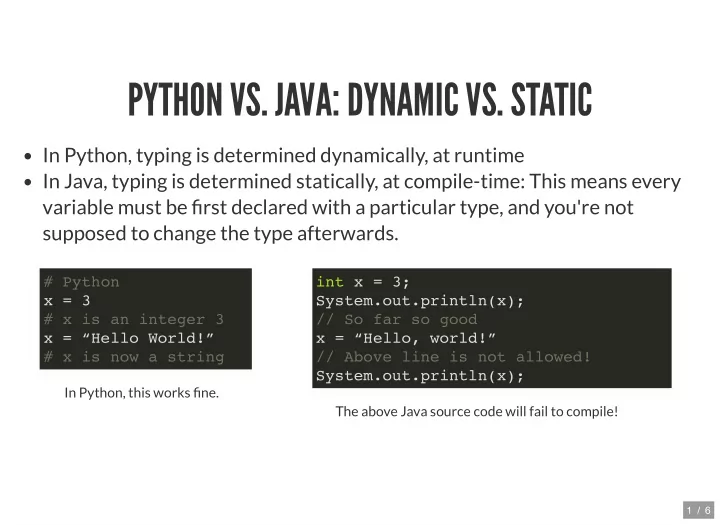
In Python, typing is determined dynamically, at runtime In Java, typing is determined statically, at compile-time: This means every variable must be rst declared with a particular type, and you're not supposed to change the type afterwards.

In Python, this works ne. The above Java source code will fail to compile!

# Python x = 3 # x is an integer 3 x = “Hello World!” # x is now a string int x = 3; System.out.println(x); // So far so good x = “Hello, world!” // Above line is not allowed! System.out.println(x);

1 / 6

slide-2
SLIDE 2

PYTHON VS. JAVA: TOTALLY OOP VS. VARYING DATA TYPES

Python is fully object-oriented. When you do x = 3, that 3 is actually an

  • bject (it has methods, etc.)

In Java, there are two different types of data: Primitive types: There are 8 of them in Java - byte, short, int, long, oat, double, char, boolean (e.g., 3 in Java would be stored as a primitive type). A primitive variable only stores a value. They are not objects. Class types: This would be all other types, provided by Java or created by you. (e.g., String is a class type. There are also wrapper classes for primitive types when you want to treat such values as objects -- e.g. the Integer class type)

2 / 6

slide-3
SLIDE 3

WRAPPER CLASSES

Every primitive type has a

  • version. It can be used to

represent a primitive value when an Object is needed. wrapper class

Integer i2 = new Integer(5); Boolean b2 = new Boolean(false); System.out.println(i2); System.out.println(b2); // Java can automatically "box" a primitive into // an instance of its wrapper class. Integer x = 6; // automatically does Integer x = new Integer(6) // And it can automatically "unbox" a wrapper object // to get the primitive value. int y = x + 4; // automatically does int y = x.intValue() + 4;

3 / 6

slide-4
SLIDE 4

Another example of boxing/unboxing:

// First we do everything very explicitly. int n; n = 42; Integer boxed; boxed = new Integer(11); // Now we take some shortcuts and know that Java will box and // unbox int values for us, as needed. boxed = 11; // exact same thing as boxed = new Integer(11) boxed = n + 3; // boxed = new Integer(42 + 3) --- 45 n = boxed + n; // n = boxed.getValue() + n --- 45 + 42 = 87 System.out.println("n is " + n + " and boxed is " + boxed); // What would the output of this be? Integer q = 2; Integer w = q; q = 4; System.out.println(w); System.out.println(q);

4 / 6

slide-5
SLIDE 5

CONVERTING DATA TYPES

Sometimes, when you assign a value of type A to a variable of type B, Java automatically converts the value to type B. Think of the primitive data types dealing with numbers in the following order:

double (64 bit oating point number)

  • at (32 bit oating point number)

long (64 bit integer; -2^63 to 2^63 - 1) int (32 bit integer; -2^31 to 2^31 - 1) short (16 bit integer; -2^15 to 2^15 - 1) byte (8 bit integer; can store numbers from -128 to 127)

5 / 6

slide-6
SLIDE 6

Converting up this list is done automatically. i.e. If I do: the short x is converted to a long y automatically. Similarly, if I do float i = 4; the 4 is an int but this statement will auto convert it to a oat, so 4.0 gets stored as i's value. To convert down the list though, you have to explicitly cast it, like so:

Note: In addition to the above, a char can be auto-converted converted to an int and up (the ASCII value of the character).

short x = 207; long y = x; float f = 5.6f; int i = (int) f;

6 / 6