Page 1 Increasing Bandwidth - Interleaving Main Memory Performance - - PDF document

page 1
SMART_READER_LITE
LIVE PREVIEW

Page 1 Increasing Bandwidth - Interleaving Main Memory Performance - - PDF document

Classical DRAM Organization (square) bit (data) lines EECS 252 Graduate Computer r Each intersection represents o a 1-T DRAM Cell w Architecture RAM Cell d Array e c o Lec 23 Storage Technology d word (row) select e r David


slide-1
SLIDE 1

Page 1

EECS 252 Graduate Computer Architecture Lec 23 – Storage Technology

David Culler

Electrical Engineering and Computer Sciences University of California, Berkeley http://www.eecs.berkeley.edu/~culler http://www-inst.eecs.berkeley.edu/~cs252

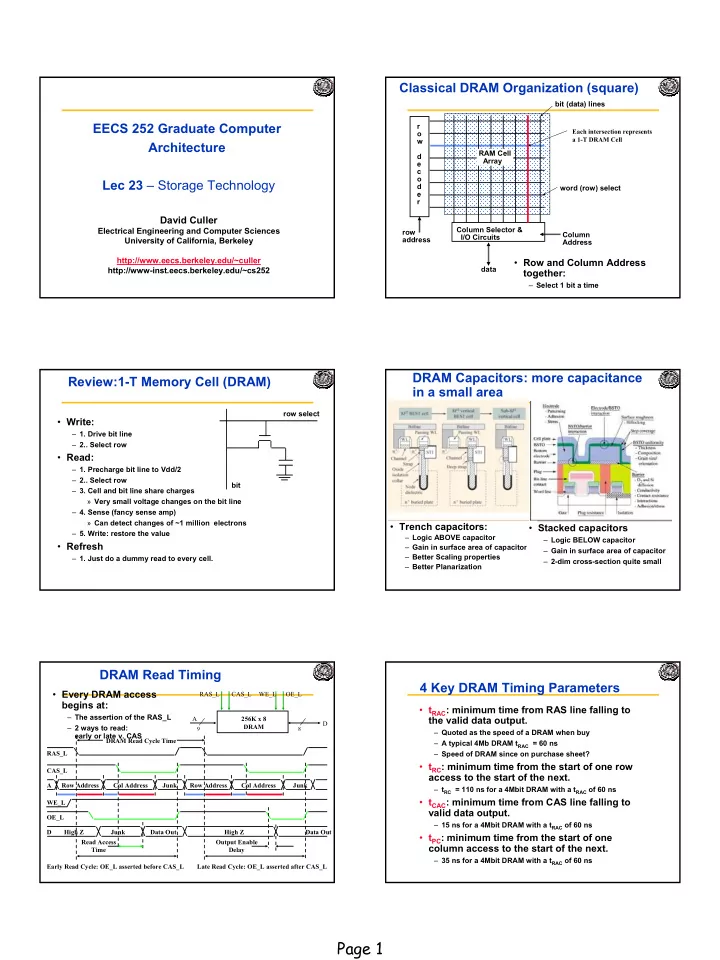
Classical DRAM Organization (square)

r

  • w

d e c

  • d

e r row address Column Selector & I/O Circuits Column Address data RAM Cell Array word (row) select bit (data) lines

  • Row and Column Address

together:

– Select 1 bit a time

Each intersection represents a 1-T DRAM Cell

Review:1-T Memory Cell (DRAM)

  • Write:

– 1. Drive bit line – 2.. Select row

  • Read:

– 1. Precharge bit line to Vdd/2 – 2.. Select row – 3. Cell and bit line share charges » Very small voltage changes on the bit line – 4. Sense (fancy sense amp) » Can detect changes of ~1 million electrons – 5. Write: restore the value

  • Refresh

– 1. Just do a dummy read to every cell. row select bit

DRAM Capacitors: more capacitance in a small area

  • Trench capacitors:

– Logic ABOVE capacitor – Gain in surface area of capacitor – Better Scaling properties – Better Planarization

  • Stacked capacitors

– Logic BELOW capacitor – Gain in surface area of capacitor – 2-dim cross-section quite small

A D OE_L 256K x 8 DRAM

9 8

WE_L CAS_L RAS_L OE_L A Row Address WE_L Junk Read Access Time Output Enable Delay CAS_L RAS_L Col Address Row Address Junk Col Address D High Z Data Out DRAM Read Cycle Time Early Read Cycle: OE_L asserted before CAS_L Late Read Cycle: OE_L asserted after CAS_L

  • Every DRAM access

begins at:

– The assertion of the RAS_L – 2 ways to read: early or late v. CAS

Junk Data Out High Z

DRAM Read Timing 4 Key DRAM Timing Parameters

  • tRAC: minimum time from RAS line falling to

the valid data output.

– Quoted as the speed of a DRAM when buy – A typical 4Mb DRAM tRAC = 60 ns – Speed of DRAM since on purchase sheet?

  • tRC: minimum time from the start of one row

access to the start of the next.

– tRC = 110 ns for a 4Mbit DRAM with a tRAC of 60 ns

  • tCAC: minimum time from CAS line falling to

valid data output.

– 15 ns for a 4Mbit DRAM with a tRAC of 60 ns

  • tPC: minimum time from the start of one

column access to the start of the next.

– 35 ns for a 4Mbit DRAM with a tRAC of 60 ns

slide-2
SLIDE 2

Page 2

  • DRAM (Read/Write) Cycle Time >> DRAM

(Read/Write) Access Time

– - 2:1; why?

  • DRAM (Read/Write) Cycle Time :

– How frequent can you initiate an access? – Analogy: A little kid can only ask his father for money on Saturday

  • DRAM (Read/Write) Access Time:

– How quickly will you get what you want once you initiate an access? – Analogy: As soon as he asks, his father will give him the money

  • DRAM Bandwidth Limitation analogy:

– What happens if he runs out of money on Wednesday?

Time Access Time Cycle Time

Main Memory Performance

Access Pattern without Interleaving:

Start Access for D1 CPU Memory Start Access for D2 D1 available

Access Pattern with 4-way Interleaving:

Access Bank 0 Access Bank 1 Access Bank 2 Access Bank 3 We can Access Bank 0 again CPU Memory Bank 1 Memory Bank 0 Memory Bank 3 Memory Bank 2

Increasing Bandwidth - Interleaving

  • Simple:

– CPU, Cache, Bus, Memory same width (32 bits)

  • Interleaved:

– CPU, Cache, Bus 1 word: Memory N Modules (4 Modules); example is word interleaved

  • Wide:

– CPU/Mux 1 word; Mux/Cache, Bus, Memory N words (Alpha: 64 bits & 256 bits)

Main Memory Performance

  • Timing model

– 1 to send address, – 4 for access time, 10 cycle time, 1 to send data – Cache Block is 4 words

  • Simple M.P.

= 4 x (1+10+1) = 48

  • Wide M.P.

= 1 + 10 + 1 = 12

  • Interleaved M.P. = 1+10+1 + 3 =15

address

Bank 0

4 8 12 address

Bank 1

1 5 9 13 address

Bank 2

2 6 10 14 address

Bank 3

3 7 11 15

Main Memory Performance Avoiding Bank Conflicts

  • Lots of banks

int x[256][512]; for (j = 0; j < 512; j = j+1) for (i = 0; i < 256; i = i+1) x[i][j] = 2 * x[i][j];

  • Even with 128 banks, since 512 is multiple of 128,

conflict on word accesses

  • SW: loop interchange or declaring array not power of 2

(“array padding”)

  • HW: Prime number of banks

– bank number = address mod number of banks – bank number = address mod number of banks – address within bank = address / number of words in bank – modulo & divide per memory access with prime no. banks?

Finding Bank Number and Address within a bank

Problem: We want to determine the number of banks, Nb, to use and the number of words to store in each bank, Wb, such that:

  • given a word address x, it is easy to find the bank where x will

be found, B(x), and the address of x within the bank, A(x).

  • for any address x, B(x) and A(x) are unique.
  • the number of bank conflicts is minimized
slide-3
SLIDE 3

Page 3

Finding Bank Number and Address within a bank

Solution: We will use the following relation to determine the bank number for x, B(x), and the address of x within the bank, A(x): B(x) = x MOD Nb A(x) = x MOD Wb and we will choose Nb and Wb to be co-prime, i.e., there is no prime number that is a factor of Nb and Wb (this condition is satisfied if we choose Nb to be a prime number that is equal to an integer power of two minus 1). We can then use the Chinese Remainder Theorem to show that B(x) and A(x) is always unique.

  • Chinese Remainder Theorem

As long as two sets of integers ai and bi follow these rules and that ai and aj are co-prime if i ≠ j, then the integer x has only one solution (unambiguous mapping): – bank number = b0, number of banks = a0 – address within bank = b1, number of words in bank = a1 – N word address 0 to N-1, prime no. banks, words power of 2

  • 3 banks Nb = 3, and 8 words per bank, Wb = 8.

bi = x mod ai,0 ≤ bi < ai, 0 ≤ x < a 0 × a1 × a 2×…

Fast Bank Number

  • Seq. Interleaved

Modulo Interleaved Bank Number: 1 2 1 2 Address within Bank: 1 2 16 8 1 3 4 5 9 1 17 2 6 7 8 18 10 2 3 9 10 11 3 19 11 4 12 13 14 12 4 20 5 15 16 17 21 13 5 6 18 19 20 6 22 14 7 21 22 23 15 7 23

Fast Memory Systems: DRAM specific

  • Multiple CAS accesses: several names (page mode)

– Extended Data Out (EDO): 30% faster in page mode

  • New DRAMs to address gap;

what will they cost, will they survive?

– RAMBUS: startup company; reinvent DRAM interface » Each Chip a module vs. slice of memory » Short bus between CPU and chips » Does own refresh » Variable amount of data returned » 1 byte / 2 ns (500 MB/s per chip) – Synchronous DRAM: 2 banks on chip, a clock signal to DRAM, transfer synchronous to system clock (66 - 150 MHz) – Intel claims RAMBUS Direct (16 b wide) is future PC memory

  • Niche memory or main memory?

– e.g., Video RAM for frame buffers, DRAM + fast serial output

Fast Page Mode Operation

  • Regular DRAM Organization:

– N rows x N column x M-bit – Read & Write M-bit at a time – Each M-bit access requires a RAS / CAS cycle

  • Fast Page Mode DRAM

– N x M “SRAM” to save a row

  • After a row is read into the

register

– Only CAS is needed to access

  • ther M-bit blocks on that row

– RAS_L remains asserted while CAS_L is toggled

N rows N cols DRAM Column Address M-bit Output M bits N x M “SRAM” Row Address A Row Address CAS_L RAS_L Col Address Col Address 1st M-bit Access Col Address Col Address 2nd M-bit 3rd M-bit 4th M-bit

DRAM History

  • DRAMs: capacity +60%/yr, cost –30%/yr

– 2.5X cells/area, 1.5X die size in -3 years

  • ‘98 DRAM fab line costs $2B

– DRAM only: density, leakage v. speed

  • Rely on increasing no. of computers & memory per

computer (60% market)

– SIMM or DIMM is replaceable unit => computers use any generation DRAM

  • Commodity, second source industry

=> high volume, low profit, conservative

– Little organization innovation in 20 years

  • Order of importance: 1) Cost/bit 2) Capacity

– First RAMBUS: 10X BW, +30% cost => little impact

DRAM Future: 1 Gbit+ DRAM

Mitsubishi Samsung

  • Blocks

512 x 2 Mbit 1024 x 1 Mbit

  • Clock

200 MHz 250 MHz

  • Data Pins

64 16

  • Die Size

24 x 24 mm 31 x 21 mm

– Sizes will be much smaller in production

  • Metal Layers

3 4

  • Technology

0.15 micron 0.16 micron

slide-4
SLIDE 4

Page 4

DRAMs per PC over Time

Minimum Memory Size DRAM Generation ‘86 ‘89 ‘92 ‘96 ‘99 ‘02 1 Mb 4 Mb 16 Mb 64 Mb 256 Mb 1 Gb 4 MB 8 MB 16 MB 32 MB 64 MB 128 MB 256 MB 32 8 16 4 8 2 4 1 8 2 4 1 8 2

Potential DRAM Crossroads?

  • After 20 years of 4X every 3 years, running into

wall? (64Mb - 1 Gb)

  • How can keep $1B fab lines full if buy fewer

DRAMs per computer?

  • Cost/bit –30%/yr if stop 4X/3 yr?
  • What will happen to $40B/yr DRAM industry?
  • Tunneling Magnetic Junction RAM (TMJ-RAM)

– Speed of SRAM, density of DRAM, non-volatile (no refresh) – “Spintronics”: combination quantum spin and electronics – Same technology used in high-density disk-drives

Something new: Structure of Tunneling Magnetic Junction MEMS-based Storage

  • Magnetic “sled” floats
  • n array of read/write

heads

– Approx 250 Gbit/in2 – Data rates: IBM: 250 MB/s w 1000 heads CMU: 3.1 MB/s w 400 heads

  • Electrostatic actuators

move media around to align it with heads

– Sweep sled ±50µm in < 0.5µs

  • Capacity estimated to be in

the 1-10GB in 10cm2

See Ganger et all: http://www.lcs.ece.cmu.edu/research/MEMS

  • Motivation:

– DRAM is dense ⇒Signals are easily disturbed – High Capacity ⇒ higher probability of failure

  • Approach: Redundancy

– Add extra information so that we can recover from errors – Can we do better than just create complete copies?

  • Block Codes: Data Coded in blocks

– k data bits coded into n encoded bits – Measure of overhead: Rate of Code: K/N – Often called an (n,k) code – Consider data as vectors in GF(2) [ i.e. vectors of bits ]

  • Code Space is set of all 2n vectors,

Data space set of 2k vectors

– Encoding function: C=f(d) – Decoding function: d=f(C’) – Not all possible code vectors, C, are valid!

Big storage (such as DRAM/DISK): Potential for Errors!

  • Not every vector in the code space is valid
  • Hamming Distance (d):

– Minimum number of bit flips to turn one code word into another

  • Number of errors that we can detect: (d-1)
  • Number of errors that we can fix: ½(d-1)

Code Space

d0 C0=f(d0)

Code Distance (Hamming Distance)

General Idea: Code Vector Space

slide-5
SLIDE 5

Page 5

Error Correction Codes (ECC)

  • Memory systems generate errors (accidentally flipped-

bits)

– DRAMs store very little charge per bit – “Soft” errors occur occasionally when cells are struck by alpha particles

  • r other environmental upsets.

– Less frequently, “hard” errors can occur when chips permanently fail. – Problem gets worse as memories get denser and larger

  • Where is “perfect” memory required?

– servers, spacecraft/military computers, ebay, …

  • Memories are protected against failures with ECCs
  • Extra bits are added to each data-word

– used to detect and/or correct faults in the memory system – in general, each possible data word value is mapped to a unique “code word”. A fault changes a valid code word to an invalid one - which can be detected.

Correcting Code Concept

  • Detection: bit pattern fails codeword check
  • Correction: map to nearest valid code word

Space of possible bit patterns (2N)

Sparse population of code words (2M << 2N)

  • with identifiable signature

Error changes bit pattern to non-code

Simple Error Detection Coding

  • Each data value, before it is

written to memory is “tagged” with an extra bit to force the stored word to have even parity:

  • Each word, as it is read from

memory is “checked” by finding its parity (including the parity bit).

Parity Bit

b7b6b5b4b3b2b1b0p

+

b7b6b5b4b3b2b1b0p

+

c

  • A non-zero parity indicates an error occurred:

– two errors (on different bits) is not detected (nor any even number of errors) –

  • dd numbers of errors are detected.
  • What is the probability of multiple simultaneous errors?

Hamming Error Correcting Code

  • Use more parity bits to pinpoint

bit(s) in error, so they can be corrected.

  • Example: Single error correction

(SEC) on 4-bit data

– use 3 parity bits, with 4-data bits results in 7-bit code word – 3 parity bits sufficient to identify any

  • ne of 7 code word bits

  • verlap the assignment of parity bits

so that a single error in the 7-bit work can be corrected

  • Procedure: group parity bits so

they correspond to subsets of the 7 bits:

– p1 protects bits 1,3,5,7 – p2 protects bits 2,3,6,7 – p3 protects bits 4,5,6,7

1 2 3 4 5 6 7 p1 p2 d1 p3 d2 d3 d4 Bit position number 001 = 110 011 = 310 101 = 510 111 = 710 010 = 210 011 = 310 110 = 610 111 = 710 100 = 410 101 = 510 110 = 610 111 = 710

p1 p2 p3

Note: number bits from left to right.

Hamming Code Example

  • Example: c = c3c2c1= 101

– error in 4,5,6, or 7 (by c3=1) – error in 1,3,5, or 7 (by c1=1) – no error in 2, 3, 6, or 7 (by c2=0)

  • Therefore error must be in bit 5.
  • Note the check bits point to 5
  • By our clever positioning and

assignment of parity bits, the check bits always address the position of the error!

  • c=000 indicates no error

– eight possibilities

1 2 3 4 5 6 7 p1 p2 d1 p3 d2 d3 d4

– Note: parity bits occupy power-of- two bit positions in code-word. – On writing to memory: » parity bits are assigned to force even parity over their respective groups. – On reading from memory: » check bits (c3,c2,c1) are generated by finding the parity

  • f the group and its parity bit. If

an error occurred in a group, the corresponding check bit will be 1, if no error the check bit will be 0. » check bits (c3,c2,c1) form the position of the bit in error.

Interactive Quiz

  • You receive:

–1111110 –0000010 –1010010

  • What is the correct value?

1 2 3 4 5 6 7 positions 001 010 011 100 101 110 111 P1 P2 d1 P3 d2 d3 d4 role Position of error = C3C2C1 Where Ci is parity of group i

slide-6
SLIDE 6

Page 6

Review: Hamming Error Correcting Code

  • Overhead involved in single

error correction code:

– let p be the total number of parity bits and d the number of data bits in a p + d bit word. – If p error correction bits are to point to the error bit (p + d cases) plus indicate that no error exists (1 case), we need: 2p >= p + d + 1, thus p >= log(p + d + 1) for large d, p approaches log(d) 8 data => 4 parity 16 data => 5 parity 32 data => 6 parity 64 data => 7 parity

  • Adding on extra parity bit covering

the entire word can provide double error detection 1 2 3 4 5 6 7 8 p1 p2 d1 p3 d2 d3 d4 p4

  • On reading the C bits are computed

(as usual) plus the parity over the entire word, P: C=0 P=0, no error C!=0 P=1, correctable single error C!=0 P=0, a double error occurred C=0 P=1, an error occurred in p4 bit

Typical modern codes in DRAM memory systems: 64-bit data blocks (8 bytes) with 72-bit code words (9 bytes).

Review: Code Types

  • Linear Codes:

Code is generated by G and in null-space of H

  • Hamming Codes: Design the H matrix

– d = 3 ⇒ Columns nonzero, Distinct – d = 4 ⇒ Columns nonzero, Distinct, Odd-weight

  • Reed-solomon codes:

– Based on polynomials in GF(2k) (I.e. k-bit symbols) – Data as coefficients, code space as values of polynomial: – P(x)=a0+a1x1+… ak-1xk-1 – Coded: P(0),P(1),P(2)….,P(n-1) – Can recover polynomial as long as get any k of n – Alternatively: as long as no more than n-k coded symbols erased, can recover data.

  • Side note: Multiplication by constant in GF(2k) can

be represented by k×k matrix: a⋅x

– Decompose unknown vector into k bits: x=x0+2x1+…+2k-1xk-1 – Each column is result of multiplying a by 2i

C H S ⋅ = d G C ⋅ =

Motivation: Who Cares About I/O?

  • CPU Performance: 60% per year
  • I/O system performance limited by mechanical delays

(disk I/O)

< 10% per year (IO per sec or MB per sec)

  • Amdahl's Law: system speed-up limited by the slowest

part!

10% IO & 10x CPU => 5x Performance (lose 50%) 10% IO & 100x CPU => 10x Performance (lose 90%)

  • I/O bottleneck:

Diminishing fraction of time in CPU Diminishing value of faster CPUs

I/O Systems

Processor Cache Memory - I/O Bus Main Memory I/O Controller Disk Disk I/O Controller I/O Controller Graphics Network

interrupts interrupts

Technology Trends

Disk Capacity now doubles every 18 months; before 1990 every 36 motnhs

  • Today: Processing Power Doubles Every 18 months
  • Today: Memory Size Doubles Every 18 months(4X/3yr)
  • Today: Disk Capacity Doubles Every 18 months
  • Disk Positioning Rate (Seek + Rotate) Doubles Every Ten Years!

The I/O GAP The I/O GAP

Storage Technology Drivers

  • Driven by the prevailing computing paradigm

– 1950s: migration from batch to on-line processing – 1990s: migration to ubiquitous computing » computers in phones, books, cars, video cameras, … » nationwide fiber optical network with wireless tails

  • Effects on storage industry:

– Embedded storage » smaller, cheaper, more reliable, lower power – Data utilities » high capacity, hierarchically managed storage

slide-7
SLIDE 7

Page 7

Historical Perspective

  • 1956 IBM Ramac — early 1970s Winchester

– Developed for mainframe computers, proprietary interfaces – Steady shrink in form factor: 27 in. to 14 in.

  • 1970s developments

– 5.25 inch floppy disk formfactor (microcode into mainframe) – early emergence of industry standard disk interfaces » ST506, SASI, SMD, ESDI

  • Early 1980s

– PCs and first generation workstations

  • Mid 1980s

– Client/server computing – Centralized storage on file server » accelerates disk downsizing: 8 inch to 5.25 inch – Mass market disk drives become a reality » industry standards: SCSI, IPI, IDE » 5.25 inch drives for standalone PCs, End of proprietary interfaces

Disk History

Data density Mbit/sq. in. Capacity of Unit Shown Megabytes

1973:

  • 1. 7 Mbit/sq. in

140 MBytes 1979:

  • 7. 7 Mbit/sq. in

2,300 MBytes

source: New York Times, 2/23/98, page C3, “Makers of disk drives crowd even mroe data into even smaller spaces”

Historical Perspective

  • Late 1980s/Early 1990s:

– Laptops, notebooks, (palmtops) – 3.5 inch, 2.5 inch, (1.8 inch formfactors) – Formfactor plus capacity drives market, not so much performance » Recently Bandwidth improving at 40%/ year – Challenged by DRAM, flash RAM in PCMCIA cards » still expensive, Intel promises but doesn’t deliver » unattractive MBytes per cubic inch – Optical disk fails on performace (e.g., NEXT) but finds niche (CD ROM)

Disk History

1989: 63 Mbit/sq. in 60,000 MBytes 1997: 1450 Mbit/sq. in 2300 MBytes

source: New York Times, 2/23/98, page C3, “Makers of disk drives crowd even mroe data into even smaller spaces”

1997: 3090 Mbit/sq. in 8100 MBytes

MBits per square inch: DRAM as % of Disk over time

0% 10% 20% 30% 40% 50% 1974 1980 1986 1992 1998

source: New York Times, 2/23/98, page C3, “Makers of disk drives crowd even mroe data into even smaller spaces” 470 v. 3000 Mb/si 9 v. 22 Mb/si 0.2 v. 1.7 Mb/si

Disk Performance Model /Trends

  • Capacity

+ 100%/year (2X / 1.0 yrs)

  • Transfer rate (BW)

+ 40%/year (2X / 2.0 yrs)

  • Rotation + Seek time

– 8%/ year (1/2 in 10 yrs)

  • MB/$

> 100%/year (2X / <1.5 yrs) Fewer chips + areal density

slide-8
SLIDE 8

Page 8

Photo of Disk Head, Arm, Actuator

Actuator Arm Head Platters (12)

{

Spindle

Nano-layered Disk Heads

  • Special sensitivity of Disk head comes from “Giant

Magneto-Resistive effect” or (GMR)

  • IBM is (was) leader in this technology

– Same technology as TMJ-RAM breakthrough

Coil for writing

Disk Device Terminology

  • Several platters, with information recorded magnetically on both

surfaces (usually)

  • Actuator moves head (end of arm,1/surface) over track (“seek”), select

surface, wait for sector rotate under head, then read or write

– “Cylinder”: all tracks under heads

  • Bits recorded in tracks, which in turn divided into sectors (e.g., 512

Bytes)

Platter Outer Track Inner Track Sector Actuator Head Arm

Disk Performance Example

Disk Latency = Queuing Time + Seek Time + Rotation Time + Xfer Time + Ctrl Time

Order of magnitude times for 4K byte transfers: Seek: 12 ms or less Rotate: 4.2 ms @ 7200 rpm = 0.5 rev/(7200 rpm/60m/s) (8.3 ms @ 3600 rpm ) Xfer: 1 ms @ 7200 rpm (2 ms @ 3600 rpm) Ctrl: 2 ms (big variation) Disk Latency = Queuing Time + (12 + 4.2 + 1 + 2)ms = QT + 19.2ms Average Service Time = 19.2 ms

Disk Time Example

  • Disk Parameters:

– Transfer size is 8K bytes – Advertised average seek is 12 ms – Disk spins at 7200 RPM – Transfer rate is 4 MB/sec

  • Controller overhead is 2 ms
  • Assume that disk is idle so no queuing delay
  • What is Average Disk Access Time for a Sector?

– Ave seek + ave rot delay + transfer time + controller overhead – 12 ms + 0.5/(7200 RPM/60) + 8 KB/4 MB/s + 2 ms – 12 + 4.15 + 2 + 2 = 20 ms

  • Advertised seek time assumes no locality: typically 1/4

to 1/3 advertised seek time: 20 ms => 12 ms

Snapshot: Ultrastar 72ZX

– 73.4 GB, 3.5 inch disk – 2¢/MB – 10,000 RPM; 3 ms = 1/2 rotation – 11 platters, 22 surfaces – 15,110 cylinders – 7 Gbit/sq. in. areal den – 17 watts (idle) – 0.1 ms controller time – 5.3 ms avg. seek – 50 to 29 MB/s(internal) source: www.ibm.com; www.pricewatch.com; 2/14/00

Latency = Queuing Time + Controller time + Seek Time + Rotation Time + Size / Bandwidth per access per byte{

+

Sector Track Cylinder Head Platter Arm Track Buffer

slide-9
SLIDE 9

Page 9

What Kind of Errors

  • In Memory
  • In Disks?
  • In networks?
  • On Tapes?
  • In distributed storage systems?

Concept: Redundant Check

  • Send a message M and a “check” word C
  • Simple function on <M,C> to determine if both

received correctly (with high probability)

  • Example: XOR all the bytes in M and append the

“checksum” byte, C, at the end

– Receiver XORs <M,C> – What should result be? – What errors are caught?

***

bit i is XOR of ith bit of each byte

Example: TCP Checksum

Application (HTTP,FTP, DNS) Transport (TCP, UDP) Network (IP) Data Link (Ethernet, 802.11b) Physical 1 2 3 4 7 TCP Packet Format

  • TCP Checksum a 16-bit checksum, consisting of the
  • ne's complement of the one's complement sum of the

contents of the TCP segment header and data, is computed by a sender, and included in a segment

  • transmission. (note end-around carry)
  • Summing all the words, including the checksum word,

should yield zero

Example: Ethernet CRC-32

Application (HTTP,FTP, DNS) Transport (TCP, UDP) Network (IP) Data Link (Ethernet, 802.11b) Physical 1 2 3 4 7

CRC concept

  • I have a msg polynomial M(x) of degree m
  • We both have a generator poly G(x) of degree m
  • Let r(x) = remainder of M(x) xn / G(x)

– M(x) xn = G(x)p(x) + r(x) – r(x) is of degree n

  • What is (M(x) xn – r(x)) / G(x) ?
  • So I send you M(x) xn – r(x)

– m+n degree polynomial – You divide by G(x) to check – M(x) is just the m most signficant coefficients, r(x) the lower m

  • n-bit Message is viewed as coefficients of n-degree

polynomial over binary numbers

n bits of zero at the end tack on n bits of remainder Instead of the zeros

Galois Fields - the theory behind LFSRs

  • LFSR circuits performs

multiplication on a field.

  • A field is defined as a set with

the following:

– two operations defined on it: » “addition” and “multiplication” – closed under these operations – associative and distributive laws hold – additive and multiplicative identity elements – additive inverse for every element – multiplicative inverse for every non-zero element

  • Example fields:

– set of rational numbers – set of real numbers – set of integers is not a field (why?)

  • Finite fields are called

Galois fields.

  • Example:

– Binary numbers 0,1 with XOR as “addition” and AND as “multiplication”. – Called GF(2). – 0+1 = 1 – 1+1 = 0 – 0-1 = ? – 1-1 = ?

slide-10
SLIDE 10

Page 10

Galois Fields - The theory behind LFSRs

  • Consider polynomials whose coefficients come from GF(2).
  • Each term of the form xn is either present or absent.
  • Examples: 0, 1, x, x2, and x7 + x6 + 1

= 1·x7 + 1· x6 + 0 · x5 + 0 · x4 + 0 · x3 + 0 · x2 + 0 · x1 + 1· x0

  • With addition and multiplication these form a field:
  • “Add”: XOR each element individually with no carry:

x4 + x3 + + x + 1 + x4 + + x2 + x x3 + x2 + 1

  • “Multiply”: multiplying by xn is like shifting to the left.

x2 + x + 1

×

x + 1 x2 + x + 1 x3 + x2 + x x3 + 1

So what about division (mod)

x4 + x2

x

= x3 + x with remainder 0

x4 + x2 + 1

X + 1

= x3 + x2 with remainder 1

x4 + 0x3 + x2 + 0x + 1

X + 1

x3

x4 + x3 x3 + x2 + x2 x3 + x2 0x2 + 0x + 0x 0x + 1 + 0

Remainder 1

Polynomial division

  • When MSB is zero, just

shift left, bringing in next bit

  • When MSB is 1, XOR with

divisor and shiftl

1 0 1 1 0 0 1 0 0 0 0 1 0 0 1 1

Q D Q1 Q D Q2 Q D Q3 Q D Q4

CLK

serial_in

0 0 0 0 1 0 0 1 1 0 0 1 0 1 1 0 1 0 1 0 1 0 1 0 1 1 0 0 1 1 1 0 0 1 0 0

CRC encoding

Q D Q1 Q D Q2 Q D Q3 Q D Q4

CLK

serial_in

1 0 1 1 0 0 1 0 0 0 0 0 0 0 0 0 0 0 1 0 1 1 0 0 1 0 0 0 0 0 0 1 1 1 0 0 1 0 0 0 0 0 1 0 1 1 0 0 1 0 0 0 0 1 0 1 1 0 0 1 0 0 0 0 0 1 0 1 0 1 0 0 0 0 1 0 1 1 0 0 0 0 1 1 0 0 0 0 1 0 1 1 0 0 1 1 0 1 0 Message sent: 1 1 0 0 0 1 0 1 1 0 0 1 1 0 1 1 0

CRC decoding

Q D Q1 Q D Q2 Q D Q3 Q D Q4

CLK

serial_in

1 0 1 1 0 0 1 1 0 1 0 0 0 0 0 0 0 0 1 0 1 1 0 0 1 1 0 1 0 0 0 1 1 1 0 0 1 1 0 1 0 0 1 0 1 1 0 0 1 1 0 1 0 1 0 1 1 0 0 1 1 0 1 0 0 1 0 1 0 1 1 0 1 0 1 0 1 1 1 0 1 0 1 1 1 0 1 0 1 1 1 0 1 0 1 0 1 1 0 0 0 0 0

Galois Fields - The theory behind LFSRs

  • These polynomials form a

Galois (finite) field if we take the results of this multiplication modulo a prime polynomial p(x).

– A prime polynomial is one that cannot be written as the product

  • f two non-trivial polynomials

q(x)r(x) – Perform modulo operation by subtracting a (polynomial) multiple of p(x) from the result. If the multiple is 1, this corresponds to XOR-ing the result with p(x).

  • For any degree, there exists at

least one prime polynomial.

  • With it we can form GF(2n)
  • Additionally, …
  • Every Galois field has a primitive

element, α, such that all non-zero elements of the field can be expressed as a power of α. By raising α to powers (modulo p(x)), all non-zero field elements can be formed.

  • Certain choices of p(x) make the

simple polynomial x the primitive

  • element. These polynomials are

called primitive, and one exists for every degree.

  • For example, x4 + x + 1 is primitive.

So α = x is a primitive element and successive powers of α will generate all non-zero elements of GF(16). Example on next slide.

slide-11
SLIDE 11

Page 11

Galois Fields – Primitives

α0 = 1 α1 = x α2 = x2 α3 = x3 α4 = x + 1 α5 = x2 + x α6 = x3 + x2 α7 = x3 + x + 1 α8 = x2 + 1 α9 = x3 + x α10 = x2 + x + 1 α11 = x3 + x2 + x α12 = x3 + x2 + x + 1 α13 = x3 + x2 + 1 α14 = x3 + 1 α15 = 1

  • Note this pattern of

coefficients matches the bits from our 4-bit LFSR example.

  • In general finding primitive

polynomials is difficult. Most people just look them up in a table, such as: α4 = x4 mod x4 + x + 1 = x4 xor x4 + x + 1 = x + 1

Primitive Polynomials

x2 + x +1 x3 + x +1 x4 + x +1 x5 + x2 +1 x6 + x +1 x7 + x3 +1 x8 + x4 + x3 + x2 +1 x9 + x4 +1 x10 + x3 +1 x11 + x2 +1

x12 + x6 + x4 + x +1 x13 + x4 + x3 + x +1 x14 + x10 + x6 + x +1 x15 + x +1 x16 + x12 + x3 + x +1 x17 + x3 + 1 x18 + x7 + 1 x19 + x5 + x2 + x+ 1 x20 + x3 + 1 x21 + x2 + 1 x22 + x +1 x23 + x5 +1 x24 + x7 + x2 + x +1 x25 + x3 +1 x26 + x6 + x2 + x +1 x27 + x5 + x2 + x +1 x28 + x3 + 1 x29 + x +1 x30 + x6 + x4 + x +1 x31 + x3 + 1 x32 + x7 + x6 + x2 +1 Galois Field Hardware Multiplication by x ⇔ shift left Taking the result mod p(x) ⇔ XOR-ing with the coefficients of p(x) when the most significant coefficient is 1. Obtaining all 2n-1 non-zero ⇔ Shifting and XOR-ing 2n-1 times. elements by evaluating xk for k = 1, …, 2n-1

Building an LFSR from a Primitive Poly

  • For k-bit LFSR number the flip-flops with FF1 on the right.
  • The feedback path comes from the Q output of the leftmost FF.
  • Find the primitive polynomial of the form xk + … + 1.
  • The x0 = 1 term corresponds to connecting the feedback directly to the D

input of FF 1.

  • Each term of the form xn corresponds to connecting an xor between FF n

and n+1.

  • 4-bit example, uses x4 + x + 1

x4 ⇔ FF4’s Q output

x ⇔ xor between FF1 and FF2

1 ⇔ FF1’s D input

  • To build an 8-bit LFSR, use the primitive polynomial x8 + x4 + x3 + x2 + 1 and

connect xors between FF2 and FF3, FF3 and FF4, and FF4 and FF5.

Q D Q1 Q D Q2 Q D Q3 Q D Q4

CLK

Q D Q4 Q D Q5 Q D Q6 Q D Q7

CLK

Q D Q3 Q D Q2 Q D Q1 Q8 Q D

Generating Polynomials

  • CRC-16: G(x) = x16 + x15 + x2 + 1

– detects single and double bit errors – All errors with an odd number of bits – Burst errors of length 16 or less – Most errors for longer bursts

  • CRC-32: G(x) = x32 + x26 + x23 + x22 + x16 + x12 + x11

+ x10 + x8 + x7 + x5 + x4 + x2 + x + 1

– Used in ethernet – Also 32 bits of 1 added on front of the message » Initialize the LFSR to all 1s

Alternative Data Storage Technologies: Early 1990s

Cap BPI TPI BPI*TPI Data Xfer Access Technology (MB) (Million) (KByte/s) Time Conventional Tape: Cartridge (.25") 150 12000 104 1.2 92 minutes IBM 3490 (.5") 800 22860 38 0.9 3000 seconds Helical Scan Tape: Video (8mm) 4600 43200 1638 71 492 45 secs DAT (4mm) 1300 61000 1870 114 183 20 secs Magnetic & Optical Disk: Hard Disk (5.25") 1200 33528 1880 63 3000 18 ms IBM 3390 (10.5") 3800 27940 2235 62 4250 20 ms Sony MO (5.25") 640 24130 18796 454 88 100 ms

Tape vs. Disk

  • Longitudinal tape uses same technology as

hard disk; tracks its density improvements

  • Disk head flies above surface, tape head lies on surface
  • Disk fixed, tape removable
  • Inherent cost-performance based on geometries:

fixed rotating platters with gaps

(random access, limited area, 1 media / reader)

vs. removable long strips wound on spool

(sequential access, "unlimited" length, multiple / reader)

  • New technology trend:

Helical Scan (VCR, Camcoder, DAT) Spins head at angle to tape to improve density

slide-12
SLIDE 12

Page 12

Current Drawbacks to Tape

  • Tape wear out:

– Helical 100s of passes to 1000s for longitudinal

  • Head wear out:

– 2000 hours for helical

  • Both must be accounted for in economic /

reliability model

  • Long rewind, eject, load, spin-up times;

not inherent, just no need in marketplace (so far)

  • Designed for archival

Automated Cartridge System

STC 4400

6000 x 0.8 GB 3490 tapes = 5 TBytes in 1992 $500,000 O.E.M. Price 6000 x 10 GB D3 tapes = 60 TBytes in 1998 Library of Congress: all information in the world; in 1992, ASCII of all books = 30 TB

8 feet 10 feet

Relative Cost of Storage Technology— Late 1995/Early 1996

Magnetic Disks

5.25” 9.1 GB $2129 $0.23/MB $1985 $0.22/MB 3.5” 4.3 GB $1199 $0.27/MB $999 $0.23/MB 2.5” 514 MB $299 $0.58/MB 1.1 GB $345 $0.33/MB

Optical Disks

5.25” 4.6 GB $1695+199 $0.41/MB $1499+189 $0.39/MB

PCMCIA Cards

Static RAM 4.0 MB $700 $175/MB Flash RAM 40.0 MB $1300 $32/MB 175 MB $3600 $20.50/MB

Manufacturing Advantages

  • f Disk Arrays

14” 10” 5.25” 3.5” 3.5”

Disk Array: 1 disk design Conventional: 4 disk designs Low End High End Disk Product Families Replace Small # of Large Disks with Large # of Small Disks! (1988 Disks)

Data Capacity Volume Power Data Rate I/O Rate MTTF Cost IBM 3390 (K) 20 GBytes 97 cu. ft. 3 KW 15 MB/s 600 I/Os/s 250 KHrs $250K IBM 3.5" 0061 320 MBytes 0.1 cu. ft. 11 W 1.5 MB/s 55 I/Os/s 50 KHrs $2K x70 23 GBytes 11 cu. ft. 1 KW 120 MB/s 3900 IOs/s ??? Hrs $150K Disk Arrays have potential for large data and I/O rates high MB per cu. ft., high MB per KW reliability?

Array Reliability

  • Reliability of N disks = Reliability of 1 Disk ÷ N

50,000 Hours ÷ 70 disks = 700 hours Disk system MTTF: Drops from 6 years to 1 month!

  • Arrays (without redundancy) too unreliable to be useful!

Hot spares support reconstruction in parallel with access: very high media availability can be achieved Hot spares support reconstruction in parallel with access: very high media availability can be achieved

slide-13
SLIDE 13

Page 13

Redundant Arrays of Disks

  • Files are "striped" across multiple spindles
  • Redundancy yields high data availability

Disks will fail Contents reconstructed from data redundantly stored in the array Capacity penalty to store it Bandwidth penalty to update Mirroring/Shadowing (high capacity cost) Horizontal Hamming Codes (overkill) Parity & Reed-Solomon Codes Failure Prediction (no capacity overhead!) VaxSimPlus — Technique is controversial Techniques:

Redundant Arrays of Disks RAID 1: Disk Mirroring/Shadowing

  • Each disk is fully duplicated onto its "shadow"

Very high availability can be achieved

  • Bandwidth sacrifice on write:

Logical write = two physical writes

  • Reads may be optimized
  • Most expensive solution: 100% capacity overhead

Targeted for high I/O rate , high availability environments recovery group

Redundant Arrays of Disks RAID 3: Parity Disk

P 10010011 11001101 10010011 . . . logical record

1 1 1 1 1 1 1 1 1 1 1 1 1 1 1

Striped physical records

  • Parity computed across recovery group to protect against

hard disk failures 33% capacity cost for parity in this configuration wider arrays reduce capacity costs, decrease expected availability, increase reconstruction time

  • Arms logically synchronized, spindles rotationally synchronized

logically a single high capacity, high transfer rate disk

Targeted for high bandwidth applications: Scientific, Image Processing

Redundant Arrays of Disks RAID 5+: High I/O Rate Parity

A logical write becomes four physical I/Os Independent writes possible because of interleaved parity Reed-Solomon Codes ("Q") for protection during reconstruction A logical write becomes four physical I/Os Independent writes possible because of interleaved parity Reed-Solomon Codes ("Q") for protection during reconstruction D0 D1 D2 D3 P D4 D5 D6 P D7 D8 D9 P D10 D11 D12 P D13 D14 D15 P D16 D17 D18 D19 D20 D21 D22 D23 P . . . . . . . . . . . . . . . Disk Columns Increasing Logical Disk Addresses Stripe Stripe Unit Targeted for mixed applications

Problems of Disk Arrays: Small Writes

D0 D1 D2 D3 P D0' + + D0' D1 D2 D3 P' new data

  • ld

data

  • ld

parity XOR XOR (1. Read) (2. Read) (3. Write) (4. Write) RAID-5: Small Write Algorithm 1 Logical Write = 2 Physical Reads + 2 Physical Writes

Subsystem Organization

host array controller single board disk controller single board disk controller single board disk controller single board disk controller host adapter manages interface to host, DMA control, buffering, parity logic physical device control

  • ften piggy-backed

in small format devices striping software off-loaded from host to array controller no applications modifications no reduction of host performance

slide-14
SLIDE 14

Page 14

System Availability: Orthogonal RAIDs

Array Controller String Controller String Controller String Controller String Controller String Controller String Controller . . . . . . . . . . . . . . . . . . Data Recovery Group: unit of data redundancy Redundant Support Components: fans, power supplies, controller, cables End to End Data Integrity: internal parity protected data paths

System-Level Availability

Fully dual redundant I/O Controller I/O Controller Array Controller Array Controller . . . . . . . . . . . . . . . . . . Recovery Group Goal: No Single Points of Failure Goal: No Single Points of Failure host host with duplicated paths, higher performance can be

  • btained when there are no failures

Summary

  • Disk industry growing rapidly, improves:

– bandwidth 40%/yr , – areal density 60%/year, $/MB faster?

  • queue + controller + seek + rotate + transfer
  • Advertised average seek time benchmark much greater

than average seek time in practice

  • Response time vs. Bandwidth tradeoffs
  • Queueing theory:
  • r (c=1):
  • Value of faster response time:

– 0.7sec off response saves 4.9 sec and 2.0 sec (70%) total time per transaction => greater productivity – everyone gets more done with faster response, but novice with fast response = expert with slow

( )

          − + = u u x C W 1 1 2 1         − = u u x W 1