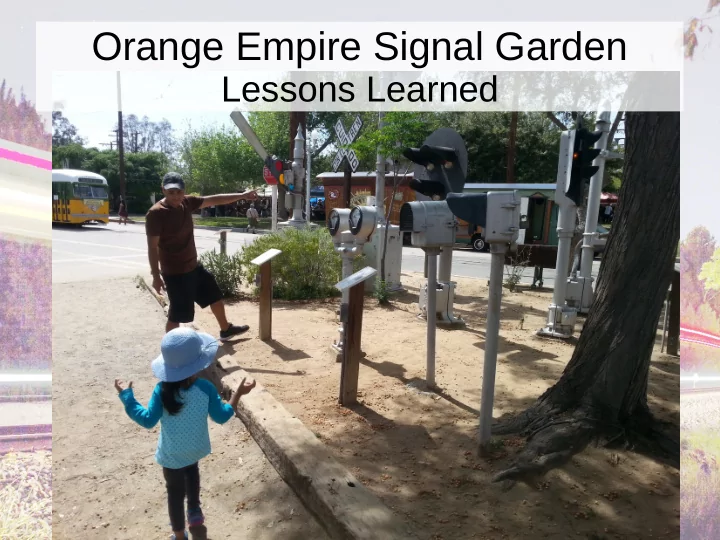
Orange Empire Signal Garden Lessons Learned OR Remove spider * - - PowerPoint PPT Presentation
Orange Empire Signal Garden Lessons Learned OR Remove spider * before servicing main board. * For those of you who's first language is not English spider is a bug + not a computer term.. + Bug denotes an animal again not a
OR
* For those of you who's first language is not English “spider” is a bug+ not a computer term.. + “Bug” denotes an animal – again not a computer term.
Remove spider* before servicing main board.
About me
- I am a software engineer who knows a little
about hardware.
- I wanted a project which would give me a
- pportunity to learn.
- If I wasn't such an idiot when it came to
hardware I would have learned a whole lot less.
Orange Empire
Historic Transportation Museum In Perris CA.
Interactive Signal Garden
- ### picture
Railroad Signal Design
- Created at a time when electricity was a new
and unproven technology.
- Designed to last.
- Built to work with little or no maintenance
Conventional Relay
12v, Low Amp relay
- Small
- Cheap
- Plastic
- Thin wires
- Protected
Environment
Railroad Relay
12v, low amps
- Big and heavy
- Glass, steel, and
ceramic
- Gravity driven, no
springs.
- Thick wire
- Harsh environment
OERM's Signals
- Some of our signals were build over 100 years
ago.
- … and some of them are really old.
- The OERM wants to preserve not only the
artifacts but the skills of the time.
- Almost all artifacts are scheduled to be restored
and used.
- “Real soon now”.
Signal Garden
- Has over 16 signals.
- Most are working
- Push a button, the signal operates
Nice things about working on the signal garden as
- pposed to regular signals.
- You don't have to go a mile down the track to
reach the next signal.
- When the signals don't work, operations isn't
made at you because trains can't run.
Why Linux and the Raspberry PI
- Commercial off the shelf parts as much as
possible.
- Development system = production system.
- Very easy to program.
- Relatively low cost ($150) for the total system.
(I work for a company that could make a custom system using a PIC for $5.98 in quantities of 1,000, but there is only one OERM)
Basic Design
PI
Power Tail 12V
USB Relays
USB Input To buttons To Signals GPIO USB
Garden Controller
Major Components
- Raspberry PI Model A
– Replaced with Model
B+
USB relay board
USB relay board
- Programming is extremely simple
- Device considered a serial interface (RS232)
- Open the device, send commands.
udev issue.
- udev assign device names based on it's rules.
- /dev/ttyACM0, /dev/ttyACM1, /etc/ttyACM2
- You can't be guaranteed the right device each time.
Solution
- Use the “device by-id” name
- #define RELAY_DEVICE "/dev/serial/by-
id/usb-Microchip_Technology_Inc._CDC_RS- 232_Emulation_Demo-if00"
Relay Programming
relay_fd = open(RELAY_DEVICE, O_RDWR); if (relay_fd < 0) throw(relay_error(...)); // … set raw mode write(relay_fd, “relay on 5\r”, sizeof(msg));
Input: Pokey55 board
- Expensive
- Overkill
- Requires Programming
- What you get when you don't know better
Pokey55 board programming
- Pokey55 is a keyboard emulator.
- Press a button, a key is typed on the keyboard.
- Linux routes all keys through a common
interface.
Pokey55: Programming
- The low level HID interface allows you to
intercept events from specific input devices
- Poorly documented though.
Pokeys programming
int fd = open(device, O_RDONLY); if (ioctl(fd, EVIOCGRAB, (void *)1) != 0) die("GRAB failed"); struct input_event event; int read_size = \ read(fd, &event, sizeof(event));
Input #2: USB/Serial with GPIO
- MIKROE-549 (USB serial breakout board)
Input #2: USB/Serial with GPIO
- Cheap ($9)
- Requires external pull-up resistor.
- GPIO requires polling.
- Works well.
Input #2: USB/Serial with GPIO
- Programming is a nightmare
- Low level programming must be done through
libusb.
- Must have good knowledge of libusb and the
UART chip.
- Code to read 8 GPIO pins periodically: 861
lines long!
UART Code
int result = libusb_claim_interface(handle, MCP2200_HID_INTERFACE); if (result != 0) { syslog(LOG_ERR, "CONFIGURE claim interface result %d", result); throw(mcp2200_error_t(__FILE__, __LINE__, result, "Claim of interface failure")); } // Send the configuration command. Get the result of the transfer result = libusb_interrupt_transfer( handle, MCP2200_HID_ENDPOINT_OUT, const_cast<unsigned char*>(config_data.get_data()), config_data.get_data_size(), &write_size, MCP2200_HID_TRANSFER_TIMEOUT); libusb_release_interface(handle, MCP2200_HID_INTERFACE);
Input #3 (Backup): AVR Trinket
- Cheap ($10)
- Easy to program
- Self contained (no extra resistors required)
- After programming acts like a keyboard sending
a character when a button is pressed.
- Took example program and stripped out the
fancy stuff, so easy to program.
AVR Trinket Programming
- Pretty much the same as the Pokey
programming.
– Grab the HID device – Read raw events
Powerswitch Tail
Powerswitch Tail
- Inherited big power battle between
– Programmer (keep it on all the time) – Management (Turn it off at night)
- Absolute requirement: Garden turns itself off at
night.
- Practice: Docent's put the system in power
- verride mode and keep it on 24/7.
Power Programming
- Wired to Raspberry PI GPIO
- Programmed using the Wiring PI library
- Simple to use and program
- However, no interrupts
Power Programming
switch (new_state) { case POWER_ON: digitalWrite(POWER_CONTROL, 1); break; case POWER_OFF: kill_garden(); digitalWrite(POWER_CONTROL, 0); log_msg += "off"; break; default: std::cout << "Internal error " << std::endl; exit(8); }
Programming
1) Every I/O board had a test program. 2) Signal program was connected to the button input program by a pipe.
- Allowed for input to be tested with button
simulator
- Allowed for multiple button handling
programs for multiple input boards
WIFI
- Does a industrially controller really need wifi?
- YES!
– If you want to debug it in the air conditioned office
instead of the 100° garden.
Design vs. Reality A few hard lessons
Tools
Expected to use:
- Soldering Iron
- Wire Strippers
- Volt ohm meter
Tools (Actual)
Vacuum Cleaner
- Mouse poop removal
– high priority item.
Tools (Actual)
Clearing supplies.
- Lots and lots of
dirt.
- Spider webs.
- Wasps nests.
Tools (Actual)
Label Maker Ran through three cartridges before I got everything labeled.
Tools (Actual)
Caulk Me to head signalman: Me: Why do you have dirt floors at the bottom
- f each signal box.
Head: We don't. They are concrete. After cleaning found out what he said was true.
Tools (Actual)
- Heavy Gloves
- Spider Killer
Surprise 1: Legacy System
Given schematic for:
- System as currently wired
- Planned new features
- Legacy features
All in the same document ... with no identification as to which was which.
- Programming notes for a program we didn't
have source to.
Button Labeling East Side
Button 1 Button 2
Legacy Labeling / North
Button 4 Button 2 Button 3
The other Button 2
Other Wiring Issues
- WWA (Wig Wag Signal A)
– Connected to relay WWB – Relay connect to terminal WWA – Terminal connected to port labeled “Upper Wig
Wag” on the computer
- Button 2
– Yellow / Blue wires at the switch – Purple / Black at the signal box
Big Problems
- Hidden underground junctions
- Buttons and signals had ground wires
connected together (more on this later)
“Ran into a Lot of Traffic In Salt Lake City”
- A phrase I use a lot
- A phrase I explain a lot
- Comes from an old Jack Benny Show
The Characters
- Jack Benny, comedian
- Dennis Day
– Only man I know of who successfully played a
dumb blond
The Show
From a show done in San Diego during the war. Dennis rushes on stage out of breath. Dennis: I'm sure glad I got hear Mr. Benny. I barely made it. Jack: Dennis, there something I don't understand. You left Los Angeles Tuesday for a show that we are doing in San Diego on Sunday and you just got here. Jack: How come?
The Show
Dennis: I ran into a lot of traffic in Salt Lake City. Jack: Dennis… Dennis… Why did you go from Los Angeles to San Diego by way of Salt Lake City. Dennis: I wanted to avoid the stoplight in Oceanside.
Typical Wiring Path
Button #1 has a yellow wire goes down a pipe which goes to...
Typical Wiring Path
… the track indicator where it is tied to a red wire with a wire nut (hidden junction) which goes to:
Typical Wiring Path
… tri-color light's base where a terminal block ties it to a purple wire which goes to:
Typical Wiring Path
… secondary signal box (I think) where it turns around and goes to:
Typical Wiring Path
… controller box where it goes to a terminal block and becomes a black wire where it is connected to:
Typical Wiring Path
.. the input relay (it's final destination):
Roadmap
Mysteries
Why is the signal box full of grass? (This isn't a nest of any sort, just a bunch of grass) Much later – tried to drop a wire down a 4” pipe and failed. Birds nests (2 of them)
ACME Traffic Signal Head #1
Birds nest #3. Nest constructed during restoration. Found while I was on top of the ladder when the bird flew out on full afterburner.
ACME Traffic Signal Head #2
Arms removed temporarily for maintenance (For 10+ years) Leaving small round holes at the top.
ACME Traffic Signal Head #2
Arms removed for maintenance (For 10+ years) Leaving small round holes at the top. Bird's nests #4, #5, #6, #7.
Removed
Next task: Figure out what I've got
- Entire layout was probed.
- Every wire was labeled (or so I thought)
New Linux controller designed, and extensively tested before deployment.
Deployment
The plan: 1) Open cabinet 2) Remove old controller 3) Install new controller Four hour job – maximum
Deployment Actuality
- 1. Open cabinet
- 2. Quickly close cabinet
- 3. Go to Home Depot, get work gloves and spider
spray.
- 4. Open cabinet
- 5. Kill black widow
- 6. Remove web and dead spider.
- 7. Carefully proceed with installation
Mistake #1
I assumed that the wires went like this: Instead they went like this After removal I had a bunch of this:
Computer Signal Label Label Label Signal Label Computer Signal Label Label Label
- Term. Block
- Term. Block
Rework
- All wires had to be re-identified.
- 4 hours of work took about 3 months of
weekends.
Alpha testing
Button was designed to start signal when pressed. Stop on second press or timeout. Alpha testers had different ideas.
Problem #1: Input controller going offline
- Input controller was disappearing from the USB
bus.
- Happened every time a wig wag stopped
sounding.
- Ran through a bunch of USB hubs trying to
figure out the problem.
Cause
- Wig wags have huge magnets. (Two of them.)
- Turning off a big magnet generates a big
energy pulse
- … which then goes down the common ground
wire and
- … causes the input controller to reset.
- – – – and later fry.
Fix #1
- Huge capacitor
- Result fried input
board.
Fix #2: Flyback Diode
Result: Fewer problems – but still problems.
Fix #3: Relay isolation and flyback diodes
- Result: The system mostly works. Now it's all
USB problems.
+12v Signal GND Input Controller Input GND
Alpha testing: Operators
- Wrote a page of instructions for the docents
concerning: 1) Turning the system on 2) Turning the system off 3) Recovering from hangs
Docent's Reality
1) If the garden's down, turn the whole thing off and back on. 2) If it's still down, call Steve.
RTC
- Raspberry PI has no RTC.
- Resetting power causes it to loose track of
time.
- USB problems prevent the system from getting
time from the network.
RTC
- Raspberry PI's solution, “fake hardware clock”
- When shutting down, record the time
- When starting up, use this time to set the time
- f day.
- Good for keeping time marching forward
- Lousy for turning on the garden in the morning.
Solution: DS3231 RTC
- Small I2C board that sits on the Raspberry PI
GPIO connector.
RTC Programming
- Must enable I2C bus in /boot/config.txt
- Need new packages: i2c-tools
- Requires a bit of configuration:
– Tell the I2C system you have a RTC – Tell udev to create devices for it – Tell systemd to start and stop it
Lesson #2: USB and USB Hubs
- Raspberry PI did not have enough USB power
to power the devices (relay board, input board, wifi).
- Almost all powered hubs will backpower the
Raspberry pi.
– With an inadequate amount of power.
- Two power supplies fight each other and the
Raspberry Pi looses.
Solution: Model B
- 4 USB ports.
- Enough power to make everything work.
Next Project: The Semaphore
Semaphore Guts
Semaphore Restoration
- Picture is not what I got originally – I cleaned it
up before taking the picture.
- Found service manual on the Internet.
- Got a second mechanism off the Internet, but
– One part arrived damaged – The only part, the only vital part – That I happened to have a spare for
New Feature Request
It's nice that you got the crossing bells to work. Now make its stop. Request made a board of directors member who was trying to hold a meeting next door. Easily programmed in Linux.
Demand!
Future Work
- Acme Traffic Signal Improvements
Planned: New controller
- First a look at the old (1930) controller
Controller
Controller
Controller
Linux Controller Plans Video
Raspberry PI
Relay Board
Signal Head Signal Head
Lessons Learned (General)
- You can accomplish a lot with a vacuum
cleaner and cleaning rag.
- Perris, CA is an ideal climate for the black
widow spider.
- Never assume that previous engineers who
deigned your system were sane.
- Document well (and correctly) for those that
come after you.
Lessons Learned (Electrical)
- Very large inductors create a very large energy
pulse when turned off.
- Flyback didoes
- Isolation
- Cross talk
- Common grounds suck.
- Circuit isolation (computer and signal use
different wires totally)
Lessons Learned (Restoration / Design)
- Talk to people who know more than you do
– Preferably before you ruin equipment.
- Patent searches are useful for finding historical
documents.
- You can find lots of old manuals on the Internet.
Lesson Learned Linux
- Lots of hooks into low level drivers
– USB – Keyboard – GPIO – I2C/RTC
- USB Hubs – most are badly built
– Avoid them
Contact Information
http://www.oualline.com
- ualline@www.oualline.com
Contact Information
http://www.oualline.com
- ualline@www.oualline.com
TODO
- ## how to interface to relay board.
- ### how to interface to keyboard simulator
- ### GPIO / serial simulator
- ### programing the input (how)
- ### programming the gpio
- ### programming