
SLIDE 1
Ombea Response – Creating a presentation (version 1) 1
Ombea Response – Creating a presentation
A quick guide for colleagues looking to use the Ombea Response (PowerPoint integration) audience response system to boost discussion and interactivity with students during their lectures.
Creating an interactive multiple choice slide with one response
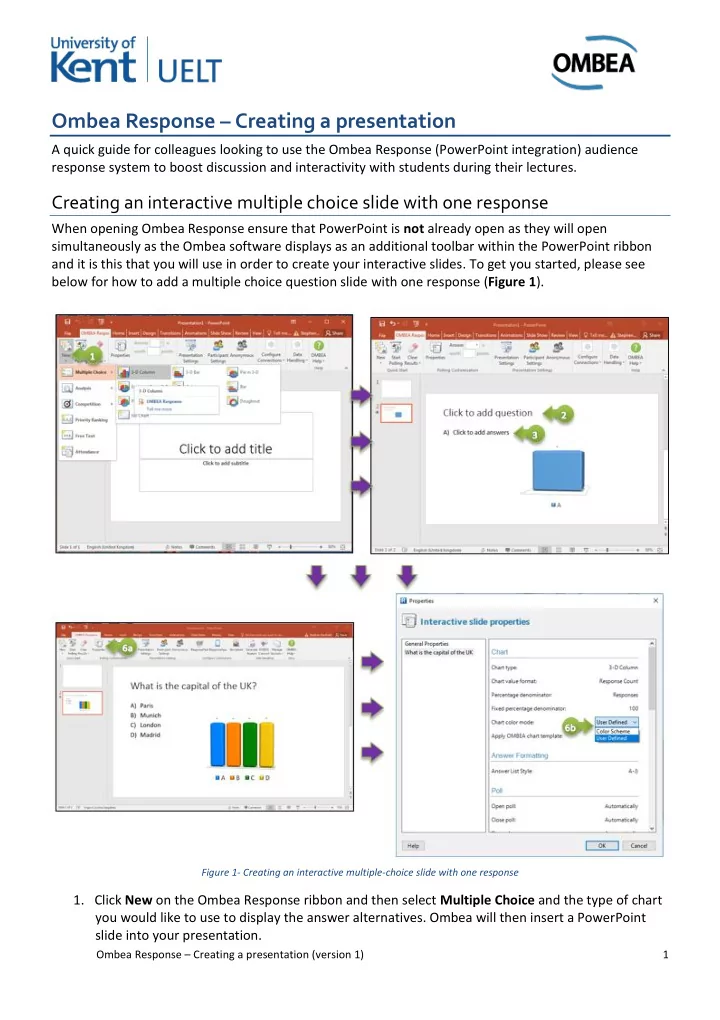
When opening Ombea Response ensure that PowerPoint is not already open as they will open simultaneously as the Ombea software displays as an additional toolbar within the PowerPoint ribbon and it is this that you will use in order to create your interactive slides. To get you started, please see below for how to add a multiple choice question slide with one response (Figure 1).
Figure 1- Creating an interactive multiple-choice slide with one response
- 1. Click New on the Ombea Response ribbon and then select Multiple Choice and the type of chart