Multi-Touch Interaction for Disaster Management Volker Paelke, - - PowerPoint PPT Presentation

multi touch interaction for disaster management
SMART_READER_LITE
LIVE PREVIEW

Multi-Touch Interaction for Disaster Management Volker Paelke, - - PowerPoint PPT Presentation

Multi-Touch Interaction for Disaster Management Volker Paelke, Karsten Nebe, Florian Klompmaker, Helge Jung Volker Paelke, Karsten Nebe, Florian Klompmaker, Helge Jung Multi-touch Multi-touch is a very prominent technology Much work on


slide-1
SLIDE 1

Volker Paelke, Karsten Nebe, Florian Klompmaker, Helge Jung

Multi-Touch Interaction for Disaster Management

Volker Paelke, Karsten Nebe, Florian Klompmaker, Helge Jung

slide-2
SLIDE 2

Multi-touch

  • Multi-touch is a very prominent technology

– Much work on development of base technology and individual interaction and visualization techniques

  • What are reasonable usage-scenarios?
  • Are those systems intuitively usable ?
  • Where are the limitations of such systems ?
  • What new challenges occur using such systems ?

http://www.apple.com http://www.microsoft.com/surface http://www.asus.de http://johannesluderschmidt.de/l http://dm.tzi.de/de/research/hci/mrt/ http://eis.comp.lancs.ac.uk/~dominik/cms/ http://iad.projects.zhdk.ch/multitouch/

slide-3
SLIDE 3

User Centred Approach

  • Multi-touch tables have high potential to improve situation awareness and

collaboration in time critical multi-user applications

  • Real applications (vs. photo sorting)
  • 1. Requirements: recurring interviews and workshops with disaster

managers and technicians from THW; observation of training exersises

  • 2. Identification of areas for improvement through multi-touch visualization

environments

  • 3. Iterative refinement of scenarios
slide-4
SLIDE 4

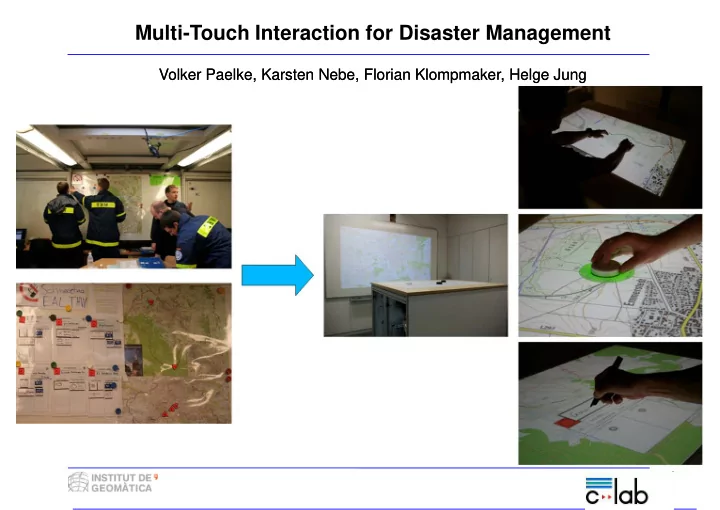
Scenarios

Management of an incident by a THW team

– paper maps, damage accounts – location reference through magnetic tiles – creation, manipulation, update of damage accounts

Key objectives

– maintain benefits of established workflow – provide access to advanced functionality of a GIS based system

slide-5
SLIDE 5

The useTable constructed @ C-LAB

slide-6
SLIDE 6

Interaction on the useTable

touch tangible pen User Studies:

  • impact of different interaction and visualization techniques on

cognitive workload

  • examine potential physiological dangers incurred by long term use
slide-7
SLIDE 7

More…

  • combination with mobile sensor network

to provide real-time tracking of rescue personal

  • GIS for spatial queries and automatic

situation analysis

  • display extension

Come outside and try the useTable!