Model : : HCRO - 600 00 INSTALLATION , OPERATION, AND MAINTENANCE - - PowerPoint PPT Presentation

model hcro 600 00
SMART_READER_LITE
LIVE PREVIEW

Model : : HCRO - 600 00 INSTALLATION , OPERATION, AND MAINTENANCE - - PowerPoint PPT Presentation

Model : : HCRO - 600 00 INSTALLATION , OPERATION, AND MAINTENANCE MANUAL A-301, Hagye Technotown, 10, Nowon-ro 15-gil, Nowon-gu, Seoul, Korea Tel. 82-2-948-0657 Fax. 82-2-948-2342 http://www.waco.co.kr INTROD ODUCTION ON This product is


slide-1
SLIDE 1

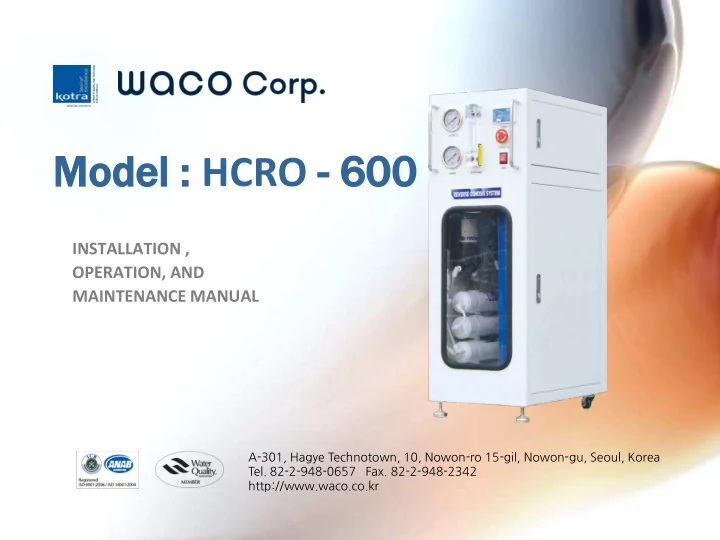
Model : : HCRO - 600 00

INSTALLATION , OPERATION, AND MAINTENANCE MANUAL

A-301, Hagye Technotown, 10, Nowon-ro 15-gil, Nowon-gu, Seoul, Korea

  • Tel. 82-2-948-0657 Fax. 82-2-948-2342

http://www.waco.co.kr

slide-2
SLIDE 2

INTROD ODUCTION ON

This product is designed and produced for residential use as well commercial use ( for small capacity) ,

  • Restaurant
  • Coffee shop
  • Aquarium
  • Detached House

It’s Reverse Osmosis filter system which was applied of Hyundai Wacortec’s highly-advanced RO technology to produce high quality of clean water continuously for drinking water. Besides, It is made to enable indoor set-up through compact and door-like exterior design minimizing noise from product. Dual TDS Meter was installed in order to check the condition of drinking water anytime.

slide-3
SLIDE 3

SYSTE TEM PERFORMANCE CE

Operational Parameters

Maximum Minimum Operating Temperatures 113℉ ( 45℃) 40℉ ( 4.4℃ ) Operating pressure 125 psi 35psi pH Range 10 .0 4.0

Specifications

Production 600GPD ( at 77℉ Water Temp. ) Membrane rejection 96% ( typical ) Tank capacity 11 gallons Pump DC 24V ( water booster pump ) x 2 Housing 20" Blue Housing x 3 fitting One touch fittings Solenoid Valve DC 24V 250㎃ x 2 Pressure gauge Maximum 150 psi Transformer

Input 100~240V , 50~60 Hz / Output DC 24V 1.2A

Faucet HF-05 Filter system PP 20" - GAC 20" - CTO 20" - 300GPD RO Membrane x 2 - PCB

slide-4
SLIDE 4

SYSTE TEM PERFORMANCE CE

Names and Function of Each parts

Front panel ① Pressure gauge of RO PUMP It’s the pressure which R/O Membrane undergoes by R/O pump. Although the proper figure of it is 70~80 psi it can be controlled by Flow Restrictor Valve as necessary. ② Pressure gauge of Raw water It shows the raw water (inlet water) pressure and 10 psi is required for operating. ③ Flow meter It shows water purification capacity. Unit is LPH( ℓ / h ) indicating what ℓ of water is purified per an hour. ④ TDS meter It indicates the real time TDS value on raw water and treated water and helps to check and decide R/O membrane filter’s condition (right time for filter replacement) and wrong signs of the system. TDS value : the figures of solids(mineral, slat, metal substances) dissolved in water and the unit of it is ppm ⑤ Emergency switch Press this switch to stop the product operation in case you face water leak or other problems. ⑥ Start switch Press this switch in case you do not use this system for a long time or when turn the system off

slide-5
SLIDE 5

SYSTE TEM PERFORMANCE CE

Names and Function of Each parts

Inner Parts

① Manual Flushing Valve It’s used to remove the remain of small particles of carbon and to expel remain air from the filter housings when replacing those filters 1st(PP), 2nd(GAC), 3rd(CTO), It’s also used for the filters flushing regularly by opening this valve specially for the area whose water is bad. ** It should be locked for the operation at all times. ② Flow Restrictor Valve It controls the amount of drain water from R/O membrane filter, Major role is to protect RO Membrane as it lowers water pressure forced by a pump by draining unpurified water through it

slide-6
SLIDE 6

SYSTE TEM PERFORMANCE CE

* User Notice and Emergency Coping tips

  • 1. Adjustment of the capacity of purified water

* After installation of the system by a specialist, the amount of purified water can be rather different at the change of water temperature For example, the capacity of the treated water is different between summer and winter season. In winter, it decreases around 20 ~ 30 %. This phenomenon occurs because viscosity of water is different according to water

  • temperature. The higher water temperature increases the purified water production.

25℃ water temperature is the optimal condition. * In order to increase the purified water in winter season, we can control it by this flow restrictor valve. The capacity of the purified water increases when you reduce the amount of drain water by closing Flow restrictor valve little by little (at this moment, the RO membrane gets to undergo high pressure) At this time, you can check the pressure of R/O membrane through the pressure gauge and should be careful not to exceed max 125psi.

  • 2. The function of Auto Flushing

* It’s on the R/O Membrane flushing for one and half minute every 2hours based on the product operating hours The amount of water can rapidly decreases at this time however it is a normal condition,

  • 3. Actions in case of water leak

* At first, press Emergence switch, close water valve to prevent water influx and contact the agent where you bought for repair.

  • 4. In case of short-time use.

* Turn the power off after locking water valve.

** Do not manage or operate electrical control box except specialist

slide-7
SLIDE 7

INSTA TALLATI TION S STEP

Type Of Pressure Tank

slide-8
SLIDE 8

INSTA TALLATI TION S STEP

Type Of Storage Tank

slide-9
SLIDE 9

INSTA TALLATI TION

  • 1. Connect each tubing to tubing connectors(1/2” or 1/4”) placed onto the backside of the system for Inlet water, Outlet

Water(clean), Tank, Drain. (If the reservoir tank is not a pressure tank, you have to install the water level switch separately)

  • 2. After the initial system installation, Flush the Carbon Filter for 2-3 minutes by using Manual Flushing Valve.
  • 3. Turn on the system for the operation.

4 Set the pressure gauge of R/O pump for 70~80PSI by flow restrictor valve and check that the treated water capacity can reach to 95LPH,

  • 5. If the pressure tank is filled with clean water and the system stops automatically, Turn on the Faucet to drain all

stored water for cleaning the tank before use.

#Auto Flushing

It’s on the RO membrane flushing for 1~2mintues every 2hours optimize R/O membrane efficiency

and water treatment capacity.

slide-10
SLIDE 10

INSTA TALLATI TION

FILTER STAGE

Carbon Filter Flushing

For the initial system installation or after the replacement of carbon filter, you have to flush carbon filter for 2-3 minutes by

  • pening the manual flushing valve before operation,

(Procedure : Power Off-->Manual Flushing Valve "Open"-->Raw Water Open--> inflow of raw water for 2-3 minutes-->Manual Flushing Valve "Close"-->Power On-->System Start) Cartridge Filter Filter Description Service Life Stage 1 Sediment Filter Sediment filter is made by high density below 5㎛ polypropylene to maximize water purification effect by removing more than 5㎛ sized sediments and pollutants from the first stage . In this regard, this filter can prolong service life of next stage filters. 3-4month Stage 2 Carbon Filter Activated carbon as a special carbon is the embodiment of amorphous carbon which is formed during the activation process ,of molecular sized micro-pores. With a large internal surface area for absorption, it can absorb existing various pollutants in water and have a great effect for removing residual chlorine, bad smell and absorbing organic matter. 6month Stage 3 Carbon Block Filter The carbon block filter is activated carbon formed by powdered activated carbon and PE resin which has some pore, in high temperature. And It has wide surface area available for

  • absorption. It can remove and absorbs organism, smell, color, remain chlorine, heavy

metal and chemical etc in water. 6month Stage 4 RO Membrane Filter (Q'ty : 2) RO membrane filter removes all pollutants such as heavy metal, virus, bacteria and

  • rganic chemicals through the membrane pore sized of 0.001-.0001㎛, which is

1/1,000,000 of thickness of human hair. It remove the smallest particles and even ionic substance. 12-16month Stage 5 PCB Filter The PCB filter is the high quality carbon made by coconut shells materials and it makes better water taste by removing remain gas and odor substance in water. 9-12month

slide-11
SLIDE 11

INSTA TALLATI TION

Fault diagnosis and Solution

Fault diagnosis

Check Point

Solution The system does not work.

  • 1. Check the pressure and

flow rate of the raw water.

Check Raw water valve ‘s status, If the raw water valve is closed, open the valve for inflow of raw water to the system,

  • 2. Check whether Low

Pressure S/W works normally.(If It has a trouble, connect with each other terminal of Low pressure switch, then it will work well

Replace the Low pressure S / W

  • 3. Check switch ON/ OFF

condition

The system does not work in case emergency switch is

  • ON. Check whether the

terminal of Start switch or Emergency switch is in normal(or missing)

  • 4. Check disconnection of

switch

Check the disconnection of each wiring and reconnect

  • r manage it properly,

Capacity of Clean water does not reach to 600 GPD.

The amount of drain water is still steady in comparison with before but treated water capacity decreases more than 30%.

1.Check whether two pumps work normally. Otherwise check disconnection of pump

  • 2. If two Pumps work

normally, need to check Membrane condition on replacement of it,

Fault diagnosis Check Point Solution The system work normally, but It does not make drain water and treated water.

  • 1. Check condition of

solenoid valve(whether it

  • pens and closes well)

Replace the solenoid valve.

  • 2. Check PP sediment filter

condition whether it is piled with many foreign substances. Replace the PP sediment filter cartridge

  • 3. Check whether RO

membrane is blocked Replace the RO membrane. The pressure of PUMP gauge rises rapidly.

  • 1. If RO Membrane is

blocked , the pressure of RO PUMP increases Replace the RO membrane. 2.Check the flow restrictor valve status, If the flow restrictor valve is blocked or It was adjusted differently with the initial set, increase drain water rate by controlling the flow restrictor valve to reduce the pressure of the Pump
slide-12
SLIDE 12

INSTA TALLATI TION

Fault diagnosis and Solution

Fault diagnosis Check Point Solution The inflow amount

  • f clean water

to tank decreases

  • 1. If air leaks from the pressure tank, Inflow

amount of treated water to tank decreases Inject air into pressure tank. Please Contact A/S TEAM for injecting air.

  • 2. Check the condition of the High pressure

S/W High pressure s/w controls the inflow rate to the tank and the amount of water can be different according to the condition of High pressure S/W. Check and decide the replacement of this switch, TDS values increase rapidly

  • 1. Check RO MEMBRNAE service life

Replace RO membrane.

  • 2. Check Damage of RO MEMBRANE film

Replace RO membrane.

  • 3. If you connect the drain water outlet with

treated water outlet conversely, TDS value Increase (Normality: TDS of treated water should be decreased more 94% from the value of raw water.) It takes some time to have the normal TDS value of treated water in case of the initial operation, Check RO Membrane housing was installed correctly (Drain water, Treated water) Water Leakage

  • 1. Check each fitting part

Check and Replace each part if necessary

  • 2. Check housing O ring
  • 3. Check housing connector
slide-13
SLIDE 13

Thank yo k you

A-301, Hagye Technotown, 10, Nowon-ro 15-gil, Nowon-gu, Seoul, Korea

  • Tel. 82-2-948-0657 Fax. 82-2-948-2342

http://www.waco.co.kr