MAELIA Multimodal M Application for Extensible Lego Intelligent - - PowerPoint PPT Presentation

maelia
SMART_READER_LITE
LIVE PREVIEW

MAELIA Multimodal M Application for Extensible Lego Intelligent - - PowerPoint PPT Presentation

MAELIA Multimodal M Application for Extensible Lego Intelligent Agent Friday, August 23, 2002 Guillaume Barraud & Priam Pierret 1 Problem Definition Lego MindStorms System Communication with user aspect Environnement


slide-1
SLIDE 1

Friday, August 23, 2002 Guillaume Barraud & Priam Pierret 1
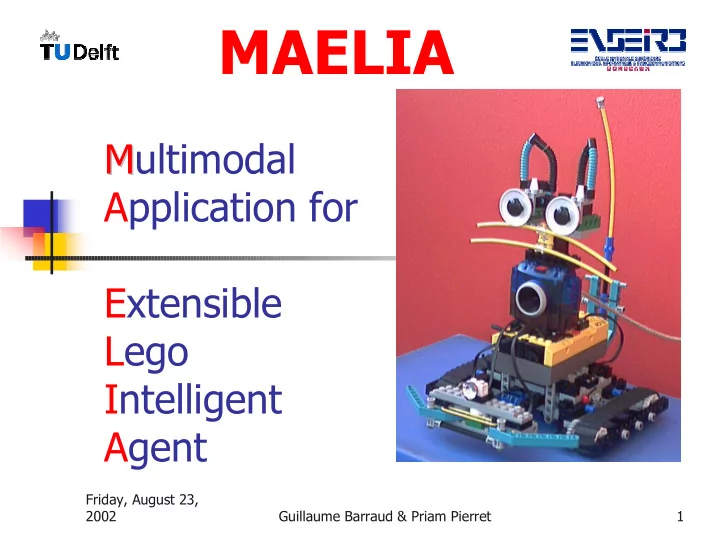
M Multimodal Application for Extensible Lego Intelligent Agent

MAELIA

slide-2
SLIDE 2

Friday, August 23, 2002 Guillaume Barraud & Priam Pierret 2

Problem Definition

Lego MindStorms System Communication with user aspect Environnement communication aspect AI aspect

slide-3
SLIDE 3

Friday, August 23, 2002 Guillaume Barraud & Priam Pierret 3

Global presentation

Three aspects :

AI Aspect Entertaining Aspect Components Aspects Lego Environment

slide-4
SLIDE 4

Friday, August 23, 2002 Guillaume Barraud & Priam Pierret 4

slide-5
SLIDE 5

Friday, August 23, 2002 Guillaume Barraud & Priam Pierret 5

Application architecture

Diagram

Body components layer Brain layer Commands layer

slide-6
SLIDE 6

Friday, August 23, 2002 Guillaume Barraud & Priam Pierret 6

slide-7
SLIDE 7

Friday, August 23, 2002 Guillaume Barraud & Priam Pierret 7

Body components

RobotCat -> Lego RCX brick EyesCat -> LegoCam camera VoiceCat -> Speech generation

slide-8
SLIDE 8

Friday, August 23, 2002 Guillaume Barraud & Priam Pierret 8

Brain Cat

Behaviors builder Knowledge Timers (notion of time) Events context (notion of reaction) Events manager (notion of event)

slide-9
SLIDE 9

Friday, August 23, 2002 Guillaume Barraud & Priam Pierret 9

slide-10
SLIDE 10

Friday, August 23, 2002 Guillaume Barraud & Priam Pierret 10

Cat Command Language

Idea from the ‘event’ pattern Structure & Grammar Vocabulary from one unique XML file

slide-11
SLIDE 11

Friday, August 23, 2002 Guillaume Barraud & Priam Pierret 11

User Interface

Text Input (Cat Command Language) Icons Input Voice Input (Speech recognition)

slide-12
SLIDE 12

Friday, August 23, 2002 Guillaume Barraud & Priam Pierret 12

Text Input Interface

slide-13
SLIDE 13

Icons Input Interface

slide-14
SLIDE 14

MDI

slide-15
SLIDE 15

MDI

slide-16
SLIDE 16

LegoCam layers

slide-17
SLIDE 17

RCX Robot Cat Interface

slide-18
SLIDE 18

Event context Interface

slide-19
SLIDE 19

Friday, August 23, 2002 Guillaume Barraud & Priam Pierret 19

frmTimers

slide-20
SLIDE 20

Friday, August 23, 2002 Guillaume Barraud & Priam Pierret 20

Recommendations

Adapted Environment

  • Light
  • Space

Use of the CCL

  • sample with the pathFinder
slide-21
SLIDE 21

Friday, August 23, 2002 Guillaume Barraud & Priam Pierret 21

Perspectives & Overviews

Re-use for new behaviors

It is made for that.

New actions (and new components) New events (and new sensors) New tests

slide-22
SLIDE 22

Friday, August 23, 2002 Guillaume Barraud & Priam Pierret 22

Acknowledgements

  • Dr. Drs. L.J.M Rothkrantz

People from all the floor. Luca Porzio

slide-23
SLIDE 23

Friday, August 23, 2002 Guillaume Barraud & Priam Pierret 23

Sample : myNameIs

  • say "Hello, my name is ELIA, I am about 2 months-old.",
  • say "I am a robot cat able to communicate with you.",
  • say "I am able to move.",
  • setPowerMotor 7,
  • driveForward 20, rotateLeft 360, say "youhouhou",
  • say "I accept differents parameters for to complete my driveForward command. It can be a

distance in centimeters, in meters.",

  • say "For example, I can draw a square.",
  • repeat 4 times driveForward 20, rotateLeft 90 end,
  • say "I can light my way",
  • setLightOn, wait 3, setLightOff,
  • say "I can move slowly",
  • setPowerMotor 2, driveForward 20,
  • say "or I can move very fast",
  • setPowerMotor 7, driveForward 30,
slide-24
SLIDE 24

Friday, August 23, 2002 Guillaume Barraud & Priam Pierret 24

Sample : myNameIs (2)

  • say "I am also able to play some music",
  • playMusic params G5,G5,G5,A6,B6,A6,G5,B6,A6,A6,G5 end,
  • say "I am also reactive, try to push on my contact sensors",
  • when contactLeftPushed then say "houhouhou", driveBack 5

end,

  • when contactRightPushed then say "hohoho", driveBack 5 end,
  • wait 60,
  • say "Finished !",
  • when contactLeftPushed then doNothing end,
  • when contactRightPushed then doNothing end,
  • stopMoving,
  • setPowerDownTime 6
slide-25
SLIDE 25

Friday, August 23, 2002 Guillaume Barraud & Priam Pierret 25

Sample : policeCar

  • doBoth
  • while true driveForward 10, turnRight end
  • and
  • doBoth
  • while true
  • setLightOn, wait 1, setLightOff, wait 1
  • end
  • and
  • while true
  • playMusic params A5, A6 end
  • end
  • end
  • end
slide-26
SLIDE 26

Friday, August 23, 2002 Guillaume Barraud & Priam Pierret 26

Sample : use of events

  • say "We are going to learn how to use events in this application",
  • say "So you will be able to set some reaction on all events.",
  • say "A first example, reaction on the contact sensors. Try to push on the contact

sensors.",

  • when contactLeftPushed then driveBack 10 end,
  • when contactRightPushed then driveBack 10 end,
  • wait 30,
  • when contactLeftPushed then doNothing end,
  • when contactRightPushed then doNothing end,
  • say "A another good sample can be a small stroll around my environment",
  • startStroll,
  • wait 30,
  • endStroll,
slide-27
SLIDE 27

Friday, August 23, 2002 Guillaume Barraud & Priam Pierret 27

Sample : use of events (2)

  • say "We can see the difference between the stroll running on the RCX,

the last one and the following stroll",

  • when contactLeftPushed then driveBack 10, rotateLeft 20,

driveForward end,

  • when contactRightPushed then driveBack 10, rotateLeft 20,

driveForward end,

  • driveForward,
  • wait 60,
  • stopMoving,
  • when contactLeftPushed then doNothing end,
  • when contactRightPushed then doNothing end
slide-28
SLIDE 28

Friday, August 23, 2002 Guillaume Barraud & Priam Pierret 28

Sample : distanceTarget

  • watchTarget,
  • when distanceTarget then
  • when distanceTarget then
  • stopMoving,
  • say "Now I am close from the red target",
  • say "I stop",
  • stopWatch
  • end,
  • stopMoving, say "I am far from the red target",
  • wait 2,
  • driveForward
  • end,
  • driveForward
slide-29
SLIDE 29

Friday, August 23, 2002 Guillaume Barraud & Priam Pierret 29

Sample : findThePath

  • setPowerMotor 2, rotateRightDuring 1, setPowerMotor 7,
  • driveFollowingTheLine,
  • when arrivedToACross then turnLeft, driveFollowingTheLine,
  • when arrivedToACross then driveForwardDuring 1,

driveFollowingTheLine,

  • when arrivedToACross then driveForwardDuring 1,

driveFollowingTheLine,

  • when arrivedToACross then turnRight, driveFollowingTheLine,
  • when arrivedToACross then driveForwardDuring 1,

driveFollowingTheLine,

  • when arrivedToACross then stopMoving, playSound 2, say "Yeah I got

it", stopFollowingTheLine

  • end end end end end end