Lab 4 Feedback We need some work on func@ons Follow examples and - - PDF document

lab 4 feedback
SMART_READER_LITE
LIVE PREVIEW

Lab 4 Feedback We need some work on func@ons Follow examples and - - PDF document

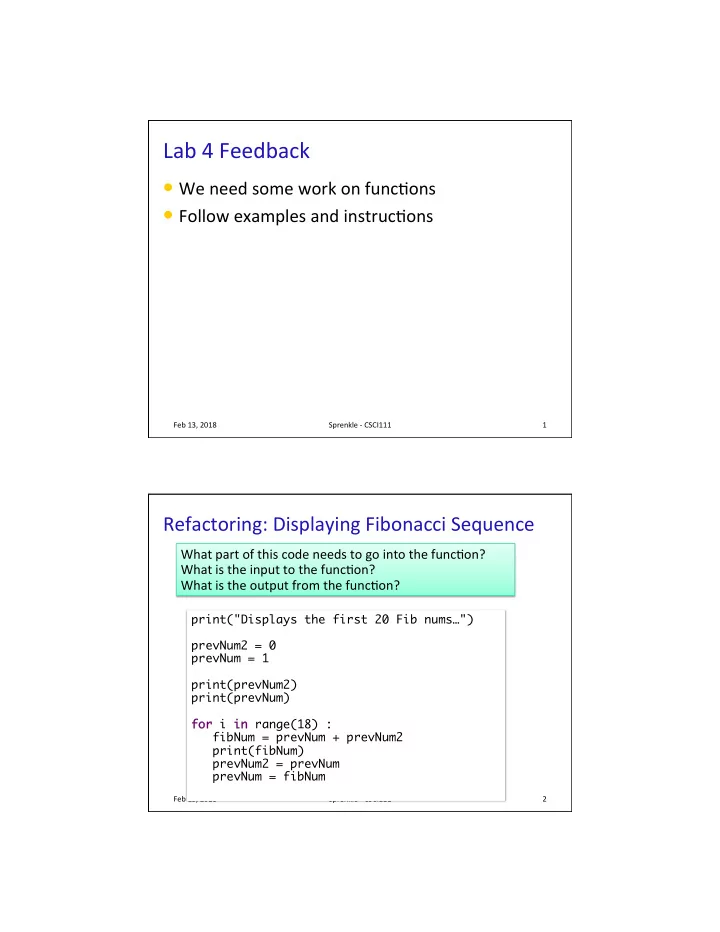
Lab 4 Feedback We need some work on func@ons Follow examples and instruc@ons Feb 13, 2018 Sprenkle - CSCI111 1 Refactoring: Displaying Fibonacci Sequence What part of this code needs to go into the func@on? What is the input to the


slide-1
SLIDE 1

1

Feb 13, 2018 Sprenkle - CSCI111 1

Lab 4 Feedback

  • We need some work on func@ons
  • Follow examples and instruc@ons

Refactoring: Displaying Fibonacci Sequence

Feb 13, 2018 Sprenkle - CSCI111 2

print("Displays the first 20 Fib nums…") prevNum2 = 0 prevNum = 1 print(prevNum2) print(prevNum) for for i in in range(18) : fibNum = prevNum + prevNum2 print(fibNum) prevNum2 = prevNum prevNum = fibNum

What part of this code needs to go into the func@on? What is the input to the func@on? What is the output from the func@on?

slide-2
SLIDE 2

2

Refactoring: Displaying Fibonacci Sequence

Feb 13, 2018 Sprenkle - CSCI111 3

print("Displays the first 20 Fib nums…") prevNum2 = 0 prevNum = 1 print(prevNum2) print(prevNum) for for i in in range(18) : fibNum = prevNum + prevNum2 print(fibNum) prevNum2 = prevNum prevNum = fibNum

What part of this code needs to go into the func@on? What is the input to the func@on? What is the output from the func@on? Unintended side effect Code that displays the Fibonacci sequence

Doc String for Fibonacci Sequence Func@on

  • How should we describe this func@on?

Ø What is a good precondi@on for the func@on?

  • What info does a good precondi@on include?

Feb 13, 2018 Sprenkle - CSCI111 4

def generateFibonacciNumber(numInSequence): """ """

slide-3
SLIDE 3

3

Doc String for Fibonacci Sequence Func@on

  • How should we describe this func@on?

Ø What is a good precondi@on for the func@on?

  • What info does a good precondi@on include?

Feb 13, 2018 Sprenkle - CSCI111 5

def generateFibonacciNumber(numInSequence): """ Pre: numInSequence must be an integer greater than 1 Post: returns the numInSequence value in the Fibonacci sequence """

Does not men@on user input – does not require user input.

Doc String for Fibonacci Sequence Func@on

  • How should we describe this func@on?

Ø What is a good precondi@on for the func@on?

  • What info does a good precondi@on include?

Feb 13, 2018 Sprenkle - CSCI111 6

def generateFibonacciNumber(numInSequence): """ Pre: numInSequence must be an integer greater than 1 Post: returns the numInSequence value in the Fibonacci sequence """

Does not men@on user input – does not require user input.

for x in range( 2, 10, 2): print( generateFibonacciNumber(x) )

slide-4
SLIDE 4

4

Molecular Weight

  • Given a non-nega@ve integer of hydrogen,
  • xygen, carbon atoms, return the molecular

weight

Feb 13, 2018 Sprenkle - CSCI111 7

def calcMolecularWeight( hAtoms, oAtoms, mAtoms ): ... # calculation ... return weight

Rounding should not be done in here à Reduces the reusability of the func@on

Molecular Weight

  • Given a non-nega@ve integer of hydrogen,
  • xygen, carbon atoms, return the molecular

weight

Feb 13, 2018 Sprenkle - CSCI111 8

def main(): # get user input … weight = calcMolecularWeight(...) print("The weight is", round(weight, 6))

Would s@ll only round to 3 places if rounding performed in func@on

slide-5
SLIDE 5

5

Review

  • How can we make our code make [good]

decisions?

Feb 13, 2018 Sprenkle - CSCI111 9

Grade – separa@on of concerns

  • If with the ands compared to the if/else

Feb 13, 2018 Sprenkle - CSCI111 10

slide-6
SLIDE 6

6

Feb 13, 2018 Sprenkle - CSCI111 11

More Complex Condi@ons

  • Boolean

Ø Two logical values: True and False

  • Combine condi@ons with Boolean operators

Ø and and – True only if both operands are True Ø or

  • r – True if at least one operand is True

Ø not not – True if the operand is not True

  • English examples

Ø If it is raining and it is cold Ø If it is Saturday or it is Sunday Ø If the shirt is on sale or the shirt is purple

Feb 13, 2018 Sprenkle - CSCI111 12

What is the output?

x = 2 y = 3 z = 4 b = x==2 c = not b d = (y<4) and (z<3) print("d=",d) d = (y<4) or (z<3) print("d=",d) d = not d print(b, c, d)

eval_cond.py Because of precedence, we don't need parentheses Focus: how operations work Not good variable names

slide-7
SLIDE 7

7

Feb 13, 2018 Sprenkle - CSCI111 13

Truth Tables

A B

A and and B A or

  • r B

not not A not not B not not A and and B A or

  • r

not not B

T T T F F T F F

  • perands

Feb 13, 2018 Sprenkle - CSCI111 14

Truth Tables

A B

A and and B A or

  • r B not

not A not notB not not A and and B A or

  • r

not not B

T T T T T F F T F T F T F F F F

  • perands
slide-8
SLIDE 8

8

Feb 13, 2018 Sprenkle - CSCI111 15

Truth Tables

A B

A and and B A or

  • r B not

not A not notB not not A and and B A or

  • r

not not B

T T T T F F T F F T F T F T F T T F F F F F T T

  • perands

Feb 13, 2018 Sprenkle - CSCI111 16

Truth Tables

A B

A and and B A or

  • r B not

not A not notB not not A and and B A or

  • r

not not B

T T T T F F F T T F F T F T F T F T F T T F T F F F F F T T F T

  • perands
slide-9
SLIDE 9

9

Feb 13, 2018 Sprenkle - CSCI111 17

Prac@ce: Numeric Grade Input Range

  • Enforce that user must input a numeric grade

between 0 and 100

Ø In Python, we can’t (always) write a condi@on like 0 <= num_grade <= 100, so we need to break it into two condi@ons

  • Write an appropriate condi@on for this check on

the numeric grade

Ø Using and and Ø Using or

  • r

Focus on the condi&on Then, we’ll block out the code

Feb 13, 2018 Sprenkle - CSCI111 18

Prac@ce: Numeric Grade Input Range

  • Enforce that user must input a numeric grade

between 0 and 100

Ø Using and and Ø Using or

  • r

if if num_grade >= 0 and and num_grade <= 100:

computa@on

else else:

print error message

if if num_grade < 0 or

  • r num_grade > 100:

print error message

else else:

computa@on

slide-10
SLIDE 10

10

Lab 5 Overview

  • “only” two non-exam class periods since last lab,

so…

  • Focus on condi@onals
  • More building blocks to draw from

Ø Break problem into smaller pieces Ø Think, write your algorithm outline, write a few lines

  • f code, then try them out.
  • Table func@ons for a week

Feb 13, 2018 Sprenkle - CSCI111 19

Common Issue: Inefficiency

Feb 13, 2018 Sprenkle - CSCI111 20

if team1Score > team2Score: print("Team 1 wins!") else: if team2Score < team1Score: print("Team 2 wins!") else: if team1Score == team2Score: print("They tied! We're going to overtime!")

Extra if statement, not necessary Know when hit second else that the only possibility is a tie

slide-11
SLIDE 11

11

Feb 13, 2018 Sprenkle - CSCI111

Problem 1, 2 Efficiency

team1 > team2 team1 wins

True

1

team2 > team1 Tie

True

team2 == team1 team2 wins

True

team1 > team2 team1 wins

True

2

team2 > team1 Tie team2 wins

True

End

  • How many condi@ons evaluated?

21 Feb 13, 2018 Sprenkle - CSCI111

Problem 1, 2 Efficiency

2

Always 3 comparisons At most 2 comparisons

22

team1 > team2 team1 wins

True

1

team2 > team1 Tie

True

team2 == team1 team2 wins

True

team1 > team2 team1 wins

True

team2 > team1 Tie team2 wins

True

End

slide-12
SLIDE 12

12

Feb 13, 2018 Sprenkle - CSCI111

Problem 2 (& 3) Efficiency

team1 > team2 1 wins

True

team2 > team1 Tie 2 wins

True

End team1 == team2 Tie

True

team2 > team1 1 wins 2 wins

True

End

Which tends to be more efficient? How many condi@ons to evaluate?

23 Feb 13, 2018 Sprenkle - CSCI111

Problem 2 (& 3) Efficiency

team1 > team2 1 wins

True

team2 > team1 Tie 2 wins

True

End team1 == team2 Tie

True

team2 > team1 1 wins 2 wins

True

End

24

Equality is a rare condition;

  • n average, will always need

to check second condition. More common case. May only need to check

  • ne condition.
slide-13
SLIDE 13

13

Adding to Development Process

Feb 13, 2018 Sprenkle - CSCI111 25

  • Last development step:

Ø Assess your program again aner it works Ø Is it efficient? Is it readable? Can I simplify?

Lab 4 – Greatest Hits: Less-Complicated Approaches for Customized Display

  • Correct but more complicated solu@on to

handling customized display

Feb 13, 2018 Sprenkle - CSCI111 26

if albums == 1 and extraTracks == 0: print("Your album requires", albums, "cd") elif albums == 1 and extraTracks > 0: print("Your album requires", albums, "cd") print(extraTracks, "tracks will have to wait for 
 the next Greatest Hits album") elif albums > 1 and extraTracks > 0: print("Your album requires", albums, "cds") print(extraTracks, "tracks will have to wait for 
 the next Greatest Hits album") elif albums > 1 and extraTracks == 0: print("Your album requires", albums, "cds") Other, similar examples in submissions

slide-14
SLIDE 14

14

Lab 4 – Greatest Hits: Less-Complicated Approaches for Customized Display

  • Less complicated solu@on

Ø Simpler logic, condi@ons Ø Less duplicated code

Feb 13, 2018 Sprenkle - CSCI111 27

if albums == 1: print("Your album requires", albums, "CD.") else: print("Your album requires", albums, "CDs") if extraTracks > 1: print(extraTracks, "tracks will have to wait for
 the next Greatest Hits album") elif extraTracks==1: print(extraTracks, "track will have to wait for the next Greatest Hits album")

REVIEW: STRINGS

Feb 13, 2018 Sprenkle - CSCI111 28

slide-15
SLIDE 15

15

Review

  • How can we combine strings?
  • How can we find out how long a string is?
  • How can you tell if one string is contained in

another string?

  • How can we find out the character at a certain

posi@on?

  • How can we iterate through a string?
  • How do you call a method on a string?

Feb 13, 2018 Sprenkle - CSCI111 29 Feb 13, 2018 Sprenkle - CSCI111

String Opera@ons

  • Examples:

Ø "I feel " + "sleepy"

  • Evaluates to "I feel sleepy"

Ø "Oops! " * 3

  • Evaluates to "Oops! Oops! Oops! "

Operand Syntax Meaning + str1 + str2

Concatenate two strings into

  • ne string

* str * num

Concatenate string num @mes

30

Recall lab 0

slide-16
SLIDE 16

16

Feb 13, 2018 Sprenkle - CSCI111 31

String Comparisons

  • Same opera@ons as with numbers:

Ø ==, != Ø <, <= Ø >, >=

  • Use in condi@ons in if

if statements

Alphabe@cal comparison string_compare.py if if userpick == pick4num: print("We have a winner!") else else: print("You lose.")

Feb 13, 2018 Sprenkle - CSCI111 32

Strings

  • A sequence of characters

Ø Example: band = “The Beatles”

index or position of characters characters

Length of the string: 11

Built-in function: len(string) to find length of a string Start at 0 End at len(band)-1

‘T’ ‘h’ ‘e’ ‘ ’ ‘B’ ‘e’ ‘a’ ‘t’ ‘l’ ‘e’ ‘s’

1 2 3 4 5 6 7 8 9 10

slide-17
SLIDE 17

17

Feb 13, 2018 Sprenkle - CSCI111 33

Summary: Itera@ng Through a String

  • For each character in the string
  • For each posi@on in the string

string of length 1

for for pos in in range(len(mystring)): print(mystring[pos])

An integer Index into the string

for for char in in mystring mystring: print(char)

Determines loop’s behavior

Feb 13, 2018 Sprenkle - CSCI111 34

str str Methods

  • Example method: find(substring)

find(substring)

Ø Finds the index where substring is in string Ø Returns -1 if substring isn't found

  • To call a method:

Ø <str_obj>.methodname([arguments]) Ø Example: filename.find(".py")

Executed on this string

slide-18
SLIDE 18

18

Feb 13, 2018 Sprenkle - CSCI111 35

Common str str Methods

Method Opera>on

center(width)

Returns a copy of string centered within the given number of columns

count(sub[, start [, end]])

Return # of non-overlapping occurrences of substring sub in the string.

endswith(sub), startswith(sub)

Return True iff string ends with/starts with sub

find(sub[, start [, end]])

Return first index where substring sub is found

isalpha(), isdigit(), isspace()

Returns True iff string contains leuers/ digits/whitespace only

lower(), upper()

Return a copy of string converted to lowercase/lowercase

string_methods.py

Feb 13, 2018 Sprenkle - CSCI111 36

Common str str Methods

Method Opera>on

replace(old, new[, 
 count])

Returns a copy of string with all occurrences of substring old

  • ld replaced by substring new.
  • new. 


If count count given, only replaces first count count instances.

split([sep])

Return a list of the words in the string, using sep sep as the delimiter string. If sep sep is not specified or is None, any whitespace string is a separator.

strip()

Return a copy of the string with the leading and trailing whitespace removed

join(<sequence>)

Return a string which is the concatena@on of the strings in the sequence with the string this is called on as the separator

swapcase()

Return a copy of the string with uppercase characters converted to lowercase and vice versa.

slide-19
SLIDE 19

19

Using the APIs

  • Given a problem, break down the problem

Ø Can any of the parts of the problem be solved using a method in the API?

Feb 13, 2018 Sprenkle - CSCI111 37 Feb 13, 2018 Sprenkle - CSCI111 38

Escape Sequences

  • Escape character: \
  • Escape sequences

Ø newline character (carriage return) à \n Ø tab à \t Ø quote à \" or \' Ø backslash à \\

  • Example:

Ø print("To print a \\, you must use \"\\\\\"")

  • What does this display?

demo_str.py

slide-20
SLIDE 20

20

FORMATTING STRINGS

Feb 13, 2018 Sprenkle - CSCI111 39

Example Format Specifiers

  • What if precision is bigger than the decimal places?
  • What if field width is smaller than the length of the

value?

Feb 13, 2018 Sprenkle - CSCI111 40

Field width is 5

1 2 2 3 . 2

"{:5d}".format(12) "{:9.2f}".format(23.1999) Field width is 9 Precision is 2 Right-justified Any guesses? Try out in interpreter. à " 12" à " 23.20"

slide-21
SLIDE 21

21

Example Format Specifiers

  • What if precision is bigger than the decimal places?

Ø Fills decimal with 0s

  • What if field width is smaller than the length of the

value?

Ø String contains en@re value

Feb 13, 2018 Sprenkle - CSCI111 41

Field width is 5

1 2 2 3 . 2

"{:5d}".format(12) "{:9.2f}".format(23.1999) Field width is 9 Precision is 2 Right-justified à " 12" à " 23.20"

Formavng Prac@ce

  • x = 10
  • y = 3.5
  • z = "apple"
  • "{:6d}".format(x)
  • "{:6.2f}".format(x)
  • "{:06.2f}".format(y)
  • "{:6.2f}".format(y)
  • "{:^10s}".format(z)
  • "{:5d} {:<7.3f}".format(x,y)

Feb 13, 2018 Sprenkle - CSCI111 42

slide-22
SLIDE 22

22

Example: Prin@ng Out Tables

  • A table of temperature conversions
  • If we want to print data in rows, what is the

template for what a row looks like?

Ø How do we make the column labels line up?

Feb 13, 2018 Sprenkle - CSCI111 43

Temp F Temp C Temp K

  • ----- ------ ------
  • 459.7 -273.1 0.0

0.0 -17.8 255.2 32.0 0.0 273.1

temp_table.py

Course Midterm Grades

  • For those of you who get midterm grades, I will

calculate your grade based on

Ø 50% midterm exam Ø 40% labs (through lab4 at least) Ø 5% broader issues Ø 5% par@cipa@on

Feb 13, 2018 Sprenkle - CSCI111 44

slide-23
SLIDE 23

23

Lab 5

  • Basic and advanced string problems

Feb 13, 2018 Sprenkle - CSCI111 45

Review

  • How do we get fine-grained control over how to

format your output?

  • How do you call a method on a string?
  • How do you convert from a character to its

decimal ASCII representa@on?

  • How do you convert from a decimal ASCII

representa@on to the character?

Feb 13, 2018 Sprenkle - CSCI111 46

slide-24
SLIDE 24

24 Decode Message

Caesar Cipher

  • Write an encoding/decoding program

Ø Encode a message Ø Give to a friend to decode

Feb 13, 2018 Sprenkle - CSCI111 47

Message, Key Encoded Message, Key Your Program Friend’s Program Should match

Feb 13, 2018 Sprenkle - CSCI111 48

Lab 5 Overview

  • More String Problems
  • ASCII manipula@on
slide-25
SLIDE 25

25

Problem with Duplicate Code

Feb 13, 2018 Sprenkle - CSCI111 49

#Print data for 100m meters = 100 kilometers = .001*meters yards = 1.094*meters miles = .0006215*meters print("%5d %12.3f %13.1f %10.3f" % (meters,kilometers,yards,miles)) #Print data for 200m meters = 200 kilometers = .001*meters yards = 1.094*meters miles = .0006215*meters print("%5d %12.3f %13.1f %10.3f" % (meters,kilometers,yards,miles)) …

Difficult to maintain:

  • What if need to change

the formatting?

  • Change the conversion

amount? Solutions:

  • Constants
  • For loop

Feb 13, 2018 Sprenkle - CSCI111 50

BMI problem

  • Compute BMI as a float
  • Check valid height, weight before compu@ng BMI

Ø Don’t waste @me compu@ng if they are invalid

  • Most elegant if/else condi@on:

if if bmi < 19: print “below” elif elif bmi > 25: print “above” else else: print “in range” if if bmi >= 19 and bmi <= 25: print “in range” elif elif bmi > 25: print “above” else else: print “below”

As opposed to Both are correct Why is that important?

slide-26
SLIDE 26

26

Par@al Student Solu@on

Feb 13, 2018 Sprenkle - CSCI111 51

TOO_HEAVY = 400 TOO_LIGHT = 60 TOO_TALL = 84 # 7ft TOO_SHORT = 36 # 3 ft LOW_BMI = 19 HIGH_BMI = 25 print "Do you know your BMI? You should!\n" height = input ("How tall are you in inches? ") # Check for unreasonable input, exit if unreasonable if height <= TOO_SHORT: print "You can't be that short!" sys.exit(1) elif height >= TOO_TALL: print "You can't be that tall!" sys.exit(1)

Well-named constants Easy to change values Also explained values (e.g., 7n) Good error messages for unreasonable cases Checks before user enters weight; less work for user

Exam 1 Results

  • Had 104 points but out of 100, plus 6 bonus points
  • Common mistakes

Ø Budge@ng @me

  • More than I asked for

Ø Not answering part of the ques@on

Ø Tracing through if problem, fixing code

  • use control flow diagrams

Ø while loop à for loop Ø <= instead of ≤

Feb 13, 2018 Sprenkle - CSCI111 52

A B C Total Average 77 75 80 83 Median 76 75 84 86

slide-27
SLIDE 27

27

Tip Chart

Feb 13, 2018 Sprenkle - CSCI111 53

print "Meal Cost 15% tip 20% tip" for for mealCost in in xrange(10, 105, 5): tip15 = mealCost * .15 tip20 = mealCost * .20 print "%9d %9.2f %9.2f" % (mealCost, tip15, tip20)

You didn’t have to worry about column widths

Animal Adop@on

Feb 13, 2018 Sprenkle - CSCI111 54

num = input("Enter the number of cats you want to adopt: ") fixed = input("Enter 1 if the cats are neutered or 0 if they aren't: ") adoption_fee=65 if if num > 1: adoption_fee -= 5*num if if fixed == 1: adoption_fee += 20 total = adoption_fee * num # Solution does not require the decimal formatting print "The adoption fee per animal is $%.2f" % adoption_fee print "The total adoption fee is $%.2f" % total

Note how clean/simple the solution is

slide-28
SLIDE 28

28

Grading

  • (38%) Programming projects
  • (30%) Two hourly exams
  • (20%) A comprehensive final exam
  • (7%) Writeups and discussions of CS-related

issues

  • (5%) Par@cipa@on and auendance

Feb 13, 2018 Sprenkle - CSCI111 55

String Review

  • How do we call methods on a string?

Ø How can we find out the methods that are available?

  • How can we tell if some string is part of some
  • ther string?

Feb 13, 2018 Sprenkle - CSCI111 56

slide-29
SLIDE 29

29

Lab 4 Feedback

  • Problem 5, if number is divisible by 6

Ø Prefer to

  • Separate blocks of code with spaces and

comments

Ø More important as we write larger programs Ø Especially with graphics programs

  • Craps: not prin@ng values of rolls

Feb 13, 2018 Sprenkle - CSCI111 57

while while num % 6 != 0 : while while not not (num % 6 == 0) :

Lab 4 Feedback

Feb 13, 2018 Sprenkle - CSCI111 58

number = 1 while number % 6 != 0: number=input("Enter a number …: ") if number % 6 != 0: print number, "is not divisible by 6. ... " print number, "is divisible by 6."

Checking same condi@on

number=input("Enter a number …: ") while number % 6 != 0: print number, "is not divisible by 6. ... " number=input('Enter a number …: ') print number, "is divisible by 6."

Change order of statements:

slide-30
SLIDE 30

30

Input Restric@ons

Feb 13, 2018 Sprenkle - CSCI111 59

user_num=int(input("Please input a number."))

Simplifying Code

Feb 13, 2018 Sprenkle - CSCI111 60

word=str(input("Enter a word: ")) #create word in clunky pig latin #slice string so that first letter is moved to the end first_letter=word[0:1] word_slice=word[1:] #add 'ay' to the end of the word pig_latin=word_slice+first_letter+"ay" print("In clunky pig latin, that word is", pig_latin)

How can we simplify this code?

slide-31
SLIDE 31

31

Consider The Following Solu@on

Feb 13, 2018 Sprenkle - CSCI111 61

string1 = input("Enter the first word: ") string2 = input("Enter the second word: ") string3 = input("Enter the third word: ") if string1 <= string2: if string1 <= string3: first=string1 else: first = string3 elif string2 <= string3: first=string2 else: first=string3 print("The alphabetically first word is " +first)

Is the above solution correct? How efficient is the solution? Any good characteristics you notice?

Drawing a Box Alterna@ves

  • For loop
  • str opera@ons

Feb 13, 2018 Sprenkle - CSCI111 62

print("."*width) for rowNum in range(height-2): print("." + " "*(width-2) + ".") print("."*width) print("."*width) line = "." + " "*(width-2) + ".\n" print(line*(height-2), end='') print("."*width)

slide-32
SLIDE 32

32

Error Handling

Feb 13, 2018 Sprenkle - CSCI111 63

WIDTH_INPUT = "Enter a width (" +str(WMIN)+"-"+str(WMAX) + "): " HEIGHT_INPUT ="Enter a height ("+str(HMIN)+"-"+str(HMAX) + "): " width = int(input(WIDTH_INPUT)) height = int(input(HEIGHT_INPUT)) error = False errorMessage = "\nError: \n" if width < WMIN or width > WMAX: error = True errorMessage += "\tWidth (" +str(width) + ") is not within
 range (" + str(WMIN) + "-" + str(WMAX) + ")\n" if height < HMIN or height > HMAX: error = True errorMessage += "\tHeight (" +str(height) + ") is not within
 range ("+ str(HMIN) + "-" + str(HMAX) + ")\n" if error: print(errorMessage) sys.exit(1)

Simplifying Code

Feb 13, 2018 Sprenkle - CSCI111 64

if (width >= 2 and width <= 80) and (height>=2 and height<=80): print('.' * width) if height > 2: for num in range(height-2): print('.' + (' '*(width-2)) + '.') print('.' * width) else: # error message and exit …

How can we simplify this code?