
1 cs533d-winter-2005
Notes
Assignment 2 going okay?
- Make sure you understand what needs to be
done before the weekend
Read Guendelman et al, “Nonconvex rigid
bodies with stacking”, SIGGRAPH’03
Mistake last class:
(forgot a transpose in calculating torque)
STFext =
- X *T xi
*T
- fi
i
- =
fi
i
- xi X
( )
i
- fi
- = F
- 2
cs533d-winter-2005
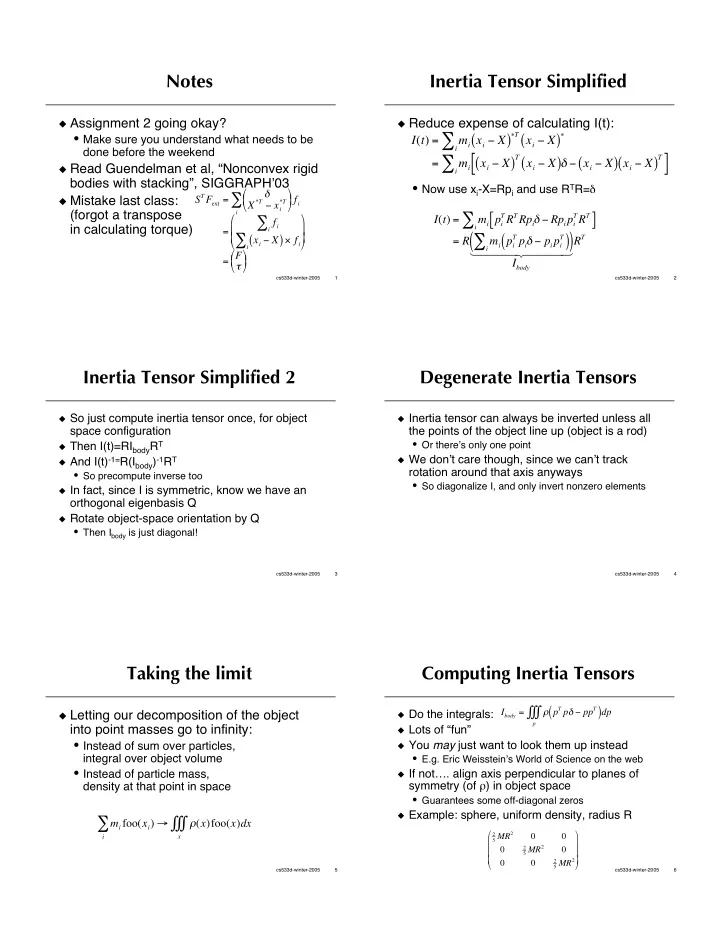
Inertia Tensor Simplified
Reduce expense of calculating I(t):
- Now use xi-X=Rpi and use RTR=
I(t) = mi xi X
( )
T xi X
( )
- i
- =
mi xi X
( )
T xi X
( ) xi X ( ) xi X ( )
T
[ ]
i
- I(t) =
mi pi
TRTRpi Rpipi TRT
[ ]
i
- = R
mi pi
T pi pipi T
( )
i
- (
)
Ibody 1 2 4 4 4 3 4 4 4 RT
3 cs533d-winter-2005
Inertia Tensor Simplified 2
So just compute inertia tensor once, for object
space configuration
Then I(t)=RIbodyRT And I(t)-1=R(Ibody)-1RT
- So precompute inverse too
In fact, since I is symmetric, know we have an
- rthogonal eigenbasis Q
Rotate object-space orientation by Q
- Then Ibody is just diagonal!
4 cs533d-winter-2005
Degenerate Inertia Tensors
Inertia tensor can always be inverted unless all
the points of the object line up (object is a rod)
- Or there’s only one point
We don’t care though, since we can’t track
rotation around that axis anyways
- So diagonalize I, and only invert nonzero elements
5 cs533d-winter-2005
Taking the limit
Letting our decomposition of the object
into point masses go to infinity:
- Instead of sum over particles,
integral over object volume
- Instead of particle mass,
density at that point in space mi foo(xi) (x)
x
- i
- foo(x)dx
6 cs533d-winter-2005
Computing Inertia Tensors
Do the integrals: Lots of “fun” You may just want to look them up instead
- E.g. Eric Weisstein’s World of Science on the web
If not…. align axis perpendicular to planes of
symmetry (of ) in object space
- Guarantees some off-diagonal zeros
Example: sphere, uniform density, radius R
Ibody = pT p ppT
( )dp
p
- 2
5 MR2 2 5 MR2 2 5 MR2