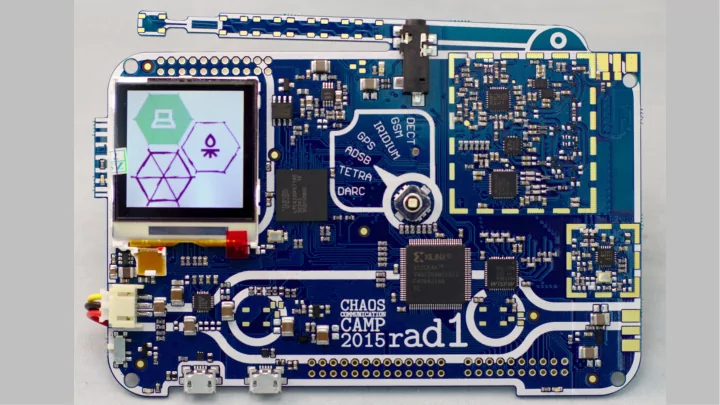
History Why an SDR? Have something useful way after camp Don't - - PowerPoint PPT Presentation
History Why an SDR? Have something useful way after camp Don't just put some sensor on it that next phone generation has by default Give an SDR to people who would not get one otherwise Open Hardware: HackRF One Developed and
History
Why an SDR?
- Have something useful way
after camp
- Don't just put some sensor
- n it that next phone
generation has by default
- Give an SDR to people who
would not get one otherwise
Open Hardware: HackRF One
- Developed and produced by Michael
Ossmann
- License: GPLv2 (Hard and software)
- Dual Core ARM Cortex M4 + M0
- 1 MHz – 6 GHz range
- 20 Msps maximum sample rate
- USB 2.0 port
Open Source
Firmware
- r0ketlib
– Adapted code from previous project – Display, l0dables, fonts
- hackrf (firmware)
– SDR support – Some initialization – CPLD flashing
- libopencm3
– Hardware initialization & abstraction
- Portapack (archived version)
– Basic embedded signal processing
- FatFS
– Portable FAT implementation
Software
- GNURadio
–
Host based signal processing
- gr-osmosdr
–
GNURadio source/sink block
- libhackrf
–
Basic tools, debug functionality
- dfu-util
–
USB bootloader support
Sponsoring: Time and Quantity
- It took a lot of time to get the OK from some sponsors
- We initially communicated a goal of 3000 devices
- Got an estimate of 4500 visitors afterwards
– Had to wait again for (much quicker) approval
Sponsoring: Design Changes
- Overall similar RF-
Path to HackRF One
- Different mixer with
external frequency generator to save cost
- Different RF-Switches
- Different LNAs
- Max 4 GHz design
Sponsoring: Design Changes
- Overall similar RF-
Path to HackRF One
- Different mixer with
external frequency generator to save cost
- Different RF-Switches
- Different LNAs
- Max 4 GHz design
Timeline
Advice
- Start early, take risks early
–
SHA2016 team is already meeting
- Lead times of components
and the PCB could have killed the project
- Had to resort to ultra fast
shipping of prototypes to gain some days
EAGLE vs. KiCad
- HackRF One design is in KiCad
–
Most team members were familiar with EAGLE
- Made mistakes while copying the
schematic...
- The ISP pin is missing a pull-up
–
May cause the rad1o to not boot
–
Apparently not an issue, but the pin is very touchy
Nerdkorea at Camp
Prototype 1
- EAGLE symbol of the CPU
had some pins swapped
–
Among them: VCC and GND
- We had to drill out a via with
a 0.4 mm hole to disconnect a ball of the BGA
- All other pins were accessible
through the pin headers
“Prototype” 2
- Make or break
– Just for
verification
- Ground
plane #$%& Prototype 2 PCB (DPF Viewer) Production PCB (gerbv)
Application: rfapp
- scope
– Shows an RF waterfall – Selectable frequency – Selectable timescale – Bandwidth: 2 MHz
Application: rfapp
- FM Receiver / Transmitter
– Wideband FM – Push to talk – Thanks to @hilse
Application: HackRF App
- Status display for different
HackRF mode settings
- Choose HKRF-APP in the
bootloader
Application: HackRF App
- Status display for different
HackRF mode settings
- Choose HKRF-APP in the
bootloader
Application: HackRF App
- Status display for different
HackRF mode settings
- Choose HKRF-APP in the
bootloader
l0ungel1cht
- Takes DMX data and transmits commands to other rad1os
- Using rflib from @hilse: Moves SDR processing to M0 core
Demo: Remote Controlled Power Socket
Possible Standalone Applications for the rad1o
- No WiFi jammers please :)
- RF replay device
- Self made home automation
- Passive indoor localization
- Simple “video” streaming
- USB filter
- USB debugging
- Very good general SDR introduction:
http://greatscottgadgets.com/sdr
- Mailing list: rad1o@lists.muc.ccc.de
- GitHub: https://github.com/rad1o/
- Wiki: https://rad1o.badge.events.ccc.de
- twitter: @rad1obadge
Thanks to all people involved in the project
- https://media.ccc.de/v/camp2015-6884-the_rad1o
- https://media.ccc.de/v/dg56-Hands-on_Rad1o
- https://media.ccc.de/v/32c3-7153-rad1o