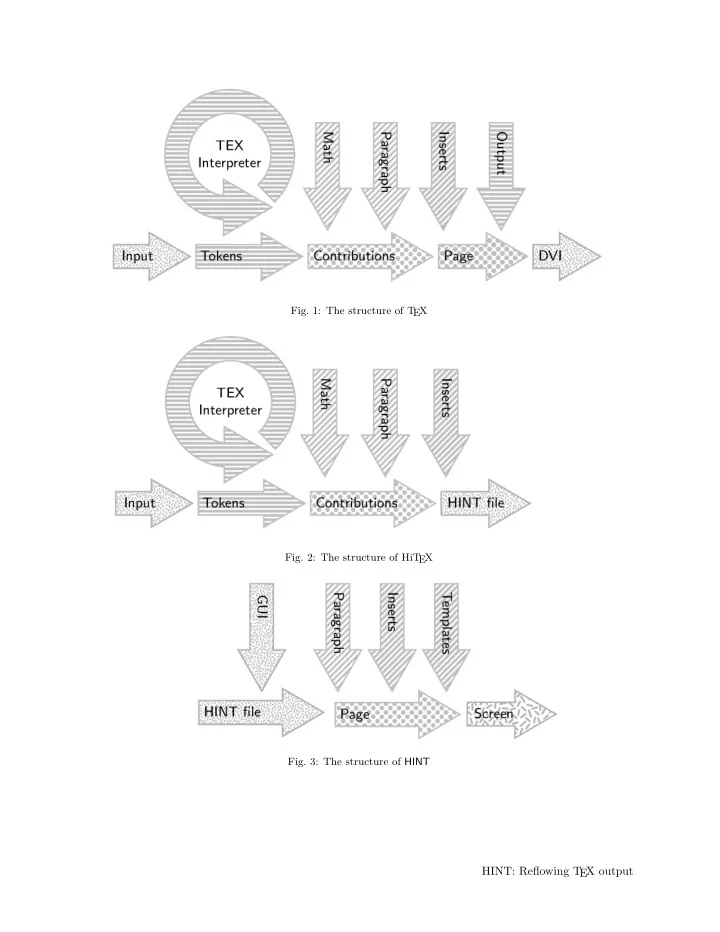
- Fig. 1: The structure of T
EX
- Fig. 2: The structure of HiT
EX
- Fig. 3: The structure of HINT
HINT: Reflowing T EX output
HINT: Reflowing T EX output T EX and the rest is a mixture of good - - PDF document
Fig. 1: The structure of T EX Fig. 2: The structure of HiT EX Fig. 3: The structure of HINT HINT: Reflowing T EX output T EX and the rest is a mixture of good and bad luck. HINT: Reflowing T EX output So let me start explaining the
EX
EX
HINT: Reflowing T EX output
HINT: Reflowing T EX output Martin Ruckert Introduction Current implementations of T EX produce .pdf (por- table document format) or .dvi (device indepen- dent) files. These formats are designed for printing
perhaps even the output resolution is known in ad-
EX, in spite of its age, still produces results of unsurpassed quality. Due to improvements in display size, resolu- tion, and technology over the past decades, it has become common practice to read T EX output on screen not only before printing but also instead of
EX output before printing, excellent programs[4][5] for “pre-viewing” are avail-
intend to provide the user with a view that matches, as close as possible, the “final” appearance on pa-
for example if we read during a train ride on a mo- bile device, then matching the appearance on paper is of no importance, and we would rather prefer if the T EX output would instead adapt to the size and resolution of our mobile device. Anyone who was forced to read a PDF file designed for output on letter paper on a 5” smartphone screen knows the problem. For this reason, web browsers or ebooks use a reflowable text format. The HTML format, how- ever, was never designed as a format for book print- ing, and epub, the ebook file format based on it, has inherited its deficiencies. Microsoft’s PDF reflow solution—converting PDF files to word documents— is an indication of the need for reflowable file formats but a proprietary surrogate at best. Considering that the T EX engine is able to re- flow whole documents just by assigning new values to hsize and vsize, it seems long overdue to put this engine to use for that purpose. The HINTproject does just that. It defines a file format and provides two utilities: HiT EX, a special version of T EX to produce such files, and HINT, a stand alone viewer to display them. What is HINT? Adopting the usual free software naming convention, HINT is a recursive acronym for “HINT is not T EX”. But then, what is it? One answer could be: It‘s 90% T EX and the rest is a mixture of good and bad luck. So let me start explaining the details. A first overview can be obtained by looking at Figure 1, 2, and 3. The first figure is a simplified de- piction of T EX’s structure: A complex input process- ing part translates T EX input files into lists of 16- bit integers, called tokens, which form the machine language of T
EX is an inter- preter that executes these programs, which eventu- ally produce lots of boxes—most of them character boxes—and glue (and a few other items) that end up on the so called contribution list. Every now and then, the page builder will inspect the contribution list and moves items to the current page. As soon as it is satisfied with the current page, it will invoke the user defined output routine, again a token list, which can inspect the proposed page, change it at will, add insertions like footnotes, floating images, page headers and footers, even store it for later use, and eventually “ship out” the page to a .dvi file. HINT splits this whole machinery into two sep- arate parts: frontend and backend. The backend is the HINT viewer. The design goal is to reduce the processing in the backend as much as possible be- cause we expect the viewer to run on small mobile devices where reduced processing implies reduced energy consumption and longer battery life. The frontend is the HiT EX version of T EX which is pre- vented from doing the full job of T EX because it does not know the values of hsize and vsize. As a first approximation of this split, HiT EX can write the contribution list to a file and HINT can read this file and feed it to the page builder as shown in Figure 2 and 3. As an overall design goal, the HiT EX and HINT combination should produce exactly the same ren- dering as T EX for any given fixed hsize and vsize. A closer look at Figure 3 reveals that the “Out- put” arrow, representing the users output routine, has disappeared; instead a new arrow, labeled “Tem- plates”, has taken its place. Keeping the full power
EX’s output routines would imply keeping the full T EX interpreter, all the token lists generated from the T EX input file, and possibly even the files that such an output routine might read or write in the viewer. This seemed to be too high a price and therefore output routines have been replaced by the template mechanism described below. This was the single most important design decision guided by the desire to allow light-weight viewers to run efficiently with a minimum amount of resources. Several iterations were necessary to arrive at a suitable file format that was compact, easy to digest, and sufficiently expressive to provide the necessary Martin Ruckert
information to the viewer. Finally, many smaller components of T EX needed to be moved back and forth between front- and backend before a satisfac- tory separation was accomplished. Before I begin to describe these in more detail, I want to emphasize that the current state of the file format and the two utilities is not the end-point of a development but a starting point. While I hope that the current specification provides enough func- tionality to attract a first small community of users, I see it more as a test-bed allowing experimentation with reflowable T EX output leading to better con- cepts, better formats, and better implementations. Further, I consider the HINT viewer and its file for- mat, while derived from T EX, as T EX independent. Why should not, for example, Open-Office have a plug-in producing HINT output files? The File Format There are actually two file formats: a long form that represents HINT files in a readable form suitable for editing and debugging, and a short form that rep- resents HINT files as a compact byte stream for the viewer. After reading a HINT file, we have a byte stream in memory. This stream contains first definitions, then the content stream, and finally resources. In the definition part, we define fonts and associate them with font-numbers for compact reference and do similar things for glues and other units that are used frequently. We finish the definitions with set- ting suitable defaults. Then follows a content stream
that positions inside the content stream can be stored in 32 bits. The content stream consists of a list of nodes; each node representing a glue, a kern, a liga- ture, a discretionary hyphen, . . . or a box. Of course the content of boxes is again a list of nodes. At the end of the stream, we store file resources, for exam- ple image- or font-files. If we want the viewer to support changing the page size while moving around in the stream—going to the next or previous page, following a link or using an index—practically any position in the stream can be the start of a page. This makes precomputing page starts impossible. As a consequence, we need to be able to parse the content stream forward and backward. A node in the content stream has therefore a start byte, from which the parser can infer the structure and size of the node, and the same byte again as an end byte. If given an arbitrary position in the stream, it is possible to check if the current byte is a start byte
it and checking the stream at the computed position for a matching byte. To be sure that the match is not a coincidence, the process can be repeated for a sequence of several nodes. Start and end bytes contain a 5-bit “kind” and a 3-bit “info” field. This allows for 32 different kinds
eters or flags, or indicate the absence of certain fields in the node.
start and end bytes is not feasible for a list of nodes because it is not possible to compute the size of the list from the start or end byte. Instead, we define a “list start” kind and a separate “list end” kind and store the total size of the list content after the start byte and before the end byte. The 3 info bits are used to indicate whether the size is stored as 0, 1, 2,
corresponding start or end byte. Specifying 0 bytes for the size, that is not storing the size at all, should be used only for very short lists where scanning the whole list is not too expensive.
acters, there is a special list format optimized for storing character nodes. We call such a list a “text”. The start and end byte of a text are like those of or- dinary lists, but they are of kind “text start” and “text end”. Only forward parsing is supported for
mandatory for text nodes so that we can skip easily to the beginning of a text. A text can be thought of as a list of integers. Small integers in the range 0 to 127 are stored as sin- gle bytes; for larger integers the multi-byte encoding known from UTF-8 is used. The integers from 0 to 32 are considered control codes, all other integers are considered character codes—or glyph-numbers to be more precise. The control codes are used for a variety of purposes. For example, a glyph-number in the range 0 to 32 can be specified by using the control code 0x1E followed by the glyph-number; or arbitrary nodes can be inserted in the text after the control code 0x1C. A glyph-numbers references a specific glyph in the current font; the current font in a text is given
select the 8 most common fonts; other fonts can be selected by using the control code 0x1D followed by the font number. HINT: Reflowing T EX output
hsize and vsize T EX treats hsize and vsize like any other dimen- sion register; you can set them to any value and do all kinds of computations with them. HiT EX is more
change hsize and vsize at all, because they denote the dimensions given in the viewer. T EX, however, allows local modifications of dimension registers; for instance you can say \vbox{\hsize = 0.5\hsize \advance \hsize by -8pt . . . } to obtain a verti- cal box, and inside this box, the value of hsize is just a bit smaller than half its global size. Hence, paragraphs inside this box are broken into lines that are almost half a page wide. The value of hsize will return to its old value once the box is completed. To make this possible, HiT EX treats dimensions as lin- ear functions α+β·hsize+γ·vsize, where α, β, and γ are constants. Computations are allowed as long as they stay inside the set of linear functions. For example \multiply \hsize by \hsize would not
tion is called an “extent”. The good news is that the viewer can convert an “extent” immediately to a normal dimension since in the viewer hsize and vsize are always known. Paragraphs Breaking paragraphs into lines is T EX’s most sophis- ticated and complex function. Fortunately the im- plementation is very efficient (it used to run fairly smooth on my 8MHz 80286). It needs to be present in the frontend and in the backend. If hsize = α is a known constant (with β = γ = 0), the frontend can perform the line breaking; if β = 0 or γ = 0, line breaking must be performed in the backend. On the other hand, we do not want the backend to perform hyphenation. Not only is hyphenation an expensive operation, it also requires hyphenation tables to be present and it makes it impossible for the author or editor to check the correctness of hy-
EX will always insert all the discretionary hyphens that T EX would compute normally in the second pass of its line breaking al-
EX’s line breaking algorithm, the discretionary hyphens found in this way are marked and are used only dur- ing the second pass in the viewer. This gives pref- erence to line breaks that do not use hyphenation (or only user specified discretionary hyphens) in the same way as T EX does. The paragraph shape is controlled by the vari- ables hangindent, hangafter, and parshape which can be used to specify an individual indentation and length for any line in the paragraph. Obvi-
start a page in the middle of a paragraph: the line number of the first line on the new page, and with it its indentation and length, then depends on how the previous page was formatted. This might not be known, for example if paging backward or if the page size has changed since the viewer had formated the previous page. It remains an open question what gives the best user experience in such a situation. Packing Boxes and Alignment T EX knows two kinds of boxes: horizontal boxes, where the reference points of the content are aligned along the baseline; and vertical boxes, where the content is stacked vertically. Let’s look at horizontal boxes; vertical boxes are handled similarly. T EX produces horizontal boxes with the func- tion hpack. The function traverses the content list and determines its total natural height, depth, and
and shrinkability. From these numbers it computes a glue ratio such that stretching or shrinking the glue inside the box by this ratio will make the box reach a given target width. HiT EX faces two problems: It might not be possible to determine the natural dimensions of the content, because for example the depth of a box can depend on how the line breaking algorithm forms the last line of a paragraph. In this case packing the box with hpack must be done in the viewer. But even if the natural dimensions of the content can be determined, a target width that depends on hsize will prevent HiT EX from comput- ing a glue ratio. Therefore the HINT format knows three kinds of horizontal boxes: those that are com- pletely packed, those that just need the computa- tion of a glue ratio, and those that need a complete traversal of the box content. Handling T EX’s alignments introduces little ex- tra complexity. When T EX encounters a horizon- tal alignment, it packs the rows into unset boxes adding material from the alignment template and the appropriate tabskip glue. After all rows are processed, T EX packs the rows using the hpack func-
EX can use the mechanisms just described for ordinary calls of hpack. Baseline Skips When T EX builds vertical stacks of boxes, typically lines of text, it tries to keep the distances between the baselines constant, that is: independent of the actual depth of descenders or height of ascenders. Martin Ruckert
Three parameters govern the insertion of glue be- tween two boxes in vertical mode: T EX will insert glue to make the distance between baselines equal to baselineskip unless this would make the glue smaller than lineskiplimit; in the latter case, the glue is set to lineskip. Additional white space be- tween boxes, for instance a \vskip 2pt, does not interfere with this computation. Instead, T EX uses the variable prev_depth, containing the depth of the last box added to the list, for the computa-
macro designers to manipulate T EX’s baseline cal-
value ignore_depth will suppress the generation of a baselineskip for the next box on the list. This is
The HINT format is designed to be a “state- less” format, that is: given the position of a page break in the stream, it is possible to read, under- stand, and format the page starting at that position
insertion of baseline skips into an interesting prob- lem: In simple cases, when all relevant information is at hand, HiT EX can insert the correct glue di- rectly. If some information is missing, a baseline node is generated. To process such a baseline node, the current values of the parameters mentioned be- fore are required, and these parameters do change
To store the current values in every baseline node would require 32 bytes per node. HINT uses a more space efficient approach: It defines default values that are constant for the entire stream. A baseline node using the defaults does not need to specify parameters. Further, the definition part of the stream can specify up to 256 baseline defini- tions, each defining the full set of parameters; such a parameter set can be used by specifying its num- ber in a single byte. Only in the rare case that these two mechanisms are not sufficient, the base- line node must contain the necessary values directly. The same approach is used for glues, extends, para- graphs, and displays. It can be generalized to arbi- trary parameter sets. Displayed Equations The positioning of displayed equations in T EX is no simple task. Usually the formula is centered on the line, but if hsize is so small that the formula would come too close to the equation number, it is centered in the remaining space between equation number and margin; if hsize is even smaller, the equation number will be moved to a separate line. Vertical spacing around the formula depends on the length of the last line preceding the display, which in turn depends on the outcome of the line break- ing algorithm. If the line is short enough, T EX will use the abovedisplayshortskip otherwise it uses the abovedisplayskip. Of course there is also a belowdisplayshortskip and a belowdisplayskip to go with them. In addition, the variables control- ling the paragraph shape influence the positioning
tions must be done in the viewer; they are not very expensive but the code is complicated. HINT uses display nodes to describe displayed formulas. Fortu- nately, none of the math mode processing must be done in the viewer. Images Native T EX does not define a mechanism for includ- ing images instead it provides a generic extension mechanism. If we expect the HINT viewer to be able to open and display any correct HINT file, we need to specify the types of images that a viewer is required to support and the exact format of the im- age nodes. Image files are included in the resource part of the hint file and are referenced by defining an image number, its position, and its size in the definition part. For simplicity, the HINT viewer will not do any image manipulation except scaling. Scaling will be necessary to display the same HINT file on a wide variety of devices in a user friendly way. Various designs for the syntax and semantics of image nodes are possible and only the experience of real users will tell what is good or useless. At present, images are treated like two dimen- sional glue: you can specify a width or a height, a stretchability, and a shrinkability. If neither width nor height are given, the natural width and height will be taken from the image file. When an image is part of the content of a box, it will stretch or shrink together with other glue to achieve the target size of the box. This mechanism works surprisingly well in practice; the image and the white space surrounding it will scale in a consistent way to fill the space that is assigned to it by the enclosing box Page building T EX’s page builder starts at the top of a new page and collects vertical material keeping track of its natural height, stretchability, and shrinkability until the page is so full, that it can get only worse. Then it uses the best page break found so far and moves remaining material back to the contribution list. Of HINT: Reflowing T EX output
course it also accounts for the size of inserts, and it uses the penalties found to estimate the goodness
EX uses the same algorithm, complementing it with a reverse version that starts at the bottom of a new page. The reverse version is used when paging backward. At the point where T EX calls the users out- put routine, a new mechanism is needed, because we want the viewer to be simple and this precludes the use of the T EX interpreter necessary to execute an output routine. HINT replaces output routines by page templates, but before we can describe this mechanism it is necessary to see how HINT handles insertions.
EX page builder identifies differ- ent insertions by there insertion number. It accounts for the contribution of inserted material to the to- tal page height by weighting the insertions natural height by the insertion scaling factor. There is also a constant overhead that needs to be added if the insertion is non empty, for example the space occu- pied by the footnote rule and the space surrounding it. HINT uses the concept of content streams. The stream number zero is used for the main page con- tent; other stream numbers are defined in the def- inition part of the HINT file together with stream parameters like the insertion scaling factor or the maximum vertical extent e that the content stream is allowed to occupy on the page. HiT EX maps the insertion numbers to stream numbers and appends the insertion nodes to the content stream. Streams have some more parameters: a lists b
after the inserted material if it is not empty; the topskip glue g that is inserted between b and the first box of inserted material reduced by the height
rial from this stream should go if there is still space available for stream p; a stream number n, where the material from this stream should go if there is no more space available for the stream but still space available for stream n; a split ration r that, if posi- tive, specifies how to split the material of the stream between stream p and n. The latter stream parameters are new and offer a mechanism to organize the flow of insertions on the page. For example when plain T EX encounters a floating insertion, it decides whether there is still enough space on the current page and if so makes it a mid-insert otherwise it makes it a top insert. HiT EX needs to postpone this decision. It will channel such an insertion to a stream with e = 0, p = 0, and n equal to the stream of top-inserts. When such an insertion arrives at the HINT page builder, it will check whether there is still space on stream 0, the main page, and if so moves the insertion there. Oth- erwise, setting the maximum extent e to zero, forces the page builder to move the insertion to the stream n of top-inserts. If the split ratio r is non zero, the splitting of the stream will be postponed even further: The page builder will collect all contributions for the given stream and will split it in the given ratio between stream p and n just before assembling the final page. For example it is possible to put all the footnotes in
and split the collected footnotes into two columns using a split ration of 0.5; with a cascade of splits, also three or more columns are possible.
EX implements marks as token lists, and the output routine has access to the top, the first, and the bottom mark of the page. Sophisticated code can be written to execute these token lists pro- ducing very flexible headers or footers. In HINT we can not use token lists but only boxes. Con- sequently, HINT uses the stream concept, which was developed for insertions, and extends it slightly. A flag is added to streams that designates them as sin- gle item streams and an other flag, that allows redef-
for first marks and a stream for bottom marks, put T EX’s marks into boxes, and add them into both streams. Difficult is the implementation of top marks be- cause it requires processing the preceding page. Top marks are not part of the present implementation.
are in place, HINT needs to compose the page. For this purpose it is possible in HiT EX to specify one
vbox with an arbitrary content: boxes, glue, rules, alignments, . . . , and most important inserts. HiT EX will store the output template in the definition part together with its valid range of stream positions. When HINT needs to compose the page, it will search for an output template that includes the stream po- sition of the current page in its range. It makes a copy of the template replacing each insert node by the material accumulated for it—insert node 0, of course, will be replaced by the content of the main
insert stream will be copied as necessary. After repacking the resulting vbox and all its subboxes, the vbox will be rendered on the display. Martin Ruckert
Implementation For the work described above, I needed to work with the T EX source code and make substantial changes. The common tool chain from the T EX Live project uses tangle to convert tex.web into Pascal code (tex.pas) which is then translated by web2c[6] into C code. Already the translation to Pascal code ex- pands all macros and evaluates constant expressions, because both are not supported by Pascal. As a result, the generated Pascal code, and with it the translation to C, becomes highly unreadable and can not be used as a basis for any further work. So during the summer term 2017, I wrote a trans- lator converting the WEB source code of T EX into cweb source code[3][2]. This cweb source code then formed the basis of the development of HiT EX and HINT. For the implementation of HiT EX and HINT, I had only a very limited time at my disposal: my sab- batical during the fall semester of 2017/2018. As a consequence, I often moved on as soon as the current research problem had turned—in my view—into an engineering problem. This allowed me to make fast progress but left lots of “loose ends” in the code. The current prototype has the functionality of Knuths T EX with the adaptations described before and without added features like search pathes for in- put files or pdf-specials. It is capable of generating format files for plain T EX or L
AT
EX and it can handle even large files. The code for paging backwards is buggy because I occasionally implemented new fea- tures in the forward page builder and neglected to update the backwards page builder accordingly. Open Questions and Future Work
different output templates depending on screen size and aspect ratio. Also conditional content, for ex- ample a choice between a small and a wide table layout, might be useful. For a whole list of ideas read [1]. Macros for L
A
T EX support. Since the input part
EX is taken directly from T EX, basic L
AT
EX is
AT
EX not only uses complex output procedures, also many macros might need a replace- ment with variable page sizes in mind. Templates are still an experimental feature of HINT that might need changes to better support L
AT
EX. Usage of Control Codes. While several control codes used in texts are indispensable, there is still plenty of room left for experiments. For example, the control code 0x1F switches to any of 256 possi- ble fonts based on the byte that follows; in addition the control codes 0x01 to 0x08 select a font using
A similar mechanism is avail- able for glues: four single byte control codes, plus a two byte control code, plus a control code to in- sert any node—including a glue node—in the text. These different possibilities try to achieve a compact encoding that can accomplish the most common op- erations with only a single byte and use two or more byte for less common operations. To decide whether it is better to spent more control codes on font selec- tion than on glues is an open question. A statistical analysis using a large collection of T EX documents could give an answer.
fication of background (and foreground) properties
rules a special case of boxes), a shading, or an image that can be stretched, or tiled, or positioned to fill the box. Certainly this would extend the capabili- ties of HINT beyond the necessities for T
a direction worth considering? Because it was easy to implement, currently
mentation should certainly support also JPEG and PNG files, and some form of vector graphic, prob- ably SVG. I think it is better to have a small col- lection of formats that is well supported across all implementations than a long list of formats that en- joy only limited support. But how about sound and video? Should there be support? How could an ex- tension mechanism look like that keeps the HINT format open for future development?
for the Windows platform just because it was conve- nient for me. Since HINT targets mobile devices, a HINT viewer for Android would be the next logical
better rendering engine and HINT would be a can- didate. References [1] Hans Hagen. Beyond the bounds of paper and within the bounds of screens; the perfect match
EX and Acrobat. In Proceedings of the Ninth European T EX Conference, volume 15a of MAPS, pages 181–196. Elsevier Science, Septem- ber 1995. HINT: Reflowing T EX output
[2] Martin Ruckert. Converting T EX from WEB to
[3] Martin Ruckert. web2w: Converting T EX from WEB to cweb. https://ctan.org/pkg/web2w, 2017. [4] Christian Schenk. Yap: Yet another previewer. https://miktex.org/. [5] Paul Vojta. xdvi. https://math.berkeley. edu/~vojta/xdvi.html. [6] Web2C: A T EX implementation. https://tug.
⋄ Martin Ruckert Hochschule Mnchen Lothstrasse 64 80336 Mnchen Germany ruckert@cs.hm.edu
Martin Ruckert