SLIDE 1
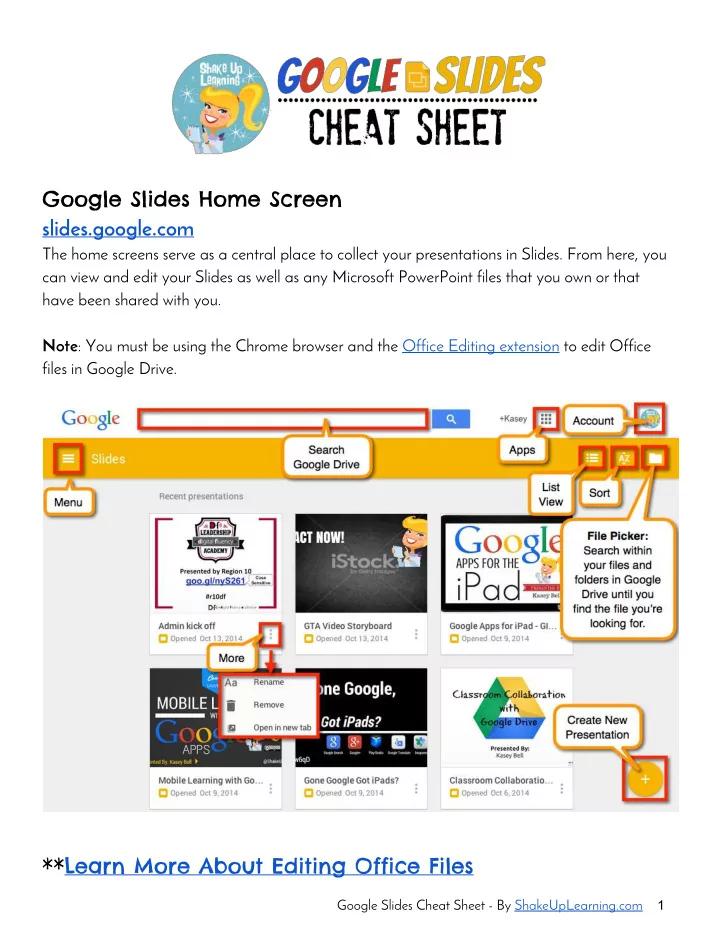
Google Slides Home Screen slides.google.com The home screens serve - - PDF document
Google Slides Home Screen slides.google.com The home screens serve as a central place to collect your presentations in Slides. From here, you can view and edit your Slides as well as any Microsoft PowerPoint files that you own or that have been
SLIDE 2
SLIDE 3
Insert Menu Highlights Tools Menu Highlights
Google Slides Cheat Sheet - By ShakeUpLearning.com 3
SLIDE 4
The Toolbar
New Slide Undo/Redo Paint Format Tool: Google documents lets you copy the formatting you’ve applied to a specific section of text to another section using the paint format tool. Zoom Select: Select objects in the slide. Insert Text Box: Insert a text box in the slide. Insert Image Insert Shape Line Tool Insert Comment Change Background Change Layout Change Theme Add Transitions
Shake Up Learning by Kasey Bell is licensed under a Creative Commons Attribution 4.0 International License. Based on a work at www.shakeuplearning.com.