
SLIDE 1
Google Docs: Presentation basics
Once you know the basics on how to access, create, and edit Google Docs, read here to learn the basics that apply specifically to Google Docs presentations.
Before we start...
You’re probably already good to go, but let’s take a brief moment to make sure you’re using a supported
- browser. Google presentations takes advantage of the latest browser technology, such as HTML5. For this reason,
new Google presentations are only supported in modern browsers. For the best experience, we recommend Google Chrome, which supports all the latest features in Google presentations.
Create a presentation
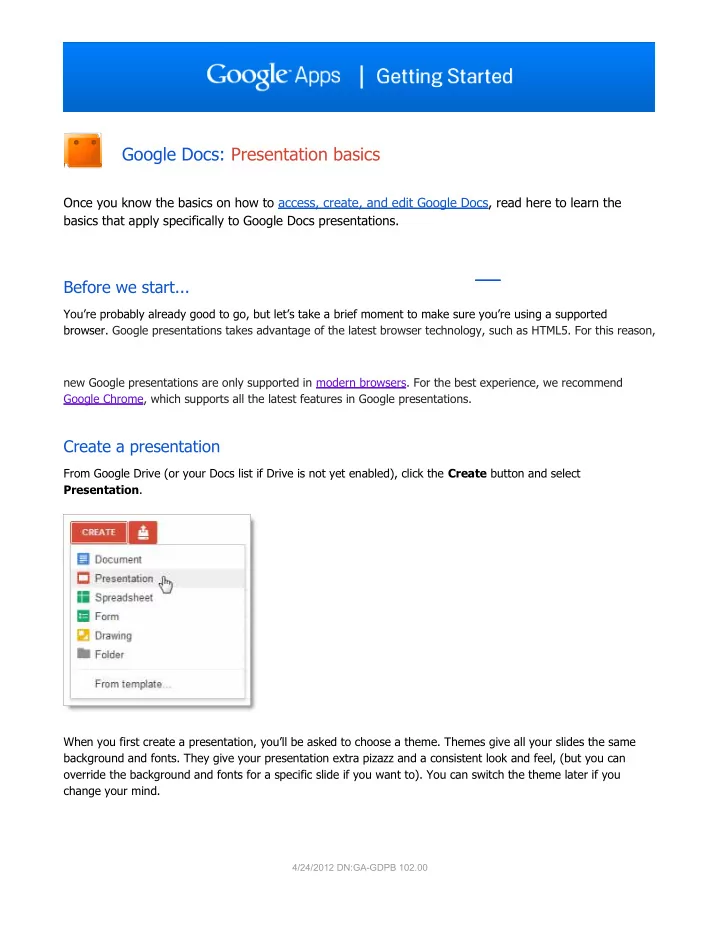
From Google Drive (or your Docs list if Drive is not yet enabled), click the Create button and select Presentation. When you first create a presentation, you’ll be asked to choose a theme. Themes give all your slides the same background and fonts. They give your presentation extra pizazz and a consistent look and feel, (but you can
- verride the background and fonts for a specific slide if you want to). You can switch the theme later if you