SLIDE 1
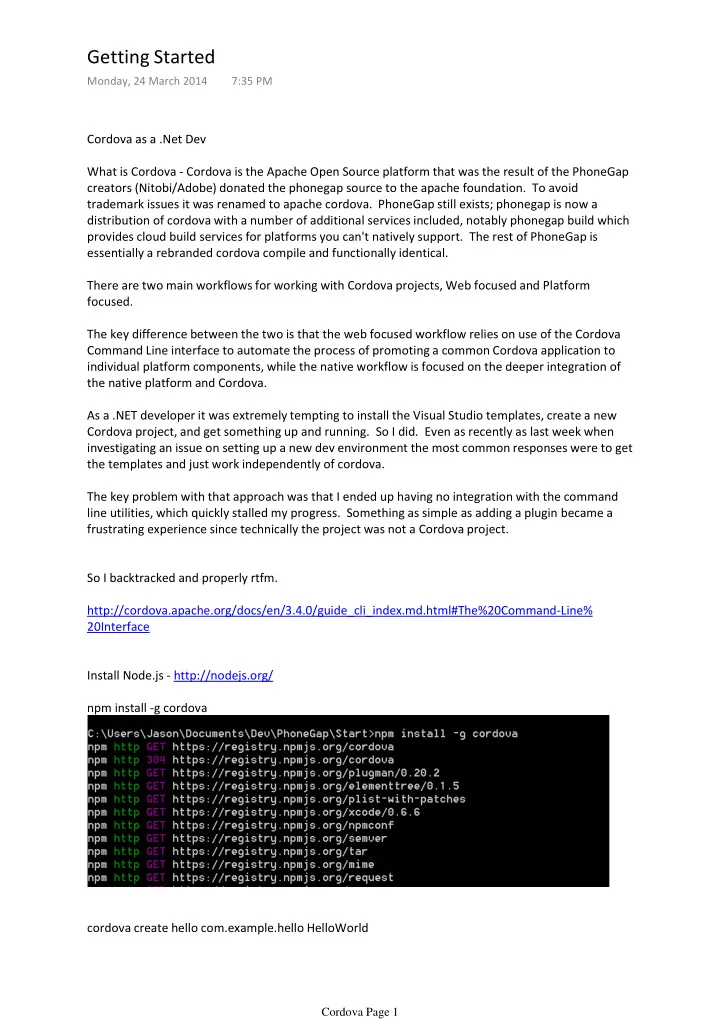
Cordova as a .Net Dev What is Cordova - Cordova is the Apache Open Source platform that was the result of the PhoneGap creators (Nitobi/Adobe) donated the phonegap source to the apache foundation. To avoid trademark issues it was renamed to apache cordova. PhoneGap still exists; phonegap is now a distribution of cordova with a number of additional services included, notably phonegap build which provides cloud build services for platforms you can't natively support. The rest of PhoneGap is essentially a rebranded cordova compile and functionally identical. There are two main workflows for working with Cordova projects, Web focused and Platform focused. The key difference between the two is that the web focused workflow relies on use of the Cordova Command Line interface to automate the process of promoting a common Cordova application to individual platform components, while the native workflow is focused on the deeper integration of the native platform and Cordova. As a .NET developer it was extremely tempting to install the Visual Studio templates, create a new Cordova project, and get something up and running. So I did. Even as recently as last week when investigating an issue on setting up a new dev environment the most common responses were to get the templates and just work independently of cordova. The key problem with that approach was that I ended up having no integration with the command line utilities, which quickly stalled my progress. Something as simple as adding a plugin became a frustrating experience since technically the project was not a Cordova project. So I backtracked and properly rtfm. http://cordova.apache.org/docs/en/3.4.0/guide_cli_index.md.html#The%20Command-Line% 20Interface Install Node.js - http://nodejs.org/ npm install -g cordova cordova create hello com.example.hello HelloWorld
Getting Started
Monday, 24 March 2014 7:35 PM Cordova Page 1
SLIDE 2
cordova platform add windows8 Right now there is a solution in the platforms\windows8 folder that represents the basic HelloWorld app.
Cordova Page 2
SLIDE 3
The key caveat here is that the solution is the product of the cordova build chain, and any updates to the build chain will overwrite changes in the individual project. What we in fact need to do is edit the content of the <root>\www folder, and then publish that to the various platforms we are working with. Let's edit the base cordova www\index.html in notepad++ to test the workflow.
Cordova Page 3
SLIDE 4
cordova build If you encounter build errors, check your %path% entry for the msbuild location.
Cordova Page 4
SLIDE 5
That is great, but it does miss the point I made at the start. I'm a .NET developer and I am familiar with, and quite like, Visual Studio. As great as Notepad++ is, I'd like to be working in VS as much as possible. Luckily that is really easy, All you need to do is Right-click on the solution, Add Existing Website, and select the cordova base\www folder. I also recommend adding the cordova base config.xml file as a solution item.
Cordova Page 5
SLIDE 6
You can now work with the base web components in VS, and use cordova build to publish into the Windows 8 project to run and debug. As a basic 'website' project type, you can't run Post-Build actions to automatically run "cordova build", but there are a few ways you can achieve this. The simplest would be to create a dummy project and run the post-build process in that, you could also potentially have a pre-build task in the Windows 8 project which did the same. Next steps: Adding debugging Adding some plugins
Cordova Page 6
SLIDE 7
Debugging of Cordova projects is a frustrating proposition. Although Visual Studio has excellent debugging features, they don't always work well with Cordova. When running a Windows Phone 8 project you have no access to the JavaScript debugger. This is because the application runs as a Native WebControl wrapping the PhoneGap html/js. You do have access to the Console for debug messages, hooray (not). And they show in the Debug Output window. When running a Windows 8 project things are much better. Since Windows 8 natively supports HTML/JavaScript projects, PhoneGap runs as a native application and the JavaScript can be debugged with breakpoints, code inspection, and all the runtime debugging you could wish for. You don't get access to the console output in the Debug Output window, but loading the JavaScript Console window (Debug->Window->JavaScript Console) will show the output the same as for WP8 projects. What you don't get is the wide range of emulator options that you do on the WP8 emulator, for example the WP8 location emulator Looks like this in the Windows 8 emulator
Debugging
Monday, 24 March 2014 9:23 PM Cordova Page 7
SLIDE 8
Nor do you have the Network or Accelerometer features available in WP8 projects. Luckily you can easily have both WP8 and Windows 8 applications in the same project, and since they are produced from the root Cordova application, your Cordova Build command will update both. Other Options Weinre Weinre (winery, not ween-er, apparently) http://people.apache.org/~pmuellr/weinre- docs/latest/Home.html is a remote JavaScript debugger. You spin up a local instance of weinre through Node.js which acts as the weinre server and debugger. weinre --boundHost 192.168.0.126 Note: The default port is 8080, and the default boundHost is "localhost" but using "localhost" does not work as the WP8 emulator treats "Localhost" as the emulated device, so you must use the IP address of the PC. Connecting to this URL on your browser you will be greeted with a welcome page
<script src="http://192.168.0.126:8080/target/target-script-min.js#anonymous">
Add a line in your Cordova website which loads a script from the weinre server.
Cordova Page 8
SLIDE 9
<script src="http://192.168.0.126:8080/target/target-script-min.js#anonymous"> </script>
Note: using "localhost" does not work as the WP8 emulator treats "Localhost" as the emulated device, so you must use the IP address of the PC. Connectivity between the wp8 emulator weinre can be a bit flaky, but this is an issue with the hyper-v bridging rather than weinre itself. It can be frustrating that you can't connect to the host when you aren't connected to the network. And then connect to the weinre server though http://192.168.0.126:8080/client/#anonymous You will be presented with an "IE Developer Tools" style page providing DOM Inspection and JavaScript console capabilities. When you run your WP8 application you will see a new Target listed. Select this Target and click the elements page. This will allow you to view the DOM Inspector.
Cordova Page 9
SLIDE 10
Mouse-over on an element will highlight that element on the WP8 app It does not however provide JavaScript breakpoints, so for IE developers working with the Windows 8 project is still the best option for comprehensive debugging. The main benefit is that it functions with any type of applications, so you can debug almost any project type, including physical devices. It does not work with Windows 8 project however, or at least I haven't been able to have it connect successfully. PhoneGap Emulator Another interesting tool is the PhoneGap Emulator - http://emulate.phonegap.com/ This is a Chrome plugin that allows you to run the root Cordova application in Chrome and emulate the Cordova API. This allows you to use the chrome developer tools against your application.
Cordova Page 10
SLIDE 11
the Cordova API. This allows you to use the chrome developer tools against your application. First connect to the emulate.phonegap.com site in chrome and install the Ripple Emulator extension. Ensure you enable "Allow access to file URLS" in the extension settings after installation. Load the Cordova root www\index.html And be greeted by the cordova emulator Some key things to note: If the website loads but not the emulator, click the plugin icon on the top right and click "enable" The platform should be set to Apache Cordova / PhoneGap, Version 1.0.0 From here you can press F12 and use the Chrome tools to debug your application, including breakpoints.
Cordova Page 11
SLIDE 12
Next steps Plugins
Cordova Page 12