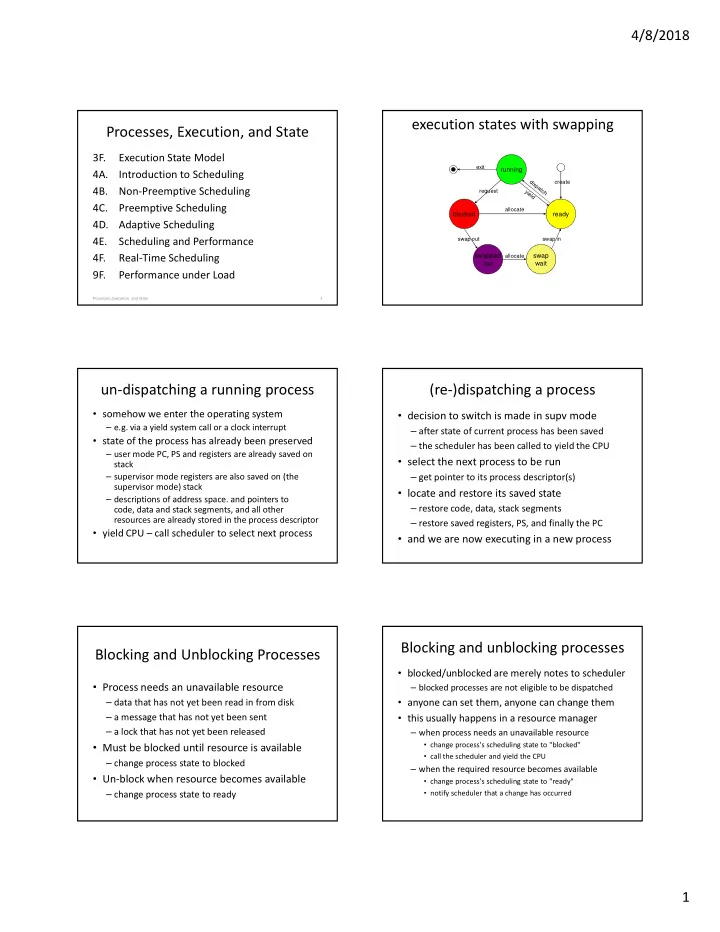
execution states with swapping Processes, Execution, and State 3F. - - PDF document

execution states with swapping processes execution and
SMART_READER_LITE
LIVE PREVIEW

execution states with swapping Processes, Execution, and State 3F. - - PDF document

4/8/2018 execution states with swapping Processes, Execution, and State 3F. Execution State Model exit running 4A. Introduction to Scheduling create 4B. Non-Preemptive Scheduling request 4C. Preemptive Scheduling allocate blocked


slide-1
SLIDE 1

4/8/2018 1

Processes, Execution, and State

3F. Execution State Model 4A. Introduction to Scheduling

  • 4B. Non-Preemptive Scheduling

4C. Preemptive Scheduling 4D. Adaptive Scheduling 4E. Scheduling and Performance 4F. Real-Time Scheduling 9F. Performance under Load

1 Processes, Execution, and State

execution states with swapping

blocked ready running swapped

  • ut

swap wait

exit allocate allocate swap out swap in create request

un-dispatching a running process

  • somehow we enter the operating system

– e.g. via a yield system call or a clock interrupt

  • state of the process has already been preserved

– user mode PC, PS and registers are already saved on stack – supervisor mode registers are also saved on (the supervisor mode) stack – descriptions of address space. and pointers to code, data and stack segments, and all other resources are already stored in the process descriptor

  • yield CPU – call scheduler to select next process

(re-)dispatching a process

  • decision to switch is made in supv mode

– after state of current process has been saved – the scheduler has been called to yield the CPU

  • select the next process to be run

– get pointer to its process descriptor(s)

  • locate and restore its saved state

– restore code, data, stack segments – restore saved registers, PS, and finally the PC

  • and we are now executing in a new process

Blocking and Unblocking Processes

  • Process needs an unavailable resource

– data that has not yet been read in from disk – a message that has not yet been sent – a lock that has not yet been released

  • Must be blocked until resource is available

– change process state to blocked

  • Un-block when resource becomes available

– change process state to ready

Blocking and unblocking processes

  • blocked/unblocked are merely notes to scheduler

– blocked processes are not eligible to be dispatched

  • anyone can set them, anyone can change them
  • this usually happens in a resource manager

– when process needs an unavailable resource

  • change process's scheduling state to "blocked"
  • call the scheduler and yield the CPU

– when the required resource becomes available

  • change process's scheduling state to "ready"
  • notify scheduler that a change has occurred
slide-2
SLIDE 2

4/8/2018 2

Primary and Secondary Storage

  • primary = main (executable) memory

– primary storage is expensive and very limited – only processes in primary storage can be run

  • secondary = non-executable (e.g. Disk)

– blocked processes can be moved to secondary storage – swap out code, data, stack and non-resident context – make room in primary for other "ready" processes

  • returning to primary memory

– process is copied back when it becomes unblocked

Why we swap

  • Make the best use of limited memory

– a process can only execute if it is in memory – max # of processes limited by memory size – if it isn't READY, it doesn't need to be in memory

  • Improve CPU utilization

– when there are no READY processes, CPU is idle – idle CPU time is wasted, reduced throughput – we need READY processes in memory

  • Swapping takes time and consumes I/O

– so we want to do it as little as possible

Swapping Out

  • Process’ state is in main memory

– code and data segments – non-resident process descriptor

  • Copy them out to secondary storage

– if we are lucky, some may still be there

  • Update resident process descriptor

– process is no longer in memory – pointer to location on 2ndary storage device

  • Freed memory available for other processes

Swapping Back In

  • Re-Allocate memory to contain process

– code and data segments, non-resident process descriptor

  • Read that data back from secondary storage
  • Change process state back to Ready
  • What about the state of the computations

– saved registers are on the stack – user-mode stack is in the saved data segments – supervisor-mode stack is in non-resident descriptor

  • This involves a lot of time and I/O

Three State Scheduling Model

  • a process may block to await

– completion of a requested I/O operation – availability of an requested resource – some external event

  • or a process can simply yield

Scheduling: Algorithms, Mechanisms and Performance 11

blocked ready running

exit allocate create request

What is CPU Scheduling?

  • Choosing which ready process to run next
  • Goals:

– keeping the CPU productively occupied – meeting the user’s performance expectations

Scheduling: Algorithms, Mechanisms and Performance 12

ready queue dispatcher context switcher CPU yield (or preemption) resource manager resource request resource granted new process

slide-3
SLIDE 3

4/8/2018 3

Goals and Metrics

  • goals should be quantitative and measurable

– if something is important, it must be measurable – if we want "goodness" we must be able to quantify it – you cannot optimize what you do not measure

  • metrics ... the way & units in which we measure

– choose a characteristic to be measured

  • it must correlate well with goodness/badness of service
  • it must be a characteristic we can measure or compute

– find a unit to quantify that characteristic – define a process for measuring the characteristic

Scheduling: Algorithms, Mechanisms and Performance 13

CPU Scheduling: Proposed Metrics

Scheduling: Algorithms, Mechanisms and Performance 14

  • candidate metric: time to completion (seconds)

– different processes require different run times

  • candidate metric: throughput (procs/second)

– same problem, not different processes

  • candidate metric: response time (milliseconds)

– some delays are not the scheduler’s fault

  • time to complete a service request, wait for a resource
  • candidate metric: fairness (standard deviation)

– per user, per process, are all equally important

Rectified Scheduling Metrics

  • mean time to completion (seconds)

– for a particular job mix (benchmark)

  • throughput (operations per second)

– for a particular activity or job mix (benchmark)

  • mean response time (milliseconds)

– time spent on the ready queue

  • overall “goodness”

– requires a customer specific weighting function – often stated in Service Level Agreements

Scheduling: Algorithms, Mechanisms and Performance 15

Different Kinds of Systems have Different Scheduling Goals

  • Time sharing

– Fast response time to interactive programs – Each user gets an equal share of the CPU – Execution favors higher priority processes

  • Batch

– Maximize total system throughput – Delays of individual processes are unimportant

  • Real-time

– Critical operations must happen on time – Non-critical operations may not happen at all

Non-Preepmtive Scheduling

  • scheduled process runs until it yields CPU

– may yield specifically to another process – may merely yield to "next" process

  • works well for simple systems

– small numbers of processes – with natural producer consumer relationships

  • depends on each process to voluntarily yield

– a piggy process can starve others – a buggy process can lock up the entire system

Scheduling: Algorithms, Mechanisms and Performance 17

Non-Preemptive: First-In-First-Out

  • Algorithm:

– run first process in queue until it blocks or yields

  • Advantages:

– very simple to implement – seems intuitively fair – all process will eventually be served

  • Problems:

– highly variable response time (delays) – a long task can force many others to wait (convoy)

Scheduling: Algorithms, Mechanisms and Performance 18

slide-4
SLIDE 4

4/8/2018 4

Example: First In First Out

Scheduling: Algorithms, Mechanisms and Performance 19

A B C

20 40 60 80 100 120 20 40 60 80 100 120

A B C Tav = (10 +20 + 120)/3 = 50 Tav = (100 +110 + 120)/3 = 110

Non-Preemptive: Shortest Job First

  • Algorithm:

– all processes declare their expected run time – run the shortest until it blocks or yields

  • Advantages:

– likely to yield the fastest response time

  • Problems:

– some processes may face unbounded wait times

  • Is this fair? Is this even “correct” scheduling?

– ability to correctly estimate required run time

Scheduling: Algorithms, Mechanisms and Performance 20

Starvation

  • unbounded waiting times

– not merely a CPU scheduling issue – it can happen with any controlled resource

  • caused by case-by-case discrimination

– where it is possible to lose every time

  • ways to prevent

– strict (FIFO) queuing of requests

  • credit for time spent waiting is equivalent
  • ensure that individual queues cannot be starved

– input metering to limit queue lengths

Scheduling: Algorithms, Mechanisms and Performance 21

Non-Preemptive: Priority

  • Algorithm:

– all processes are given a priority – run the highest priority until it blocks or yields

  • Advantages:

– users control assignment of priorities – can optimize per-customer “goodness” function

  • Problems:

– still subject to (less arbitrary) starvation – per-process may not be fine enough control

Scheduling: Algorithms, Mechanisms and Performance 22

Preemptive Scheduling

  • a process can be forced to yield at any time

– if a higher priority process becomes ready

  • perhaps as a result of an I/O completion interrupt

– if running process's priority is lowered

  • Advantages

– enables enforced "fair share" scheduling

  • Problems

– introduces gratuitous context switches – creates potential resource sharing problems

Scheduling: Algorithms, Mechanisms and Performance 23

Forcing Processes to Yield

  • need to take CPU away from process

– e.g. process makes a system call, or clock interrupt

  • consult scheduler before returning to process

– if any ready process has had priority raised – if any process has been awakened – if current process has had priority lowered

  • scheduler finds highest priority ready process

– if current process, return as usual – if not, yield on behalf of the current process

Scheduling: Algorithms, Mechanisms and Performance 24

slide-5
SLIDE 5

4/8/2018 5

Preemptive: Round-Robin

  • Algorithm

– processes are run in (circular) queue order – each process is given a nominal time-slice – timer interrupts process if time-slice expires

  • Advantages

– greatly reduced time from ready to running – intuitively fair

  • Problems

– some processes will need many time-slices – extra interrupts/context-switches add overhead

Example: Round-Robbin

Scheduling: Algorithms, Mechanisms and Performance 26

A B C

20 40 60 80 100 120 20 40 60 80 100 120

A B C Trsp = (0 +30 + 60)/3 = 30 Trsp = (0 +11 + 22)/3 = 11 A B C A B C

Costs of an extra context-switch

  • entering the OS

– taking interrupt, saving registers, calling scheduler

  • cycles to choose who to run

– the scheduler/dispatcher does work to choose

  • moving OS context to the new process

– switch process descriptor, kernel stack

  • switching process address spaces

– map-out old process, map-in new process

  • losing hard-earned L1 and L2 cache contents

Scheduling: Algorithms, Mechanisms and Performance 27

Response Time/Throughput Trade-off

1000 500 200 125 80 60 40 20 12 8 4 1 Throughput Response Time

Scheduling: Algorithms, Mechanisms and Performance 28

Time-Slice/Context Switch overhead

So which approach is best?

  • preemptive has better response time

– but what should we choose for our time-slice?

  • non-preemptive has lower overhead

– but how should we order our the processes?

  • there is no one “best” algorithm

– performance depends on the specific job mix – goodness is measured relative to specific goals

  • a good scheduler must be adaptive

– responding automatically to changing loads – configurable to meet different requirements

Scheduling: Algorithms, Mechanisms and Performance 29

The “Natural” Time-Slice

  • CPU share = time_slice x slices/second

2% = 20ms/sec 2ms/slice x 10 slices/sec 2% = 20ms/sec 5ms/slice x 4 slices/sec

  • context switches are far from free

– they waste otherwise useful cycles – they introduce delay into useful computations

  • natural rescheduling interval

– when a process blocks for resources or I/O – optimal time-slice would be based on this period

Scheduling: Algorithms, Mechanisms and Performance 30

slide-6
SLIDE 6

4/8/2018 6

Dynamic Multi-Queue Scheduling

  • natural time-slice is different for each process

– create multiple ready queues – some with short time-slices that run more often – some with long time-slices that run infrequently – different queues may get different CPU shares

  • Advantages:

– response time very similar to Round-Robin – relatively few gratuitous preemptions

  • Problem:

– how do we know where a process belongs

Scheduling: Algorithms, Mechanisms and Performance 31

Dynamic Equilibrium

  • Natural equilibria are seldom calibrated
  • Usually the net result of

– competing processes – negative feedback

  • Once set in place these processes

– are self calibrating – automatically adapt to changing circumstances

  • The tuning is in rate and feedback constants

– avoid over-correction, ensure convergence

Scheduling: Algorithms, Mechanisms and Performance 32

Dynamic Multi-Queue Scheduling

Scheduling: Algorithms, Mechanisms and Performance 33

tsmax = ∞ real time queue #tse = ∞ #yield = ∞ tsmax = 500us short quantum queue #tse = 10 #yield = ∞ tsmax = 2ms medium quantum queue #tse = 50 #yield = 10 tsmax = 5ms long quantum queue #tse = ∞ #yield = 20

share scheduler

20% 50% 25% 05%

Mechanism/Policy Separation

  • simple built-in scheduler mechanisms

– always run the highest priority process – formulae to compute priority and time slice length

  • controlled by user specifiable policy

– per process (inheritable) parameters

– initial, relative, minimum, maximum priorities – queue in which process should be started (or resumed) – these can be set based on user ID, or program being run

– per queue parameters

– maximum time slice length and number of time slices – priority change per unit of run time and wait time – CPU share (absolute or relative to other queues)

Scheduling: Algorithms, Mechanisms and Performance 34

Real Time Schedulers

  • Some things must happen at particular times

– if you can’t process the next sound sample in time, there will be a gap in the music – if you don’t rivet the widget before the conveyer belt moves, you have a manufacturing error – if you can’t adjust the spoilers quickly enough, the space shuttle goes out of control

  • Real Time scheduling has deadlines

– they can be either soft or hard

Hard Real Time Schedulers

  • The system absolutely must meet its deadlines
  • By definition, system fails if a deadline is not

met

– e.g., controlling a nuclear power plant . . .

  • How can we ensure no missed deadlines?
  • Typically by careful design-time analysis

– prove no possible schedule misses a deadline – scheduling order may be hard-coded

slide-7
SLIDE 7

4/8/2018 7

Ensuring Hard Deadlines

  • Requires deep understanding of all code

– we know exactly how long it will take in every case

  • Avoid complex operations w/non-deterministic times

– e.g. interrupts, garbage collection

  • Predictability is more important than speed

– non-preemptive, fixed execution order – no run time decisions

Soft Real Time Schedulers

  • Highly desirable to meet your deadlines

– some (or any) can occasionally be missed

  • Goal of scheduler is to avoid missing deadlines

– with the understanding that you might – sometimes called “best effort”

  • May have different classes of deadlines

– some “harder” than others

  • May have more dynamic/variable traffic

– rendering up-front analysis impractical

Soft Real Time and Preemption

  • All tasks need not always run to completion

– we are allowed to miss some deadlines

  • A high priority near-deadline task may arrive

– it should preempt a lower priority task

  • What if we miss (or cannot make) a deadline?

– we fall behind, run it as soon as possible? – skip this invocation, we will catch it next time? – kill the task that missed its deadline? This is a policy question, let the programmer decide

Scheduling: Algorithms, Mechanisms and Performance 39

Soft Real-Time Algorithms?

  • Most common is Earliest Deadline First

– each job has a deadline associated with it – keep the job queue sorted by those deadlines – always run the first job on the queue

  • Minimizes total lateness
  • Possible refinements

– skip jobs that are already late – drop low priority jobs when system is overloaded

Example of a Soft Real Time Scheduler

  • A video playing device
  • Frames arrive (e.g. from disk or network)
  • Each frame should be rendered “on time”

– to achieve highest user-perceived quality

  • If a frame is late, skip it

– rather than fall further behind

CPU Scheduling is not Enough

  • CPU scheduler chooses a ready process
  • memory scheduling

– a process on secondary storage is not ready

  • resource allocation

– a process waiting for a resource is not ready

  • I/O scheduling

– a process waiting for I/O is not ready

  • cache management

– if process data is not cached, it will need more I/O

Scheduling: Algorithms, Mechanisms and Performance 42

slide-8
SLIDE 8

4/8/2018 8

Charles Dickens on System Performance

Scheduling: Algorithms, Mechanisms and Performance 43

“Annual income, twenty pounds; annual expenditure, nineteen, nineteen, six; Result … happiness. Annual income, twenty pounds; annual expenditure, twenty pounds ought & six; Result … misery!” Wilkins Micawber, David Copperfield

Performance: Throughput vs Load

Scheduling: Algorithms, Mechanisms and Performance 44

throughput

  • ffered load

ideal typical

(why throughput falls off)

  • dispatching processes is not free

– it takes time to dispatch a process (overhead) – more dispatches means more overhead (lost time) – less time (per second) is available to run processes

  • how to minimize the performance gap

– reduce the overhead per dispatch – minimize the number of dispatches (per second)

  • allow longer time slices per task
  • increase the number of servers (e.g. CPUs)
  • this phenomenon will be seen in many areas

Scheduling: Algorithms, Mechanisms and Performance 45

Performance: response time vs load

Scheduling: Algorithms, Mechanisms and Performance 46

delay (response time)

  • ffered load

ideal typical

(why response time grows w/o limit)

  • response time is function of server & load

– how long it takes to complete one request – how long the waiting line is

  • length of the line is function of server & load

– how long it takes to complete one request – the average inter-request arrival interval

  • if requests arrive faster than they are serviced

– the length of the waiting list grows – and the response time grows with it

Scheduling: Algorithms, Mechanisms and Performance 47

Graceful Degradation

  • when is a system "Overloaded"?

– when it is no longer able to meet service goals

  • what can we do when overloaded?

– continue service, but with degraded performance – maintain acceptable performance by rejecting work – resume normal service when load drops to normal

  • what can we not do when overloaded?

– allow throughput to drop to zero (stop doing work) – allow response time to grow without limit

Scheduling: Algorithms, Mechanisms and Performance 48

slide-9
SLIDE 9

4/8/2018 9

Assignments

  • Projects

– try to get P1A working before lab session – move on to (more difficult) P1B ASAP

  • Reading

– Arpaci C12-14, 17 memory & allocation algorithms – Garbage Collection

Processes, Execution, and State 49

Supplementary Slides

What Is Scheduling?

  • An operating system often has choices about

what to do next

  • In particular:

– For a resource that can serve one client at a time – When there are multiple potential clients – Who gets to use the resource next? – And for how long?

  • Making those decisions is scheduling

OS Scheduling Examples

  • What job to run next on an idle core?

– How long should we let it run?

  • In what order to handle a set of block requests

for a disk drive?

  • If multiple messages are to be sent over the

network, in what order should they be sent?

How Do We Decide How To Schedule?

  • Generally, we choose goals we wish to achieve
  • And design a scheduling algorithm that is

likely to achieve those goals

  • Different scheduling algorithms try to optimize

different quantities

  • So changing our scheduling algorithm can

drastically change system behavior

The Process Queue

  • The OS typically keeps a queue of processes that

are ready to run

– Ordered by whichever one should run next – Which depends on the scheduling algorithm used

  • When time comes to schedule a new

process, grab the first one on the process queue

  • Processes that are not ready to run either:

– Aren’t in that queue – Or are at the end – Or are ignored by scheduler

slide-10
SLIDE 10

4/8/2018 10

Preemptive Vs. Non-Preemptive Scheduling

  • When we schedule a piece of work, we could

let it use the resource until it finishes

  • Or we could use virtualization techniques to

interrupt it part way through

– Allowing other pieces of work to run instead

  • If scheduled work always runs to

completion, the scheduler is non-preemptive

  • If the scheduler temporarily halts running jobs

to run something else, it’s preemptive

Scheduling: Policy and Mechanism

  • The scheduler will move jobs into and out of a

processor (dispatching)

– Requiring various mechanics to do so

  • How dispatching is done should not depend
  • n the policy used to decide who to dispatch
  • Desirable to separate the choice of who runs

(policy) from the dispatching mechanism

– Also desirable that OS process queue structure not be policy-dependent

Scheduling and Performance

  • How you schedule important system activities

has a major effect on performance

  • Performance has different aspects

– You may not be able to optimize for all of them

  • Scheduling performance has very different

characteristic under light vs. heavy load

  • Important to understand the performance

basics regarding scheduling

Fairness as a Scheduling Metric

  • Maybe we want to make sure all processes are

treated fairly

  • In what dimension?

– Fairness in delay? Which one? – Fairness in time spent processing?

  • Many metrics can be used in Jain’s fairness

equation:

An Example – Measuring CPU Scheduling

  • Process execution can be divided into phases

– Time spent running

  • The process controls how long it needs to run

– Time spent waiting for resources or completions

  • Resource managers control how long these take

– Time spent waiting to be run

  • This time is controlled by the scheduler
  • Proposed metric:

– Time that “ready” processes spend waiting for the CPU

CPU Scheduling is not Enough

  • CPU scheduler chooses a ready process
  • memory scheduling

– a process on secondary storage is not ready

  • resource allocation

– a process waiting for a resource is not ready

  • I/O scheduling

– a process waiting for I/O is not ready

  • cache management

– if process data is not cached, it will need more I/O

Scheduling: Algorithms, Mechanisms and Performance 60

slide-11
SLIDE 11

4/8/2018 11

Greek to English dictionary

  • many of these are often used in queuing theory

– λ

lambda request arrival rate (e.g. 200/second)

– µ

mu

request service rate (e.g. 400/second) – τ

tau

time to complete operation (e.g. 5ms) – τ(pi) time process i will need to complete – ρ

rho

load factor (λ/µ, e.g. 50% of capacity)

  • when (λ > µ) or (ρ > 1)

– requests arriving faster than they can be serviced – the system is over-loaded

Pros and Cons of Non-Preemptive Scheduling

+ Low scheduling overhead + Tends to produce high throughput + Conceptually very simple − Poor response time for processes − Bugs can cause machine to freeze up

− If process contains infinite loop, e.g.

− Not good fairness (by most definitions) − May make real time and priority scheduling difficult

First Come First Served Example

Dispatch Order 0, 1, 2, 3, 4 Process Duration Start Time End Time 350 350 1 125 350 475 2 475 475 950 3 250 950 1200 4 75 1200 1275 Average wait 595

Note: Average is worse than total/5 because four other processes had to wait for the slow-poke who ran first.

Total 1275 595

When Would First Come First Served Work Well?

  • FCFS scheduling is very simple
  • It may deliver very poor response time
  • Thus it makes the most sense:
  • 1. In batch systems, where response time is not

important

  • 2. In embedded (e.g. telephone or set-top box)

systems where computations are brief and/or exist in natural producer/consumer relationships

Priority Scheduling Algorithm

  • Sometimes processes aren’t all equally

important

  • We might want to preferentially run the more

important processes first

  • How would our scheduling algorithm work

then?

  • Assign each job a priority number
  • Run according to priority number

Priority and Preemption

  • If non-preemptive, priority scheduling is just

about ordering processes

  • Much like shortest job first, but ordered by

priority instead

  • But what if scheduling is preemptive?
  • In that case, when new process is created, it

might preempt running process

– If its priority is higher

slide-12
SLIDE 12

4/8/2018 12

Priority Scheduling Example

Process 3’s priority is lower than running process Process 4’s priority is higher than running process Process 4 completes So we go back to process 2

Time

Problems With Priority Scheduling

  • Possible starvation
  • Can a low priority process ever run?
  • If not, is that really the effect we wanted?
  • May make more sense to adjust priorities

– Processes that have run for a long time have priority temporarily lowered – Processes that have not been able to run have priority temporarily raised

Hard Priorities Vs. Soft Priorities

  • What does a priority mean?
  • That the higher priority has absolute

precedence over the lower?

– Hard priorities – That’s what the example showed

  • That the higher priority should get a larger

share of the resource than the lower?

– Soft priorities

Priority Scheduling in Linux

  • Each process in Linux has a priority

– Called a nice value – A soft priority describing share of CPU that a process should get

  • Commands can be run to change process

priorities

  • Anyone can request lower priority for his

processes

  • Only privileged user can request higher

Priority Scheduling in Windows

  • 32 different priority levels

– Half for regular tasks, half for soft real time – Real time scheduling requires special privileges – Using a multi-queue approach

  • Users can choose from 5 of these priority

levels

  • Kernel adjusts priorities based on process

behavior

– Goal of improving responsiveness

How Do I Know What Queue To Put New Process Into?

  • If it’s in the wrong queue, its scheduling

discipline causes it problems

  • Start all processes in short quantum queue

– Move downwards if too many time-slice ends – Move back upwards if too few time slice ends – Processes dynamically find the right queue

  • If you also have real time tasks, you know

what belongs there

– Start them in real time queue and don’t move them

slide-13
SLIDE 13

4/8/2018 13

Graceful Degradataion

  • System overloads will happen

– random fluctuations in traffic – load bursts from unanticipated events – additional work associated with errors

  • What to do when the system is overloaded?

– offer slower service to all clients? – allow deadlines to get later and later? – offer on-time service to fewer clients?

  • We must choose (or allow clients to do so)

Scheduling: Algorithms, Mechanisms and Performance 73

Discussion Slides