Distributed Computing Systems Compensation techniques Cheating - - PDF document

distributed computing systems
SMART_READER_LITE
LIVE PREVIEW

Distributed Computing Systems Compensation techniques Cheating - - PDF document

2/26/2016 Outline Network Games Architectures Distributed Computing Systems Compensation techniques Cheating Cloud games (Slides for Final Class) Peer-to-Peer Systems Overview P2P file sharing Communication


slide-1
SLIDE 1

2/26/2016 1

Distributed Computing Systems

(Slides for Final Class)

Outline

  • Network Games

– Architectures – Compensation techniques – Cheating – Cloud games

  • Peer-to-Peer Systems

– Overview – P2P file sharing

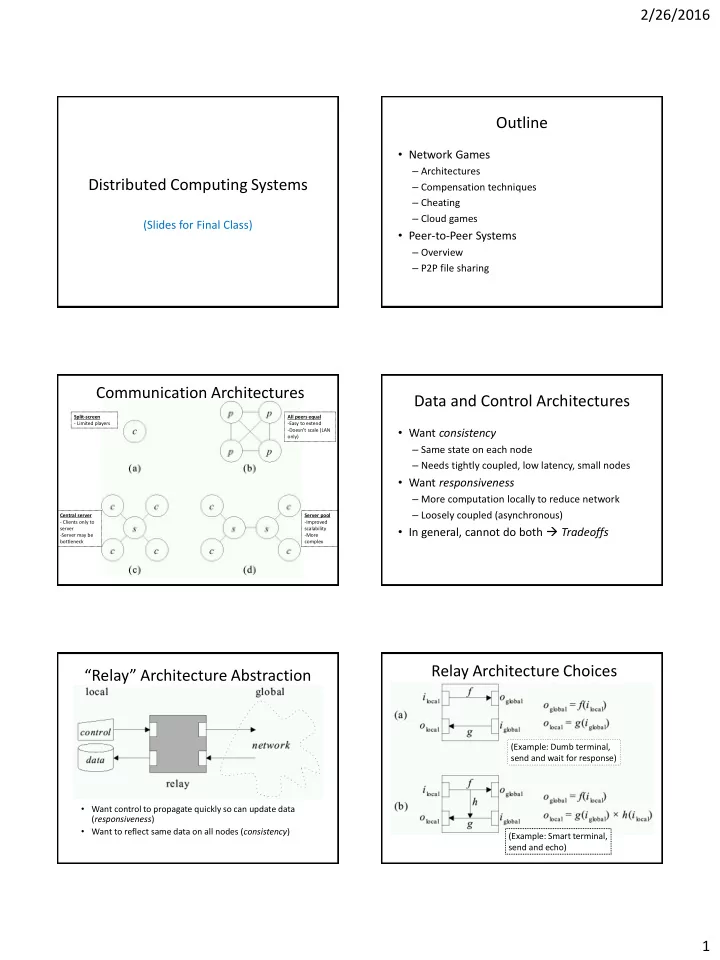
Communication Architectures

Split-screen

  • Limited players

All peers equal

  • Easy to extend
  • Doesn’t scale (LAN
  • nly)

Central server

  • Clients only to

server

  • Server may be

bottleneck Server pool

  • Improved

scalability

  • More

complex

Data and Control Architectures

  • Want consistency

– Same state on each node – Needs tightly coupled, low latency, small nodes

  • Want responsiveness

– More computation locally to reduce network – Loosely coupled (asynchronous)

  • In general, cannot do both  Tradeoffs

“Relay” Architecture Abstraction

  • Want control to propagate quickly so can update data

(responsiveness)

  • Want to reflect same data on all nodes (consistency)

Relay Architecture Choices

(Example: Dumb terminal, send and wait for response) (Example: Smart terminal, send and echo)

slide-2
SLIDE 2

2/26/2016 2

Network Game Architectures

  • Centralized

– Use only two-way relay (no short-circuit) – One node holds data so view is consistent at all times – Lacks responsiveness

  • Distributed and Replicated

– Allow short-circuit relay, provides responsiveness – What about consistency?  Make design decisions

  • Replicated has copies, used when predictable (e.g., behavior
  • f non-player characters)
  • Distributed has local node only, used when unpredictable

(e.g., behavior of players)

Outline

  • Network Games

– Architectures (done) – Compensation techniques (next) – Cheating – Cloud games

  • Peer-to-Peer Systems

– Overview – P2P file sharing

Interest Management – Auras

  • Nodes express area of interest to them

– Do not get messages for outside areas

  • Only world information in

circle/sent sent even if world is larger

  • Side benefit  can

prevent cheating (later)

Dead Reckoning

  • When prediction differs and adjust, get “warping” or

“rubber-banding” effect

– Some techniques move smoothly to place over short time (predicted position) (actual position) (“warp”)

  • Based on ocean navigation techniques (“dead” == “deduced (ded.)”)
  • Predict position based on last known position plus direction

– Only send updates when deviates past threshold

Time Delay

  • Server delays processing of events

– Wait until all messages from clients arrive – (Note, game plays at highest round-trip time)

  • Server sends messages to more distant client first,

delays messages to closer

– Needs accurate estimate of round-trip time

Time

Client 1 command arrives Client 2 command arrives Server processes both client commands

Time Delay

Time Warp

  • With network latency, must lead opponent to hit (even with

“instant” weapon!)

  • Instead, knowing latency roll-back (warp) to when action took

place

– Usually, estimate latency as ½ round-trip time

  • Client 100 ms

behind

  • Still hits (note

blood)

  • (Boxes are bounding

boxes)

https://developer.valvesoftware.com/wiki/Source_Multiplayer_Networking

slide-3
SLIDE 3

2/26/2016 3

Time Warp Notes

  • Inconsistency

– Player target – Move around corner – Warp back  hit – Bullets seem to “bend” around corner!

 “Magic” bullets

  • Fortunately, player often does not notice

– Doesn’t see opponent – May be just wounded

Outline

  • Network Games

– Architectures (done) – Compensation techniques (done) – Cheating (next) – Cloud games

  • Peer-to-Peer Systems

– Overview – P2P file sharing

Cheating

  • Unique to games

– Other multi-person applications don’t have – e.g, Distributed Interactive Simulation (DIS), not public, “employees” so considered trustworthy

  • Cheaters want:

– Vandalism – create havoc (relatively few).

  • Mostly, game design to prevent (e.g., no friendly fire)

– Dominance – gain advantage (more)

  • Next slides

Packet and Traffic Tampering

  • Packet interception – prevent some packets from

reaching cheater

– e.g., suppress damage packets, so cheater is invulnerable

  • Packet replay – repeat event over for added

advantage

– e.g., multiple bullets or rockets if otherwise limited

  • Solutions:

– MD5 Checksum or Encrypt packets – Authoritative host keeps within bounds

Packet Tampering

  • Reflex augmentation - enhance

cheater’s reactions

– e.g., aiming proxy monitors

  • pponents movement packets,

when cheater fires, improve aim

  • Tough to detect

– e.g., PunkBuster – scan for “known” hacks – False positives?

aimbot human

  • S. Yeung and J. Lui. “Dynamic Bayesian

approach for detecting cheats in multi- player online games”, Springer Multimedia Systems, Vol. 14, No. 4 Sep. 2008.

Information Exposure

  • Allows cheater to gain access to

replicated, hidden game data (e.g. status of other players)

– Passive, since does not alter traffic – e.g., ignore “fog of war” in RTS, or “wall hack” to see through walls in FPS

  • Cannot be defeated by network alone
  • Instead:

– Sensitive data should be encoded – Kept in hard-to-detect memory location – Centralized server may detect cheating (e.g., attack enemy could not have seen)

slide-4
SLIDE 4

2/26/2016 4

Outline

  • Network Games

– Architectures (done) – Compensation techniques (done) – Cheating (done) – Cloud games (next)

  • Peer-to-Peer Systems

– Overview – P2P file sharing

Cloud-based Games

  • Connectivity and capacity of networks growing
  • Opportunity for cloud-based games

– Game processing on servers in cloud – Stream game video down to client – Client displays video, sends player input up to server

20 Server Server Server

Thin Client Cloud Servers

Player input Game frames

Why Cloud-based Games?

  • Potential elastic scalability

– Overcome processing and storage limitations of clients – Avoid potential upfront costs for servers, while supporting demand

  • Ease of deployment

– Client “thin”, so inexpensive ($100 for OnLive console vs. $400 for Playstation 4 console) – Potentially less frequent client hardware upgrades – Games for different platforms (e.g., Xbox and Playstation) on one device

  • Piracy prevention

– Since game code is stored in cloud, server controls content and content cannot be copied – Unlike other solutions (e.g., DRM), still easy to distribute to players

  • Click-to-play

– Game can be run without installation

Cloud Game - Modules (1 of 2)

  • Input (i) – receives

control messages from players

  • Game logic – manages

game content

  • Networking (n) –

exchanges data with server

  • Rendering (r) – renders

game frames

  • How to put in cloud?

Cloud Game - Modules (2 of 2)

“Cuts”

1. All game logic on player, cloud only relay information (traditional network game) 2. Player only gets input and displays frames (remote rendering) 3. Player gets input and renders frames (local rendering)

Application Streams vs. Game Streams

  • Traditional thin client

applications (e.g., x-term, remote login shell):

– Relatively casual interaction

  • e.g., typing or mouse clicking

– Infrequent display updates

  • e.g., character updates or

scrolling text

  • Computer games:

– Intense interaction

  • e.g., avatar movement and

shooting

– Frequently changing displays

  • e.g., 360 degree panning
  • Approximate traffic analysis

– 70 kb/s traditional network game – 700 kb/s virtual world – 2000-7000 kb/s live video (HD) – 1000-7000 kb/s pre-recorded video

  • Cloud-based games?

– 7000 kb/s (HD) Challenge: Latency since player input requires round-trip to server before player sees effects

slide-5
SLIDE 5

2/26/2016 5

Outline

  • Network Games

(done)

– Architectures (done) – Compensation techniques (done) – Cheating (done) – Cloud games (done)

  • Peer-to-Peer Systems

(next)

– Overview – P2P file sharing

Definition of Peer-to-Peer (P2P)

  • Significant autonomy from central servers
  • Exploits resources at edges of Internet

– Storage and content – Multicast routing – CPU cycles – Human knowledge (e.g., recommendations, classification)

  • Resources at edge may have intermittent

connectivity

P2P Includes

  • P2P communication

– Instant messaging – Voice-over-IP (e.g., Skype)

  • P2P multicast routing

– e.g., Mbone, Yoid, Scattercast

  • P2P computation

– e.g., seti@home, folding@home

  • P2P systems built on overlays

– e.g., PlanetLab

  • P2P file sharing

– e.g., Napster, gnutella, KaZaA, eDonkey, BitTorrent …

P2P File Sharing – General

  • Alice runs P2P client on

her laptop

  • Registers her content in

P2P system

  • Asks for “Hey Jude”
  • Application displays
  • ther peers with copy
  • Alice choses one, Bob
  • File is copied from Bob’s

computer to Alice’s

 P2P

  • While Alice downloads,
  • thers upload

P2P File Sharing Capabilities

  • Allows Alice to show directory in her file

system

– Anyone can retrieve file from it – Like Web server

  • Allows Alice to copy files from other’s

– Like Web client

  • Allows users to search nodes for content

based on keyword matches

– Like search engine (e.g., Google)

Example: Searching

Internet

N1 N2 N3 N6 N5 N4

Publisher Key=“title” Value=MP3 data… Client Lookup(“title”)

?

1000’s of nodes Set of nodes may change

  • Needles versus Haystacks

Searching for top 40 pop song? Or obscure punk track ‘81 nobody’s heard of?

  • Search expressiveness

Whole word? Regular expressions? File names? Attributes? Whole-text search?

slide-6
SLIDE 6

2/26/2016 6

P2P File Sharing Systems

Central Flood Super- node flood Route Whole File Napster Gnutella Freenet Chunk Based BitTorrent (swarm) KaZaA (bytes) (DHTs) eDonkey2k New BT

Centralized (napster.com)

Napster: Publish

I have X, Y , and Z! Publish insert (X, 123.2.21.23) ... 123.2.21.23 Centralized (napster.com)

Napster: Search

Where is file A? Query Reply search(A)  returns 123.2.0.18  returns 163.2.1.0 … Fetch 123.2.0.18 Client “pings” each host, picks closest

Napster: Discussion

  • Pros

– Simple – Search scope is O(1) – Controllable (pro or con?)

  • Cons

– Single point of failure – Server maintains O(N) state – Server does all processing – (Napster’s server farm had difficult time keeping up with traffic)

I have file A. I have file A.

Query Flooding (e.g., Gnutella)

Where is file A? Query Reply

Flooding Discussion

  • Pros

– Fully de-centralized – Search cost distributed – Processing @ each node permits powerful search semantics

  • Cons

– Search scope is O(N) – Search time is O(???) – depends upon “height” of tree – Nodes leave often, network unstable

  • Hop-limited search works well for haystacks

– For scalability, does NOT search every node. May have to re- issue query later

slide-7
SLIDE 7

2/26/2016 7 Flooding with Supernodes (e.g., KaZaA)

  • Architecture

– Hierarchical – Cross between Napster and Gnutella

  • Some nodes better

connected, longer connected than others

– Use them more heavily – Super Nodes

  • “Smart” query

flooding

– Only flood through Super Nodes – Only one Super Node replies

“Super Nodes”

Supernodes: Publish

I have X! Publish insert(X, 123.2.21.23) ... 123.2.21.23

Supernodes: Search

Where is file A? Query search(A)

  • ->

123.2.0.18 search(A)

  • ->

123.2.22.50 Replies 123.2.0.18 123.2.22.50

Supernode Flooding Discussion

  • Pros

– Take into account node heterogeneity

  • Bandwidth
  • Host computational resources
  • Host aavailability

– May take into account network locality – Scales better

  • Cons

– Still no real guarantees on search scope or search time

  • Similar behavior to plain flooding, but better

Fetching in Parallel and Swarming (e.g., BitTorrent)

  • When have file ID, get list of peers with ID
  • Download in parallel from multiple peers
  • “Swarming”

– Download from others downloading same object at same time (tit-for-tat)

Fetching in Parallel and Swarming (e.g., BitTorrent)

  • When have file ID, get

list of peers with ID

  • Download in parallel

from multiple peers

⁻ Use “rarest first” algorithm to increase availability

  • “Swarming”

– Download from others downloading same

  • bject at same time

tracks peers participating in torrent

slide-8
SLIDE 8

2/26/2016 8

BitTorrent: Publish/Join

Tracker

BitTorrent: Fetch BitTorrent: Summary

  • Pros

– Works reasonably well in practice – Gives peers incentive to share resources; avoids freeloaders

  • Cons

– Central tracker server needed to bootstrap swarm – Tracker is a design choice, not a requirement

  • Newer variants use a “distributed tracker” - a Distributed Hash

Table (DHT)