Device I/O I/O architectures: busses 10A I/O Architectures 10B - - PDF document

device i o i o architectures busses
SMART_READER_LITE
LIVE PREVIEW

Device I/O I/O architectures: busses 10A I/O Architectures 10B - - PDF document

Device I/O I/O architectures: busses 10A I/O Architectures 10B I/O Mechanisms CPU controller 10C Disks control address main bus 10D Low-Level I/O Techniques data interrupts 10E Higher Level I/O Techniques memory


slide-1
SLIDE 1

1

I/O Architectures and Techniques 1

Device I/O

  • 10A I/O Architectures
  • 10B I/O Mechanisms
  • 10C Disks
  • 10D Low-Level I/O Techniques
  • 10E Higher Level I/O Techniques
  • 10I

Polled and non-blocking I/O

  • 10J User-Mode Asynchronous I/O
  • 10U User-Mode Device Drivers

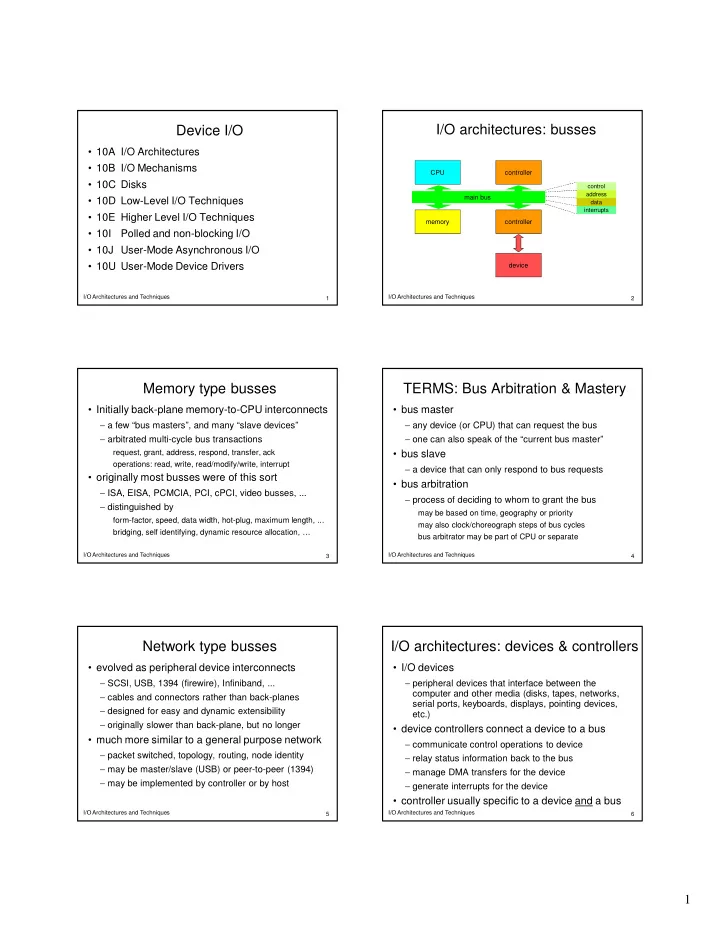
I/O Architectures and Techniques 2 I/O architectures: busses

main bus controller controller device CPU memory

control address data interrupts I/O Architectures and Techniques 3

Memory type busses

  • Initially back-plane memory-to-CPU interconnects

− a few “bus masters”, and many “slave devices” − arbitrated multi-cycle bus transactions

request, grant, address, respond, transfer, ack

  • perations: read, write, read/modify/write, interrupt
  • originally most busses were of this sort

− ISA, EISA, PCMCIA, PCI, cPCI, video busses, ... − distinguished by

form-factor, speed, data width, hot-plug, maximum length, ... bridging, self identifying, dynamic resource allocation, …

I/O Architectures and Techniques 4

TERMS: Bus Arbitration & Mastery

  • bus master

− any device (or CPU) that can request the bus − one can also speak of the “current bus master”

  • bus slave

− a device that can only respond to bus requests

  • bus arbitration

− process of deciding to whom to grant the bus

may be based on time, geography or priority may also clock/choreograph steps of bus cycles bus arbitrator may be part of CPU or separate

I/O Architectures and Techniques 5

Network type busses

  • evolved as peripheral device interconnects

− SCSI, USB, 1394 (firewire), Infiniband, ... − cables and connectors rather than back-planes − designed for easy and dynamic extensibility − originally slower than back-plane, but no longer

  • much more similar to a general purpose network

− packet switched, topology, routing, node identity − may be master/slave (USB) or peer-to-peer (1394) − may be implemented by controller or by host

I/O Architectures and Techniques 6

I/O architectures: devices & controllers

  • I/O devices

− peripheral devices that interface between the computer and other media (disks, tapes, networks, serial ports, keyboards, displays, pointing devices, etc.)

  • device controllers connect a device to a bus

− communicate control operations to device − relay status information back to the bus − manage DMA transfers for the device − generate interrupts for the device

  • controller usually specific to a device and a bus
slide-2
SLIDE 2

2

I/O Architectures and Techniques 7

Device Controller Registers

  • device controllers export registers to the bus

− registers in controller can be addressed from bus − writing into registers controls device or sends data − reading from registers obtains data/status

  • register access method varies with CPU type

− may require special instructions (e.g. x86 IN/OUT)

privileged instructions restricted to supervisor mode

− may be mapped onto bus like memory

accessed with normal (load/store) instructions I/O address space not accessible to most processes

I/O Architectures and Techniques 8 A simple device: 16550 UART

  • ffset

contents Register

x x x x x x x x Data Register 1 MDM STS XMT RCV Interrupt Enable Register 2 MDM STS XMT RCV Interrupt Register 3 speed BRK PARITY STOP WORDLEN Line Control Register 4 DTR RTS Modem Control Register 5 RCV EMT XMT BRK FER PER OVR RER Line Status Register 6 DCD RI DSR CTS Modem Status Register

A 16550 presents seven 8-bit registers to the bus. All communication between the bus and the device (send data, receive data, status and control) is performed by reading from, and writing to these registers.

I/O Architectures and Techniques 9

(16550 UART registers)

  • 0: data – read received byte, write to transmit a byte

− (or LSB of speed divisor when speed set is enabled)

  • 1: interrupt enables – for transmit done, data received, cd/ring

− (or MSB of speed divisor when speed set is enabled)

  • 2: interrupt registers – currently pending interrupt conditions
  • 3: line control register – character length, parity and speed
  • 4: modem control register – control signals sent by computer
  • 5: line status register – xmt/rcv completion and error conditions
  • 6: modem status registers – received modem control signals

I/O Architectures and Techniques 10 Scenario: direct I/O with polling

uart_write_char( char c ) { while( (inb(UART_LSR) & TR_DONE) == 0);

  • utb( UART_DATA, c );

} char uart_read_char() { while( (inb(UART_LSR) & RX_READY) == 0); return( inb(UART_DATA) ); }

I/O Architectures and Techniques 11

(mechanisms: direct polled I/O)

  • all transfers happen under direct control of CPU

− CPU transfers data to/from device controller registers − transfers are typically one byte or word at a time − may be accomplished with normal or I/O instructions

  • CPU polls device until it is ready for data transfer

− received data is available to be read − previously initiated write operations are completed

  • advantages

− very easy to implement (both hardware and software)

I/O Architectures and Techniques 12

performance of direct I/O

  • CPU intensive data transfers

− each byte/word requires mutiple instructions

  • CPU wasted while awaiting completion

− busy-wait polling ties up CPU until I/O is completed

  • devices are idle while we are running other tasks

− I/O can only happen when an I/O task is running

  • how can these problems be dealt with

− let controller transfer data without attention from CPU − let application block pending I/O completion − let controller interrupt CPU when I/O is finally done

slide-3
SLIDE 3

3

I/O Architectures and Techniques 13

importance of good device utilization

  • key system devices limit system performance

− file system I/O, swapping, network communication

  • if device sits idle, its throughput drops

− this may result in lower system throughput − longer service queues, slower response times

  • delays can disrupt real-time data flows

− resulting in unacceptable performance − possible loss of irreplaceable data

  • it is very important to keep key devices busy

− start request n+1 immediately when n finishes

I/O Architectures and Techniques 14

Poor I/O device Utilization

IDLE BUSY

I/O device process

1. process waits to run 2. process does computation in preparation for I/O operation 3. process issues read system call, blocks awaiting completion 4. device performs requested operation 5. completion interrupt awakens blocked process 6. process runs again, finishes read system call 7. process does more computation 8. Process issues read system call, blocks awaiting completion I/O Architectures and Techniques 15

Direct Memory Access

  • bus facilitates data flow in all directions between

− CPU, memory, and device controllers

  • CPU can be the bus-master

− initiating data transfers w/memory, device controllers

  • device controllers can also master the bus

− CPU instructs controller what transfer is desired

what data to move to/from what part of memory

− controller does transfer w/o CPU assistance − controller generates interrupt at end of transfer

I/O Architectures and Techniques 16

I/O Interrupts

  • device controllers, busses, and interrupts

− busses have ability to send interrupts to the CPU − devices signal controller when they are done/ready − when device finishes, controller puts interrupt on bus

  • CPUs and interrupts

− interrupts look very much like traps

traps come from CPU, interrupts are caused externally

− unlike traps, interrupts can be enabled/disabled

a device can be told it can or cannot generate interrupts special instructions can enable/disable interrupts to CPU interrupt may be held pending until s/w is ready for it

I/O Architectures and Techniques 17 Interrupt Handling

1st level interrupt handler 2nd level handler (device driver interrupt routine) return to user mode Application Program user mode supervisor mode

PS/PC

interrupt vector table

PS/PC PS/PC PS/PC instr ; instr ; instr ; instr ; instr ; instr ; driver driver driver driver

list of device interrupt handlers device requests interrupt

I/O Architectures and Techniques 18

Keeping Key Devices Busy

  • allow multiple requests pending at a time

− queue them, just like processes in the ready queue − requesters block to await eventual completions

  • use DMA to perform the actual data transfers

− data transferred, with no delay, at device speed − minimal overhead imposed on CPU

  • when the currently active request completes

− device controller generates a completion interrupt − interrupt handler posts completion to requester − interrupt handler selects and initiates next transfer

slide-4
SLIDE 4

4

I/O Architectures and Techniques 19

Interrupt Driven Chain Scheduled I/O

xx_read/write() { allocate a new request descriptor fill in type, address, count, location insert request into service queue if (device is idle) { disable_device_interrupt(); xx_start(); enable_device_interrupt(); } await completion of request extract completion info for caller } xx_start() { get next request from queue get address, count, disk address load request parameters into controller start the DMA operation mark device busy }

xx_intr() { extract completion info from controller update completion info in current req wakeup current request if (more requests in queue) xx_start() else mark device idle }

I/O Architectures and Techniques 20

Multi-Tasking & Interrupt Driven I/O

device

1A

process 1

1A

1. P1 runs, requests a read, and blocks 2. P2 runs, requests a read, and blocks 3. P3 runs until interrupted 4. Awaken P1 and start next read operation 5. P1 runs, requests a read, and blocks 6. P3 runs until interrupted

process 2 process 3

2A 1B 2B 1B 1C 2A 2B

  • 7. Awaken P2 and start next read operation
  • 8. P2 runs, requests a read, and blocks
  • 9. P3 runs until interrupted
  • 10. Awaken P1 and start next read operation
  • 11. P1 runs, requests a read, and blocks

I/O Architectures and Techniques 21

mechanisms: memory mapped I/O

  • DMA may not be the best way to do I/O

− designed for large contiguous transfers − some devices have many small sparse transfers

e.g. consider a video game display adaptor

  • implement as a bit-mapped display adaptor

− 1Mpixel display controller, on the CPU memory bus − each word of memory corresponds to one pixel − application uses ordinary stores to update display

  • low overhead per update, no interrupts to service
  • relatively easy to program

I/O Architectures and Techniques 22

Trade-off: memory mapped vs. DMA

  • DMA performs large transfers efficiently

− better utilization of both the devices and the CPU

device doesn't have to wait for CPU to do transfers

− but there is considerable per transfer overhead

setting up the operation, processing completion interrupt

  • memory-mapped I/O has no per-op overhead

− but every byte is transferred by a CPU instruction

no waiting because device accepts data at memory speed

  • DMA better for occasional large transfers
  • memory-mapped better frequent small transfers
  • memory-mapped devices more difficult to share

I/O Architectures and Techniques 23 Smart Device Controller shared buffers (in memory) buffer pointers I/O instructions normal instructions DMA I/O completion interrupts device driver device controller

basic status basic status memory ptr

I/O Architectures and Techniques 24

(I/O Mechanisms: smart controllers)

  • Smarter controlers can improve on basic DMA
  • they can queue multiple input/output requests

− when one finishes, automatically start next one − reduce completion/start-up delays − eliminate need for CPU to service interrupts

  • they can relieve CPU of other I/O responsibilities

− request scheduling to improve perormance − they can do automatic error handling & retries

  • abstract away details of underlying devices
slide-5
SLIDE 5

5

I/O Architectures and Techniques 25

Disk Drives and Geometry

Spindle head positioning assembly 5 platters 10 surfaces 10 heads Motor

1 8 9

cylinder

(10 corresponding tracks)

platter surface track sectors I/O Architectures and Techniques 26

(Disk drive geometry)

  • spindle

− a mounted assembly of circular platters

  • head assembly

− read/write head per surface, all moving in unison

  • track

− ring of data readable by one head in one position

  • cylinder

− corresponding tracks on all platters

  • sector

− logical records written within tracks

  • disk address = <cylinder / head / sector >

I/O Architectures and Techniques 27

Disks have Dominated File Systems

  • fast swap, file system, database access
  • minimize seek overhead

− organize file systems into cylinder clusters − write-back caches and deep request queues

  • minimize rotational latency delays

− maximum transfer sizes − buffer data for full-track reads and writes

  • we accepted poor latency in return for IOPS

I/O Architectures and Techniques 28

(Optimizing disk performance)

  • don't start I/O until disk is on-cyl/near sector

− I/O ties up the controller, locking out other operations − other drives seek while one drive is doing I/O

  • minimize head motion

− do all possible reads in current cylinder before moving − make minimum number of trips in small increments

  • encourage efficient data requests

− have lots of requests to choose from − encourage cylinder locality − encourage largest possible block sizes

I/O Architectures and Techniques 29

Disk vs SSD Performance

Cheeta (archival) Barracuda (high perf) Extreme/Pro (SSD) RPM 7,000 15,000 n/a average latency 4.3ms 2ms n/a average seek 9ms 4ms n/a transfer speed 105MB/s 125MB/s 540MB/s sequential 4KB read 39us 33us 10us sequential 4KB write 39us 33us 11us random 4KB read 13.2ms 6ms 10us random 4KB write 13.2ms 6ms 11us

I/O Architectures and Techniques 30

Random Access: Game Over

slide-6
SLIDE 6

6

I/O Architectures and Techniques 31

The Changing I/O Landscape

  • Storage paradigms

− old: swapping, paging, file systems, data bases − new: NAS, distributed object/key-value stores

  • I/O traffic

− old: most I/O was disk I/O − new: network and video dominate many systems

  • Performance goals:

− old: maximize throughput, IOPS − new: low latency, scalability, reliability, availability

I/O Architectures and Techniques 32

Bigger Transfers are Better

32 I/O Architectures and Techniques 33

(Bigger Transfers are Better)

  • disks have high seek/rotation overheads

− larger transfers amortize down the cost/byte

  • all transfers have per-operation overhead

− instructions to set up operation − device time to start new operation − time and cycles to service completion interrupt

  • larger transfers have lower overhead/byte

− this is not limited to s/w implementations

I/O Architectures and Techniques 34

Input/Output Buffering

  • Fewer/larger transfers are more efficient

− they may not be convenient for applications − natural record sizes tend to be relatively small

  • Operating system can buffer process I/O

− maintain a cache of recently used disk blocks − accumulate small writes, flush out as blocks fill − read whole blocks, deliver data as requested

  • Enables read-ahead

− OS reads/caches blocks not yet requested

I/O Architectures and Techniques 35

Deep Request Queues

  • Having many I/O operations queued is good

− maintains high device utilization (little idle time) − reduces mean seek distance/rotational delay − may be possible to combine adjacent requests

  • Ways to achieve deep queues:

− many processes making requests − individual processes making parallel requests − read-ahead for expected data requests − write-back cache flushing

I/O Architectures and Techniques 36

Data Striping for Bandwidth

initiator striping target target target A B C A B C initiator striping target target target A B C A B C

slide-7
SLIDE 7

7

I/O Architectures and Techniques 37

(Data Striping for Bandwidth)

  • spread requests across multiple targets

− increased aggregate throughput − fewer operations per second per target

  • used for many types of devices

− disk or server striping − NIC bonding

  • potential issues

− more/shorter requests may be less efficient − source can generate many parallel requests − striping agent throughput is the bottleneck

I/O Architectures and Techniques 38

Data Mirroring for Reliability

initiator mirror target target target A B C A B C initiator mirror target target target A B C A B C A B C A B C I/O Architectures and Techniques 39

(Data Mirroring for Reliability)

  • mirror writes to multiple targets

− redundancy in case a target fails − spread reads across multiple targets

increased aggregate throughput, reduced ops/target

  • used for all types of persistent storage

− disks, NAS, distributed key/value stores

  • potential issues

− added write traffic on the source − 2x-3x storage requirements on targets − deciding which (conflicting) copy is correct

I/O Architectures and Techniques 40

Parity/Erasure Coding for Efficiency

initiator parity

  • r E/C

target target target A B C F1(A,B,C) F2(A,B,C) F3(A,B,C) initiator parity

  • r E/C

target target target A B C F1(A,B,C) F2(A,B,C) I/O Architectures and Techniques 41

(Parity/Erasure Coding for Efficiency)

  • N out of M encoding (with M/N overhead)

− accumulate N writes from source − compute M versions of that collection − send a version to each of M targets

  • Advantages

− reduced overhead for higher redundancy − rotating parity reduces bottleneck

  • Potential issues

− greatly increased source computational load − deferred writes for parity block accumulation − expensive updates, recovery (and EC reads) − choosing the right ratio

I/O Architectures and Techniques 42

Error Detection/Correction Terms

  • Parity

− typically one bit per byte, detect single-bit errors − used as redundancy, it can recover one lost bit/block

  • Cyclical Redundancy Check (CRC)

− multiple bits per record, detect multi-bit burst errors

  • Error Correcting Coding (ECC)

− fixed ratio, capable of detection and correction − e.g. Reed-Soloman (204,188) can correct 8 bad bits

  • Erasure Coding (distributed Reed-Soloman)

− transforms K blocks into N (>K) − all can be recovered from any K (of those N) blocks

slide-8
SLIDE 8

8

I/O Architectures and Techniques 43

Parallel I/O Paradigms

  • Busy, but periodic checking just in case

− new input might cause a change of plans

  • Multiple semi-independent streams

− each requiring relatively simple processing

  • Multiple semi-independent operations

− each requiring multiple, potentially blocking steps

  • Many balls in the air at all times

− numerous parallel requests from many clients − keeping I/O queues full to improve throughput

I/O Architectures and Techniques 44

Enabling Parallel Operations

  • Threads are an obvious solution

− one thread per-stream or per-request − streams or requests are handled in parallel − when one thread blocks, others can continue

  • There are other parallel I/O mechanisms

− non-blocking I/O − multi-channel poll/select operations − asynchronous I/O

I/O Architectures and Techniques 45

Non-Blocking I/O

  • check to see if data/room is available

− but do not block to wait for it − this enables parallelism, prevents deadlocks

  • a file can be opened in a non-blocking mode

− open(name, flags | O_NONBLOCK) − fcntl(fd, F_SETFL, flags | O_NONBLOCK)

  • if data is available, read(2) will return it

− otherwise it fails with EWOULDBLOCK

  • can also be used with write(2) and open(2)

I/O Architectures and Techniques 46

Multi-Channel Poll/Select

  • there are multiple possible input sources

− parallel streams (e.g. ssh input/output) − multiple request generating clients

  • poll(2)/select(2) wait for first interesting event

− a list of file descriptors to be checked − a list of interesting events (input, output, error) − a maximum time to wait − a signal mask (to use while waiting)

  • do read/write on indicated file descriptor(s)

I/O Architectures and Techniques 47

Worker Threads

  • Consider a web or remote file system server

− it receives thousands of requests/second − each requires multiple (blocking) operations − create a thread to serve each new request

  • Thread creation is relatively expensive

− continuous creation/destruction seems wasteful − solution: recycle the worker threads

thread blocks when its operation finishes it is awakened when a new operation needs servicing

  • we still have switching and synchronization

I/O Architectures and Techniques 48

NBIO vs. Poll/Select vs. Threads

  • NBIO … very simple

− occasional checks for unlikely input − cost of wasted spins is not a concern

  • Poll/Select … efficient multi-stream processing

− multiple sources of interesting input/event − wait for the first available, serve one at a time

  • Parallel Threads … for complex operations

− all can operations proceed in parallel, not just I/O − blocking operation does not block other threads

  • None are practical for massive parallelism
slide-9
SLIDE 9

9

I/O Architectures and Techniques 49

Asynchronous I/O

  • Huge numbers of parallel I/O operations

− many parallel clients w/many parallel requests − deep I/O queues to improve throughput − make sure completions processed correctly

  • thread per operation is too expensive
  • we want to queue many parallel operations

− receive asynchronous completion notifications − OS has always handled high traffic I/O this way − increasingly many applications now do as well

I/O Architectures and Techniques 50

Scheduling Asynchronous I/O

int aio_read( struct aiocb *)

struct aiocb { int aio_filedes; // file descriptor

  • ff_t

aio_offset; // file offset void *aio_buf; // local buffer int aio_nbytes; // byte count int aio_reqprio; // request priority sigevent aio_sigevent; // notification method }

  • if successful, operation has been queued

− it will complete at some time in the future

  • a very large number of ops can be outstanding

I/O Architectures and Techniques 51

Asynchronous Completion

  • we can poll the status of any operation

int aio_error( struct aiocb * ) int aio_return( struct aiocb *)

− returns 0, EINPROGRESS, or completion error

  • we can await completion of some opeations

int aio_suspend( struct aiocb *, items, timeout)

− returns when one or more complete (or timeout)

  • we can cancel or force any operations

int aio_cancel( struct aiocb * ) int aio_fsync( fd)

I/O Architectures and Techniques 52

Completion Notifications

struct sigevent {

int sigev_notify; // by signal or thread int sigev_signo; // notification signal # int sigev_value; // param to signal handler void (*handler)(int); // handler to invoke …

  • user-mode analog of completion interrupts

− completion generates a specified signal − completion creates a specified thread

I/O Architectures and Techniques 53

Signals for Event Notifications

  • Signals were originally designed for exceptions

− infrequent events, most often fatal − multiple race conditions in handling/disabling − bad semantics were “good enough”

  • Now they are used for event notifications

− continuous events in normal operation − loss of even a single event is unacceptable − they need to be safe and reliable

  • We have long known how to do this properly

− make them more like h/w interrupts

I/O Architectures and Techniques 54

sigaction(2)

int sigaction (int signum, sigaction *new, sigaction *old)

struct sigaction { void (*handler)(int); // handler void (*action)(int, siginfo); // handler sigset_t mask; // signals to block int flags; // handling options

  • mask eliminates reentrancy races
  • siginfo passes much info about cause of signal
  • sigreturn(2) controls return from handler
slide-10
SLIDE 10

10

I/O Architectures and Techniques 55

Asynchronous I/O: Back to the Future

  • OS I/O always asynchronous, interrupt driven

− necessary to achieve throughput and efficiency − apps were given comforting synchronous illusion

until they needed major throughput and efficiency

  • simpler, more s/w-like mechanisms were tried

− they were much less efficient − they proved race-prone under heavy use

  • h/w interrupt model is refined, well proven

− if there was a simpler way, we would be using it − the same model works well for s/w too

I/O Architectures and Techniques 56

User-Mode Drivers: Why?

  • Kernel-mode code is brittle

− if it crashes, it takes the OS with it

  • Kernel-mode code is hard to build and test

− correctness rules are extremely complex − debugging tools are relatively crude

  • Kernel-mode code is hard to upgrade

− often necessary to reboot the system

  • Kernel-mode code is not necessarily fast

− system calls and interrupts are very expensive − processes can be pinned to memory and cores

I/O Architectures and Techniques 57

User-Mode Drivers: How?

  • Doesn’t I/O require privileged instructions?

− many ISAs allow user-mode I/O to limited ports − I/O space may be mapped into user address space

  • Doesn’t I/O require access to DMA controller?

− some devices (e.g. graphics) don’t need DMA − smart devices have on-board DMA controllers

all DMA is done to/from device-owned memory

  • Doesn’t I/O require interrupt handling?

− smart devices have request queues, polled status

I/O Architectures and Techniques 58 Smart Device Controller shared buffers (in memory) buffer pointers I/O instructions normal instructions DMA I/O completion interrupts device driver device controller

basic status basic status memory ptr

I/O Architectures and Techniques 59

User-Mode Drivers: Security?

  • There is lots of trusted user-mode code

− init, login, mail delivery, network protocols, … − there are even user-mode file systems

  • Accessing I/O space is a privileged operation

− it can be restricted to specific (privileged) UIDs − only a few programs can run w/those UIDs − file system security protects those programs

  • Privileged User-mode code can be trusted

− and safer than loadable kernel modules

I/O Architectures and Techniques 60

User-Mode Drivers: Limitations

  • They cannot use kernel services or data

− they are ordinary user-mode programs − they do not execute in kernel mode − they do not run in kernel address space

  • They open a driver to access the device

− driver maps I/O device into process address space − driver handles configuration, interrupts, errors

  • They cannot service interrupts

− they must poll for asynchronous completions − but they may get signals for asynchronous errors

slide-11
SLIDE 11

11

I/O Architectures and Techniques 61

Assignments

  • For Next Lecture

− AD 39 Files − AD 40 File Systems − File Types − Key-Value Stores (intro, types) − Object Storage (history, architectures) − FAT File Systems − FUSE (intro)

  • Project 4B … talk to your sensors ASAP

I/O Architectures and Techniques 62

Supplementary Slides

I/O Architectures and Techniques 63

Device Drivers: where they fit in

  • They meet the requirements for kernel code:

− privileged instructions, kernel structures, trust

  • Not entirely part of the Operating System

− most OS code is device-independent − although the OS does depend on some devices

  • Drivers are often after-market additions

− built by device manufacturers − down-loaded when new devices are added

I/O Architectures and Techniques 64

Drivers – plug-in modules

  • each driver supports a particular device

− automatic discovery and configuration − implements a standard set of operations

  • they can be dynamically loaded/unloaded

− making them easy to add and upgrade − they tend to be highly compartmentalized − using only a small number of kernel services

  • when loaded, they become part of the OS

− making correctness/security a key consideration − some run drivers in a “sand-box” or user-mode

I/O Architectures and Techniques 65

Drivers – simplifying abstractions

  • encapsulate knowledge of how to use device

− map standard operations into operations on device − map device states into standard object behavior − hide irrelevant behavior from users − correctly coordinate device and application behavior

  • encapsulate knowledge of optimization

− efficiently perform standard operations on a device

  • encapsulation of fault handling

− knowledge of how to handle recoverable faults − prevent device faults from becoming OS faults

I/O Architectures and Techniques 66

Drivers – generalizing abstractions

  • OS defines idealized device classes

− disk, display, printer, tape, network, serial ports

  • classes define expected interfaces/behavior

− all drivers in class support standard methods

  • device drivers implement standard behavior

− make diverse devices fit into a common mold − protect applications from device eccentricities

  • software analog to h/w device controllers

− device drivers connect a device controller to an OS

slide-12
SLIDE 12

12

I/O Architectures and Techniques 67

Special Files

brw-r----- 1 root operator 14, 0 Apr 11 18:03 disk0 brw-r----- 1 root operator 14, 1 Apr 11 18:03 disk0s1 brw-r----- 1 root operator 14, 2 Apr 11 18:03 disk0s2 br--r----- 1 reiher reiher 14, 3 Apr 15 16:19 disk2 br--r----- 1 reiher reiher 14, 4 Apr 15 16:19 disk2s1 br--r----- 1 reiher reiher 14, 5 Apr 15 16:19 disk2s2

block special file Major number (driver) 14 Minor number (instance) I/O Architectures and Techniques 68

(UNIX: special files)

  • how does one open an instance of a device

− like everything else, by opening some named file

  • special files

− files that are associated with a device instance − UNIX/LINUX uses <block/character, major, minor>

major number corresponds to a particular device driver minor number identifies an instance under that driver

  • opening special file opens the associated device

− open/close/read/write/etc calls map into calls to the appropriate DDI entry-points of the selected driver

I/O Architectures and Techniques 69

UNIX: block and character Devices

  • block devices ... used for file systems

− random access devices, accessible block at a time − support queued, asynchronous reads and writes − accessed through an LRU buffer cache

  • character devices ... anything else

− may be either stream or record structured − may be sequential or random access − support direct, synchronous reads and writes

  • all other device sub-classes derive from these

A2

I/O Architectures and Techniques 70

UNIX: device instances

  • minor device # is an instance under a driver

− meaning of minor number is entirely driver-specific

  • instances may be physically distinct

− e.g. different serial ports, different disk drives

  • instances may refer to multiplexed sub-devices

− e.g. one of four FDISK partitions on a hard disk − e.g. a sub-channel on a communications interface

  • instances may merely select different options

− e.g. enable rewind-on-close for a tape drive − e.g. different densities for diskettes

B1

I/O Architectures and Techniques 71

Registering Dynamic Driver Instances

wlan0 attributes methods svga0 attributes methods c0t0p1 attributes methods c0t0p2 attributes methods

svga entry points svga driver wavelan entry points wavelan driver SATA entry points SATA driver

Device Interface Registry class instance object

net wlan0 disk c0t0p1 disk c0t0p2 display svga0

register( wlan0, net, wavelan-ops ) register( c0t0p1, disk, sata-ops ) register( c0t0p2, disk, sata-ops ) register( svga0, display, svga-ops ) I/O Architectures and Techniques 72

(driver instance/interface registration)

  • driver must register each device instance

− register name, class, and instance # of device − so programs will know that instance is available

  • register driver methods for accessing that device

− driver advertises its entrypoints for all methods

which methods depend on the class and driver

− enables other s/w to use device instance/call driver

  • OS includes services to register and un-register

− e.g. register_chrdev( major ID, minor ID, operations ) − create special file for accessing device instance

E1

slide-13
SLIDE 13

13

I/O Architectures and Techniques 73

Device Driver Interface (DDI)

  • standard (top-end) device driver entry-points

− basis for device independent applications − enables system to exploit new devices − a critical interface contract for 3rd party developers

  • some correspond directly to system calls

− e.g. open, close, read, write

  • some are associated w/OS frameworks

− disk drivers are meant to be called by block I/O − network drivers are meant to be called by protocols

I/O Architectures and Techniques 74

DDIs and sub-DDIs

Basic I/O read, write, seek, ioctl, select Life Cycle initialize, cleanup

  • pen, release

Common DDI Disk request revalidate fsync Network receive, transmit set MAC stats Serial receive character start write line parms I/O Architectures and Techniques 75

(General DDI entry points (Linux))

  • Standard entry points, supported by most drivers
  • house-keeping operations

− xx_open ... check/initialize hardware and software − xx_release ... release one reference, close on last

  • generic I/O operations

− xx_read, xx_write ... synchronous I/O operations − xx_seek ... change target address on device − xx_ioctl ... generic & device specific control functions − Xx_select ... is data currently available

I/O Architectures and Techniques 76

(sub-DDI – block devices (linux))

  • includes wide range of random access devices

− hard disks, diskettes, CDs, flash-RAM, ...

  • drivers do block reads, writes, and scheduling

− caching is implemented in higher level modules − file systems implemented in higher level modules

  • standard entry-points

− xx_request ... queue a read or write operation − xx_fsync ... complete all pending operations − xx_revalidate ... for dismountable devices

I/O Architectures and Techniques 77

(sub-DDI – network devices (linux))

  • includes wide range of networking technologies

− ethernet, token-ring, wireless, infra-red, ...

  • drivers provide only basic transport/control

− protocols are implemented by higher level modules

  • standard entry-points

− xx_transmit ... queue a packet for transmission − xx_rcv ... process a received packet − xx_statistics ... extract packet, error, retransmit info − xx_set_mac/multicast ... address configuration

C1

I/O Architectures and Techniques 78

Standard Driver Classes & Clients

file & directory

  • perations

networking & IPC

  • perations

direct device access system calls UNIX FS DOS FS CD FS block I/O TCP/IP X.25 PPP data Link provider display class serial class tape class disk class CD drivers disk drivers tape drivers display drivers serial drivers NIC drivers device driver interfaces (*-ddi)

A1

slide-14
SLIDE 14

14

I/O Architectures and Techniques 79

Criticality of Stable Interfaces

  • Drivers are independent from the OS

− they are built by different organizations − they are not co-packaged with the OS

  • OS and drivers have interface dependencies

− OS depends on driver implementations of DDI − drivers depends on kernel DKI implementations

  • These interfaces must be carefully managed

− well defined and well tested − upwards-compatible evolution

I/O Architectures and Techniques 80

Channels – I/O co-processors

  • Channels sit between CPU and I/O devices

− think of them as extremely smart busses

  • the include highly specialized CPUs

− they execute channel I/O programs

instructions to read, write and control devices instructions to generate progress interrupts

  • once started, I/O pgms execute w/o CPU attention

− command chaining, from one command to the next − data chaining, from one buffer to the next

I/O Architectures and Techniques 81 Typical Channel Architecture

main bus

channel controller 0x2?? channel controller 0x1??

CPU memory

device controller 0x10? device 0x100 device controller 0x1F0? device 0x101 device 0x10F

… …

channels, controllers, and devices, all have assigned (relatively geographic) addresses. I/O Architectures and Techniques 82 Typical Channel Program

Main CPU Program

Device driver SIO 0x1C2 iopgm … Interrupt handler TIO 0x1C2

… Channel Program

(can execute one per controller) iopgm: SEEK cyl=1020 hd=5 rec=10 READ buf=xxx, cnt=4096 READX buf=yyy, cnt=4096, IR TIC next next: SEEK cyl=1050, hd=0, rec=2 WRITE buf=zzz, cnt=8192, IR END intr

I/O Architectures and Techniques 83

Devices and Busses

  • Devices are not connected directly to the CPU
  • Both CPU and devices are connected to a bus
  • Sometimes the same bus, sometimes a different

bus

  • Devices communicate with CPU across the bus
  • Bus used both to send/receive interrupts and to

transfer data and commands

− Devices signal controller when they are done/ready − When device finishes, controller puts interrupt on bus − Bus then transfers interrupt to the CPU − Perhaps leading to movement of data

I/O Architectures and Techniques 84

Devices and Interrupts

  • Devices are primarily interrupt-driven

− Drivers aren’t schedulable processes

  • They work at different speed than the CPU

− Typically slower

  • They can do their own work while CPU does

something else

  • They use interrupts to get the CPU’s attention
slide-15
SLIDE 15

15

I/O Architectures and Techniques 85 Head Travel w/various algorithms

Scan/Look (elevator algorithm)

76 124 137 201 269 29 17 12 48 13 64 68 240 12 5

total head motion: 450 cylinders

First Come First Served

76 124 17 269 201 29 137 12 48 107 252 68 172 108 125

total head motion: 880 cylinders

Shortest Seek First

76 29 17 12 124 137 201 269 47 12 5 112 13 64 68

total head motion: 321 cylinders

E2

I/O Architectures and Techniques 86

Double-Buffered Output

buffer #1 buffer #2 application device I/O Architectures and Techniques 87

(double-buffered output)

  • multiple buffers queued up, ready to write

− each write completion interrupt starts next write

  • application and device I/O proceed in parallel

− application queues successive writes

don’t bother waiting for previous operation to finish

− device picks up next buffer as soon as it is ready

  • if we're CPU-bound (more CPU than output)

− application speeds up because it doesn't wait for I/O

  • if we're I/O-bound (more output than CPU)

− device is kept busy, which improves throughput − but eventually we may have to block the process

I/O Architectures and Techniques 88

Double-Buffered Input

buffer #1 buffer #2 application device I/O Architectures and Techniques 89

(double buffered input)

  • have multiple reads queued up, ready to go

− read completion interrupt starts read into next buffer

  • filled buffers wait until application asks for them

− application doesn't have to wait for data to be read

  • when can we do chain-scheduled reads?

− each app will probably block until its read completes

so we won’t get multiple reads from one application

− we can queue reads from multiple processes − we can do predictive read-ahead

I/O Architectures and Techniques 90

Scatter/Gather I/O

  • many controllers support DMA transfers

− entire transfer must be contiguous in physical memory

  • user buffers are in paged virtual memory

− user buffer may be spread all over physical memory − scatter: read from device to multiple pages − gather: writing from multiple pages to device

  • three basic approaches apply

− copy all user data into contiguous physical buffer − split logical req into chain-scheduled page requests − I/O MMU may automatically handle scatter/gather

slide-16
SLIDE 16

16

I/O Architectures and Techniques 91

“gather” writes from paged memory

process virtual address space physical memory DMA I/O stream user I/O buffer I/O Architectures and Techniques 92

“scatter” reads into paged memory

process virtual address space physical memory DMA I/O stream user I/O buffer I/O Architectures and Techniques 93

RAID

  • disks are the weak point of any computer system

− reliability: disk drives are subject to mechanical wear

mis-seeks: resulting in corrupted or unreadable data head crashes: resulting in catastrophic data loss

− performance: limited seek and transfer speeds

  • these limitations are inherent in the technology

− moving heads and rotating media

  • don’t try to build super-fast or reliable disks

− build Redundant Array of Independent Disks − combine multiple cheap disks for better performance

93 File Systems: Performance and Robustness I/O Architectures and Techniques 94

Striping (RAID-0)

  • combine them to get a larger virtual drive

− striping: alternate tracks are on alternate physical drives − concatenation: 1st 500 cylinders on drive 1, 2nd 500 on drive 2

  • benefits

− increased capacity (file systems larger than a physical disk) − read/write throughput (spread traffic out over multiple drives)

  • cost

− increased susceptibility to failure

G1

94 File Systems: Performance and Robustness I/O Architectures and Techniques 95

Mirroring (RAID-1)

  • two copies of everything

− all writes are sent to both disks − reads can be satisfied from either disk

  • benefits

− redundancy (data survives failure of one disk) − read throughput (can be doubled)

  • cost

− requires twice as much disk

G2

95 File Systems: Performance and Robustness I/O Architectures and Techniques 96

Block-wise Striping w/Parity (RAID-5)

  • dedicate 1/Nth of the space to parity

− write data on N-1 corresponding blocks − Nth block contains XOR of the N-1 data blocks

  • benefits

− data can survive loss of any one drive − much more space efficient than mirroring

  • cost

− slower and more complex write performance

1A 1B 1C XOR 1A-1C 2A 2B 2C XOR 2A-2C 3A 3B 3C XOR 3A-3C disk 1 disk 2 disk 3 disk 4

G3

96 File Systems: Performance and Robustness

slide-17
SLIDE 17

17

I/O Architectures and Techniques 97

RAID implementation

  • RAID is implemented in many different ways

− as part of the disk driver

these were the original implementations

− between block I/O and the disk drivers (e.g. Veritas)

making it independent of disks and controllers

− absorbed into the file system (e.g. zfs)

permitting smarter implementation

− built into disk controllers

potentially more reliable significantly off-loads the host OS exploit powerful Storage Area Networking (SAN) fabric

G4

97 File Systems: Performance and Robustness I/O Architectures and Techniques 98

select(2)

int pselect( int nfds, fd_set *readfds, fd_set *writefds, fd_set *exceptfds, struct timeval *timeout, sigset_t *sigmask)

− fd_set is a bit-map of interesting file descriptors − returns when event, timeout, or signal − parameters updated to reflect what happened

  • Created in 4.2BSD (1983)

− older, more widely adopted

Device I/O, Techniques and Frameworks 98 I/O Architectures and Techniques 99

poll(2)

int ppoll( stuct pollfd *fds, int nfds, struct timespec *, sigset_t *) struct pollfd { int fd; short events; // requested events short revents; // returned events }

− returns when event, timeout, or signal − revents reflect what happened

  • Created in UNIX SVR3 (1986)

− newer, perhaps a little better thought out

Device I/O, Techniques and Frameworks 99