Design of Web Applications Web applications: an overview General - - PDF document

design of web applications
SMART_READER_LITE
LIVE PREVIEW

Design of Web Applications Web applications: an overview General - - PDF document

Design of Web Applications 1 : Overview Global course introduction Design of Web Applications Web applications: an overview General Introduction Why this course? Planned technologies in PWA/DWA More 3 / 20 Rmi Emonet Design of


slide-1
SLIDE 1

Design of Web Applications General Introduction

3 / 20 − Rémi Emonet − Design of Web Applications General Introduction

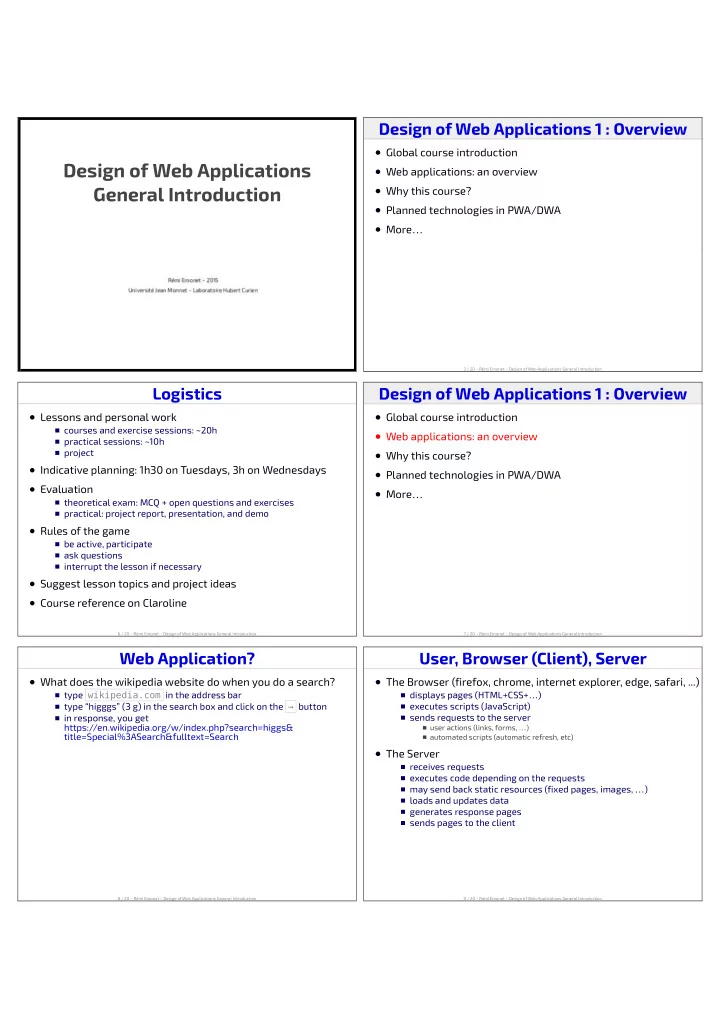
Design of Web Applications 1 : Overview

Global course introduction Web applications: an overview Why this course? Planned technologies in PWA/DWA More…

6 / 20 − Rémi Emonet − Design of Web Applications General Introduction

Logistics

Lessons and personal work

courses and exercise sessions: ~20h practical sessions: ~10h project

Indicative planning: 1h30 on Tuesdays, 3h on Wednesdays Evaluation

theoretical exam: MCQ + open questions and exercises practical: project report, presentation, and demo

Rules of the game

be active, participate ask questions interrupt the lesson if necessary

Suggest lesson topics and project ideas Course reference on Claroline

7 / 20 − Rémi Emonet − Design of Web Applications General Introduction

Design of Web Applications 1 : Overview

Global course introduction Web applications: an overview Why this course? Planned technologies in PWA/DWA More…

8 / 20 − Rémi Emonet − Design of Web Applications General Introduction

Web Application?

What does the wikipedia website do when you do a search?

type wikipedia.com in the address bar type “higggs” (3 g) in the search box and click on the → button in response, you get https://en.wikipedia.org/w/index.php?search=higgs& title=Special%3ASearch&fulltext=Search

9 / 20 − Rémi Emonet − Design of Web Applications General Introduction

User, Browser (Client), Server

The Browser (firefox, chrome, internet explorer, edge, safari, ...)

displays pages (HTML+CSS+…) executes scripts (JavaScript) sends requests to the server

user actions (links, forms, …) automated scripts (automatic refresh, etc)

The Server

receives requests executes code depending on the requests may send back static resources (fixed pages, images, …) loads and updates data generates response pages sends pages to the client

slide-2
SLIDE 2

10 / 20 − Rémi Emonet − Design of Web Applications General Introduction

Design of Web Applications 1 : Overview

Global course introduction Web applications: an overview Why this course? Planned technologies in PWA/DWA More…

11 / 20 − Rémi Emonet − Design of Web Applications General Introduction

Why Learning to Build Web Apps?

As a web app user

understand how things work behind the scene feel empowered to build things understand privacy and security implications

As a software engineer

more and more applications are web based convergence of mobile and web

As a scientist (researcher or R&D engineer)

generate ad hoc visualizations of results … … … do attractive visualization for communications

12 / 20 − Rémi Emonet − Design of Web Applications General Introduction

Design of Web Applications 1 : Overview

Global course introduction Web applications: an overview Why this course? Planned technologies in PWA/DWA More…

13 / 20 − Rémi Emonet − Design of Web Applications General Introduction

Technologies From Today and Yesterday

14 / 20 − Rémi Emonet − Design of Web Applications General Introduction

Technologies in this course

In this PWA/DWA course

mostly Java techs on the server basic client-side techs (HTML, CSS, javascript) client-side framework (AngularJS)

JEE : Java Entreprise Edition

a standard for Java servers Java: portability, security, standardization JEE web container

runtime environment providing services portability between containers

JEE platform specification

tens of individual specifications (JSR) servlets, JSP, JPA, …

Spring (Pivotal)

additional framework around JEE Java and Groovy not a standard ⇒ sometimes faster advances

JEE and Spring

both huge evolve in parallel and interact positively

15 / 20 − Rémi Emonet − Design of Web Applications General Introduction

Design of Web Applications 1 : Overview

Global course introduction Web applications: an overview Why this course? Planned technologies in PWA/DWA More…

slide-3
SLIDE 3

16 / 20 − Rémi Emonet − Design of Web Applications General Introduction

Let's have… quizzes

17 / 20 − Rémi Emonet − Design of Web Applications General Introduction

Learning to Learn (in general)

Work regularly (not a big rush before the deadline)

repeat exercises practice (don't just re-read things)

Be extremely focused

limit interruptions work for fixed-duration slots (e.g., 25 minutes)

… but make real and regular breaks

stretch or have a walk practice sport sleep well

18 / 20 − Rémi Emonet − Design of Web Applications General Introduction

Succeeding in this Course

Be pro-active in lessons and practical sessions Embrace the proposed technologies Bring your own objectives and ideas Look and ask for complement (me, other students, online, ...) Practice!

make room on your computer to install things install the required software practice regularly

19 / 20 − Rémi Emonet − Design of Web Applications General Introduction

Project Ideas? Emphasis on some Technologies?

Key Points

Course Objectives

understanding web apps principles and evolution mastering some technologies “full-stack”: both client and server side techs

Logistics

lessons + practical sessions exam + project

Learn to learn efficiently! Course reference on Claroline

20 / 20 − Rémi Emonet − Design of Web Applications General Introduction

slide-4
SLIDE 4

Design of Web Applications Client-Side Basics

4 / 27 − Rémi Emonet − Design of Web Applications Client-Side Basics

Design of Web Applications 2 : Overview

Introduction HTML and DOM Styling and CSS More

5 / 27 − Rémi Emonet − Design of Web Applications Client-Side Basics

Design of Web Applications 2 : Overview

Introduction HTML and DOM Styling and CSS More

6 / 27 − Rémi Emonet − Design of Web Applications Client-Side Basics

Client Side Technologies

A few langages

HTML (declarative langage): page structure CSS (declarative langage) : styling of elements Javascript (imperative/functional langage) : behavior Java, PHP, Python, ... : server-side behavior

This is a paragraph with an image, followed by a list and a form and two links. All together, they form a web page. first interesting element I. second element II. go to infinity and beyond

7 / 27 − Rémi Emonet − Design of Web Applications Client-Side Basics

Design of Web Applications 2 : Overview

Introduction HTML and DOM Styling and CSS More

8 / 27 − Rémi Emonet − Design of Web Applications Client-Side Basics

A Simple HTML page (minimal)

1 <!DOCTYPE html> 2 <html lang="en"> 3 <head> 4 <meta charset="utf-8"> 5 <title>title</title> 6 </head> 7 <body> 8 content 9 </body> 10 </html>

HTML Page Structure

html root element head for metadata (encoding, title, ...) body for the actual page content

HTML Elements

head elements: meta, title, style, script

body elements: p, h1, h2, …, h6, ul, ol, li, dl, form, input, table, …

more body elements: a, em, strong, i, b, … more body elements: div, span, img, video, object, …

slide-5
SLIDE 5

9 / 27 − Rémi Emonet − Design of Web Applications Client-Side Basics

The Document Object Model (DOM)

a cross-platform and language- independent convention for representing and interacting with objects in HTML, XHTML, and XML documents

A set of nodes

representing the document

  • rganized in a tree structure

navigable in any direction (parent, children, previous/next siblings)

A representation of an HTML document

tree of elements each with possible attributes

With APIs

to manipulate the tree available for most existing languages (most importantly in this course, Javascript)

10 / 27 − Rémi Emonet − Design of Web Applications Client-Side Basics

Basic HTML Elements

1 <h3>Demo</h3> 2 <p class="hummm yeah"> 3 This is a paragraph with an image then a list 4 and a form and two links 5 </p> 6 <img src="media/kitten.jpg" width="200px" alt="kitten"> 7 <ol> 8 <li>first interesting element</li> 9 <li>second element</li> 10 </ol> 11 <form> 12 <input type="text" id="datext" placeholder="name..."> 13 <input type="submit" value="go"> 14 </form> 15 <p class="links"> 16 <a href="http://graphhopper.com/">to infinity</a> 17 and <a href="https://cozy.io/">beyond</a> 18 </p>

Headings ( h1 ... h6 ), paragraphs ( p ), ordered (numbered) and un-ordered lists ( ol , ul ), list items ( li ), images ( img ), links ( a ) More: section, nav, article, code, sup, sub, blockquote, pre, table/tr/td, … un-semantic blocks element ( div ) and inline element ( span )

11 / 27 − Rémi Emonet − Design of Web Applications Client-Side Basics

HTML: Questions? Demo?

12 / 27 − Rémi Emonet − Design of Web Applications Client-Side Basics

Design of Web Applications 2 : Overview

Introduction HTML and DOM Styling and CSS More

13 / 27 − Rémi Emonet − Design of Web Applications Client-Side Basics

CSS never go out of style

14 / 27 − Rémi Emonet − Design of Web Applications Client-Side Basics

Making the Web, With Style

This is a first paragraph. This is a second paragraph. 1 <!DOCTYPE html> 2 <html lang="en"> 3 <head> 4 <meta charset="utf-8"> 5 <title>title</title> 6 </head> 7 <body> 8 <p>This is a first paragraph.</p> 9 <p style=" color: red; border: 1px solid blue; background: #EFF; margin-left: 50px; padding-bottom: 30px; "> 10 This is a second paragraph. 11 </p> 12 </body> 13 </html>

Style declarations

«property» : «value» declarations are semicolon-separated ( ; )

slide-6
SLIDE 6

15 / 27 − Rémi Emonet − Design of Web Applications Client-Side Basics

Basics of Cascading Style Sheets (CSS)

Motivation

separate content from styling

Principle

define styling rules to apply to elements e.g., all paragraphs should have a margin

CSS Syntax

comments: /* «whatever» */

NB: // ... is not a comment in CSS

rule: «selector» { «semi-colon-separated-declarations» } example: p.cool {color: red;}

Where to put the CSS rules?

directly in a style element (within the head ) in a separate file, with a .css extension, included with a link rel="stylesheet" element

16 / 27 − Rémi Emonet − Design of Web Applications Client-Side Basics

Basic CSS Selectors …

Element selector

* any element (any node in the tree) e any element of type e (any node <e> )

Class selector

.c any element with class c (e.g. <p class="toto c z"> )

Identifier selector

#toto any element with identifier toto (e.g. <p id="toto"> )

Conjunctions of selectors (no spaces) and “or”

e.c any element of type e with class c e.c.d any element of type e with both class c and d e#i element of type e if it has id i E, F any element matching E or F

Children and descendants

E F any F that is a descendant of a E E > F (or E>F ) any F that is a child of a E

17 / 27 − Rémi Emonet − Design of Web Applications Client-Side Basics

More Advanced CSS Selectors

Attribute filters

E[attt] any E with a attt attribute E[attt="toto"] any E with a attt attribute equal to toto E[attt*="toto"] any E with a attt attribute contains toto …

Pseudo-classes

:visited any already visited link :hover an element with the mouse hovering it

Following siblings

E + F any F that immediately follows an E E ~ F any F that follows an E

18 / 27 − Rémi Emonet − Design of Web Applications Client-Side Basics

CSS Styling: Questions? Demo?

19 / 27 − Rémi Emonet − Design of Web Applications Client-Side Basics

CSS Styling: Box Model − Live

20 / 27 − Rémi Emonet − Design of Web Applications Client-Side Basics

CSS Styling: Positioning − Live

slide-7
SLIDE 7

21 / 27 − Rémi Emonet − Design of Web Applications Client-Side Basics

CSS Styling: Transitions/Animations − Live

22 / 27 − Rémi Emonet − Design of Web Applications Client-Side Basics

Priorities and Specificity in CSS

Priorities (decreasing)

!important -values > inline-style > (CSS RULES) selector-specificity > (CSS RULES) rule-order > parent-inheritance > browser-default

Selector specificity (try)

p ⇒ 1 p em ⇒ 2 div p em ⇒ 3 .fancy ⇒ 1,0 p.fancy ⇒ 1,1 p.fancy em.cool ⇒ 2,2 #id218 ⇒ 1,0,0 (inline) style="…" ⇒ 1,0,0,0

23 / 27 − Rémi Emonet − Design of Web Applications Client-Side Basics

Different Ways of Adding Style

Inline, with style attribute

priority over other solutions thus, difficult to override recommendation: do not use it

1. Using CSS rules (preferred way)

in a style element a. in a file included via a link rel="stylesheet" element b.

2.

1 <!DOCTYPE html> 2 <html lang="en"> 3 <head> 4 <meta charset="utf-8"> 5 <title>title</title> 6 <link rel="stylesheet" href="allblue.css"> 7 <style> p {color: red;} </style> 8 </head> 9 <body> 10 <p style="color: green">This is a paragraph.</p> 11 </body> 12 </html>

24 / 27 − Rémi Emonet − Design of Web Applications Client-Side Basics

Design of Web Applications 2 : Overview

Introduction HTML and DOM Styling and CSS More

25 / 27 − Rémi Emonet − Design of Web Applications Client-Side Basics

Potentially Useful Tools for Experimentation

Your favorite editor + a browser + F5 (or an auto-refresh) Your browsers "dev tools" (Ctrl+Shift+I) A live CSS editor with autocompletion, in your browser, like liveweave A CSS-aware IDE for auto-completion An IDE with live CSS edition (e.g. in netbeans)

26 / 27 − Rémi Emonet − Design of Web Applications Client-Side Basics

Tomorrow

HTML+CSS+… practice Installation help-desk

slide-8
SLIDE 8

Key Points

?

27 / 27 − Rémi Emonet − Design of Web Applications Client-Side Basics

slide-9
SLIDE 9

Design of Web Applications Basics of Server-Side Web Programming in Java

4 / 21 − Rémi Emonet − Design of Web Applications Basics of Server-SideWeb Programming in Java

Design of Web Applications 3 : Overview

What we've seen so far The HTTP protocol Java servlets The Spring framework

5 / 21 − Rémi Emonet − Design of Web Applications Basics of Server-SideWeb Programming in Java

What we've seen so far

11 / 21 − Rémi Emonet − Design of Web Applications Basics of Server-SideWeb Programming in Java

Design of Web Applications 3 : Overview

What we've seen so far The HTTP protocol Java servlets The Spring framework

12 / 21 − Rémi Emonet − Design of Web Applications Basics of Server-SideWeb Programming in Java

A Web Page in a Browser

Concepts

web page = collection of objects

  • bject types

HTML, CSS, javascript files images: PNG, JPEG, … multimedia files: mp3, avi, webm, … Java applet, flash, …

URL uniform resource locator

example:

https://en.wikipedia.org/static/images/project-logos/enwiki.png http : protocol en.wikipedia.org : host /static/images/project-logos/enwiki.png : path

« web address » (when http:// or https:// )

13 / 21 − Rémi Emonet − Design of Web Applications Basics of Server-SideWeb Programming in Java

HTTP: Introduction

HTTP: hypertext transfer protocol Client-Server architecture

client process

web browser queries, receives and displays web objects

server process

web server send objects in response to client requests

Default network port: TCP 80 Stateless protocol

the HTTP server keeps no information on the client all requests are independent memory-based logic needs to be build on top of HTTP

slide-10
SLIDE 10

14 / 21 − Rémi Emonet − Design of Web Applications Basics of Server-SideWeb Programming in Java

Example HTTP Request

HTTP defines specific types of requests and responses Example HTTP request (plain text)

GET /index.php HTTP/1.1 Host: wikipedia.fr User-Agent: Mozilla/5.0 (X11; Ubuntu; …) Gecko/20100101 Firefox/26.0 Accept: text/html,application/xhtml+xml,application/xml;q=0.9,*/*;q=0.8 Accept-Language: en-US,en;q=0.5 Accept-Encoding: gzip, deflate Connection: keep-alive Content-Length: 123

Request line: type/method (GET, POST, HEAD, …), path, version Header lines

«name» : «value» content negotiation connexion persistence …

«request» → «req-line» «header-line»* «newline» «body» «body» → any content of size Content-Length bytes

15 / 21 − Rémi Emonet − Design of Web Applications Basics of Server-SideWeb Programming in Java

Sending Data With a Request

Typical use case

sending information from the client to the server a file to upload the values filled in the forms (by the user)

Case 1: using a POST request

send the data inside the request «body»

Case 2: Encoded in the URL (using GET)

mostly for forms adding parameters in the URL

http://en.wikipedia.org/w/index.php?search=kitten&title=Special%3ASearch

search = kitten title = Special:Search

16 / 21 − Rémi Emonet − Design of Web Applications Basics of Server-SideWeb Programming in Java

Format of an HTTP Response

«request» → «req-line» «header-line»* «newline» «body» «response» → «resp-line» «header-line»* «newline» «body» «resp-line» → «http-version» «code» «message» «newline» «code» → 200 | 404 | … «message» → OK | Not Found | … HTTP status codes

http://www.w3.org/Protocols/rfc2616/rfc2616-sec10.html 200 OK: object is in the response «body» 301 Moved Permanently:

a "Location:" header gives the new location

400 Bad Request: the server could not understand the request 404 Not Found: the object has not been found on the server 505 HTTP Version Not Supported https://http.cat/

17 / 21 − Rémi Emonet − Design of Web Applications Basics of Server-SideWeb Programming in Java

Design of Web Applications 3 : Overview

What we've seen so far The HTTP protocol Java servlets The Spring framework

18 / 21 − Rémi Emonet − Design of Web Applications Basics of Server-SideWeb Programming in Java

Java Servlets, in Practice

19 / 21 − Rémi Emonet − Design of Web Applications Basics of Server-SideWeb Programming in Java

Java Servlets

A Java object handling HTTP requests

a single instance processes all requests requests can be parallel

Associated to one or multiple URL

with the web.xml file

  • r with a @WebServlet annotation

A Java method for each HTTP method, with 2 parameters

doGet, doPost, ...

  • param. 1: HttpServletRequest, to access the request information
  • param. 2: HttpServletResponse, to write the output (header, body)

Access to different sources of information

the application and server this.getServletContext() (global, per-application state) the request request (headers, URL parameters, body, ...) the HTTP session request.getSession() (per-client state) … with the possibility to get/setAttribute() on these 3 scopes

slide-11
SLIDE 11

20 / 21 − Rémi Emonet − Design of Web Applications Basics of Server-SideWeb Programming in Java

Design of Web Applications 3 : Overview

What we've seen so far The HTTP protocol Java servlets The Spring framework

21 / 21 − Rémi Emonet − Design of Web Applications Basics of Server-SideWeb Programming in Java

Spring: History and Motivation

Spring Core support for dependency injection, transaction management, web applications, data access, messaging, testing and more.

"http://projects.spring.io/spring-framework/"

History

created in 2002, Apache license (open source) Pivotal Software version 4.2 : July 2015 “concurrent” of JavaEE

non-standard, parallel evolution consolidated in JavaEE

Spring principles

no strong requirement for an application server container for inversion of control (IoC) or dependency injection

slide-12
SLIDE 12

Design of Web Applications Spring Framework More and Less

4 / 26 − Rémi Emonet − Design of Web Applications Spring Framework More and Less

Design of Web Applications 4 : Overview

What we've seen so far Model-View-Controller (MVC) Dependency injection (DI) The Spring framework A few Spring modules Spring Boot

5 / 26 − Rémi Emonet − Design of Web Applications Spring Framework More and Less

What we've seen so far

6 / 26 − Rémi Emonet − Design of Web Applications Spring Framework More and Less

Back to the Servlet Demo

7 / 26 − Rémi Emonet − Design of Web Applications Spring Framework More and Less

About the PWA project

8 / 26 − Rémi Emonet − Design of Web Applications Spring Framework More and Less

Design of Web Applications 4 : Overview

What we've seen so far Model-View-Controller (MVC) Dependency injection (DI) The Spring framework A few Spring modules Spring Boot

slide-13
SLIDE 13

9 / 26 − Rémi Emonet − Design of Web Applications Spring Framework More and Less

Original MVC Pattern

Model-View-Controller (MVC)

1978: Trygve Reenskaug Context: classical graphical applications

Model: data and business logic

corresponds to the user's mental model

View: display/filter information from the model

knows the model structure can also act on the model

Controller: handle user actions

acts on the views and/or model A controller is the link between a user and the system. … The controller receives such user output, translates it into the appropriate messages and pass these messages on to one or more of the views.

10 / 26 − Rémi Emonet − Design of Web Applications Spring Framework More and Less

MVC in Java Swing

Model

  • bservable (observer pattern) objects (java beans)

ex: ButtonModel, BoundedRangeModel, ListModel, Document

Vue

graphical objects listen to the model (observer) and updates itself ex: JButton, JCheckBox, JSlider, JList, JTextField

Controller

at the frame level

event routing keyboard event ⇒ focused component mouse event ⇒ component under the cursor

at the component level

action on the component's model notification of listeners/callbacks, defined by the programmer

11 / 26 − Rémi Emonet − Design of Web Applications Spring Framework More and Less

MVC with Servlets

Model

Java objects (JavaBeans) using get/setAttribute persistence?

Views

usually JSP (pseudo-html templating language, compiled into servlet) accessing the model (with the EL and/or JSTL)

Controller

routes description (in WEB-INF/web.xml and with @WebServlet(...) ) normal servlets ( .java ) handle requests “forward” to JSP

12 / 26 − Rémi Emonet − Design of Web Applications Spring Framework More and Less

Design of Web Applications 4 : Overview

What we've seen so far Model-View-Controller (MVC) Dependency injection (DI) The Spring framework A few Spring modules Spring Boot

13 / 26 − Rémi Emonet − Design of Web Applications Spring Framework More and Less

Aside: Java Annotations

Méta-data on Java code

usable by the compiler potentially usable at run-time (introspection) an annotation has a type,

ex : @Override void superMethod(@NotNull String str)

and possibly parameters,

ex : @SuppressWarnings(value = "unchecked")

What can be annotated

methods, classes, attributes parameters, local variables

In Java 8

new @... CustomObject() s = (@NotNull String) o class ... implements @... CustomObject ... throws @... Exception

Dependency Injection (DI)

Classical setup (without DI)

we need an instance (e.g., a database connection) we create it, or we ask a “Factory”

DI Design pattern

Inversion of Control (IoC) Hollywood Principle: "Don't call us, we'll call you." the framework provides the instance, injecting a reference injection via a constructor or a “setter”

Exemple

1 class UserObject { 2 @Inject Connection connection; 3 @Inject BlablaService blabla; 4 }

What the framework does (for you)

1 Connection cDB = new SQLDataConnection(); 2 BlablaService s = new BlaBlaServiceImpl(); 3 UserObject obj = new UserObject(); 4

  • bj.setConnection(cDB);

5

  • bj.setService(s);

14 / 26 − Rémi Emonet − Design of Web Applications Spring Framework More and Less

slide-14
SLIDE 14

15 / 26 − Rémi Emonet − Design of Web Applications Spring Framework More and Less

Design of Web Applications 4 : Overview

What we've seen so far Model-View-Controller (MVC) Dependency injection (DI) The Spring framework A few Spring modules Spring Boot

16 / 26 − Rémi Emonet − Design of Web Applications Spring Framework More and Less

Spring: History and Motivation

Spring Core support for dependency injection, transaction management, web applications, data access, messaging, testing and more.

"http://projects.spring.io/spring-framework/"

History

created in 2002, Apache license (open source) Pivotal Software version 4.2 : July 2015 “concurrent” of JavaEE

non-standard, parallel evolution consolidated in JavaEE

Spring principles

no strong requirement for an application server container for inversion of control (IoC) or dependency injection

17 / 26 − Rémi Emonet − Design of Web Applications Spring Framework More and Less

Design of Web Applications 4 : Overview

What we've seen so far Model-View-Controller (MVC) Dependency injection (DI) The Spring framework A few Spring modules Spring Boot

18 / 26 − Rémi Emonet − Design of Web Applications Spring Framework More and Less

Spring Modules, core

Dependency Injection (DI) / Inversion of control (IoC)

description via XML or Java annotations

@Component on a class @Autowired on attributes to inject (or the standard @Inject ) @Configuration and @ComponentScan @Bean for a method that produces “injectable”

Aspect Oriented Programming

aspect weaving

avoid copy and paste easy control and addition of behavior

example

logging code at the beginning of each java method to be disabled/tuned in production

@Aspect , @Before , @After , @AfterReturning , @Around

19 / 26 − Rémi Emonet − Design of Web Applications Spring Framework More and Less

Spring Modules, Spring MVC

@Controller , @RequestMapping , @PathVariable

1 @Controller 2 public class Controller { 3 @RequestMapping("/news/pwa") 4 String mycontr(){ 5 ... 6 } 7 }

With relative URL paths

1 @Controller 2 @RequestMapping("/news") 3 public class Controller { 4 @RequestMapping("/pwa") 5 String mycontr(){ 6 ... 7 } 8 }

With capture of variables in URL paths

1 @RequestMapping(value="/news/{section}") 2 String mycontr(@PathVariable("section") String theSection){ 3 ... 4 }

... and way more

20 / 26 − Rémi Emonet − Design of Web Applications Spring Framework More and Less

Spring Modules, Spring Web (more)

Spring Data: easy access to data sources

Spring Data JPA Spring Data Rest JDBC, Hadoop, Redis, ...

Spring WebFlow: sequences of requests Spring Batch: batch processing of incoming files etc

e.g. in the XML course

Spring Security: authentication and access control and way more...

slide-15
SLIDE 15

21 / 26 − Rémi Emonet − Design of Web Applications Spring Framework More and Less

Design of Web Applications 4 : Overview

What we've seen so far Model-View-Controller (MVC) Dependency injection (DI) The Spring framework A few Spring modules Spring Boot

22 / 26 − Rémi Emonet − Design of Web Applications Spring Framework More and Less

Spring Boot: origin and goal

Complexity of the Spring framework

a lot of modules, to know, to add, to setup very difficult for newcomers sometimes, modules with bad cohesion way too much “default” configuration

History

Spring Roo

command line tool generating Spring projects (wizard :()

first commit (empty) on Spring Boot on github : October 2012 second commit on github : April 2013 version 1.0 : April 2014

Objectives

simplify Spring utilization no code generation

23 / 26 − Rémi Emonet − Design of Web Applications Spring Framework More and Less

Philosophy of Spring Boot

No code generation « Convention over configuration » Meaningful default behaviors Leverage the build system (maven or graddle) Special modules: « starters » Operational (can be used since its creation) Integrated web server (Tomcat or Jetty)

24 / 26 − Rémi Emonet − Design of Web Applications Spring Framework More and Less

Spring Boot : minimal example

in pom.xml (maven build system)

1 ... 2 <parent> 3 <groupId>org.springframework.boot</groupId> 4 <artifactId>spring-boot-starter-parent</artifactId> 5 <version>1.2.5.RELEASE</version> 6 </parent> 7 <dependencies> 8 <dependency> 9 <groupId>org.springframework.boot</groupId> 10 <artifactId>spring-boot-starter-web</artifactId> 11 </dependency> 12 </dependencies>

in SampleController.java

1 import ... 2 @Controller 3 @SpringBootApplication 4 public class SampleController { 5 @RequestMapping("/") 6 @ResponseBody 7 String home() { 8 return "Hello World!"; 9 } 10 11 public static void main(String[] args) throws Exception { 12 SpringApplication.run(SampleController.class, args); 13 } 14 }

25 / 26 − Rémi Emonet − Design of Web Applications Spring Framework More and Less

Spring Boot + Spring Tool Suite Demo

Key Points

26 / 26 − Rémi Emonet − Design of Web Applications Spring Framework More and Less

slide-16
SLIDE 16

Design of Web Applications Git etc

4 / 36 − Rémi Emonet − Design of Web Applications Git etc

Design of Web Applications 5 : Overview

Back to Spring and Boot Introduction to Version Control and Git Git basics Schyzophrenic Git Collaborating using Git and GitLab (or github) Summing it up

5 / 36 − Rémi Emonet − Design of Web Applications Git etc

Design of Web Applications 5 : Overview

Back to Spring and Boot Introduction to Version Control and Git Git basics Schyzophrenic Git Collaborating using Git and GitLab (or github) Summing it up

6 / 36 − Rémi Emonet − Design of Web Applications Git etc

Spring+Boot Demo (iterations and parameters)

7 / 36 − Rémi Emonet − Design of Web Applications Git etc

Design of Web Applications 5 : Overview

Back to Spring and Boot Introduction to Version Control and Git Git basics Schyzophrenic Git Collaborating using Git and GitLab (or github) Summing it up

8 / 36 − Rémi Emonet − Design of Web Applications Git etc

About You

Who already knows Git? Who knows any of these?

CVS, Subversion, Mercurial, Baz, GnuArch

slide-17
SLIDE 17

9 / 36 − Rémi Emonet − Design of Web Applications Git etc

About This Presentation

Objectives

get convinced by version control systems learn practical Git skills learn about GitLab for collaboration hands on with some “code” : a LaTeX paper

Don't Hesitate

to ask questions to interrupt me to ping me after, when trying to practice

10 / 36 − Rémi Emonet − Design of Web Applications Git etc

Design of Web Applications 5 : Overview

Back to Spring and Boot Introduction to Version Control and Git Git basics Schyzophrenic Git Collaborating using Git and GitLab (or github) Summing it up

Why?

12 / 36 − Rémi Emonet − Design of Web Applications Git etc

Version Control: What?

A version control system (VCS)

records what you and your collaborators have done allows easy replication across machines allows you to easily see changes allows you to easily experiment new things

Why dropbox/google drive/... is not sufficient

safety of your data

  • wnership of your data

semantics of your changes

Why CVS/Subversion might not be sufficient

centralized : a host of the repository working in the train/plane/countryside speed limit SVN-Git migration in progress. 8h to retrieve full SVN history, less than 1min to push full history to Git (same network)!

13 / 36 − Rémi Emonet − Design of Web Applications Git etc

wikipedia

Git

Git (/ɡɪt/) is a distributed revision control and source code management (SCM) system with an emphasis on speed, data integrity, and support for distributed, non-linear workflows. Git was initially designed and developed by Linus Torvalds for Linux kernel development in 2005, and has since become the most widely adopted version control system for software development.

History of Git

  • pen source

initiated by Linus Torvalds first release: 7 April 2005 version 2.1.2: 30 September 2014 fast and efficient most used

Good alternative: mercurial (hg)

14 / 36 − Rémi Emonet − Design of Web Applications Git etc

Design of Web Applications 5 : Overview

Back to Spring and Boot Introduction to Version Control and Git Git basics Schyzophrenic Git Collaborating using Git and GitLab (or github) Summing it up

slide-18
SLIDE 18

15 / 36 − Rémi Emonet − Design of Web Applications Git etc

Starting with Git

Initializing your project git init What's up? git status Deciding what is relevant git add file1 file2 … git commit first: introduce yourself

16 / 36 − Rémi Emonet − Design of Web Applications Git etc

Let's try it

cp -r base mypaper ; cd mypaper git init git status git add mypaper.tex cvpr.sty git status git commit git status ... and more …

17 / 36 − Rémi Emonet − Design of Web Applications Git etc

Recap

Beginning git init git add ... git commit [-m ...] Working git status git add ... git commit [-m ...]

18 / 36 − Rémi Emonet − Design of Web Applications Git etc

Recap 2

Keep your project clean: ignoring files

.gitignore file(s) blabla.* , !blabla.my_precious, * ~**

What did I just modify? git status git diff [...] What happened? git log

19 / 36 − Rémi Emonet − Design of Web Applications Git etc

Nota Bene (vs CVS, Subversion)

You have the complete repository

have all commits locally commit often, fast and everywhere (train, plane, here) merge with 0-stress warning: commit ≠ backup

Need to “git add” modifications Repository == project

SVN has a big tree-shaped repository SVN allows to "checkout" any subtree Git works at the repository level you'll have a set of repository commits are at the repository level

20 / 36 − Rémi Emonet − Design of Web Applications Git etc

GUI for Git

Bundled with git: git gui Many others (gitg, qgit, GitX, tortoisegit, Netbeans, ...) graphical user interfaces for Git huge list of frontends and tools

slide-19
SLIDE 19

21 / 36 − Rémi Emonet − Design of Web Applications Git etc

Customizing Git

Introducing yourself git config --global user.name "John Doe" git config --global user.email john@doe.com Fancy colors and shortcuts git config --global color.ui true git config --global alias.st status git config --global alias.ci commit Configuration in ~/.gitconfig

22 / 36 − Rémi Emonet − Design of Web Applications Git etc

Design of Web Applications 5 : Overview

Back to Spring and Boot Introduction to Version Control and Git Git basics Schyzophrenic Git Collaborating using Git and GitLab (or github) Summing it up

23 / 36 − Rémi Emonet − Design of Web Applications Git etc

About History

Remember git log? Each commit is written in stone

parent(s) commit modifications sha1sum (e.g. cb6dc3cb1f4f5eb15c1d9b2b25ae741cd73c0554)

can be diff'ed against git diff cb6dc3... can be retreived git checkout cb6dc3...

24 / 36 − Rémi Emonet − Design of Web Applications Git etc

Back to the Future: parallel universes

git log gitk # or gitg git checkout 41474a33e098689b... emacs paper.tex git commit gitk gitk --all ... and more …

25 / 36 − Rémi Emonet − Design of Web Applications Git etc

Recap

Branch

a label for a commit automatically follows on new commit (git commit)

Always commit before merging

commit is cheap, easy and local you never loose anything when merging

Use of “sha1” or branch-name (e.g. brrrr) Shortcuts cb6dc3, brrrr, HEAD, HEAD^, HEAD~, HEAD~~, HEAD~2, HEAD~42, HEAD^2, cb6dc3^42, tagggg

26 / 36 − Rémi Emonet − Design of Web Applications Git etc

Recap 2

Moving in the history git checkout sha1-or-branch-name Creating a new branch at current position git checkout -b new-branch-name Merging “brrrr” into “master” git checkout master git merge brrrr

slide-20
SLIDE 20

27 / 36 − Rémi Emonet − Design of Web Applications Git etc

Recap 3

Automatic git merge ⇒ automatic commit On conflicting git merge

(partial merge) solve conflict git add git commit

Exploring history

git log gitk [--all] log --graph --decorate --oneline --all --color

29 / 36 − Rémi Emonet − Design of Web Applications Git etc

Best Practices

commit early and often always commit before merge (or pull) use meaningful commit messages avoid committing

binary files that change often (NB: word/excel/... are binary) generated files (that can be regenerated in a reasonable time) temporary files

keep your git status clean don't put git repositories inside git repositories more

30 / 36 − Rémi Emonet − Design of Web Applications Git etc

Design of Web Applications 5 : Overview

Back to Spring and Boot Introduction to Version Control and Git Git basics Schyzophrenic Git Collaborating using Git and GitLab (or github) Summing it up

31 / 36 − Rémi Emonet − Design of Web Applications Git etc

What is GitLab (and GitHub)

GitLab

a company providing support and advanced features an open source project (Community Edition) a web application collaboration platform hosting git repositories visualizing repositories managing issues/tickets GitLab offers git repository management, code reviews, issue tracking, activity feeds, wikis.

32 / 36 − Rémi Emonet − Design of Web Applications Git etc

Let's Go

Create a repository on GitLab Push our content

link our repository to the remote repository (on GitLab) push the changes to this remote repository

On another machine

clone the repository make changes, commit and push them

On this machine

pull changes: fetch them and then merge

33 / 36 − Rémi Emonet − Design of Web Applications Git etc

Recap GitLab (and Git remotes)

GitLab project == git repository (+ more)

slide-21
SLIDE 21

34 / 36 − Rémi Emonet − Design of Web Applications Git etc

More GitLab (additions to git)

Groups

groups of users (e.g., PhD student and supervisors) automatic access to the projects of the group

Forking

take a repository on GitLab make a “personal” copy of this repository (still on GitLab)

Merge requests (pull requests in GitHub)

ask for another repo to integrate changes from your fork

Issues

bug questions feature requests

Wikis

set of pages (also accessible as a git repository)

35 / 36 − Rémi Emonet − Design of Web Applications Git etc

Design of Web Applications 5 : Overview

Back to Spring and Boot Introduction to Version Control and Git Git basics Schyzophrenic Git Collaborating using Git and GitLab (or github) Summing it up

Key Points

Version control

keep track of what happened store semantic snapshots/versions of your “code”

Git

“distributed” version control: you have a complete repository efficient and widely used

  • ne repository per project

GitLab : a place to share repositories (projects)

visualization of the repositories, wiki pages, issue tracker, … groups of users (e.g., PhD student and supervisors)

Links

interactive learning of branching in Git

  • fficial website

graphical user interfaces for Git for Git by a git, ask Linus Torvald Pro Git book (available online)

36 / 36 − Rémi Emonet − Design of Web Applications Git etc 37 / 39 − Rémi Emonet − Design of Web Applications Git etc

Correspondence git <-> svn

git commit <-> none git commit ; git push <-> svn commit git fetch <-> none git fetch ; git merge <-> svn update git pull == git fetch ; git merge NB: you can use git to collaborate with SVN users

38 / 39 − Rémi Emonet − Design of Web Applications Git etc

Going further

git remote add git tag git rebase git commit --amend git reflog git ls-files git revert git bisect

Key Points

39 / 39 − Rémi Emonet − Design of Web Applications Git etc

slide-22
SLIDE 22

Design of Web Applications Rebooting DWA

3 / 15 − Rémi Emonet − Design of Web Applications Rebooting DWA

About the Course

Courses

understand the overall principles big picture view some details with the demos

Project

dive into the details confront to practical problems build something

5 / 15 − Rémi Emonet − Design of Web Applications Rebooting DWA

Design of Web Applications 6 : Overview

Previously in DWA Back to Spring and Boot Introduction to Java Persistence Java Persistence API

6 / 15 − Rémi Emonet − Design of Web Applications Rebooting DWA

HTML?

7 / 15 − Rémi Emonet − Design of Web Applications Rebooting DWA

CSS?

8 / 15 − Rémi Emonet − Design of Web Applications Rebooting DWA

HTTP?

slide-23
SLIDE 23

9 / 15 − Rémi Emonet − Design of Web Applications Rebooting DWA

Client/Server Interactions?

10 / 15 − Rémi Emonet − Design of Web Applications Rebooting DWA

Java Servlets?

11 / 15 − Rémi Emonet − Design of Web Applications Rebooting DWA

Model/View/Controller?

12 / 15 − Rémi Emonet − Design of Web Applications Rebooting DWA

Git?

13 / 15 − Rémi Emonet − Design of Web Applications Rebooting DWA

?

14 / 15 − Rémi Emonet − Design of Web Applications Rebooting DWA

Design of Web Applications 6 : Overview

Previously in DWA Back to Spring and Boot Introduction to Java Persistence Java Persistence API

slide-24
SLIDE 24

15 / 15 − Rémi Emonet − Design of Web Applications Rebooting DWA

Spring+Boot Demo … reboot

slide-25
SLIDE 25

Design of Web Applications Spring (re)Boot, Persistence with JPA

4 / 28 − Rémi Emonet − Design of Web Applications Spring (re)Boot, Persistence with JPA

Design of Web Applications 7 : Overview

Previously in DWA Introduction to Java Persistence Java Persistence API

HTML CSS HTTP Client/Server Interactions Java Servlets Model/View/Controller Git Spring Boot Project ?

6 / 28 − Rémi Emonet − Design of Web Applications Spring (re)Boot, Persistence with JPA

PWA Project

Group composition and subject for today!

in an email 3 students names and emails, 3 github usernames 1 description of the subject (what application) preferred team name

Part 1: server-side pages

Spring + JPA Generate pages on the server (MVC, Thymeleaf) HTML + CSS on the client Use forms to post data Not too much JS on the client

Part 2: rich client application

Spring + JPA + REST Server MVC on the client (Javascript) HTML + CSS on the client No page generation on the server

7 / 28 − Rémi Emonet − Design of Web Applications Spring (re)Boot, Persistence with JPA

Spring Boot Demo This Time With Data

8 / 28 − Rémi Emonet − Design of Web Applications Spring (re)Boot, Persistence with JPA

What Did We Just Do?

Creating a Spring Starter/Boot Project

Model

Java Beans (class with get/set) Repository to manage instances (with findAll and add )

Controller: annotated methods

using @Controller and @RequestMapping handling the main page and the object addition accessing the data model via the repository accessing @RequestParam (request parameters) filling a Model parameter (model for the view) returning a view name (without suffix) or "redirect:/"

View: templates (actually one)

HTML file (with balanced XML elements) with a form to add elements with xmlns:th="http://www.thymeleaf.org" looping over a list with th:each="c : ${theList}" filling html content with th:text="${c.theProp}" setting html attributes, e.g. th:attr=" style = 'background:' + ${c.color} "

Using injection, with @Component and @Inject

the Repository (model) is an interface we have an implementation annotated with @Component we use the interface in the controller, and get a reference using @Inject

slide-26
SLIDE 26

9 / 28 − Rémi Emonet − Design of Web Applications Spring (re)Boot, Persistence with JPA

Design of Web Applications 7 : Overview

Previously in DWA Introduction to Java Persistence Java Persistence API

10 / 28 − Rémi Emonet − Design of Web Applications Spring (re)Boot, Persistence with JPA

Persistence: motivation

When we close/restart an application

memory is freed all objects are lost

Persistence

saving objects state ... on a permanent storage (non-volatile), e.g., database, file, etc allows for reloading objects later

11 / 28 − Rémi Emonet − Design of Web Applications Spring (re)Boot, Persistence with JPA

Persistence Options in Java

Simple JDBC with or without DAOs (DataAccessObjects)

direct access to the SQL database DAO: object that encapsulates/hides SQL requests

ORM Concept: Object-Relational Mapping

systematic mapping between Java objects and database relations/tables

Persistence Frameworks with ORM

JPA (Java Persistence API) JDO (Java Data Objects) EJB 3 (Entreprise JavaBeans) Hibernate (Spring), via JPA

Simple JDBC Example

1 import java.sql.*; 2 … 3 // JDBC driver name and database URL 4 static final String JDBC_DRIVER = "com.mysql.jdbc.Driver"; 5 static final String DB_URL = "jdbc:mysql://localhost/EMP"; 6 // Database credentials 7 static final String USER = "username"; 8 static final String PASS = "password"; 9 10 public static void main(String[] args) throws ... { 11 12 Class.forName(JDBC_DRIVER); 13 14 Connection conn = DriverManager.getConnection(DB_URL, USER, PASS); 15 16 Statement stmt = conn.createStatement(); 17 18 ResultSet rs = stmt.executeQuery("SELECT id, prenom, nom, age FROM Employes"); 19 20 while(rs.next()){ 21 22 int id = rs.getInt("id"); 23 int age = rs.getInt("age"); 24 String first = rs.getString("prenom"); 25 String last = rs.getString("nom"); 26 27 System.out.print(id + " : " + first + " " + last + " agé de " + age); 28 } 29 30 rs.close(); // hum.... 31 stmt.close(); // hum.... 32 conn.close(); // hum.... 33 } 34 …

12 / 28 − Rémi Emonet − Design of Web Applications Spring (re)Boot, Persistence with JPA 13 / 28 − Rémi Emonet − Design of Web Applications Spring (re)Boot, Persistence with JPA

Simple JDBC example, Java 7+

1 import java.sql.*; 2 … 3 // JDBC driver name and database URL 4 static final String JDBC_DRIVER = "com.mysql.jdbc.Driver"; 5 static final String DB_URL = "jdbc:mysql://localhost/EMP"; 6 // Database credentials 7 static final String USER = "username"; 8 static final String PASS = "password"; 9 10 public static void main(String[] args) throws ... { 11 12 Class.forName(JDBC_DRIVER); 13 14 try ( 15 Connection conn = DriverManager.getConnection(DB_URL, USER, PASS); 16 Statement stmt = conn.createStatement(); 17 ResultSet rs = stmt.executeQuery("SELECT id, prenom, nom, age FROM Employes"); 18 ) { 19 20 while(rs.next()){ 21 22 int id = rs.getInt("id"); 23 int age = rs.getInt("age"); 24 String first = rs.getString("prenom"); 25 String last = rs.getString("nom"); 26 27 System.out.print(id + " : " + first + " " + last + " agé de " + age); 28 } 29 } 30 }

14 / 28 − Rémi Emonet − Design of Web Applications Spring (re)Boot, Persistence with JPA

Pro/Cons of Plain JDBC?

slide-27
SLIDE 27

15 / 28 − Rémi Emonet − Design of Web Applications Spring (re)Boot, Persistence with JPA

Objet-Relational Mapping: concept

Car id: long price: long model: String company: String

Objects Relation(s)

id

company model price

  • pt_id

Vehicle Option id: long desc: String

* id

desc

Option

16 / 28 − Rémi Emonet − Design of Web Applications Spring (re)Boot, Persistence with JPA

Object-Relational Mapping

Questions?

what class corresponds to what table what attribute corresponds to what column what attribute corresponds to what foreign key what are the multiplicities

In practice

using JDBC, manually… tedious

source code very long (most of the app) very repetitive code dangerous code (error-prone) difficult to evolve

using a persistence framework

JPA, JDO, Hibernate writing metadata on Java classes and attributes

17 / 28 − Rémi Emonet − Design of Web Applications Spring (re)Boot, Persistence with JPA

Design of Web Applications 7 : Overview

Previously in DWA Introduction to Java Persistence Java Persistence API

18 / 28 − Rémi Emonet − Design of Web Applications Spring (re)Boot, Persistence with JPA

JPA: Java Persistance API

Why the JPA standard?

Pure JDBC: tedious Data Access Objects: abstraction, but too much code need a Object/Relational Mapping (ORM) description XML description too verbose and not DRY (Don't Repeat Yourself) proliferation of frameworks (hibernate, toplink, ...) need a usable standard

What is JPA?

a set of annotations and conventions description of object/relational mappings

  • riginally, a part EJB 3 (Entreprise Java Beans)

an EntityManager to manage data

to save, em.persist() to delete, em.remove() to read, em.find() , …

JPA Annotations: simple example

1 import javax.persistence.Column; 2 import javax.persistence.Entity; 3 import javax.persistence.Id; 4 import javax.persistence.GeneratedValue; 5 6 7 8 @Entity 9 public class Car { 10 11 12 @Id 13 @GeneratedValue(strategy = GenerationType.AUTO) 14 private long id; 15 16 17 private String company; 18 19 20 private String model; 21 22 23 private long price; 24 25 ...constr/get/set... Important! 26 } 27 28

19 / 28 − Rémi Emonet − Design of Web Applications Spring (re)Boot, Persistence with JPA

JPA Annotations: simple example

1 import javax.persistence.Column; 2 import javax.persistence.Entity; 3 import javax.persistence.Id; 4 import javax.persistence.GeneratedValue; 5 import javax.persistence.Table; 6 7 @Entity 8 @Table(name = "Vehicle") 9 public class Car { 10 11 @Id 12 @Column(name = "id") 13 @GeneratedValue(strategy = GenerationType.AUTO) 14 private long id; 15 16 @Column(name = "company") 17 private String company; 18 19 @Column(name = "model") 20 private String model; 21 22 @Column(name = "price") 23 private long price; 24 25 ...constr/get/set... Important! 26 } 27 28

20 / 28 − Rémi Emonet − Design of Web Applications Spring (re)Boot, Persistence with JPA

slide-28
SLIDE 28

21 / 28 − Rémi Emonet − Design of Web Applications Spring (re)Boot, Persistence with JPA

Others

@PersistenceContext …

Attribute-level, JavaBean relations

@OneToOne @ManyToOne @OneToMany @ManyToMany @MapKey @OrderBy …

JPA Annotations

Class-level

@Entity @Table (EJB @Stateless) (EJB @Stateful) …

Attribute-level, JavaBean

@Column @Id @GeneratedValue @Temporal, @Lob, @Basic @Version @Transient …

22 / 28 − Rémi Emonet − Design of Web Applications Spring (re)Boot, Persistence with JPA

Manipulating JPA Entities

Using an EntityManager

to read, em.find() , … to save, em.persist() to delete, em.remove()

Using Repositories

abstraction to list and filter objects need to define an interface implemented automatically, e.g., by Spring Data interfaces: Repository, CrudRepository, PagingAndSortingRepository

23 / 28 − Rémi Emonet − Design of Web Applications Spring (re)Boot, Persistence with JPA

Let's do it! Using JPA and Spring Data

24 / 28 − Rémi Emonet − Design of Web Applications Spring (re)Boot, Persistence with JPA

What Did We Just Do?

Update the model

add an @Entity on the class add a long id field, with @Id @GeneratedValue(strategy=GenerationType.AUTO)

Create a new repository

an (empty) interface (not a class) extending CrudRepository<MyEntity, Long>

Used the new repository interface

injected it used findAll and save the implementation being provided by spring data

According to project configuration (and defaults)

spring automatically uses an H2 database the database is in memory (by default) the database schema is automatically created the database is dropped at startup

25 / 28 − Rémi Emonet − Design of Web Applications Spring (re)Boot, Persistence with JPA

Keeping Our Data! Tuning application.properties

26 / 28 − Rémi Emonet − Design of Web Applications Spring (re)Boot, Persistence with JPA

What Did We Just Do?

Changing project configuration

to override default configuration adding key=value properties in application.properties

Using a file database (instead of solely in-memory)

spring.datasource.url=jdbc:h2:/tmp/mytestdb

Stopped dropping (and recreating) the database everytime

spring.jpa.hibernate.ddl-auto=none

NB about previous point

in case one need to re-create the databse (schema update) the line can be remove

  • r, use spring.jpa.hibernate.ddl-auto=create-drop

Some properties

spring.datasource.password , spring.datasource.username server.port and WAY more

slide-29
SLIDE 29

27 / 28 − Rémi Emonet − Design of Web Applications Spring (re)Boot, Persistence with JPA

ORM Pros/Cons?

Key Points

28 / 28 − Rémi Emonet − Design of Web Applications Spring (re)Boot, Persistence with JPA

slide-30
SLIDE 30

Design of Web Applications Javascript and the Browser

4 / 17 − Rémi Emonet − Design of Web Applications Javascript and the Browser

Design of Web Applications 8 : Overview

Javascript Basics Javascript as a language Javascript + BOM Javascript + DOM

5 / 17 − Rémi Emonet − Design of Web Applications Javascript and the Browser

JavaScript Basics

Only imperative language in the browser Nickname for ECMAScript First release: 1995 ECMAScript 6 (ES6): June 17, 2015 No (strong) relation with Java Multi-paradigm: object, imperative, functional, prototype

6 / 17 − Rémi Emonet − Design of Web Applications Javascript and the Browser

Executing Javascript in the Browser

Using the script HTML element/tag <script></script> element with content

1 <script> alert("Hello World."); </script>

<script src="..."></script> element to include a .js file

1 <script src="myFile.js" />

Executed when the element is parsed ⇒ Using the browser console (debug, trying things, ...)

7 / 17 − Rémi Emonet − Design of Web Applications Javascript and the Browser

Design of Web Applications 8 : Overview

Javascript Basics Javascript as a language Javascript + BOM Javascript + DOM

8 / 17 − Rémi Emonet − Design of Web Applications Javascript and the Browser

JS Typing and Variables

C-like syntax No static typing (for functions, variables, ...) Default types .__proto__ or as string with typeof()

String (ex "hello" ) Number (ex 12 , 42.10 ) Boolean (ex true , false ) Function (ex function (a) { return a*a; } ) Object (for arrays, and any other objects)

Variables

defined with var , function-scoped (like python, unlike java) null is a value undefined variable: typeof(...) === 'undefined'

slide-31
SLIDE 31

9 / 17 − Rémi Emonet − Design of Web Applications Javascript and the Browser

JS Objects (and JSON)

JavaScript objects are “maps”

from string keys to values of any type

JavaScript objects don't have fixed classes

can add properties dynamically can remove and change the type of a property

Notation for creation and access

1 var o = {first: 123, 2 "second": 456, 3 "third": {firstname: "Bob", age: "99"} 4 }; 5 alert(o.first); 6 alert(o["first"]); 7 var k = "second"; 8 alert(o[k]);

JSON (JavaScript Object Notation) to represent data

very close to JavaScript, but only constants quotes are mandatory (e.g, first would be an error)

10 / 17 − Rémi Emonet − Design of Web Applications Javascript and the Browser

JS Arrays (and JSON)

JavaScript array

a special type of JavaScript object syntax sugar can be used in JSON

Notation for creation and access

1 var freshFruits = ["banana", "pear", "apple", "tomato"]; 2 alert(freshFruits[0]); 3 alert(freshFruits.length); 4 freshFruits.push("blueberries") 5 alert(freshFruits.length); 6 for (k in freshFruits) { 7 alert(freshFruits[k]); 8 }

11 / 17 − Rémi Emonet − Design of Web Applications Javascript and the Browser

JS First-Class Functions

Classical named functions in JavaScript

1 function toto(a,b) { 2 return a+b; 3 }

First-class function: variable can contain functions

1 var f = function(a) { 2 return a*a; 3 } 4 var squares = [1,2,3].map(f);

Anonymous functions

1 var squares = [1,2,3].map(function(a) { 2 return a*a; 3 }); 4 setTimeout(function() { alert("Hello"); }, 10000);

12 / 17 − Rémi Emonet − Design of Web Applications Javascript and the Browser

JS Object and Classes

Not a class-based language like Java A prototype based language Very dynamic Beware of this (not like Java)

a context object not necessarily of a given type (class)

More flexible than class-based languages The keyword class is arriving in JavaScript :(

13 / 17 − Rémi Emonet − Design of Web Applications Javascript and the Browser

Design of Web Applications 8 : Overview

Javascript Basics Javascript as a language Javascript + BOM Javascript + DOM

14 / 17 − Rémi Emonet − Design of Web Applications Javascript and the Browser

JavaScript and the BOM

BOM: Browser Object Model

communicate from JS to the browser NB: not a specified standard

Javascript does not have a global scope

the browser provide a global scope more exactly, in the window object

Properties in the typical BOM

alert , confirm , prompt , console , console.log , console.time eval , parseFloat , parseInt toString , JSON.parse , JSON.stringify history , location

  • nload , on....

setTimeout , setInterval XMLHttpRequest , ... document to access the DOM indexedDB , localStorage , sessionStorage , Worker

slide-32
SLIDE 32

15 / 17 − Rémi Emonet − Design of Web Applications Javascript and the Browser

Design of Web Applications 8 : Overview

Javascript Basics Javascript as a language Javascript + BOM Javascript + DOM

16 / 17 − Rémi Emonet − Design of Web Applications Javascript and the Browser

JavaScript and the DOM

Reminder: DOM

Document Object Model represents the HTML (or an XML) document tree structure

Access the page DOM

window.document document.getElementById("plop") document.querySelector(".cssClass") document.querySelectorAll(".cssClass")

Manipulating elements

document.createElement('div') e.tagName , e.getAttribute , e.children , e.classList , ... e.addEventListener , ... e.innerHTML

Key Points

17 / 17 − Rémi Emonet − Design of Web Applications Javascript and the Browser

slide-33
SLIDE 33

Design of Web Applications AngularJS and REST

4 / 22 − Rémi Emonet − Design of Web Applications AngularJS and REST

Design of Web Applications 9 : Overview

AngularJS REST Principles REST Server in Spring REST JSON Client in AngularJS

5 / 22 − Rémi Emonet − Design of Web Applications AngularJS and REST

AngularJS — “Superheroic JavaScript MVW Framework”

6 / 22 − Rémi Emonet − Design of Web Applications AngularJS and REST

What is AngularJS

AngularJS

client side rich web application single page application MVC or M-V-Whatever

  • pen source

by Google

History

start in 2010 version 1.0.0 in June 2012 version 1.4.7 in September 2015 version 2.0…

Principles

augmented HTML logic in Javascript automated binding (without manipulating the DOM) (DEMO) js ng dependency injection (DI)

7 / 22 − Rémi Emonet − Design of Web Applications AngularJS and REST

AngularJS Concepts

Views = HTML template with “directives”

ng-model , ng-bind (one-way) ng-repeat , {{ ... }} , … ng-click , ng-change , … ng-app , ng-controller , ng-view , … .directive() (to define new ones)

Scope, $scope (details)

data container (model) for the view can be nested

Controller, .controller() (details)

fills in the $scope adds behavior into the $scope

Service, .factory()

singleton (single instance) factory for lazy-instantiation

8 / 22 − Rémi Emonet − Design of Web Applications AngularJS and REST

AngularJS Concepts

Directive : HTML templates, view, with ng-view to “include” Scope $scope (“ViewModel”) Contrôleur .controller() Service .factory() Dependency Injection (DI)

for dependencies of controllers, services, etc injection of services (remote data access, etc) $ ⇒ element from the framework ( $scope , $http , $window )

Module

encapsulation of one or multiple elements dependency handling

and more… (DEMO) ⇒

slide-34
SLIDE 34

9 / 22 − Rémi Emonet − Design of Web Applications AngularJS and REST

1 $routeProvider 2 .when('/home', { 3 templateUrl: 'home.html', 4 controller: function() { 5 ...... 6 } 7 }); 8 $routeProvider 9 .otherwise({ 10 redirectTo: '/home' 11 }); 12 // and in the HTML template 13 <div ng-view></div>

AngularJS Router

Semantic URLs

pb: always the same page uninformative URL/address back/forward buttons? bookmarking?

Trick: use the “hash”

index.html#/home index.html#/vegetables index.html#/vegetables/beans /details

Router = mapping URL → behavior

In practice

load the ngRoute module in the initialization of your application ( app.config() )… … inject the $routeProvider service and register routes with it the service replaces the ng-view with the “template”

Alternatives: new router, ui-router

10 / 22 − Rémi Emonet − Design of Web Applications AngularJS and REST

AngularJS Demo Wish List

11 / 22 − Rémi Emonet − Design of Web Applications AngularJS and REST

AngularJS Online Resources

https://angularjs.org

  • fficial tutorial

tutorial on W3School some old-ish tutorial videos

12 / 22 − Rémi Emonet − Design of Web Applications AngularJS and REST

Tools you might encounter in tutorials…

git

version control system (cf our course) why: to recover different steps of the tutorials

node.js

server side Javascript environment why: to run some tools

npm

package manager for node.js why: used to install tools

bower

tool to download Javascript libraries why: for the client-side (not node.js)

bootstrap: CSS “responsive” framework netbeans/...: IDE to edit javascript, debug, etc… chromium: open source version of the chrome browser jasmine: BDD framework to write behavioral tests protractor: framework for end-to-end testing for AngularJS selenium: browser automation for testing ruby: interpreted language gem: package manager for ruby

13 / 22 − Rémi Emonet − Design of Web Applications AngularJS and REST

Design of Web Applications 9 : Overview

AngularJS REST Principles REST Server in Spring REST JSON Client in AngularJS

14 / 22 − Rémi Emonet − Design of Web Applications AngularJS and REST

Principes REST : Representational State Transfer

slide-35
SLIDE 35

15 / 22 − Rémi Emonet − Design of Web Applications AngularJS and REST

Representational State Transfer

Roy T. Fielding's Thesis (and [fr]) An architectural style defined by

a set of resources links between these resources like on a good web site Hypermedia as the engine of application state (HATEOAS) (not so easy to consume from AngularJS clients, as of today)

Properties and objectives

performance ans scaling (cache-ability) simple and evolutive

Principles

client-server, stateless, layered (cache, security, ...) self-described resources with identifiers and metadata, HATEOAS

Summary (in french)

16 / 22 − Rémi Emonet − Design of Web Applications AngularJS and REST

RESTful HTTP APIs : REST over HTTP

Resource: identifier and representation

URI (Unique Resource Identifier), ex: https://github.com/apache/spark metadata, ex: Content-Type: text/html , Content-Encoding: gzip data, ex: gzipped HTML

Note: no verbs or actions in URI

  • k: https://github.com/repositories

ko: https://github.com/createNewRepo?name=pwa

stateless protocol: HTTP with HTTP methods

GET: safe (no side effects)

retrieves the representation of a resource lists the content of a collection

DELETE: idempotent (same result if applied twice)

deletes an existing resource or collection

PUT: idempotent

replaces or updates a resource or collection

POST:

creates a new entry in a collection the "identifier" is set by the server

17 / 22 − Rémi Emonet − Design of Web Applications AngularJS and REST

Design of Web Applications 9 : Overview

AngularJS REST Principles REST Server in Spring REST JSON Client in AngularJS

18 / 22 − Rémi Emonet − Design of Web Applications AngularJS and REST

Creating a REST Server in Spring

Goal

share a JPA model using REST data format: JSON (or XML)

Steps

model: JPA entities service: JpaRepository or CrudRepository controler:: @RestController , @Valid , RequestMethod.* Cross-origin resource sharing (CORS) ⇒

Very simplified tests

1 curl -X GET http://localhost:8080/wish 2 curl -X POST http://localhost:8080/wish -H "Content-Type: application/json" -d '{"name":"candies", "granted":true}' 3 curl -X GET http://localhost:8080/wish 4 curl -X GET http://localhost:8080/wish/1 5 curl -X DELETE http://localhost:8080/wish/1 6 curl -X GET http://localhost:8080/wish

(DEMO) Let's do it (with wishes)

19 / 22 − Rémi Emonet − Design of Web Applications AngularJS and REST

Design of Web Applications 9 : Overview

AngularJS REST Principles REST Server in Spring REST JSON Client in AngularJS

20 / 22 − Rémi Emonet − Design of Web Applications AngularJS and REST

Raw HTTP With AngularJS

Default service $http

inject the $http service call $http.get(...) , $http.put(...) , etc.

Example

1 $http.get('https://api.github.com/users/torvalds/repos') 2 .success(function(data, status, headers, config) { 3 $scope.repositories = data; 4 }) 5 .error(function(data, status, headers, config) { 6 console.log('hum... probleme'); 7 });

Dependency Injection

1 .controller('truc', 2 ['$scope', '$http', function ($scope, $http) { 3 ... 4 }]);

(DEMO with github) ⇒

slide-36
SLIDE 36

21 / 22 − Rémi Emonet − Design of Web Applications AngularJS and REST

REST+HTTP+JSON With AngularJS

Service $resource provided by the ngResource module

higher level API to consume REST servers

Steps

include angular-resource.min.js add a dependency to ngResource inject the $resource service instantiate/personnalize the service

Examples

1 angular.module('myModule', ['ngResource', ...]); 2 … 3 var User = $resource('/user/:userId', {userId:'@id'}); 4 … 5 User.get({userId:123}, function(u) { ... }); 6 … 7 u.$save(function() { ... }); 8 … 9 var u = new User({...});

(DEMO) Let's do it (with wishes)

Key Points

22 / 22 − Rémi Emonet − Design of Web Applications AngularJS and REST

slide-37
SLIDE 37

Design of Web Applications Aspects of Security

4 / 16 − Rémi Emonet − Design of Web Applications Aspects of Security

Design of Web Applications 10 : Overview

HTTPS Spring Security Managing Users Dynamically

6 / 16 − Rémi Emonet − Design of Web Applications Aspects of Security

HTTPS

Plain HTTP traffic is unsecure A deployed service must use HTTPS/SSL (all traffic encrypted) How to setup HTTPS (the server should handle it)

generate a certificate, either

self-signed signed by https://letsencrypt.org/ signed by another authority (e.g., see video at https://www.gandi.net/ssl)

setup your server or application

configure SSL in Spring 1 server.port=8443 2 server.ssl.key-store=classpath:keystore.jks 3 server.ssl.key-store-password=secret 4 server.ssl.key-password=another-secret

7 / 16 − Rémi Emonet − Design of Web Applications Aspects of Security

Design of Web Applications 10 : Overview

HTTPS Spring Security Managing Users Dynamically

8 / 16 − Rémi Emonet − Design of Web Applications Aspects of Security

Spring Security

spring-boot-starter-security in the pom.xml

handles user authentication restricts access redirects to a login page if necessary

Need to create a configuration class

extending WebSecurityConfigurerAdapter annotated with @Configuration and @EnableWebMvcSecurity

  • ne method: configure(HttpSecurity http)

set what urls are public/private set login/logout urls, etc

configuring the authentication back-end

a method annotated with @Inject taking a AuthenticationManagerBuilder as a parameter select how/where users are stored create test users

Spring guide: https://spring.io/guides/gs/securing-web/

9 / 16 − Rémi Emonet − Design of Web Applications Aspects of Security

Spring Security Typical Configuration

1 @Configuration 2 @EnableWebMvcSecurity 3 public class WebSecurityConfig extends WebSecurityConfigurerAdapter { 4 5 @Override 6 protected void configure(HttpSecurity http) throws Exception { 7 http.authorizeRequests() 8 .antMatchers("/info", "/").permitAll() 9 .anyRequest().authenticated() //.hasAnyRole("ADMIN") 10 .and().formLogin().permitAll() 11 .and().logout().permitAll(); 12 } 13 14 @Override 15 protected void configure(AuthenticationManagerBuilder auth) { 16 auth.inMemoryAuthentication() 17 .withUser("robert").password("toto").roles("USER", "ADMIN") 18 .and().withUser("bob").password("toto").roles("USER"); 19 } 20 }

In-memory authentication Understanding roles/authorities (on stack overflow)

slide-38
SLIDE 38

10 / 16 − Rémi Emonet − Design of Web Applications Aspects of Security

DEMO !

11 / 16 − Rémi Emonet − Design of Web Applications Aspects of Security

Spring Security: custom login page, etc

1 ... 2 http.authorizeRequests() 3 .anyRequest().authenticated() 4 .and().formLogin().permitAll().loginPage("/MYlogin") 5 .and().logout().permitAll(); 6 ... 7

+ controller to route to a thymeleaf login page

1 ... xmlns:th="http://www.thymeleaf.org" ... 2 3 <!-- the POST is handle by spring --> 4 <form th:action="@{/MYlogin}" method="post"> 5 <input name="username" type="text"> 6 <input name="password" type="password"> 7 <div><input value="Sign In" type="submit"></div> 8 </form> 9 ... 10 <!-- same here --> 11 <form th:action="@{/logout}" method="post"> 12 <input value="Sign Out" type="submit"> 13 </form>

12 / 16 − Rémi Emonet − Design of Web Applications Aspects of Security

DEMO !

13 / 16 − Rémi Emonet − Design of Web Applications Aspects of Security

Design of Web Applications 10 : Overview

HTTPS Spring Security Managing Users Dynamically

14 / 16 − Rémi Emonet − Design of Web Applications Aspects of Security

Custom UserDetailsService

Objectives

replace the in-memory user handling allow for addition and persistence of users

Principle

make JPA entities for users make a repository to access these implement a custom user manager ( UserDetailsService ) and properly store passwords ( BCryptPasswordEncoder ) register the UserDetailsService tell Spring what password encoder the services expects use JPA to add users

15 / 16 − Rémi Emonet − Design of Web Applications Aspects of Security

DEMO !

slide-39
SLIDE 39

Key Points

16 / 16 − Rémi Emonet − Design of Web Applications Aspects of Security