CS4513 Dist ribut ed Comput er Syst ems The Web Huge client-ser - - PDF document

cs4513 dist ribut ed comput er syst ems
SMART_READER_LITE
LIVE PREVIEW

CS4513 Dist ribut ed Comput er Syst ems The Web Huge client-ser - - PDF document

The Wor ld Wide Web CS4513 Dist ribut ed Comput er Syst ems The Web Huge client-ser ver syst em (Ch 11.1) Document-based Ref erenced by Unif orm Resource Locat or (URL) Document Model Out line All inf or mat ion in


slide-1
SLIDE 1

1

CS4513 Dist ribut ed Comput er Syst ems

The Web (Ch 11.1)

The Wor ld Wide Web

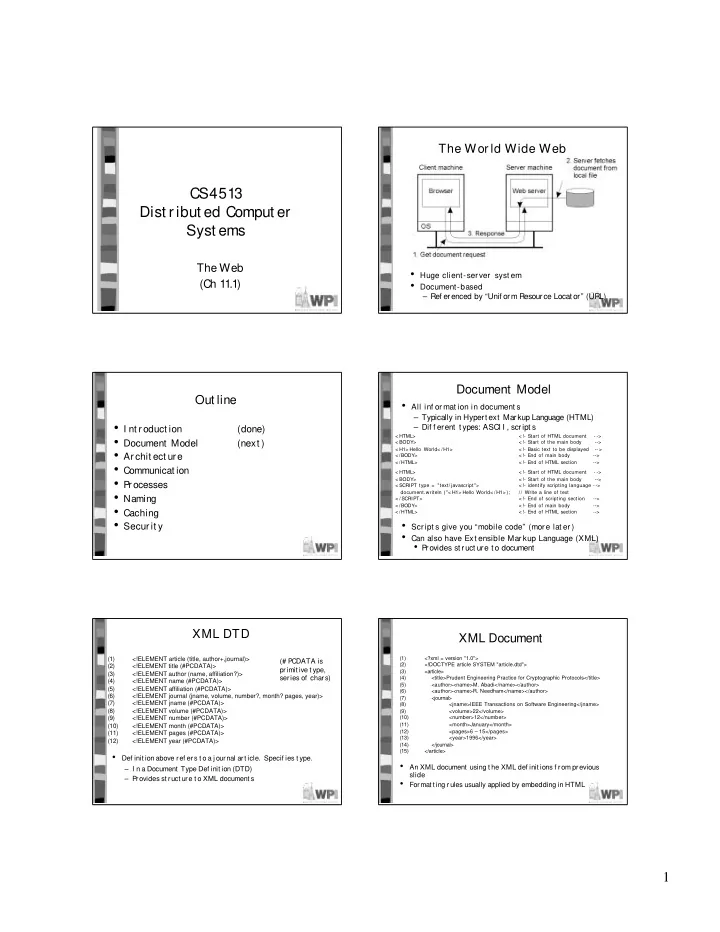
  • Huge client-ser ver syst em
  • Document-based

– Ref erenced by “Unif orm Resource Locat or” (URL)

Out line

  • I nt roduct ion

(done)

  • Document Model

(next )

  • Archit ect ure
  • Communicat ion
  • P

rocesses

  • Naming
  • Caching
  • Secur it y

Document Model

< HTML> < !- Start of HTML document - -> < BODY> < !- Start of the main body --> < H1> Hello World< /H1> < !- Basic text to be displayed -- > < /BODY> < !- End of main body

  • ->

< /HTML> < !- End of HTML section

  • ->

< HTML> < !- Start of HTML document - -> < BODY> < !- Start of the main body --> < SCRIPT type = "text/javascript"> < !- identify scripting language - -> document.writeln ("< H1> Hello World< /H1> ); // Write a line of text < / SCRIPT> < !- End of scripting section

  • ->

< /BODY> < !- End of main body

  • ->

< /HTML> < !- End of HTML section

  • ->
  • All inf or mat ion in document s

– Typically in Hypert ext Markup Language (HTML) – Dif f erent t ypes: ASCI I , script s

  • Scr ipt s give you “mobile code” (mor e lat er )
  • Can also have Ext ensible Mar kup Language (XML)
  • P

rovides st ruct ure t o document

(1) <!ELEMENT article (title, author+,journal)> (2) <!ELEMENT title (#PCDATA)> (3) <!ELEMENT author (name, affiliation?)> (4) <!ELEMENT name (#PCDATA)> (5) <!ELEMENT affiliation (#PCDATA)> (6) <!ELEMENT journal (jname, volume, number?, month? pages, year)> (7) <!ELEMENT jname (#PCDATA)> (8) <!ELEMENT volume (#PCDATA)> (9) <!ELEMENT number (#PCDATA)> (10) <!ELEMENT month (#PCDATA)> (11) <!ELEMENT pages (#PCDATA)> (12) <!ELEMENT year (#PCDATA)>

XML DTD

  • Def init ion above ref ers t o a j ournal art icle. Specif ies t ype.

– I n a Document Type Def init ion (DTD) – P rovides st ruct ure t o XML document s (# P CDATA is primit ive t ype, series of chars)

XML Document

  • An XML document using t he XML def init ions f rom previous

slide

  • Format t ing rules usually applied by embedding in HTML

(1) <?xml = version "1.0"> (2) <!DOCTYPE article SYSTEM "article.dtd"> (3) <article> (4) <title>Prudent Engineering Practice for Cryptographic Protocols</title> (5) <author><name>M. Abadi</name></author> (6) <author><name>R. Needham</name></author> (7) <journal> (8) <jname>IEEE Transactions on Software Engineering</jname> (9) <volume>22</volume> (10) <number>12</number> (11) <month>January</month> (12) <pages>6 – 15</pages> (13) <year>1996</year> (14) </journal> (15) </article>

slide-2
SLIDE 2

2

Document Types

  • Beyond t ext can include ot her t ypes

– Mult ipurpose I nt ernet Mail Ext ensions (MI ME)

Multipart Representation of a pointer device for presentations Pointer Video Audio Image Text Parts must be viewed simultaneously Parallel Independent parts in the specified order Mixed A printable document in PDF PDF A printable document in Postscript Postscript An uninterrupted byte sequence Octet

  • stream

Application Movie in MPEG format MPEG A specific audible tone Tone Audio, 8 -bit PCM sampled at 8000 Hz Basic Still image in JPEG format JPEG Still image in GIF format GIF Text including XML markup commands XML Text including HTML markup commands HTML Unformatted text Plain Description Subtype Type

  • I ncludes t ypes and sub-t ypes
  • Applicat ion specif ies applicat ion-specif ic dat a t ype

Out line

  • I nt roduct ion

(done)

  • Document Model

(done)

  • Archit ect ure

(next )

  • Communicat ion
  • P

rocesses

  • Naming
  • Caching
  • Secur it y

Ar chit ect ur al Over view

  • Text document s t ypically “pr ocessed” on client

– But can be done at server, t oo

  • Common Gat eway I nt erf ace (CGI )

(often with user input ie- form)

Server -Side Script s

  • Like Client , Ser ver can execut e J avaScr ipt

(1) <HTML> (2) <BODY> (3) <P>The current content of <pre>/data/file.txt</PRE>is:</P> (4) <P> (5) <SERVER type = "text/javascript"); (6) clientFile = new File("/data/file.txt"); (7) if(clientFile.open("r")){ (8) while (!clientFile.eof()) (9) document.writeln(clientFile.readln()); (10) clientFile.close(); (11) } (12) </SERVER> (13) </P> (14) <P>Thank you for visiting this site.</P> (15) </BODY> (16) </HTML>

(The t ag < SERVER… > is syst em specif ic)

  • Ser ver can also pass pr e
  • compiled code applet

<OBJECT codetype=“application/java” classid=“java.welcome.class”>

  • Servlet s ar e applet s t hat r un on t he ser ver side

Overall Archit ect ural Overview Out line

  • I nt roduct ion

(done)

  • Document Model

(done)

  • Archit ect ure

(done)

  • Communicat ion

(next )

  • P

rocesses

  • Naming
  • Caching
  • Secur it y
slide-3
SLIDE 3

3

HTTP Connect ions

  • TCP

connect ion set up expensive a) Using nonpersist ent connect ions (HTTP 1.0) b) Using persist ent connect ions (HTTP 1.1)

  • Can also have request s in parallel
  • Communication based on Hypertext Transfer Protocol (HTTP)
  • client request, server reply protocol
  • uses TCP (why?_

HTTP Met hods

  • Head used t o ver if y obj ect , get t ime modif ied
  • Get can also r et r ieve only if mat ches t ags
  • Put

and Delet e used only if aut hor ized (secur it y lat er )

Request t o delet e a document Delet e Provide dat a t hat is t o be added t o a document (collect ion) Post Request t o st ore a document P ut Request t o ret urn a document t o t he client G et Request t o ret urn t he header of a document Head Description Operation

HTTP Messages: Client Server

  • Request line r equir ed
  • (Slide of addit ional header s lat er )

HTTP Messages: Ser verClient

  • St at us code indicat es r esponse

– 200 means honor request (“OK”) – 400 (“Bad Request ”) – 403 (“Forbidden”) – 404 (“Not Found”)

HTTP Addit ional Headers

Information about the status of the data Both Warning App protocol the sender wants to switch to Both Upgrade Client's most recently requested document Client Referer Reference to which the client should redirect Server Location Time the returned document was last modified Server Last-Modified Return a document only if it has not been modified since the specified time Client If-Unmodified- Since Only return a document if newly modified Client If-Modified- Since The tags the document should not have Client If-None-Match The tags the document should have Client If-Match The TCP address of the document's server Client Host The client's e -mail address Client From The time how long the response remains valid Server Expires Tags associated with the returned document Server ETag Date and time the message was sent Both Date Security challenge to the client Server WWW-Auth A list of the client's credentials Client Authorization The natural language the client can handle Client Accept-Language Document encodings the client can handle Client Accept-Encoding Character sets are acceptable for the client Client Accept-Charset The type of documents the client can handle Client Accept Contents Source Header

  • Augment

Client request

  • r Server

Response

  • Accept encoding
  • f gzip
  • Upgrade to

Secure HTTP

  • Redirectfor

load balance

Out line

  • I nt roduct ion

(done)

  • Document Model

(done)

  • Archit ect ure

(done)

  • Communicat ion

(done)

  • P

rocesses (next )

  • Naming
  • Caching
  • Secur it y
slide-4
SLIDE 4

4

Client Process: Ext ensible Browser

  • Need client browser t o be ext ensible

– Plug-in – Associat ed wit h document t ype (MI ME t ype)

Client -Side Process: Web Proxy

  • I nit ially, handle connect ion when browser does not “speak”

language

  • I nit ially, handle connect ion when browser does not “speak”

language

  • Now, most browsers can handle, but proxies st ill popular f or

common cache f or many browsers

  • NZ, AOL

Ser ver s

  • Cor e invokes modules wit h dat a

– Act ual module pat h depends upon dat a t ype

  • P

hases: – aut hent icat ion, response, synt ax checking, user- prof ile, t ransmission

  • Ext end ser ver t o suppor t dif f er ent t ypes (PHP)

Ser ver Clust er s (1)

  • Fr ont -end replicat es request t o back-end (horizont al

dist ribut ion)

  • Single server can become heavily loaded

Ser ver Clust er s (2)

  • The pr inciple of TCP handof f

– But can’t t ake advant age of document knowledge or caching – But higher -layer has t o do more work, making f ront -end a bot t leneck

Ser ver Clust er s (3)

  • Dist r ibut or t alks t o dispat cher init ially, t hen

hands of f connect ion

  • Fr ont-end swit ch can st ay at TCP layer , t old wher e

t o send dat a

slide-5
SLIDE 5

5

Out line

  • I nt roduct ion

(done)

  • Document Model

(done)

  • Archit ect ure

(done)

  • Communicat ion

(done)

  • P

rocesses (done)

  • Naming

(naming)

  • Caching
  • Secur it y

Unif orm Resource Locat ors

  • Locat ion-specif ic document locat ion.

a) Using only a DNS name (lookup I P , def ault port ) b) Combining a DNS name wit h a port number (lookup I P ). c) Combining an I P address wit h a port number.

  • Not e: t ricks wit h DNS f or load balancing

URL Examples

modem:+31201234567;type=v32 Modem modem tel:+31201234567 Telephone tel telnet://flits.cs.vu.nl Remote login telnet

data:text/plain;charset=iso-8859-7,%e1%e2%e3

Inline data data file:/edu/book/work/chp/11/11 Local file file ftp://ftp.cs.vu.nl/pup/minx/README FTP ftp http://www.cs.vu.nl:80/globe HTTP http Example Used for Scheme Name

Unif orm Resource Names (URN)

  • Locat ion independent document

specif icat ion

  • Easy t o def ine name spaces, but hard t o

resolve

  • No gener al mechanisms
  • URL + URN = URI
  • Unif or m Resour ce I dent if ier

Out line

  • I nt roduct ion

(done)

  • Document Model

(done)

  • Archit ect ure

(done)

  • Communicat ion

(done)

  • P

rocesses (done)

  • Naming

(done)

  • Caching

(next )

  • Secur it y

Web Caching

  • Browser keeps recent request s

– Proxy can be valuable if shared int erest s

  • Check cache f irst , server next
  • Cache is f ull. How t o decide replacement ?

– LRU (what is dif f erent t han pages or disk blocks?) – GreedyDual (value divided by size)

  • How consist ent should t he cache be t o t he

server cont ent ? What are t he t radeof f s?

slide-6
SLIDE 6

6

Cache Coherency

  • St r ong consist ency

– validat e each access – server indicat es if invalid – but requires request t o server f or each client request

  • Weak consist ency

– validat e only when client clicks “ref resh” – Or, using a heurist ic Time To Live (TTL)

  • Squid Texpire = α(Tcached – Tlast _modif ied) + Tcached
  • α = 0.2 (derived f rom pract ice)
  • Why not have ser ver push invalidat ion?
  • I n pr act ice, cache hit s low (50% max, only if r eally

large) – Make “cooperat ive” caches

Cooperat ive Web Proxy Caching

  • P

roxy f irst checks neighbors bef ore asking server – Shown ef f ect ive f or 10,000 + user

  • But complicat ed, and of t en not a clear win over single

proxy

Misc Caching

  • St at ic vs. Dynamic Document s

– Caching only ef f ect ive f or st at ic document s (non CGI )

  • But Web incr easingly dynamic (per sonalized)
  • Cookies used since ser ver (most ly) st at eless

– Make proxies support act ive caching

  • Gener at e t he HTML
  • Need copies of ser ver - side scr ipt s/ code
  • Accessing dat abases har der
  • Caching large document s

– Can only send changes f rom original – Of t en, connect ion request is t he large cost

Server Replicat ion

  • Clust ers (covered)
  • Deploy ent ire copy of Web sit e at anot her

sit e (mirror)

– Of t en done wit h FTP servers – Non-t ransparent

  • Cont ent Delivery Net work (CDN)

– Have net work of cooperat ive caches run by t he provider

Akamai CDN

  • Embedded document s have names t hat are resolved by

Akamai DNS t o a local CDN server – Use I nt ernet “map” t o det ermine local server

  • Local server get s copy f rom original server
  • Akamai has many CDN servers “close” t o client s

(“Close” CDN Server r esolved by DNS)

Out line

  • I nt roduct ion

(done)

  • Document Model

(done)

  • Archit ect ure

(done)

  • Communicat ion

(done)

  • P

rocesses (done)

  • Naming

(done)

  • Caching

(done)

  • Secur it y

(next )

– Secur e Socket Layer (SSL)

slide-7
SLIDE 7

7

Securit y: Secure Communicat ion Channel

  • Need secur e channel f or t r ansact ions

– Net scape’s Secure Socket Layer (SSL) – More recent Transport Securit y Layer (TSL)

  • Applicat ion independent
  • Sit s above t ransport layer
  • I nvoked by scheme “ht t ps”

Est ablishing an SSL connect ion

1. Client sends SSL version number, cipher set t ings, randomly gener at ed dat a and ot her inf or mat ion ser ver needs. 2. Server sends server SSL version number, cipher set t ings, r andomly gener at ed dat a, ser ver s own cer t if icat e.

  • (Opt ional) Ser ver may r equest client ' s cer t if icat e. Client

aut hent icat es ser ver cer t if icat e by using public key of cert if icat e aut horit y (CA) 3. Client cr eat espremast er key f or session and encr ypt s it wit h servers public key (obt ained f rom server' s cert if icat e) and sends t o server.

  • (Opt ional) Client sends encr ypt ed dat a based on own pr ivat e

key if client needs aut hent icat ion. 4. Server generat es mast er secret , sends t o ser ver 5. Bot h client and server use mast er secret t o generat e session keys, which ar e symmet r ic keys f or encr ypt ion/ decr ypt ion of exchanged inf or mat ion dur ing SSL session. 6. Client and ser ver inf or m each ot her session key has been cr eat ed. 7. SSL handshake is complet e.