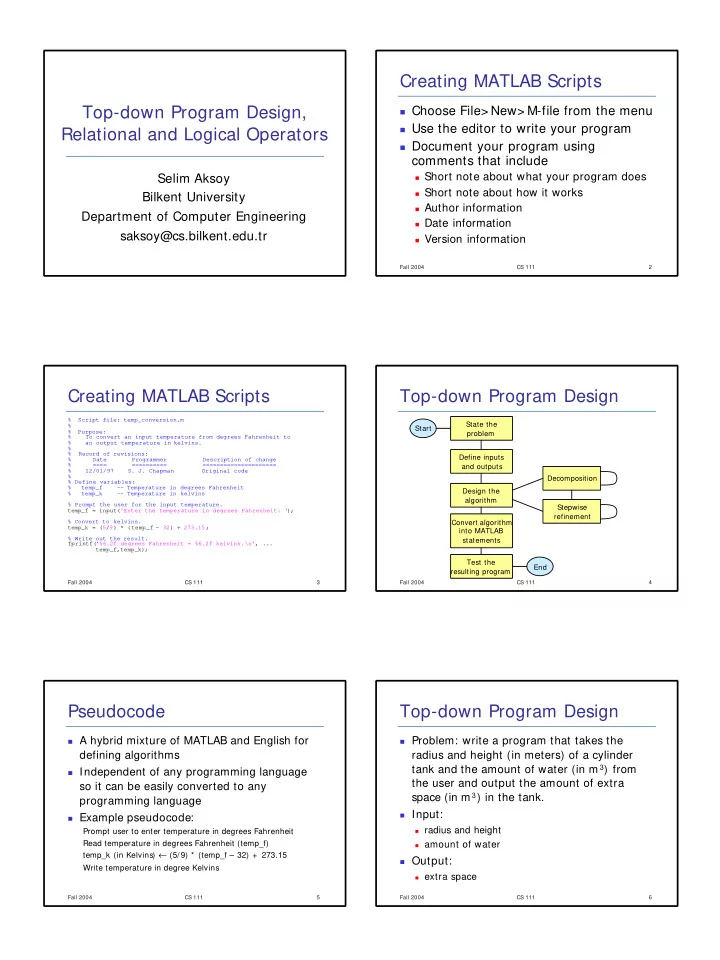
Creating MATLAB Scripts Top-down Program Design, Choose File> - - PDF document

creating matlab scripts top down program design
SMART_READER_LITE
LIVE PREVIEW

Creating MATLAB Scripts Top-down Program Design, Choose File> - - PDF document

Creating MATLAB Scripts Top-down Program Design, Choose File> New> M-file from the menu Use the editor to write your program Relational and Logical Operators Document your program using comments that include Short note about


slide-1
SLIDE 1

Top-down Program Design, Relational and Logical Operators

Selim Aksoy Bilkent University Department of Computer Engineering saksoy@cs.bilkent.edu.tr

Fall 2004 CS 111 2

Creating MATLAB Scripts

Choose File> New> M-file from the menu Use the editor to write your program Document your program using

comments that include

Short note about what your program does Short note about how it works Author information Date information Version information Fall 2004 CS 111 3

Creating MATLAB Scripts

% Script file: temp_conversion.m % % Purpose: % To convert an input temperature from degrees Fahrenheit to % an output temperature in kelvins. % % Record of revisions: % Date Programmer Description of change % ==== ========== ===================== % 12/01/97 S. J. Chapman Original code % % Define variables: % temp_f

  • - Temperature in degrees Fahrenheit

% temp_k

  • - Temperature in kelvins

% Prompt the user for the input temperature. temp_f = input('Enter the temperature in degrees Fahrenheit: '); % Convert to kelvins. temp_k = (5/9) * (temp_f - 32) + 273.15; % Write out the result. fprintf('%6.2f degrees Fahrenheit = %6.2f kelvins.\n', ... temp_f,temp_k); Fall 2004 CS 111 4

Top-down Program Design

Start State the problem Define inputs and outputs Design the algorithm Convert algorithm into MATLAB statements Test the resulting program End Decomposition Stepwise refinement

Fall 2004 CS 111 5

Pseudocode

A hybrid mixture of MATLAB and English for

defining algorithms

Independent of any programming language

so it can be easily converted to any programming language

Example pseudocode:

Prompt user to enter temperature in degrees Fahrenheit Read temperature in degrees Fahrenheit (temp_f) temp_k (in Kelvins) ← (5/9) * (temp_f – 32) + 273.15 Write temperature in degree Kelvins

Fall 2004 CS 111 6

Top-down Program Design

Problem: write a program that takes the

radius and height (in meters) of a cylinder tank and the amount of water (in m 3) from the user and output the amount of extra space (in m 3) in the tank.

Input:

radius and height amount of water

Output:

extra space

slide-2
SLIDE 2

Fall 2004 CS 111 7

Top-down Program Design

  • Design:

1.

Get radius of the tank base from the user

2.

Get the height of the tank from the user

3.

Get the amount of water

4.

Calculate the amount of extra space

5.

Write the result

  • Step 4 is not clear enough, refine it:
  • Calculate the capacity of the tank

(pi * radius^ 2 * h)

  • extra space ← capacity - water

Fall 2004 CS 111 8

Top-down Program Design

Code:

r = input('Enter the radius of the tank base:'); h = input('Enter the height of the tank:'); water = input('Enter the amount of water:'); capacity = pi * r^2 * h; space = capacity - water; fprintf('There is %f m3 extra space in the tank', space);

Fall 2004 CS 111 9

Top-down Program Design

Testing:

Enter the radius of the tank base:2 Enter the height of the tank:5 Enter the amount of water:10 There is 52.831853 m3 extra space in the tank

Continue testing:

Enter the radius of the tank base:2 Enter the height of the tank:5 Enter the amount of water:100 There is -37.168147 m3 extra space in the tank

Fall 2004 CS 111 10

Top-down Program Design

Design: refine step 4 again

Calculate the capacity of the tank

(pi * radius^ 2 * h)

extra space ← ((capacity – water) +

abs(capacity – water))/2

Fall 2004 CS 111 11

Relational Operators

Relational operators are used to

represent conditions (such as “space ≤ 0” in the water tank example)

Result of the condition is either true or

false

In MATLAB:

false is represented by 0 true is represented by 1 (non-zero) Fall 2004 CS 111 12

Relational Operators

3 = = 4 1 3 ~ = 4 1 ‘A’ < ‘B’ 1 4 > = 4 3 > 4 1 3 < = 4 1 3 < 4

Result Operation

slide-3
SLIDE 3

Fall 2004 CS 111 13

Relational Operators

Don’t confuse equivalance (= = ) with

assignment (= )

Be careful about roundoff errors during

numeric comparisons (you can represent “x = = y” as “ abs(x-y) < eps”)

Relational operations have lower priority

than arithmetic operations (use parentheses to be safe, though)

Fall 2004 CS 111 14

Logical Operators

More complex conditions can be

represented by combining relational

  • perations using logic operators

Logical operators:

& AND | OR xor Exclusive OR ~ NOT

Fall 2004 CS 111 15

Logical Operators

1 1 1 1 1 1 1 1 1 1 1 1

~ a xor(a,b) a | b a & b b a not xor

  • r

and input

Fall 2004 CS 111 16

Operator Hierarchy

Processing order of operations:

parenthesis (starting from the innermost) exponentials (left to right) multiplications and divisions (left to right) additions and subtractions (left to right) relational operators (left to right) ~ operators & operators (left to right) | operators (left to right)