Correction/News News Midterm Grading CPSC 314 Computer Graphics - - PowerPoint PPT Presentation

correction news news midterm grading
SMART_READER_LITE
LIVE PREVIEW

Correction/News News Midterm Grading CPSC 314 Computer Graphics - - PowerPoint PPT Presentation

University of British Columbia Correction/News News Midterm Grading CPSC 314 Computer Graphics Homework 2 was posted Wed midterms returned Jan-Apr 2007 due Fri Mar 2 project 2 out Tamara Munzner Project 2 out today


slide-1
SLIDE 1

University of British Columbia CPSC 314 Computer Graphics Jan-Apr 2007 Tamara Munzner http://www.ugrad.cs.ubc.ca/~cs314/Vjan2007

Lighting/Shading II Week 6, Fri Feb 16

2

Correction/News

  • Homework 2 was posted Wed
  • due Fri Mar 2
  • Project 2 out today
  • due Mon Mar 5

3

News

  • midterms returned
  • project 2 out

4

Midterm Grading

5

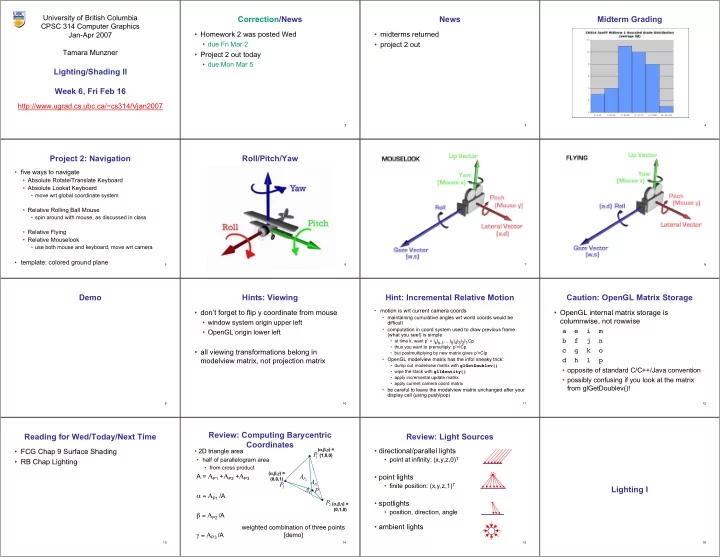
Project 2: Navigation

  • five ways to navigate
  • Absolute Rotate/Translate Keyboard
  • Absolute Lookat Keyboard
  • move wrt global coordinate system
  • Relative Rolling Ball Mouse
  • spin around with mouse, as discussed in class
  • Relative Flying
  • Relative Mouselook
  • use both mouse and keyboard, move wrt camera
  • template: colored ground plane

6

Roll/Pitch/Yaw

7 8 9

Demo

10

Hints: Viewing

  • don’t forget to flip y coordinate from mouse
  • window system origin upper left
  • OpenGL origin lower left
  • all viewing transformations belong in

modelview matrix, not projection matrix

11

Hint: Incremental Relative Motion

  • motion is wrt current camera coords
  • maintaining cumulative angles wrt world coords would be

difficult

  • computation in coord system used to draw previous frame

(what you see!) is simple

  • at time k, want p' = IkIk-1….I5I4I3I2I1Cp
  • thus you want to premultiply: p’=ICp
  • but postmultiplying by new matrix gives p’=CIp
  • OpenGL modelview matrix has the info! sneaky trick:
  • dump out modelview matrix with glGetDoublev()
  • wipe the stack with glIdentity()
  • apply incremental update matrix
  • apply current camera coord matrix
  • be careful to leave the modelview matrix unchanged after your

display call (using push/pop)

12

Caution: OpenGL Matrix Storage

  • OpenGL internal matrix storage is

columnwise, not rowwise a e i m b f j n c g k o d h l p

  • opposite of standard C/C++/Java convention
  • possibly confusing if you look at the matrix

from glGetDoublev()!

13

Reading for Wed/Today/Next Time

  • FCG Chap 9 Surface Shading
  • RB Chap Lighting

14

Review: Computing Barycentric Coordinates

  • 2D triangle area
  • half of parallelogram area
  • from cross product

A = ΑP1 +ΑP2 +ΑP3 α = ΑP1 /A β = ΑP2 /A γ = ΑP3 /A

3

P

A

1

P

3

P

2

P P

( (α,β,γ α,β,γ) = ) = (1,0,0) (1,0,0) ( (α,β,γ α,β,γ) = ) = (0,1,0) (0,1,0) ( (α,β,γ α,β,γ) = ) = (0,0,1) (0,0,1)

2

P

A

1

P

A weighted combination of three points [demo]

15

Review: Light Sources

  • directional/parallel lights
  • point at infinity: (x,y,z,0)T
  • point lights
  • finite position: (x,y,z,1)T
  • spotlights
  • position, direction, angle
  • ambient lights

16

Lighting I

slide-2
SLIDE 2

17

Light Source Placement

  • geometry: positions and directions
  • standard: world coordinate system
  • effect: lights fixed wrt world geometry
  • demo:

http://www.xmission.com/~nate/tutors.html

  • alternative: camera coordinate system
  • effect: lights attached to camera (car headlights)
  • points and directions undergo normal

model/view transformation

  • illumination calculations: camera coords

18

Types of Reflection

  • specular (a.k.a. mirror or regular) reflection causes

light to propagate without scattering.

  • diffuse reflection sends light in all directions with

equal energy.

  • mixed reflection is a weighted

combination of specular and diffuse.

19

Types of Reflection

  • retro-reflection occurs when incident energy

reflects in directions close to the incident direction, for a wide range of incident directions.

  • gloss is the property of a material surface

that involves mixed reflection and is responsible for the mirror like appearance of rough surfaces.

20

Reflectance Distribution Model

  • most surfaces exhibit complex reflectances
  • vary with incident and reflected directions.
  • model with combination

+ + =

specular + glossy + diffuse = reflectance distribution

21

Surface Roughness

  • at a microscopic scale, all

real surfaces are rough

  • cast shadows on

themselves

  • “mask” reflected light:

shadow shadow Masked Light

22

Surface Roughness

  • notice another effect of roughness:
  • each “microfacet” is treated as a perfect mirror.
  • incident light reflected in different directions by

different facets.

  • end result is mixed reflectance.
  • smoother surfaces are more specular or glossy.
  • random distribution of facet normals results in diffuse

reflectance.

23

Physics of Diffuse Reflection

  • ideal diffuse reflection
  • very rough surface at the microscopic level
  • real-world example: chalk
  • microscopic variations mean incoming ray of

light equally likely to be reflected in any direction over the hemisphere

  • what does the reflected intensity depend on?

24

Lambert’s Cosine Law

  • ideal diffuse surface reflection

the energy reflected by a small portion of a surface from a light source in a given direction is proportional to the cosine

  • f the angle between that direction and the surface normal
  • reflected intensity
  • independent of viewing direction
  • depends on surface orientation wrt light
  • often called Lambertian surfaces

25

Lambert’s Law

intuitively: cross-sectional area of the “beam” intersecting an element

  • f surface area is smaller for greater

angles with the normal.

26

Computing Diffuse Reflection

  • depends on angle of incidence: angle between surface

normal and incoming light

  • Idiffuse = kd Ilight cos θ
  • in practice use vector arithmetic
  • Idiffuse = kd Ilight (n • l)
  • always normalize vectors used in lighting!!!
  • n, l should be unit vectors
  • scalar (B/W intensity) or 3-tuple or 4-tuple (color)
  • kd: diffuse coefficient, surface color
  • Ilight: incoming light intensity
  • Idiffuse: outgoing light intensity (for diffuse reflection)

n l θ

27

Diffuse Lighting Examples

  • Lambertian sphere from several lighting

angles:

  • need only consider angles from 0° to 90°
  • [demo] Brown exploratory on reflection
  • http://www.cs.brown.edu/exploratories/freeSoftware/repository/edu/brown/cs/

exploratories/applets/reflection2D/reflection_2d_java_browser.html

28

diffuse diffuse plus specular

Specular Reflection

  • shiny surfaces exhibit specular reflection
  • polished metal
  • glossy car finish
  • specular highlight
  • bright spot from light shining on a specular surface
  • view dependent
  • highlight position is function of the viewer’s position

29

Specular Highlights

Michiel van de Panne

30

Physics of Specular Reflection

  • at the microscopic level a specular reflecting

surface is very smooth

  • thus rays of light are likely to bounce off the

microgeometry in a mirror-like fashion

  • the smoother the surface, the closer it

becomes to a perfect mirror

31

Optics of Reflection

  • reflection follows Snell’s Law:
  • incoming ray and reflected ray lie in a plane

with the surface normal

  • angle the reflected ray forms with surface

normal equals angle formed by incoming ray and surface normal θ(l)ight = θ(r)eflection

32

Non-Ideal Specular Reflectance

  • Snell’s law applies to perfect mirror-like surfaces,

but aside from mirrors (and chrome) few surfaces exhibit perfect specularity

  • how can we capture the “softer” reflections of

surface that are glossy, not mirror-like?

  • one option: model the microgeometry of the

surface and explicitly bounce rays off of it

  • or…
slide-3
SLIDE 3

33

Empirical Approximation

  • we expect most reflected light to travel in

direction predicted by Snell’s Law

  • but because of microscopic surface

variations, some light may be reflected in a direction slightly off the ideal reflected ray

  • as angle from ideal reflected ray increases,

we expect less light to be reflected

34

Empirical Approximation

  • angular falloff
  • how might we model this falloff?

35

  • nshiny : purely empirical

constant, varies rate of falloff

  • ks: specular coefficient,

highlight color

  • no physical basis, works
  • k in practice

v

Ispecular = ksIlight(cosφ)nshiny Phong Lighting

  • most common lighting model in computer

graphics

  • (Phong Bui-Tuong, 1975)

36

Phong Lighting: The nshiny Term

  • Phong reflectance term drops off with divergence of viewing angle from

ideal reflected ray

  • what does this term control, visually?

Viewing angle – reflected angle

37

Phong Examples

varying l varying nshiny

38

Calculating Phong Lighting

  • compute cosine term of Phong lighting with vectors
  • v: unit vector towards viewer/eye
  • r: ideal reflectance direction (unit vector)
  • ks: specular component
  • highlight color
  • Ilight: incoming light intensity
  • how to efficiently calculate r ?

v

Ispecular = ksIlight(v•r)nshiny

39

Calculating R Vector

P = N cos θ = projection of L onto N

L P N

θ

40

Calculating R Vector

P = N cos θ = projection of L onto N P = N ( N · L )

L P N

θ

41

Calculating R Vector

P = N cos θ |L| |N| projection of L onto N P = N cos θ L, N are unit length P = N ( N · L )

L P N

θ

42

Calculating R Vector

P = N cos θ |L| |N| projection of L onto N P = N cos θ L, N are unit length P = N ( N · L ) 2 P = R + L 2 P – L = R 2 (N ( N · L )) - L = R

L P P R L N

θ

43

Phong Lighting Model

  • combine ambient, diffuse, specular components
  • commonly called Phong lighting
  • once per light
  • once per color component
  • reminder: normalize your vectors when calculating!

Itotal = ksIambient + Ii(

i=1 #lights

kd(n•li) + ks(v•ri)nshiny )

44

Phong Lighting: Intensity Plots

45

Blinn-Phong Model

  • variation with better physical interpretation
  • Jim Blinn, 1977
  • h: halfway vector
  • h must also be explicitly normalized: h / |h|
  • highlight occurs when h near n

l l n n v v h h Iout(x) = ks(h•n)nshiny • Iin(x);with h = (l + v)/2

46

Light Source Falloff

  • quadratic falloff
  • brightness of objects depends on power per

unit area that hits the object

  • the power per unit area for a point or spot light

decreases quadratically with distance

Area Area 4 4π πr r2

2

Area Area 4 4π π(2 (2r) r)2

2

47

Light Source Falloff

  • non-quadratic falloff
  • many systems allow for other falloffs
  • allows for faking effect of area light sources
  • OpenGL / graphics hardware
  • Io: intensity of light source
  • x: object point
  • r: distance of light from x

2

1 ) ( I c br ar Iin ⋅ + + = x

48

Lighting Review

  • lighting models
  • ambient
  • normals don’t matter
  • Lambert/diffuse
  • angle between surface normal and light
  • Phong/specular
  • surface normal, light, and viewpoint
slide-4
SLIDE 4

49

Lighting in OpenGL

  • light source: amount of RGB light emitted
  • value represents percentage of full intensity

e.g., (1.0,0.5,0.5)

  • every light source emits ambient, diffuse, and specular

light

  • materials: amount of RGB light reflected
  • value represents percentage reflected

e.g., (0.0,1.0,0.5)

  • interaction: multiply components
  • red light (1,0,0) x green surface (0,1,0) = black (0,0,0)

50

Lighting in OpenGL

glLightfv(GL_LIGHT0, GL_AMBIENT, amb_light_rgba ); glLightfv(GL_LIGHT0, GL_DIFFUSE, dif_light_rgba ); glLightfv(GL_LIGHT0, GL_SPECULAR, spec_light_rgba ); glLightfv(GL_LIGHT0, GL_POSITION, position); glEnable(GL_LIGHT0); glMaterialfv( GL_FRONT, GL_AMBIENT, ambient_rgba ); glMaterialfv( GL_FRONT, GL_DIFFUSE, diffuse_rgba ); glMaterialfv( GL_FRONT, GL_SPECULAR, specular_rgba ); glMaterialfv( GL_FRONT, GL_SHININESS, n );

  • warning: glMaterial is expensive and tricky
  • use cheap and simple glColor when possible
  • see OpenGL Pitfall #14 from Kilgard’s list

http://www.opengl.org/resources/features/KilgardTechniques/oglpitfall/