Consumer IoT is vaporware. 1 Consumer IoT is vaporware. 2 So far - - PowerPoint PPT Presentation

consumer iot is vaporware
SMART_READER_LITE
LIVE PREVIEW

Consumer IoT is vaporware. 1 Consumer IoT is vaporware. 2 So far - - PowerPoint PPT Presentation

Consumer IoT is vaporware. 1 Consumer IoT is vaporware. 2 So far no truly compelling applica;on with mass appeal has been found. 4 Consumer reports paint a consistent picture. 41 percent feel strongly that the smart products theyve


slide-1
SLIDE 1

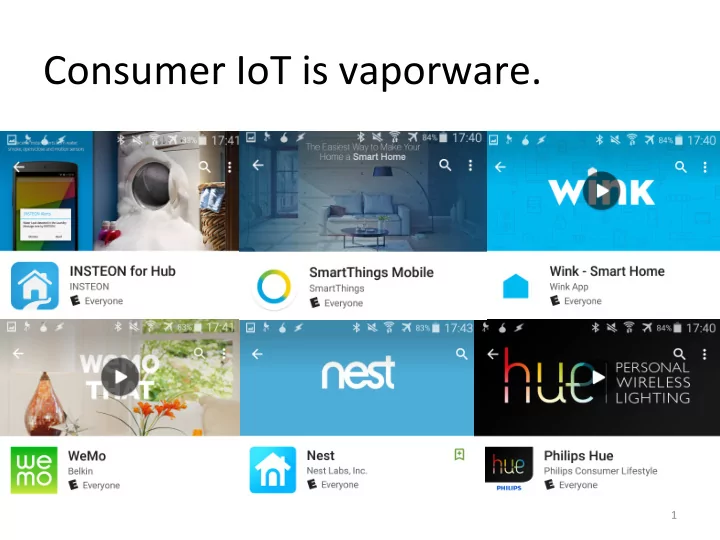
Consumer IoT is vaporware.

1
slide-2
SLIDE 2

Consumer IoT is vaporware.

2

slide-3
SLIDE 3
slide-4
SLIDE 4

So far no truly compelling applica;on with mass appeal has been found.

4

slide-5
SLIDE 5

Consumer reports paint a consistent picture.

  • 41 percent feel strongly that the smart

products they’ve seen or heard about have just been gimmicky.

  • 58 percent feel strongly that they won’t

upgrade to smart products unless they offer real value.

5

The Internet of Things: Can it find a foothold with mainstream audiences today? Affinova industry report, 2014

slide-6
SLIDE 6

Consumer reports paint a consistent picture.

  • 41 percent feel strongly that the smart

products they’ve seen or heard about have just been gimmicky.

  • 58 percent feel strongly that they won’t

upgrade to smart products unless they offer real value.

6

The Internet of Things: Can it find a foothold with mainstream audiences today? Affinova industry report, 2014

slide-7
SLIDE 7

What offers consumers real value?

7

The Internet of Things: Can it find a foothold with mainstream audiences today? Affinova industry report, 2014

slide-8
SLIDE 8

What offers consumers real value?

  • 92 percent say it’s very difficult to pinpoint

what they’d want from smart objects, but feel that they’ll know it when they see it.

8

The Internet of Things: Can it find a foothold with mainstream audiences today? Affinova industry report, 2014

slide-9
SLIDE 9

What if past consumer behavior has already iden;fied the killer app?

9

slide-10
SLIDE 10

The Killer App: Social communica8on!

10

slide-11
SLIDE 11

The Killer App: Social communica8on!

11

slide-12
SLIDE 12

Social communica;on dominates rankings of the most popular smartphone apps.

12

Derived from “Top 25 Mobile Apps by Unique Visitors” comScore Mobile Metrix, U.S., Age 18+, June 2014

slide-13
SLIDE 13

People spend the most ;me in social apps.

13

slide-14
SLIDE 14

Instead of IoT within homes, the killer app will come from IoT between homes.

14

The smart and connected home The socially-connected home

slide-15
SLIDE 15

The point of this talk is to bring social applicaDons into the smart home discourse.

  • Ligh;ng
  • Climate
  • Energy
  • Entertainment
  • Security

15

slide-16
SLIDE 16

The point of this talk is to bring social applicaDons into the smart home discourse.

  • Ligh;ng
  • Climate
  • Energy
  • Entertainment
  • Security
  • Social

16

slide-17
SLIDE 17

Ghos8ng: Virtual Shared Living

Imagine a life-long friend of yours who lives far away.

  • Hear him walk from room to room.
  • Hear him making sounds in around the corner.
  • See him turn lights on and off in other rooms.
  • Hear him shout to you from across the house.
  • Join him in the room he is occupying and chat.

Ghos;ng works by synchronizing audio and ligh;ng contexts at a room level.

17

slide-18
SLIDE 18

Ghos8ng: Virtual Shared Living

Imagine a life-long friend of yours who lives far away.

  • Hear him walk from room to room.
  • Hear him making sounds in around the corner.
  • See him turn lights on and off in other rooms.
  • Hear him shout to you from across the house.
  • Join him in the room he is occupying and chat.

Ghos;ng works by synchronizing audio and ligh;ng at a room level.

18

slide-19
SLIDE 19

Ghos;ng is useful for many people.

  • Diaspora of family and friends
  • Long-distance rela;onships
  • Older popula;on aging in place

19

slide-20
SLIDE 20

Ghos;ng: A typical use case

20

B A

slide-21
SLIDE 21

Ghos;ng: A typical use case

21

B A B A Answer Decline Bob calling…

slide-22
SLIDE 22

Ghos;ng: A typical use case

22

B A B A Answer Decline Bob calling…

slide-23
SLIDE 23

Ghos;ng: A typical use case

23

B A

slide-24
SLIDE 24

Ghos;ng: A typical use case

24

B A

slide-25
SLIDE 25

Ghos;ng: A typical use case

25

B A

slide-26
SLIDE 26

Ghos;ng: A typical use case

26

B A

slide-27
SLIDE 27

Ghos;ng: A typical use case

27

B A

slide-28
SLIDE 28

Ghos;ng: A typical use case

28

B A

slide-29
SLIDE 29

Ghos;ng: A typical use case

29

B A

slide-30
SLIDE 30

Ghos;ng: A typical use case

30

B A

slide-31
SLIDE 31

Ghos;ng: A typical use case

31

B A How are you?

slide-32
SLIDE 32

Ghos;ng: A typical use case

32

B A Great! Working right now.

slide-33
SLIDE 33

Ghos;ng: A typical use case

33

B A Cool! I’m gonna chill then.

slide-34
SLIDE 34

Ghos;ng: A typical use case

34

B A B

slide-35
SLIDE 35

Ghos;ng: A typical use case

35

A B

slide-36
SLIDE 36

Ghos;ng: A typical use case

36

A B *shuffle* *creak* *shuffle* *creak*

slide-37
SLIDE 37

Ghos;ng: A typical use case

37

A B

slide-38
SLIDE 38

Ghos;ng: A typical use case

38

A B

slide-39
SLIDE 39

Ghos;ng: A typical use case

39

A B

slide-40
SLIDE 40

Ghos;ng: A typical use case

40

A B *cooking* *cooking*

slide-41
SLIDE 41

Ghos;ng: A typical use case

41

A B Yak yak Yak yak

slide-42
SLIDE 42

Ghos;ng: A typical use case

42

A B

slide-43
SLIDE 43

Ghos;ng: A typical use case

43

A B Good night!

slide-44
SLIDE 44

Ghos;ng: A typical use case

44

A B You too!

slide-45
SLIDE 45

Ghos;ng: A typical use case

45

A B B A End Call Alice

slide-46
SLIDE 46

Ghos;ng: A typical use case

46

A B B A End Call Alice

slide-47
SLIDE 47

Ghos;ng: A typical use case

47

A B Alice

slide-48
SLIDE 48

Is this creepy?

Yes.

48

slide-49
SLIDE 49

What design points do we need for users to feel comfortable?

49

slide-50
SLIDE 50

What design points do we need for users to feel comfortable?

  • Cura;on

– Sokware TX/RX – Hardware TX/RX

50

B B A End Call Alice

slide-51
SLIDE 51

What design points do we need for users to feel comfortable?

  • Cura;on

– Sokware TX/RX – Hardware TX/RX

  • Visibility

– TX/RX state change è alert – TX/RX current state è at-a-glance

51

slide-52
SLIDE 52

What design points do we need for users to feel comfortable?

  • Cura;on

– Sokware TX/RX – Hardware TX/RX

  • Visibility

– TX/RX state change è alert – TX/RX current state è at-a-glance

  • Telepresence

– ???

52

slide-53
SLIDE 53

We explored the telepresence experience with two deployments.

  • One to test the audio experience
  • One to test mul;-room audio and light

synchroniza;on Qualita;ve evalua;on of the core Ghos;ng experience.

53

slide-54
SLIDE 54

The first deployment focused on audio synchroniza;on.

Synchronized spaces:

  • Quiet 4-person office
  • Loud 10-person lab space

Lek conference call sokware running for three days.

54

slide-55
SLIDE 55

The second deployment focused on mul;- room audio and light synchroniza;on.

55

Maryland Apartment Michigan Apartment

Microphone Speaker Light: Philips Hue Bulb Light: Philips Hue Lightstrip Light: LIFX Bulb Light: Wemo Insight-controlled holiday lights

Living Living Dining Dining Kitchen Kitchen Bedroom Bedroom Bath Bath

slide-56
SLIDE 56

Audio synchroniza;on was performed using Skype and Google Hangouts.

56

Maryland Apartment Michigan Apartment

Microphone Speaker Light: Philips Hue Bulb Light: Philips Hue Lightstrip Light: LIFX Bulb Light: Wemo Insight-controlled holiday lights

Living Living Dining Dining Kitchen Kitchen Bedroom Bedroom Bath Bath

slide-57
SLIDE 57

Light synchroniza;on was performed using a custom stream-processing plaqorm.

57

slide-58
SLIDE 58

We confirmed that the core ghos;ng experience is achievable.

  • Hearing someone walk between rooms
  • Hearing someone from the other room
  • Seeing someone control your lights
  • Need a visual indicator of room occupancy.
  • Need something for speaker to look at.

58

slide-59
SLIDE 59

We found that auditory immersion has several system requirements.

System requirements:

  • Good far-field microphone
  • Direc;onal speakers
  • Audio sokware

– High-fidelity – Stream muxing – Echo cancella;on – Computa;onally efficient – Bandwidth efficient

59

slide-60
SLIDE 60

We found that auditory immersion has several system requirements.

System requirements:

  • Good far-field microphone
  • Direc;onal speakers
  • Audio sokware

– High-fidelity – Stream muxing – Echo cancella;on – Computa;onally efficient – Bandwidth efficient

60

slide-61
SLIDE 61

We found that auditory immersion has several system requirements.

System requirements:

  • Good far-field microphone
  • Direc;onal speakers
  • Audio sokware

– High-fidelity – Stream muxing – Echo cancella;on – Computa;onally efficient – Bandwidth efficient

61

slide-62
SLIDE 62

We found that telepresence has several important components.

Telepresence needs:

  • Presence

System requirements:

  • Remote occupant avatar(s)
  • Indoor localiza;on

62

slide-63
SLIDE 63

We found that telepresence has several important components.

Telepresence needs:

  • Presence
  • Iden;ty

System requirements:

  • Remote occupant avatar(s)
  • Indoor localiza;on

63

slide-64
SLIDE 64

We found that telepresence has several important components.

Telepresence needs:

  • Presence
  • Iden;ty
  • Avatar

System requirements:

  • Remote occupant avatar(s)
  • Indoor localiza;on

64

slide-65
SLIDE 65

We found that telepresence has several important components.

Telepresence needs:

  • Presence
  • Iden;ty
  • Avatar

System requirements:

  • Remote occupant avatar(s)
  • Indoor localiza;on

65

slide-66
SLIDE 66

We found that telepresence has several important components.

Telepresence needs:

  • Presence
  • Iden;ty
  • Avatar

System requirements:

  • Remote occupant avatar(s)
  • Indoor localiza;on

66

PolyPoint DoorJamb

slide-67
SLIDE 67

High-res indoor tracking would enable extensions of the core applica;on.

67

slide-68
SLIDE 68

Now we have our final design points.

  • Cura;on

– Sokware TX/RX – Hardware TX/RX

  • Visibility

– TX/RX state change è alert – TX/RX current state è at-a-glance

  • Telepresence

– Auditory immersion – Occupant tracking (Presence and Iden;ty) – Avatar

68

slide-69
SLIDE 69

What does the final infrastructure look like?

69

  • Computer, mic, and speakers in every room!
  • Ligh;ng control
  • Occupant tracking

Networked to homes with similar capabili;es.

slide-70
SLIDE 70

Ghos;ng infrastructure could result in the emergence of a home-to-home network.

…If we build the infrastructure right!

  • Need an OS

– Hardware abstrac;on layer – Resource-sharing – Access control – Audi;ng logs

  • Keep it P2P and encrypted

70

slide-71
SLIDE 71

A home-to-home network would enable new applica;ons.

  • Home automa;on/AI assistant
  • Burglary deterrence
  • Remote observa;on for home care
  • Immersive games
  • Immersive movies
  • Digital scrapbooking

71

slide-72
SLIDE 72

A home-to-home network would enable new applica;ons.

  • Language and cultural exchange programs
  • ChatRouleue for homes
  • Snapchat for homes
  • Sta;s;cal models of deceased loved ones
  • Lifestyle subscrip;ons

A home-to-home network could support a wide variety of novel applica;ons.

72

slide-73
SLIDE 73

A home-to-home network would enable new applica;ons.

  • Language and cultural exchange program
  • ChatRouleue for homes
  • Snapchat for homes
  • Sta;s;cal models of deceased loved ones
  • Lifestyle subscrip;ons

A home-to-home network could support a wide variety of novel applica;ons.

73

slide-74
SLIDE 74

Socially-connected homes are a way that the IoT can provide real value to individuals and posi;vely impact society.

74

slide-75
SLIDE 75

The Haunted House: Virtual Shared Living Over a Home-to-Home Network

Meghan Clark, Prabal Duua

mclarkk@umich.edu

slide-76
SLIDE 76

Bonus Slides

76

slide-77
SLIDE 77

Ghos;ng requires two types of configura;on by end users.

One-8me configura8on:

  • Discover and match devices to rooms

Once for every new contact:

  • Pairing rooms between houses
  • Can be automated with intelligent defaults
  • Mismatched topologies present opportuni;es

to pair in different ways

77

slide-78
SLIDE 78

Room mapping presents interes;ng technical considera;ons

Room mapping edge cases:

  • mul;-room homes to studio apartments
  • big open floorplans
  • mappings that destroy the spa;al con;nuity
  • f sound auenua;on

A more systema;c understanding of the topological structure of buildings may prove useful.

78

slide-79
SLIDE 79

Ghos;ng requires suppor;ng infrastructure.

  • Hardware for the rooms (under $400/rm)

– Microphone, speaker, audio controller – Controllable overhead light – TX/RX indicator light

  • Local server for applica;on logic
  • Call interfaces

– Phone – LAN

79

slide-80
SLIDE 80

IoT-enabled smart homes are uniquely posi;oned to impact social communica;on.

Homes:

  • Vast majority of people have a home
  • Associated with social, community, bonding

IoT-enabled:

  • Sensors capture context
  • Networks bridge distance
  • Actuators replicate context

80

slide-81
SLIDE 81

Localiza;on Cita;ons

  • Kempke, Benjamin, Pat Pannuto, and Prabal Duua. "Polypoint: Guiding indoor

quadrotors with ultra-wideband localiza;on." Proceedings of the 2nd InternaDonal Workshop on Hot Topics in Wireless. ACM, 2015.

  • Hnat, Timothy W., et al. "Doorjamb: unobtrusive room-level tracking of people in

homes using doorway sensors." Proceedings of the 10th ACM Conference on Embedded Network Sensor Systems. ACM, 2012.

  • Adib, Fadel, and Dina Katabi. See through walls with wifi!. Vol. 43. No. 4. ACM,

2013.

81

PolyPoint DoorJamb