Classes: Detailed View vs. Compact View (1) Drawing a Design - - PowerPoint PPT Presentation

classes detailed view vs compact view 1 drawing a design
SMART_READER_LITE
LIVE PREVIEW

Classes: Detailed View vs. Compact View (1) Drawing a Design - - PowerPoint PPT Presentation

Classes: Detailed View vs. Compact View (1) Drawing a Design Diagram using the Business Object Notation (BON) Detailed view shows a selection of: features (queries and/or commands) contracts (class invariant and feature


slide-1
SLIDE 1

Drawing a Design Diagram using the Business Object Notation (BON)

EECS3311 A: Software Design Winter 2020 CHEN-WEI WANG

Why a Design Diagram?

  • SOURCE CODE is not an appropriate form for communication.
  • Use a DESIGN DIAGRAM showing selective sets of important:

○ clusters (i.e., packages) ○ classes [ deferred vs. effective ] [ generic vs. non-generic ] ○ architectural relations [ client-supplier vs. inheritance ] ○ features (queries and commands) [ deferred vs. effective vs. redefined ] ○ contracts [ precondition vs. postcondition vs. class invariant ]

  • Your design diagram is called an abstraction of your system:

○ Being selective on what to show, filtering out irrelevant details ○ Presenting contractual specification in a mathematical form (e.g., ∀ instead of across ... all ... end).

2 of 25

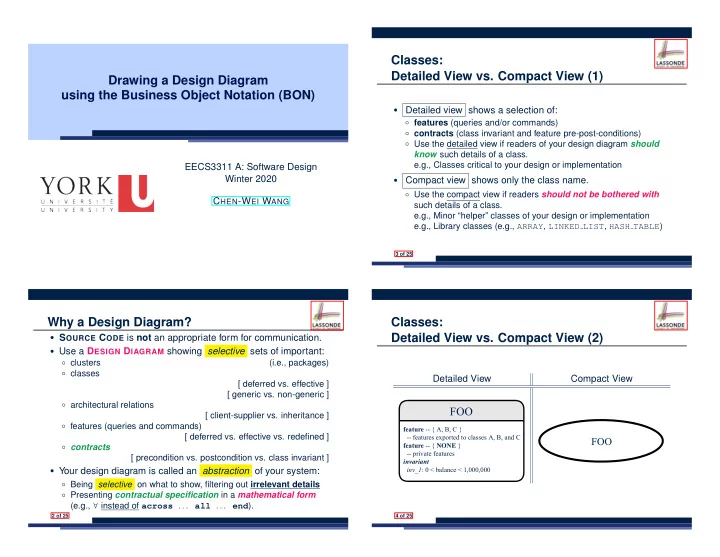
Classes: Detailed View vs. Compact View (1)

  • Detailed view shows a selection of:

○ features (queries and/or commands) ○ contracts (class invariant and feature pre-post-conditions) ○ Use the detailed view if readers of your design diagram should know such details of a class. e.g., Classes critical to your design or implementation

  • Compact view shows only the class name.

○ Use the compact view if readers should not be bothered with such details of a class. e.g., Minor “helper” classes of your design or implementation e.g., Library classes (e.g., ARRAY, LINKED LIST, HASH TABLE)

3 of 25

Classes: Detailed View vs. Compact View (2)

Detailed View Compact View

FOO

featre--A,B,

  • -A,B,

featre--NONE

  • inarian

in_1:0<<1,000,000

FOO

4 of 25

slide-2
SLIDE 2

Contracts: Mathematical vs. Programming

○ When presenting the detailed view of a class, you should include contracts of features which you judge as important. ○ Consider an array-based linear container:

AAEDCONAINE+

  • -Q

c+:INEGER

  • -Na
  • -Cad

a_a+(:INEGER;:RING)

  • -Caaa''''.
  • a_:1c
  • _a:.c=(.).c

_a:[] _a:∀:1.c:⇒[](.)[]

  • -NONE

+:ARRA[RING]

  • -Iaaaa-a

inarian :.c=c

  • A tag should be included for each contract.
  • Use mathematical symbols (e.g., ∀, ∃, ≤) instead of programming

symbols (e.g., across . . . all . . . , across . . . some . . . , <=).

5 of 25

Classes: Generic vs. Non-Generic

  • A class is generic if it declares at least one type parameters.

○ Collection classes are generic: ARRAY[G], HASH TABLE[G, H], etc. ○ Type parameter(s) of a class may or may not be instantiated:

HAHABLEG,H HAHABLEIG,IEGE HAHABLEE,IEGE

○ If necessary, present a generic class in the detailed form:

DAABAEG

feature

  • feature--NONE
  • -:ARRAYG

inarian

  • DAABAEING

feature

  • feature--NONE
  • -:ARRAYSTRING

inarian

  • DAABAEEON

feature

  • feature--NONE
  • -:ARRAYPERON

inarian

  • A class is non-generic if it declares no type parameters.

6 of 25

Deferred vs. Effective

Deferred means unimplemented (≈ abstract in Java) Effective means implemented

7 of 25

Classes: Deferred vs. Effective

  • A deferred class has at least one feature unimplemented.

○ A deferred class may only be used as a static type (for declaration), but cannot be used as a dynamic type. ○ e.g., By declaring list: LIST[INTEGER] (where LIST is a deferred class), it is invalid to write:

  • create list.make
  • create {LIST[INTEGER]} list.make
  • An effective class has all features implemented.

○ An effective class may be used as both static and dynamic types. ○ e.g., By declaring list: LIST[INTEGER], it is valid to write:

  • create {LINKED LIST[INTEGER]} list.make
  • create {ARRAYED LIST[INTEGER]} list.make

where LINKED LIST and ARRAYED LIST are both effective descendants of LIST.

8 of 25

slide-3
SLIDE 3

Features: Deferred, Effective, Redefined (1)

A deferred feature is declared with its header only (i.e., name, parameters, return type).

○ The word “deferred” means a descendant class would later implement this feature. ○ The resident class of the deferred feature must also be deferred.

deferred class DATABASE[G] feature -- Queries search (g: G): BOOLEAN

  • - Does item ‘g‘ exist in database?

deferred end end

9 of 25

Features: Deferred, Effective, Redefined (2)

  • An effective feature implements some inherited deferred

feature.

class DATABASE_V1[G] inherit DATABASE feature -- Queries search (g: G): BOOLEAN

  • - Perform a linear search on the database.

deferred end end

  • A descendant class may still later re-implement this feature.

10 of 25

Features: Deferred, Effective, Redefined (3)

  • A redefined feature re-implements some inherited effective

feature.

class DATABASE_V2[G] inherit DATABASE_V1[G] redefine search end feature -- Queries search (g: G): BOOLEAN

  • - Perform a binary search on the database.

deferred end end

  • A descendant class may still later re-implement this feature.

11 of 25

Classes: Deferred vs. Effective (2.1)

Append a star * to the name of a deferred class or feature. Append a plus + to the name of an effective class or feature. Append two pluses ++ to the name of a redefined feature.

  • Deferred or effective classes may be in the compact form:

DAABAEG* DAABAE1G+ DAABAE2G+ LIG* LINKEDLIG+ ARRAEDLIG+ LILIPERON* LINKEDLIINEGER+ ARRAEDLIG+

12 of 25

slide-4
SLIDE 4

Classes: Deferred vs. Effective (2.2)

Append a star * to the name of a deferred class or feature. Append a plus + to the name of an effective class or feature. Append two pluses ++ to the name of a redefined feature.

  • Deferred or effective classes may be in the detailed form:

DAABAE*

E--I :AAG

  • -C

*(:G)

  • -A.
  • _eiig_ie:()
  • ie_iceeed:=+1

ie_added:()

  • +:IEGE
  • -N
  • cec_el:=.

*(:G):BLEA

  • -D?
  • cec_el:=(∃:1:)

DAABAE1+

E--I :AAG

  • -C

+(:G)

  • -A.
  • +:IEGE
  • -N

+(:G):BLEA

  • -.

DAABAE2+

E--I :AAG

  • -C

++(:G)

  • -I.
  • +:IEGE
  • -N

++(:G):BLEA

  • -.
  • ed_daa:∀:1<:<+1

13 of 25

Class Relations: Inheritance (1)

  • An inheritance hierarchy is formed using red arrows.

○ Arrow’s origin indicates the child/descendant class. ○ Arrow’s destination indicates the parent/ancestor class.

  • You may choose to present each class in an inheritance

hierarchy in either the detailed form or the compact form:

* LIST[G

MYLISTINTERFACE[G]*

featre

  • featre--NONE
  • inarian
  • +

MYLISTIMPONE[G+ + MYLISTIMPTWO[G+

14 of 25

Class Relations: Inheritance (2)

More examples (emphasizing different aspects of DATABASE): Inheritance Hierarchy Features being (Re-)Implemented

DAABAE* DAABAE1+ DAABAE2+

DAABAEG*

E-- :AAG

  • -C

*(:G)

  • -A.
  • _eiig_ie:()
  • ie_iceeed:=+1

ie_added:()

  • +:IEGE
  • cec_el:=.

*(:G):BLEA

  • -D?
  • cec_el:=(∃:1:)

DAABAE1G+

DAABAE2G+

E-- :AAG

  • -C

++(:G)

  • -.
  • +:IEGE
  • ++(:G):BLEA
  • -.
  • ed_daa:∀:1<:<+1

15 of 25

Class Relations: Client-Supplier (1)

  • A client-supplier (CS) relation exists between two classes:
  • ne (the client) uses the service of another (the supplier).
  • Programmatically, there is CS relation if in class CLIENT there

is a variable declaration s1: SUPPLIER .

○ A variable may be an attribute, a parameter, or a local variable.

  • A green arrow is drawn between the two classes.

○ Arrow’s origin indicates the client class. ○ Arrow’s destination indicates the supplier class. ○ Above the label there should be a label indicating the supplier name (i.e., variable name). ○ In the case where supplier is an attribute, indicate after the label name if it is deferred (*), effective (+), or redefined (++).

16 of 25

slide-5
SLIDE 5

Class Relations: Client-Supplier (2.1)

class DATABASE feature {NONE} -- implementation data: ARRAY[STRING] feature -- Commands add_name (nn: STRING)

  • - Add name ‘nn‘ to database.

require . . . do . . . ensure . . . end name_exists (n: STRING): BOOLEAN

  • - Does name ‘n‘ exist in database?

require . . . local u: UTILITIES do . . . ensure . . . end invariant . . . end class UTILITIES feature -- Queries search (a: ARRAY[STRING]; n: STRING): BOOLEAN

  • - Does name ‘n‘ exist in array ‘a‘?

require . . . do . . . ensure . . . end end

○ Attribute data: ARRAY[STRING] indicates two suppliers: STRING and ARRAY. ○ Parameters nn and n may have an arrow with label nn, n , pointing to the STRING class. ○ Local variable u may have an arrow with label u , pointing to the UTILITIES class.

17 of 25

Class Relations: Client-Supplier (2.2.1)

If STRING is to be emphasized, label is data: ARRAY[...] , where ... denotes the supplier class STRING being pointed to.

DAABAE+

  • +(:ING)
  • -Adda``daaba.
  • ...
  • ...

+(:ING):BOOLEAN

  • -Da``?
  • ...
  • ...

inariant ... + G

n,nn data+:ARRA... E+

  • +(:AAING;:ING):BOOLEAN
  • -Da``aa`a`?

require ...

  • ...
  • 18 of 25

Class Relations: Client-Supplier (2.2.2)

If ARRAY is to be emphasized, label is data . The supplier’s name should be complete: ARRAY[STRING]

AABA+

  • +(:ING)
  • -Adda``daaba.
  • ...
  • ...

+(:ING):BOOLEAN

  • -Da``?
  • ...
  • ...

inarian ... + AA

n,nn

  • +

+

  • +

E 19 of 25

Class Relations: Client-Supplier (3.1)

Known: The deferred class LIST has two effective descendants ARRAY LIST and LINKED LIST).

  • DESIGN ONE:

class DATABASE_V1 feature {NONE} -- implementation imp: ARRAYED_LIST[PERSON] . . . -- more features and contracts end

  • DESIGN TWO:

class DATABASE_V2 feature {NONE} -- implementation imp: LIST[PERSON] . . . -- more features and contracts end

Question: Which design is better? [ DESIGN TWO ] Rationale: Program to the interface, not the implementation.

20 of 25

slide-6
SLIDE 6

Class Relations: Client-Supplier (3.2.1)

We may focus on the PERSON supplier class, which may not help judge which design is better.

DAABAE1+

featre

  • featre--NONE
  • inarian
  • +

PERSON

im+:AAED... DAABAE2+

featre

  • featre--NONE
  • inarian
  • +

PERSON

imp+:...

21 of 25

Class Relations: Client-Supplier (3.2.2)

Alternatively, we may focus on the LIST supplier class, which in this case helps us judge which design is better.

DATABASE1+

featre

  • featre--NONE
  • inarian
  • *

ARRAYEDLIST[PERSON]

imp+ DATABASE2+

featre

  • featre--NONE
  • inarian
  • *

LISTPERSON + ARRAYEDLISTPERSON + LINKEDLISTPERSON

imp+

22 of 25

Clusters: Grouping Classes

Use clusters to group classes into logical units.

ba-ba

  • *

IG + AAEDIG + IEDIG

im DATABASEG+

  • -C

++(:G)

  • -I.
  • +:INEGE
  • ++(:G):BLEAN
  • -.
  • _aa:∀:1<:<+1

DAABAEG* DAABAE1G+ DAABAEE+

  • 23 of 25

Index (1)

Why a Design Diagram? Classes: Detailed View vs. Compact View (1) Classes: Detailed View vs. Compact View (2) Contracts: Mathematical vs. Programming Classes: Generic vs. Non-Generic Deferred vs. Effective Classes: Deferred vs. Effective Features: Deferred, Effective, Redefined (1) Features: Deferred, Effective, Redefined (2) Features: Deferred, Effective, Redefined (3) Classes: Deferred vs. Effective (2.1) Classes: Deferred vs. Effective (2.2)

24 of 25

slide-7
SLIDE 7

Index (2)

Class Relations: Inheritance (1) Class Relations: Inheritance (2) Class Relations: Client-Supplier (1) Class Relations: Client-Supplier (2.1) Class Relations: Client-Supplier (2.2.1) Class Relations: Client-Supplier (2.2.2) Class Relations: Client-Supplier (3.1) Class Relations: Client-Supplier (3.2.1) Class Relations: Client-Supplier (3.2.2) Clusters: Grouping Classes

25 of 25